
Claude Desktop / Web UI GitHub integration has an issue where subdirectories are not visible (January 2026)

This page has been translated by machine translation. View original
Many people use GitHub repository integration with Claude Desktop and Claude.ai Web UI for code reviews and development support. I'm one of them, managing my pet's weight data in a GitHub repository and using that data as context when consulting with AI.
However, since around January 13, 2026, there's been an issue with the GitHub integration functionality where subdirectories are not displayed or accessible.
In this article, I'll summarize the symptoms of this problem, the countermeasures I've tried, and the current situation. I hope this will be helpful for those experiencing the same issue.
Test Environment
- Test date: January 14, 2026
- MacBook Pro (16-inch, 2021), Apple M1 Pro
- macOS 26.2
- Claude Desktop 1.0.3218 (8679c9)
- Claude.ai Web UI
Symptoms
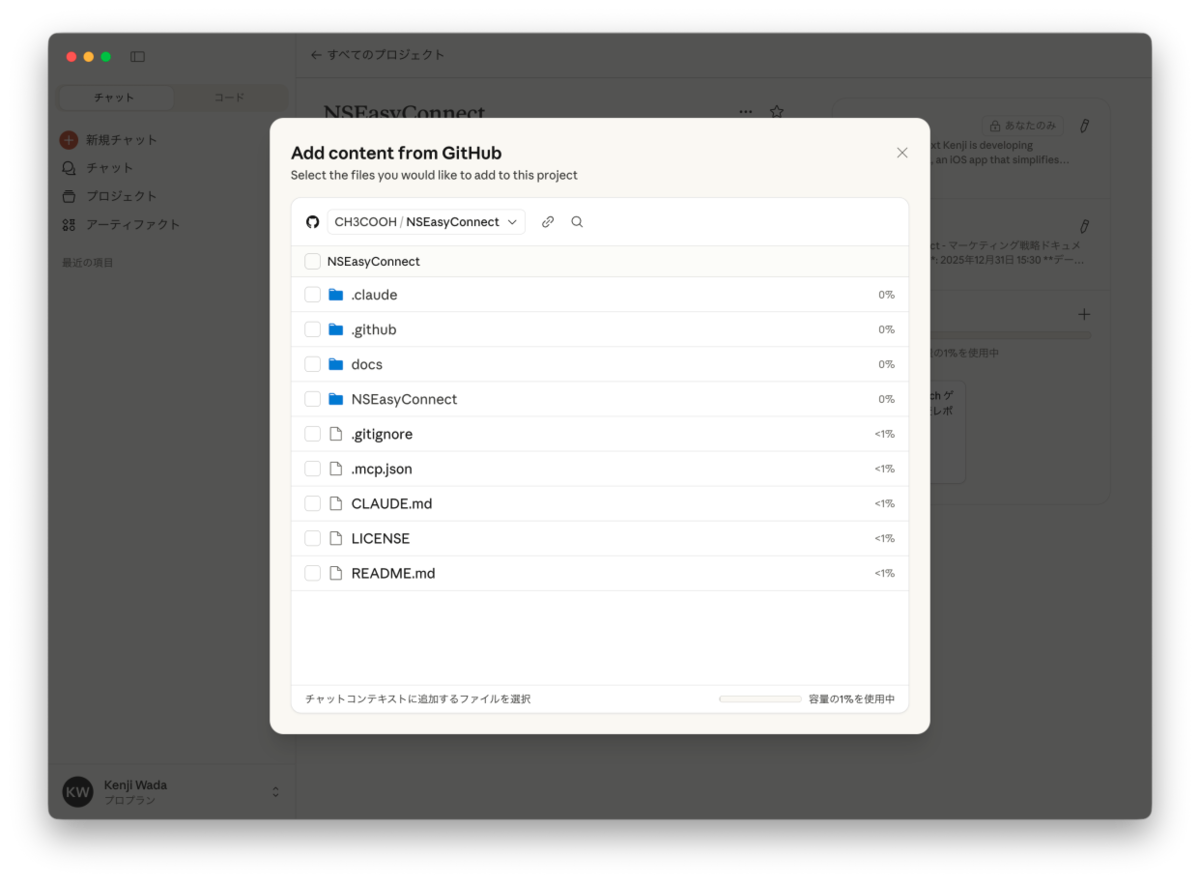
When trying to add a repository via GitHub integration, the following symptoms occur:
- Only root directory files are displayed
- Clicking on subdirectories shows blank content
- File/folder capacities are all displayed as "0%"
- Sometimes an error "Claude cannot access that resource" is displayed
This issue occurs in both Claude Desktop and Claude.ai Web UI, suggesting it affects the entire platform rather than just specific local environments.
Attempted Solutions (No Effect)
I tried all of the following solutions, but none were effective.
1. Basic Reconnection
- Disconnected and reconnected GitHub integration on Claude's side
- Checked and reset Claude's access permissions on GitHub
2. Reinstalling GitHub App
# Remove Claude App on GitHub side
https://github.com/settings/installations → Uninstall "Claude"
https://github.com/settings/apps/authorizations → Revoke "Claude"

# Reconnect
Reauthorize GitHub Connector on Claude's side
Reinstall GitHub App (Install & Authorize Claude)
No effect as a result
3. Verification with New Projects
Suspecting a cache issue with existing projects, I created a new project and added a GitHub repository, but the same symptoms occurred.
4. Checking GitHub App Permissions
Changed Claude's Repository access to "All repositories" at https://github.com/settings/installations, but the problem remained unresolved.
Cause
I've determined this to be a server-side issue (Anthropic bug) for the following reasons:
- Same symptoms occur in both Claude Desktop and Web UI
- Multiple users have reported similar issues during the same period
- All possible user-side solutions have been tried without success
Related GitHub Issues
Today, I found reports of what appears to be the same issue in the anthropics/claude-code repository on GitHub.
Issue #17807 - Cannot access subdirectories
Using claude on the web with a new project, adding a github repo works, however the subdirectories in that github repo with corresponding files do not load, it is blank.
Issue #17824 - All files shown as 0% capacity
GitHub integration in Claude.ai (web interface) is showing 0% capacity for ALL files and folders when trying to add content from a connected repository.
Both issues were reported on January 13, 2026, and are currently Open (unresolved).
Current Workarounds
Unfortunately, there is likely no solution on the user side. We need to wait for a fix from Anthropic.
Temporary Workarounds
- Manually upload necessary files to the chat
- Set up a GitHub Server in MCP as an alternative
Contacting Support
If you want to contact Anthropic support, here are the methods:
- Visit support.anthropic.com or support.claude.com
- Click on the chat icon in the bottom right
- Inquire with the AI support bot (complex issues will be escalated to a human)
When inquiring, referencing the issue numbers above (#17807, #17824) might speed things up. However, in my case, the bot denied that there was an issue and didn't escalate to a human.
Summary
- Since around January 13, 2026, there's been a bug where subdirectories are not visible in GitHub integration
- Both Claude Desktop and Web UI are affected
- This is a server-side issue, so users cannot resolve it themselves
- We need to wait for a fix from Anthropic
- You can add 👍 to the relevant Issues to increase their priority
If you're experiencing the same issue, you can help raise the priority of this problem by adding 👍 to the GitHub Issues. I hope this article is helpful for those dealing with this issue.