Building Serverless RAG with GenU (Generative AI Use Cases JP) v5.4 and S3 Vectors

This page has been translated by machine translation. View original
I'm from the Cloud Business Headquarters Consulting Division, Ishikawa. You can build a serverless RAG with dramatically lower running costs using S3 Vectors in the GenU (Generative AI Use Cases JP) v5.4 environment that was recently set up. I'd like to introduce how to use S3 Vectors, which just became GA at the end of last year, and AgentCore from GenU.
Prerequisites
- Vector store: Amazon S3 Vectors
- RAG: Amazon Bedrock Knowledge Base
- S3 Vectors and Bedrock Knowledge Base are in the Tokyo Region (ap-northeast-1)
- Embedding model: Amazon Titan Text Embeddings V2
- Create and deploy Amazon Bedrock AgentCore that calls Amazon Bedrock Knowledge Base
- Deploy GenU (Generative AI Use Cases JP) that calls Amazon Bedrock Knowledge Base
Resource Configuration
Preparing the S3 Source Bucket
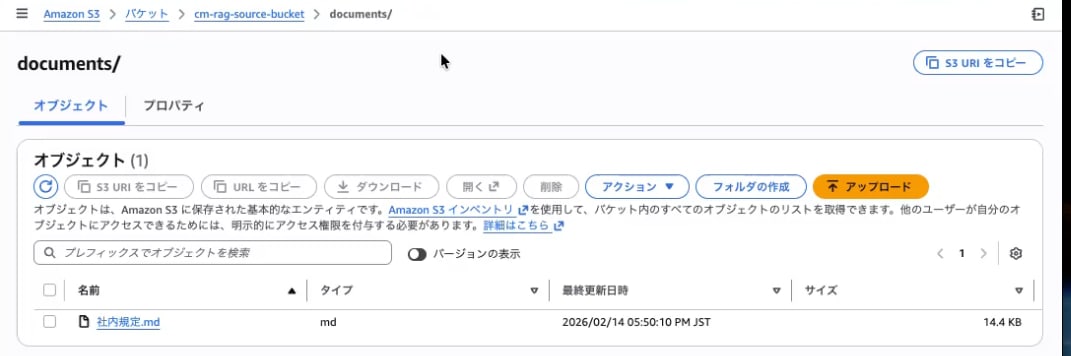
Place the documents that will be stored in RAG (Amazon S3 Vectors) in an S3 bucket.
Creating an S3 Vector Bucket
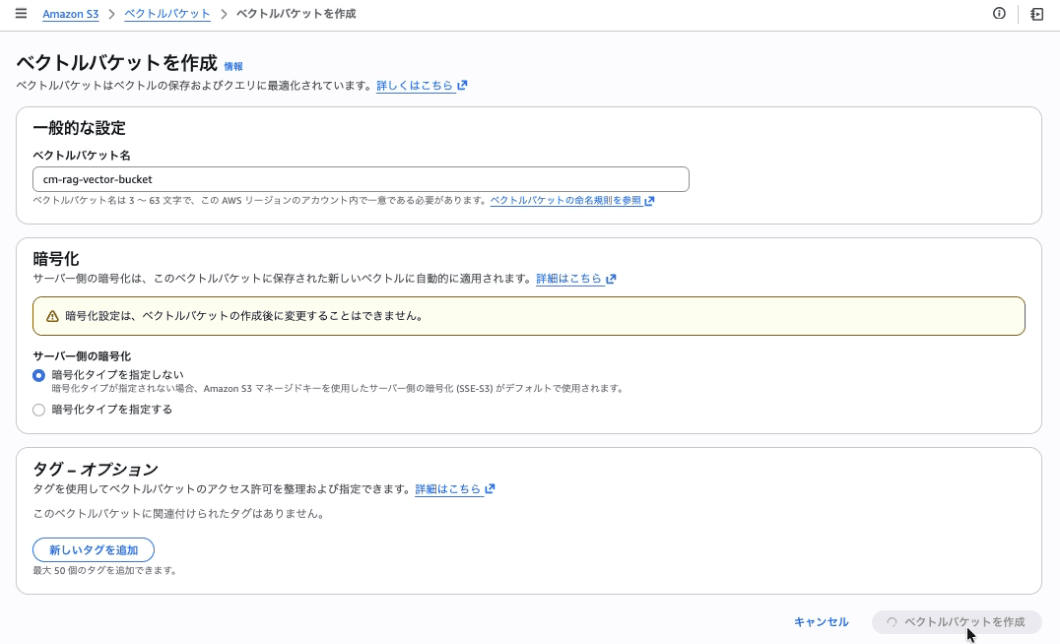
Create a Vector Bucket to store vector data.
| Setting item | Value |
|---|---|
| Vector bucket name | cm-rag-vector-bucket |
| Encryption | SSE-S3 (default) |
Creating an S3 Vector Index
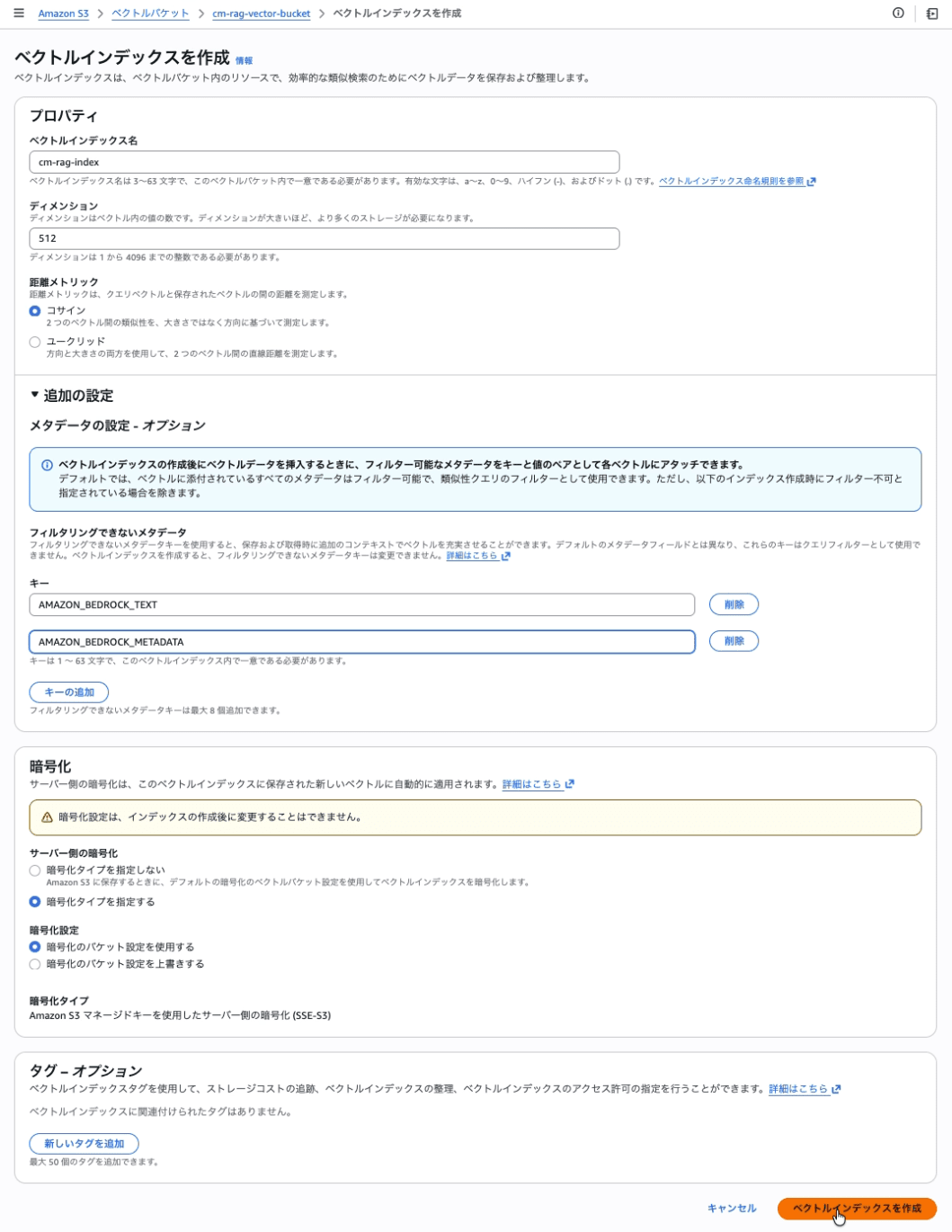
Create a vector index within the Vector Bucket.
| Setting item | Value |
|---|---|
| Vector index name | cm-rag-index |
| Dimension | 512 |
| Distance metric | Cosine |
| Non-filterable metadata keys | AMAZON_BEDROCK_TEXT, AMAZON_BEDROCK_METADATA |
Creating an IAM Service Role
Create a service role (cm-japanese-rag-kb-role) for Bedrock Knowledge Base to access various resources.
4-1. Setting up the Trust Policy
Trusted entity type: Select Custom trust policy.
{
  "Version": "2012-10-17",
  "Statement": [
    {
      "Effect": "Allow",
      "Principal": {
        "Service": "bedrock.amazonaws.com"
      },
      "Action": "sts:AssumeRole",
      "Condition": {
        "StringEquals": {
          "aws:SourceAccount": "<AccountID>"
        },
        "ArnLike": {
          "aws:SourceArn": "arn:aws:bedrock:<Region>:<AccountID>:knowledge-base/*"
        }
      }
    }
  ]
}
4-2. Creating and Attaching Permission Policies
Create and attach the following inline policy (cm-japanese-rag-kb-policy).
{
  "Version": "2012-10-17",
  "Statement": [
    {
      "Sid": "S3SourceReadAccess",
      "Effect": "Allow",
      "Action": [
        "s3:GetObject",
        "s3:ListBucket"
      ],
      "Resource": [
        "arn:aws:s3:::cm-rag-source-bucket",
        "arn:aws:s3:::cm-rag-source-bucket/*"
      ]
    },
    {
      "Sid": "S3VectorsAccess",
      "Effect": "Allow",
      "Action": [
        "s3vectors:PutVectors",
        "s3vectors:GetVectors",
        "s3vectors:DeleteVectors",
        "s3vectors:QueryVectors",
        "s3vectors:GetIndex"
      ],
      "Resource": "arn:aws:s3vectors:<Region>:<AccountID>:bucket/cm-rag-vector-bucket/index/cm-rag-index"
    },
    {
      "Sid": "BedrockModelInvocation",
      "Effect": "Allow",
      "Action": "bedrock:InvokeModel",
      "Resource": "arn:aws:bedrock:<Region>::foundation-model/amazon.titan-embed-text-v2:0"
    }
  ]
}
Creating Amazon Bedrock Knowledge Base + Data Source
Here, we'll create an Amazon Bedrock Knowledge Base.
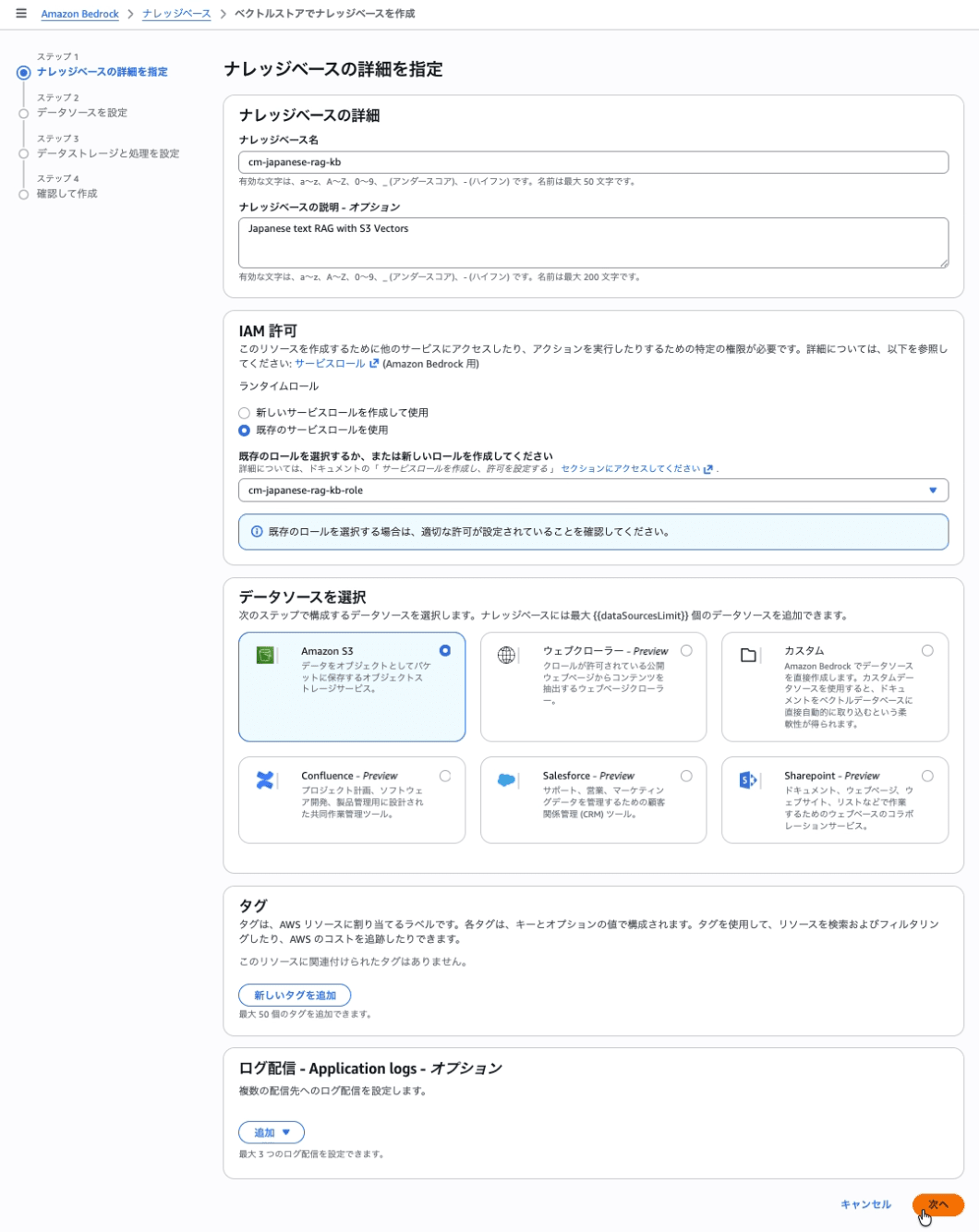
Step 1: Knowledge Base Details
Create an Amazon Bedrock Knowledge Base and data source.
| Setting item | Value |
|---|---|
| Knowledge base name | cm-japanese-rag-kb |
| Knowledge base description | Japanese text RAG with S3 Vectors |
| IAM permissions | cm-japanese-rag-kb-role |
Step 2: Setting up Data Source and Chunking Strategy
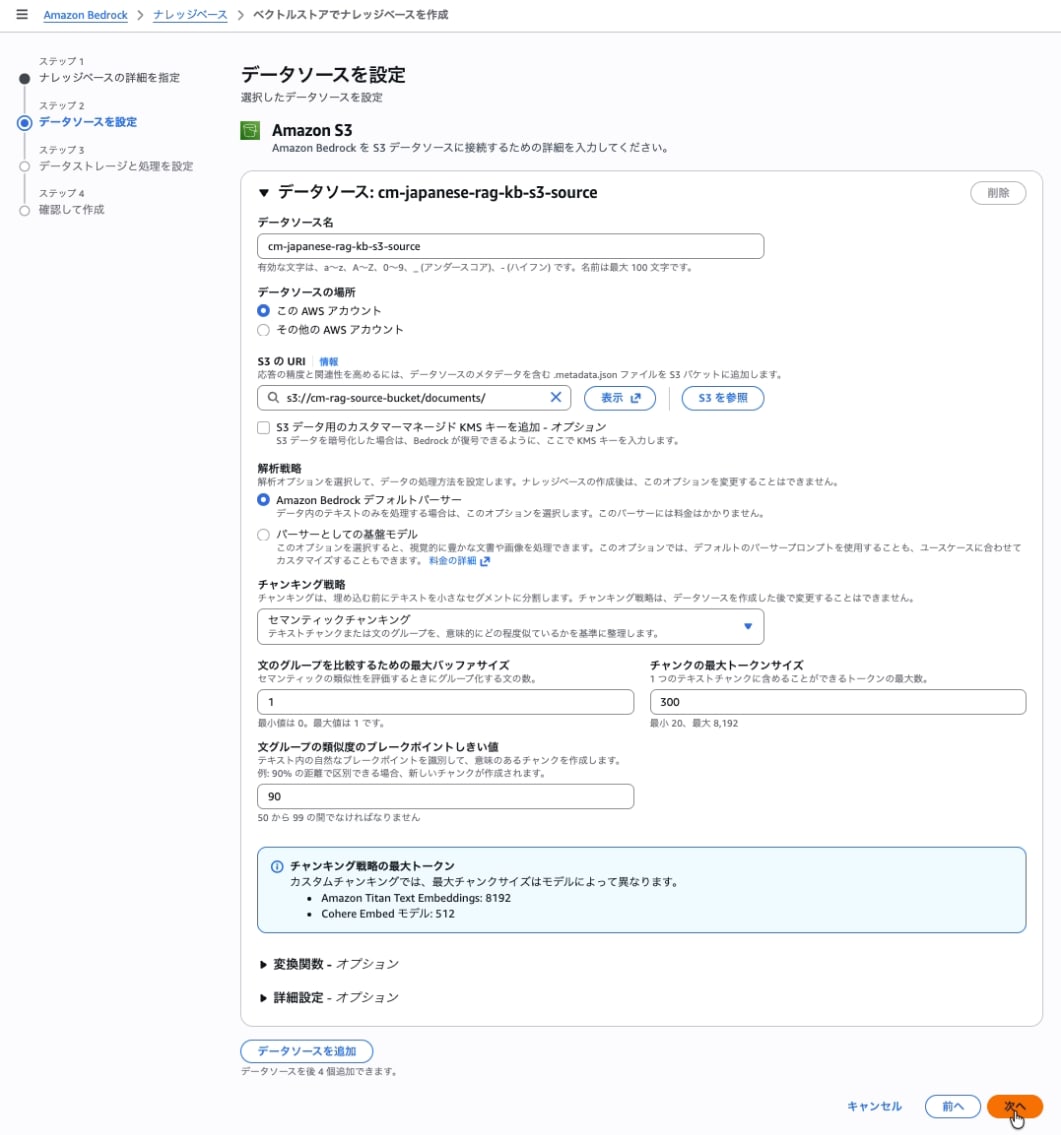
Set up the data source and chunking strategy. It's possible to maintain meaningful segments while considering sentence boundaries. However, additional model calls occur during processing, so there will be extra costs during data ingestion (injection).
Semantic chunking determines split positions based on semantic connections in the text, not just character count. This determination requires calling a model (embedding model).
| Setting item | Value |
|---|---|
| Data source name | cm-japanese-rag-kb-s3-source |
| S3 URI | s3://cm-rag-source-bucket/documents/ |
Select Semantic chunking for Chunking strategy.
| Setting item | Value |
|---|---|
| Maximum buffer size for comparing sentence groups | 1 |
| Maximum token size of chunks | 15 |
| Breakpoint threshold for sentence group similarity | 90 |
Recommended values are based on the AWS official blog and should be adjusted according to the document type.
Step 3: Setting up the Embedding Model and Vector Store
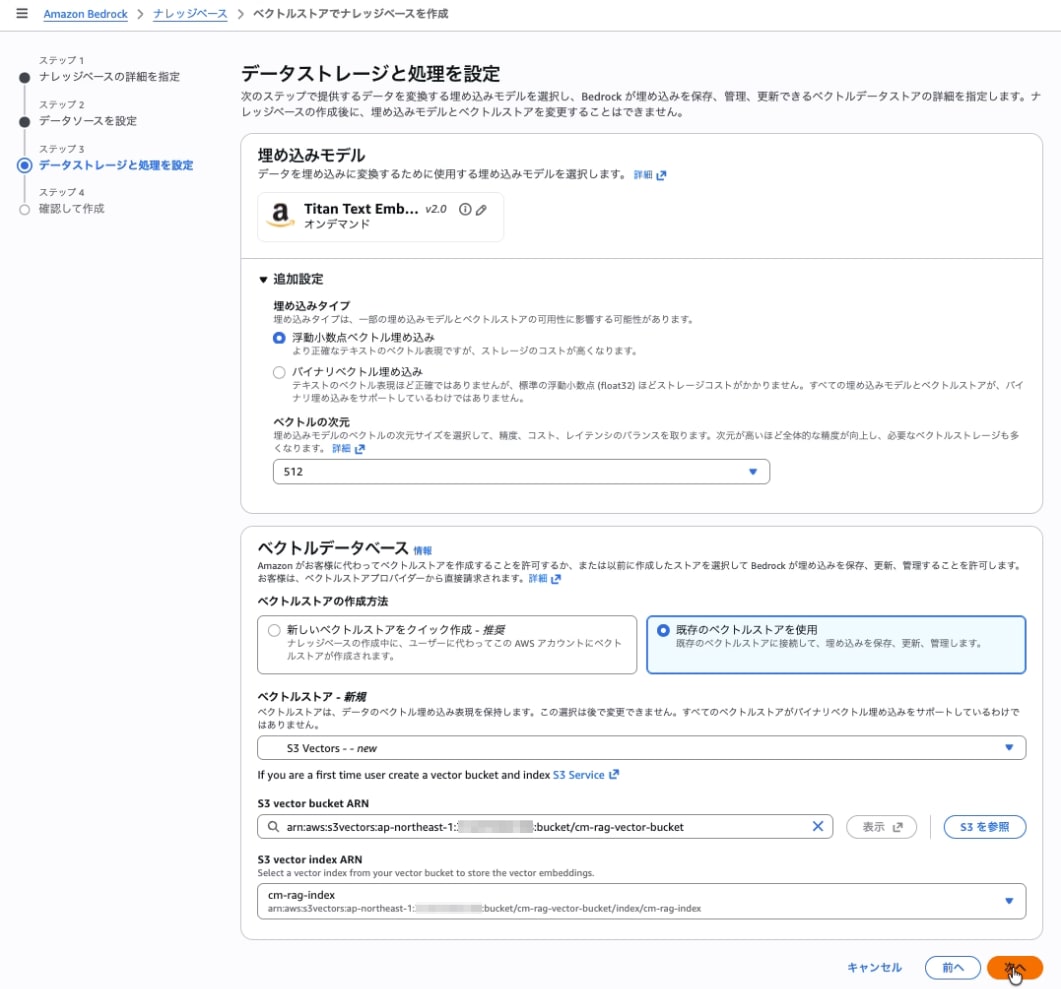
Embedding model
| Setting item | Value |
|---|---|
| Embeddings model | Amazon Titan Text Embeddings V2 |
| Vector dimensions | 512 |
Note: Since the default dimension for Titan v2 is 1024, be sure to explicitly select 512. If it doesn't match the Vector Index dimension (512), you'll get a "Query vector contains invalid values or is invalid for this index" error.
Vector database
| Setting item | Value |
|---|---|
| Vector store creation method | Create from existing vector store |
| Vector store | S3 Vectors |
| S3 Vector bucket | Select cm-rag-vector-bucket |
| S3 Vector index | Select cm-rag-index |
Step 4: Review and Create
Review your settings and click Create knowledge base.
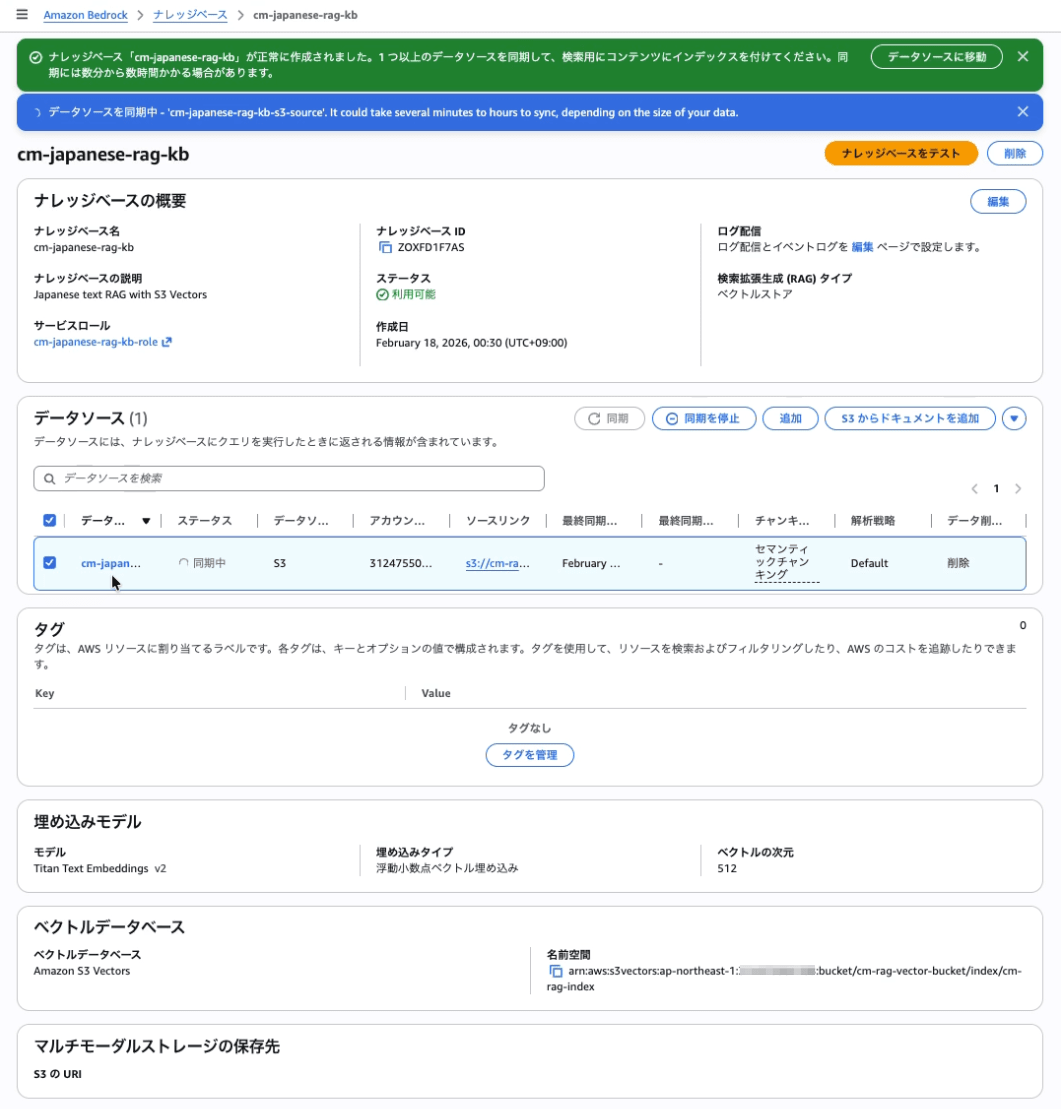
Syncing the Data Source (Ingestion)
- Select
cm-japanese-rag-kb-s3-sourcein the Data Sources section - Click Sync
- Wait until the status becomes Available
Verifying Amazon Bedrock Knowledge Base
Select the knowledge base (cm-japanese-rag-kb), open Test knowledge base, specify a model, enter a prompt, and confirm that a response is returned.
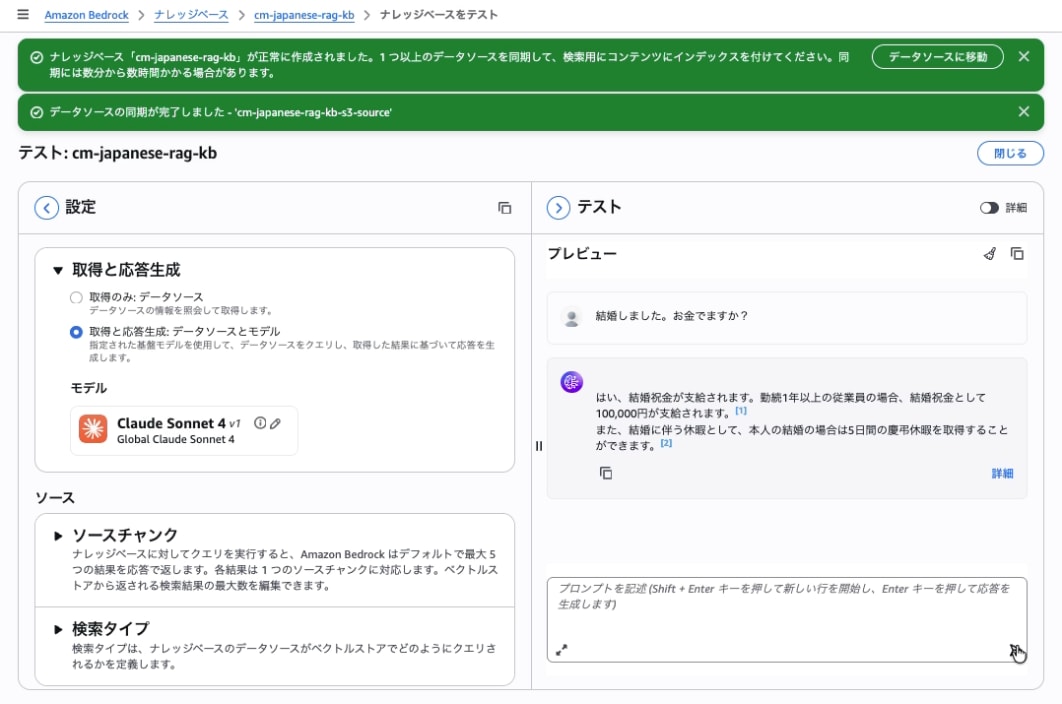
Now that we've created the RAG with S3 Vectors, let's incorporate it into GenU.
Creating and Deploying Amazon Bedrock AgentCore
Create and deploy an Amazon Bedrock AgentCore that calls the Amazon Bedrock Knowledge Base.
Preparing the AgentCore Program
Here, we'll create a strands agent that calls the Knowledge Base we created earlier. This agent retrieves information about "company regulations".
Create agent.py in the agentcore_s3vectors directory. Please replace KNOWLEDGE_BASE_ID with the ID you created earlier.
Note: I would like to explain about strands agent and AgentCore as well, but I'll omit it as the explanation would become too lengthy.
agentcore_s3vectors/agent.py
import os
import boto3
from botocore.config import Config
from strands import Agent, tool
from strands.models import BedrockModel
from bedrock_agentcore.runtime import BedrockAgentCoreApp

# Knowledge Base settings
KNOWLEDGE_BASE_ID = os.getenv("KNOWLEDGE_BASE_ID", "<Enter your KNOWLEDGE_BASE_ID here>")
KNOWLEDGE_BASE_REGION = os.getenv("KNOWLEDGE_BASE_REGION", "ap-northeast-1")

model_id = os.getenv("BEDROCK_MODEL_ID", "global.anthropic.claude-haiku-4-5-20251001-v1:0")
model = BedrockModel(
    model_id=model_id,
    max_tokens=4096,
    temperature=0.1,
    region_name="ap-northeast-1"
)

app = BedrockAgentCoreApp()

@tool
def get_rag(query: str, number_of_results: int = 5) -> str:
    """
    Search for information about company regulations, work rules, benefits, procedure guidelines.
    Always call this function when employees ask about "vacation system", "expense reimbursement", "service",
    "childcare/nursing care leave", "condolence money", "wages", "travel expenses", "condolence leave", etc.,
    regarding internal rules or public systems.
    Provide accurate company regulations as answers based on the retrieved information.

    Args:
        query: Search query (user's question or content to search for)
        number_of_results: Maximum number of results to retrieve (default: 5)

    Returns:
        Text of search results
    """
    client = boto3.client(
        "bedrock-agent-runtime",
        region_name=KNOWLEDGE_BASE_REGION,
        config=Config(retries={"mode": "standard", "total_max_attempts": 3})
    )

    try:
        response = client.retrieve(
            knowledgeBaseId=KNOWLEDGE_BASE_ID,
            retrievalQuery={'text': query},
            retrievalConfiguration={
                'vectorSearchConfiguration': {
                    'numberOfResults': number_of_results
                }
            }
        )

        results = response.get('retrievalResults', [])
        if not results:
            return "No relevant information found."

        # Format results
        output_lines = []
        for i, result in enumerate(results, 1):
            text = result.get('content', {}).get('text', '')
            score = result.get('score', 0.0)
            source = result.get('location', {}).get('s3Location', {}).get('uri', 'Unknown')
            output_lines.append(f"--- Result {i} (Score: {score:.2f}) ---")
            output_lines.append(f"Source: {source}")
            output_lines.append(text)
            output_lines.append("")

        return "\n".join(output_lines)

    except Exception as e:
        return f"Failed to search Knowledge Base: {str(e)}"

@app.entrypoint
async def entrypoint(payload):
    agent = Agent(model=model, tools=[get_rag])
    message = payload.get("prompt", "")
    # return {"result": agent(message).message}
    stream_messages = agent.stream_async(message)
    async for message in stream_messages:
        if "event" in message:
            yield message

if __name__ == "__main__":
    app.run()
Installing Dependent Modules
Create requirements.txt in the agentcore_s3vectors directory.
agentcore_s3vectors/requirements.txt
strands-agents
strands-agents-tools
bedrock-agentcore
bedrock-agentcore-starter-toolkit
Install the required modules.
pip install -r requirements.txt
Agent Deployment Configuration
Run agentcore configure --entrypoint agent.py to create a configuration file (agentcore_s3vectors/bedrock_agentcore/agent/.bedrock_agentcore.yaml). This time, we created it automatically with default settings.
agentcore_s3vectors % agentcore configure --entrypoint agent.py
Configuring Bedrock AgentCore...
✓ Using file: agent.py

🏷️  Inferred agent name: agent
Press Enter to use this name, or type a different one (alphanumeric without '-')
Agent name [agent]:
✓ Using agent name: agent

🔍 Detected dependency file: requirements.txt
Press Enter to use this file, or type a different path (use Tab for autocomplete):
Path or Press Enter to use detected dependency file: requirements.txt
✓ Using requirements file: requirements.txt

🚀 Deployment Configuration
Select deployment type:
  1. Direct Code Deploy (recommended) - Python only, no Docker required
  2. Container - For custom runtimes or complex dependencies
Choice [1]: 1

Select Python runtime version:
  1. PYTHON_3_10
  2. PYTHON_3_11
  3. PYTHON_3_12
  4. PYTHON_3_13
Note: Current Python 3.14 not supported, using python3.11
Choice [2]: 2
✓ Deployment type: Direct Code Deploy (python.3.11)

🔐 Execution Role
Press Enter to auto-create execution role, or provide execution role ARN/name to use existing
Execution role ARN/name (or press Enter to auto-create):
✓ Will auto-create execution role

🏗️  S3 Bucket
Press Enter to auto-create S3 bucket, or provide S3 URI/path to use existing
S3 URI/path (or press Enter to auto-create):
✓ Will auto-create S3 bucket

🔐 Authorization Configuration
By default, Bedrock AgentCore uses IAM authorization.
Configure OAuth authorizer instead? (yes/no) [no]:
✓ Using default IAM authorization

🔒 Request Header Allowlist
Configure which request headers are allowed to pass through to your agent.
Common headers: Authorization, X-Amzn-Bedrock-AgentCore-Runtime-Custom-*
Configure request header allowlist? (yes/no) [no]:
✓ Using default request header configuration
Configuring BedrockAgentCore agent: agent

Memory Configuration
Tip: Use --disable-memory flag to skip memory entirely

✅ MemoryManager initialized for region: ap-northeast-1
No existing memory resources found in your account

Options:
  • Press Enter to create new memory
  • Type 's' to skip memory setup

Your choice:
✓ Short-term memory will be enabled (default)
  • Stores conversations within sessions
  • Provides immediate context recall

Optional: Long-term memory
  • Extracts user preferences across sessions
  • Remembers facts and patterns
  • Creates session summaries
  • Note: Takes 120-180 seconds to process

Enable long-term memory? (yes/no) [no]:
✓ Using short-term memory only
Will create new memory with mode: STM_ONLY
Memory configuration: Short-term memory only
Network mode: PUBLIC
Setting 'agent' as default agent
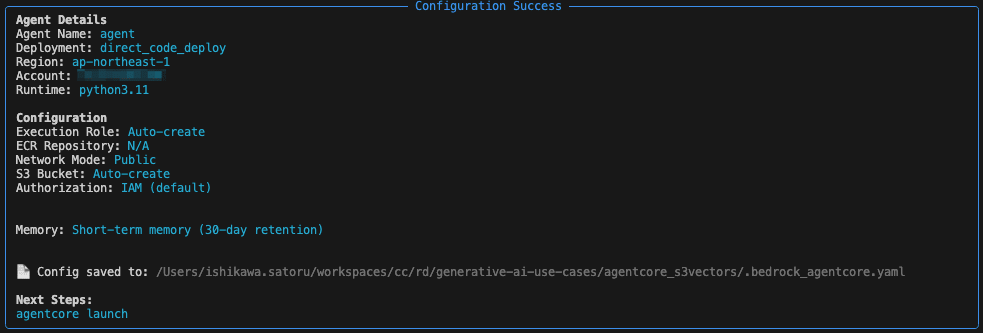
Deploy Agent to AgentCore
Run agentcore launch to deploy the agent to AgentCore.
agentcore_s3vectors % agentcore launch
🚀 Launching Bedrock AgentCore (cloud mode - RECOMMENDED)...
   • Deploy Python code directly to runtime
   • No Docker required (DEFAULT behavior)
   • Production-ready deployment

💡 Deployment options:
   • agentcore deploy                → Cloud (current)
   • agentcore deploy --local        → Local development

Launching with direct_code_deploy deployment for agent 'agent'
Creating memory resource for agent: agent
✅ MemoryManager initialized for region: ap-northeast-1
⠸ Launching Bedrock AgentCore...Creating new STM-only memory...
⏳ Creating memory resource (this may take 30-180 seconds)...
⠇ Launching Bedrock AgentCore...Created memory: agent_mem-Jh9uGT50Zu
Created memory agent_mem-Jh9uGT50Zu, waiting for ACTIVE status...
Waiting for memory agent_mem-Jh9uGT50Zu to return to ACTIVE state and strategies to reach terminal states...
⠋ Launching Bedrock AgentCore...[23:31:07]    ⏳ Memory: CREATING (10s elapsed)                                                                                                                                            manager.py:1029
⠏ Launching Bedrock AgentCore...[23:31:17]    ⏳ Memory: CREATING (20s elapsed)                                                                                                                                            manager.py:1029
:                                                                                   :                                                                                   :

⠹ Launching Bedrock AgentCore...[23:33:21]    ⏳ Memory: CREATING (144s elapsed)                                                                                                                                           manager.py:1029
⠙ Launching Bedrock AgentCore...[23:33:32]    ⏳ Memory: CREATING (155s elapsed)                                                                                                                                           manager.py:1029
⠦ Launching Bedrock AgentCore...Memory agent_mem-Jh9uGT50Zu is ACTIVE and all strategies are in terminal states (took 160 seconds)
[23:33:37]    ✅ Memory is ACTIVE (took 160s)                                                                                                                                              manager.py:1043
⠇ Launching Bedrock AgentCore...ObservabilityDeliveryManager initialized for region: ap-northeast-1, account: 123456789012
⠋ Launching Bedrock AgentCore...Created log group: /aws/vendedlogs/bedrock-agentcore/memory/APPLICATION_LOGS/agent_mem-Jh9uGT50Zu
⠋ Launching Bedrock AgentCore...✅ Logs delivery enabled for memory/agent_mem-Jh9uGT50Zu
⠧ Launching Bedrock AgentCore...Failed to enable observability for memory/agent_mem-Jh9uGT50Zu: ValidationException - X-Ray Delivery Destination is supported with CloudWatch Logs as a Trace Segment Destination. Please enable the CloudWatch Logs destination for your traces using the UpdateTraceSegmentDestination API (https://docs.aws.amazon.com/xray/latest/api/API_UpdateTraceSegmentDestination.html)
⚠️ Failed to enable observability: ValidationException: X-Ray Delivery Destination is supported with CloudWatch Logs as a Trace Segment Destination. Please enable the CloudWatch Logs destination for your
traces using the UpdateTraceSegmentDestination API (https://docs.aws.amazon.com/xray/latest/api/API_UpdateTraceSegmentDestination.html)
Memory created and active: agent_mem-Jh9uGT50Zu
Ensuring execution role...
Getting or creating execution role for agent: agent
Using AWS region: ap-northeast-1, account ID: 123456789012
Role name: AmazonBedrockAgentCoreSDKRuntime-ap-northeast-1-d4f0bc5a29
⠏ Launching Bedrock AgentCore...Role doesn't exist, creating new execution role: AmazonBedrockAgentCoreSDKRuntime-ap-northeast-1-d4f0bc5a29
Starting execution role creation process for agent: agent
✓ Role creating: AmazonBedrockAgentCoreSDKRuntime-ap-northeast-1-d4f0bc5a29
Creating IAM role: AmazonBedrockAgentCoreSDKRuntime-ap-northeast-1-d4f0bc5a29
⠹ Launching Bedrock AgentCore...✓ Role created: arn:aws:iam::123456789012:role/AmazonBedrockAgentCoreSDKRuntime-ap-northeast-1-d4f0bc5a29
⠴ Launching Bedrock AgentCore...✓ Execution policy attached: BedrockAgentCoreRuntimeExecutionPolicy-agent
Role creation complete and ready for use with Bedrock AgentCore
Execution role available: arn:aws:iam::123456789012:role/AmazonBedrockAgentCoreSDKRuntime-ap-northeast-1-d4f0bc5a29
Using entrypoint: agent.py (relative to /Users/ishikawa.satoru/workspaces/cc/rd/generative-ai-use-cases/agentcore_s3vectors)
Creating deployment package...
📦 No cached dependencies found, will build
Building dependencies (this may take a minute)...
Building dependencies for Linux ARM64 Runtime (manylinux2014_aarch64)
Installing dependencies with uv for aarch64-manylinux2014 (cross-compiling for Linux ARM64)...
⠴ Launching Bedrock AgentCore...✓ Dependencies installed with uv
Creating dependencies.zip...
⠏ Launching Bedrock AgentCore...✓ Dependencies cached
Packaging source code...
⠋ Launching Bedrock AgentCore...Creating deployment package...
⠋ Launching Bedrock AgentCore...✓ Deployment package ready: 44.26 MB
Getting or creating S3 bucket for agent: agent
Bucket doesn't exist, creating new S3 bucket: bedrock-agentcore-codebuild-sources-123456789012-ap-northeast-1
✅ Created S3 bucket: bedrock-agentcore-codebuild-sources-123456789012-ap-northeast-1
⠏ Launching Bedrock AgentCore...S3 bucket available: s3://bedrock-agentcore-codebuild-sources-123456789012-ap-northeast-1
Uploading deployment package to S3...
Uploading to s3://bedrock-agentcore-codebuild-sources-123456789012-ap-northeast-1/agent/deployment.zip...
⠴ Launching Bedrock AgentCore...✓ Deployment package uploaded: s3://bedrock-agentcore-codebuild-sources-123456789012-ap-northeast-1/agent/deployment.zip
Deploying to Bedrock AgentCore Runtime...
⠸ Launching Bedrock AgentCore...✅ Agent created/updated: arn:aws:bedrock-agentcore:ap-northeast-1:123456789012:runtime/agent-s921Yn5WVW
Waiting for agent endpoint to be ready...
⠏ Launching Bedrock AgentCore...Enabling observability...
⠹ Launching Bedrock AgentCore...Created/updated CloudWatch Logs resource policy
⠼ Launching Bedrock AgentCore...Configured X-Ray trace segment destination to CloudWatch Logs
X-Ray indexing rule already configured
Transaction Search configured: resource_policy, trace_destination
🔍 GenAI Observability Dashboard: https://console.aws.amazon.com/cloudwatch/home?region=ap-northeast-1#gen-ai-observability/agent-core
✅ Deployment completed successfully - Agent: arn:aws:bedrock-agentcore:ap-northeast-1:123456789012:runtime/agent-s921Yn5WVW
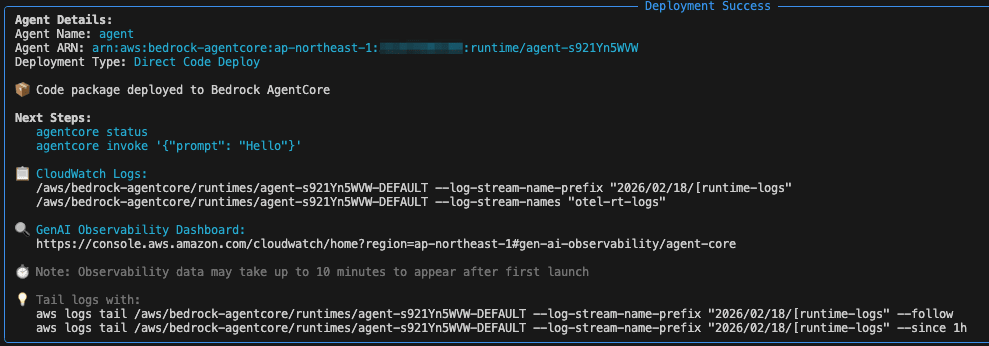
Call Amazon Bedrock AgentCore from GenU
Edit parameter.ts
Edit generative-ai-use-cases/packages/cdk/parameter.ts to add and override agentCoreRegion and agentCoreExternalRuntimes in the envs section to configure calling Amazon Bedrock AgentCore from GenU. Replace the AgentCore ARN with the ARN displayed in the last line after deploying AgentCore.
✅ Deployment completed successfully - Agent: arn:aws:bedrock-agentcore:ap-northeast-1:123456789012:runtime/agent-s921Yn5WVW
  '': {
    selfSignUpEnabled: false,
    agentCoreRegion: 'ap-northeast-1',
    agentCoreExternalRuntimes: [
      {
        name: 'Company Policies (S3 Vectors RAG)',
        arn: '<Replace with your AgentCore ARN>',
        description: 'S3 Vectors for RAG'
      }
  },
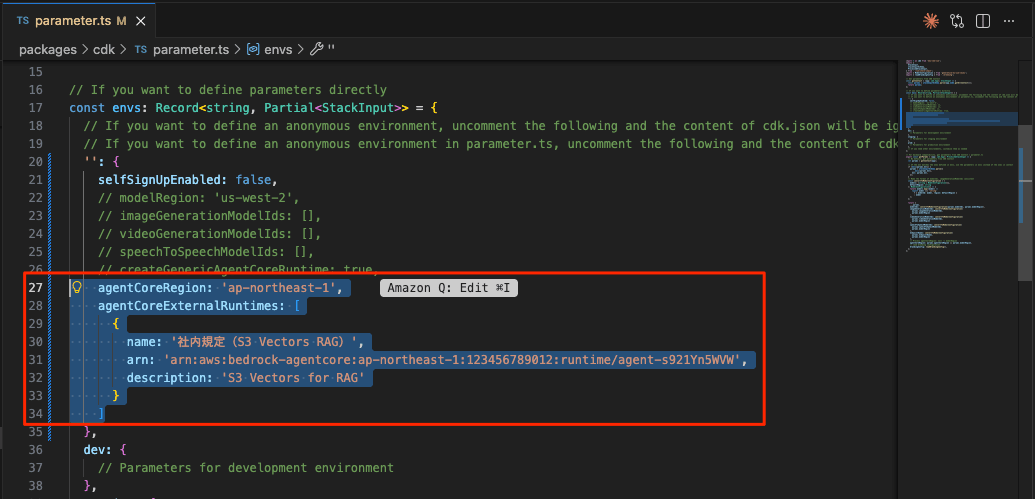
After configuration, deploy again.
npm run cdk:deploy
Testing
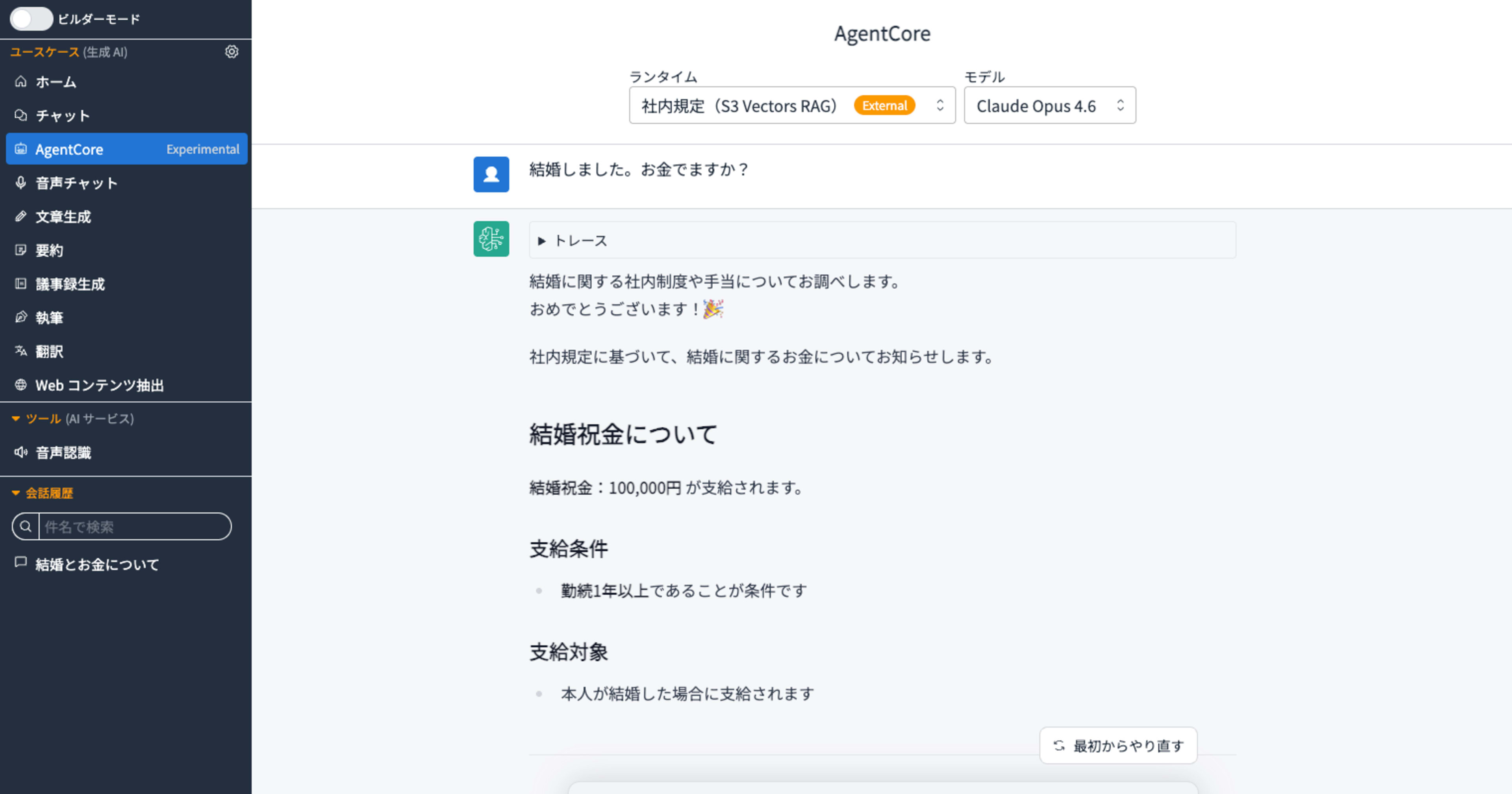
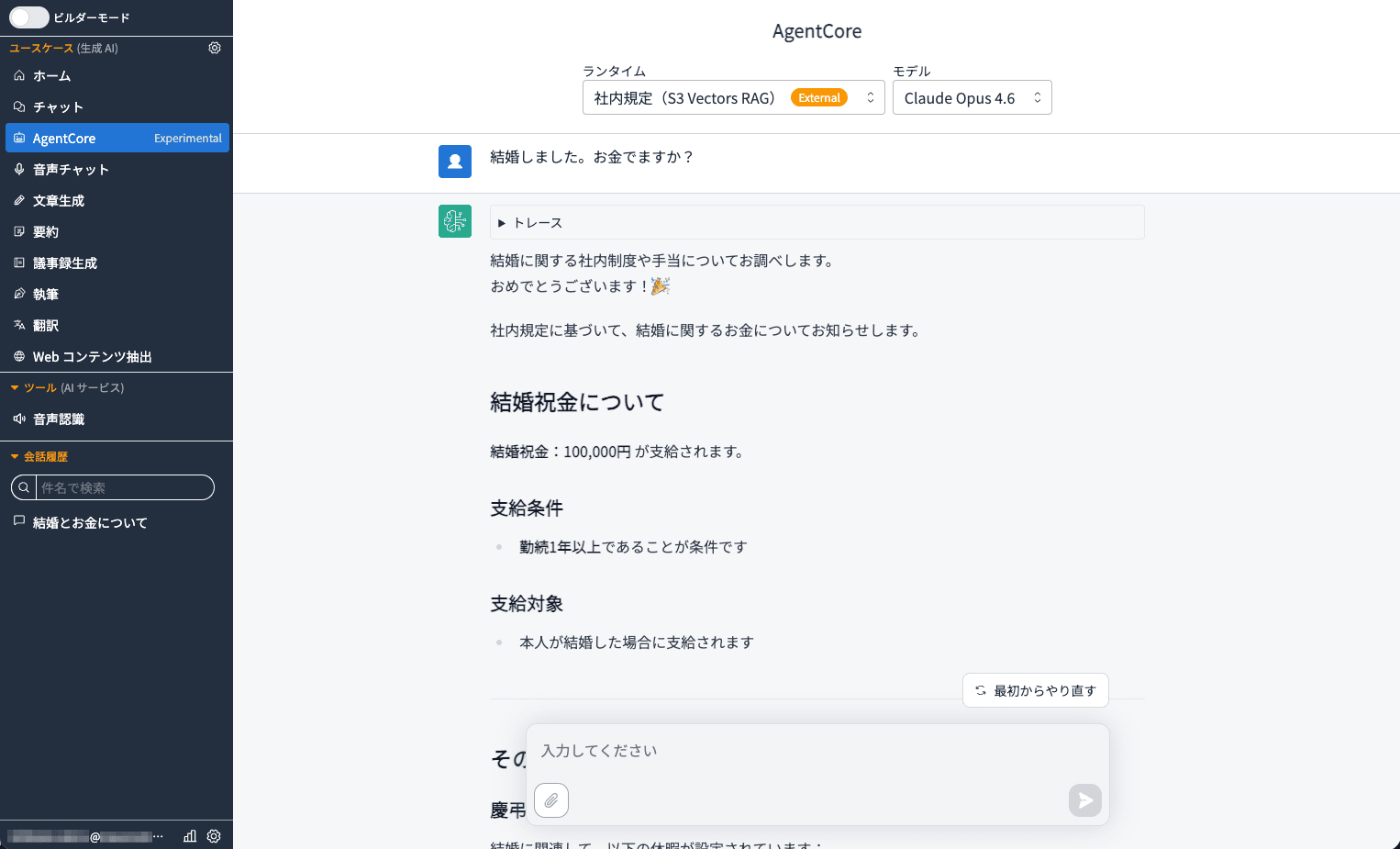
[AgentCore Experimental] has been added to the left navigation. Clicking on it will show "Company Policies (S3 Vectors RAG)".
For a prompt like "I got married. Do I get any money?" which would be difficult to match with keywords alone, semantic search generates an answer based on company information.
Conclusion
In this article, we introduced how to build a cost-effective RAG with a serverless configuration by combining GenU v5.4 and Amazon S3 Vectors.
Compared to traditional vector stores like Amazon Kendra or OpenSearch Serverless, S3 Vectors offers vector search capabilities with a serverless and simple configuration, which significantly reduces running costs. Additionally, using Amazon Bedrock AgentCore allows you to seamlessly call Bedrock Knowledge Base from GenU, which is very practical.
The fact that it can provide appropriate answers to queries like "I got married. Do I get any money?" that are difficult to match by keywords demonstrates the power of RAG through semantic search. I hope you can utilize this for use cases directly related to daily business operations such as company policies and FAQs.