![[UPDATE] Amazon Redshift Serverless introduces 3-year Serverless Reservations, enabling up to 45% cost savings](https://images.ctfassets.net/ct0aopd36mqt/wp-thumbnail-63f1274931b942e9a92e601c1127ad73/cfe87ec6d62fa2fc3c474ed4cb2f6c2e/amazon-redshift?w=3840&fm=webp)
[UPDATE] Amazon Redshift Serverless introduces 3-year Serverless Reservations, enabling up to 45% cost savings

This page has been translated by machine translation. View original
This is Ishikawa from the Cloud Business Division. Amazon Redshift Serverless has introduced new 3-year Serverless Reservations. In addition to the conventional 1-year reservations, longer-term commitments now enable cost reductions of up to 45%. This update provides a powerful cost optimization option for those who already run Redshift Serverless in production.
What are Serverless Reservations
Serverless Reservations is a discounted pricing option for Amazon Redshift Serverless. By committing to a certain number of Redshift Processing Units (RPUs) for a period (1 year or 3 years), you can reduce computing costs compared to on-demand pricing.
The main features of Serverless Reservations are as follows:
- Managed at the AWS payer account level
- Can be shared among multiple AWS accounts under the same payer account
- Billed hourly and measured by the second (consistent billing model 24/7)
- Usage beyond the reserved RPU level is charged at standard on-demand rates
What's New in This Update
Previously, Serverless Reservations were available for only 1 year, but with this update, 3-year Serverless Reservations are now available.
While 1-year reservations offered discounts of up to 20% with No Upfront payment and up to 24% with All Upfront payment, 3-year reservations now provide discounts of up to 45% with No Upfront payment.
| Term | Payment Option | Maximum Discount |
|---|---|---|
| 1 year | No Upfront | Up to 20% |
| 1 year | All Upfront | Up to 24% |
| 3 years | No Upfront | Up to 45% |
While a 3-year commitment is required, the difference in discount rates is substantial.
How to Purchase
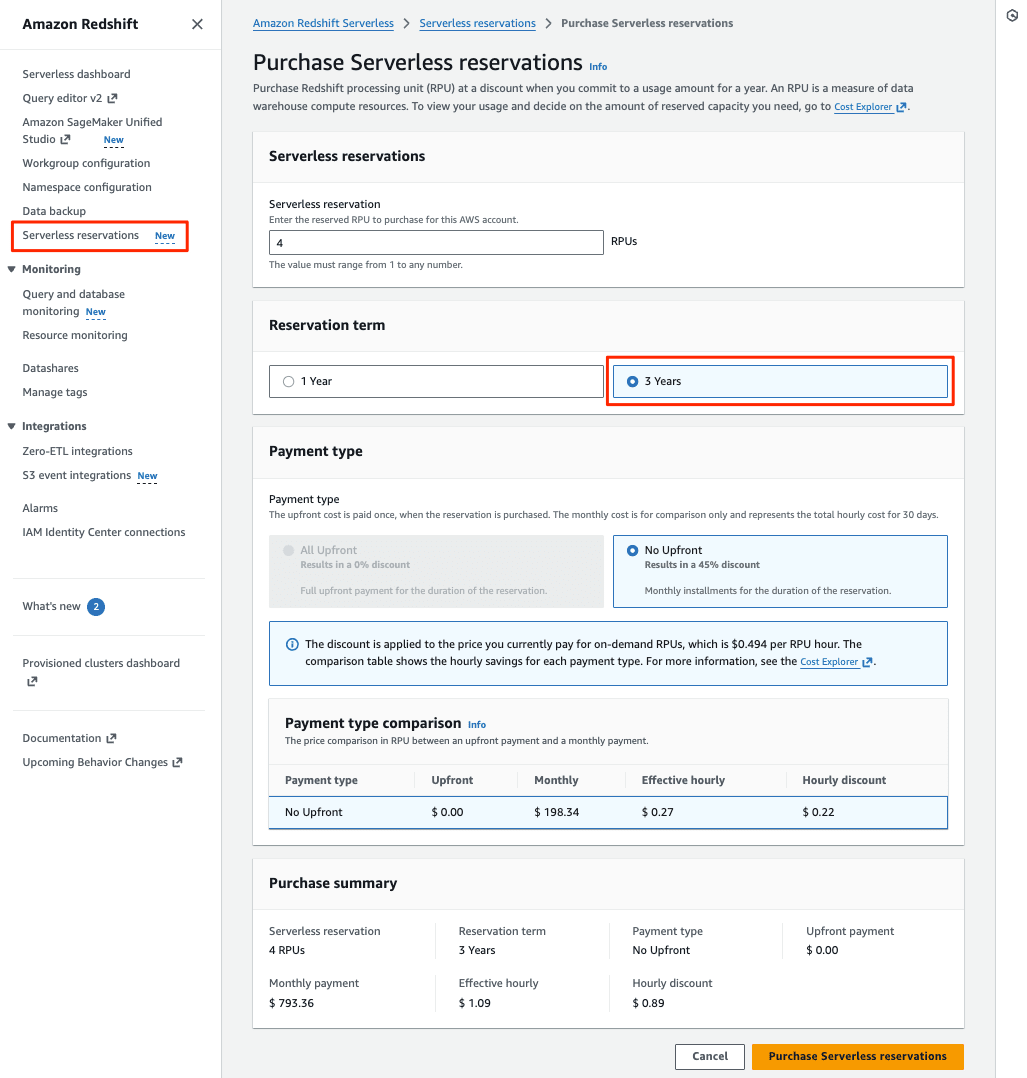
Serverless Reservations can be purchased from the Amazon Redshift console or through the AWS CLI / API.
Purchasing from the console
- Open the Amazon Redshift console
- Select "Serverless reservations" from the "Serverless" menu on the left
- Select "Purchase serverless reservations"
- Enter the RPU level to reserve
- Select the payment type
- Review and purchase
Effective Implementation of Serverless Reservations
Understanding Usage Patterns
To determine the appropriate reservation level, you need to analyze your current RPU usage. There are two methods for analysis.
Redshift Serverless Dashboard (7-day view)
From the Redshift Serverless console dashboard, select a workgroup to view RPU usage from the last hour to the last week.
AWS Cost Explorer (long-term analysis)
Use Cost Explorer to analyze usage trends over a longer period. Set the granularity to "hourly" and filter by usage type Redshift:ServerlessUsage to check hourly Serverless usage.
Key Points for Effective Implementation
1. Understand your usage patterns first
Before purchasing reservations, it's most important to analyze your current RPU usage.
- Check RPU usage for the last 7 days using the Redshift Serverless dashboard
- Analyze long-term usage trends with AWS Cost Explorer
- Get detailed usage history from the SYS_SERVERLESS_USAGE system table
2. Target "continuously used RPUs" for reservation
Best practice is to cover the baseline (where queries are always running) with reservations and handle additional peak-time usage with on-demand.
3. Aim for 55% utilization (for 3-year No Upfront)
For 3-year No Upfront reservations, the break-even point is 55% utilization (about 13.2 hours per day). If your usage pattern is lower, reservations might actually increase costs.
4. Start with a conservative RPU count
Purchased reservations cannot be changed or deleted. It's safer to operate for several months to understand RPU requirements, or start with a conservative RPU count and add more as needed.
Simulation 1: Annual Cost Comparison by Usage Pattern (for 32 RPUs)
Comparing annual costs for common workload patterns with 32 RPUs.
Calculation Method
- On-demand: RPU price × RPU count × daily usage hours × 365 days
- Reservation: Discounted RPU price × RPU count × 24 hours × 365 days
| Usage Pattern | Daily Hours | Utilization | On-demand | 1-year No Upfront | 1-year All Upfront | 3-year No Upfront |
|---|---|---|---|---|---|---|
| Business hours | 8 hours | 33% | $46,159 | $110,782 | $105,243 | $76,163 |
| Extended hours | 12 hours | 50% | $69,239 | $110,782 | $105,243 | $76,163 |
| Almost all day | 18 hours | 75% | $103,859 | $110,782 | $105,243 | $76,163 |
| 24-hour operation | 24 hours | 100% | $138,478 | $110,782 | $105,243 | $76,163 |
Bar graph: On-demand (increases proportionally with usage hours) / Upper line: 1-year No Upfront reservation (fixed) / Lower line: 3-year No Upfront reservation (fixed)
3-year No Upfront reservation (fixed)
- Business hours only (8 hours/day・33% utilization): On-demand is cheapest. All reservations are more expensive. Even the 3-year reservation costs about 1.65 times more than on-demand.
- Extended business hours (12 hours/day・50% utilization): On-demand is still cheaper, but the gap with 3-year reservation narrows.
- Almost all-day usage (18 hours/day・75% utilization): 3-year reservation is cheapest (27% reduction compared to on-demand). 1-year reservation is roughly equivalent to on-demand.
- 24-hour full operation (100%): 3-year reservation is cheapest (45% reduction compared to on-demand). 1-year reservations also provide 20-24% cost reduction.
Simulation 2: Baseline + Peak Combination Strategy (Recommended)
From Simulation 1, we can see that rather than choosing between "cover everything with reservations" or "use everything on-demand," the most cost-efficient approach is to combine baseline stable usage with reservations and peak spikes with on-demand.
Workload Example:
- Continuous baseline operation: 32 RPU (24 hours, 365 days)
- Additional peak usage (business hours): +32 RPU (8 hours on weekdays)
| Strategy | Annual Cost | Savings |
|---|---|---|
| All on-demand | $105,120 (base) + $24,960 (peak) = $130,080 | ― |
| All 64RPU reservation (3-year) | $0.20625 × 64 × 24 × 365 = $115,632 | $14,448 (11% reduction) |
| Base 32RPU reservation (3-year) + Peak 32RPU on-demand | $57,816 (reservation) + $24,960 (on-demand) = $82,776 | $47,304 (36% reduction) |
Usage Notes
Important points to note when using Serverless Reservations:
- Once purchased, reservations cannot be changed or deleted. You can expand coverage by creating additional reservations
- Usage beyond reserved RPUs is charged at Redshift Serverless on-demand rates
- Amazon Redshift Serverless free credits do not apply to Serverless Reservations, only to RPUs charged on-demand
- If you purchase multiple reservations, the RPUs accumulate (e.g., 100 RPU × 2 = total of 200 RPUs eligible for discount)
Conclusion
Amazon Redshift Serverless has introduced 3-year Serverless Reservations. The cost reduction of up to 45% is a significant improvement compared to 1-year reservations (up to 24%).
While the appeal of Redshift Serverless is the on-demand flexibility of "pay as you go," for workloads used continuously in production environments, covering baseline RPU usage with reservations and handling peak spikes with on-demand is effective from a cost optimization perspective. The ability to share reservations among multiple AWS accounts under the same payer account is also noteworthy.
A 3-year commitment may seem long, but for those already stably operating data warehouses on Redshift Serverless, the cost reduction effect is substantial. I recommend first analyzing your current RPU usage with Cost Explorer or the Redshift Serverless dashboard, and then considering the application of reservations.
Related Reading