![[Speaker Report] I failed at the RTA (Real-Time Attack) while presenting "Connecting AWS and Google Cloud using AWS Interconnect - multicloud" at the "AWS re:Invent 2025 New Features 'I Tried It' Report Meeting - Network & Operations Edition"](https://devio2024-media.developers.io/image/upload/f_auto,q_auto,w_3840/v1775229860/user-gen-eyecatch/e3lw4fv9iqoblcjorawa.webp)
[Speaker Report] I failed at the RTA (Real-Time Attack) while presenting "Connecting AWS and Google Cloud using AWS Interconnect - multicloud" at the "AWS re:Invent 2025 New Features 'I Tried It' Report Meeting - Network & Operations Edition"

This page has been translated by machine translation. View original
Introduction
Hello everyone, this is Akaike.
I had the opportunity to speak at the "AWS re:Invent 2025 New Features 'Hands-on' Report - Network & Operations Edition" held on March 24, 2026.
My presentation was titled "Connecting AWS and Google Cloud with AWS Interconnect - multicloud during the LT" which was meant to be a real-time attempt (RTA), but to get straight to the point, the RTA failed.
Since ending with just a failure is too disappointing, in this article I'll review the presentation content, explain why the RTA failed, and share my subsequent successful re-attempt.
Presentation Materials
Why did the RTA fail?
So why did I fail at the RTA?
During my presentation, I was executing the AWS Interconnect - multicloud setup procedures live, but an error occurred when creating the Transport resource on the Google Cloud side.
The command that was executed when the error occurred was as follows:
$ gcloud beta network-connectivity transports create interconnect-transport \
  --region=us-east4 \
  --network=interconnect-multicloud-vpc \
  --advertised-routes="10.1.0.0/16" \
  --activation-key="$ACTIVATION_KEY"
And the error that occurred was:
(Project IDs etc. have been masked)
ERROR: (gcloud.beta.network-connectivity.transports.create) HttpError accessing <https://networkconnectivity.googleapis.com/v1beta/projects/XXX-XXX/locations/us-east4/transports?alt=json&transportId=interconnect-transport>: response: <{'vary': 'Origin, X-Origin, Referer', 'content-type': 'application/json; charset=UTF-8', 'content-encoding': 'gzip', 'date': 'Tue, 24 Mar 2026 10:43:49 GMT', 'server': 'ESF', 'x-xss-protection': '0', 'x-frame-options': 'SAMEORIGIN', 'x-content-type-options': 'nosniff', 'transfer-encoding': 'chunked', 'status': 429}>, content <{
  "error": {
    "code": 429,
    "message": "Quota limit 'RegionalPerProjectTransports' has been exceeded. Limit: 1 in region us-east4.",
    "status": "RESOURCE_EXHAUSTED",
    "details": [
      {
        "@type": "type.googleapis.com/google.rpc.QuotaFailure",
        "violations": [
          {
            "subject": "project:XXXXXXXXXXXX",
            "description": "Quota 'RegionalPerProjectTransports' exhausted. Limit 1 in region us-east4"
          }
        ]
      }
    ]
  }
}
Yes, those of you who are perceptive will already understand.
I hit the RegionalPerProjectTransports quota limit, which prevented me from creating the resource.
And the reason this quota was already used up was forgetting to delete resources from a practice run before the presentation.
In summary, "While Google Cloud Transport resources are limited to 1 per project per region, I attempted to create a new one while resources from my practice run still existed, causing the error".
The re-attempt
Since I was disappointed, I decided to try again.
I'm using the same repository that I used during the presentation:
This time, of course, I deleted all existing resources beforehand. I won't make the same mistake twice.
Here are the results of the re-attempt.
| Step | Build Method | Content | LAP | Lap Time | Total Time |
|---|---|---|---|---|---|
| Preliminary Resource Creation | Terraform | Create AWS/GCP infrastructure resources in bulk with terraform apply |
#1 | 08:39 | 08:39 |
| Interconnect Creation | GUI | Create Multicloud Interconnect from AWS console and obtain Activation Key | #2 | 00:54 | 09:34 |
| Transport Creation | CLI | Create Transport resource using Activation Key in GCP CloudShell | #3 | 07:13 | 16:48 |
| VPC Peering Configuration | CLI | Create GCP side VPC Peering using Transport's peeringNetwork |
#4 | 00:47 | 17:35 |
| Connectivity Test (EC2 -> GCE) | CLI | Connect to EC2 via SSM Session Manager and ping/curl to GCE | #5 | 01:56 | 19:31 |
| Connectivity Test (GCE -> EC2) | CLI | Connect to GCE via IAP tunnel and ping/curl to EC2 | #6 | 01:07 | 20:39 |
| Total | - | From Terraform build to bidirectional connectivity test | - | - | 20:40 |
Though it's a rather weak piece of evidence, here's the record I took during the re-attempt.
(I had Claude create a stopwatch for me)
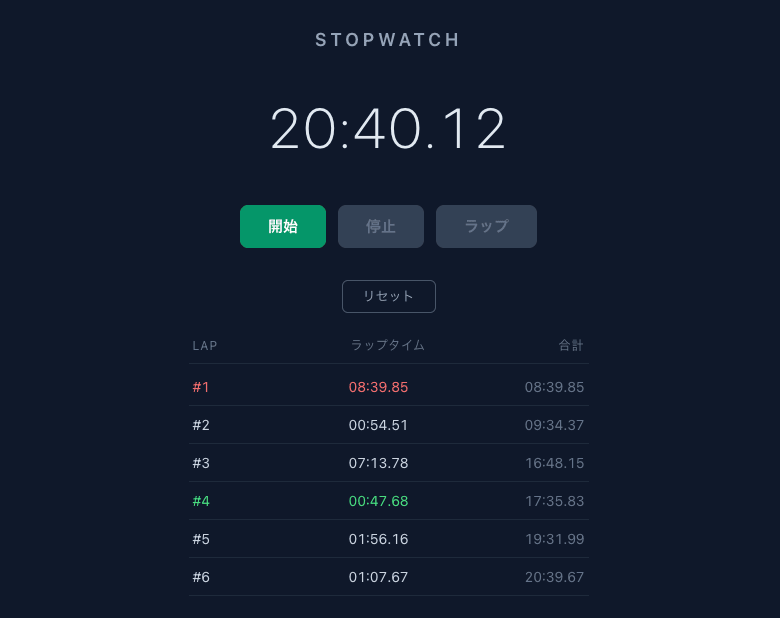
What do you think?
From Terraform Apply to bidirectional connectivity testing between AWS and Google Cloud, everything was completed in just this much time.
It's amazing that a multi-cloud private connection can be built at this speed.
Also, since the Terraform Apply is just for preliminary infrastructure setup, focusing only on AWS Interconnect - multicloud related resources, it was effectively completed in about 12 minutes.
Furthermore, during this re-attempt, I was still fumbling at various points (such as not logging into AWS CLI and Google Cloud CLI beforehand).
With proper preparation and streamlining, it might be possible to complete it in under 10 minutes.
Conclusion
That concludes my presentation report from "AWS re:Invent 2025 New Features 'Hands-on' Report - Network & Operations Edition," the cause of my RTA failure, and my successful re-attempt.
While it was quite frustrating to fail the RTA during the LT, I'm satisfied that I was able to successfully complete it in my re-attempt. Thank you.
The cause of the failure was the simple matter of "forgetting to delete resources from the practice run," so I intend to apply this lesson in future RTAs.
AWS Interconnect - multicloud is still in preview, but the ability to privately connect AWS and Google Cloud is quite an attractive option for those considering multi-cloud configurations.
I've also published a sample repository, so if you're interested, please try this RTA yourself.
I hope this article has been helpful to someone.