
How Well Does Claude Code to Figma Preserve Design Systems? I Tested It

This page has been translated by machine translation. View original
Including myself, designers in contracted development often create UI and organize screen flows during the requirements definition phase before starting development.
As development progresses, specification changes and text modifications are made, and before you know it, "which is the latest version—Figma or implementation?" tends to become ambiguous.
If the implementation side has the latest version, you want to accurately return that state to Figma to update the design data... we all have those moments, right?
With Figma's "Claude Code to Figma," operations that update Figma based on code may become a reality.
This time, I verified "Creating a Material 3 UI in Figma, implementing it with React + MUI via Claude Code, and returning it to Figma using Claude Code to Figma".
The aim was to confirm "how much of the design system (structure/tokens/spacing rules) is preserved through AI-mediated round trips" using procedures close to actual work.
What Was Verified
Looking beyond just visual changes to focus on whether "design information returns":
- Whether component structure returns
- Whether Variables references remain
- Whether Auto Layout remains in a usable form
- Whether shadows and state expressions are preserved
- Whether naming conventions for layer names, etc., remain
Verification Results
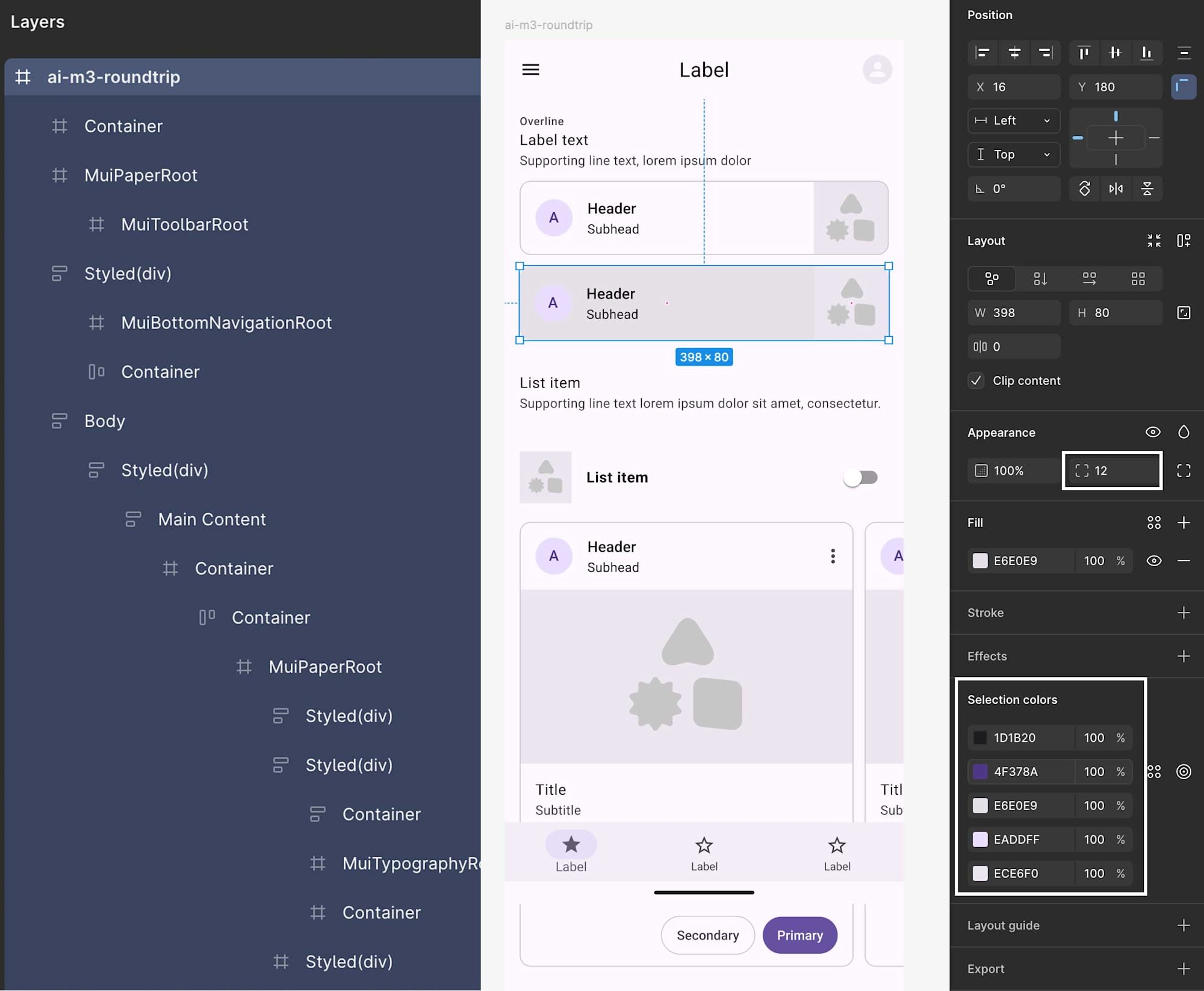
To conclude, while the general appearance (AppBar / Card / List / BottomNavigation) aligns, preserving design information is difficult.
| Aspect | Result | Evidence |
|---|---|---|
| Component structure | Not achieved | Generated as implementation-derived structures like Mui*Root / Styled(div) / Container, not restored as M3 components (Design Kit instances) |
| Variables references | Not achieved | Fill/Stroke become fixed HEX values, not Variables references |
| Auto Layout | Partially achieved | Buttons have Auto Layout, but the overall screen and cards are primarily Frame-based (fixed positioning) with mixed approaches |
| Shadows and states | Not achieved | Effects remain empty when selecting cards, and Elevation is not preserved as a design element |
| Naming | Not achieved | Names like Horizontal card_A/B are not preserved, with consecutive Container elements making tracking difficult |
Verification Environment
- Figma Desktop App v126.1.2
- Claude Code v1.0.44
- Model claude-sonnet-4-6
- React v19.2.4
- @mui/material v7.3.8
- @emotion/react v11.14.0
Figma Preparation
I created the UI using the Material 3 Design Kit.
For components placed more than once, I varied the Styles and States.
Screen Structure
- App Bar
- Text
- Horizontal card
- List item
- Stacked card
- Fixed Bottom Navigation
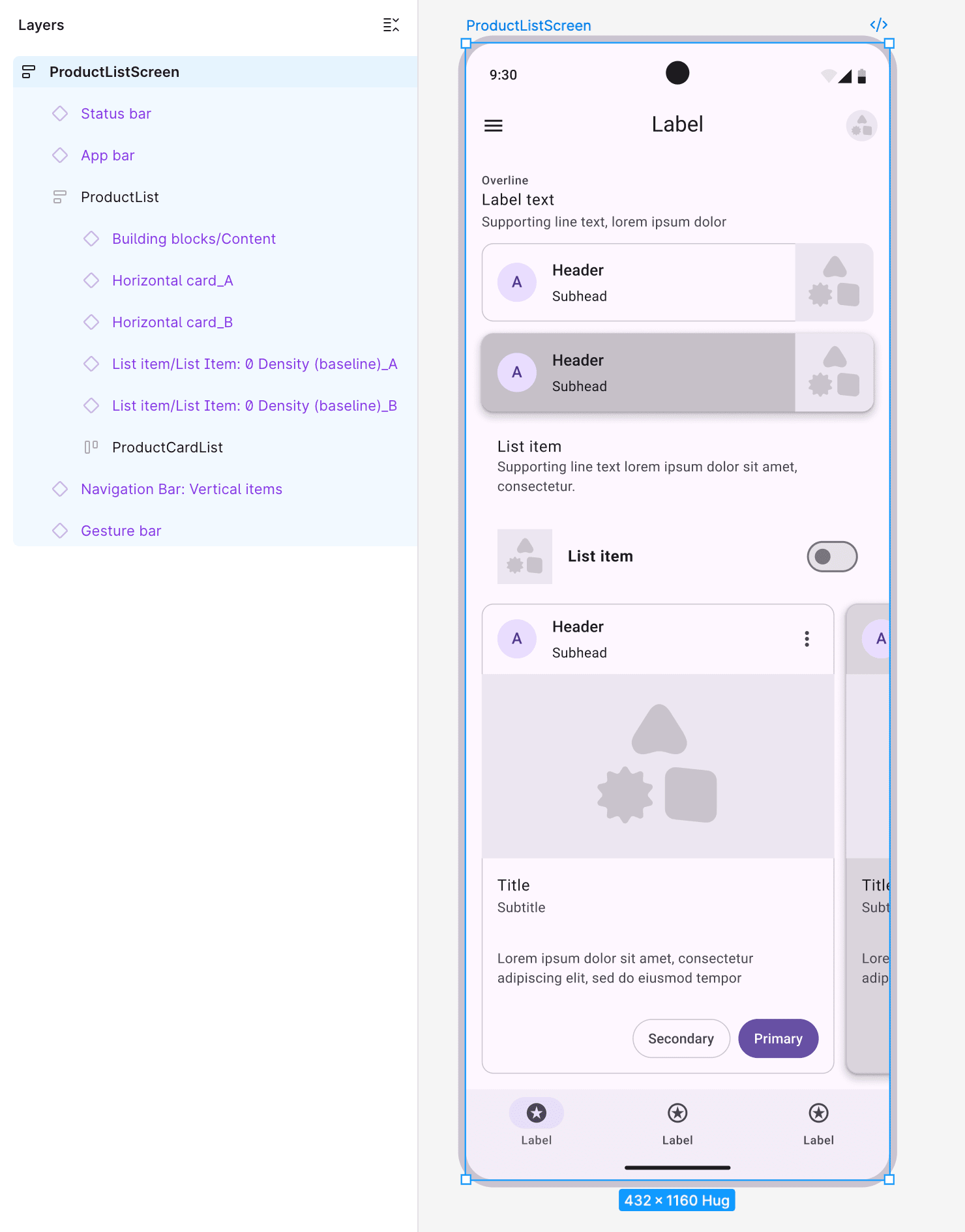
I registered Color, Spacing/Radius included in the Material 3 Design Kit individually as Variables to confirm whether spacing would be referenced as fixed values or corner radius tokens.
Implementation Conditions
Implementation assumes using MUI's theme functionality to manage colors, corner radii, and spacing collectively as tokens.
To ensure a valid test (rather than forcing visual similarity), I limited theme modifications to palette / shape.borderRadius / spacing only.
No components.*.styleOverrides were used.
Additionally, since AI-based implementation sometimes omitted elements at the bottom of the screen (like BottomNavigation), I specified "no omissions + specified order" in the prompt.
What is a theme?
In MUI, it's a collection of app-wide visual rules (colors, spacing, corner radii, etc.).
Created with createTheme and applied to the entire app with ThemeProvider.
Prompt
I instructed the following in Claude Code in VSCode:
Implement a single "ProductListScreen" screen in React + MUI based on the following Figma (refactoring existing implementation is OK).
Figma:
https://www.figma.com/design/……………………………………
Target frame: ProductListScreen
Conditions (tokenization with theme):
- Define and apply theme using createTheme + ThemeProvider
- Only these 3 things can be set in the theme:
  1) palette (primary/secondary/background/text/divider, etc.)
  2) shape.borderRadius (e.g., 12)
  3) spacing (base is 4px, so spacing(4)=16px, spacing(3)=12px, spacing(20)=80px should be valid)
- Don't use components' styleOverrides
- Implement all elements in the Figma without omitting anything down to the bottom of the screen
UI to implement (from top to bottom):
1) AppBar (title: "Label")
2) 3 lines of explanatory text (Overline / Label text / Supporting line text)
3) 2 Horizontal cards (A/B)
4) 2 List items (one with a Switch)
5) 2 Stacked cards (horizontal scroll)
6) Fixed BottomNavigation (3 tabs, always showing labels with showLabels)
Implementation:
- Create src/theme.js
- Apply ThemeProvider + CssBaseline in src/main.jsx
- Create/modify src/ProductListScreen.jsx
- Display ProductListScreen in src/App.jsx
- Please provide a list of changed/created files and the content of each file
Claude Code to Figma
- I ran
generate_figma_designvia MCP to import the web (localhost) screen into Figma. - Clicking "Send to Figma" inputs the result into Figma.
- Since Figma MCP doesn't provide tools for duplicating existing frames, editing Variables values, or changing colors or properties of existing nodes, Claude Code's writing to Figma is limited to creating new frames via web capture.
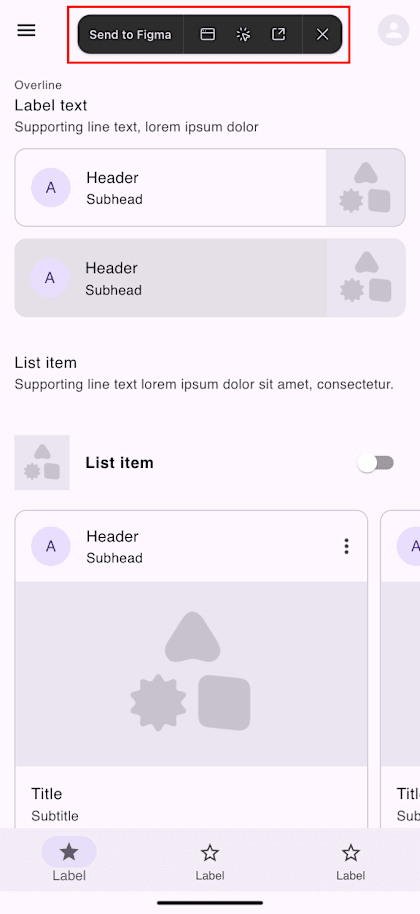
Import is successful if a frame with the captured result is added to the open Figma file.
UI output with Claude Code to Figma
Summary
- I was able to reflect implementation results in Figma via Claude Code to Figma.
- It's very useful when you only have code without Figma design data.
- It was difficult to maintain Material 3 design information (component structure, Variables references, naming) during the round trip, and Auto Layout only partially remained.
- For use cases maintaining design systems during round trips, reproduction with a single instruction was difficult, requiring additional instructions or prompt adjustments.
Troubleshooting Notes
I ran into some issues during this verification, so I'm writing them down for future reference:
- When testing
generate_figma_design, requests can become large, so instruct "no editing at all" when checking connectivity. mcp.jsonwas in.vscode/mcp.jsonin the project, and Figma MCP's connection was set totype: "http"/url: "http://127.0.0.1:3845/mcp"(referring to the local Figma MCP server)- If the server status shows
Runningon the VSCode side withDiscovered 6 tools / 3 prompts, this indicates the "VSCode → Figma MCP" connection is working. - Opening
http://127.0.0.1:3845/mcpdirectly in a browser might returnInvalid sessionId, but this doesn't necessarily indicate failure (MCP expects clients like VSCode to call with sessions, not direct browser access)
While there are breakdowns, I'm amazed at how easily we can now move between Figma and code through AI.
Through this verification, I realized my understanding of Claude Code to Figma and my prompting skills were insufficient.
I'll continue studying Claude Code and Figma.
Thank you for reading to the end.