![[Small Talk] AgentCore Runtime's Conversation History and Scope](https://images.ctfassets.net/ct0aopd36mqt/7qr9SuOUauNHt4mdfTe2zu/8f7d8575eed91c386015d09e022e604a/AgentCore.png?w=3840&fm=webp)
[Small Talk] AgentCore Runtime's Conversation History and Scope

This page has been translated by machine translation. View original
Introduction
Hello, I'm Kanno from the consulting department, and I like supermarkets.
Are you creating AI agents with Strands Agents and AgentCore? I've been working with them a bit every day too.
Today, I want to talk about conversation history.
For example, if you want to persist conversation history, you might think of using AgentCore Memory's short-term memory,
but actually, within the same session and as long as the session is alive, you can maintain conversations without using Memory.
However, depending on how you write your code, variable scope can change, leading to cases where conversation history isn't maintained.
I wrote this article to dive deeper into these aspects.
How Strands Agent conversation history works
Strands Agent maintains conversation history in its messages attribute.
As long as you keep using the same Agent instance, conversations accumulate in these messages.
from strands import Agent

agent = Agent()

# First call
agent("Hello, my name is Kanno")

# Second call - using same instance so conversation history remains
agent("What is my name?")

# Check conversation history
print(agent.messages)

agent2 = Agent()

agent2("What is my name?")

print(agent2.messages)
When executed, you can see the responses returned and that previous messages have been accumulated.
Meanwhile, a newly created instance doesn't remember any messages. This behavior is as expected.
# First execution
Nice to meet you, Kanno-san. Hello! I'm Claude. I'm glad to meet you. Please let me know if there's anything I can help you with. How are you doing?Your name is Kanno-san. You introduced yourself earlier.[{'role': 'user', 'content': [{'text': 'こんにちは、私の名前は神野です'}]}, {'role': 'assistant', 'content': [{'text': 'はじめまして、神野さん。こんにちは!私はClaudeです。お会いできて嬉しいです。何かお手伝いできることがあればお気軽にお声かけください。いかがお過ごしですか?'}]}, {'role': 'user', 'content': [{'text': '私の名前は何ですか?'}]}, {'role': 'assistant', 'content': [{'text': 'あなたのお名前は神野さんですね。先ほど自己紹介していただきました。'}]}]

# Second execution
I'm sorry, but I don't know your name as you haven't told me yet. Would you please tell me your name?[{'role': 'user', 'content': [{'text': '私の名前は何ですか?'}]}, {'role': 'assistant', 'content': [{'text': '申し訳ありませんが、あなたのお名前をお教えいただいていないので、わかりません。よろしければ、お名前を教えていただけますでしょうか?'}]}]
The official documentation states the following:
Conversation history is automatically:
- Maintained between calls to the agent
- Passed to the model during each inference
The content matches our findings: conversation history automatically accumulates in the Agent instance's messages,
and as long as you keep using the same instance, inference is performed with memory of previous conversations.
Conversely, when creating a new instance, conversation history starts from scratch.
This is the same with AgentCore, but behavior changes depending on where the agent is initialized, so let's check that.
Setup
Now let's set up the environment to check implementation patterns.
Prerequisites
For this article, I used the following versions:
- Python 3.12
- strands-agents >= 1.22.0
- bedrock-agentcore >= 1.2.0
- bedrock-agentcore-starter-toolkit >= 0.2.6
- uv 0.6.12
Initializing Dependencies
Initialize the project using uv.
uv init
Add dependencies with the following command:
uv add strands-agents bedrock-agentcore bedrock-agentcore-starter-toolkit
Deploying to AgentCore
Deploy the implemented Agent to AgentCore Runtime. Before deployment, you need to configure deployment settings.
Deployment Configuration
Configure deployment using the agentcore configure command.
Since we're using IAM authentication, the default authentication settings are fine.
uv run agentcore configure -e agent.py
When executed, an interactive prompt appears. You can generally proceed with the recommended settings!
Configuring Bedrock AgentCore...
✓ Using file: agent.py

🏷️  Inferred agent name: agent
Press Enter to use this name, or type a different one (alphanumeric without '-')
Agent name [agent]: agent_sample_test_0123
✓ Using agent name: agent_sample_test_0123

🔍 Detected dependency file: pyproject.toml
Press Enter to use this file, or type a different path (use Tab for autocomplete):
Path or Press Enter to use detected dependency file: pyproject.toml
✓ Using requirements file: pyproject.toml

🚀 Deployment Configuration
Select deployment type:
  1. Direct Code Deploy (recommended) - Python only, no Docker required
  2. Container - For custom runtimes or complex dependencies
Choice [1]: 1

Select Python runtime version:
  1. PYTHON_3_10
  2. PYTHON_3_11
  3. PYTHON_3_12
  4. PYTHON_3_13
Choice [3]: 3
✓ Deployment type: Direct Code Deploy (python.3.12)

🔐 Execution Role
Press Enter to auto-create execution role, or provide execution role ARN/name to use existing
Execution role ARN/name (or press Enter to auto-create):
✓ Will auto-create execution role

🏗️  S3 Bucket
Press Enter to auto-create S3 bucket, or provide S3 URI/path to use existing
S3 URI/path (or press Enter to auto-create):
✓ Will auto-create S3 bucket

🔐 Authorization Configuration
By default, Bedrock AgentCore uses IAM authorization.
Configure OAuth authorizer instead? (yes/no) [no]: no
✓ Using IAM authorization (default)
IAM authentication is set by default, so there's no need to change anything!
Running Deployment
After configuration, run deployment with the following command:
uv run agentcore deploy
Upon completion, the agent's ARN will be displayed. This ARN will be used for testing later.
To test the deployed agent, run the following command:
uv run agentcore invoke '{"prompt": "こんにちは"}'
You can deploy both patterns separately or overwrite one implementation and deploy again.
Now let's deploy each execution pattern and check their behavior.
I deployed both patterns separately. If you deploy two agents in the same directory, you can specify which agent to call by passing the --agent argument when invoking.
uv run agentcore invoke '{"prompt": "私の名前は神野です。覚えておいてください。"}' --agent agent_global --session-id a1b2c3d4e5f6g7h8i9j0k1l2m3n4o5p67
Comparing Implementation Patterns
Pattern 1: Initialization within the Entrypoint
First, let's initialize Agent within the entrypoint.
from strands import Agent
from strands.models import BedrockModel
from bedrock_agentcore.runtime import BedrockAgentCoreApp

app = BedrockAgentCoreApp()

@app.entrypoint
async def entrypoint(payload):
    message = payload.get("prompt", "")

    # Initialize Agent within the entrypoint
    model = BedrockModel(
        model_id="us.anthropic.claude-haiku-4-5-20251001-v1:0",
        params={"max_tokens": 4096, "temperature": 0.7},
        region_name="us-west-2"
    )
    agent = Agent(model=model)

    # New instance every time, so conversation history is empty
    result = agent(message)
    return {"result": str(result)}

if __name__ == "__main__":
    app.run()
In this implementation, a new Agent is created for each request.
Therefore, inference is performed each time without remembering previous conversations.
Pattern 1 Execution Example
After deployment, test using the Starter toolkit's agentcore invoke command.
Specify --session-id for each request.
This --session-id uniquely identifies a session, but in Pattern 1 where a new Agent instance is created for each request, conversation history isn't maintained even within the same session.
First, send the first request with session ID 1:
uv run agentcore invoke '{"prompt": "私の名前は神野です。覚えておいてください。"}' --agent agent_inside --session-id a1b2c3d4e5f6g7h8i9j0k1l2m3n4o5p6
The response returned was:
{"result": "わかりました。あなたの名前は**神野**さんですね。覚えておきます。\n\n何かお手伝いできることはありますか?\n"}
Now send a second request with the same session ID 1:
uv run agentcore invoke '{"prompt": "私の名前は何ですか?"}' --agent agent_inside --session-id a1b2c3d4e5f6g7h8i9j0k1l2m3n4o5p67
In Pattern 1, since Agent is newly created within the entrypoint each time,
even using the same session ID 1, it doesn't remember the previous conversation.
This is expected behavior.
{"result":
"申し訳ありませんが、あなたのお名前を知りません。\n\n私はこれまでのチャット履歴にアクセスすることができず、各会話は新しく始まるため、あなたについての情報を持っていません
。\n\nよろしければ、あなたのお名前を教えていただけますか?\n"}
Even if you send a request with a different session ID 2, the conversation history is reset similarly.
uv run agentcore invoke '{"prompt": "私の名前は何ですか?"}' --agent agent_inside --session-id b2c3d4e5f6g7h8i9j0k1l2m3n4o5p6q78
{"result":
"申し訳ありませんが、あなたのお名前を知りません。\n\n私はこれまでのチャット履歴にアクセスすることができず、各会話は新しく始まるため、あなたについての情報を持っていません
。\n\nよろしければ、あなたのお名前を教えていただけますか?\n"}
As we can see, in Pattern 1, conversation history is always reset both within sessions and between sessions.
Pattern 2: Initialization in Global Scope
Here, we initialize Agent in the global scope.
from strands import Agent
from strands.models import BedrockModel
from bedrock_agentcore.runtime import BedrockAgentCoreApp

app = BedrockAgentCoreApp()

# Initialize model and agent in global scope
model = BedrockModel(
    model_id="us.anthropic.claude-haiku-4-5-20251001-v1:0",
    region_name="us-west-2"
)

agent = Agent(
    model=model,
    system_prompt="あなたは親切なアシスタントです。"
)

@app.entrypoint
def invoke(payload):
    prompt = payload.get("prompt", "")

    if not prompt:
        return {"error": "promptが必要です"}

    # Use the global agent - conversation history may be preserved
    result = agent(prompt)

    return {"result": str(result)}

if __name__ == "__main__":
    app.run()
In this implementation, the Agent is initialized in the global scope. If the execution environment is reused, the same Agent instance will be used, so inference is performed with previous conversation history preserved.
Pattern 2 Execution Example
After deployment, test using the starter toolkit's agentcore invoke command.
First, send the first request with session ID 1:
uv run agentcore invoke '{"prompt": "私の名前は神野です。覚えておいてください。"}' --agent agent_global --session-id a1b2c3d4e5f6g7h8i9j0k1l2m3n4o5p67
The response returned was:
{"result": "はい、神野さん。お名前を覚えました。これからどのようにお手伝いできるでしょうか。\n"}
Now send a second request with the same session ID 1:
Let's check if it remembers the name.
uv run agentcore invoke '{"prompt": "私の名前はなんですか?"}' --agent agent_global --session-id a1b2c3d4e5f6g7h8i9j0k1l2m3n4o5p67
Since the Agent instance initialized in the global scope is retained in the same execution environment, it remembered the previous conversation!!
{"result": "神野さんです。先ほど、神野さんからお名前を教えていただきました。\n"}
On the other hand, when sending a request with a different session ID 2, a new execution environment is created for the new session, so the Agent is reset and conversation history isn't preserved.
uv run agentcore invoke '{"prompt": "私の名前は何ですか?"}' --agent agent_global --session-id b2c3d4e5f6g7h8i9j0k1l2m3n4o5p6q78
{"result": "申し訳ありませんが、あなたの名前は知りません。名前を教えていただけますか?\n"}
In Pattern 2, conversation history is maintained within the same session ID, but conversation history is reset with different session IDs.
This demonstrates how execution environments differ by session.
Same Scope Concept as Lambda
The container reuse mechanism of AgentCore Runtime is almost identical to the cold start/warm start concept of AWS Lambda.
Lambda Scope Concept
import boto3

# Global scope - retained when container is reused
dynamodb = boto3.resource('dynamodb')
table = dynamodb.Table('MyTable')

def lambda_handler(event, context):
    # Inside handler - executed every time
    item = {"id": event["id"]}
    table.put_item(Item=item)
    return {"statusCode": 200}
In Lambda, objects initialized in the global scope (like dynamodb and table in the example above) are retained when the container is reused. This allows for connection reuse and cache utilization.
Same Applies to AgentCore Runtime
The same concept applies to AgentCore Runtime.
| Scope | Initialization Timing | Conversation History |
|---|---|---|
| Global | Only at startup (cold start) | Retained when reused |
| Inside entrypoint | For each request | Reset every time |
Use Case Patterns
| Use Case | Recommended Pattern | Reason |
|---|---|---|
| Stateless Q&A | Initialize inside entrypoint | Can respond with a clean state every time |
| Simple conversation continuity (no guarantee needed) | Initialize in global scope | Continues conversation only when reused |
| Reliable conversation history persistence | AgentCore Memory + Session Manager | Reliably maintains state between sessions |
If you need to reliably maintain conversation history across sessions, using AgentCore Memory is a good approach!
Strands Agents provides the following method, so let's utilize it! It allows easy integration with Memory!
Changing the topic slightly, when you want to control the conversation history (such as how much history to retain), features like Conversation Management are also provided, which can be utilized as needed.
Additional Note: Session Duration
When continuing to use sessions with AgentCore Runtime, it's important to understand how long sessions are maintained.
Runtime applies lifecycle settings to each session, with two main timeout settings:
| Setting | Default Value | Description |
|---|---|---|
| idleRuntimeSessionTimeout | 900 seconds (15 minutes) | Time a session can remain idle. If no processing occurs during this period, the session ends. |
| maxLifetime | 28800 seconds (8 hours) | Maximum lifetime of a session. When this time is reached, the session is forcibly terminated. |
A session ends when either of these conditions is met:
- No processing for 15 minutes
- 8 hours elapsed since the session started
Visually, it looks like this:
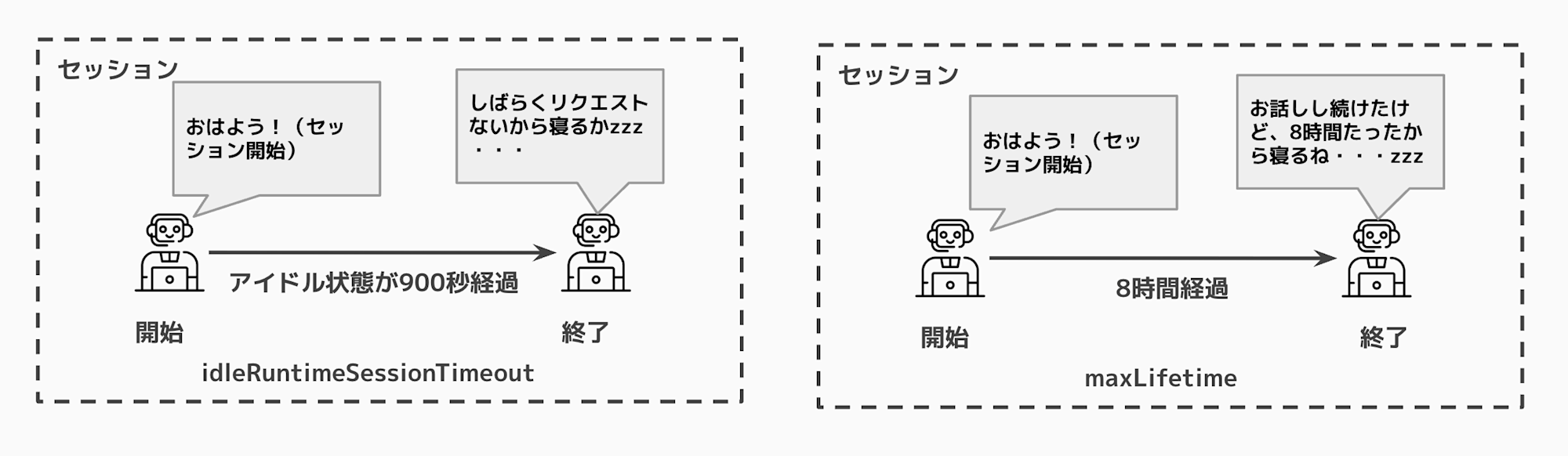
When using an Agent instance initialized in the global scope, conversation history is maintained as long as the same execution environment is reused within this timeout period.
However, when the idle timeout is reached or the maximum lifetime is reached, the session ends, and a new session will be created the next time a request is made.
At that point, conversation history is reset, so if you want to reliably maintain conversations between sessions, it's recommended to use AgentCore Memory to persist the state.
Lifecycle configuration helps optimize resource utilization by automatically cleaning up idle sessions and preventing long-running instances from consuming resources indefinitely.
By the way, there are also examples of setting times by use case, which can be helpful as a reference.
It seems good to set shorter times during development.
Setting Time Examples by Use Case
| Use Case | Idle Timeout | Max Lifetime | Rationale for Settings |
|---|---|---|---|
| Interactive Chat | 10-15 minutes | 2-4 hours | Maintains balance between responsiveness and resource usage |
| Batch Processing | 30 minutes | 8 hours | Considers longer execution times |
| Development Environment | 5 minutes | 30 minutes | Quickly cleans up for cost optimization |
| Production API | 15 minutes | 4 hours | Standard production workload |
| Demo/Testing | 2 minutes | 15 minutes | Aggressively frees resources for temporary use |
Conclusion
If you've worked with Lambda, the difference between global scope and handler scope should be familiar.
Remember that conversation history maintained in the global scope is only preserved as long as the session is maintained with the same session ID, so if you want to persistently maintain conversation history for a certain period, use AgentCore Memory!
I hope this article has been helpful.
Thank you for reading!