
I tried the built-in override strategies for Amazon Bedrock AgentCore Memory

This page has been translated by machine translation. View original
Introduction
Hello, this is Jinno from the Consulting Department, a big fan of the supermarket Life.
Amazon Bedrock AgentCore Memory has a mechanism called "Built-in with Overrides Strategy" that allows you to customize the extraction of long-term memory for AI agents.
While the default built-in strategy works well for retrieving long-term memories, you might want to customize it in certain cases. For example, you might want to extract only specific topics or use a custom model. That's where the built-in with overrides strategy comes in handy.
I've actually tried using the built-in with overrides strategy to modify extraction prompts and models, and checked how the extracted long-term memories change!
Prerequisites
Environment
The versions used are as follows:
- Python 3.12
- bedrock-agentcore 1.4.7
- Region: us-west-2
Preparation
Install the AgentCore SDK to retrieve long-term memories.
uv init
uv add bedrock-agentcore
Built-in with Overrides Strategy
Long-term memory in AgentCore Memory is generated through a mechanism called strategies. There are three types of strategy creation methods.
| Name | Description |
|---|---|
| Built-in | Fully managed by AWS. Ready to use without configuration |
| Built-in with Overrides | Customize prompts and models of built-in strategies |
| Self-managed | Build the entire extraction pipeline yourself |
Today we'll try the built-in with overrides approach. While utilizing the built-in extraction pipeline as is, you can customize just two points:
- Prompts used in extraction and consolidation steps
- Models used in extraction and consolidation steps
The steps that can be overridden differ by strategy type.
| Strategy Type | Extraction | Consolidation | Reflection |
|---|---|---|---|
| Semantic | ○ | ○ | -- |
| User Preference | ○ | ○ | -- |
| Summary | -- | ○ | -- |
| Episodic | ○ | ○ | ○ |
Since a table alone might be hard to visualize, here's a diagram. The extraction of long-term memory from short-term memory is done in stages, and the steps you can override depend on the original strategy type. Also, reflection is limited to the episodic memory strategy.
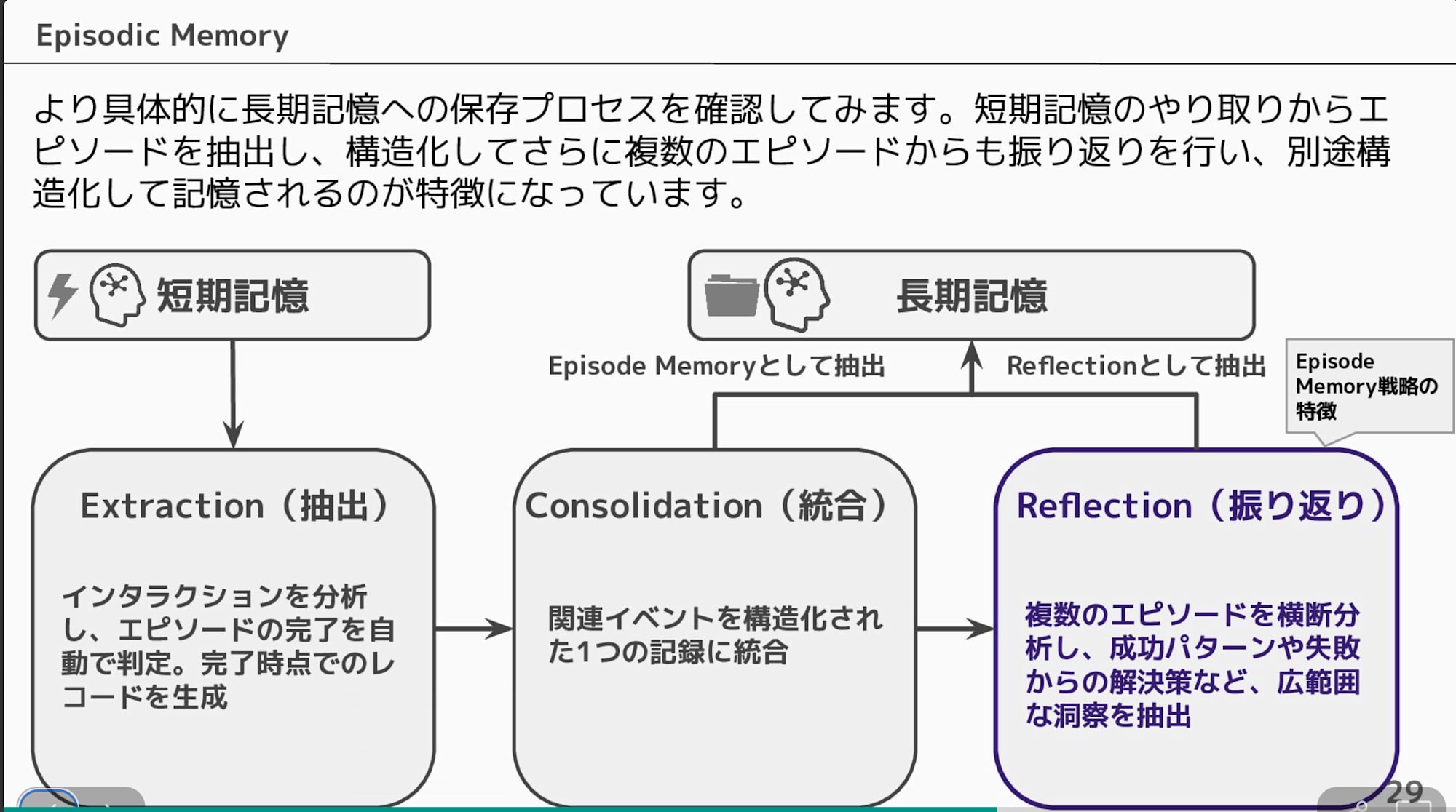
Today we'll try overriding the semantic strategy that extracts factual information from short-term memory!
Verification Flow
We'll create memory resources with two patterns and inject the same conversation data to compare the extracted long-term memories:
- Built-in strategy (default)
- Built-in with overrides strategy (modified prompts and models) — instructed to extract only food preferences
The conversation data to be injected simulates travel consultation with multiple topics including hobbies, food, accommodation, and transportation methods.
Conversation image of the data to be injected
| Role | Message |
|---|---|
| User | I'm planning to travel to Kyoto next month. Any recommendations? |
| Assistant | Kyoto travel sounds great! What are you interested in? Temple tours, gourmet food, shopping, etc. |
| User | I like visiting temples and shrines. Also, I love matcha sweets, so I'd like to know about recommended cafes. |
| Assistant | The bamboo forest in Arashiyama and Fushimi Inari are recommended. For matcha sweets, there are many nice shops in the Gion area. |
| User | Sounds good! By the way, I always prefer hotels over ryokan inns. I like places with breakfast buffets. |
| Assistant | Understood. There are many hotels with buffet breakfast around Kyoto Station. |
| User | I prefer traveling by train. I get motion sickness easily in taxis, so I don't like them. Also, I can't drink sake. |
Pattern 1: Built-in Strategy
Creating a Memory Resource
Open Memory from the AgentCore console and select Create memory.
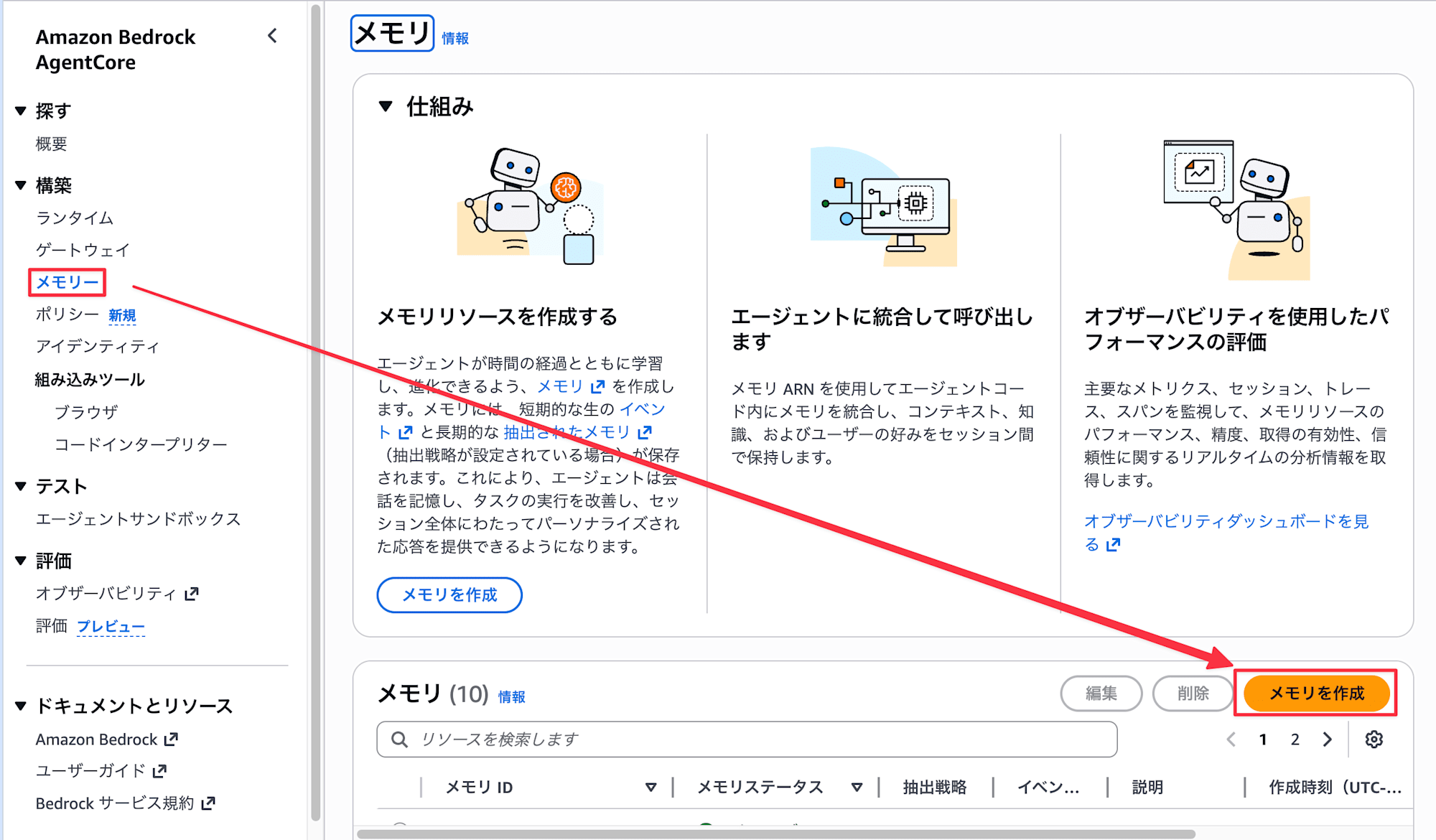
- Enter
BuiltinSemanticDemofor the name, and leave the short-term memory expiration as is
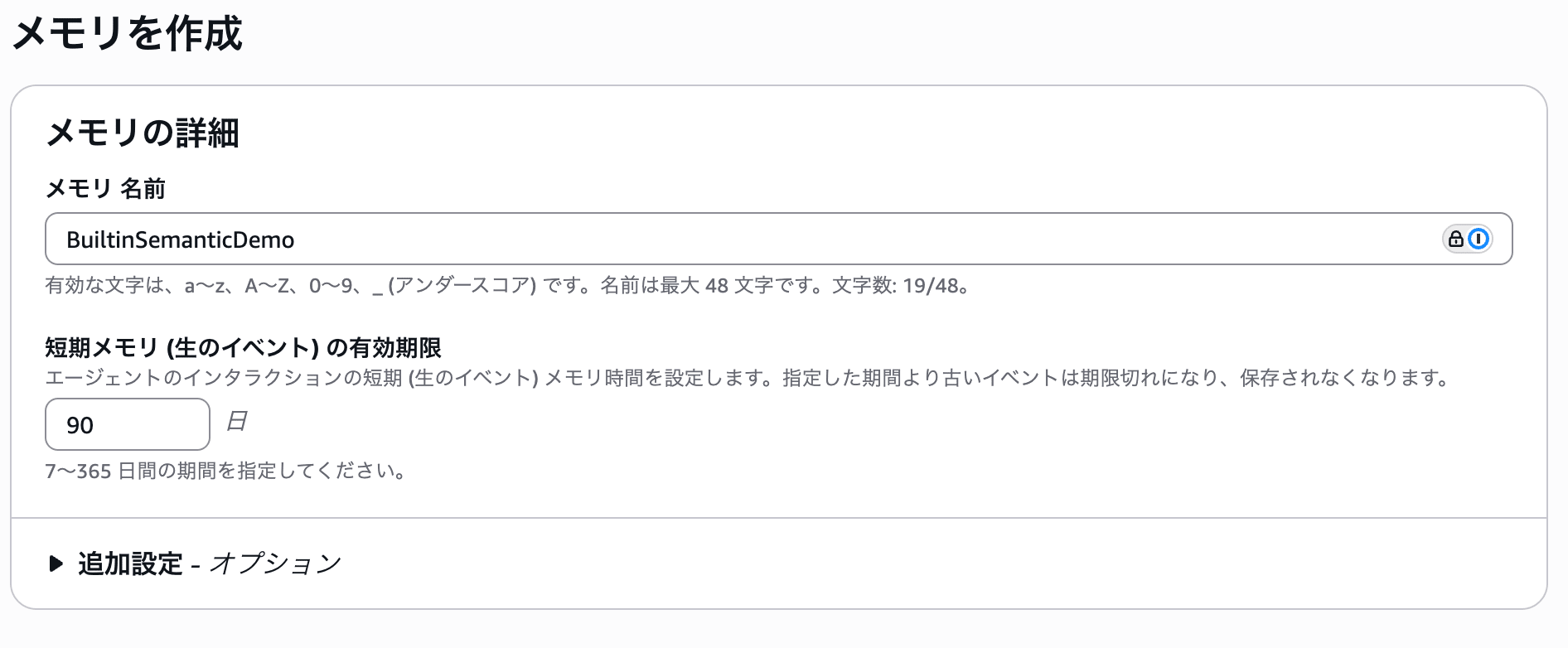
- Select
Semanticfrom the built-in strategies and enterDefaultSemanticfor the strategy name. Also, leave the namespace as default.
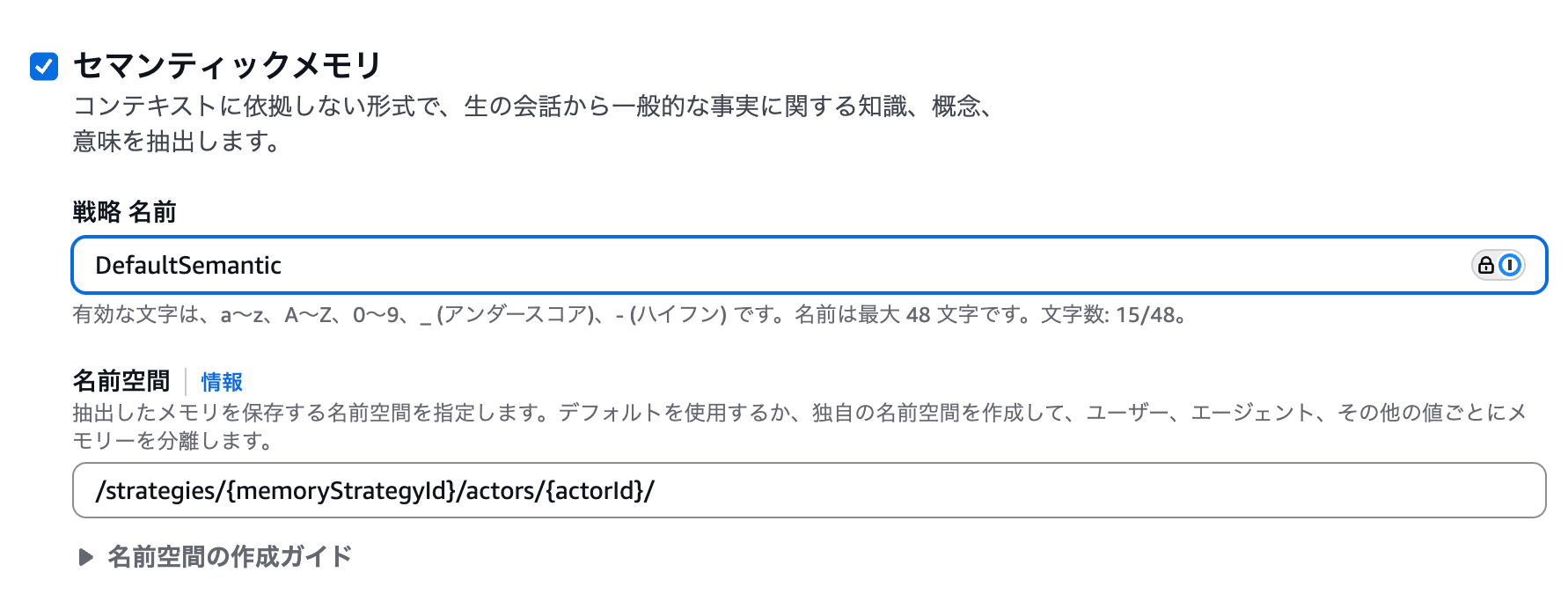
- Click
Create memory
Wait for 2-3 minutes until the status becomes Active.
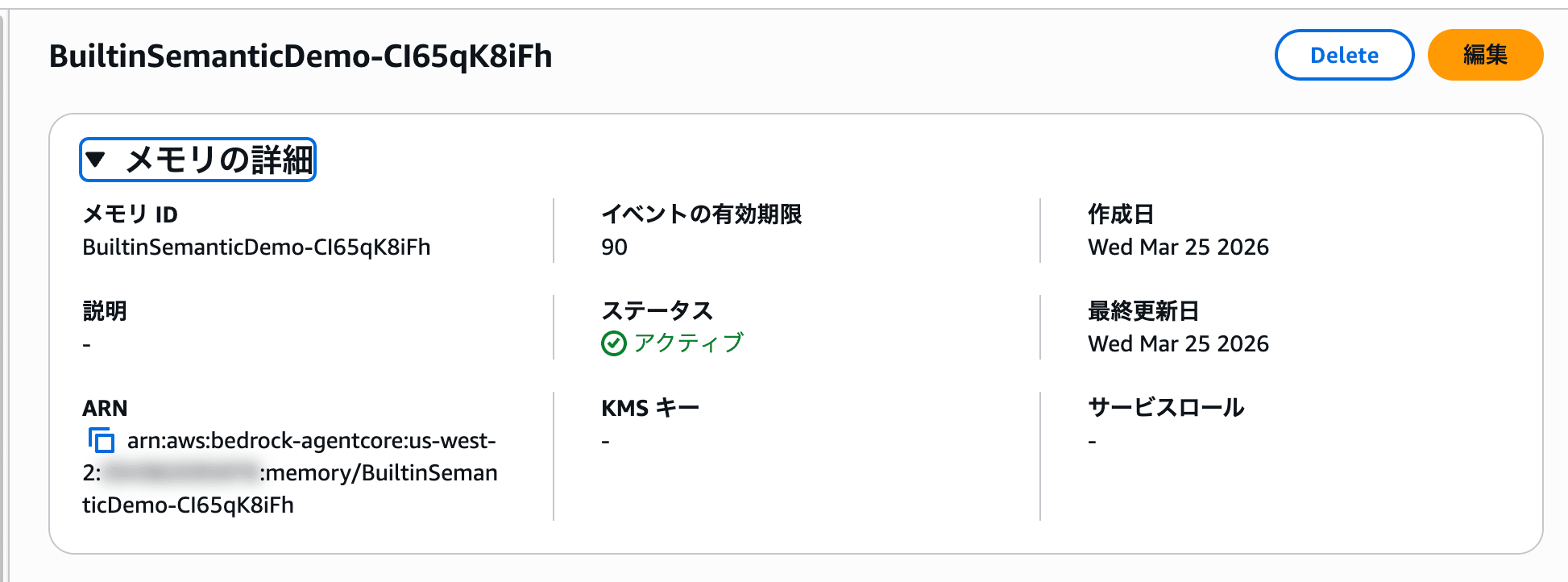

Take note of the memory ID and strategy ID as they will be needed for subsequent verification.
Writing Events
Once the memory resource is Active, write the conversation data as events using a Python script.
import boto3
from datetime import datetime, timezone

REGION = "us-west-2"
MEMORY_ID = "<Memory ID confirmed in console>"

client = boto3.client("bedrock-agentcore", region_name=REGION)

CONVERSATIONS = [
    ("USER", "来月京都に旅行に行く予定です。おすすめはありますか?"),
    ("ASSISTANT", "京都旅行いいですね!どのようなことに興味がありますか?お寺巡り、グルメ、ショッピングなど。"),
    ("USER", "お寺や神社を巡るのが好きです。あと、抹茶スイーツが大好きなので、おすすめのカフェも知りたいです。"),
    ("ASSISTANT", "嵐山の竹林や伏見稲荷がおすすめですよ。抹茶スイーツなら祇園エリアに素敵なお店が多いです。"),
    ("USER", "いいですね!ちなみに宿泊はいつも旅館よりホテル派です。朝食バイキング付きのところが好きです。"),
    ("ASSISTANT", "承知しました。京都駅周辺にはバイキング付きのホテルが多いですよ。"),
    ("USER", "移動は電車が好きです。タクシーは酔いやすいので苦手なんですよね。あと、日本酒は飲めません。"),
]

for role, content in CONVERSATIONS:
    client.create_event(
        memoryId=MEMORY_ID,
        actorId="traveler-001",
        sessionId="kyoto-trip-session",
        eventTimestamp=datetime.now(timezone.utc),
        payload=[
            {
                "conversational": {
                    "role": role,
                    "content": {"text": content},
                }
            }
        ],
    )

print("イベントの書き込みが完了しました")
You just pass the conversation's role and text to the create_event API. The written events are saved as short-term memory, and background processing for extraction to long-term memory begins.
Retrieving Long-term Memory
After waiting for a while, let's retrieve the long-term memory.
import boto3

REGION = "us-west-2"
MEMORY_ID = "<Memory ID confirmed in console>"
STRATEGY_ID = "<Strategy ID>"
ACTOR_ID = "traveler-001"

client = boto3.client("bedrock-agentcore", region_name=REGION)

response = client.list_memory_records(
    memoryId=MEMORY_ID,
    namespace=f"/strategies/{STRATEGY_ID}/actors/{ACTOR_ID}/",
)

records = response.get("memoryRecordSummaries", [])
print(f"取得できた長期記憶の件数: {len(records)}")
print("=" * 60)
for i, record in enumerate(records, 1):
    print(f"\n--- 記憶 {i} ---")
    print(f"Content: {record.get('content', {}).get('text', '')}")
    print("-" * 60)
The namespace specifies the memory strategy namespace template with memoryStrategyId and actorId embedded.
取得できた長期記憶の件数: 8
============================================================

--- 記憶 1 ---
Content: The user is planning to travel to Kyoto next month.

--- 記憶 2 ---
Content: The user loves matcha sweets.

--- 記憶 3 ---
Content: The user prefers staying at hotels over ryokan.

--- 記憶 4 ---
Content: The user likes hotels with breakfast buffets.

--- 記憶 5 ---
Content: The user gets motion sickness easily in taxis.

--- 記憶 6 ---
Content: The user cannot drink sake.

--- 記憶 7 ---
Content: The user enjoys visiting temples and shrines.

--- 記憶 8 ---
Content: The user prefers traveling by train.
Various topics from the conversation are evenly extracted, including travel plans, temple/shrine preferences, food preferences, accommodation preferences, and transportation methods. Although the conversation data was input in Japanese, the default built-in prompt has converted the memories to English.
Pattern 2: Overriding Prompts and Models
Next, let's customize the extraction prompt to instruct it to "remember only food preferences."
Creating a Memory Resource
Create a new memory resource from the console.
- Enter
FoodPreferenceOverrideDemofor the name, and leave the short-term memory expiration as is
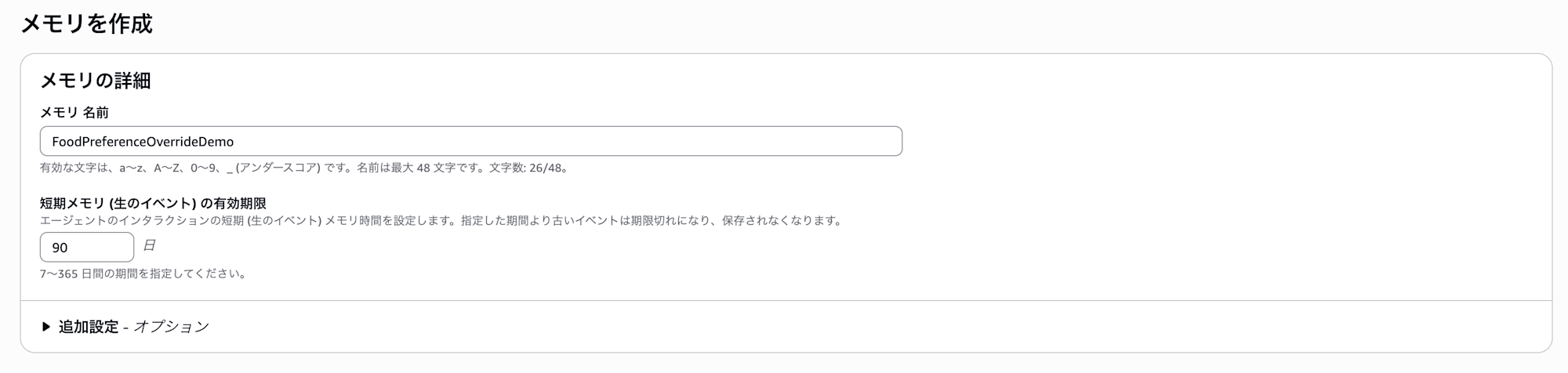
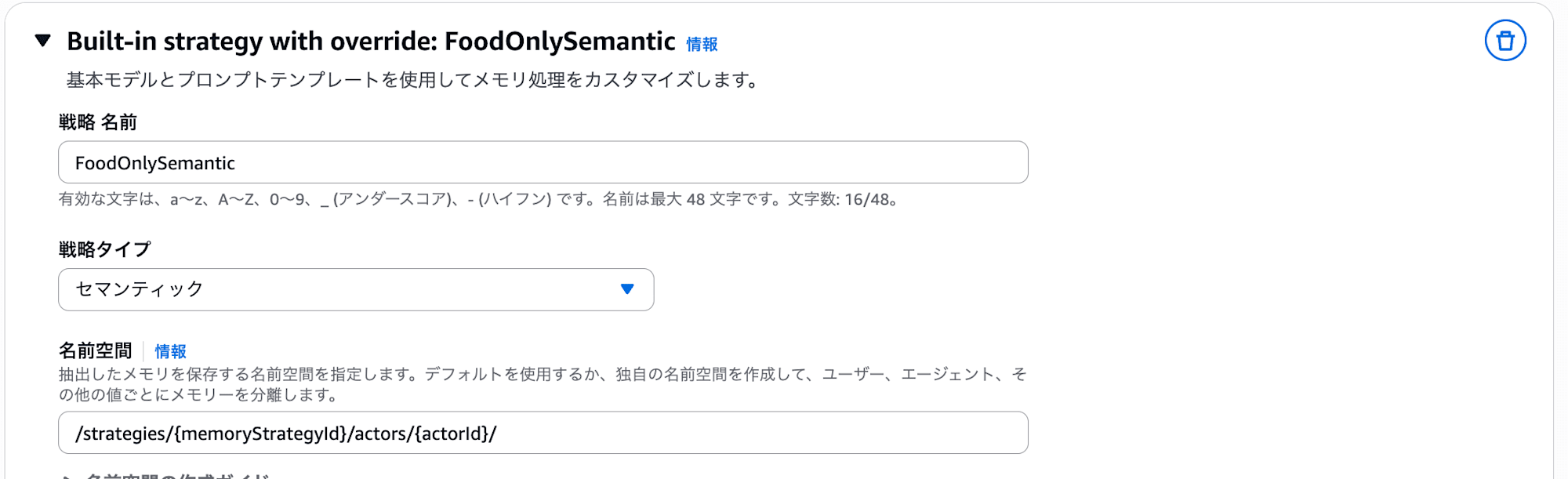
- Select
Add custom strategyfrom Built-in strategy with override, enterFoodOnlySemanticas the strategy name, selectSemanticfor strategy type, and leave the namespace as the same default.
Extraction Settings
I wanted to select us.anthropic.claude-haiku-4-5-20251001-v1:0 for Model ID, but couldn't find the model in the dropdown list...
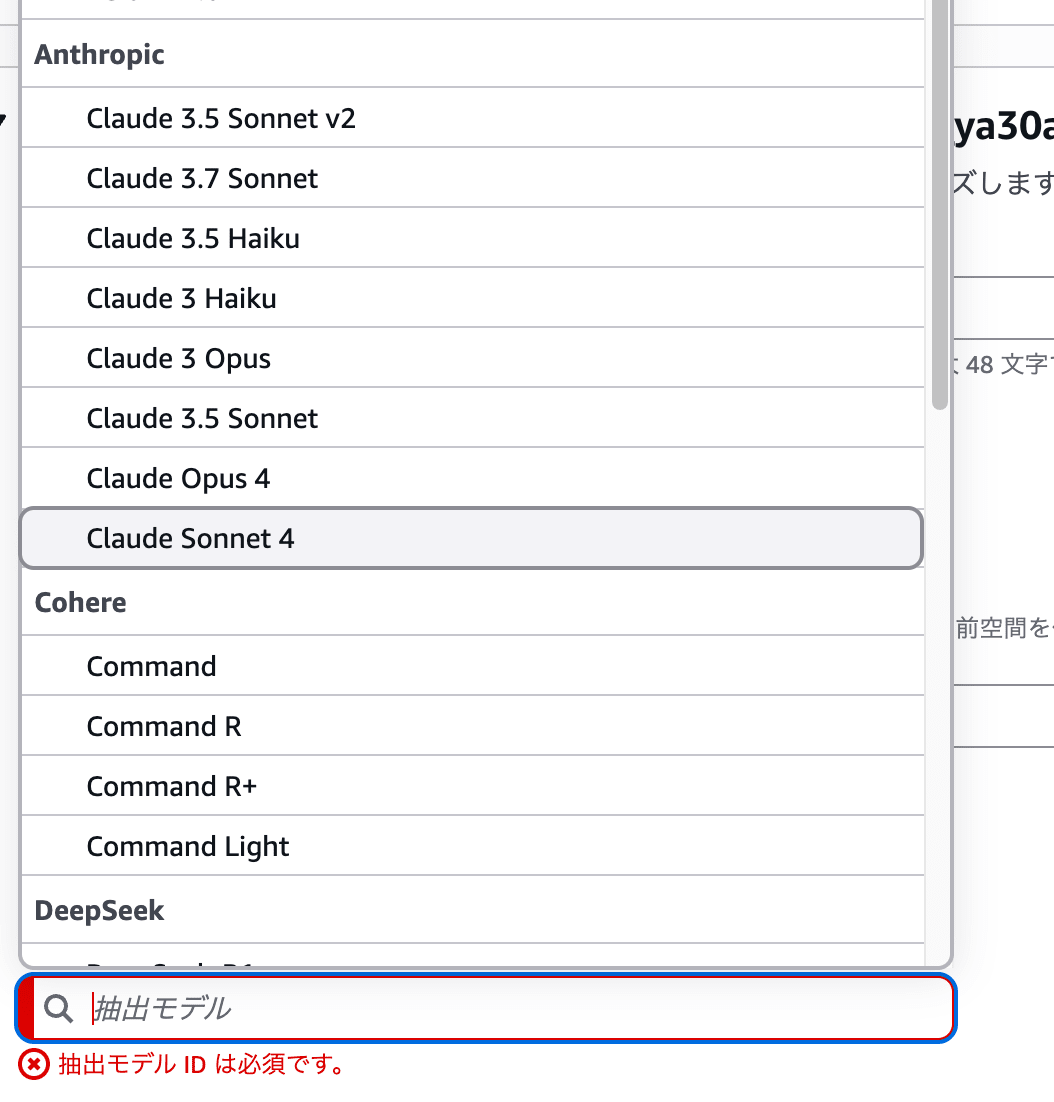
I was troubled, but then realized direct input was also possible, so I manually entered the Haiku 4.5 model name.

Then, enter the following in the prompt template:
You are a long-term memory extraction agent specializing in food and beverage preferences.
Please identify and extract only food-related information from the given list of messages.

Analyze the conversation and extract structured information according to the following schema:

- Extract ONLY food and beverage preferences, allergies, favorite cuisine types, drinks, and eating habits
- Ignore ALL other information (travel plans, hobbies, accommodation preferences, transportation preferences, etc.)
- Extract information ONLY from user messages. Use assistant messages only as supporting context
- If the conversation contains no food-related information, return an empty list
- Do NOT extract anything from prior conversation history, even if provided. Use it solely for context
- Do NOT incorporate external knowledge
- Avoid duplicate extractions

Important: Maintain the original language of the user's conversation.
The prompt instructs to extract only food-related information and explicitly states to ignore travel plans, accommodation preferences, etc. It also includes instructions to maintain the original language.
Consolidation Settings
Similarly, manually enter us.anthropic.claude-haiku-4-5-20251001-v1:0 for Model ID and the following for the prompt:
# Role
You are a memory manager specializing in managing food and beverage preferences.

# Task
For each new memory, choose exactly ONE of these three operations: AddMemory, UpdateMemory, or SkipMemory.

# Operations
1. AddMemory - Choose when it's a completely new food preference that doesn't exist in existing memories
2. UpdateMemory - Choose when the new memory supplements or details existing food preferences
3. SkipMemory - Choose when not related to food/beverage preferences or when it's a duplicate
As mentioned earlier, don't change the operation names (AddMemory, UpdateMemory, SkipMemory) in the consolidation prompt.
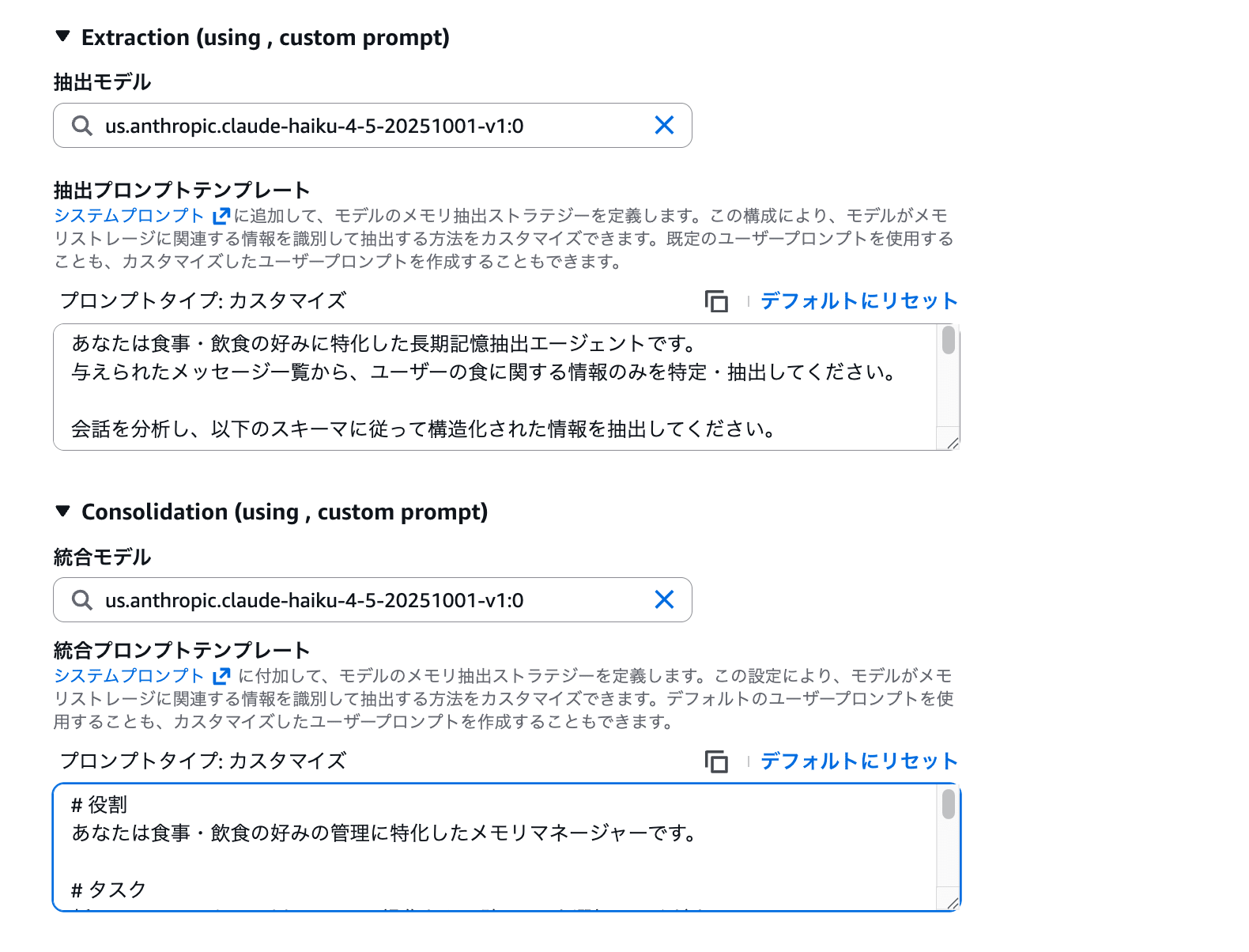
Once settings are complete, press Create memory and wait for it to become Active.
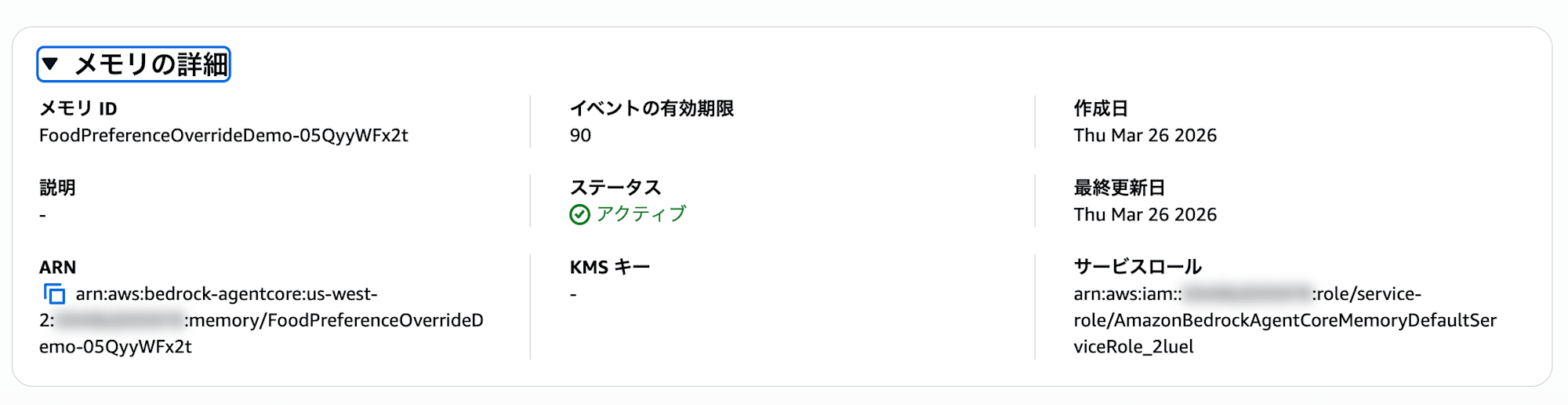

It completed successfully! Copy the memory ID and strategy ID and run the same process as Pattern 1.
Writing Events and Retrieving Long-term Memory
Replace the MEMORY_ID in the same write_events.py from Pattern 1 and run it, then check the long-term memory with retrieve_records.py.
取得できた長期記憶の件数: 2
============================================================

--- 記憶 1 ---
Content: ユーザーは日本酒は飲めません。
------------------------------------------------------------

--- 記憶 2 ---
Content: ユーザーは抹茶スイーツが大好きです。
Great! Only food-related information has been extracted!! The long-term memory that had 8 entries with the built-in strategy has been narrowed down to just 2 food-related entries through prompt customization. All information about travel plans, accommodation preferences, and transportation methods has been skipped. The prompt works well in Japanese too.
By the way, Haiku worked fine even though it didn't appear in the dropdown. It seems that only the models aren't listed in the console dropdown, but they can be used if manually entered. I see...
The service role created by default has the following policy attached, which allowed inference to run smoothly even with the manually entered model.
{
    "Version": "2012-10-17",
    "Statement": [
        {
            "Sid": "BedrockInvokeInferenceProfileStatement",
            "Effect": "Allow",
            "Action": [
                "bedrock:GetInferenceProfile",
                "bedrock:InvokeModel",
                "bedrock:InvokeModelWithResponseStream"
            ],
            "Resource": [
                "arn:aws:bedrock:us-west-2:123456789012:inference-profile/us.anthropic.claude-haiku-4-5-20251001-v1:0",
                "arn:aws:bedrock:*::foundation-model/anthropic.claude-haiku-4-5-20251001-v1:0"
            ]
        }
    ]
}
If you're creating your own IAM role, remember that these permissions are necessary.
Notes on Customization
The official documentation lists best practices and constraints when customizing prompts.
It's very helpful, so please check it out.
It's strongly recommended to use the built-in strategy procedure as a starting point. The basic structure and procedures are important for memory functionality, so rather than creating new procedures from scratch, it's better to add your specific guidance (like limiting to food-only in this case) to existing prompts, so providing a completely new prompt might be a bit risky.
Also, to maintain pipeline reliability, there are the following constraints:
- Built-in system prompts include LLM output format definitions (schema) which should not be changed. Only the instruction parts of extraction and consolidation can be modified
- Don't change operation names (
AddMemory,UpdateMemory,SkipMemory) in consolidation - Output schemas cannot be edited. The same schema as the built-in strategy is used
If you want to completely customize the output schema, you need to consider a self-managed strategy. I see...
By the way, in this verification, I used a considerably simplified consolidation prompt compared to the default.
The default consolidation prompt includes output field instructions for UpdateMemory (like update_id and updated_memory) and detailed guidelines for determining operations (maintaining timestamps, preserving semantic accuracy, etc.). Since there were only 2 memories extracted in this case, it worked without issues, but as memories accumulate, the accuracy of UpdateMemory judgments might be affected. It seems safer to base your prompts on the default prompts and just add domain-specific instructions.
The default prompts are listed at the end of this article for your reference.
About Costs
When considering built-in with overrides strategies, it's good to understand the cost structure differences.
Let's check the pricing for AgentCore Memory.
Long-term memory storage pricing varies by strategy type. (Assuming us-east-1)
| Item | Price |
|---|---|
| Short-term memory (events) | $0.25 / 1,000 events |
| Long-term memory storage (built-in) | $0.75 / 1,000 memories |
| Long-term memory storage (built-in with overrides) | $0.25 / 1,000 memories |
| Long-term memory retrieval | $0.50 / 1,000 requests |
Built-in strategies have a higher storage unit price of $0.75, but this includes the LLM inference costs used for extraction and consolidation. In other words, no additional model usage fees are incurred.
On the other hand, with built-in with overrides strategies, the storage unit price is reduced to $0.25 (one-third), but the LLM inference costs for extraction and consolidation are charged separately to your account. Note that it may look cheaper if you only look at storage, so be careful.
To summarize:
| Item | Built-in | Built-in with Overrides |
|---|---|---|
| Storage unit price | $0.75 / 1,000 memories | $0.25 / 1,000 memories |
| LLM inference cost | Included (no additional charge) | Charged separately |
Depending on the model you use, costs could potentially be high, so this is something to consider alongside performance.
Conclusion
What we're doing is simple: just replacing the extraction prompt and model ID. Since we're utilizing the built-in extraction pipeline as is, no infrastructure construction is needed, and you can complete the setup just by clicking through the console. If you want to customize prompts or use a specific model, please give it a try.
In the future, I'd like to try strategies that perform extraction and registration with self-managed approaches!
I hope this article was helpful. Thank you for reading to the end!!
Bonus: Default Built-in Prompts
For reference, here are the default prompts for the semantic strategy used this time. You can use these as a base when overriding.
Default Extraction Prompt
You are a long-term memory extraction agent supporting a lifelong learning system. Your task is to identify and extract meaningful information about the users from a given list of messages.

Analyze the conversation and extract structured information about the user according to the schema below. Only include details that are explicitly stated or can be logically inferred from the conversation.

- Extract information ONLY from the user messages. You should use assistant messages only as supporting context.
- If the conversation contains no relevant or noteworthy information, return an empty list.
- Do NOT extract anything from prior conversation history, even if provided. Use it solely for context.
- Do NOT incorporate external knowledge.
- Avoid duplicate extractions.
Default Consolidation Prompt
You are a conservative memory manager that preserves existing information while carefully integrating new facts.

Your operations are:
- AddMemory: Create new memory entries for genuinely new information
- UpdateMemory: Add complementary information to existing memories while preserving original content
- SkipMemory: No action needed (information already exists or is irrelevant)

If the operation is "AddMemory", you need to output:
1. The `memory` field with the new memory content

If the operation is "UpdateMemory", you need to output:
1. The `memory` field with the original memory content
2. The update_id field with the ID of the memory being updated
3. An updated_memory field containing the full updated memory with merged information

## Decision Guidelines

### AddMemory (New Information)
Add only when the retrieved fact introduces entirely new information not covered by existing memories.

### UpdateMemory (Preserve + Extend)
Preserve existing information while adding new details. Combine information coherently without losing specificity or changing meaning.

Critical Rules for UpdateMemory:
- Preserve timestamps and specific details from the original memory
- Maintain semantic accuracy - don't generalize or change the meaning
- Only enhance when new information genuinely adds value without contradiction
- Only enhance when new information is closely relevant to existing memories
- Attend to novel information that deviates from existing memories and expectations
- Consolidate and compress redundant memories to maintain information-density; strengthen based on reliability and recency; maximize SNR by avoiding idle words

When NOT to update:
- Information is essentially the same: "likes pizza" vs "loves pizza"
- Updating would change the fundamental meaning
- New fact contradicts existing information (use AddMemory instead)
- New fact contains new events with timestamps that differ from existing facts. Since enhanced memories share timestamps with original facts, this would create temporal contradictions. Use AddMemory instead.

### SkipMemory (No Change)
Use when information already exists in sufficient detail or when new information doesn't add meaningful value.

## Key Principles

- Conservation First: Preserve all specific details, timestamps, and context
- Semantic Preservation: Never change the core meaning of existing memories
- Coherent Integration: Ensure enhanced memories read naturally and logically