I implemented IAM authentication from AgentCore Runtime to AgentCore Gateway using MCP Proxy for AWS

This page has been translated by machine translation. View original
Introduction
Hello, I'm Jinno from the Consulting Department, a fan of the supermarket "La Mu" (@yjinno).
How do you handle Inbound Auth authentication when calling Gateway from Amazon Bedrock AgentCore Runtime?
During AgentCore's Preview, I thought M2M authentication was the way to go,
but now that Gateway also supports IAM authentication, I wondered if IAM might be simpler in some cases... That's what prompted me to write this article.
Prerequisites
Environment
I used the following versions for this implementation:
| Item | Version |
|---|---|
| Terraform | >= 1.5.0 |
| AWS Provider | >= 6.25.0 |
| Python | 3.12 |
| bedrock-agentcore | >= 1.2.0 |
| strands-agents | >= 1.22.0 |
| mcp-proxy-for-aws | >= 1.1.5 |
Architecture Overview
Here's the architecture we're building.
Gateway calls will use IAM authentication, and for simplicity, Runtime calls will also use IAM authentication.
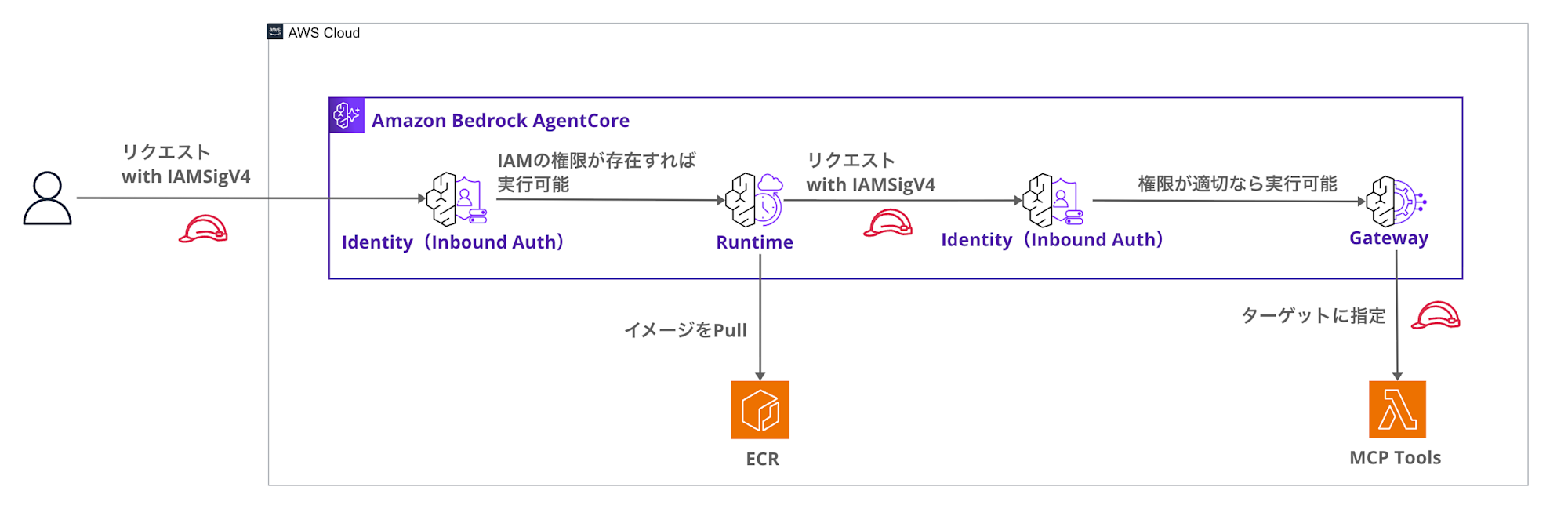
For the complete Terraform code, please refer to this repository:
Terminology Clarification
Since AgentCore involves authentication at two levels (Runtime / Gateway), let's clarify the terminology first:
- Runtime Inbound Auth
- Authentication when a client (person/application) calls AgentCore Runtime (IAM or JWT)
- Gateway Inbound Auth
- Authentication when Runtime calls AgentCore Gateway (IAM (SigV4) or JWT)
- Gateway Outbound Auth
- Authentication when Gateway calls a target (e.g., Lambda / external API) (SigV4, etc.)
The main focus of this article is Runtime → Gateway calls (= Gateway Inbound Auth).
For simplicity of verification, Runtime Inbound Auth is set to IAM.
Authentication Methods for Runtime→Gateway
M2M Authentication
Initially, I was considering M2M (Machine-to-Machine) authentication for Runtime→Gateway.
However, using M2M authentication requires:
- Setting up a Cognito User Pool
- Creating a Machine-to-Machine application client
- Managing client secrets
- Implementing token acquisition and refreshing
Creating Cognito and acquiring tokens is a bit cumbersome, isn't it?
Of course, token acquisition can be simplified using the SDK.
import asyncio
from bedrock_agentcore.identity.auth import requires_access_token, requires_api_key

@requires_access_token(
    provider_name= "sample-provider",
    scopes= [],
    auth_flow= 'M2M',
)
async def need_token_2LO_async(*, access_token: str):
IAM Authentication
On the other hand, IAM authentication offers these benefits:
- No need for Cognito
- No secret management required (uses IAM roles)
- Just add
bedrock-agentcore:InvokeGatewaypermission to Runtime's IAM role - SigV4 signing automated with
mcp-proxy-for-aws
Since AgentCore Runtime already has an IAM role, it's convenient that you only need to add permissions for Gateway access without building additional authentication infrastructure.
Gateway configuration is also simple; just set authorizer_type to AWS_IAM:
resource "aws_bedrockagentcore_gateway" "main" {
  name     = "${var.project_name}-gateway"
  role_arn = aws_iam_role.gateway.arn

  protocol_type = "MCP"

  # Inbound auth: Specify IAM authentication
  authorizer_type = "AWS_IAM"

  # ...omitted
}
For Runtime, add bedrock-agentcore:InvokeGateway permission:
resource "aws_iam_role_policy" "agent_runtime_gateway" {
  name = "${var.project_name}-agent-runtime-gateway-policy"
  role = aws_iam_role.agent_runtime.id

  policy = jsonencode({
    Version = "2012-10-17"
    Statement = [
      {
        Sid    = "InvokeGateway"
        Effect = "Allow"
        Action = [
          "bedrock-agentcore:InvokeGateway"
        ]
        Resource = aws_bedrockagentcore_gateway.main.gateway_arn
      }
    ]
  })
}
While the MCP client for Gateway connections typically assumes token authentication, AgentCore Gateway requires IAM (SigV4) authentication. You might worry about implementing signature processing, but the convenient MCP Proxy for AWS library bridges this gap! We'll look at the implementation details later.
When to Choose IAM vs M2M Authentication
After explaining the benefits of IAM authentication, you might wonder when to use M2M authentication instead.
If you have multiple agents and need fine-grained authorization control for tools on a per-agent basis, M2M authentication might be a better option. Let's look at the differences in detail.
IAM Authentication Constraints
IAM authentication only allows access control at the Gateway level.
{
  "Action": "bedrock-agentcore:InvokeGateway",
  "Resource": "arn:aws:bedrock-agentcore:us-east-1:123456789012:gateway/my-gateway"
}
It doesn't allow tool-level control, such as specifying which tools within a Gateway a Runtime can use.
Therefore, if each agent needs to execute different sets of tools, you'd need to separate Gateways as shown below:
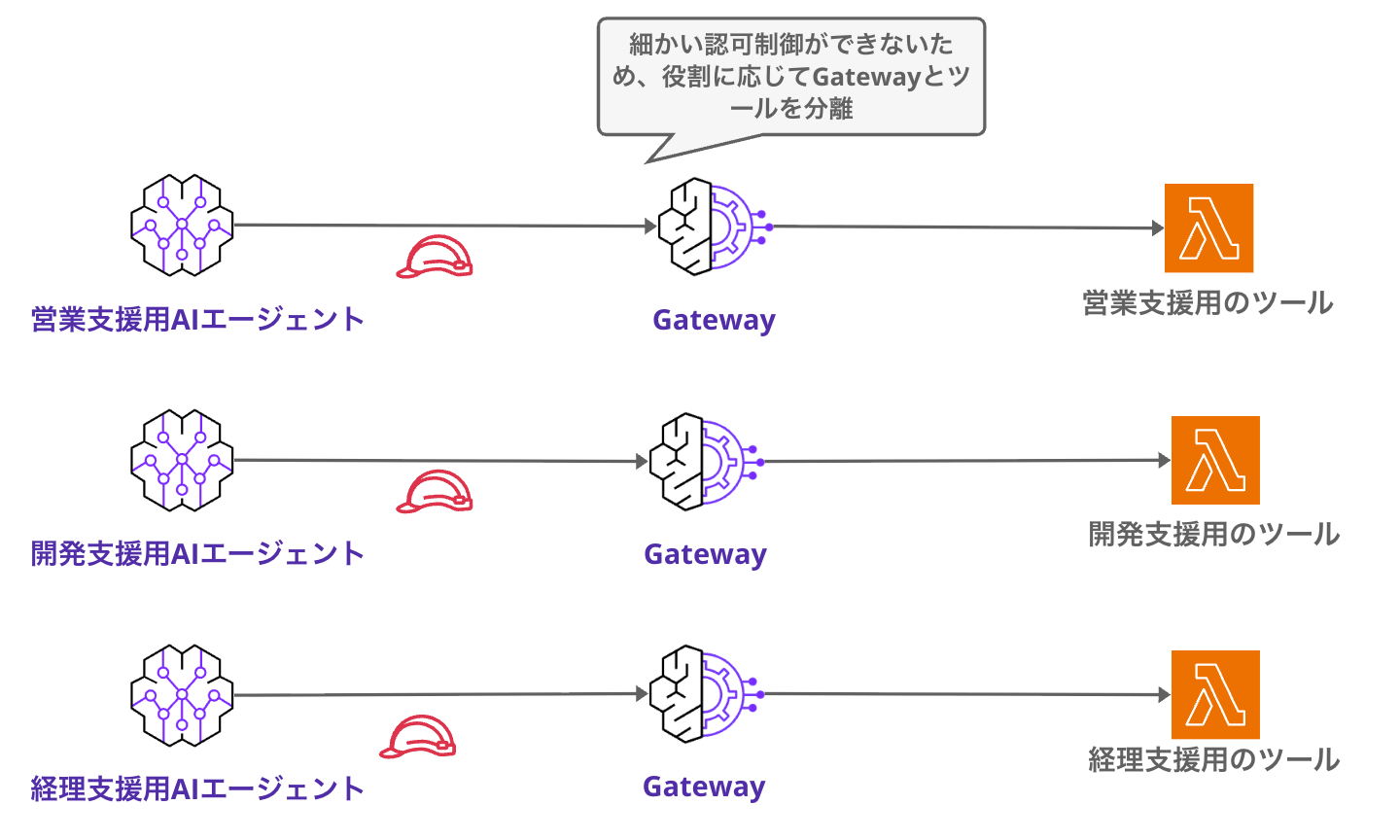
If you only have a few tools, you might not need Gateway at all, or if all agents use the same universal tools, one Gateway might be sufficient.
What M2M Authentication + Interceptors/Policies Can Do
On the other hand, combining M2M JWT authentication with Gateway Interceptors/Cedar Policies enables more fine-grained authorization control.
Let's consider a scenario with multiple AI agents, each with restricted access to specific tools:
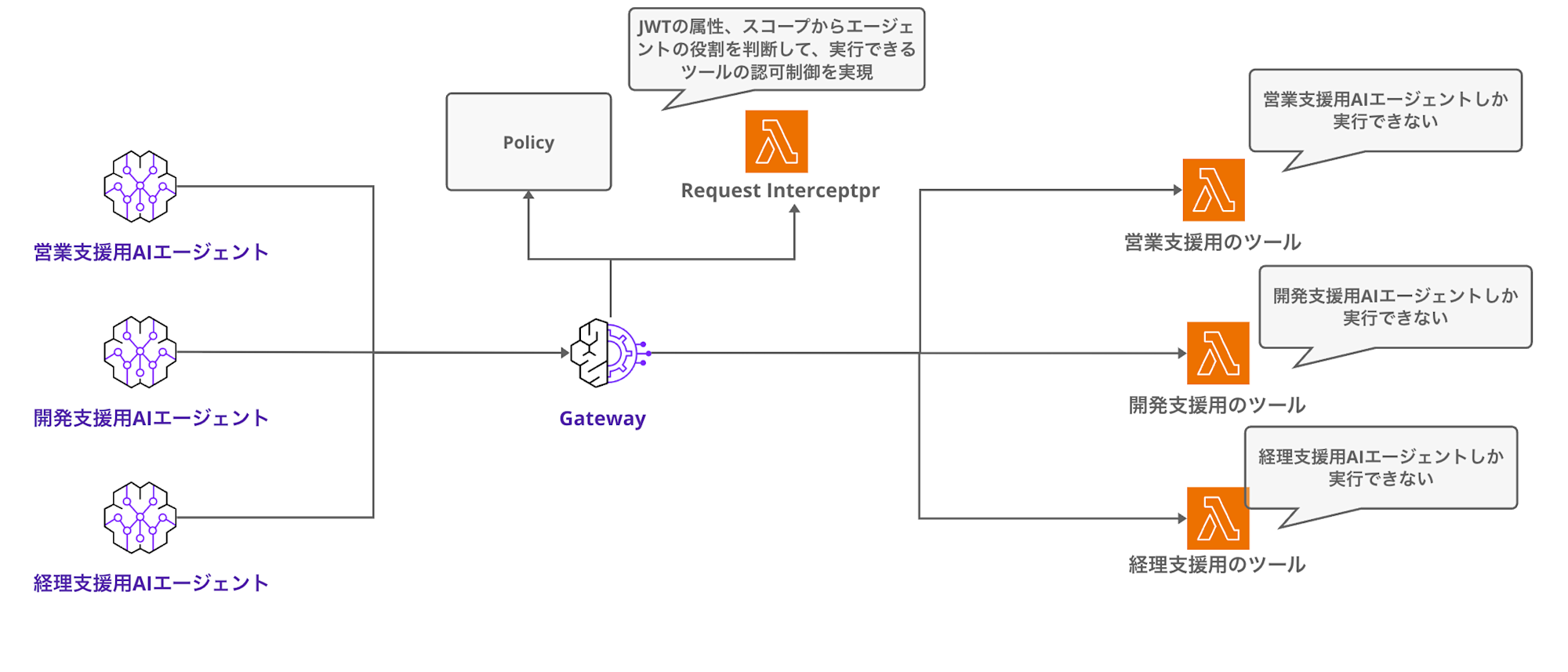
This level of control can be achieved by validating JWT scopes and attributes using Interceptors or Cedar Policies.
Authentication Method Selection Guide
| Pattern | Use Case | Tool-level Authorization |
|---|---|---|
| IAM Authentication | Simple setup, all tools available to all agents | Not possible |
| M2M JWT + Interceptor/Policy | Multi-agent, tool-level authorization needed | Possible |
I believe IAM authentication is sufficient for simple configurations with just one agent.
If you have multiple agents and need to assign different tool access permissions to each agent for the same Gateway, consider M2M authentication.
I plan to test and introduce agent-specific permission separation in a future article.
M2M Authentication Considerations
When using custom attributes with M2M authentication, there are some important considerations:
If you need authorization control based on user permissions, you'll need to implement user delegation-based permission control. This article is specifically focused on scenarios where agents are the authorization principals.
Implementation with Strands Agents
Agent Implementation
Let's look at the code implementation.
It's a simple agent that connects to Gateway and calls tools:
import os
from bedrock_agentcore.runtime import BedrockAgentCoreApp
from strands import Agent
from strands.models import BedrockModel
from strands.tools.mcp import MCPClient
from mcp_proxy_for_aws.client import aws_iam_streamablehttp_client

GATEWAY_URL = os.getenv("GATEWAY_URL", "")
AWS_REGION = os.getenv("AWS_REGION", "us-east-1")
MODEL_ID = os.getenv("BEDROCK_MODEL_ID", "us.anthropic.claude-haiku-4-5-20251001-v1:0")

app = BedrockAgentCoreApp()
model = BedrockModel(model_id=MODEL_ID, region_name=AWS_REGION)

@app.entrypoint
def invoke(payload: dict) -> dict:
    message = payload.get("prompt") or payload.get("message", "")
    if not message:
        return {"error": "No message", "status": "error"}

    if GATEWAY_URL:
        # Create MCP client with SigV4 signature using mcp-proxy-for-aws
        mcp_factory = lambda: aws_iam_streamablehttp_client(
            endpoint=GATEWAY_URL,
            aws_region=AWS_REGION,
            aws_service="bedrock-agentcore"
        )
        mcp_client = MCPClient(mcp_factory)
        agent = Agent(model=model, tools=[mcp_client])
        result = agent(message)
    else:
        agent = Agent(model=model)
        result = agent(message)

    return {"response": str(result.message), "status": "success"}

if __name__ == "__main__":
    app.run()
The key part is using aws_iam_streamablehttp_client to connect to Gateway with IAM authentication:
mcp_factory = lambda: aws_iam_streamablehttp_client(
    endpoint=GATEWAY_URL,
    aws_region=AWS_REGION,
    aws_service="bedrock-agentcore"
)
| Parameter | Value | Description |
|---|---|---|
| endpoint | Gateway URL | AgentCore Gateway endpoint URL |
| aws_region | us-east-1, etc. | AWS Region |
| aws_service | bedrock-agentcore | Service name for SigV4 signature |
Specifying bedrock-agentcore as the aws_service ensures that requests to Gateway have the correct SigV4 signatures. It's simple and convenient!
The rest is almost the same as a regular MCP Client implementation.
Set the mcp_client in the Agent's tools:
mcp_factory = lambda: aws_iam_streamablehttp_client(
            endpoint=GATEWAY_URL,
            aws_region=AWS_REGION,
            aws_service="bedrock-agentcore"
        )
mcp_client = MCPClient(mcp_factory)
agent = Agent(model=model, tools=[mcp_client])
result = agent(message)
This is an experimental feature, but being able to set the client directly is convenient! Previously, we had to write it with a with statement, so this is simpler. Even though it's experimental, I'd like to use it actively.
mcp_factory = lambda: aws_iam_streamablehttp_client(
            endpoint=GATEWAY_URL,
            aws_region=AWS_REGION,
            aws_service="bedrock-agentcore"
        )
with MCPClient(mcp_factory) as mcp:
    agent = Agent(model=model, tools=mcp.list_tools_sync())
    result = agent(message)
Let's Try It Out
Let's deploy this configuration with Terraform and verify that requests are properly sent to Gateway!
Clone the Repository
First, clone the repository:
git clone https://github.com/yuu551/runtime-to-gateway-for-iam.git
cd runtime-to-gateway-for-iam
Initialize and Deploy with Terraform
Initialize Terraform:
terraform init
Next, check what will be deployed:
terraform plan
After confirming that Gateway, Runtime, Lambda functions, and other resources will be created,
run the deployment:
terraform apply
When prompted for confirmation, enter yes:
Do you want to perform these actions?
  Terraform will perform the actions described above.
  Only 'yes' will be accepted to approve.

  Enter a value: yes
Upon completion, you'll see output like this:
Apply complete! Resources: 23 added, 0 changed, 0 destroyed.

Outputs:

gateway_endpoint = "https://xxxxxxxxxx.bedrock-agentcore.us-east-1.amazonaws.com"
runtime_endpoint = "https://yyyyyyyyyy.bedrock-agentcore.us-east-1.amazonaws.com"
Deployment complete!
Testing from the Console
Now that we've deployed, let's try sending requests from the console.
We expect the Lambda functions attached to the Gateway to process our requests. We have:
- Addition tool
- Multiplication tool
- Greeting tool
- Tool search tool made available by Gateway
{"prompt": "Tell me what I can do with these tools"}
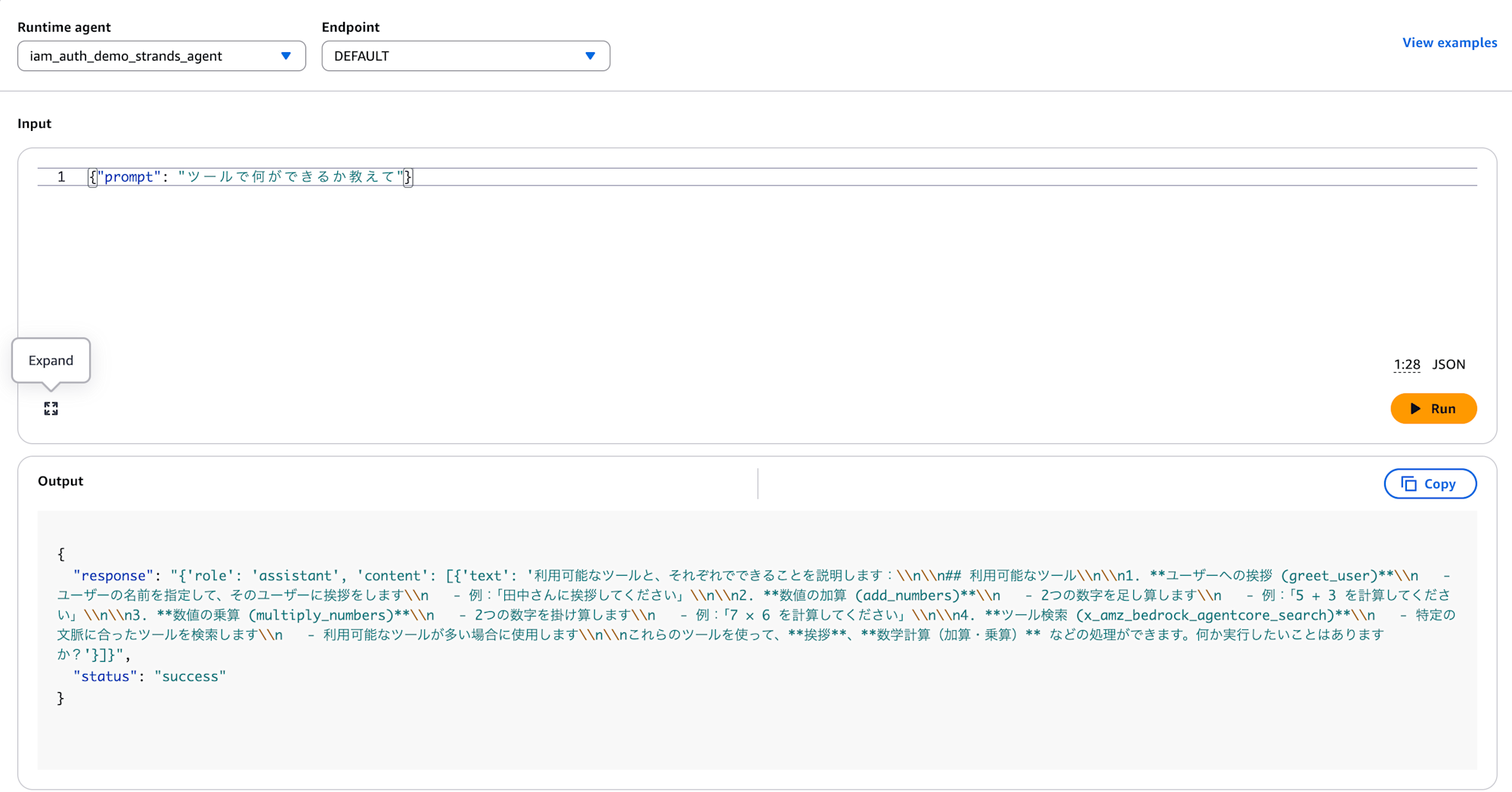
We got the tool list as expected!
Now let's check if the addition tool works:
{"prompt": "What is 100 + 12?"}
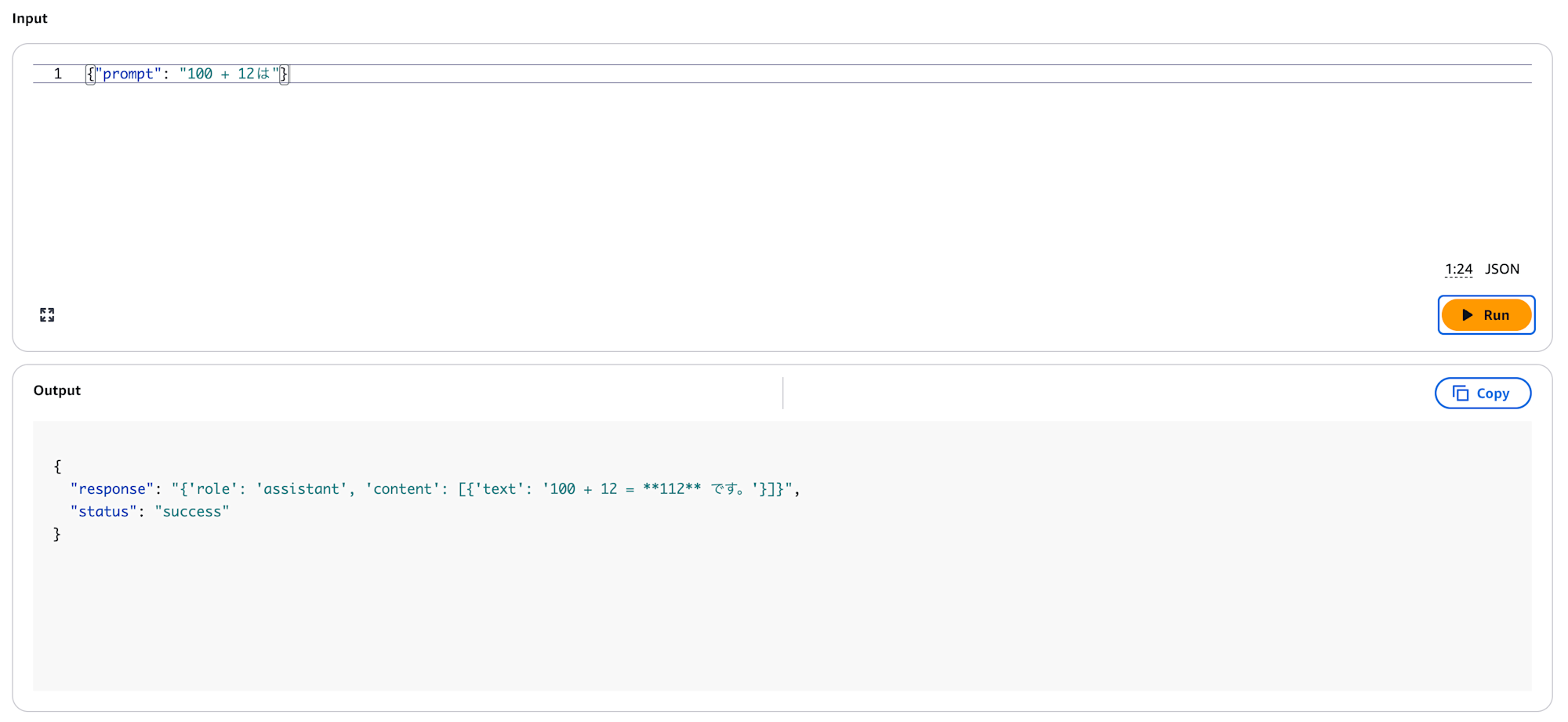
The tool executed correctly! The logs also confirm it:
{
  "message": {
    "tool_calls": [
      {
        "type": "function",
        "id": "tooluse_c9qOEPXPS2a6OR8UxN4tfg",
        "function": {
          "name": "iam-auth-demo-lambda-target___add_numbers",
          "arguments": {
            "a": 100,
            "b": 12
          }
        }
      }
    ],
    "role": "assistant"
  },
  "index": 0,
  "finish_reason": "tool_use"
}
This confirms that Runtime→Gateway works with IAM authentication!
Conclusion
Using MCP Proxy for AWS makes it convenient to call Gateway from Runtime without worrying about SigV4 signatures.
For simple configurations, IAM authentication is a viable option as it doesn't require Cognito or secret management.
However, for multi-agent environments where tool-level authorization is needed for each agent, consider using M2M authentication with Interceptors/Policies.
I hope this article has been helpful!
Thank you for reading!