
I tried executing simple code in Code Interpreter to create an image

This page has been translated by machine translation. View original
Introduction
Hello, I'm Jinno from the Consulting Department, a fan of the La Mu supermarket.
It's a great supermarket with affordable prices, isn't it?
Are you all using Amazon Bedrock AgentCore that was released last month?
I've been testing it every day. There are so many features that I don't have enough time to test them all.
Among the many features, today I'd like to introduce and demonstrate the Amazon Bedrock AgentCore Code Interpreter!
What is Amazon Bedrock AgentCore Code Interpreter?
Code Interpreter is a managed service that provides a sandbox environment where AI agents can safely execute code. In the official hands-on diagram, the Code Interpreter function is represented as shown below.
It works as a tool that can be executed by the AI agent.
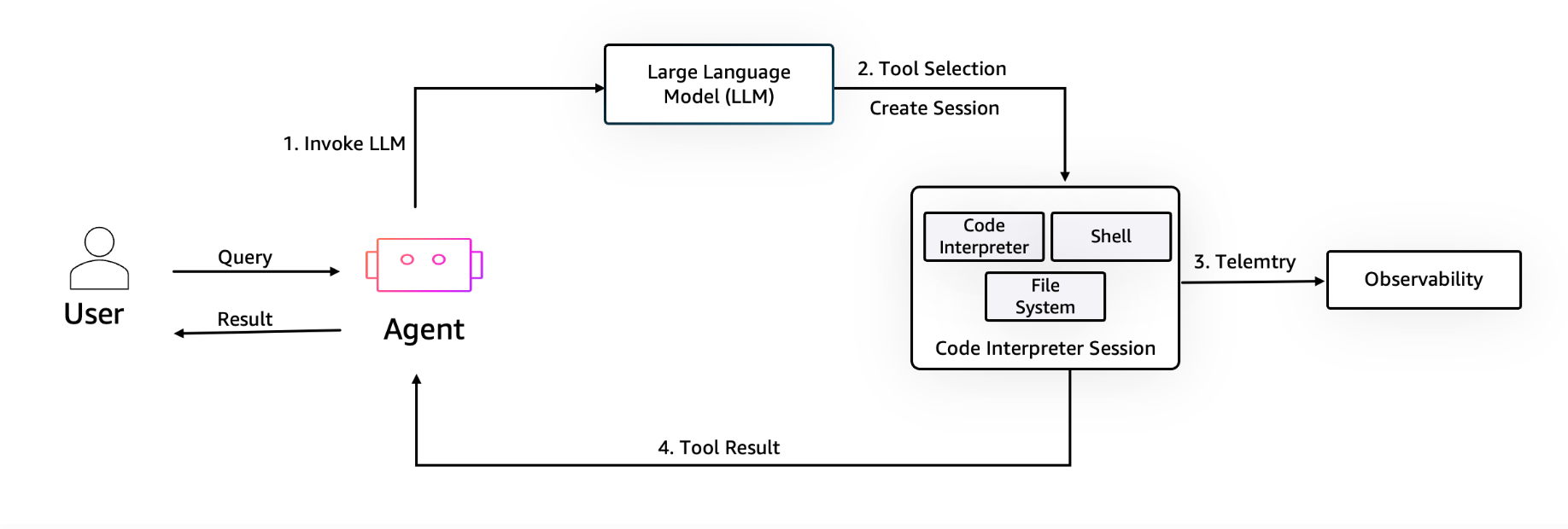
So it's an environment where code created by AI can be safely executed. Indeed, if you were to run code created by generative AI in the same environment as the agent, there's no telling what might happen, which is scary... Having it run in an independent environment provides peace of mind!
Code Interpreter has the following features:
- Code execution in a completely isolated sandbox environment
- Support for Python, JavaScript, and TypeScript
- Access to data science libraries such as pandas, numpy, and matplotlib
- Ability to process files up to 100MB inline or up to 5GB via S3
- Default execution time of 15 minutes, maximum of 8 hours
- Maintenance of file and variable states within a session
It has many useful features. It's especially nice that data science libraries are built-in, saving the trouble of preparing libraries.
Although I haven't tested it this time, I'd also like to try retrieving files via S3 for code execution.
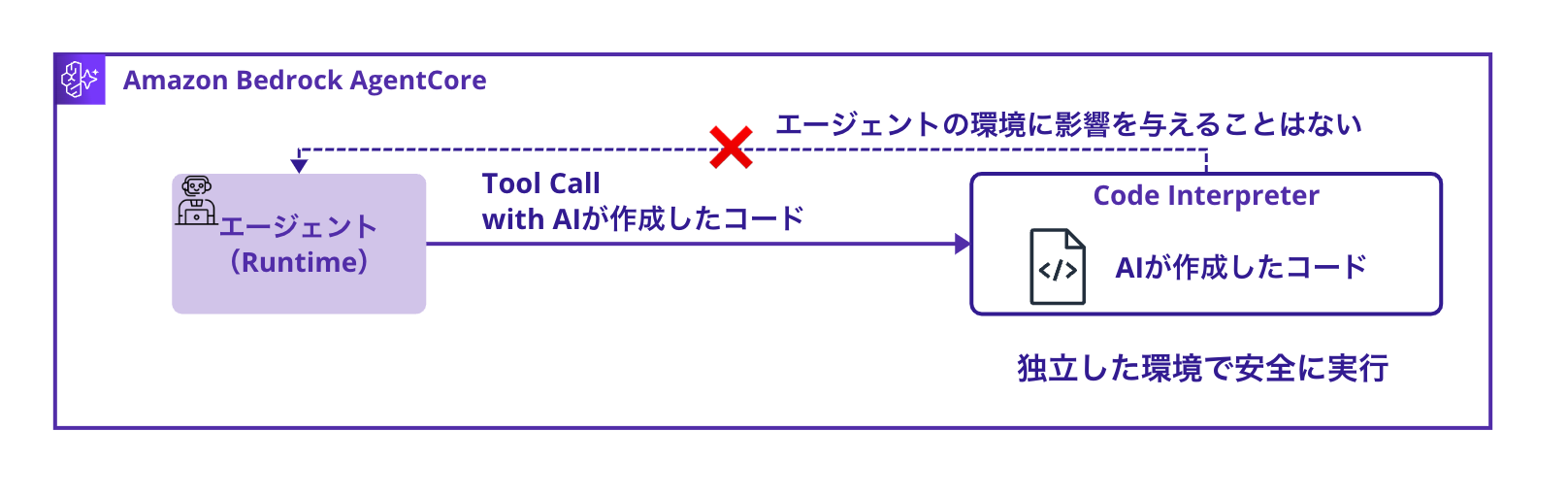
I'm a bit curious if familiar services like Gemini's Canvas are executing code in an independent environment like this.
Architecture to Implement
In this article, I will implement a simple data analysis agent with the following architecture:
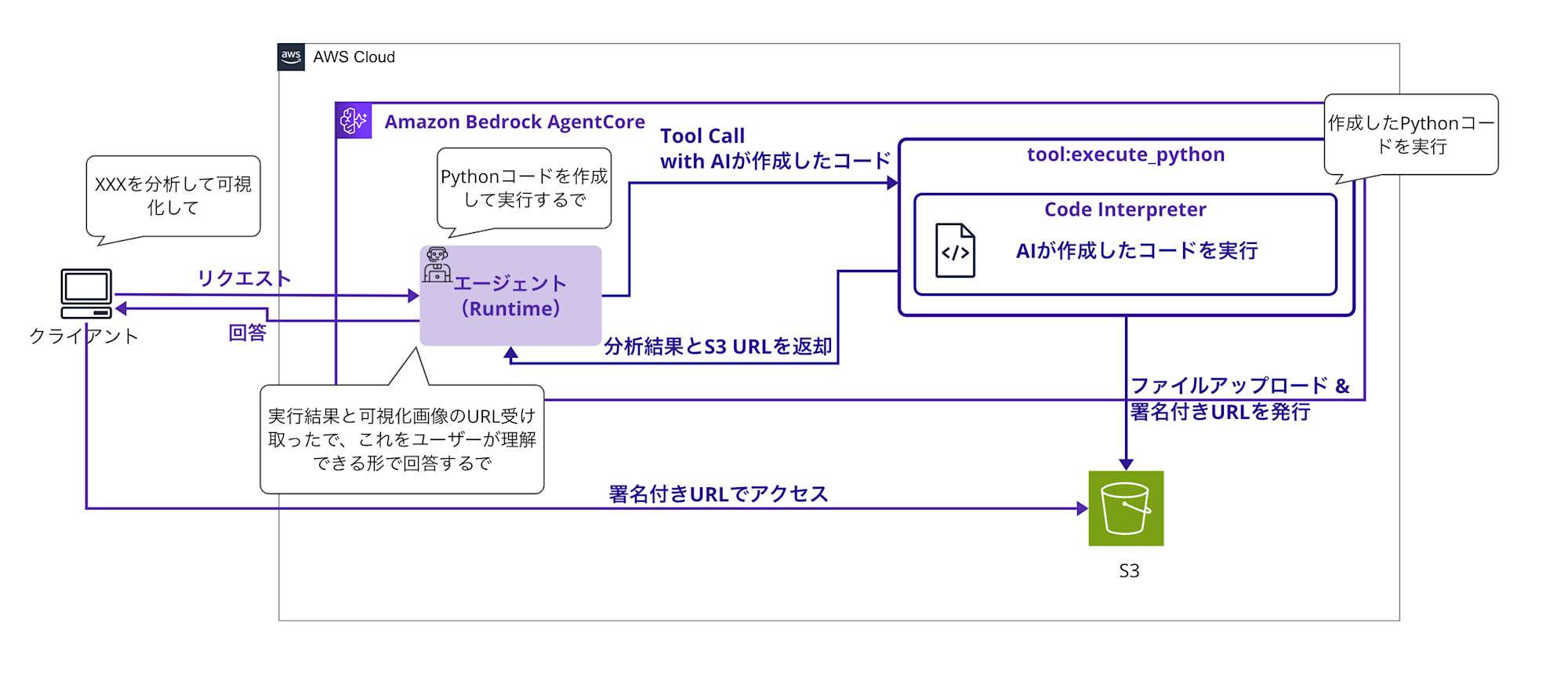
The flow is that the AI agent (using Strands Agent) understands the question, generates appropriate Python code, safely executes it in the Code Interpreter, visualizes the analysis results, uploads them to S3, and returns a summary with signed S3 URLs for the images.
Prerequisites
Required Environment
- Python 3.12
- AWS CLI 2.28
- AWS account (us-west-2 region)
- Bedrock model enabled
- We'll be using anthropic.claude-3-5-sonnet-20241022-v2:0.
I'll omit the creation of roles and deployment in this article!
The reason is that the preparation stage would be quite voluminous, making it take too long to get to the main topic of Code Interpreter. You can refer to the procedure on GitHub.
The overall flow is somewhat similar to the Memory implementation, so you might find this reference helpful as well.
Implementation Steps
Implementing the Strands Agent
The full code is quite long, so I'll collapse it.
Full Code
import json
import boto3
import base64
import uuid
import os
from datetime import datetime
from typing import Dict, Any
from strands import Agent, tool
from strands.models import BedrockModel
from bedrock_agentcore.runtime import BedrockAgentCoreApp
from bedrock_agentcore.tools.code_interpreter_client import code_session

app = BedrockAgentCoreApp()

# S3 settings
S3_BUCKET = os.environ.get('S3_BUCKET', 'your-bucket-name')
S3_REGION = os.environ.get('AWS_REGION', 'us-west-2')

# Initialize S3 client (with error handling)
try:
    s3_client = boto3.client('s3', region_name=S3_REGION)
    S3_AVAILABLE = True
except Exception as e:
    print(f"S3 client initialization failed: {e}")
    S3_AVAILABLE = False

# Shortened system prompt
SYSTEM_PROMPT = """You are a data analysis expert AI assistant.

Key principles:
1. Verify all claims with code
2. Use execute_python tool for calculations
3. Show your work through code execution
4. ALWAYS provide S3 URLs when graphs are generated

When you create visualizations:
- Graphs are automatically uploaded to S3
- Share the S3 URLs with users (valid for 1 hour)
- Clearly indicate which figure each URL represents
- IMPORTANT: Only use matplotlib for plotting. DO NOT use seaborn or other plotting libraries
- Use matplotlib's built-in styles instead of seaborn themes

Available libraries:
- pandas, numpy for data manipulation
- matplotlib.pyplot for visualization (use ONLY this for plotting)
- Basic Python libraries (json, datetime, etc.)

The execute_python tool returns JSON with:
- isError: boolean indicating if error occurred
- structuredContent: includes image_urls (S3 links) or images (base64 fallback)
- debug_info: debugging information about code execution

Always mention generated graph URLs in your response."""

@tool
def execute_python(code: str, description: str = "") -> str:
    """Execute Python code and capture any generated graphs"""

    if description:
        code = f"# {description}\n{code}"

    # Minimal image capture code
    img_code = f"""
import matplotlib
matplotlib.use('Agg')
{code}
import matplotlib.pyplot as plt,base64,io,json
imgs=[]
for i in plt.get_fignums():
 b=io.BytesIO()
 plt.figure(i).savefig(b,format='png')
 b.seek(0)
 imgs.append({{'i':i,'d':base64.b64encode(b.read()).decode()}})
if imgs:print('_IMG_'+json.dumps(imgs)+'_END_')
"""

    try:
        # Keep session open while consuming the stream to avoid premature closure/timeouts
        with code_session("us-west-2") as code_client:
            response = code_client.invoke("executeCode", {
                "code": img_code,
                "language": "python",
                "clearContext": False
            })
            # Consume stream inside the context
            result = None
            for event in response["stream"]:
                result = event["result"]
            if result is None:
                # Safeguard: ensure we return a structured result even if no events arrived
                result = {
                    "isError": True,
                    "structuredContent": {
                        "stdout": "",
                        "stderr": "No result events from Code Interpreter",
                        "exitCode": 1
                    }
                }

        # Add debug information
        result["debug_info"] = {
            "code_size": len(img_code),
            "original_code_size": len(code),
            "img_code_preview": img_code[-200:],  # Last 200 characters
        }

        # Check for images
        stdout = result.get("structuredContent", {}).get("stdout", "")

        # Extend debug information
        result["debug_info"]["stdout_length"] = len(stdout)
        result["debug_info"]["img_marker_found"] = "_IMG_" in stdout
        result["debug_info"]["stdout_tail"] = stdout[-300:] if len(stdout) > 300 else stdout

        if "_IMG_" in stdout and "_END_" in stdout:
            try:
                start = stdout.find("_IMG_") + 5
                end = stdout.find("_END_")
                img_json = stdout[start:end]
                imgs = json.loads(img_json)

                # Add image count to debug information
                result["debug_info"]["images_found"] = len(imgs)

                # Clean output
                clean_out = stdout[:stdout.find("_IMG_")].strip()

                # Try uploading to S3
                image_urls = []
                if S3_AVAILABLE and imgs:
                    for img_data in imgs:
                        try:
                            # Decode image data
                            img_bytes = base64.b64decode(img_data['d'])

                            # Generate unique filename
                            timestamp = datetime.now().strftime('%Y%m%d_%H%M%S')
                            file_key = f"agent-outputs/{timestamp}_fig{img_data['i']}.png"

                            # Upload to S3
                            s3_client.put_object(
                                Bucket=S3_BUCKET,
                                Key=file_key,
                                Body=img_bytes,
                                ContentType='image/png'
                            )

                            # Generate signed URL (valid for 1 hour)
                            url = s3_client.generate_presigned_url(
                                'get_object',
                                Params={'Bucket': S3_BUCKET, 'Key': file_key},
                                ExpiresIn=3600
                            )

                            image_urls.append({
                                'figure': img_data['i'],
                                'url': url,
                                's3_key': file_key
                            })

                        except Exception as e:
                            print(f"S3 upload error for figure {img_data['i']}: {e}")
                            result["debug_info"][f"s3_upload_error_fig{img_data['i']}"] = str(e)
                            result["debug_info"]["s3_fallback_message"] = "S3 upload failed, using base64 fallback"

                # Enhanced result
                result["structuredContent"]["stdout"] = clean_out

                if image_urls:
                    result["structuredContent"]["image_urls"] = image_urls
                    result["debug_info"]["s3_upload_success"] = True
                    result["debug_info"]["uploaded_count"] = len(image_urls)
                    result["debug_info"]["s3_bucket"] = S3_BUCKET
                else:
                    # Keep original base64 data if S3 is not available
                    result["structuredContent"]["images"] = imgs
                    result["debug_info"]["s3_upload_success"] = False
                    result["debug_info"]["s3_available"] = S3_AVAILABLE
                    if not S3_AVAILABLE:
                        result["debug_info"]["fallback_reason"] = "S3 client not available"

            except Exception as e:
                result["debug_info"]["image_parse_error"] = str(e)
        else:
            result["debug_info"]["images_found"] = 0

        return json.dumps(result, ensure_ascii=False)

    except Exception as e:
        # Return properly formatted error
        error_result = {
            "isError": True,
            "structuredContent": {
                "stdout": "",
                "stderr": f"Error executing code: {str(e)}",
                "exitCode": 1
            },
            "debug_info": {
                "error_type": type(e).__name__,
                "error_message": str(e),
                "code_size": len(img_code)
            }
        }
        return json.dumps(error_result, ensure_ascii=False)

model = BedrockModel(
    model_id="anthropic.claude-3-5-haiku-20241022-v1:0",
    params={"max_tokens": 4096, "temperature": 0.7},
    region="us-west-2"
)

agent = Agent(
    tools=[execute_python],
    system_prompt=SYSTEM_PROMPT,
    model=model
)

@app.entrypoint
async def code_interpreter_agent(payload: Dict[str, Any]) -> str:
    user_input = payload.get("prompt", "")

    response_text = ""
    tool_results = []

    async for event in agent.stream_async(user_input):
        if "data" in event:
            response_text += event["data"]
        # Collect tool execution results
        elif "tool_result" in event:
            try:
                result = json.loads(event["tool_result"])
                if isinstance(result, dict) and "structuredContent" in result:
                    tool_results.append(result)
            except:
                pass

    # Include S3 URLs in response if available
    image_urls = []
    for tool_result in tool_results:
        if "structuredContent" in tool_result and "image_urls" in tool_result["structuredContent"]:
            image_urls.extend(tool_result["structuredContent"]["image_urls"])

    if image_urls:
        response_text += "\n\n **Generated Visualizations (S3 URLs - Valid for 1 hour):**"
        for img_url_data in image_urls:
            response_text += f"\n **Figure {img_url_data['figure']}**: [View Graph]({img_url_data['url']})"
            response_text += f"\n   └── Direct Link: {img_url_data['url']}"

    return response_text

if __name__ == "__main__":
    app.run()
Let's look at it point by point.
First, let's change the S3 bucket name to an appropriate value since it's using environment variables and fixed values.
S3_BUCKET = os.environ.get('S3_BUCKET', 'your-bucket-name')
S3_REGION = os.environ.get('AWS_REGION', 'us-west-2')
For the prompt, we're giving these instructions in English:
SYSTEM_PROMPT = """You are a data analysis expert AI assistant.

Key principles:
1. Verify all claims with code
2. Use execute_python tool for calculations
3. Show your work through code execution
4. ALWAYS provide S3 URLs when graphs are generated

When you create visualizations:
- Graphs are automatically uploaded to S3
- Share the S3 URLs with users (valid for 1 hour)
- Clearly indicate which figure each URL represents
- IMPORTANT: Only use matplotlib for plotting. DO NOT use seaborn or other plotting libraries
- Use matplotlib's built-in styles instead of seaborn themes

Available libraries:
- pandas, numpy for data manipulation
- matplotlib.pyplot for visualization (use ONLY this for plotting)
- Basic Python libraries (json, datetime, etc.)

The execute_python tool returns JSON with:
- isError: boolean indicating if error occurred
- structuredContent: includes image_urls (S3 links) or images (base64 fallback)
- debug_info: debugging information about code execution

Always mention generated graph URLs in your response."""
We instruct it to code, analyze, and explain the results based on the given instructions.
We also instruct it to create images and inform about the URLs where they are uploaded to S3.
We also specify which libraries to use.
Tool Implementation
We register the function to be executed with the @tool decorator, and the function takes code thought up by the generative AI and an explanation as arguments.
The image generation code is also embedded before and after {code}, so the generated code will be used as the basis for creating images! We arrange to extract the image binary (in Base64 format) by sandwiching it between _IMG_ and _END_!
I'm forcing an image extraction method just to try out Code Interpreter this time, but I'd like to think of a better approach...
@tool
def execute_python(code: str, description: str = "") -> str:
    """Execute Python code and capture any generated graphs"""

    # Add description as a comment to the code
    if description:
        code = f"# {description}\n{code}"

    # Add lightweight image capture code
    img_code = f"""
import matplotlib
matplotlib.use('Agg')
{code}
import matplotlib.pyplot as plt,base64,io,json
imgs=[]
for i in plt.get_fignums():
 b=io.BytesIO()
 plt.figure(i).savefig(b,format='png')
 b.seek(0)
 imgs.append({{'i':i,'d':base64.b64encode(b.read()).decode()}})
if imgs:print('_IMG_'+json.dumps(imgs)+'_END_')
"""
		#omitted
With code_session, we create a new session and simply pass the code as an argument to execute it in Code Interpreter. It's that simple.
with code_session("us-west-2") as code_client:
    response = code_client.invoke("executeCode", {
        "code": img_code,
        "language": "python",
        "clearContext": False
    })
    # Consume stream inside the context
    result = None
    for event in response["stream"]:
        result = event["result"]
We look for the markers _IMG_ and _END_ in the output to extract the image data.
# Image processing: Detect image data from standard output
stdout = result.get("structuredContent", {}).get("stdout", "")

if "_IMG_" in stdout and "_END_" in stdout:
    # Extract image data
    start = stdout.find("_IMG_") + 5
    end = stdout.find("_END_")
    img_json = stdout[start:end]
    imgs = json.loads(img_json)

    # Clean up standard output
    clean_out = stdout[:stdout.find("_IMG_")].strip()
We upload the extracted image data to S3 and issue a signed URL.
# Try uploading to S3
image_urls = []
if S3_AVAILABLE and imgs:
    for img_data in imgs:
        try:
            # Decode image data
            img_bytes = base64.b64decode(img_data['d'])

            # Generate unique filename
            timestamp = datetime.now().strftime('%Y%m%d_%H%M%S')
            file_key = f"agent-outputs/{timestamp}_fig{img_data['i']}.png"

            # Upload to S3
            s3_client.put_object(
                Bucket=S3_BUCKET,
                Key=file_key,
                Body=img_bytes,
                ContentType='image/png'
            )

            # Generate signed URL (valid for 1 hour)
            url = s3_client.generate_presigned_url(
                'get_object',
                Params={'Bucket': S3_BUCKET, 'Key': file_key},
                ExpiresIn=3600
            )
We include the issued S3 signed URLs in the results!
# Include S3 URLs in response if available
if image_urls:
    response_text += "\n\n **Generated Visualizations (S3 URLs - Valid for 1 hour):**"
    for img_url_data in image_urls:
        response_text += f"\n **Figure {img_url_data['figure']}**: [View Graph]({img_url_data['url']})"
        response_text += f"\n   └── Direct Link: {img_url_data['url']}"
The code implementation is now complete!!
Let's see if it actually works.
Verification
This is a simple script to start the AgentCore Runtime.
It's long, so I'll collapse the entire content.
Full Code
"""
A test script to call the deployed Code Interpreter Agent
"""
import boto3
import json
def invoke_code_interpreter_agent():
    """Call the deployed agent"""

    # Set the Agent ARN obtained during deployment
    agent_arn = "arn:aws:bedrock-agentcore:us-west-2:YOUR_ACCOUNT_ID:runtime/YOUR_AGENT_ID"

    # Please replace the agent_arn with the actual value before running!
    if "YOUR_ACCOUNT" in agent_arn:
        print("Error: Please replace agent_arn with the actual value")
        print("   Set the Agent ARN obtained from the deploy_runtime.py execution result")
        return None

    client = boto3.client('bedrock-agentcore', region_name='us-west-2')

    # Test queries in English
    queries = [
        """Analyze the following sales data:
    - Product A: [100, 120, 95, 140, 160, 180, 200]
    - Product B: [80, 85, 90, 95, 100, 105, 110]
    - Product C: [200, 180, 220, 190, 240, 260, 280]
    Please visualize the sales trends and calculate growth rates."""
    ]

    for i, query in enumerate(queries, 1):
        print(f"\n{'='*60}")
        print(f"Test {i}: {query}")
        print(f"{'='*60}")

        payload = json.dumps({
            "prompt": query
        }).encode('utf-8')

        try:
            response = client.invoke_agent_runtime(
                agentRuntimeArn=agent_arn,
                qualifier="DEFAULT",
                payload=payload,
                contentType='application/json',
                accept='application/json'
            )

            # Process the response
            if response.get('contentType') == 'application/json':
                content = []
                for chunk in response.get('response', []):
                    content.append(chunk.decode('utf-8'))

                try:

                    result = json.loads(''.join(content))
                    print("Agent Response:")
                    print(result)

                except json.JSONDecodeError:
                    print("📄 Raw Response:")
                    raw_content = ''.join(content)
                    print(raw_content)

            else:
                print(f"Unexpected Content-Type: {response.get('contentType')}")
                print(f"Response: {response}")

        except Exception as e:
            print(f"Error: {e}")
            if hasattr(e, 'response'):
                error_message = e.response.get('Error', {}).get('Message', 'No message')
                print(f"Error message: {error_message}")

if __name__ == "__main__":

    invoke_code_interpreter_agent()
Enter the ARN of the deployed Runtime in agent_arn.
agent_arn = "arn:aws:bedrock-agentcore:us-west-2:YOUR_ACCOUNT_ID:runtime/YOUR_AGENT_ID"
This is designed to perform simple queries.
Since it's an array, you can set multiple questions if you want to ask multiple questions.
queries = [
        """Analyze the following sales data:
    - Product A: [100, 120, 95, 140, 160, 180, 200]
    - Product B: [80, 85, 90, 95, 100, 105, 110]
    - Product C: [200, 180, 220, 190, 240, 260, 280]
    Please visualize the sales trends and calculate growth rates."""
    ]
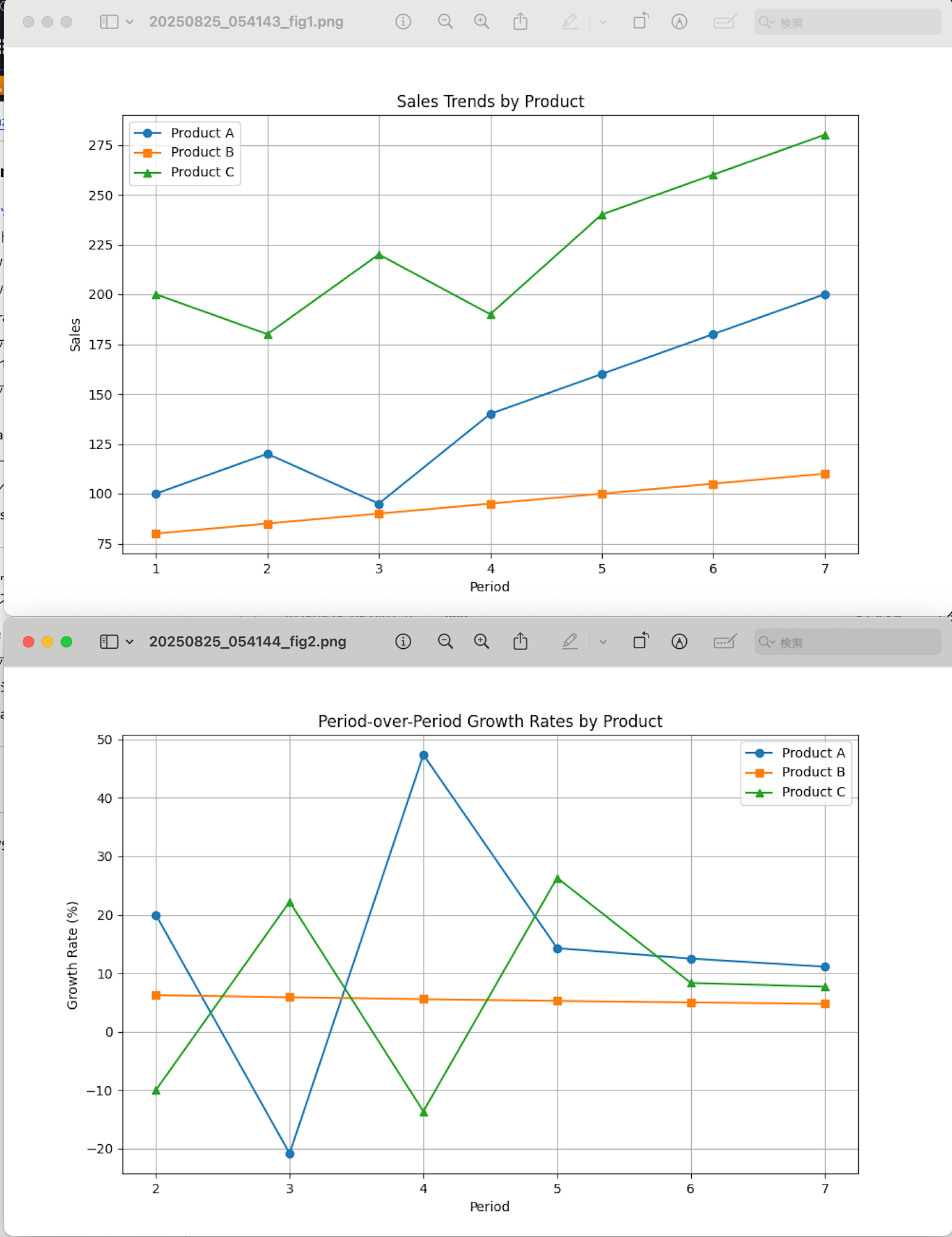
Here I'm passing mysterious sales data with unknown units and asking it to analyze them. And I'm instructing it to show sales trends and calculate growth rates.
Let's run it.
python invoke_agent.py
Example output:
Agent Response:
I'll help you analyze the sales data for Products A, B, and C. I'll create visualizations and calculate growth rates using Python.

1. First, let's create a visualization of the sales trends:Based on the analysis of the sales data, here are the key findings:

1. Sales Trends Visualization:
- The line graph shows the sales trends for all three products over the 7 periods
- Product C has consistently highest sales volume, ranging between 180-280 units
- Product A shows strong growth trend, starting at 100 and reaching 200 units
- Product B has the most stable but lowest sales volume, gradually increasing from 80 to 110 units

2. Overall Growth Rates:
- Product A showed the highest overall growth at 100% (doubled from 100 to 200 units)
- Product C grew by 40% (from 200 to 280 units)
- Product B had the lowest but still positive growth at 37.5% (from 80 to 110 units)

3. Period-over-Period Growth Rates:
- Product A shows the most volatile growth rates, ranging from -20.8% to +47.4%
- Product B shows the most consistent growth rates, steadily declining from 6.2% to 4.8%
- Product C shows moderate volatility, ranging from -13.6% to +26.3%

Key Observations:
1. Product A shows the most dramatic improvement but with highest volatility
2. Product B shows the most stable and predictable growth pattern
3. Product C maintains highest volume but with moderate volatility

The visualization can be viewed at: https://your-bucket-name.s3.amazonaws.com/agent-outputs/TIMESTAMP_fig1.png?[presigned-url-parameters]
It analyzed it for us!! At the end, an S3 link is also provided and I was able to download it without any issues!
It created a graph showing the sales trend over time.
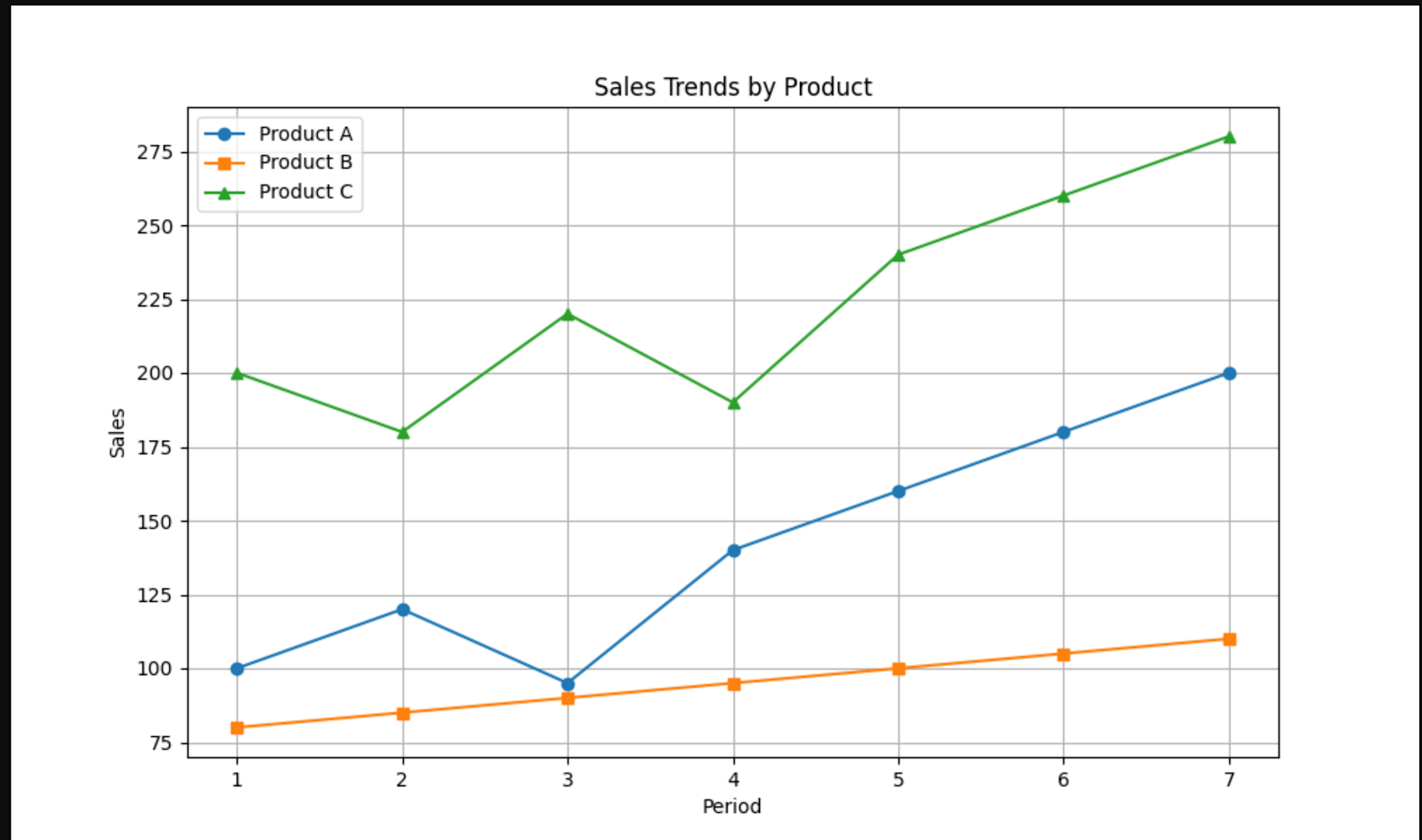
The mysterious values I specified are accurately plotted. After running it several times and getting exactly the same image, I confirmed through Tool Use logs that it was executed via Code Interpreter.
The Tool Use logs were output like this (I'm showing a shortened version):
```json
{
    "resource": {
        "attributes": {
            "deployment.environment.name": "bedrock-agentcore:default",
            "aws.local.service": "code_interpreter_agent_2.DEFAULT",
            "service.name": "code_interpreter_agent_2.DEFAULT",
            "cloud.region": "us-west-2",
            "aws.log.stream.names": "runtime-logs",
            "telemetry.sdk.name": "opentelemetry",
            "aws.service.type": "gen_ai_agent",
            "telemetry.sdk.language": "python",
            "cloud.provider": "aws",
            "cloud.resource_id": "arn:aws:bedrock-agentcore:us-west-2:YOUR_ACCOUNT_ID:runtime/YOUR_AGENT_ID/runtime-endpoint/DEFAULT:DEFAULT",
            "aws.log.group.names": "/aws/bedrock-agentcore/runtimes/code_interpreter_agent_2-F1oystCkUi-DEFAULT",
            "telemetry.sdk.version": "1.33.1",
            "cloud.platform": "aws_bedrock_agentcore",
            "telemetry.auto.version": "0.11.0-aws"
        }
    },
    "scope": {
        "name": "opentelemetry.instrumentation.botocore.bedrock-runtime",
        "schemaUrl": "https://opentelemetry.io/schemas/1.30.0"
    },
    "timeUnixNano": 1756126601867181407,
    "observedTimeUnixNano": 1756126601867186743,
    "severityNumber": 9,
    "severityText": "",
    "body": {
        "content": [
            {
                "text": "{\"content\": [{\"type\": \"text\", \"text\": \"Overall Growth Rates:\\nProduct A: 100.0%\\nProduct B: 37.5%\\nProduct C: 40.0%\\n\\nPeriod-over-Period Growth Rates:\\n\\nProduct A:\\n['20.0%', '-20.8%', '47.4%', '14.3%', '12.5%', '11.1%']\\n\\nProduct B:\\n['6.2%', '5.9%', '5.6%', '5.3%', '5.0%', '4.8%']\\n\\nProduct C:\\n['-10.0%', '22.2%', '-13.6%', '26.3%', '8.3%', '7.7%']\\n_IMG_[{\\\"i\\\": 1, \\\"d\\\": \\\"[BASE64_IMAGE_DATA_TRUNCATED]\\\"}]_END_\"}], \"structuredContent\": {\"stdout\": \"[OUTPUT_TRUNCATED]\", \"stderr\": \"\", \"exitCode\": 0, \"executionTime\": 1.2329983711242676, \"image_urls\": [{\"figure\": 1, \"url\": \"https://your-bucket-name.s3.amazonaws.com/[TRUNCATED]\"}]}, \"isError\": false, \"debug_info\": {\"code_size\": 1912, \"original_code_size\": 1611, \"img_code_preview\": \"[CODE_TRUNCATED]\", \"stdout_length\": 69601, \"img_marker_found\": true, \"stdout_tail\": \"[TRUNCATED]\", \"images_found\": 1, \"s3_upload_success\": true, \"uploaded_count\": 1, \"s3_bucket\": \"your-bucket-name\"}}"
            }
        ],
        "id": "tooluse_aRyqmVz3QACGTM84c5ze2A"
    },
    "attributes": {
        "event.name": "gen_ai.tool.message",
        "gen_ai.system": "aws.bedrock"
    },
    "flags": 1,
    "traceId": "68ac5d7a68f728c70ed47fb358a02c4a",
    "spanId": "f45341102e1c7f13"
}
```
By the way, perhaps due to the prompt being a bit vague, after several executions it had both successes and failures, and occasionally it even shared URLs with cut-off parameters that weren't signed.
Sometimes it would create two images. Looking at the second one, the growth rates were more easily understood.
The unstable output might be related to how to use these tools and prompting skills... I feel like I want to improve my skills more.
Conclusion
I tried implementing Strands Agent using Amazon Bedrock AgentCore Code Interpreter, and it's great that the generated code execution is isolated. Also, the execution method is simple with Strands Agent - just calling it with the @tool decorator.
While execution is easy and convenient, I noticed that we need to carefully consider how to handle things created by the generated code (in this case, the visualization image). For example, how to connect with S3 in this case. If I find better ways to do this, I'll write another blog post!
Also, I'd like to try executing S3 files with code in the future!
I hope this article was helpful. Thank you for reading to the end!