![[UPDATE] IAM authentication is now available for MCP Server targets with Amazon Bedrock AgentCore Gateway](https://images.ctfassets.net/ct0aopd36mqt/7M0d5bjsd0K4Et30cVFvB6/5b2095750cc8bf73f04f63ed0d4b3546/AgentCore2.png?w=3840&fm=webp)
[UPDATE] IAM authentication is now available for MCP Server targets with Amazon Bedrock AgentCore Gateway

This page has been translated by machine translation. View original
Introduction
Hello, I'm Jinno from the Consulting Department, a big fan of cheese naan.
Previously, I introduced a configuration where AgentCore Gateway's Target points to an MCP Server deployed on AgentCore Runtime.
In that article, I used Cognito M2M (Client Credentials) for Gateway→Runtime (MCP Server) outbound authentication.
While it worked fine, I thought it was a bit cumbersome to use Cognito for communication between AWS resources.
Recently, the Gateway Target's outbound authentication now supports GATEWAY_IAM_ROLE for MCP Server targets!
This allows direct invocation of the Runtime with SigV4 signatures using the Gateway's IAM role, making integration much easier! I'm delighted!
In this article, I'll test whether Claude Code can directly call MCP tools on AgentCore Runtime with this configuration!
Prerequisites
- AWS account (tested in us-east-1 region)
- Terraform v1.14.4 + AWS Provider v6.39.0
- Python 3.13 (for MCP Server code)
- Docker v29.1.5 (for ARM64 image building)
- Claude Code v2.1.84
- uv v0.9.26 (used for running mcp-proxy-for-aws v1.1.6)
Architecture
The overall architecture is as follows:
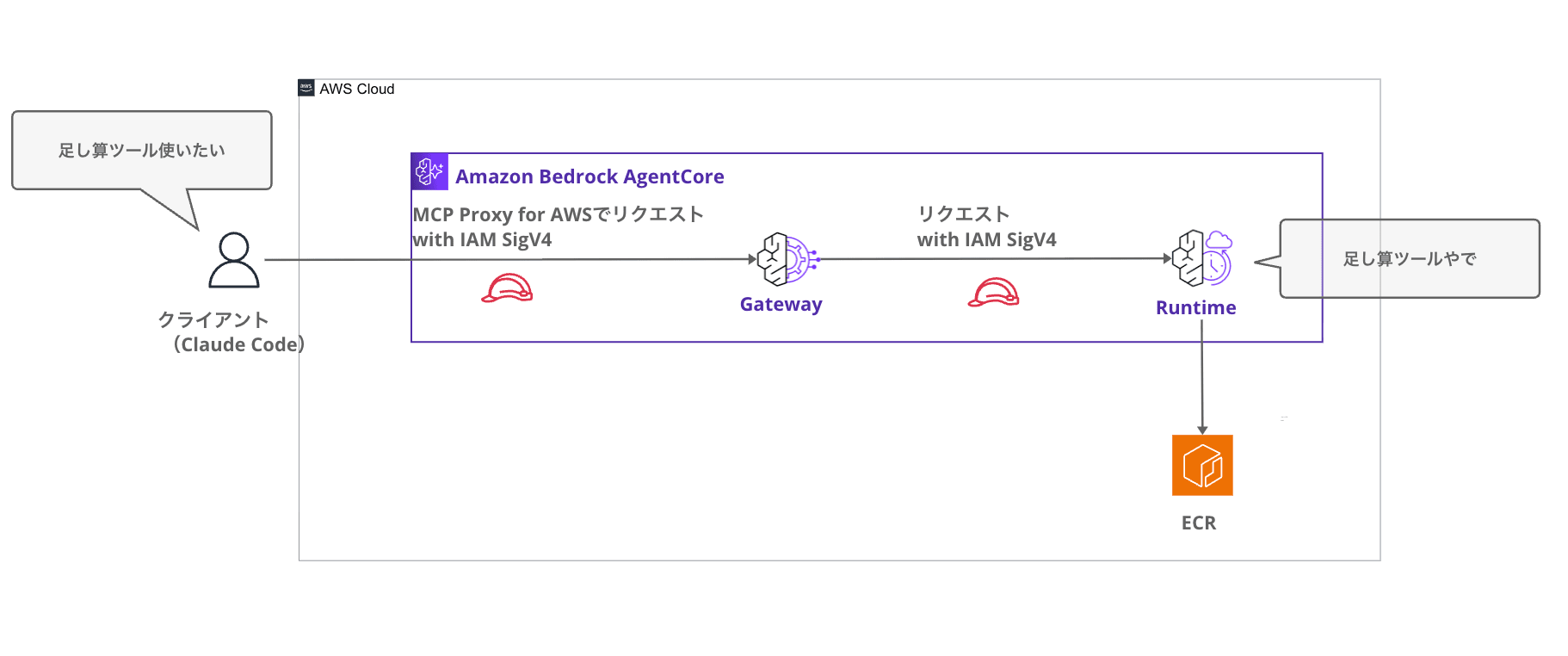
It's simple and complete with just IAM. (Previously, we had to use Cognito...)
The client, Claude Code, connects to the Gateway as an MCP Server using MCP Proxy for AWS.
Implementation
MCP Server Implementation
The MCP Server code is the same as in the previous article. I implemented three tools using FastMCP 3.2.3: addition, multiplication, and greeting.
from fastmcp import FastMCP

mcp = FastMCP("sample-tools")

@mcp.tool()
def add_numbers(a: int, b: int) -> int:
    """2つの数字を足し算します"""
    return a + b

@mcp.tool()
def multiply_numbers(a: int, b: int) -> int:
    """2つの数字を掛け算します"""
    return a * b

@mcp.tool()
def greet_user(name: str) -> str:
    """ユーザーに挨拶します"""
    return f"Hello, {name}! Welcome to AgentCore Runtime."

if __name__ == "__main__":
    mcp.run()
Functions decorated with @mcp.tool() are exposed as MCP tools. The docstrings serve as tool descriptions, helping the agent decide which tool to call.
Next is the Dockerfile for the container image. Since AgentCore Runtime operates on ARM64 architecture, we'll specify --platform linux/arm64 during the build (this is handled by Terraform).
FROM public.ecr.aws/docker/library/python:3.12-slim

WORKDIR /app
COPY requirements.txt .
RUN pip install --no-cache-dir -r requirements.txt

COPY mcp_server.py .

CMD ["python", "mcp_server.py"]
This is a simple configuration based on Python 3.12's slim image that installs dependencies and launches the MCP Server.
The only dependency is fastmcp.
fastmcp
Deploying Runtime + Gateway with Terraform
With Terraform, we'll create the Runtime, ECR, IAM roles, and Gateway. We'll configure the Gateway Target using the console.
For the complete Terraform code, please refer to the GitHub repository.
Here, I'll focus on explaining the important aspects of IAM authentication.
IAM Role Design
In this IAM configuration, three permissions come into play:
| Permission | Who | For What | Purpose |
|---|---|---|---|
bedrock-agentcore:InvokeGateway |
Caller (Claude Code user) | Gateway | Inbound: To pass Gateway's IAM authentication |
bedrock-agentcore:InvokeAgentRuntime |
Gateway's IAM role | Runtime | Outbound: For Gateway to call Runtime |
ecr:BatchGetImage, etc. |
Runtime's IAM role | ECR repository | For Runtime to pull container images |
Here's how they're defined in Terraform:
# Policy for Gateway to invoke Runtime
resource "aws_iam_role_policy" "gateway_invoke_runtime" {
  name = "${var.project_name}-gateway-invoke-runtime-policy"
  role = aws_iam_role.gateway.id

  policy = jsonencode({
    Version = "2012-10-17"
    Statement = [{
      Sid      = "InvokeAgentRuntime"
      Effect   = "Allow"
      Action   = "bedrock-agentcore:InvokeAgentRuntime"
      Resource = "${aws_bedrockagentcore_agent_runtime.mcp_server.agent_runtime_arn}*"
    }]
  })
}
The only permission needed for the Gateway role is InvokeAgentRuntime. The * at the end of the Resource is necessary because the actual access point is a sub-resource like runtime/xxx/runtime-endpoint/DEFAULT.
Gateway Configuration
The Gateway definition is simple. We specify AWS_IAM for the authorizer_type.
resource "aws_bedrockagentcore_gateway" "main" {
  name            = "${var.project_name}-gateway-${random_string.suffix.result}"
  description     = "AgentCore Gateway with IAM inbound authentication"
  role_arn        = aws_iam_role.gateway.arn
  authorizer_type = "AWS_IAM"
  protocol_type   = "MCP"
}
Deployment
Run the terraform apply command to deploy.
terraform init
terraform apply

# Select yes when asked to apply
After applying, you'll get the following outputs:
gateway_id             = "xxxxxxxx-xxxx-xxxx-xxxx-xxxxxxxxxxxx"
gateway_url            = "https://xxxxxxxx.gateway.bedrock-agentcore.us-east-1.amazonaws.com"
runtime_arn_url_encoded = "https://bedrock-agentcore.us-east-1.amazonaws.com/runtimes/arn%3Aaws%3A.../invocations"
We'll use gateway_url for Gateway Target configuration and .mcp.json. runtime_arn_url_encoded will be used for the Gateway Target Endpoint.
Creating Gateway Target in the Console (IAM Authentication)
Once the Gateway is created, add the Runtime as a Target.
In the Gateway details screen, you can confirm that the Inbound Auth type is set to "IAM authorization". Click "Add" for targets.
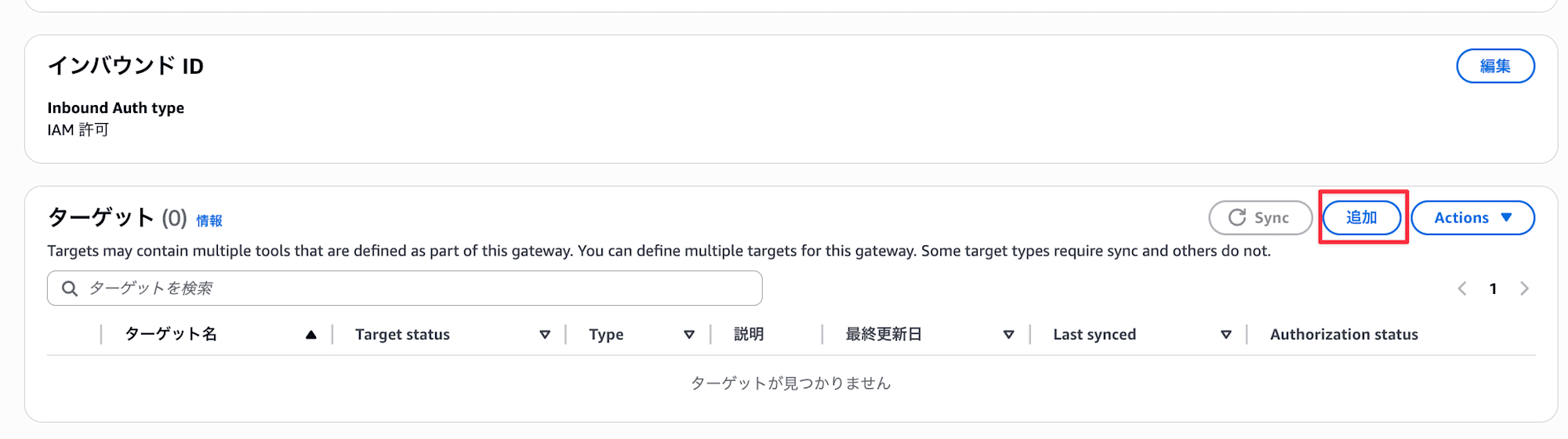
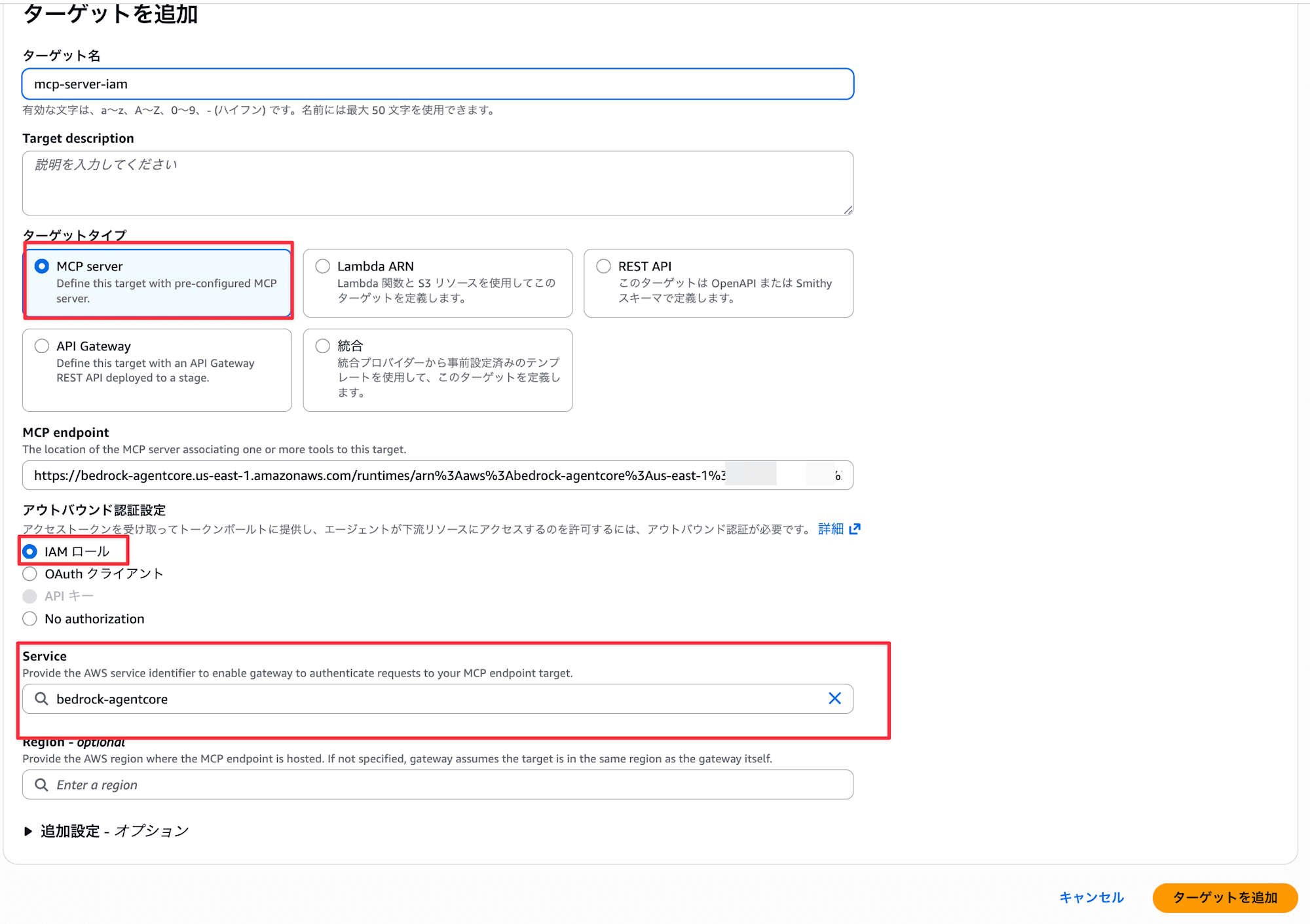
Enter the following and click "Add target":
- Target type:
MCP server - MCP endpoint: Enter the
runtime_arn_url_encodedfrom Terraform output - Outbound authentication configuration: Select
IAM role - Service:
bedrock-agentcore
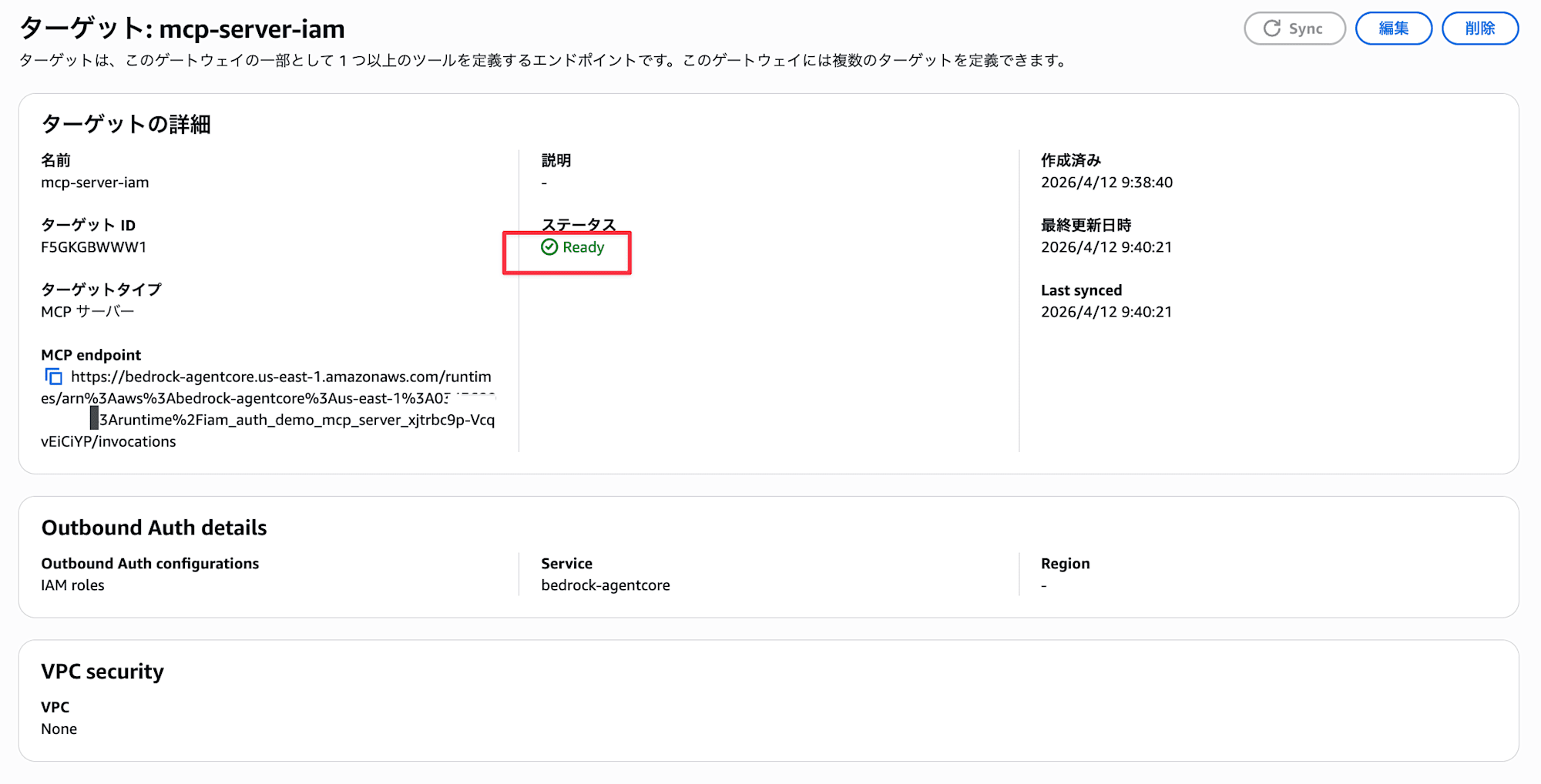
Once the Target status shows Ready, it's complete. You can also confirm that the Outbound Auth configurations is set to "IAM roles".
Note that IAM (SigV4) outbound authentication is only available for MCP servers behind AWS services that can verify SigV4 signatures. This includes AgentCore Runtime, AgentCore Gateway, API Gateway, and Lambda Function URLs. It cannot be used with MCP servers on ALB or EC2, so be aware of this limitation.
Setting Up IAM Permissions for the Caller
Since Gateway Inbound authentication is set to AWS_IAM, we need to grant the InvokeGateway permission to the IAM entity used by Claude Code (mcp-proxy-for-aws). Without this permission, access to the Gateway will be denied.
{
  "Version": "2012-10-17",
  "Statement": [
    {
      "Sid": "AllowGatewayInvocation",
      "Effect": "Allow",
      "Action": "bedrock-agentcore:InvokeGateway",
      "Resource": "arn:aws:bedrock-agentcore:us-east-1:<ACCOUNT_ID>:gateway/<GATEWAY_ID>"
    }
  ]
}
Attach this policy to the IAM user or role linked to your local AWS profile. You can find the <GATEWAY_ID> in the Terraform output's gateway_id. While you could use wildcards in the Resource, it's recommended to limit it to specific Gateway ARNs for security reasons.
Setting Up Claude Code Connection
What is MCP Proxy for AWS?
MCP Proxy for AWS is an official AWS open-source tool. MCP clients like Claude Code don't natively support SigV4 signatures. This proxy automatically adds SigV4 signatures to MCP requests using local AWS credentials (~/.aws/credentials or environment variables) and forwards them to the Gateway.
It can be configured directly in Claude Code's .mcp.json.
.mcp.json Configuration
Create a .mcp.json file in your project root.
{
  "mcpServers": {
    "agentcore-gateway": {
      "command": "uvx",
      "args": [
        "mcp-proxy-for-aws@latest",
        "https://<GATEWAY_ID>.gateway.bedrock-agentcore.us-east-1.amazonaws.com/mcp",
        "--service", "bedrock-agentcore",
        "--region", "us-east-1"
      ]
    }
  }
}
Replace <GATEWAY_ID> with the gateway_id value from your Terraform output. --service bedrock-agentcore specifies the service name for SigV4 signing, and --region is the signing region.
If you're adding it directly from Claude Code, you can also use the following command:
claude mcp add --transport stdio agentcore-gateway -- \
  uvx mcp-proxy-for-aws@latest \
  "https://<GATEWAY_ID>.gateway.bedrock-agentcore.us-east-1.amazonaws.com/mcp" \
  --service bedrock-agentcore \
  --region us-east-1
Testing
When you start Claude Code, mcp-proxy-for-aws will launch as a stdio process and establish a SigV4-signed connection to the Gateway. The MCP Server tools will be automatically loaded.
First, let's check if we're connected by running /mcp.
When the connection to the MCP Server is established, it will display connected.

Looking at the tool list, we can see that the three tools on the Runtime are recognized.

Let's try calling a tool. Enter "Use the addition tool to add 3123 + 31341234" and Claude Code will call the add_numbers tool.
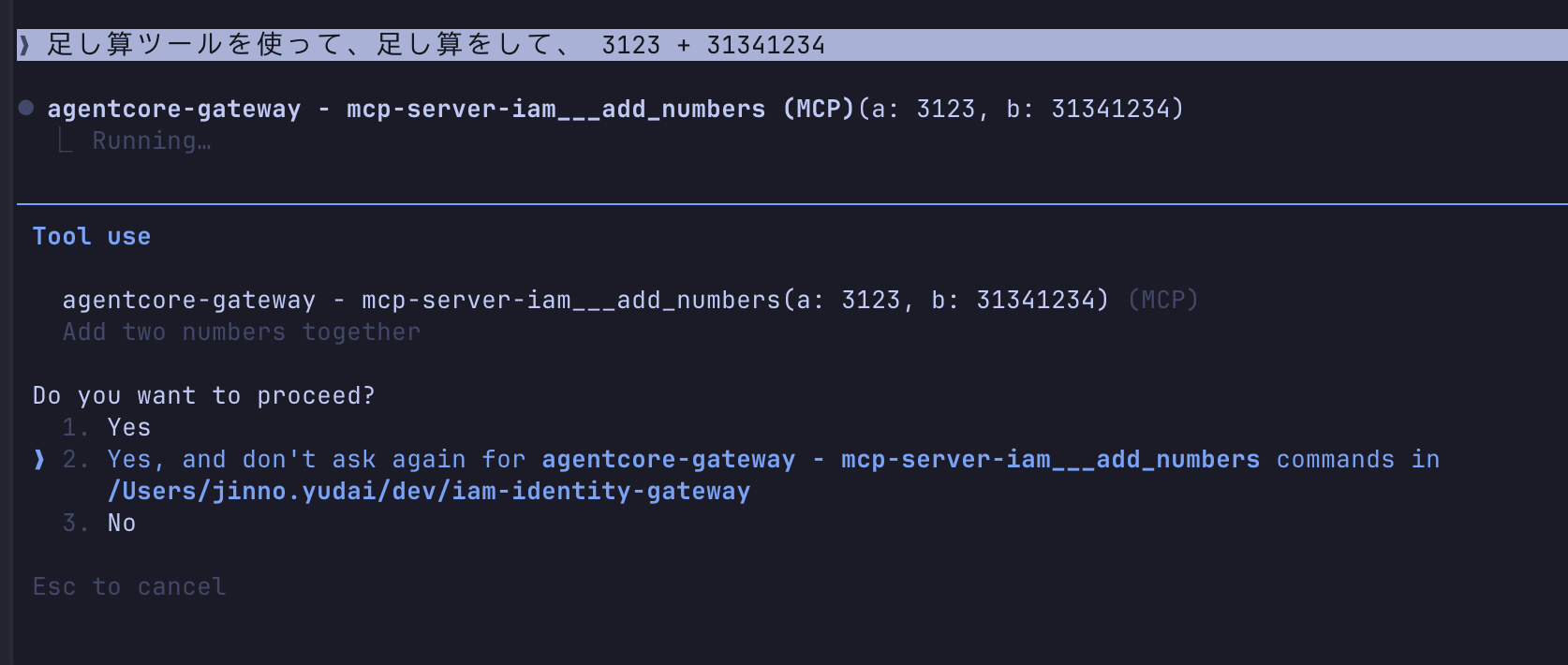
The result is returned!

We successfully called MCP tools on Runtime through AgentCore Gateway directly from Claude Code. It was quite easy!
Conclusion
I've tested an IAM authentication configuration combining AgentCore Gateway's outbound IAM authentication support with MCP Proxy for AWS!
I think this is a great setup for use cases that can be unified with IAM authentication, such as internal tools or usage within AWS accounts. This is a nice update, as I previously found it cumbersome to call an MCP Server deployed on Runtime through Gateway!
I had been reluctant to deploy MCP Server on Runtime and link it to Gateway because I didn't want to use Cognito as an intermediary, but now I'd like to use this approach more actively.
I hope this article was helpful. Thank you for reading to the end!