I filtered the list of tool information available in the Response Interceptor of Amazon Bedrock AgentCore Gateway

This page has been translated by machine translation. View original
Hello, I'm Kano from the Consulting Department who loves supermarkets.
I've been interested in Lopia recently. I haven't actually been there yet, so I'd like to visit.
This time I've been curious about Amazon Bedrock AgentCore's Gateway Interceptors feature, so I tried out the Response Interceptor function and wrote an article about it.
What are Gateway Interceptors
Gateway Interceptors is a feature released in November 2025 that, as shown below, allows intercepting Gateway requests and responses through Lambda functions.
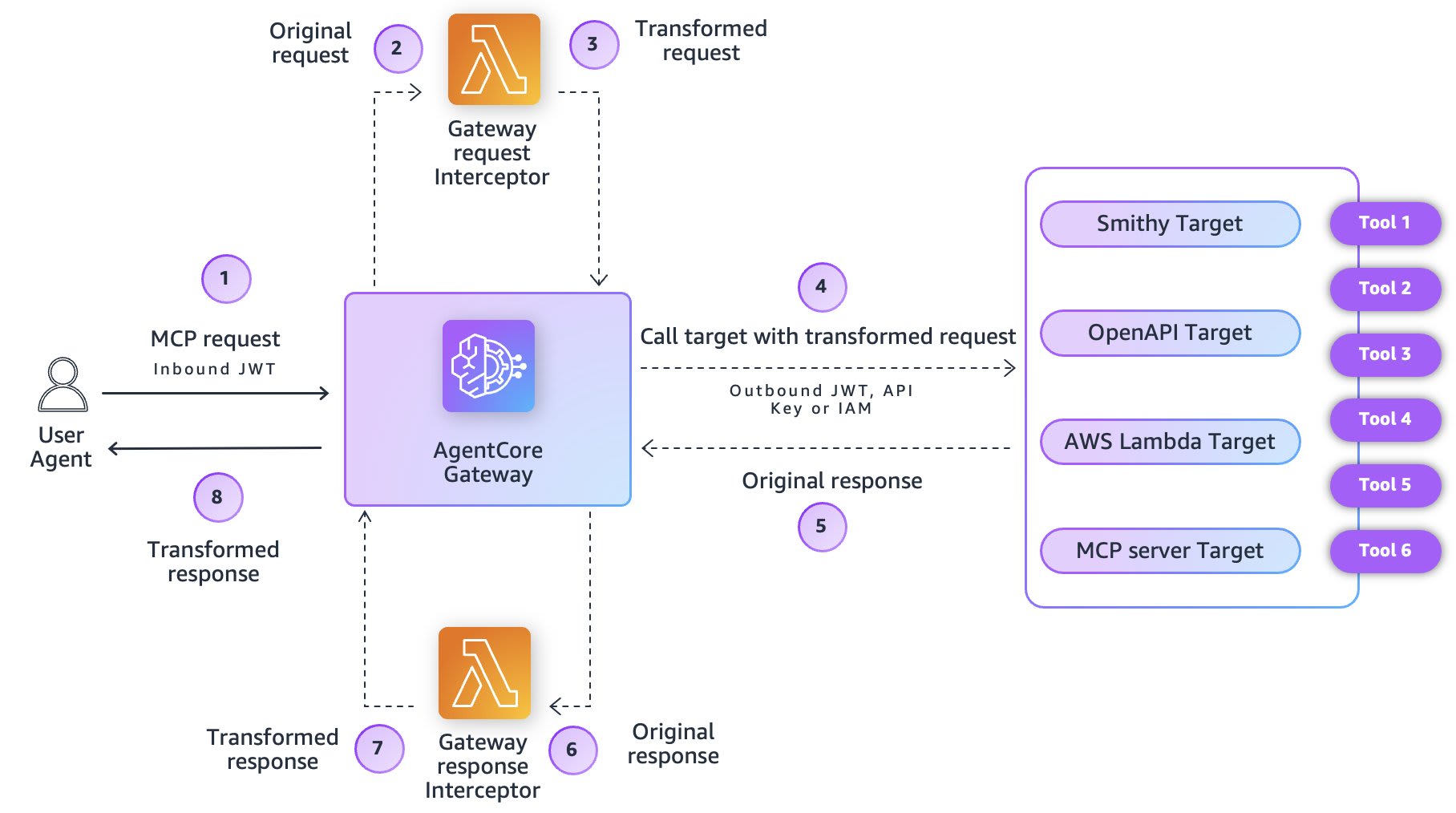
Looking at this diagram, you might wonder what exactly it can do and how it can be effectively utilized.
Let's examine the roles of Request/Response Interceptors to understand when they're useful.
Request Interceptor
Request Interceptor runs before the Gateway calls the target.
Let's look at some specific use cases.
Tool authorization control based on user permissions
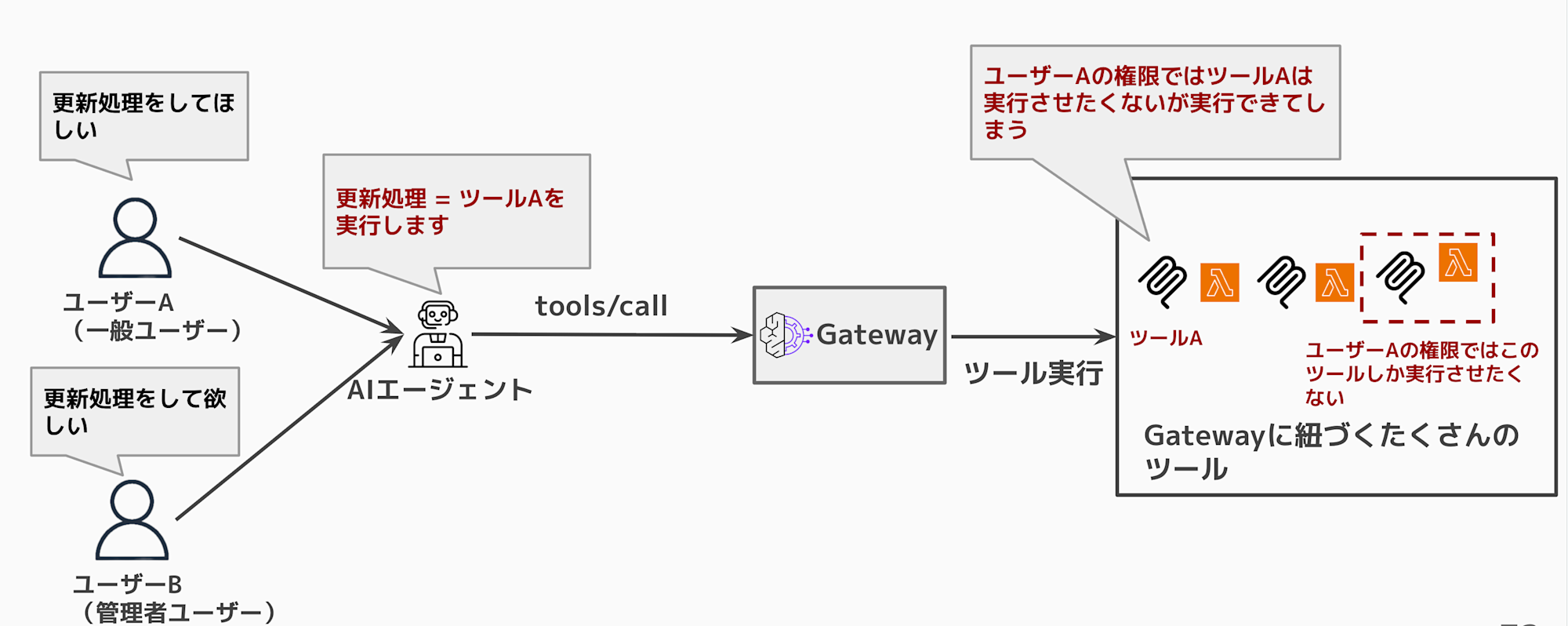
There might be cases where you need detailed authorization control. For example, user A belongs to group ZZZ and can execute a certain tool, while user B who doesn't belong to that group shouldn't be allowed. The Interceptor enables fine-grained authorization control in such situations.
When using Gateway without any modifications, any authenticated user can execute all tools.
This can lead to undesirable situations where users can execute tools they shouldn't have access to.
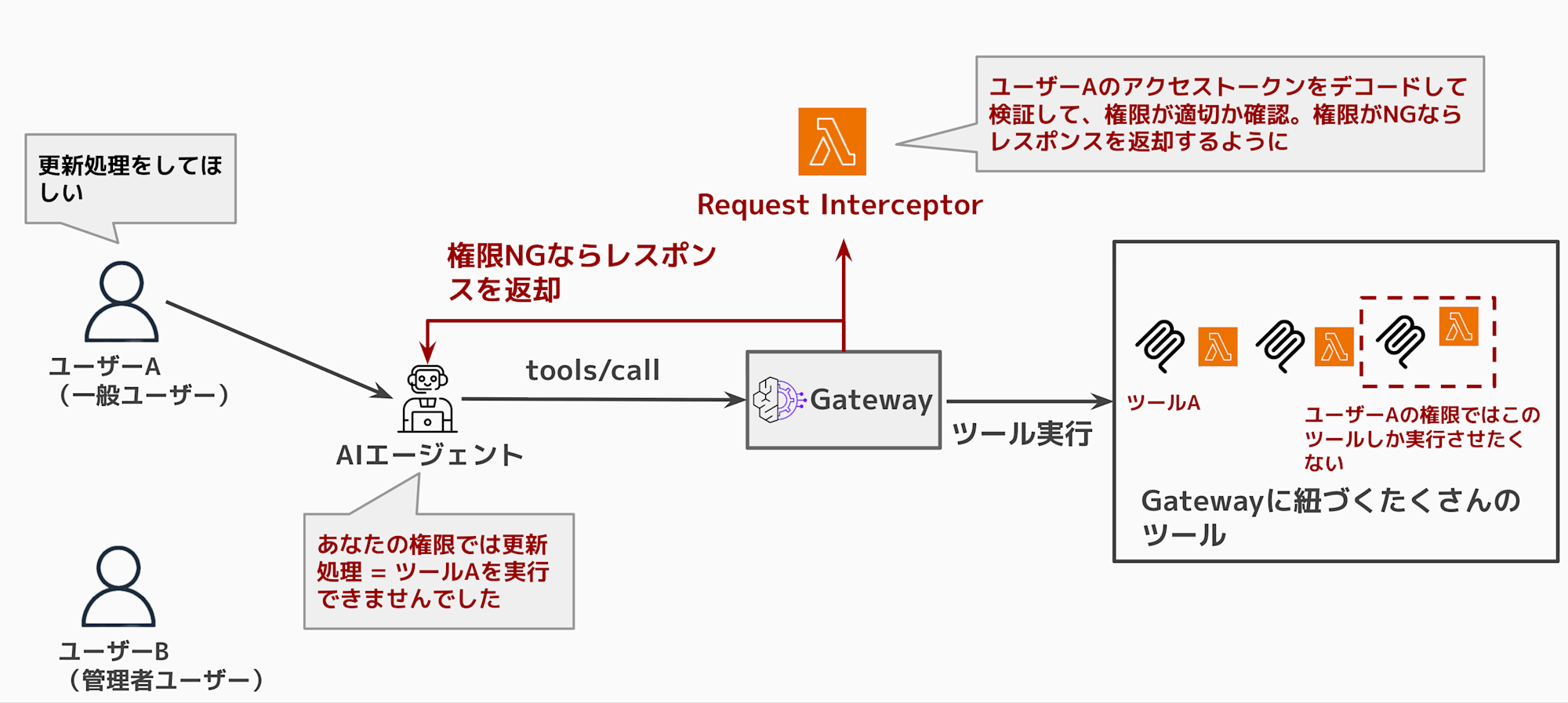
By utilizing Request Interceptor for permission checks, you can prevent tool execution if the user doesn't have appropriate permissions and return a permission error response.
Converting to appropriate access tokens
Passing the access token received from the client directly to the target can pose impersonation risks.
For example, a client's JWT token might contain information like:
{
  "sub": "user-123",
  "email": "user@example.com",
  "cognito:groups": ["power_user"],
  "aud": "gateway-client-id",
  "exp": 1735400000
}
If this token is passed directly to the target (such as an external API), the target could use it to impersonate the user and access other services.
With a Request Interceptor, you can convert the token before passing it to the target, issuing a new token with only the minimum necessary information.
{
  "sub": "internal-service",
  "scope": "tools:execute",
  "original_user": "user-123",
  "exp": 1735400060
}
This ensures that the target processes requests with a token limited to necessary operations rather than with the user's full access permissions.
Response Interceptor
Response Interceptor runs before the Gateway returns a response.
Let's see what can be done with and without this Interceptor.
Without any configuration, Gateway returns a list of all associated tools. It's not ideal if users see tools they shouldn't have access to or shouldn't be allowed to execute. The AI agent might also mistakenly believe these tools are executable.
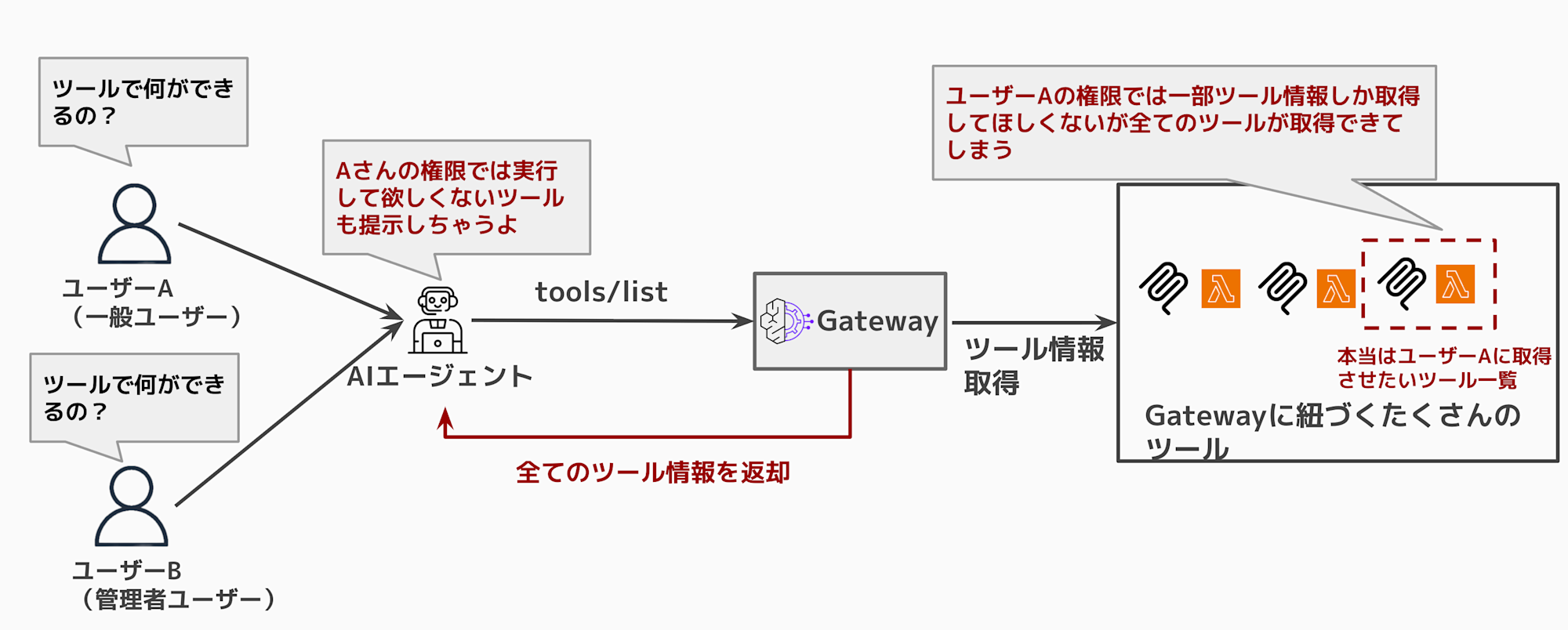
When using Response Interceptor, it looks like this:
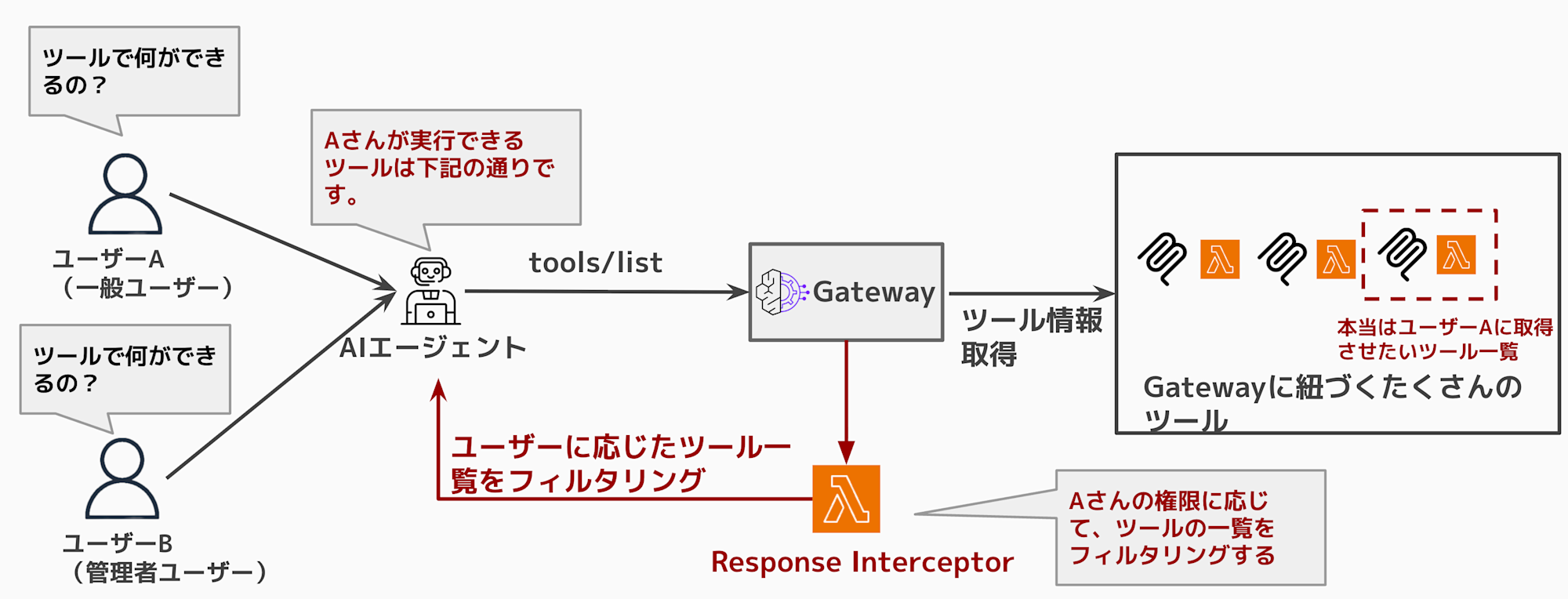
When executing tools/list, you can return only the necessary tools based on permissions.
Showing unavailable tools might confuse the agent, so providing only what's needed is sufficient.
Beyond the use cases mentioned, you can also implement guardrails to check for sensitive information or implement custom authorization logic.
For this article, I'll implement tool filtering based on user permissions using Response Interceptor.
Test Environment Setup
I'll quickly set up the environment using Terraform.
The source code is uploaded to the repository below for reference if needed.
Here's what it looks like:
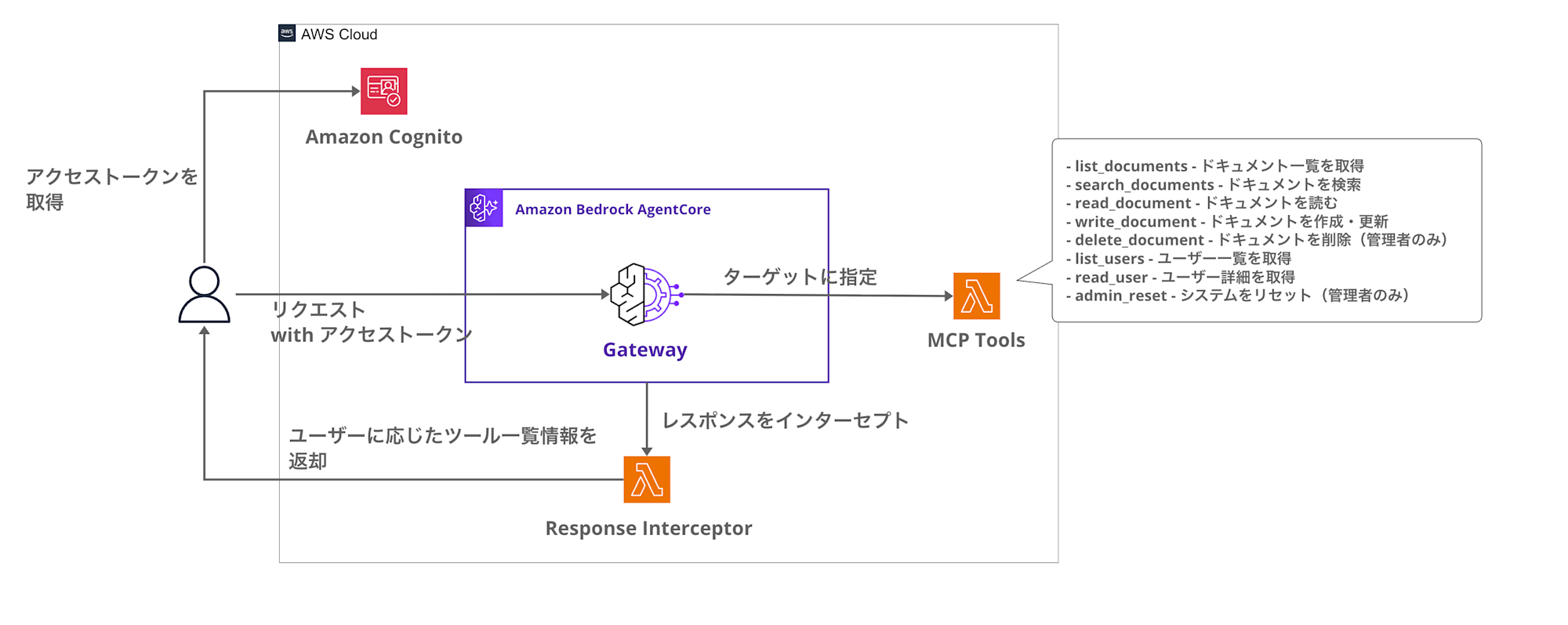
Key aspects of this setup:
- Cognito User Pool for user authentication and group management
- AgentCore Gateway using JWT authentication, integrated with Cognito
- Response Interceptor Lambda to filter
tools/listresponses - Dynamic control of available tools based on user groups
Permission Model
I've set up four groups with different permissions:
| Group | Allowed Tools | Description |
|---|---|---|
| admin | all tools | For system admins |
| power_user | search, read, write, list | Users with read/write |
| reader | search, read, list | Read-only users |
| guest | list | List-only access |
Let's check if tools are properly filtered based on these different permissions.
Implementation
Directory Structure
The directory structure looks like this:
sample-terraform-agentcore/
├── gateway.tf           # AgentCore Gateway and Targets
├── lambda.tf            # Lambda function definitions
├── cognito.tf           # Cognito User Pool and groups
├── variables.tf         # Variable definitions
├── outputs.tf           # Output values
├── versions.tf          # Provider settings
└── lambda/
    ├── interceptor/     # Response Interceptor
    │   └── handler.py
    └── mcp_tools/       # MCP Tools Target
        └── handler.py
Prerequisites
I used the following Terraform versions:
| Item | Version |
|---|---|
| Terraform | 1.5.0 |
| AWS Provider | 6.25.0 |
| hashicorp/archive | 2.4.0 |
| hashicorp/random | 3.5.0 |
Response Interceptor Flow
The Response Interceptor process flow is implemented as follows:
- Gateway calls the Interceptor Lambda
- Check for
gatewayResponseto determine if it's a REQUEST/RESPONSE interceptor- This check is useful if you want to handle both in the same Lambda function, though it's not particularly meaningful in our case
- Execute filtering only for the
tools/listmethod- The Lambda's environment variables contain permission mapping information that is used for filtering based on user attributes
- Get user groups from the JWT's
cognito:groupsclaim - Return a response containing only the tools allowed for those groups
Here's the Interceptor source code (collapsed for brevity):
Full Code
"""
Response Interceptor Lambda for AgentCore Gateway

Cognitoのグループ情報に基づいて tools/list のレスポンスをフィルタリングする
"""

import json
import logging
import base64
import os
from typing import Any

logger = logging.getLogger()
logger.setLevel(logging.INFO)

# 環境変数からツール権限マッピングを取得
TOOL_PERMISSIONS = json.loads(os.environ.get('TOOL_PERMISSIONS', '{}'))

def decode_jwt_payload(token: str) -> dict:
    """JWTのペイロード部分をデコード(署名検証はGatewayが実施済み)"""
    try:
        # Bearer プレフィックスを除去
        if token.startswith('Bearer '):
            token = token[7:]

        # JWTのペイロード部分を取得(ヘッダー.ペイロード.署名)
        parts = token.split('.')
        if len(parts) != 3:
            return {}

        # Base64デコード(パディング調整)
        payload = parts[1]
        padding = 4 - len(payload) % 4
        if padding != 4:
            payload += '=' * padding

        decoded = base64.urlsafe_b64decode(payload)
        return json.loads(decoded)
    except Exception as e:
        logger.warning(f"Failed to decode JWT: {e}")
        return {}

def get_user_groups(event: dict) -> list[str]:
    """リクエストからユーザーのCognitoグループを取得"""
    try:
        gateway_request = event.get('mcp', {}).get('gatewayRequest', {})
        headers = gateway_request.get('headers', {})

        # Authorization ヘッダーから JWT を取得
        auth_header = headers.get('Authorization', '') or headers.get('authorization', '')
        if not auth_header:
            logger.info("No Authorization header found")
            return ['guest']

        payload = decode_jwt_payload(auth_header)

        # Cognito の cognito:groups クレームを取得
        groups = payload.get('cognito:groups', [])
        if not groups:
            # カスタム属性もチェック
            custom_groups = payload.get('custom:groups', '')
            if custom_groups:
                groups = custom_groups.split(',')

        logger.info(f"User groups: {groups}")
        return groups if groups else ['guest']

    except Exception as e:
        logger.error(f"Error getting user groups: {e}")
        return ['guest']

def get_allowed_tools(groups: list[str]) -> set[str]:
    """グループに基づいて許可されたツール名のセットを返す"""
    allowed = set()

    for group in groups:
        group_tools = TOOL_PERMISSIONS.get(group, [])
        if '*' in group_tools:
            # 全ツールアクセス可
            return {'*'}
        allowed.update(group_tools)

    # デフォルトでguestの権限
    if not allowed:
        allowed.update(TOOL_PERMISSIONS.get('guest', ['list']))

    return allowed

def filter_tools_response(response_body: dict, allowed_tools: set[str]) -> dict:
    """tools/list レスポンスをフィルタリング"""
    if '*' in allowed_tools:
        return response_body

    result = response_body.get('result', {})
    tools = result.get('tools', [])

    filtered_tools = []
    for tool in tools:
        tool_name = tool.get('name', '')

        # AgentCore Gateway のツール名形式: {target-name}___{tool-name}
        # 例: agentcore-demo-list-documents___list_documents
        if '___' in tool_name:
            actual_tool_name = tool_name.split('___')[-1]  # list_documents
        else:
            actual_tool_name = tool_name

        # ツール名のカテゴリでマッチング(例: list_documents -> list)
        tool_category = actual_tool_name.split('_')[0] if '_' in actual_tool_name else actual_tool_name

        logger.info(f"Checking tool: {tool_name} -> actual: {actual_tool_name} -> category: {tool_category}")

        if actual_tool_name in allowed_tools or tool_category in allowed_tools:
            filtered_tools.append(tool)
            logger.info(f"Tool allowed: {tool_name}")
        else:
            logger.info(f"Tool filtered out: {tool_name}")

    # フィルタリング後のレスポンスを構築
    filtered_response = response_body.copy()
    filtered_response['result'] = result.copy()
    filtered_response['result']['tools'] = filtered_tools

    return filtered_response

def lambda_handler(event: dict, context: Any) -> dict:
    """
    AgentCore Gateway Response Interceptor

    tools/list のレスポンスをユーザーの権限に基づいてフィルタリング
    """
    logger.info(f"Interceptor invoked with event keys: {list(event.keys())}")

    mcp_data = event.get('mcp', {})

    # REQUEST or RESPONSE インターセプターかを判定
    gateway_response = mcp_data.get('gatewayResponse')

    if gateway_response is None:
        # REQUEST インターセプター: パススルー
        logger.info("Processing REQUEST interceptor - passing through")
        gateway_request = mcp_data.get('gatewayRequest', {})
        return {
            "interceptorOutputVersion": "1.0",
            "mcp": {
                "transformedGatewayRequest": {
                    "body": gateway_request.get('body', {})
                }
            }
        }

    # RESPONSE インターセプター
    logger.info("Processing RESPONSE interceptor")

    gateway_request = mcp_data.get('gatewayRequest', {})
    request_body = gateway_request.get('body', {})
    response_body = gateway_response.get('body', {})

    # MCP メソッドを確認
    mcp_method = request_body.get('method', '')
    logger.info(f"MCP method: {mcp_method}")

    # tools/list 以外はパススルー
    if mcp_method != 'tools/list':
        logger.info(f"Method '{mcp_method}' - passing through unchanged")
        return {
            "interceptorOutputVersion": "1.0",
            "mcp": {
                "transformedGatewayResponse": {
                    "statusCode": gateway_response.get('statusCode', 200),
                    "body": response_body
                }
            }
        }

    # tools/list の場合: 権限に基づいてフィルタリング
    logger.info("Filtering tools/list response based on user permissions")

    # ユーザーのグループを取得
    user_groups = get_user_groups(event)

    # 許可されたツールを取得
    allowed_tools = get_allowed_tools(user_groups)
    logger.info(f"Allowed tools for groups {user_groups}: {allowed_tools}")

    # レスポンスをフィルタリング
    filtered_body = filter_tools_response(response_body, allowed_tools)

    original_count = len(response_body.get('result', {}).get('tools', []))
    filtered_count = len(filtered_body.get('result', {}).get('tools', []))
    logger.info(f"Tools filtered: {original_count} -> {filtered_count}")

    return {
        "interceptorOutputVersion": "1.0",
        "mcp": {
            "transformedGatewayResponse": {
                "statusCode": gateway_response.get('statusCode', 200),
                "body": filtered_body
            }
        }
    }
Be careful with the response format as it must follow a specific structure. Note the interceptor-specific fields like interceptorOutputVersion and transformedGatewayResponse:
return {
        "interceptorOutputVersion": "1.0",
        "mcp": {
            "transformedGatewayResponse": {
                "statusCode": gateway_response.get('statusCode', 200),
                "body": filtered_body
            }
        }
    }
Filtering Example
For instance, when a user in the reader group calls tools/list, the tools are filtered like this:
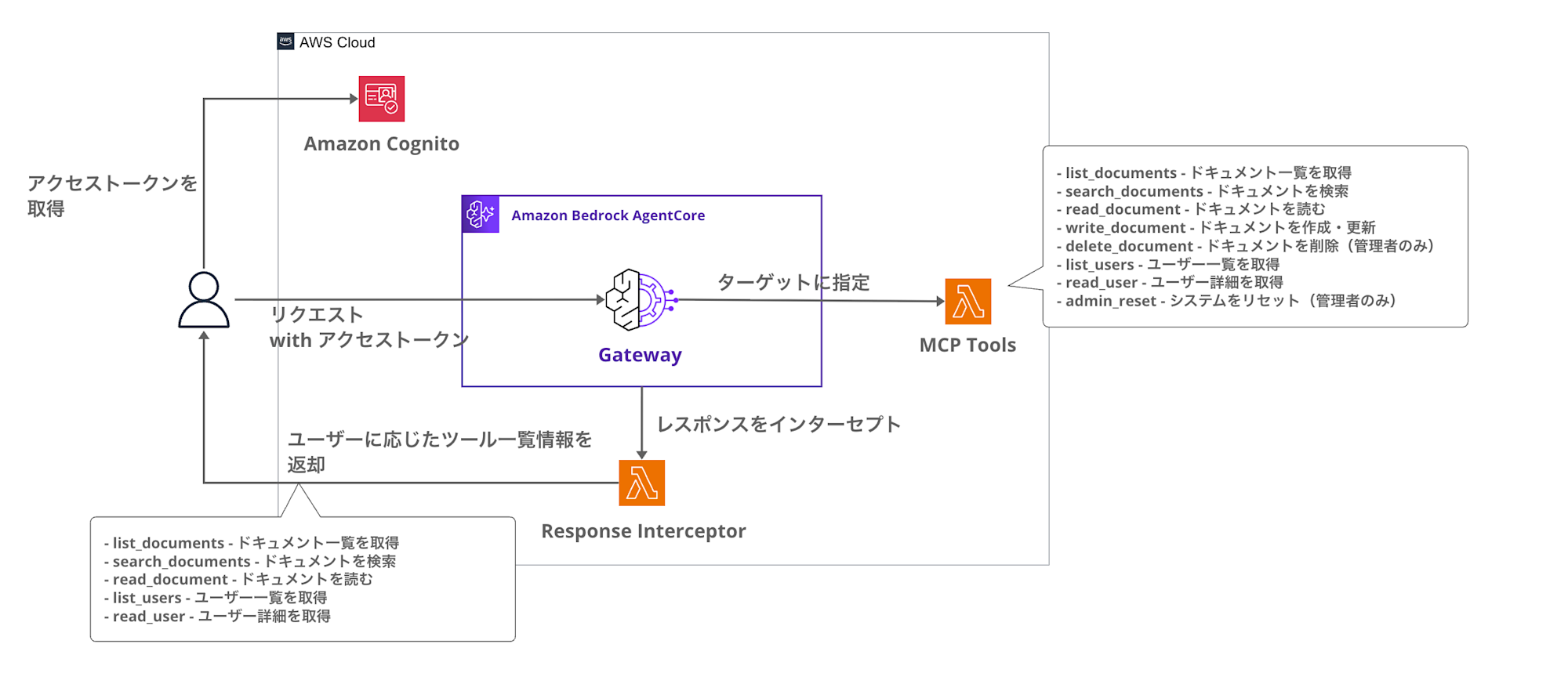
While admin users can see management tools like delete and admin_reset, reader users don't see these. By hiding tools from the agent based on user permissions, we can prevent unnecessary tool calls. For example, if you're implementing authorization control with Request Interceptor, there's no need to show tools that users can't use.
Verification
Let's deploy and verify the functionality.
Deploying the Environment
First, deploy the environment using Terraform:
terraform init
terraform apply --auto-approve
After deployment completes, you'll see output like:
Apply complete! Resources: 18 added, 0 changed, 0 destroyed.

Outputs:

cognito_client_id = "xxxxxxxxxxxxxxxxxxxxxxxxxx"
cognito_user_pool_id = "us-east-1_XXXXXXXXX"
gateway_endpoint = "https://xxxxxxxxxx.gateway.bedrock-agentcore.us-east-1.amazonaws.com/mcp"
gateway_id = "XXXXXXXXXX"
The environment is now ready. Let's set environment variables for the AWS CLI commands:
# Save to environment variables
export AWS_REGION=us-east-1
export GATEWAY_URL=$(terraform output -raw gateway_url)
export USER_POOL_ID=$(terraform output -raw cognito_user_pool_id)
export CLIENT_ID=$(terraform output -raw cognito_client_id)
Creating Test Users
Next, let's create test users in Cognito.
We'll create users in the admin and reader groups for comparison:
# Create Admin user
aws cognito-idp admin-create-user \
  --user-pool-id ${USER_POOL_ID} \
  --username admin-user \
  --user-attributes Name=email,Value=admin@example.com \
  --temporary-password 'TempPass123!'

# Add to Admin group
aws cognito-idp admin-add-user-to-group \
  --user-pool-id ${USER_POOL_ID} \
  --username admin-user \
  --group-name admin

# Create Reader user
aws cognito-idp admin-create-user \
  --user-pool-id ${USER_POOL_ID} \
  --username reader-user \
  --user-attributes Name=email,Value=reader@example.com \
  --temporary-password 'TempPass123!'

# Add to Reader group
aws cognito-idp admin-add-user-to-group \
  --user-pool-id ${USER_POOL_ID} \
  --username reader-user \
  --group-name reader
Changing Passwords
Users created with admin-create-user are in FORCE_CHANGE_PASSWORD state, so we need to change their passwords:
# Change Admin user password
aws cognito-idp admin-set-user-password \
  --user-pool-id ${USER_POOL_ID} \
  --username admin-user \
  --password 'NewPass123!' \
  --permanent

# Change Reader user password
aws cognito-idp admin-set-user-password \
  --user-pool-id ${USER_POOL_ID} \
  --username reader-user \
  --password 'NewPass123!' \
  --permanent
Getting Access Tokens
Now let's authenticate each user and get access tokens:
# Get Admin user token
ADMIN_TOKEN=$(aws cognito-idp admin-initiate-auth \
  --user-pool-id ${USER_POOL_ID} \
  --client-id ${CLIENT_ID} \
  --auth-flow ADMIN_USER_PASSWORD_AUTH \
  --auth-parameters USERNAME=admin-user,PASSWORD='NewPass123!' \
  --query 'AuthenticationResult.AccessToken' \
  --output text)

# Get Reader user token
READER_TOKEN=$(aws cognito-idp admin-initiate-auth \
  --user-pool-id ${USER_POOL_ID} \
  --client-id ${CLIENT_ID} \
  --auth-flow ADMIN_USER_PASSWORD_AUTH \
  --auth-parameters USERNAME=reader-user,PASSWORD='NewPass123!' \
  --query 'AuthenticationResult.AccessToken' \
  --output text)
Comparing tools/list Execution
Now for the main test - let's execute tools/list with each user and compare the results.
Admin User
curl -s -X POST ${GATEWAY_URL} \
  -H "Content-Type: application/json" \
  -H "Authorization: Bearer ${ADMIN_TOKEN}" \
  -d '{"jsonrpc":"2.0","id":1,"method":"tools/list"}' | jq .
{
  "jsonrpc": "2.0",
  "id": 1,
  "result": {
    "tools": [
      {
        "inputSchema": {
          "type": "object",
          "properties": {
            "target": {
              "description": "Target to reset (cache, database, etc)",
              "type": "string"
            }
          },
          "required": [
            "target"
          ]
        },
        "name": "agentcore-demo-admin-reset___admin_reset",
        "description": "Reset system (admin only)"
      },
      {
        "inputSchema": {
          "type": "object",
          "properties": {
            "document_id": {
              "description": "Document ID to delete",
              "type": "string"
            }
          },
          "required": [
            "document_id"
          ]
        },
        "name": "agentcore-demo-delete-document___delete_document",
        "description": "Delete a document (admin only)"
      },
      {
        "inputSchema": {
          "type": "object"
        },
        "name": "agentcore-demo-list-documents___list_documents",
        "description": "List available documents in the system"
      },
      {
        "inputSchema": {
          "type": "object"
        },
        "name": "agentcore-demo-list-users___list_users",
        "description": "List all users"
      },
      {
        "inputSchema": {
          "type": "object",
          "properties": {
            "document_id": {
              "description": "Document ID to read",
              "type": "string"
            }
          },
          "required": [
            "document_id"
          ]
        },
        "name": "agentcore-demo-read-document___read_document",
        "description": "Read a specific document"
      },
      {
        "inputSchema": {
          "type": "object",
          "properties": {
            "user_id": {
              "description": "User ID to retrieve",
              "type": "string"
            }
          },
          "required": [
            "user_id"
          ]
        },
        "name": "agentcore-demo-read-user___read_user",
        "description": "Get user details"
      },
      {
        "inputSchema": {
          "type": "object",
          "properties": {
            "query": {
              "description": "Search query string",
              "type": "string"
            }
          },
          "required": [
            "query"
          ]
        },
        "name": "agentcore-demo-search-documents___search_documents",
        "description": "Search documents by query"
      },
      {
        "inputSchema": {
          "type": "object",
          "properties": {
            "title": {
              "description": "Document title",
              "type": "string"
            },
            "content": {
              "description": "Document content",
              "type": "string"
            }
          },
          "required": [
            "content",
            "title"
          ]
        },
        "name": "agentcore-demo-write-document___write_document",
        "description": "Create or update a document"
      }
    ]
  }
}
The Admin user sees all 8 tools, including administrative tools like delete_document and admin_reset.
For Reader users
curl -s -X POST ${GATEWAY_URL} \
  -H "Content-Type: application/json" \
  -H "Authorization: Bearer ${READER_TOKEN}" \
  -d '{"jsonrpc":"2.0","id":1,"method":"tools/list"}' | jq .
{
  "jsonrpc": "2.0",
  "id": 1,
  "result": {
    "tools": [
      {
        "inputSchema": {
          "type": "object"
        },
        "name": "agentcore-demo-list-documents___list_documents",
        "description": "List available documents in the system"
      },
      {
        "inputSchema": {
          "type": "object"
        },
        "name": "agentcore-demo-list-users___list_users",
        "description": "List all users"
      },
      {
        "inputSchema": {
          "type": "object",
          "properties": {
            "document_id": {
              "description": "Document ID to read",
              "type": "string"
            }
          },
          "required": [
            "document_id"
          ]
        },
        "name": "agentcore-demo-read-document___read_document",
        "description": "Read a specific document"
      },
      {
        "inputSchema": {
          "type": "object",
          "properties": {
            "user_id": {
              "description": "User ID to retrieve",
              "type": "string"
            }
          },
          "required": [
            "user_id"
          ]
        },
        "name": "agentcore-demo-read-user___read_user",
        "description": "Get user details"
      },
      {
        "inputSchema": {
          "type": "object",
          "properties": {
            "query": {
              "description": "Search query string",
              "type": "string"
            }
          },
          "required": [
            "query"
          ]
        },
        "name": "agentcore-demo-search-documents___search_documents",
        "description": "Search documents by query"
      }
    ]
}
Wow, Reader users can only see 5 tools. write_document, delete_document, and admin_reset have been filtered out and are no longer visible.
Comparison of Results
| Group | Number of Tools Displayed | Filtering |
|---|---|---|
| admin | 8 | None (all tools displayed) |
| reader | 5 | Excludes write, delete, admin-related |
We have successfully confirmed that the tool filtering by the Response Interceptor is working!
Conclusion
This time we only tried the Response Interceptor, but you can also use the Request Interceptor for authorization checks before tool execution. By combining both, you can implement more fine-grained permission control.
Next time I'd like to try the Request Interceptor too!!
I hope this article has been helpful. Thank you for reading until the end!!
Additional Note
If you want to know more about the Gateway Interceptors mechanism, the following article thoroughly examines it and is very educational!
Please check it out!