I tried specifying the MCP Server deployed to AgentCore Runtime as the Target for Amazon Bedrock AgentCore Gateway

This page has been translated by machine translation. View original
Hello, I'm Kamino from the Consulting Department and I love supermarkets.
Let me get straight to the point - have you ever specified an MCP Server hosted on AgentCore Runtime as a Target for AgentCore Gateway?
Looking at the AWS official sample, I can see it's a selectable option, but I wanted to understand how this configuration works by drawing a diagram, which is why I wrote this article.
AgentCore Gateway
To recap about Gateway, the following options are available as Gateway Targets.
Gateway allows you to use external services as MCP tools and centralize them.

- Lambda function
- OpenAPI specification API
- API Gateway
- Integrated services (Slack, GitHub, etc.)
- Smithy model
- MCP Server
Since MCP Server is among these options, we can understand that an MCP Server deployed to Runtime can also be used via Gateway. However, note that Runtime Inbound Auth is limited to IAM or JWT authentication, while Gateway Outbound Auth can only be set to No Auth or JWT. It's like a puzzle of combinations...
Let's look at the available options for each.
Runtime Inbound Auth Options
According to the official documentation, IAM SigV4 and JWT Bearer Token are available options.
Note that there is no option for no authentication.
| Authentication Method | Description |
|---|---|
| IAM SigV4 | Default authentication method. Works like other AWS APIs without additional configuration |
| JWT Bearer Token | Authentication using OpenID Connect compliant JWT tokens. Set Discovery URL, allowed audience/client/scope |
Runtime can be configured with either IAM SigV4 or JWT Bearer Token, but not both simultaneously.
Gateway Outbound Auth Options
Let's also look at the official documentation for this.
| Target type | No authorization | Gateway service role | OAuth (client credentials) | OAuth (authorization code) | API key |
|---|---|---|---|---|---|
| API Gateway stage | No | Yes | No | No | Yes |
| Lambda function | No | Yes | No | No | No |
| MCP server | Yes | No | Yes | No | No |
| OpenAPI schema | No | No | Yes | Yes | Yes |
| Smithy schema | No | Yes | Yes | Yes | No |
When using MCP Server as a Target, Outbound Auth only supports client_credentials (M2M authentication),
not authorization_code (user delegation 3LO). This is important to note.
Since both Gateway and Runtime are AWS services, IAM authentication (Gateway service role) would be the easiest, but
since Gateway's Outbound Auth doesn't support it, we'll need to use JWT authentication. In this case, M2M authentication would look like the following flow:

It's a bit complex. Today, I'll create this configuration quickly with Terraform and try using an MCP Server deployed to Runtime through Gateway.
System Architecture Diagram
I'll create the following architecture with Terraform:
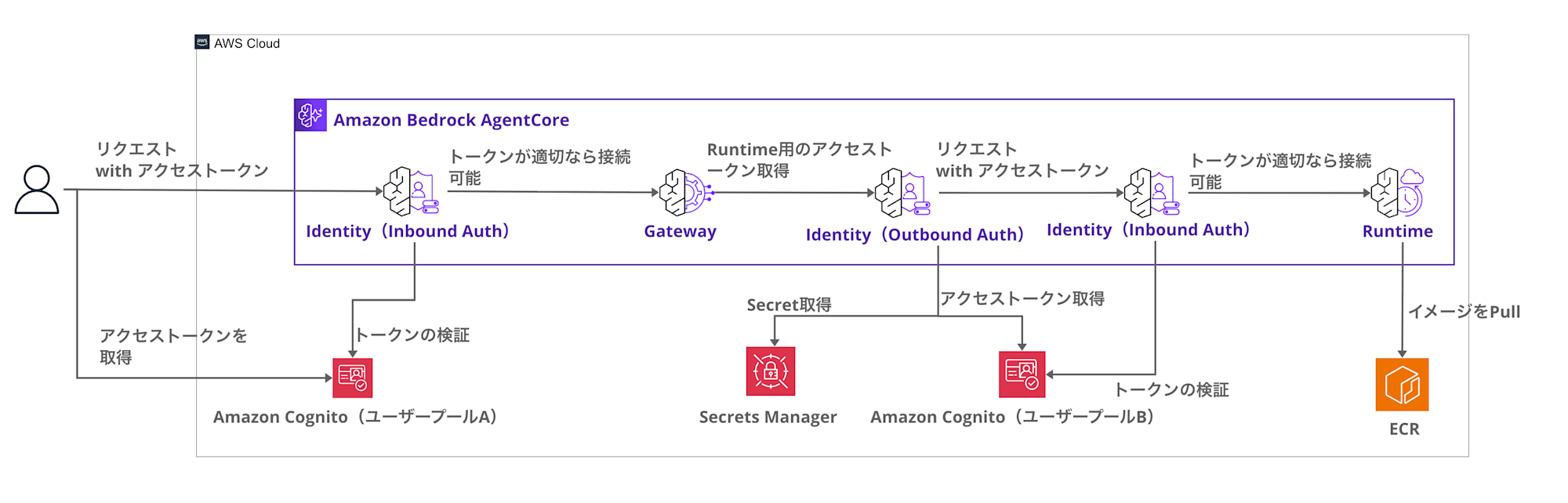
The key point is using JWT for M2M authentication between Runtime and Gateway.
Since IAM authentication and user delegation are not currently available when using Runtime as a Target, M2M seems to be the only option.
We have two Cognito user pools, so let's clarify their respective roles:
| Aspect | Cognito User Pool A (Inbound) | Cognito User Pool B (Outbound) |
|---|---|---|
| Purpose | User authentication | Service-to-service authentication |
| Auth Flow | User password authentication (USER_PASSWORD_AUTH) | M2M authentication (client_credentials) |
| Client Secret | No (public client) | Yes (confidential client) |
| Principal | User | Gateway (machine) |
Since user authentication and M2M authentication have different requirements, we separate the user pools.
Note: Using IAM for Gateway Inbound Auth
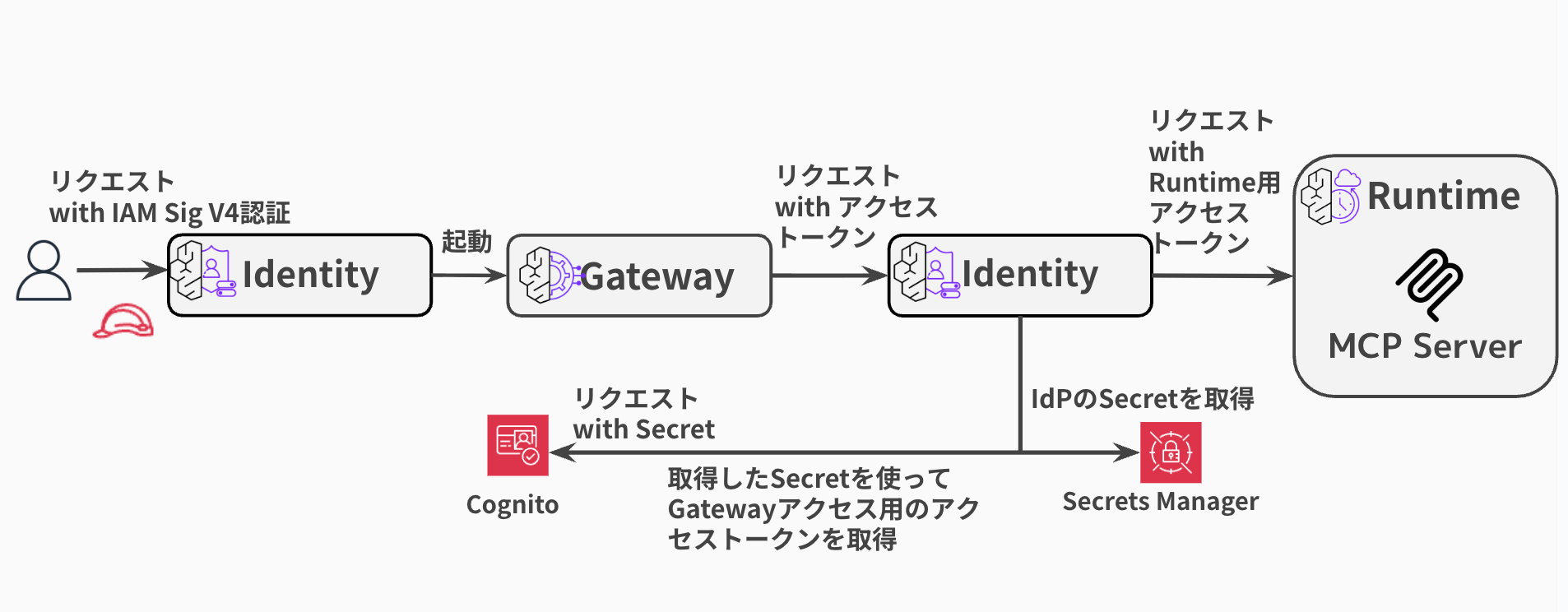
In this article, we use JWT for Gateway's Inbound Auth, but if issuing access tokens is cumbersome, using IAM for Inbound Auth as described in the blog below might be a good option. However, this approach has challenges like usage by users without AWS accounts or deployment to non-engineers, but it's still a viable option.
The configuration would look like this:
MCP Server to Build
Let's create a simple MCP Server.
from mcp.server.fastmcp import FastMCP

mcp = FastMCP(host="0.0.0.0", stateless_http=True)

@mcp.tool()
def add_numbers(a: int, b: int) -> int:
    """Add two numbers together"""
    return a + b

@mcp.tool()
def multiply_numbers(a: int, b: int) -> int:
    """Multiply two numbers together"""
    return a * b

@mcp.tool()
def greet_user(name: str) -> str:
    """Greet a user by name"""
    return f"Hello, {name}! Nice to meet you."

if __name__ == "__main__":
    mcp.run(transport="streamable-http")
This is a simple MCP Server using FastMCP. It defines three tools (add_numbers, multiply_numbers, greet_user).
We'll host this MCP Server in Runtime and call it from a local environment.
Let's Try It
Sample code is available in the repository below. Please refer to it to see the entire codebase.
Let's look at the Terraform code for the Gateway Target, which is the key point of this demonstration:
resource "aws_bedrockagentcore_gateway_target" "mcp_server" {
  name               = "${var.project_name}-mcp-target"
  gateway_identifier = aws_bedrockagentcore_gateway.main.gateway_id

  # Outbound Authentication: OAuth M2M (client_credentials)
  credential_provider_configuration {
    oauth {
      provider_arn = aws_bedrockagentcore_oauth2_credential_provider.m2m.credential_provider_arn
      scopes = [
        "${aws_cognito_resource_server.mcp.identifier}/tools.read",
        "${aws_cognito_resource_server.mcp.identifier}/tools.write",
        "${aws_cognito_resource_server.mcp.identifier}/tools.execute"
      ]
    }
  }

  # Target Configuration: MCP Server
  target_configuration {
    mcp {
      mcp_server {
        endpoint = "https://bedrock-agentcore.${data.aws_region.current.name}.amazonaws.com/runtimes/${urlencode(aws_bedrockagentcore_agent_runtime.mcp_server.agent_runtime_arn)}/invocations"
      }
    }
  }
}
The credential_provider_configuration sets up M2M authentication, and
target_configuration specifies the Runtime endpoint.
The Credential Provider referenced by the Gateway Target is defined as follows:
resource "aws_bedrockagentcore_oauth2_credential_provider" "m2m" {
  name                       = "${var.project_name}-m2m-oauth2-provider"
  credential_provider_vendor = "CustomOauth2"

  oauth2_provider_config {
    custom_oauth2_provider_config {
      client_id     = aws_cognito_user_pool_client.m2m.id
      client_secret = aws_cognito_user_pool_client.m2m.client_secret

      oauth_discovery {
        discovery_url = "https://cognito-idp.${data.aws_region.current.name}.amazonaws.com/${aws_cognito_user_pool.outbound.id}/.well-known/openid-configuration"
      }
    }
  }
}
It configures the Cognito client ID and secret, and specifies the Discovery URL.
Gateway uses this Credential Provider to obtain M2M tokens and attach them to requests to Runtime.
Prerequisites
Here are the versions used in this article:
- macOS 26.1
- Terraform v1.11.4
- AWS CLI 2.28.8
- Docker 29.0.2
- AWS Provider 6.27.0
- Region: us-east-1
Clone the Repository
First, let's clone the repository.
git clone https://github.com/yuu551/agentcore-gateway-runtime-m2m-auth-demo.git
cd agentcore-gateway-runtime-m2m-auth-demo
Deploy
Let's deploy everything with Terraform.
terraform init
terraform apply --auto-approve
terraform apply will create all of the following:
- Cognito User Pool A (for Inbound Auth)
- Cognito User Pool B (for Outbound Auth)
- ECR Repository + Docker Image Build & Push
- AgentCore Identity (Credential Provider)
- AgentCore Runtime (MCP Server)
- AgentCore Gateway + Target
Docker image building and pushing are also executed automatically.
After completion, let's create a Cognito user, issue a token, and send a request via Gateway.
Create Test User
Let's create a test user for Gateway calls.
INBOUND_USER_POOL_ID=$(terraform output -raw inbound_user_pool_id)
INBOUND_CLIENT_ID=$(terraform output -raw inbound_client_id)
export AWS_REGION=us-east-1

aws cognito-idp admin-create-user \
  --user-pool-id $INBOUND_USER_POOL_ID \
  --username test-user \
  --temporary-password 'TempPass123!' \
  --message-action SUPPRESS

aws cognito-idp admin-set-user-password \
  --user-pool-id $INBOUND_USER_POOL_ID \
  --username test-user \
  --password 'TestPass123!' \
  --permanent
Get User Token
After creating the user, let's authenticate with ID and password to get an access token.
TOKEN=$(aws cognito-idp initiate-auth \
  --client-id $INBOUND_CLIENT_ID \
  --auth-flow USER_PASSWORD_AUTH \
  --auth-parameters USERNAME=test-user,PASSWORD='TestPass123!' \
  --query 'AuthenticationResult.AccessToken' \
  --output text)
Access MCP Server via Gateway
Now, let's access the MCP Server in Runtime via Gateway!
tools/list
First, let's get a list of available tools.
GATEWAY_URL=$(terraform output -raw gateway_url)

curl -X POST "$GATEWAY_URL" \
  -H "Authorization: Bearer $TOKEN" \
  -H "Content-Type: application/json" \
  -H "Accept: application/json, text/event-stream" \
  -d '{"jsonrpc":"2.0","id":1,"method":"tools/list"}' | jq
{
  "jsonrpc": "2.0",
  "id": 1,
  "result": {
    "tools": [
      {
        "inputSchema": {
          "type": "object",
          "properties": {
            "query": {
              "type": "string"
            }
          },
          "required": ["query"]
        },
        "name": "x_amz_bedrock_agentcore_search",
        "description": "A special tool that returns a trimmed down list of tools given a context. Use this tool only when there are many tools available and you want to get a subset that matches the provided context."
      },
      {
        "inputSchema": {
          "type": "object",
          "properties": {
            "a": { "type": "integer" },
            "b": { "type": "integer" }
          },
          "required": ["a", "b"]
        },
        "name": "m2m-auth-demo-mcp-target___add_numbers",
        "description": "Add two numbers together"
      },
      {
        "inputSchema": {
          "type": "object",
          "properties": {
            "name": { "type": "string" }
          },
          "required": ["name"]
        },
        "name": "m2m-auth-demo-mcp-target___greet_user",
        "description": "Greet a user by name"
      },
      {
        "inputSchema": {
          "type": "object",
          "properties": {
            "a": { "type": "integer" },
            "b": { "type": "integer" }
          },
          "required": ["a", "b"]
        },
        "name": "m2m-auth-demo-mcp-target___multiply_numbers",
        "description": "Multiply two numbers together"
      }
    ]
  }
}
We got our 3 defined tools plus the Gateway search tool (x_amz_bedrock_agentcore_search), a total of 4!
Now, let's try calling a tool.
tools/call (add_numbers)
Let's call the addition MCP tool.
curl -X POST "$GATEWAY_URL" \
  -H "Authorization: Bearer $TOKEN" \
  -H "Content-Type: application/json" \
  -H "Accept: application/json, text/event-stream" \
  -d '{
    "jsonrpc":"2.0",
    "id":2,
    "method":"tools/call",
    "params":{
      "name":"m2m-auth-demo-mcp-target___add_numbers",
      "arguments":{"a": 5, "b": 3}
    }
  }' | jq
{
  "jsonrpc": "2.0",
  "id": 2,
  "result": {
    "content": [
      {
        "type": "text",
        "text": "8"
      }
    ],
    "isError": false,
    "structuredContent": {
      "result": 8
    }
  }
}
It's working perfectly!
Let's try another MCP tool.
tools/call (greet_user)
This tool returns a simple greeting based on the provided name.
curl -X POST "$GATEWAY_URL" \
  -H "Authorization: Bearer $TOKEN" \
  -H "Content-Type: application/json" \
  -H "Accept: application/json, text/event-stream" \
  -d '{
    "jsonrpc":"2.0",
    "id":3,
    "method":"tools/call",
    "params":{
      "name":"m2m-auth-demo-mcp-target___greet_user",
      "arguments":{"name": "Alice"}
    }
  }' | jq
{
  "jsonrpc": "2.0",
  "id": 3,
  "result": {
    "content": [
      {
        "type": "text",
        "text": "Hello, Alice! Nice to meet you."
      }
    ],
    "isError": false,
    "structuredContent": {
      "result": "Hello, Alice! Nice to meet you."
    }
  }
}
We received a response for this one too!
We successfully accessed the MCP Server in Runtime via Gateway!! Great!!
Points of Interest
Here are some points I found interesting during my testing.
Gateway Target Endpoint URL Format
When specifying Runtime as a Gateway Target, pay attention to the endpoint URL format.
# ARN-based URL
endpoint = "https://bedrock-agentcore.${region}.amazonaws.com/runtimes/${urlencode(runtime_arn)}/invocations"
You need to URL encode the ARN, and the endpoint should end with /invocations.
I initially thought it should be /mcp, which caused some confusion... The document below has information on how to call it.
Gateway Service Role IAM Policy
When using M2M authentication, be careful with the IAM policy settings for the Gateway service role. If resource specifications for GetResourceOauth2Token or GetSecretValue are insufficient, tools/call will result in errors.
For more details on permissions, refer to the following documents:
For this sample, I've granted the following permissions (though they're somewhat broad):
iam.tf (Click to expand)
resource "aws_iam_role_policy" "gateway_identity" {
  name = "${var.project_name}-gateway-identity-policy"
  role = aws_iam_role.gateway.id

  policy = jsonencode({
    Version = "2012-10-17"
    Statement = [
      {
        Sid    = "GetWorkloadAccessToken"
        Effect = "Allow"
        Action = [
          "bedrock-agentcore:GetWorkloadAccessToken"
        ]
        Resource = [
          "arn:aws:bedrock-agentcore:${data.aws_region.current.name}:${data.aws_caller_identity.current.account_id}:workload-identity-directory/default",
          "arn:aws:bedrock-agentcore:${data.aws_region.current.name}:${data.aws_caller_identity.current.account_id}:workload-identity-directory/default/workload-identity/${var.project_name}-*"
        ]
      },
      {
        Sid    = "GetResourceOauth2Token"
        Effect = "Allow"
        Action = [
          "bedrock-agentcore:GetResourceOauth2Token"
        ]
        Resource = [
          "arn:aws:bedrock-agentcore:${data.aws_region.current.name}:${data.aws_caller_identity.current.account_id}:workload-identity-directory/default",
          "arn:aws:bedrock-agentcore:${data.aws_region.current.name}:${data.aws_caller_identity.current.account_id}:workload-identity-directory/default/workload-identity/*",
          "arn:aws:bedrock-agentcore:${data.aws_region.current.name}:${data.aws_caller_identity.current.account_id}:token-vault/default",
          "arn:aws:bedrock-agentcore:${data.aws_region.current.name}:${data.aws_caller_identity.current.account_id}:token-vault/default/oauth2credentialprovider/*"
        ]
      },
      {
        Sid    = "GetSecretValue"
        Effect = "Allow"
        Action = [
          "secretsmanager:GetSecretValue"
        ]
        Resource = [
          "arn:aws:secretsmanager:${data.aws_region.current.name}:${data.aws_caller_identity.current.account_id}:secret:bedrock-agentcore*"
        ]
      }
    ]
  })
}
GetResourceOauth2Token is needed for obtaining OAuth2 tokens, and GetSecretValue is required for retrieving client secrets stored in Secrets Manager.
Conclusion
I've tried configuring AgentCore Gateway with AgentCore Runtime's MCP Server as a Target!
The authentication seems a bit complex... For small-scale agents, it might be easier to use them as agent tools or target Lambda functions.
Using IAM authentication to connect to the Gateway could also be a good approach.
I hope this article has been helpful.
Thank you for reading!