
I tried out the blob payload of Amazon Bedrock AgentCore Memory

This page has been translated by machine translation. View original
Introduction
Hello, I'm Jinno from the Consulting Department, and I love supermarkets.
Are you using AgentCore Memory? Amazon Bedrock AgentCore Memory provides a blob payload for storing arbitrary JSON and binary data in addition to the conversational payload that stores conversation messages.
Blob: For storing binary format data, such as images and documents, or data that is unique to your agent, such as data stored in JSON format.
I thought it was just for conversations, but it also supports binary data, so you can incorporate images and documents into chats.
This time, I tried to see if I could use this blob to save and restore conversation messages and documents (Markdown and JSON files) in a single event!
The idea is to record the context of "this document was shared during this conversation" together, like the following:
[One Event]
  ├─ payload[0]: conversational (USER)    ← Conversation message
  ├─ payload[1]: conversational (ASSISTANT) ← Conversation message
  ├─ payload[2]: blob (document)          ← minutes.md
  └─ payload[3]: blob (document)          ← specification.json
Prerequisites
Environment
| Item | Version / Value |
|---|---|
| Python | 3.12 |
| strands-agents | 1.29.0 |
| strands-agents-tools | 0.2.22 |
| bedrock-agentcore SDK | 1.4.3 |
| AWS Region | us-east-1 |
Preparation
- AWS account is set up
- You have IAM permissions to operate Amazon Bedrock and AgentCore Memory
Creating AgentCore Memory Resource
This time, we'll create a Memory resource from the AWS Management Console.
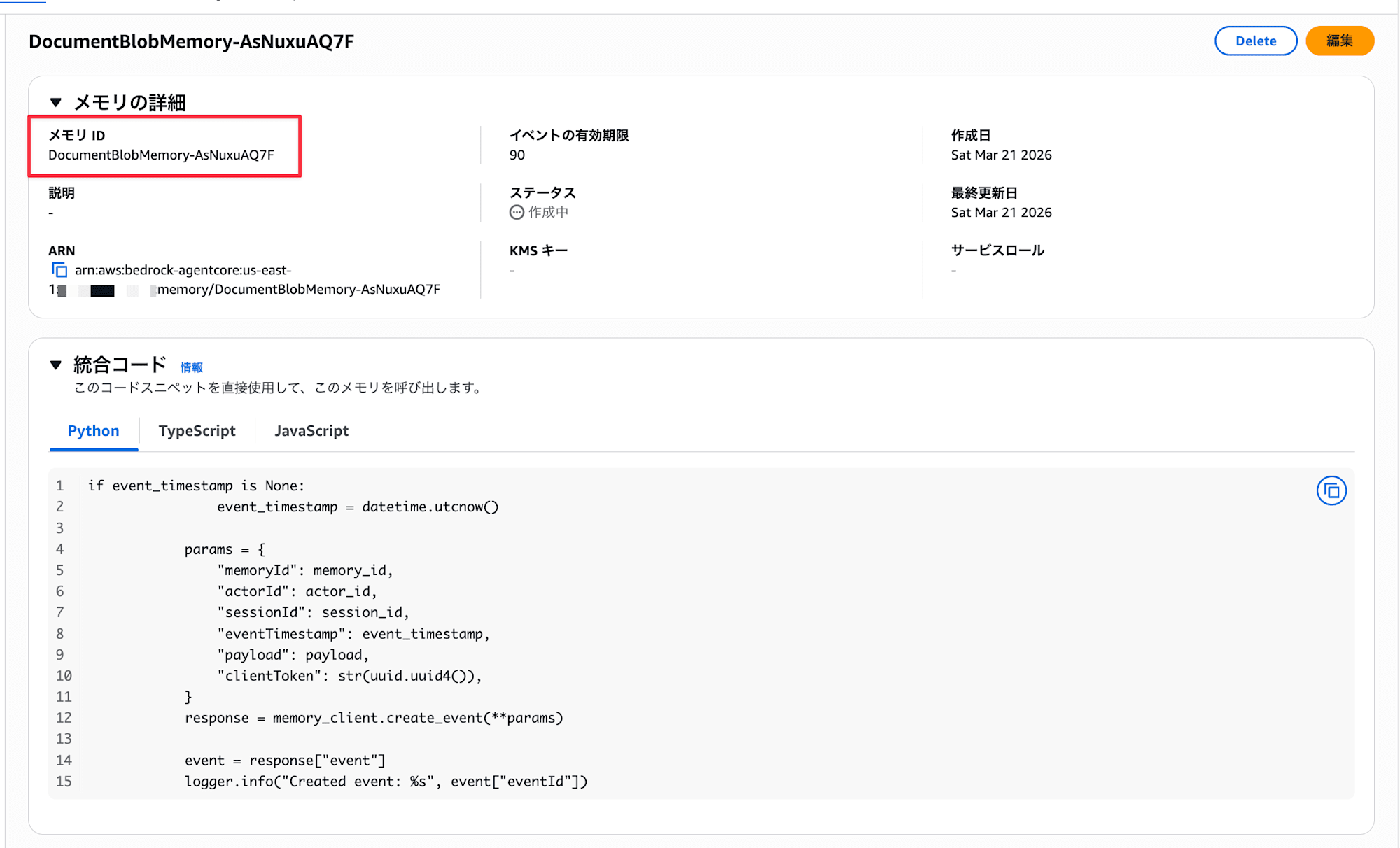
- Open the AgentCore console, select
Memoryfrom the left menu, and chooseCreate memory
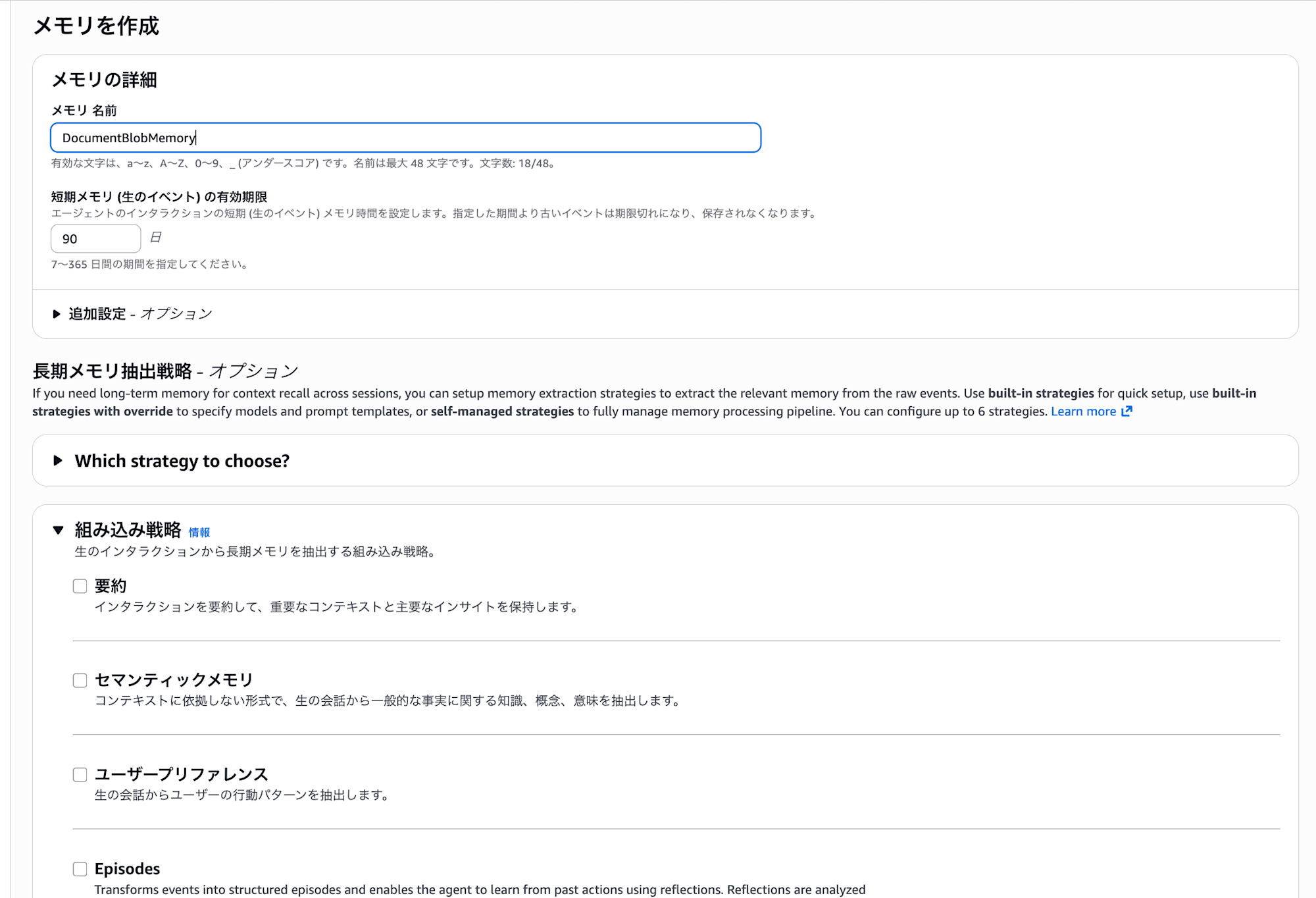
- Enter the following and create
- Name: Any name (e.g.,
DocumentBlobMemory) - Short-term memory expiration: Number of days for event expiration (e.g.,
90) - We won't use long-term memory for this example, so no need to configure it
- Name: Any name (e.g.,
- After creation, check the Memory ID on the list screen
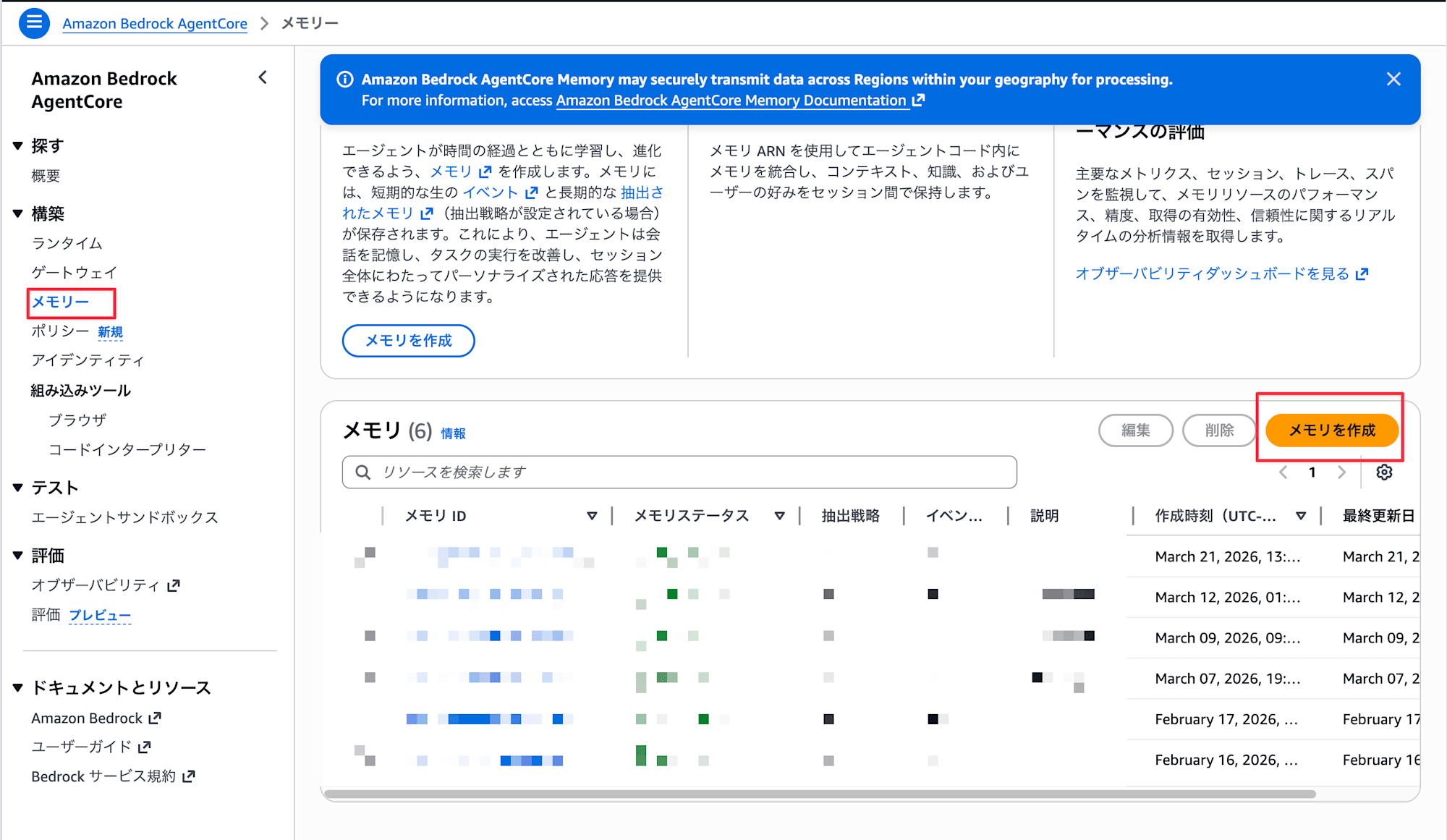
Set the obtained Memory ID as an environment variable.
export AGENTCORE_MEMORY_ID="your Memory ID"
Project Setup
uv init
uv add strands-agents strands-agents-tools bedrock-agentcore
AgentCore Memory's blob payload
AgentCore Memory Events have two types of payloads available:
| Payload type | Purpose |
|---|---|
conversational |
Storing conversation messages (role + content). Subject to long-term memory (LTM) extraction |
blob |
Storing arbitrary JSON/binary data. Not subject to LTM extraction |
Both types can be mixed in the payload array of a single event. We'll leverage this to store conversation messages and documents together.
Note that blob is not subject to long-term memory. Since it's binary, that makes sense.
Also, Strands Agents' AgentCoreMemorySessionManager is a Session Manager that handles conversational payloads, so it can't save or restore blobs. If you want to use blobs like in this example, you need to call the AgentCore Memory API directly and manage it yourself.
Implementation
The flow is to base64 encode, convert to JSON, and save together with the conversation event.
First, let's implement a helper for converting attachments.
Document Save/Restore Helper
Let's implement a helper for base64 encoding/decoding files and saving mixed conversational + blob data.
import base64
import json
import mimetypes
from datetime import datetime, timezone
from pathlib import Path

import boto3

def create_client(region_name: str = "us-east-1"):
    return boto3.client("bedrock-agentcore", region_name=region_name)

def encode_file(file_path: str | Path) -> dict:
    """Encode file to base64 and create blob dict"""
    path = Path(file_path)
    content_type = mimetypes.guess_type(str(path))[0] or "application/octet-stream"
    data = path.read_bytes()

    return {
        "type": "document",
        "filename": path.name,
        "content_type": content_type,
        "data_base64": base64.b64encode(data).decode("ascii"),
        "size_bytes": len(data),
    }

def decode_file(blob_dict: dict, output_dir: str | Path = ".") -> Path:
    """Restore file from blob dict"""
    output_dir = Path(output_dir)
    output_dir.mkdir(parents=True, exist_ok=True)

    filename = blob_dict["filename"]
    data = base64.b64decode(blob_dict["data_base64"])

    out_path = output_dir / filename
    out_path.write_bytes(data)
    return out_path
encode_file reads a file as binary and encodes it as base64, while decode_file does the reverse. Since we process at the binary level, the same functions work for Markdown, JSON, or images.
The JSON structure saved as a blob looks like this:
{
  "type": "document",
  "filename": "meeting_notes.md",
  "content_type": "text/markdown",
  "data_base64": "IyDjg5fjg63jgrjjgqfjgq/jg4jlrprkvov...",
  "size_bytes": 523
}
| Field | Content |
|---|---|
type |
Fixed as "document". Tag to distinguish from other blob data |
filename |
Original filename |
content_type |
MIME type (e.g., text/markdown, image/png) |
data_base64 |
Base64 encoded string of the file content |
size_bytes |
Original file size in bytes |
Next, here are functions to save and restore conversation messages and documents in a single event:
def save_conversation_with_docs(
    client,
    memory_id: str,
    actor_id: str,
    session_id: str,
    user_message: str,
    assistant_message: str,
    documents: list[str | Path] | None = None,
) -> str:
    """Save conversation messages and documents in a single event"""
    payload = [
        {
            "conversational": {
                "content": {"text": user_message},
                "role": "USER",
            }
        },
        {
            "conversational": {
                "content": {"text": assistant_message},
                "role": "ASSISTANT",
            }
        },
    ]

    if documents:
        for doc_path in documents:
            encoded = encode_file(doc_path)
            encoded["saved_at"] = datetime.now(timezone.utc).isoformat()
            payload.append({"blob": json.dumps(encoded)})

    response = client.create_event(
        memoryId=memory_id,
        actorId=actor_id,
        sessionId=session_id,
        eventTimestamp=int(datetime.now(timezone.utc).timestamp()),
        payload=payload,
    )
    event_id = response["event"]["eventId"]
    print(f"Event saved: {event_id}  (messages: 2, docs: {len(documents or [])})")
    return event_id
We put conversational (USER and ASSISTANT) at the beginning of the payload array and add document blob after them. For conversation turns without documents, the event contains only conversational payloads.
The dict created by encode_file is stringified with json.dumps() before being passed to blob.
def load_conversation_with_docs(
    client,
    memory_id: str,
    actor_id: str,
    session_id: str,
    restore_dir: str | Path = "restored_docs",
) -> list[dict]:
    """Get all events in the session and restore conversations and documents together"""
    response = client.list_events(
        memoryId=memory_id,
        actorId=actor_id,
        sessionId=session_id,
    )

    events = response.get("events", [])
    results = []

    for event in reversed(events):
        entry = {
            "event_id": event["eventId"],
            "messages": [],
            "documents": [],
        }

        for payload_item in event.get("payload", []):
            if "conversational" in payload_item:
                conv = payload_item["conversational"]
                entry["messages"].append({
                    "role": conv["role"],
                    "text": conv["content"]["text"],
                })

            if "blob" in payload_item:
                blob_raw = payload_item["blob"]
                if isinstance(blob_raw, str):
                    try:
                        blob = json.loads(blob_raw)
                    except json.JSONDecodeError:
                        continue
                else:
                    blob = blob_raw

                if isinstance(blob, dict) and blob.get("type") == "document":
                    restored_path = decode_file(blob, output_dir=restore_dir)
                    entry["documents"].append({
                        "filename": blob["filename"],
                        "content_type": blob.get("content_type", "unknown"),
                        "size_bytes": blob.get("size_bytes", 0),
                        "restored_path": restored_path,
                    })

        results.append(entry)

    return results
Since list_events returns events in reverse chronological order, we use reversed() to arrange them in chronological order to reconstruct the conversation flow. Only blobs with type set to "document" are restored to files using decode_file.
Implementing a Document-Aware Agent
Now that we have our helpers, let's implement an agent that uses them. This simple agent can save attachments and retrieve a list of saved attachments.
import os
from pathlib import Path

from strands import Agent, tool
from strands.types.tools import ToolContext

from doc_helper import (
    create_client,
    load_conversation_with_docs,
    save_conversation_with_docs,
)

MEMORY_ID = os.environ["AGENTCORE_MEMORY_ID"]
ACTOR_ID = "doc_demo_user"
SESSION_ID = "doc_session_v1"
REGION = "us-east-1"
RESTORE_DIR = "restored_docs"

agentcore_client = create_client(REGION)

@tool(context=True)
def attach_document(file_path: str, tool_context: ToolContext):
    """Add a document to the attachment list. It will be saved as a blob in AgentCore Memory on the next save.

    Args:
        file_path: Path to the file to attach
    """
    path = Path(file_path)
    if not path.exists():
        return f"File not found: {file_path}"

    pending = tool_context.agent.state.get("pending_documents") or []
    pending.append(str(path))
    tool_context.agent.state.set("pending_documents", pending)

    size_kb = path.stat().st_size / 1024
    return f"'{path.name}' added to attachment list ({size_kb:.1f} KB)"

@tool(context=True)
def list_attachments(tool_context: ToolContext):
    """Display the current attachment list and previously restored documents"""
    pending = tool_context.agent.state.get("pending_documents") or []
    history = tool_context.agent.state.get("document_history") or []

    lines = ["=== Pending Documents ==="]
    if pending:
        for p in pending:
            lines.append(f"  - {Path(p).name}")
    else:
        lines.append("  (None)")

    lines.append("\n=== Document History ===")
    if history:
        for h in history:
            lines.append(f"  - {h['filename']} ({h['content_type']}, {h['size_bytes']} bytes)")
    else:
        lines.append("  (None)")

    return "\n".join(lines)
The attach_document tool adds the specified file to the attachment list in agent.state, and list_attachments displays the list of pending attachments and document history.
Next, let's implement the agent startup, conversation loop, and saving logic:
def main():
    # 1. Restore conversations+documents from previous session
    history = load_conversation_with_docs(
        agentcore_client, MEMORY_ID, ACTOR_ID, SESSION_ID,
        restore_dir=RESTORE_DIR,
    )

    doc_history = []
    if history:
        print(f"Restored {len(history)} conversation+document entries from session")
        for entry in history:
            for doc in entry["documents"]:
                doc_history.append({
                    "filename": doc["filename"],
                    "content_type": doc["content_type"],
                    "size_bytes": doc["size_bytes"],
                    "restored_path": str(doc["restored_path"]),
                })
                print(f"  Restored: {doc['filename']} -> {doc['restored_path']}")
    else:
        print("No previous session found. Starting new.")

    # 2. Create agent
    agent = Agent(
        system_prompt=(
            "You are a Document Management Assistant.\n"
            "You help answer user questions while supporting document attachment and management.\n"
            "- attach_document: Add a file to the attachment list\n"
            "- list_attachments: Display attachment list and history\n"
            "\nIf a user wants to attach a document, ask them for the file path and use attach_document."
        ),
        tools=[attach_document, list_attachments],
        state={
            "pending_documents": [],
            "document_history": doc_history,
        },
    )

    # 3. Conversation loop
    try:
        while True:
            user_input = input("\nYou: ").strip()
            if user_input.lower() in ("quit", "exit", "q"):
                break

            result = agent(user_input)
            assistant_text = str(result)

            # 4. Save conversation+attached documents as an event each turn
            pending = agent.state.get("pending_documents") or []
            save_conversation_with_docs(
                agentcore_client,
                MEMORY_ID,
                ACTOR_ID,
                SESSION_ID,
                user_message=user_input,
                assistant_message=assistant_text[:500],
                documents=pending if pending else None,
            )

            if pending:
                print(f"  ({len(pending)} documents saved as blobs)")
                agent.state.set("pending_documents", [])

    except KeyboardInterrupt:
        print("\nInterrupted")

    print("Session ended.")

if __name__ == "__main__":
    main()
At startup, load_conversation_with_docs restores conversations and documents, and after each conversation turn, save_conversation_with_docs saves them. If documents are attached, the event contains both conversational and blob payloads; if not, it contains only conversational payloads.
Testing
Preparing Sample Documents
I've prepared two sample documents for testing: meeting notes and an API specification.
# Project Regular Meeting Notes

**Date**: 2026-03-10 14:00-15:00
**Participants**: Tanaka, Sato, Suzuki

## Agenda

### 1. Progress Report
- Frontend: Dashboard screen implementation completed (Tanaka)
- Backend: Adding API v2 endpoints in progress (Sato)
- Infrastructure: Preparing to update ECS task definitions (Suzuki)

### 2. Issues
- API response time exceeds the target of 200ms in some cases
- Database index review needed
{
  "openapi": "3.0.0",
  "info": {
    "title": "Sample Project API",
    "version": "2.0.0",
    "description": "Project management API"
  },
  "paths": {
    "/tasks": {
      "get": {
        "summary": "Get task list",
        ...
      }
    }
  }
}
Testing the Agent
Let's run the agent and attach some documents.
uv run document_agent.py
No previous session found. Starting new.

You: sample_docs/meeting_notes.md を添付して
Tool: attach_document
'meeting_notes.md' added to attachment list (0.5 KB)
Event saved: 0000001773100200000#a1b2c3d4  (messages: 2, docs: 1)
  (1 documents saved as blobs)

You: sample_docs/api_spec.json も添付して
Tool: attach_document
'api_spec.json' added to attachment list (0.8 KB)
Event saved: 0000001773100201000#e5f6a7b8  (messages: 2, docs: 1)
  (1 documents saved as blobs)

You: ^C
Interrupted
Session ended.
Conversation messages and documents are being saved together. Now let's restart the process and check if they're restored.
Restored 2 conversation+document entries from session
  Restored: meeting_notes.md -> restored_docs/meeting_notes.md
  Restored: api_spec.json -> restored_docs/api_spec.json

You:
The structure saved in AgentCore Memory looks like this, and we retrieve it using list_events to restore the documents:
{
  "eventId": "0000001773100200000#a1b2c3d4",
  "payload": [
    {
      "conversational": {
        "role": "USER",
        "content": { "text": "sample_docs/meeting_notes.md を添付して" }
      }
    },
    {
      "conversational": {
        "role": "ASSISTANT",
        "content": { "text": "'meeting_notes.md' を添付リストに追加しました" }
      }
    },
    {
      "blob": "{\"type\": \"document\", \"filename\": \"meeting_notes.md\", \"content_type\": \"text/markdown\", \"data_base64\": \"IyDjg5fjg63jgrjjgqfjgq...\", \"size_bytes\": 523}"
    }
  ]
}
Looking at the restored_docs/ folder, we can see that the files we attached earlier have been restored:
restored_docs/
├── meeting_notes.md
└── api_spec.json
Even after restarting the process, the documents shared in the conversation are properly restored!!
Image files (PNG, JPEG, etc.) can be saved and restored using the same method. encode_file simply reads as binary and base64 encodes, so we don't need to be aware of the file format.
For this example, I used simple small files that could be directly base64 encoded into blobs, but for large files, there's room for optimization. In my tests, I was able to save a 133 KB image and a 2 MB PDF without issues, but a 11.4 MB PDF resulted in a 413 error. This is likely because AgentCore Memory has a quota limit of 10 MB per event.
Also, when passing restored documents to an agent, it's not practical to pass the entire content of large files directly since LLM context windows aren't infinite, and raw binary would just be noise. When you need to have the LLM read the content, you might want to convert it separately or store it in S3 and just record the reference path in the blob, then retrieve only the necessary parts to include in the context.
Challenging Points
Can't restore when passing dict directly to blob
You can pass a dict directly to the blob, but when retrieved with list_events, it comes back as a string with unquoted keys:
payload.append({"blob": {"type": "agent_state", "data": {"count": 1}}})
{type=agent_state, data={count=1}}
This isn't JSON, so you can't parse it with json.loads(). If you stringify it with json.dumps() when saving, it will come back as a JSON string that can be parsed:
payload.append({"blob": json.dumps({"type": "agent_state", "data": {"count": 1}})})
'{"type": "agent_state", "data": {"count": 1}}'
Conclusion
By combining base64 encoding, I confirmed that binary data like Markdown documents and JSON files can be saved and restored as blobs. Furthermore, being able to mix conversational and blob in a single event allows us to remember the context of "this document was shared during this conversation," which is very useful.
This verification was done with small files, but practical scenarios would require design considerations for file size and LLM context. There's room for creativity in integrating with S3 and extracting only the necessary parts to pass to the context. Storing the file itself in S3 and keeping only the state like paths as blobs seems like a good approach.
I hope this article was helpful. Thank you for reading!