![I Implemented an Agent that Remembers Conversation History with [Amazon Bedrock AgentCore]Memory Feature](https://images.ctfassets.net/ct0aopd36mqt/7qr9SuOUauNHt4mdfTe2zu/8f7d8575eed91c386015d09e022e604a/AgentCore.png?w=3840&fm=webp)
I Implemented an Agent that Remembers Conversation History with [Amazon Bedrock AgentCore]Memory Feature

This page has been translated by machine translation. View original
Introduction
Hello, I'm Kanno from the Consulting Department.
Are you using Amazon Bedrock AgentCore (hereafter AgentCore) Memory feature? It's an interesting feature that was released in preview last month.
I'd like to explore what AgentCore Memory's Short-term Memory and Long-term Memory can do by implementing an agent!
About AgentCore Memory
AgentCore Memory is a managed service for giving AI agents "memory." It can manage two main types of memory.
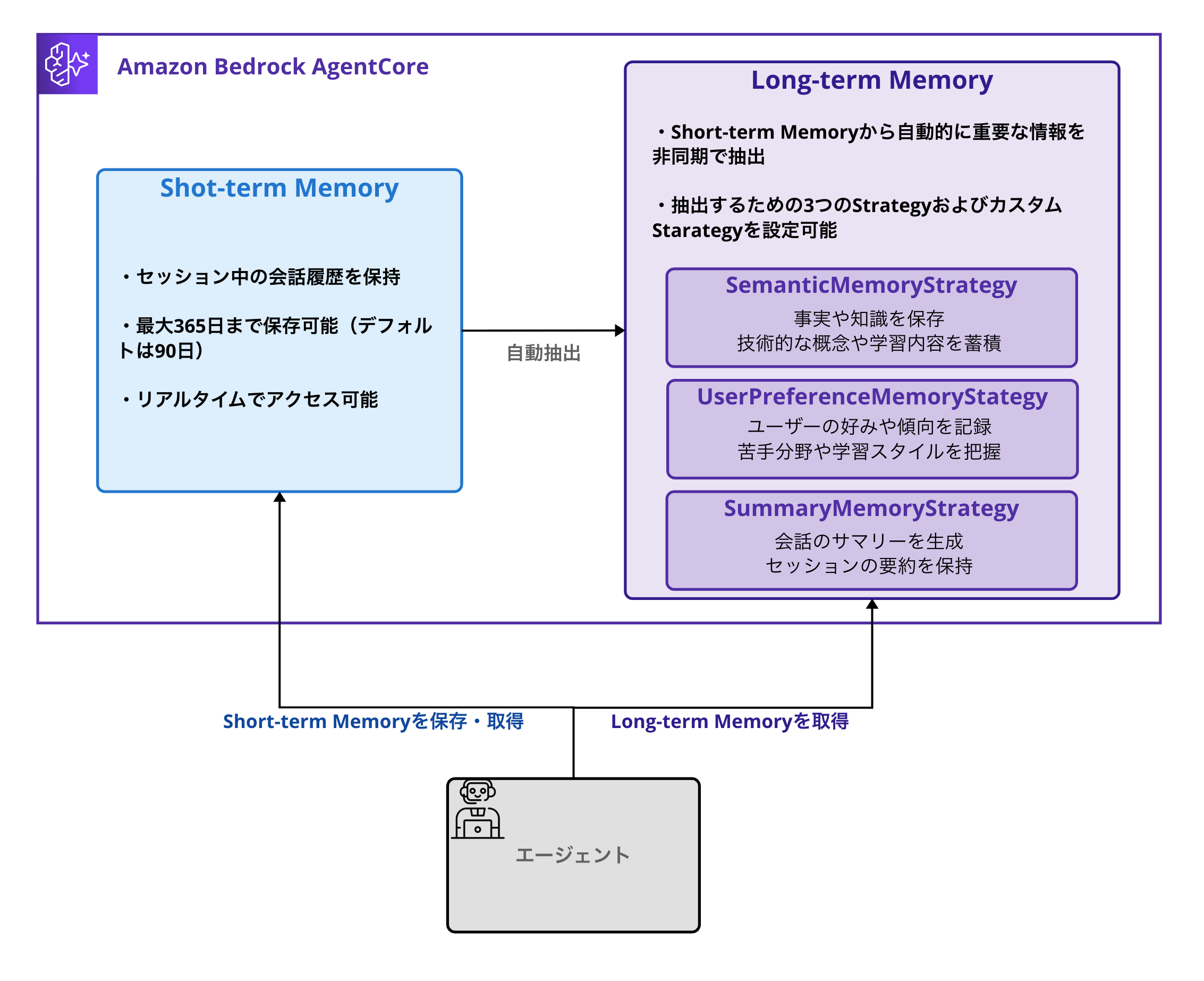
Short-term Memory
Short-term Memory is a mechanism for retaining conversation history during a session.
Features:
-
Can record conversation history during a session
-
Can be stored for up to 365 days
- Default setting is 90 days storage
-
Real-time access
-
Data is organized by Actor ID and Session ID
- Actor ID: Whose memory it is (identifies users or entities)
- Session ID: Which session/conversation the memory belongs to
-
Raw data is stored directly
Usage Example
# Record questions and answers from today's learning session
memory_client.create_event(
    memory_id=MEMORY_ID,
    actor_id="engineer_alice",
    session_id="python_study_20250817",
    messages=[
        ("Tell me about Python decorators", "USER"),
        ("Decorators are a mechanism for extending functions...", "ASSISTANT")
    ]
)

# Retrieve Memory information
events = memory_client.list_events(
            memory_id=memory_id,
            actor_id=actor_id,
            session_id=session_id,
            max_results=max_results
        )
Conversation history can be maintained as a managed service. It's also nice that attributes like actor for sorting by person and session for switching content by conversation are provided by default.
This alone makes it possible to maintain independent conversation histories per user and per session for chatbots.
Long-term Memory
Long-term Memory is a feature that automatically extracts and integrates important information from Short-term Memory.
The extracted insights are stored as vector data,
allowing efficient retrieval of relevant memories through semantic search.
I thought it was great that it's processed automatically and asynchronously!
Three Built-in Memory Strategies
According to the AWS official documentation, the following three built-in strategies are available:
| Strategy | Role |
|---|---|
| SemanticMemoryStrategy | Extract and store facts and knowledge |
| UserPreferenceMemoryStrategy | Record user preferences and tendencies |
| SummaryMemoryStrategy | Generate summaries of conversations |
These all seem like useful strategies. They can be used depending on the purpose.
Scoping with Namespace
Namespace is a mechanism for logically grouping and organizing Long-term Memory. It can be defined in a hierarchical structure (slash-separated) and can use the following variables:
- {actorId}: Whose memory it is (identifies users or entities)
- {sessionId}: Which session/conversation the memory belongs to
- {strategyId}: ID to distinguish strategies
Namespace Design Examples
You can design Namespace as follows:
/retail-agent/customer-123/preferences: For specific customer preferences
/retail-agent/product-knowledge: For shared product information accessible by users
/support-agent/customer-123/case-summaries/session-001: For summaries of past support cases
For a more detailed understanding of the Memory feature, please refer to the following AWS official blog, which is very informative.
Technical Learning Assistant to be Implemented
Overall Architecture
Here's what the agent architecture we're creating looks like:
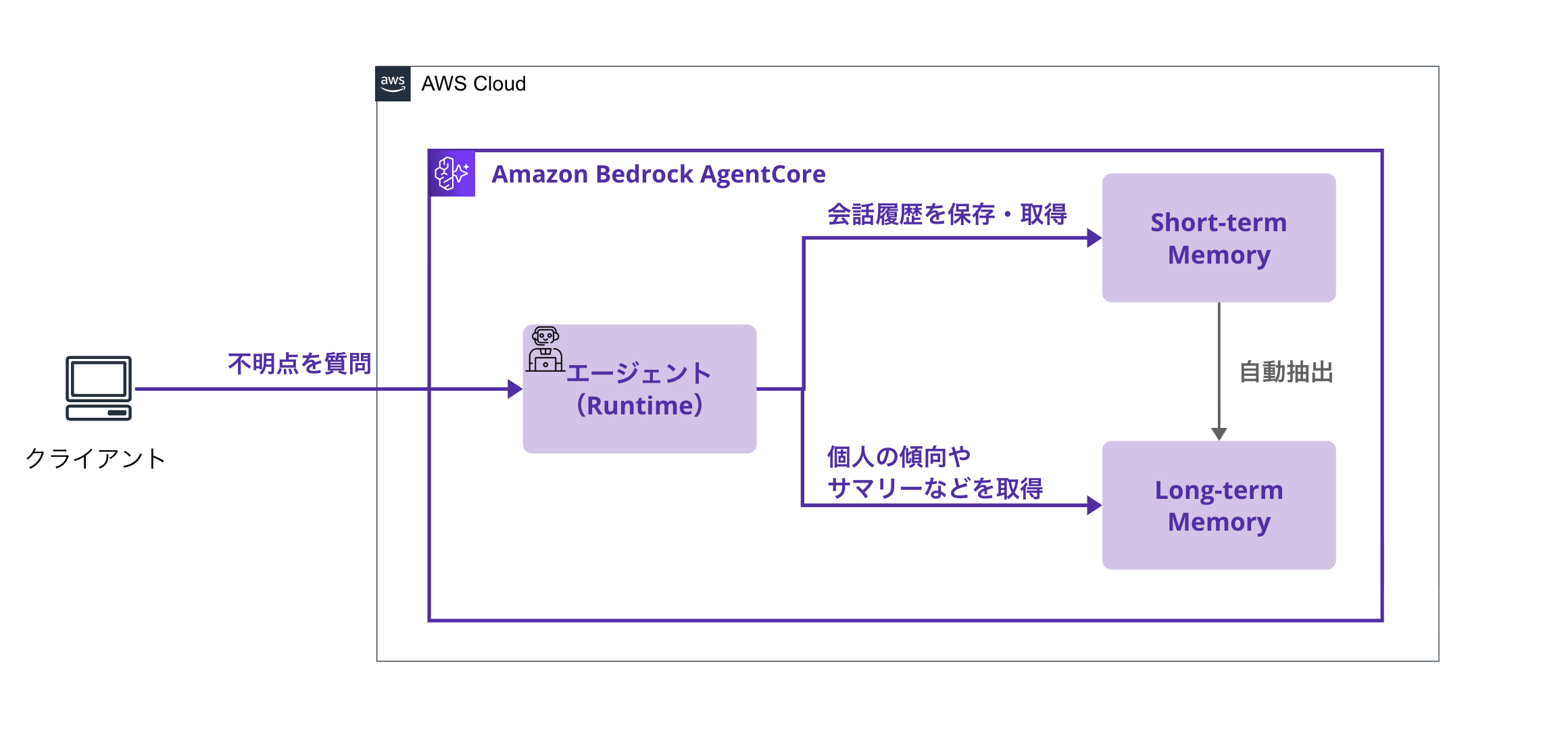
The flow is as follows:
-
User asks a technical question
- Example: "Tell me about Python decorators"
-
Agent responds while updating memory
- Short-term Memory: Records questions and answers in the session
- Long-term Memory (asynchronous):
- Extracts technical knowledge (SemanticMemory)
- Analyzes comprehension and weak areas (UserPreference)
- Extracts session summaries (SummaryMemory)
-
Learning Analysis Features
- "What are my weak areas?" → Analysis from Long-term Memory
- "Summarize what I've learned recently" → Generated from session summaries
- "I want to review Python" → Suggests review points from past learning content
Let's create an agent that utilizes the Memory feature!
Prerequisites
Required Environment
- AWS CLI 2.28.8
- Python 3.12.6
- AWS account
- Region to use: us-west-2
- Model activation
- We'll use
anthropic.claude-3-5-haiku-20241022-v1:0for this example
- We'll use
Environment Setup
Python Environment Setup
Let's start by creating a virtual environment and installing the necessary libraries.
# Create project directory
mkdir tech-learning-assistant
cd tech-learning-assistant

# Create and activate virtual environment
python3 -m venv venv
source venv/bin/activate
Installing Required Libraries
Create a requirements.txt file.
strands-agents
strands-agents-tools
boto3
bedrock-agentcore
bedrock-agentcore-starter-toolkit
python-dotenv
Install the libraries.
pip install -r requirements.txt
Preparing Environment Variables
Create a .env file to manage environment variables.
Basically, the creation script is designed to automatically update ARNs for roles, etc.
If you want to change the model, please modify BEDROCK_MODEL_ID. We'll use anthropic.claude-3-5-haiku-20241022-v1:0 for this example.
# AWS configuration
REGION=us-west-2

# Agent configuration
AGENT_NAME=tech_learning_assistant

# Memory settings (create_memory.py will update automatically)
MEMORY_ID=placeholder

# IAM role configuration (ARN created by create_iam_role.py)
EXECUTION_ROLE_ARN=arn:aws:iam::YOUR_ACCOUNT_ID:role/AgentCoreExecutionRole

# Bedrock model configuration
BEDROCK_MODEL_ID=anthropic.claude-3-5-haiku-20241022-v1:0

# Agent Runtime configuration (update after deployment)
AGENT_RUNTIME_ARN=arn:aws:bedrock-agentcore:us-west-2:YOUR_ACCOUNT_ID:runtime/YOUR_RUNTIME_ID
Creating Memory
Now, let's create AgentCore Memory! This is a pretty important part, so I'd like to explain it thoroughly.
Understanding ID Hierarchical Structure
AgentCore Memory manages IDs at three levels. Understanding this will make implementation much easier!
| Level | ID Type | Role/Purpose | Lifecycle | Example |
|---|---|---|---|---|
| 1 | Memory ID | Identifies the entire memory instance | Permanent (years) | TechLearningAssistantMemory_1692345678 |
| 2 | Actor ID | Identifies users/data separation | Semi-permanent (account) | engineer_alice, team_lead_bob |
| 3 | Session ID | Management per learning session/summaries | Short-term (hours/days) | python_study_20250817, react_review |
Role of Each
Here's the general idea:
- Memory ID: Unique memory instance for the entire system.
- Actor ID: Achieves data separation between users. Alice's learning data won't mix with Bob's learning data.
- Session ID: Learning session unit. Even for the same user, "Today's Python learning" and "Yesterday's React review" are managed separately.
You might think of ChatGPT's SessionID as a record unit in the conversation history tab for a better understanding.
Namespace Design Approach
For this technical learning assistant, we've designed the following namespaces:
# Technical knowledge: Managed by user (accumulated across sessions)
"tech_learning/knowledge/{actorId}"

# Learning tendencies: Managed by user (long-term learning pattern analysis)
"tech_learning/preferences/{actorId}"

# Summaries: Managed by user×session (used as learning history)
"tech_learning/summaries/{actorId}/{sessionId}"
By separating with actor_id, data won't mix between users, and knowledge accumulates long-term (per actor), while summaries are managed per session.
Implementation Code (Detailed Version)
Now, let's actually create the Memory!
from bedrock_agentcore.memory import MemoryClient
from bedrock_agentcore.memory.constants import StrategyType
import time

# Initialize Memory Client
client = MemoryClient(region_name="us-west-2")

# Define three strategies
# Set name, description, and namespace for each
strategies = [
    {
        # Strategy for extracting technical knowledge
        StrategyType.SEMANTIC.value: {
            "name": "TechnicalKnowledgeExtractor",
            "description": "Extract and store technical knowledge and concepts",
            "namespaces": ["tech_learning/knowledge/{actorId}"]
            # Separate knowledge by actorId (User A's knowledge won't mix with User B's)
        }
    },
    {
        # Strategy for recording learning tendencies
        StrategyType.USER_PREFERENCE.value: {
            "name": "LearningPreferences",
            "description": "Record learning tendencies, comprehension level, and weak areas",
            "namespaces": ["tech_learning/preferences/{actorId}"]
            # Manage each user's learning style and weak areas individually
        }
    },
    {
        # Strategy for generating session summaries
        StrategyType.SUMMARY.value: {
            "name": "SessionSummary",
            "description": "Generate summaries of learning sessions",
            "namespaces": ["tech_learning/summaries/{actorId}/{sessionId}"]
            # Create summaries for each session (used as learning history)
        }
    }
]

print("🚀 Creating AgentCore Memory...")
print("📝 Configuration:")
print(f"   - Semantic Strategy: Store technical knowledge for each user")
print(f"   - User Preference Strategy: Record learning tendencies and weak areas")
print(f"   - Summary Strategy: Generate summaries for each session")

timestamp = int(time.time())
memory_name = f"TechLearningAssistantMemory_{timestamp}"

# Create Memory (365 days event retention)
memory = client.create_memory(
    name=memory_name,
    strategies=strategies,
    description="Memory for technical learning assistant (individual user management)",
)

memory_id = memory['id']
print(f"\n✅ Memory creation complete!")
print(f"   Memory ID: {memory_id}")
print(f"   Status: {memory['status']}")

# Check IDs for each strategy (automatically generated)
print(f"\n📋 Generated Strategy IDs:")
for strategy in memory.get('strategies', []):
    print(f"   - {strategy['type']}: {strategy['strategyId']}")
    print(f"     Namespace: {strategy['namespaces'][0]}")

# Automatically update .env file
with open('.env', 'r') as f:
    content = f.read()

updated_content = content.replace('MEMORY_ID=placeholder', f'MEMORY_ID={memory_id}')

with open('.env', 'w') as f:
    f.write(updated_content)

print(f"\n🎉 .env file automatically updated!")
Let's run it.
python create_memory.py
The execution result will look like this:
🚀 Creating AgentCore Memory...
📝 Configuration:
   - Semantic Strategy: Store technical knowledge for each user
   - User Preference Strategy: Record learning tendencies and weak areas
   - Summary Strategy: Generate summaries for each session

✅ Memory creation complete!
   Memory ID: TechLearningAssistantMemory_1692345678-AbC123DeF456
   Status: CREATING

📋 Generated Strategy IDs:
   - SEMANTIC: TechnicalKnowledgeExtractor-xyz789abc123
     Namespace: tech_learning/knowledge/{actorId}
   - USER_PREFERENCE: LearningPreferences-def456ghi789
     Namespace: tech_learning/preferences/{actorId}
   - SUMMARY: SessionSummary-jkl012mno345
     Namespace: tech_learning/summaries/{actorId}/{sessionId}

🎉 .env file automatically updated!
You can see that each strategy has been automatically assigned a strategyId! We're ready to go.
Example of Memory Search Usage
When searching the created Memory, you can efficiently retrieve data by specifying the appropriate namespace.
# Analysis of weak areas
preference_records = memory_client.retrieve_memories(
            memory_id=MEMORY_ID,
            namespace=f"tech_learning/preferences/{actor_id}",
            query="weak difficult challenge",
            top_k=10
)
It's great that you can efficiently retrieve only the necessary data by specifying the namespace. The ability to automatically aggregate by user or by session is also a strong point.
It's also possible to write queries for searching.
Creating IAM Role
Let's create an IAM role for execution in AgentCore Runtime.
import boto3
import json
from dotenv import load_dotenv

load_dotenv()

def create_execution_role():
    print("🔐 Creating IAM Execution Role...")

    iam = boto3.client('iam', region_name='us-west-2')
    sts = boto3.client('sts', region_name='us-west-2')

    # Dynamically get account ID
    account_id = sts.get_caller_identity()['Account']
    region = 'us-west-2'

    # IAM Role name
    role_name = "AgentCoreExecutionRole"

    # Trust policy
    trust_policy = {
        "Version": "2012-10-17",
        "Statement": [
            {
                "Effect": "Allow",
                "Principal": {
                    "Service": "bedrock-agentcore.amazonaws.com"
                },
                "Action": "sts:AssumeRole",
                "Condition": {
                    "StringEquals": {
                        "aws:SourceAccount": account_id
                    },
                    "ArnLike": {
                        "aws:SourceArn": f"arn:aws:bedrock-agentcore:{region}:{account_id}:*"
                    }
                }
            }
        ]
    }

    # Permission policy (including permissions for Memory feature)
    permission_policy = {
        "Version": "2012-10-17",
        "Statement": [
            {
                "Effect": "Allow",
                "Action": [
                    "ecr:BatchGetImage",
                    "ecr:GetDownloadUrlForLayer",
                    "ecr:GetAuthorizationToken"
                ],
                "Resource": ["*"]
            },
            {
                "Effect": "Allow",
                "Action": [
                    "logs:CreateLogGroup",
                    "logs:CreateLogStream",
                    "logs:PutLogEvents"
                ],
                "Resource": f"arn:aws:logs:{region}:{account_id}:*"
            },
            {
                "Effect": "Allow",
                "Action": [
                    "bedrock:InvokeModel",
                    "bedrock-agentcore:*"
                ],
                "Resource": "*"
            }
        ]
    }

    try:
        # Check for existing role
        try:
            existing_role = iam.get_role(RoleName=role_name)
            print(f"✅ Existing role found: {role_name}")
            role_arn = existing_role['Role']['Arn']

            # Automatically update .env file
            try:
                with open('.env', 'r') as f:
                    content = f.read()

                # Update EXECUTION_ROLE_ARN line
                lines = content.split('\n')
                updated_lines = []
                arn_updated = False

                for line in lines:
                    if line.startswith('EXECUTION_ROLE_ARN='):
                        updated_lines.append(f'EXECUTION_ROLE_ARN={role_arn}')
                        arn_updated = True
                        print(f"✅ Updated EXECUTION_ROLE_ARN in .env file")
                    else:
                        updated_lines.append(line)

                # Add EXECUTION_ROLE_ARN line if it doesn't exist
                if not arn_updated:
                    updated_lines.append(f'EXECUTION_ROLE_ARN={role_arn}')
                    print(f"✅ Added EXECUTION_ROLE_ARN to .env file")

                with open('.env', 'w') as f:
                    f.write('\n'.join(updated_lines))
                    if not content.endswith('\n'):
                        f.write('\n')

                print(f"🎉 .env file automatically updated!")

            except Exception as e:
                print(f"⚠️ Failed to update .env file: {e}")
                print(f"Please manually set EXECUTION_ROLE_ARN to: {role_arn}")

            return role_arn
        except iam.exceptions.NoSuchEntityException:
            pass

        # Create IAM Role
        response = iam.create_role(
            RoleName=role_name,
            AssumeRolePolicyDocument=json.dumps(trust_policy),
            Description="Execution role for AgentCore Tech Learning Assistant"
        )

        role_arn = response['Role']['Arn']
        print(f"✅ IAM Role created: {role_name}")

        # Create and attach policy
        policy_name = "AgentCoreExecutionPolicy"

        try:
            policy_response = iam.create_policy(
                PolicyName=policy_name,
                PolicyDocument=json.dumps(permission_policy),
                Description="Permissions for AgentCore Tech Learning Assistant"
            )
            policy_arn = policy_response['Policy']['Arn']
            print(f"✅ IAM Policy created: {policy_name}")
        except iam.exceptions.EntityAlreadyExistsException:
            # Get ARN for existing policy
            account_id = boto3.client('sts').get_caller_identity()['Account']
            policy_arn = f"arn:aws:iam::{account_id}:policy/{policy_name}"
            print(f"✅ Using existing policy: {policy_name}")

        # Attach policy to role
        iam.attach_role_policy(
            RoleName=role_name,
            PolicyArn=policy_arn
        )
        print(f"✅ Policy attached to role")

        print(f"🎉 IAM Execution Role preparation complete!")
        print(f"Role ARN: {role_arn}")

        # Automatically update .env file
        try:
            with open('.env', 'r') as f:
                content = f.read()

            # Update EXECUTION_ROLE_ARN line
            lines = content.split('\n')
            updated_lines = []
            arn_updated = False

            for line in lines:
                if line.startswith('EXECUTION_ROLE_ARN='):
                    updated_lines.append(f'EXECUTION_ROLE_ARN={role_arn}')
                    arn_updated = True
                    print(f"✅ Updated EXECUTION_ROLE_ARN in .env file")
                else:
                    updated_lines.append(line)

            # Add EXECUTION_ROLE_ARN line if it doesn't exist
            if not arn_updated:
                updated_lines.append(f'EXECUTION_ROLE_ARN={role_arn}')
                print(f"✅ Added EXECUTION_ROLE_ARN to .env file")

            with open('.env', 'w') as f:
                f.write('\n'.join(updated_lines))
                if not content.endswith('\n'):
                    f.write('\n')

            print(f"🎉 .env file automatically updated!")

        except Exception as e:
            print(f"⚠️ Failed to update .env file: {e}")
            print(f"Please manually set EXECUTION_ROLE_ARN to: {role_arn}")

        return role_arn

    except Exception as e:
        print(f"❌ IAM Role creation error: {e}")
        return None

if __name__ == "__main__":
    create_execution_role()
Let's execute it to get the role ARN. The script will automatically update the EXECUTION_ROLE_ARN in the .env file.
python create_iam_role.py
Execution result:
🔐 Creating IAM Execution Role...
✅ IAM Role created: AgentCoreExecutionRole
✅ IAM Policy created: AgentCoreExecutionPolicy
✅ Policy attached to role
🎉 IAM Execution Role preparation complete!
Role ARN: arn:aws:iam::123456789012:role/AgentCoreExecutionRole
✅ Updated EXECUTION_ROLE_ARN in .env file
🎉 .env file automatically updated!
Agent Implementation
Now we move to the main agent implementation! We'll create a learning assistant with memory capabilities.
Using Short-term Memory to automatically save conversation history and maintain context between sessions, we'll develop an agent that provides personalized technical learning support for each user. It will integrate with Long-term Memory through four tools: analyze_learning_progress, identify_weak_areas, get_session_summary, and suggest_review_topics.
import os
from datetime import datetime
from typing import List, Dict
from bedrock_agentcore.runtime import BedrockAgentCoreApp
from bedrock_agentcore.memory import MemoryClient
from strands import Agent, tool
from strands.models import BedrockModel
from dotenv import load_dotenv

# Load environment variables
load_dotenv()

# Global settings
MEMORY_ID = os.getenv("MEMORY_ID")
REGION = os.getenv("REGION", "us-west-2")

# Initialize Memory Client
memory_client = MemoryClient(region_name=REGION)

# Define custom tools
@tool
def analyze_learning_progress(subject: str = None) -> str:
    """
    Analyzes learning progress.
    Can also specify a particular technology field.
    """
    try:
        # Get current user information (from global variable)
        actor_id = getattr(analyze_learning_progress, 'actor_id', 'current_user')

        # Retrieve technical knowledge
        query = f"{subject} learning" if subject else "learned technologies"
        knowledge_records = memory_client.retrieve_memories(
            memory_id=MEMORY_ID,
            namespace=f"tech_learning/knowledge/{actor_id}",
            query=query,
            top_k=10
        )

        records = knowledge_records
        if not records:
            return f"There are no learning records for {subject or 'technology'} yet. Let's start learning!"

        # Generate analysis results
        progress_info = []
        for record in records[:5]:  # Show latest 5 entries
            content = record['content']['text']
            progress_info.append(f"・{content}")

        result = f"📊 Learning progress for {subject or 'overall'}:\n\n"
        result += "\n".join(progress_info)
        result += f"\n\nThere are {len(records)} learning records in total!"

        return result

    except Exception as e:
        return f"An error occurred while analyzing learning progress: {str(e)}"

@tool
def identify_weak_areas() -> str:
    """Identifies weak areas"""
    try:
        actor_id = getattr(identify_weak_areas, 'actor_id', 'current_user')

        # Retrieve learning tendencies
        preference_records = memory_client.retrieve_memories(
            memory_id=MEMORY_ID,
            namespace=f"tech_learning/preferences/{actor_id}",
            query="weak difficult challenge",
            top_k=10
        )

        records = preference_records
        if not records:
            return "There is not enough learning data yet. Continue learning a bit more and I'll be able to analyze your weak areas!"

        # Analyze weak areas
        weak_areas = []
        for record in records:
            content = record['content']['text']
            weak_areas.append(f"・{content}")

        result = "🔍 Weak areas analysis result:\n\n"
        result += "\n".join(weak_areas)
        result += "\n\n📈 Improvement suggestions:\n"
        result += "・Progress step by step from the basics\n"
        result += "・Feel free to ask questions about anything unclear"

        return result

    except Exception as e:
        return f"An error occurred while analyzing weak areas: {str(e)}"

@tool
def get_session_summary(session_id: str = None, full_content: bool = True, max_summaries: int = 3) -> str:
    """Retrieves learning session summaries

    Args:
        session_id: The session ID to retrieve (uses current session if not specified)
        full_content: Whether to display the complete content (truncates to 200 chars if False)
        max_summaries: Maximum number of summaries to display
    """
    try:
        actor_id = getattr(get_session_summary, 'actor_id', 'current_user')

        # Use current session if session_id is not specified
        if not session_id:
            session_id = getattr(get_session_summary, 'current_session_id', 'current_session')

        # Retrieve session summaries
        summary_records = memory_client.retrieve_memories(
            memory_id=MEMORY_ID,
            namespace=f"tech_learning/summaries/{actor_id}/{session_id}",
            query="learning session summary",
            top_k=max(max_summaries, 5)
        )

        records = summary_records
        if not records:
            return f"No summaries have been generated for session '{session_id}' yet. Summaries will be created automatically as you continue learning!"

        # Display session summaries
        session_summaries = []
        for i, record in enumerate(records[:max_summaries]):
            content = record['content']['text']

            if full_content:
                # Display full content (including XML tag formatting)
                if content.strip().startswith('<summary>'):
                    # Display structured XML summaries
                    formatted_content = content.replace('<topic name="', '\n🎯 **').replace('">', '**\n   ')
                    formatted_content = formatted_content.replace('</topic>', '\n')
                    formatted_content = formatted_content.replace('<summary>', '').replace('</summary>', '')
                    session_summaries.append(f"📋 **Summary {i+1}:**{formatted_content}")
                else:
                    session_summaries.append(f"📋 **Summary {i+1}:**\n{content}")
            else:
                # Truncate to 200 characters
                session_summaries.append(f"📋 {content[:200]}...")

        result = f"📊 Summaries for session '{session_id}':\n\n"
        result += "\n".join(session_summaries)
        result += f"\n\n💡 These summaries help you efficiently review what you've learned!"
        result += f"\n(Showing: {len(session_summaries)}/{len(records)} entries)"

        return result

    except Exception as e:
        return f"An error occurred while retrieving session summaries: {str(e)}"

@tool
def suggest_review_topics() -> str:
    """Suggests topics for review"""
    try:
        actor_id = getattr(suggest_review_topics, 'actor_id', 'current_user')

        # Search for review candidates from past learning content
        knowledge_records = memory_client.retrieve_memories(
            memory_id=MEMORY_ID,
            namespace=f"tech_learning/knowledge/{actor_id}",
            query="review understand concept",
            top_k=15
        )

        records = knowledge_records
        if not records:
            return "There are no learning records to review yet. Let's continue learning!"

        # Suggest review topics
        review_topics = []
        for i, record in enumerate(records[:5]):  # Suggest top 5
            content = record['content']['text']
            review_topics.append(f"{i+1}. {content}")

        result = "📚 Recommended topics for review:\n\n"
        result += "\n".join(review_topics)
        result += "\n\n💡 Review tips:\n"
        result += "・First recall concepts before checking details\n"
        result += "・Write and test code to confirm understanding\n"
        result += "・Ask questions about parts you find ambiguous"

        return result

    except Exception as e:
        return f"An error occurred while searching for review topics: {str(e)}"

# Memory management helper functions
def save_conversation_to_memory(memory_id: str, actor_id: str, session_id: str,
                               user_message: str, assistant_message: str):
    """Save conversation to memory"""
    try:
        memory_client.create_event(
            memory_id=memory_id,
            actor_id=actor_id,
            session_id=session_id,
            messages=[
                (user_message, "USER"),
                (assistant_message, "ASSISTANT")
            ]
        )
        print("✅ Conversation saved to memory")
    except Exception as e:
        print(f"❌ Memory save error: {e}")

def load_conversation_history(memory_id: str, actor_id: str, session_id: str, max_results: int = 10):
    """Get past conversation history"""
    try:
        events = memory_client.list_events(
            memory_id=memory_id,
            actor_id=actor_id,
            session_id=session_id,
            max_results=max_results
        )

        # Sort events chronologically (direct list is returned)
        sorted_events = sorted(events, key=lambda x: x['eventTimestamp'])

        # Build conversation history (correct format for Strands agent)
        history_messages = []
        for event in sorted_events:
            for item in event.get('payload', []):
                if 'conversational' in item:
                    conv = item['conversational']
                    history_messages.append({
                        "role": conv['role'].lower(),
                        "content": [{"text": conv['content']['text']}]
                    })

        return history_messages

    except Exception as e:
        print(f"⚠️ History retrieval error: {e}")
        return []

# BedrockAgentCoreApp application
app = BedrockAgentCoreApp()

# Global agent variable
agent = None

@app.entrypoint
async def tech_learning_assistant(payload):
    """Tech learning assistant entrypoint"""
    global agent

    print("🎓 Launching tech learning assistant...")

    # Get information from payload
    user_input = payload.get("message") or payload.get("prompt", "Hello")
    actor_id = payload.get("actor_id", "default_user")
    session_id = payload.get("session_id", f"session_{datetime.now().strftime('%Y%m%d_%H%M%S')}")

    # Set actor_id and session_id for tools (as global variables)
    analyze_learning_progress.actor_id = actor_id
    identify_weak_areas.actor_id = actor_id
    suggest_review_topics.actor_id = actor_id
    get_session_summary.actor_id = actor_id
    get_session_summary.current_session_id = session_id

    # Initialize only on first call
    if agent is None:
        print("Initializing agent...")

        # Get model ID from environment variable
        model_id = os.getenv("BEDROCK_MODEL_ID", "anthropic.claude-3-5-haiku-20241022-v1:0")

        model = BedrockModel(
            model_id=model_id,
            params={"max_tokens": 4096, "temperature": 0.7},
            region="us-west-2"
        )

        # Initialize agent
        agent = Agent(
            model=model,
            tools=[
                analyze_learning_progress,
                identify_weak_areas,
                suggest_review_topics,
                get_session_summary
            ],
            system_prompt="""You are an excellent technical learning assistant.
            You support engineers in their technical learning, record their understanding, and suggest effective learning methods.

            The following tools are available:
            - analyze_learning_progress: Analyze learning progress (can specify particular technology field)
            - identify_weak_areas: Identify weak areas
            - suggest_review_topics: Suggest topics for review
            - get_session_summary: Retrieve learning session summaries

            Please keep the following in mind:
            - Explain technical questions with concrete examples
            - Check understanding as you go
            - When identifying weak areas, suggest appropriate learning methods
            - Provide encouragement and constructive feedback
            - Use tools as needed to understand the learning situation
            """
        )
        print("✅ Agent initialization complete!")

    print(f"👤 User: {actor_id}")
    print(f"📝 Session: {session_id}")
    print(f"💬 Question: {user_input}")

    try:
        # Get past conversation history
        print("📚 Getting past learning history...")
        history_messages = load_conversation_history(MEMORY_ID, actor_id, session_id, max_results=10)

        if history_messages:
            print(f"✅ Retrieved {len(history_messages)} past messages")
            # If history exists, set it as the agent's message list
            agent.messages = history_messages

        # Run agent (always passing just the current user input)
        response = await agent.invoke_async(user_input)

        result = response.message['content'][0]['text']

        # Save conversation to memory
        print("💾 Saving learning content to memory...")
        save_conversation_to_memory(MEMORY_ID, actor_id, session_id, user_input, result)

        print(f"🤖 Response: {result[:100]}...")
        return result

    except Exception as e:
        print(f"❌ An error occurred: {e}")
        return f"I'm sorry. An error occurred: {str(e)}"

if __name__ == "__main__":
    app.run()
Deployment
Deploying to AgentCore Runtime
We'll use the script below for deployment.
from bedrock_agentcore_starter_toolkit import Runtime
import os
from dotenv import load_dotenv

load_dotenv()

def deploy_tech_learning_assistant():
    print("🚀 Deploying tech learning assistant...")

    env_vars = {
        "MEMORY_ID": os.getenv("MEMORY_ID"),
        "REGION": os.getenv("REGION", "us-west-2"),
    }

    runtime = Runtime()

    # Get IAM role ARN from environment variable
    execution_role = os.getenv("EXECUTION_ROLE_ARN")
    if not execution_role:
        raise ValueError("EXECUTION_ROLE_ARN environment variable is not set")

    response = runtime.configure(
        entrypoint="agent_tech_learning_assistant.py",
        execution_role=execution_role,
        auto_create_ecr=True,
        requirements_file="requirements.txt",
        region="us-west-2",
        agent_name=os.getenv("AGENT_NAME", "tech_learning_assistant")
    )

    print("✅ Configuration complete! Executing deployment...")

    launch_result = runtime.launch(env_vars=env_vars)

    print(f"✅ Deployment complete!")

    # Get Agent Runtime ARN and automatically update .env file
    try:
        # Extract Agent Runtime ARN from launch_result
        agent_runtime_arn = None

        if hasattr(launch_result, 'agent_arn'):
            agent_runtime_arn = launch_result.agent_arn
        elif isinstance(launch_result, dict):
            agent_runtime_arn = launch_result.get('agent_arn')

        if agent_runtime_arn:
            print(f"🔗 Agent Runtime ARN: {agent_runtime_arn}")

            # Automatically update .env file
            try:
                with open('.env', 'r') as f:
                    content = f.read()

                # Update AGENT_RUNTIME_ARN line
                lines = content.split('\n')
                updated_lines = []
                arn_updated = False

                for line in lines:
                    if line.startswith('AGENT_RUNTIME_ARN='):
                        updated_lines.append(f'AGENT_RUNTIME_ARN={agent_runtime_arn}')
                        arn_updated = True
                        print(f"✅ Updated AGENT_RUNTIME_ARN in .env file")
                    else:
                        updated_lines.append(line)

                # Add AGENT_RUNTIME_ARN line if it doesn't exist
                if not arn_updated:
                    updated_lines.append(f'AGENT_RUNTIME_ARN={agent_runtime_arn}')
                    print(f"✅ Added AGENT_RUNTIME_ARN to .env file")

                with open('.env', 'w') as f:
                    f.write('\n'.join(updated_lines))
                    if not content.endswith('\n'):
                        f.write('\n')

                print(f"🎉 .env file automatically updated!")

            except Exception as e:
                print(f"⚠️ Failed to update .env file: {e}")
                print(f"Please manually set the following as AGENT_RUNTIME_ARN: {agent_runtime_arn}")
        else:
            print(f"⚠️ Could not retrieve Agent Runtime ARN")
            print(f"Deployment result: {launch_result}")
            print("Please manually set AGENT_RUNTIME_ARN in your .env file")

    except Exception as e:
        print(f"⚠️ Agent Runtime ARN retrieval error: {e}")
        print(f"Deployment result: {launch_result}")

    return launch_result

if __name__ == "__main__":
    deploy_tech_learning_assistant()
Let's run it to deploy. The script will automatically update the AGENT_RUNTIME_ARN in your .env file.
python deploy_agent.py
Results:
🚀 Deploying tech learning assistant...
✅ Configuration complete! Executing deployment...
✅ Deployment complete!
🔗 Agent Runtime ARN: arn:aws:bedrock-agentcore:us-west-2:123456789012:runtime/abcd1234-efgh-5678-ijkl-9012mnop3456
✅ Updated AGENT_RUNTIME_ARN in .env file
🎉 .env file automatically updated!
All settings are now complete! Let's start testing!
Testing and Verification
I've prepared a script called chat.py for easy testing.
You can easily set actor and session to chat with the agent.
#!/usr/bin/env python3
"""
Tech Learning Assistant - Simple Chat Client

Usage:
    python chat.py "question"
    python chat.py "question" --user "username"
    python chat.py "question" --session "sessionID"
"""

import boto3
import json
import uuid
import sys
import argparse
import os
from dotenv import load_dotenv

load_dotenv()

class TechLearningAssistantClient:
    def __init__(self):
        self.client = boto3.client('bedrock-agentcore', region_name='us-west-2')
        # Get Agent Runtime ARN from environment variable
        self.agent_arn = os.getenv("AGENT_RUNTIME_ARN")
        if not self.agent_arn:
            raise ValueError("AGENT_RUNTIME_ARN environment variable is not set")
        self.default_session_id = None
        self.default_actor_id = "default_user"

    def chat(self, message, actor_id=None, session_id=None):
        """Send message to agent and get response"""

        if not actor_id:
            actor_id = self.default_actor_id
        if not session_id:
            if not self.default_session_id:
                self.default_session_id = str(uuid.uuid4())
            session_id = self.default_session_id

        runtime_session_id = str(uuid.uuid4())

        payload = json.dumps({
            "prompt": message,
            "actor_id": actor_id,
            "session_id": session_id
        }).encode()

        try:
            response = self.client.invoke_agent_runtime(
                agentRuntimeArn=self.agent_arn,
                runtimeSessionId=runtime_session_id,
                payload=payload
            )

            content_parts = []
            for chunk in response["response"]:
                try:
                    decoded = chunk.decode('utf-8')
                    content_parts.append(decoded)
                except UnicodeDecodeError:
                    decoded = chunk.decode('utf-8', errors='ignore')
                    content_parts.append(decoded)

            full_response = ''.join(content_parts)

            # Format JSON response if applicable
            try:
                json_response = json.loads(full_response)
                return json.dumps(json_response, ensure_ascii=False, indent=2)
            except:
                return full_response.strip('"')

        except Exception as e:
            return f"❌ An error occurred: {str(e)}"

def main():
    parser = argparse.ArgumentParser(description='Tech Learning Assistant Chat Client')
    parser.add_argument('message', nargs='?', help='Question message')
    parser.add_argument('--user', '-u', help='User ID (actor_id)')
    parser.add_argument('--session', '-s', help='Session ID')

    args = parser.parse_args()

    client = TechLearningAssistantClient()

    if args.user:
        client.default_actor_id = args.user

    if args.session:
        client.default_session_id = args.session

    if args.message:
        response = client.chat(args.message)
        print(response)
    else:
        # Default test
        print("🎓 Tech Learning Assistant Test Mode")
        print("=" * 50)

        test_questions = [
            "Tell me about asynchronous programming in Python",
            "Analyze my learning progress",
            "What are my weak areas"
        ]

        for i, question in enumerate(test_questions, 1):
            print(f"\n{i}. {question}")
            response = client.chat(question)
            print(f"Answer: {response[:200]}...")

if __name__ == "__main__":
    main()
Now let's test the implemented Memory functionality.
Test 1: Verifying Short-term Memory (In-session memory)
First, let's ask about React's useEffect. We'll set actor as test_user1 and session as session_test1.
python chat.py "Please tell me about React's useEffect" \
  --user "test_user1" --session "session_test1"
Result
useEffectの理解を深めるためのアドバイス:\n1. 簡単な例から始める\n2. 依存配列の挙動を実際に試してみる\n3. クリーンアップ関数の重要性を理解する\n4. 実際のプロジェクトで使用してみる\n\n質問や具体的な使用例について、さらに詳しく知りたいことがあればお聞きします。useEffectの理解を一緒に深めていきましょう!
Next, let's check if it remembers this conversation. We'll say 1. Please teach me with a simple example assuming it remembers our previous conversation.
python chat.py "1. Please teach me with a simple example" \
  --user "test_user1" --session "session_test1"
Result
もちろんです!useEffectの基本的な例を使って説明します。\n\n基本的な useEffect の構造:\n```javascript\nimport React, { useState, useEffect } from 'react';\n\nfunction ExampleComponent() {\n const [count, setCount] = useState(0);\n\n // 基本的なuseEffect\n useEffect(() => {\n // コンポーネントがマウントされた時、または依存配列の値が変更された時に実行される処理\n document.title = `You clicked ${count} times`;\n }, [count]); // countが変更されるたびにこのエフェクトが実行される\n\n return (\n <div>\n <p>You clicked {count} times</p>\n <button onClick={() => setCount(count + 1)}>\n Click me\n </button>\n </div>\n );\n}\n```\n\nこのシンプルな例では、以下のことを示しています:\n\n1. useEffectの基本的な構造\n2. 依存配列の使用([count])\n3. stateの変更に応じて副作用(この場合はdocument.titleの更新)を実行\n\nさらに、異なる使用例も見てみましょう:\n\n```javascript\nfunction DataFetchingComponent() {\n const [data, setData] = useState(null);\n\n useEffect(() => {\n // APIからデータを取得\n fetch('[https://api.example.com/data](https://api.example.com/data)')\n .then(response => response.json())\n .then(result => setData(result));\n }, []); // 空の依存配列 = コンポーネントマウント時に1回だけ実行\n\n return (\n <div>\n {data ? (\n <ul>\n {data.map(item => (\n <li key={item.id}>{item.name}</li>\n ))}\n </ul>\n ) : (\n <p>Loading...</p>\n )}\n </div>\n );\n}\n```\n\nこの例では:\n- 空の依存配列([])を使用して、コンポーネントのマウント時に1回だけAPIコールを実行\n- データ取得中は「Loading...」を表示\n- データ取得後にリストをレンダリング\n\nuseEffectの主なポイント:\n1. コンポーネントのライフサイクルに関連する副作用を管理\n2. 依存配列によって実行タイミングをコントロール\n3. データフェッチ、購読設定、DOM直接操作などに使用\n\n理解を深めるためのヒント:\n- 依存配列を省略すると、毎回レンダリング時に実行\n- 空の依存配列([])は初回のみ実行\n- 特定の値の変更時のみ実行したい場合は、その値を依存配列に含める\n\nさらに詳しく知りたい点や、具体的な質問はありますか?クリーンアップ関数や複雑な使用例など、掘り下げて説明できます。
Since the conversation is being recorded, it provided us with a basic sample of useEffect!
It's great that the conversation history is stored in a managed way. No complicated implementation is needed, which is a really nice feature.
Verification 2: Confirming learning and long-term memory with another user
Let's try learning about JavaScript Promises with a different user. We'll use actor user_alice and session test_session1.
python chat.py "JavaScriptのPromiseについて学習中です" --user "user_alice" --session "test_session1"
Execution result
Promiseの学習において、以下のポイントに注目してください:\n\n1. Promise作成と基本的な使用方法\n2. .then(), .catch(), .finally() メソッド\n3. Promise.all(), Promise.race() などの静的メソッド\n4. async/await構文との関係\n\n質問や、特に理解が難しい部分はありますか?具体的な例を交えて説明しますので、わからない点を教えてください。例えば、「Promiseチェーン」や「エラーハンドリング」などについて詳しく知りたいことはありますか?\n\n一緒に段階的にPromiseの理解を深めていきましょう!何か具体的に知りたいことや、つまずいている部分はありますか?
Now let's ask questions with test_user1 and user_alice again. This time, we'll let test_user1 use the identify_weak_areas tool by asking for an analysis of weak areas, and user_alice will use the analyze_learning_progress tool.
python chat.py "私の苦手分野を教えて" --user "test_user1"
python chat.py "私の学習進捗は?" --user "user_alice"
Execution results
test_user1
分析結果から、Reactのフック、特に`useEffect`について理解を深めたいと考えていることがわかりました。この分野は少し難しいと感じているようですね。\n\n具体的な改善提案をいくつか提示します:\n\n1. `useEffect`の基本的な概念を理解する\n - コンポーネントのライフサイクルとの関連\n - 依存配列の仕組み\n - 副作用の管理方法\n\n2. 簡単な例から始める\n - データフェッチ\n - イベントリスナーの追加と削除\n - タイマーの設定\n\n3. 学習リソース\n - 公式React documentation\n - オンラインチュートリアル\n - コーディング演習サイト\n\nさらに詳しく知りたいことや、具体的な疑問点はありますか?React hooksについて一緒に学んでいきましょう!\n\n追加で学習進捗を分析したい場合は、特定の技術分野を指定して確認することもできます。
user_alice
私からの追加アドバイス:\n1. JavaScript Promisesは非同期処理を簡潔に扱うための重要な機能です。\n2. 学習のポイント:\n - Promiseの基本構文\n - `.then()`, `.catch()`, `.finally()` メソッド\n - async/await構文\n3. 実践的な練習を心がけてください。簡単な非同期処理から始めて、徐々に複雑な処理に挑戦しましょう。\n\n何か具体的に疑問に思っていることはありますか?Promisesについてさらに詳しく説明することができます。
As expected, the questions from the two users are not mixed in memory. That's good.
The tools are also working properly, and the LLM is returning their results!
When checking CloudWatch Logs, details of the weak area analysis tool (identify_weak_areas) execution were recorded.
{
  "toolResult": {
    "content": [
      {
        "text": "🔍 苦手分野の分析結果:\n\n・{\"context\":\"User is learning about React's useEffect and asking for simple examples, indicating an interest in understanding React hooks\",\"preference\":\"Interested in learning React hooks, particularly useEffect\",\"categories\":[\"programming\",\"web development\",\"React\",\"JavaScript\"]}\n\n📈 改善提案:\n・基礎から段階的に学習を進めましょう\n・実際にコードを書いて練習しましょう\n・不明な点は遠慮なく質問してください"
      }
    ]
  }
}
It's interesting to see how UserPreferenceMemoryStrategy structures memories from users in English.
I learned a lot about how information is stored in this format.
Other Tools Implemented
While this article verified basic memory functions, the agent also has other learning support tools implemented.
Review Suggestion Tool (suggest_review_topics)
@tool
def suggest_review_topics() -> str:
    """Suggests topics that should be reviewed"""
    # Search for review candidates from past learning content
    knowledge_records = memory_client.retrieve_memories(
        memory_id=MEMORY_ID,
        namespace=f"tech_learning/knowledge/{actor_id}",
        query="復習 理解 概念",
        top_k=15
    )
    # Select 5 recommended topics for review
This analyzes past learning content and automatically suggests topics that should be reviewed. It can be useful for scheduling that takes learning retention into account.
Session Summary Tool (get_session_summary)
@tool
def get_session_summary(session_id: str = None, full_content: bool = True, max_summaries: int = 3) -> str:
    """Get summaries of learning sessions"""
    # Get session summaries
    summary_records = memory_client.retrieve_memories(
        memory_id=MEMORY_ID,
        namespace=f"tech_learning/summaries/{actor_id}/{session_id}",
        query="学習セッション サマリー",
        top_k=max(max_summaries, 5)
    )
    # Supports structured display of XML summaries and truncated displays
This automatically summarizes the content of learning sessions, enabling efficient review. Summaries are really useful when you've had a lot of exchanges in one session.
If there are features you're interested in, please give them a try!
The complete source code is also uploaded to GitHub.
Conclusion
Using Amazon Bedrock AgentCore Memory, we were able to create a simple agent that remembers conversation history and provides advice based on insights gained from those conversations!
Short-term Memory is very convenient. It's great to be able to manage conversation history with a managed service.
The automatic integration between Short-term Memory and Long-term Memory is convenient, but I'm curious about the accuracy when operating over the long term.
I hope this article was helpful! Thank you for reading to the end!