Confirm policy determination results in LOG_ONLY mode of Amazon Bedrock AgentCore Policy

This page has been translated by machine translation. View original
Introduction
Hello, I'm Kanno from the Consulting Department, and I'm a big fan of supermarkets.
Recently, Amazon Bedrock AgentCore Policy was released in preview!
Amazon Bedrock AgentCore Policy has two modes when evaluating policies:
ENFORCE- Checks if requests comply with the policy and rejects those that don't
LOG_ONLY- Checks if requests comply with the policy and records in logs. Only records in logs without rejecting
When selecting these options in the console, there's the following note:

Enabling enforcement: Consider testing and validating policies in log only mode before enabling enforcement to avoid unintended denials or adversely affecting production traffic.
It suggests checking policies in log-only mode before enabling enforcement.
The operational approach would be to use LOG_ONLY to verify logs are recorded as designed, then switch to ENFORCE if there are no issues.
However, I was curious about where and how LOG_ONLY logs are output and how to check them, so I've summarized that in this article.
Prerequisites
We'll use the Gateway + Policy created in the blog below:
If you haven't created it yet, you can follow the steps in the article.
In this approach, logs and traces are automatically enabled, but I'll explain the enablement process as well.
Changing to LOG_ONLY mode
Since the mode is automatically set to ENFORCE with the script generation, we'll change it to LOG_ONLY.
Open the policy engine screen and select Associate Gateway.

Select the Gateway you want to change and check Emits logs only.
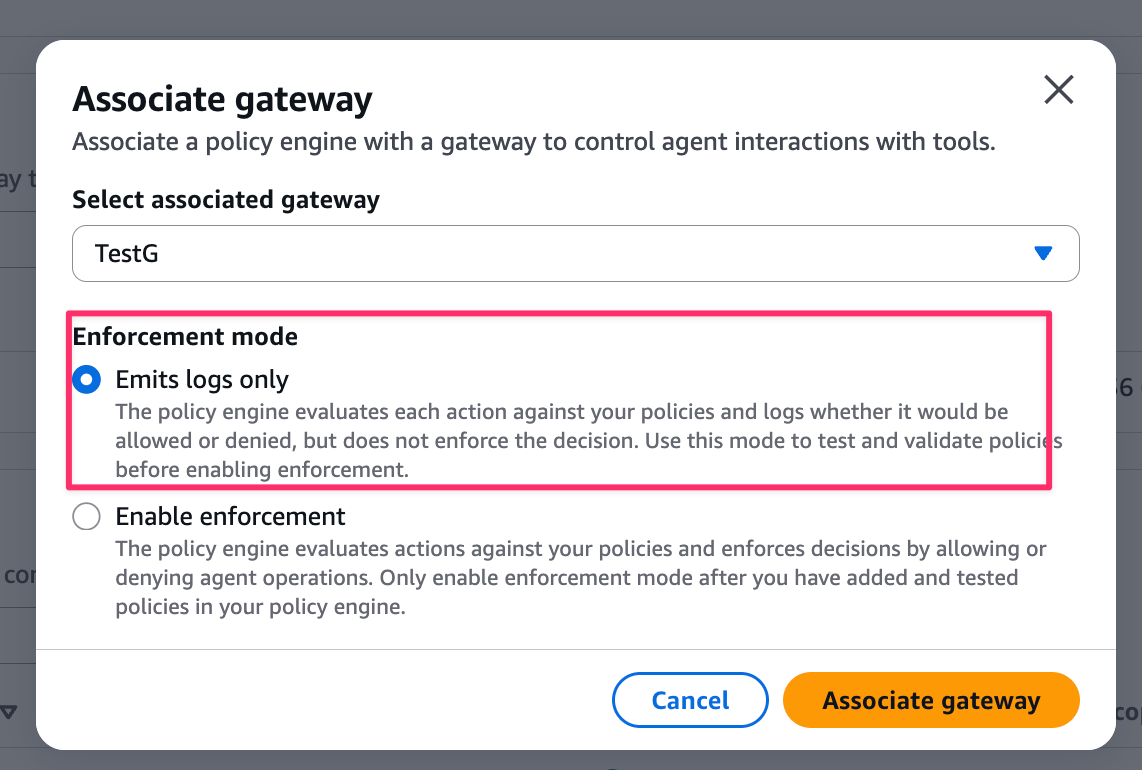
After the change, it should show Log only as follows:

Enabling Gateway logs and checking in CloudWatch
First, let's enable Gateway logs.
Select To Amazon CloudWatch Logs as the log delivery destination.
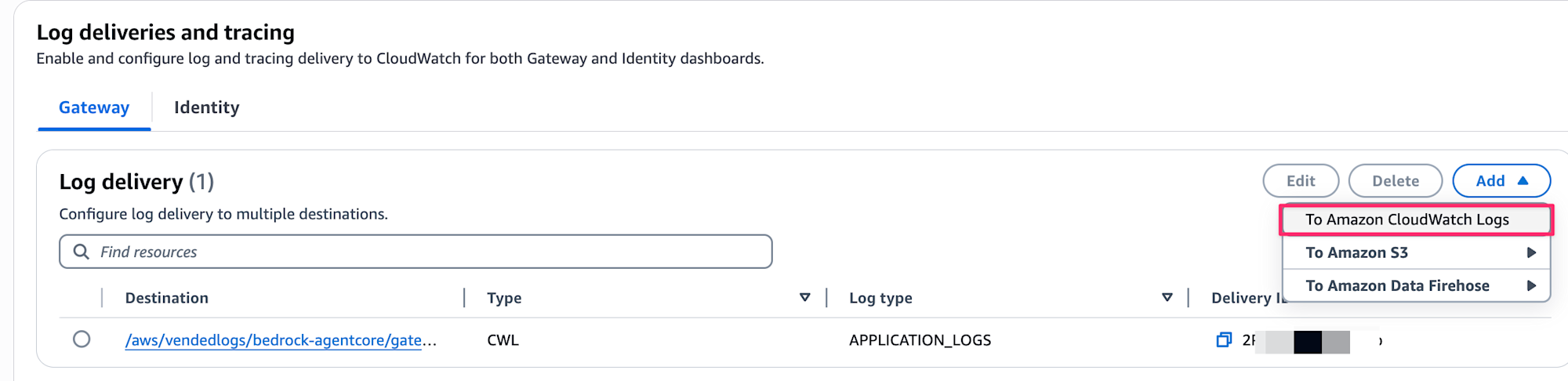
Select APPLICATION_LOGS for Log type, and use the automatically entered value for the Destination log group.

The format will be like /aws/vendedlogs/bedrock-agentcore/gateway/APPLICATION_LOGS/gateway-name.
This completes the log configuration. Now run the test script test_policy.py.
# Execute
python test_policy.py

# Execution result
(.venv) ~/gatewa-sample-mcp/agentcore-policy-quickstart ❯ python test_policy.py
============================================================
🧪 Testing Policy Engine
============================================================

Gateway: https://testgateway8ede8d86-xxx.gateway.bedrock-agentcore.us-west-2.amazonaws.com/mcp
Refund limit: $1000

🔑 Getting access token...
2025-12-06 08:49:31,604 - bedrock_agentcore.gateway - INFO - Fetching test token from Cognito...
2025-12-06 08:49:31,604 - bedrock_agentcore.gateway - INFO -   Attempting to connect to token endpoint: https://agentcore-xxxxxxxx.auth.us-west-2.amazoncognito.com/oauth2/token
2025-12-06 08:49:32,246 - bedrock_agentcore.gateway - INFO - ✓ Got test token successfully
✅ Token obtained

📝 Test 1: Refund $500 (Expected: ALLOW)
----------------------------------------
Status Code: 200
Response Body: {
  "jsonrpc": "2.0",
  "id": 1,
  "result": {
    "isError": false,
    "content": [
      {
        "type": "text",
        "text": "{\"status\":\"success\",\"message\":\"Refund of $500 processed successfully\",\"amount\":500}"
      }
    ]
  }
}

📝 Test 2: Refund $2000 (Expected: DENY)
----------------------------------------
Status Code: 200
Response Body: {
  "jsonrpc": "2.0",
  "id": 1,
  "result": {
    "isError": false,
    "content": [
      {
        "type": "text",
        "text": "{\"status\":\"success\",\"message\":\"Refund of $2000 processed successfully\",\"amount\":2000}"
      }
    ]
  }
}

============================================================
✅ Testing complete!
============================================================
Since we switched to LOG_ONLY mode, both are successful.
Let's check how they appear in CloudWatch logs for both success and failure cases.
$500 request (policy allowed)
{
  "resource_arn": "arn:aws:bedrock-agentcore:us-west-2:xxxxxxxxxxxx:gateway/testgateway8ede8d86-xxx",
  "event_timestamp": 1764957505903,
  "body": {
    "isError": false,
    "log": "Started processing request",
    "requestBody": "{id=1, jsonrpc=2.0, method=tools/call, params={name=RefundTarget___process_refund, arguments={amount=500}}}",
    "id": "1"
  },
  "account_id": "xxxxxxxxxxxx",
  "request_id": "1badab22-4e8a-4c91-8af8-xxxxxxxxxxxx",
  "trace_id": "69331d4130b02df27b1e002a47acd8e5",
  "severityText": "INFO"
}
{
  "resource_arn": "arn:aws:bedrock-agentcore:us-west-2:xxxxxxxxxxxx:gateway/testgateway8ede8d86-xxx",
  "event_timestamp": 1764957506495,
  "body": {
    "isError": false,
    "responseBody": "{jsonrpc=2.0, id=1, result={isError=false, content=[{type=text, text={\"status\":\"success\",\"message\":\"Refund of $500 processed successfully\",\"amount\":500}}]}}",
    "log": "Successfully processed request",
    "id": "1"
  },
  "account_id": "xxxxxxxxxxxx",
  "request_id": "1badab22-4e8a-4c91-8af8-xxxxxxxxxxxx",
  "trace_id": "69331d4130b02df27b1e002a47acd8e5",
  "severityText": "INFO"
}
$2000 request (policy violation but allowed)
{
  "resource_arn": "arn:aws:bedrock-agentcore:us-west-2:xxxxxxxxxxxx:gateway/testgateway8ede8d86-xxx",
  "event_timestamp": 1764957506765,
  "body": {
    "isError": false,
    "log": "Started processing request",
    "requestBody": "{id=1, jsonrpc=2.0, method=tools/call, params={name=RefundTarget___process_refund, arguments={amount=2000}}}",
    "id": "1"
  },
  "account_id": "xxxxxxxxxxxx",
  "request_id": "b5f1913c-95c3-4f1b-ad36-xxxxxxxxxxxx",
  "trace_id": "69331d4208d35049567698eb726e7f73",
  "severityText": "INFO"
}
{
  "resource_arn": "arn:aws:bedrock-agentcore:us-west-2:xxxxxxxxxxxx:gateway/testgateway8ede8d86-xxx",
  "event_timestamp": 1764957507065,
  "body": {
    "isError": false,
    "responseBody": "{jsonrpc=2.0, id=1, result={isError=false, content=[{type=text, text={\"status\":\"success\",\"message\":\"Refund of $2000 processed successfully\",\"amount\":2000}}]}}",
    "log": "Successfully processed request",
    "id": "1"
  },
  "account_id": "xxxxxxxxxxxx",
  "request_id": "b5f1913c-95c3-4f1b-ad36-xxxxxxxxxxxx",
  "trace_id": "69331d4208d35049567698eb726e7f73",
  "severityText": "INFO"
}
They look identical at first glance. We can't see the policy allow/deny differences in CloudWatch logs.
For reference, when an error actually occurs in ENFORCEMENT mode, the following log is output. The isError part is true:
{
  "resource_arn": "arn:aws:bedrock-agentcore:us-west-2:xxxxxxxxxxxx:gateway/testgateway8ede8d86-feklilrkin",
  "event_timestamp": 1764956946241,
  "body": {
    "isError": true,
    "log": "Tool Execution Denied: Tool call not allowed due to policy enforcement [Policy evaluation denied due to no determining policies]",
    "id": "1"
  },
  "account_id": "xxxxxxxxxxxx",
  "request_id": "2fd17c4f-27b2-4180-8e29-xxxxxxxxxxxx",
  "trace_id": "69331b116559f96a6af3cf201493d3d6",
  "severityText": "ERROR"
}
Since we couldn't see policy decision information in CloudWatch, let's check traces for new information.
Enabling Gateway traces and checking in GenAI Dashboard
Let's enable tracing. This can be done from the Gateway console screen by selecting Tracking > Edit button.

Make sure the Enable checkbox is checked.
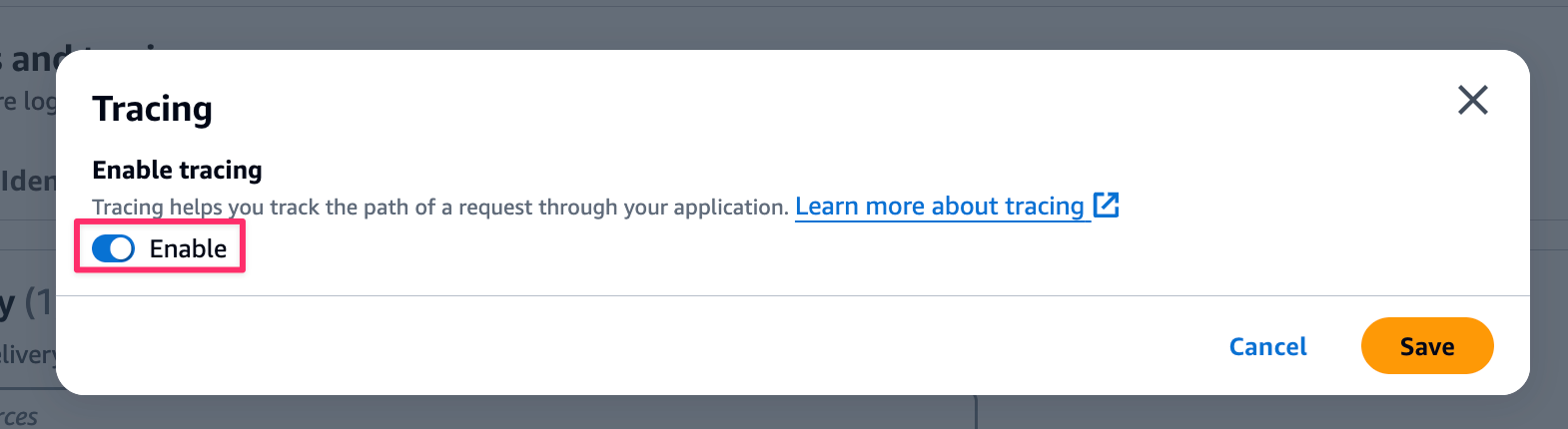
This completes the trace configuration. Now run the test script test_policy.py again.
# Execute
python test_policy.py

# Execution result
(.venv) ~/gatewa-sample-mcp/agentcore-policy-quickstart ❯ python test_policy.py
============================================================
🧪 Testing Policy Engine
============================================================

Gateway: https://testgateway8ede8d86-xxx.gateway.bedrock-agentcore.us-west-2.amazonaws.com/mcp
Refund limit: $1000

🔑 Getting access token...
・・・(omitted)
2025-12-06 08:49:31,604 - bedrock_agentcore.gateway - INFO -   Attempting to connect to token endpoint: https://agentcore-xxxxxxxx.auth.us-west-2.amazoncognito.com/oauth2/token
✅ Token obtained

📝 Test 1: Refund $500 (Expected: ALLOW)
----------------------------------------
Status Code: 200
Response Body: {
  "jsonrpc": "2.0",
  "id": 1,
  "result": {
    "isError": false,
    "content": [
      {
        "type": "text",
        "text": "{\"status\":\"success\",\"message\":\"Refund of $500 processed successfully\",\"amount\":500}"
      }
    ]
  }
}

📝 Test 2: Refund $2000 (Expected: DENY)
----------------------------------------
Status Code: 200
Response Body: {
  "jsonrpc": "2.0",
  "id": 1,
  "result": {
    "isError": false,
    "content": [
      {
        "type": "text",
        "text": "{\"status\":\"success\",\"message\":\"Refund of $2000 processed successfully\",\"amount\":2000}"
      }
    ]
  }
}

============================================================
✅ Testing complete!
============================================================
Let's check the trace status.
You can check traces by clicking Bedrock AgentCore in CloudWatch's GenAI Observability and selecting the target Gateway.
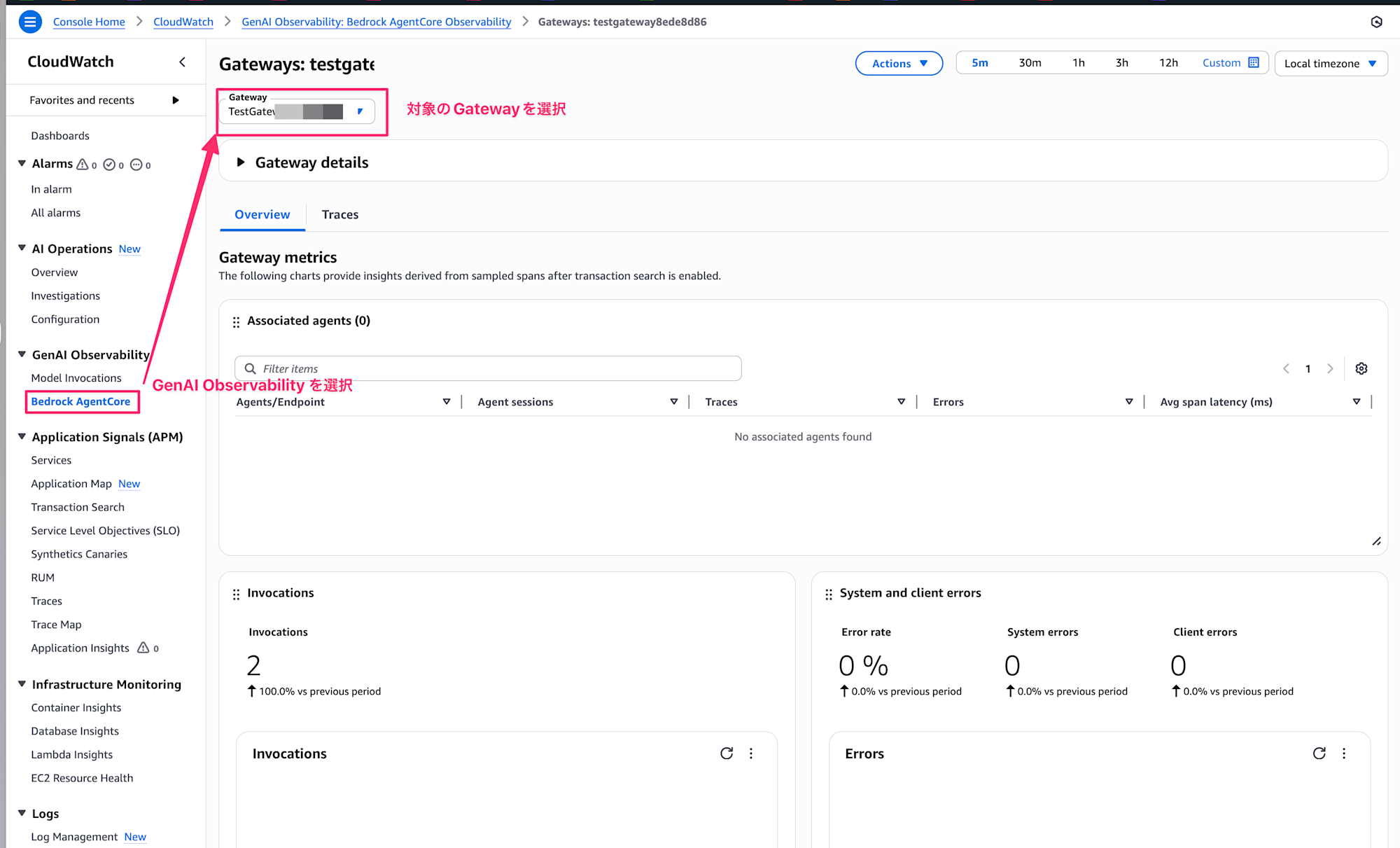
This is a useful dashboard where you can check error rates, latency, and more.
Here you can see visualizations of errors by logs.
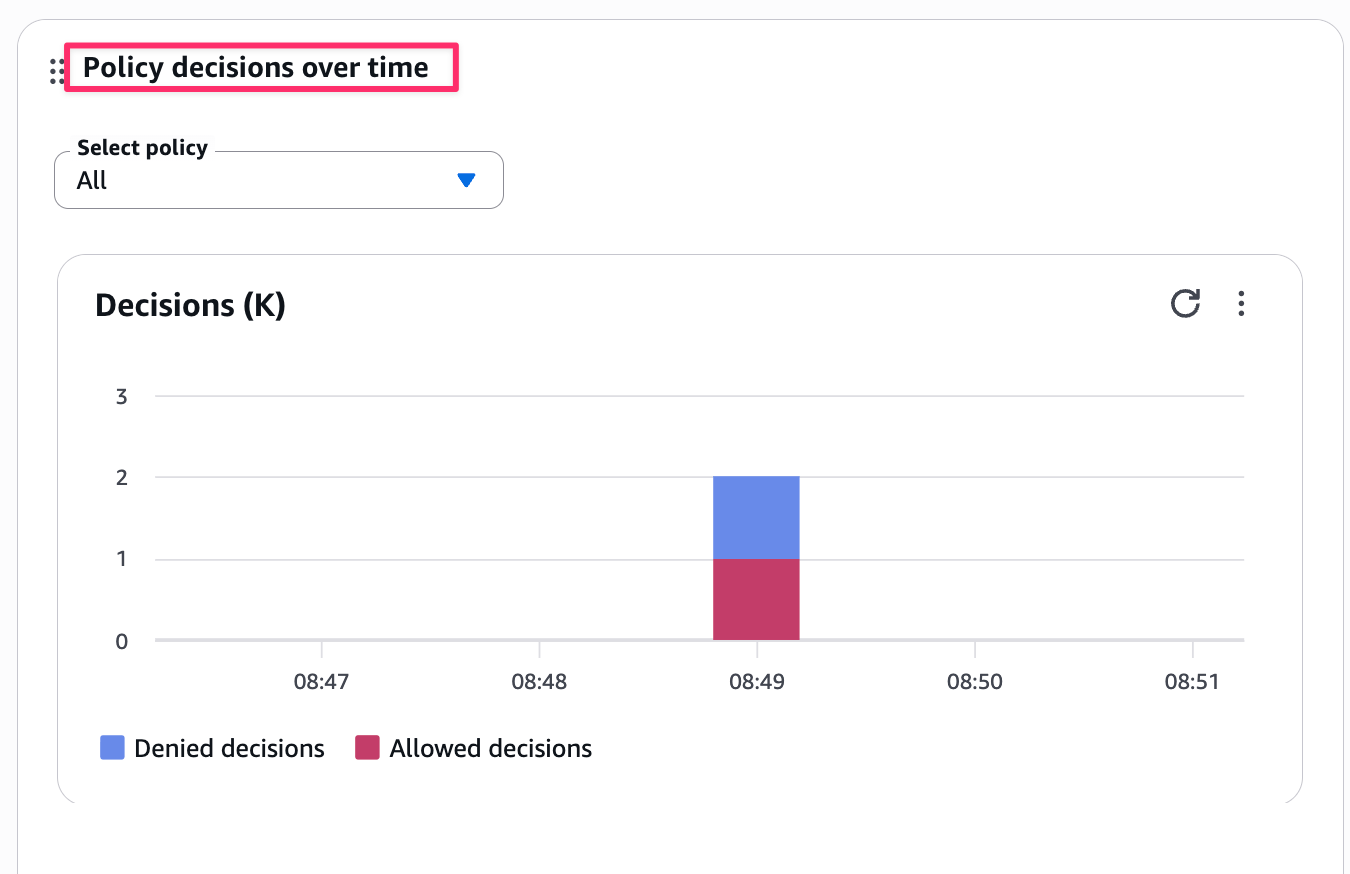
You can check in Policy decisions over time. Blue shows the number of denials, and red shows the number of approvals. Since test_policy.py has requests that should be allowed and denied, this is as expected. You can see general trends here.
If you want to check individual traces for requests that were denied, you can switch from the Overview tab to the Traces tab.

The Policy Decision column shows either DENY or ALLOW for each trace. If the Policy Decision column isn't visible, you can add it from the gear icon.
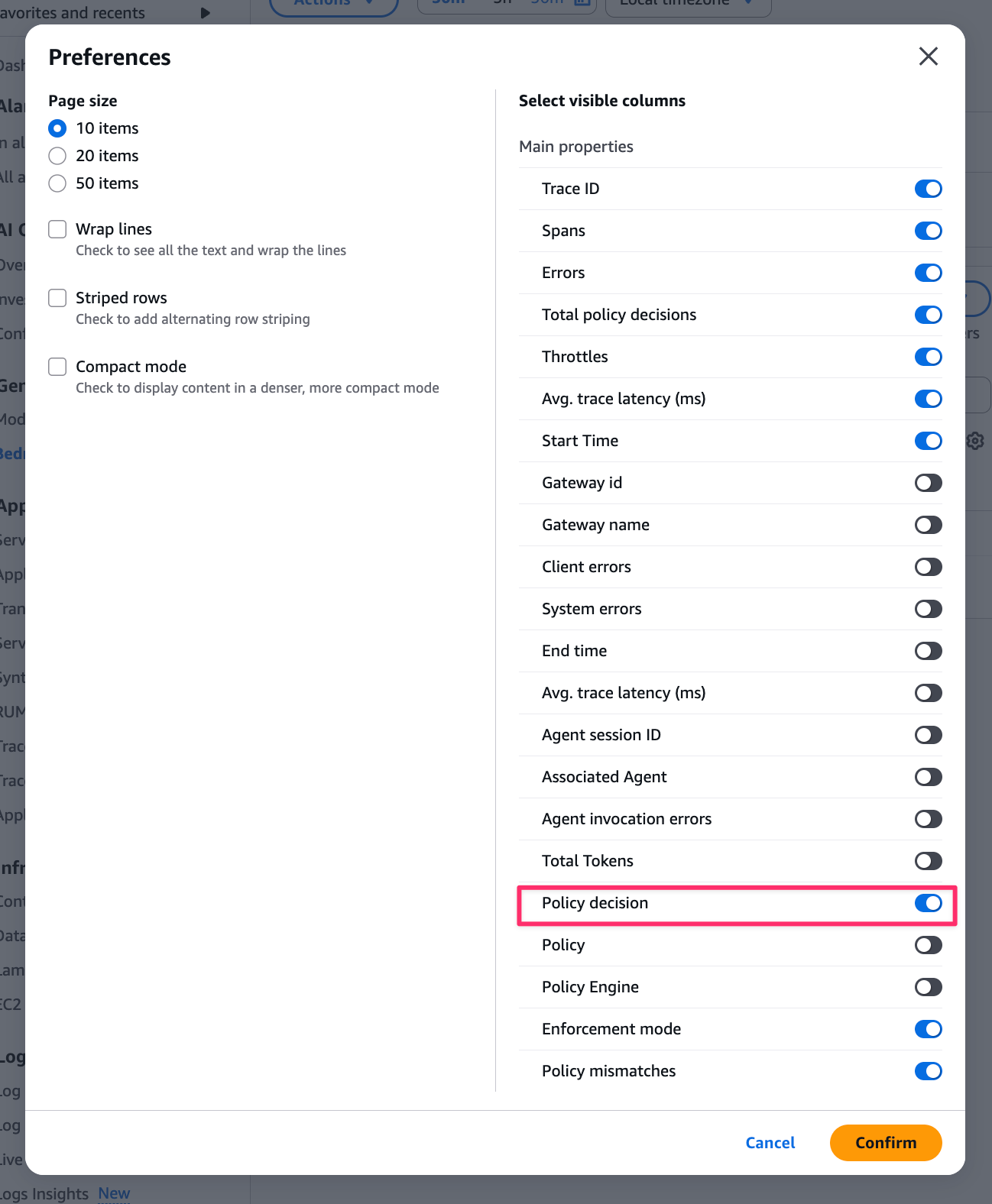
To check behavior at an individual trace level, you can click on the Trace ID.
For example, let's look at a DENY trace.

This opens the full trace event view.
From here, you can check individual span details, but for now we're looking for how denials are recorded in logs. When actually denied in logs, you'd check what requests were sent.
Select AgentCore.Policy.AuthorizeAction.
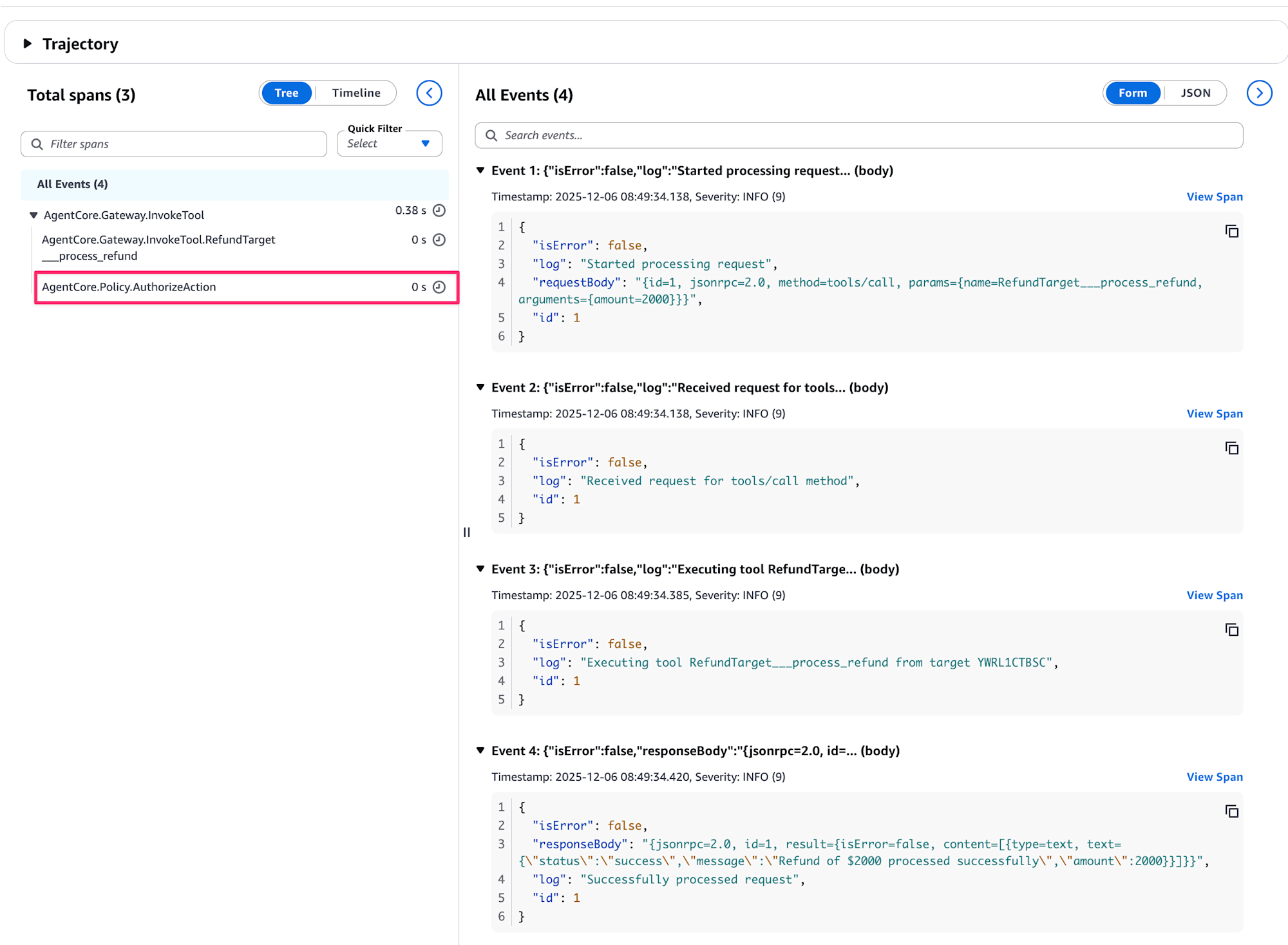
When you open Metadata, aws.agentcore.policy.authorization_decision shows either ALLOW or DENY. And aws.agentcore.policy.authorization_reason shows the reason for denial.
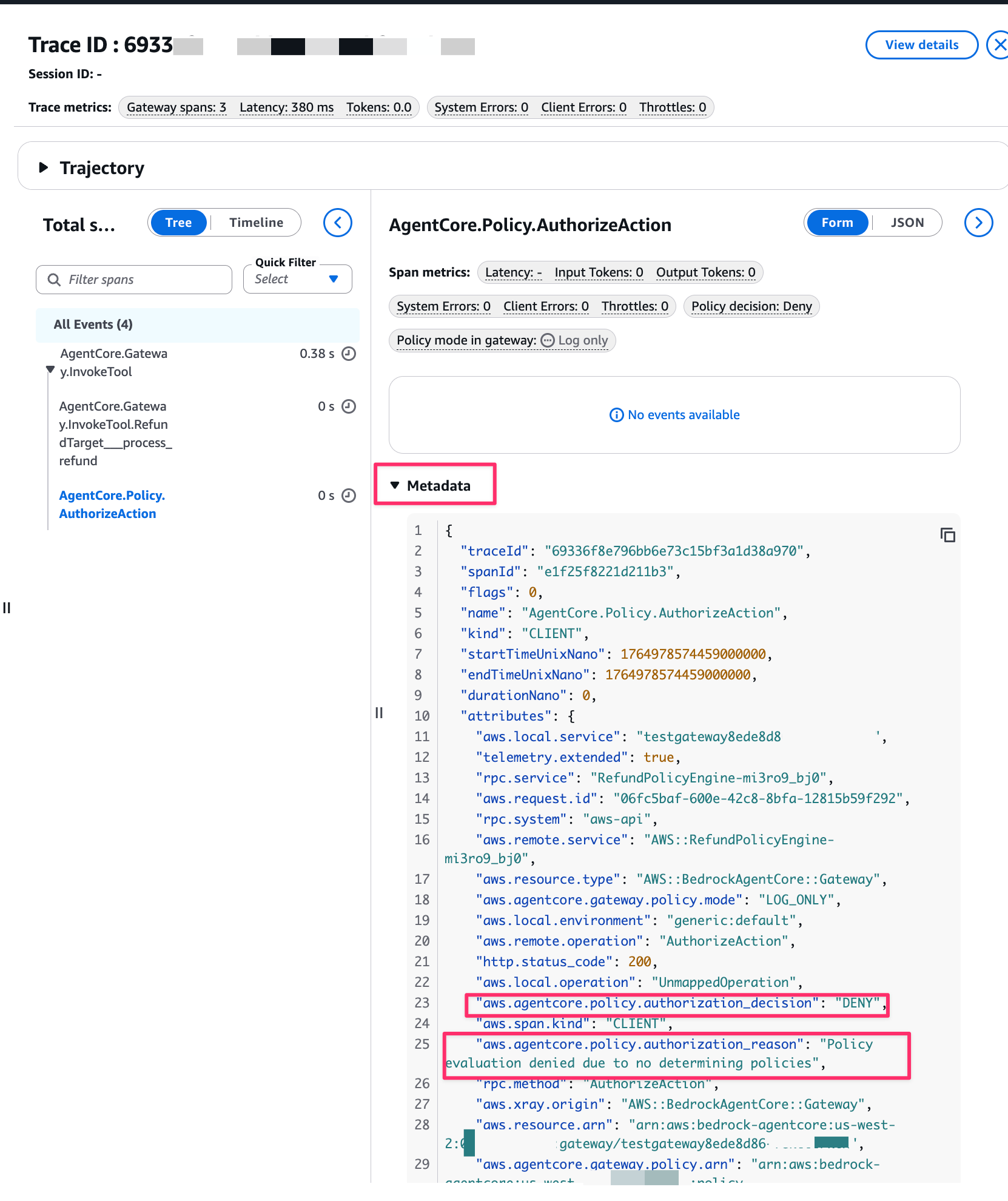
{
  "traceId": "69336f8e796bb6e73c15bf3a1d38a970",
  "spanId": "e1f25f8221d211b3",
  "flags": 0,
  "name": "AgentCore.Policy.AuthorizeAction",
  "kind": "CLIENT",
  "startTimeUnixNano": 1764978574459000000,
  "endTimeUnixNano": 1764978574459000000,
  "durationNano": 0,
  "attributes": {
    "aws.local.service": "testgateway8ede8d86-xxx",
    "telemetry.extended": true,
    "rpc.service": "RefundPolicyEngine-mi3ro9_bj0",
    "aws.request.id": "06fc5baf-600e-42c8-8bfa-12815b59f292",
    "rpc.system": "aws-api",
    "aws.remote.service": "AWS::RefundPolicyEngine-mi3ro9_bj0",
    "aws.resource.type": "AWS::BedrockAgentCore::Gateway",
    "aws.agentcore.gateway.policy.mode": "LOG_ONLY",
    "aws.local.environment": "generic:default",
    "aws.remote.operation": "AuthorizeAction",
    "http.status_code": 200,
    "aws.local.operation": "UnmappedOperation",
    "aws.agentcore.policy.authorization_decision": "DENY",
    "aws.span.kind": "CLIENT",
    "aws.agentcore.policy.authorization_reason": "Policy evaluation denied due to no determining policies",
    "rpc.method": "AuthorizeAction",
    "aws.xray.origin": "AWS::BedrockAgentCore::Gateway",
    "aws.resource.arn": "arn:aws:bedrock-agentcore:us-west-2:xxxxxxxxxxxx:gateway/testgateway8ede8d86-feklilrkin",
    "aws.agentcore.gateway.policy.arn": "arn:aws:bedrock-agentcore:us-west-2:xxxxxxxxxxxx:policy-engine/RefundPolicyEngine-mi3ro9_bj0",
    "aws.agentcore.policy.target_resource.id": "testgateway8ede8d86-feklilrkin",
    "aws.agentcore.policy.determining_policies": [],
    "aws.agentcore.policy.mismatched_policies": [],
    "PlatformType": "Generic",
    "http.response.status_code": 200
  },
  "status": {
    "code": "OK"
  },
  "resource": {
    "attributes": {
      "cloud.resource_id": "arn:aws:bedrock-agentcore:us-west-2:xxxxxxxxxxxx:gateway/testgateway8ede8d86-feklilrkin",
      "cloud.provider": "aws",
      "service.name": "testgateway8ede8d86-feklilrkin",
      "cloud.platform": "aws_bedrock_agentcore"
    }
  },
  "parentSpanId": "7c04545014a52945"
}
Based on these results, you would check the overall overview to see if requests are being allowed/denied as designed and to identify any unintended results.
Summary
To summarize this article in three lines:
- In
LOG_ONLYmode, requests that violate policies are processed without being rejected - Policy decision results are checked in traces (GenAI Observability), not CloudWatch logs
- You can understand trends in the "Policy decisions over time" dashboard and check details in individual traces
Things might get more convenient with future updates, but this is the current workflow! (If you know a more convenient way to view logs, please let me know!)
Conclusion
In this article, we looked at the behavior of LOG_ONLY mode and how to check logs!
Before implementing policies in production, it's good to use LOG_ONLY mode to verify behavior and ensure the design works as intended.
Note that currently, you need to check policy allow/deny logs in traces rather than CloudWatch, which requires some attention.
I hope this article was helpful! Thank you for reading!