Implementing streaming responses with Amazon Bedrock AgentCore + Amazon API Gateway + AWS Lambda

This page has been translated by machine translation. View original
Introduction
Hello, this is Kamino from the Consulting Department.
On November 19, 2025, an update made response streaming possible in Amazon API Gateway!!
This is a welcome update since there have been cases where timeout was a concern when calling Bedrock with the API Gateway + AWS Lambda combination.
Our colleague suzuki.ryo has already tried this combined with Amazon Bedrock in the following article, so please check it out.
In this article, I've created a streaming API that wraps Amazon Bedrock AgentCore Runtime (hereinafter "AgentCore") using API Gateway's response streaming!
AgentCore URL Format
The URL to call AgentCore Runtime has the following format:
https://bedrock-agentcore.ap-northeast-1.amazonaws.com/runtimes/arn%3Aaws%3Abedrock-agentcore%3Aap-northeast-1%3A123456789012%3Aagent-runtime%2Fabcd1234/invocations
When sending requests directly from the frontend, I was concerned about the account ID being included in the URL and having to encode the ARN. You might also want to use a custom domain in some cases.
For such cases, you can use CloudFront or Lambda Function URLs, but this time I implemented it with Lambda + API Gateway, which was made possible by the update!
Reference: How to Wrap with CloudFront
AWS has provided an official guide, so please refer to the following if you want to wrap AgentCore with CloudFront:
Why I Chose API Gateway
While wrapping is possible with CloudFront or Lambda Function URLs, I thought API Gateway + Lambda offers the following advantages:
- Easy authentication and authorization integration
- You can configure various authentication methods such as API Key, Amazon Cognito, and Lambda Authorizer
- Rate limiting and usage plans as standard features
- You can set usage limits and throttling per API Key
- Easier management as an API
- Stage management is also possible
The following benefits apply to both CloudFront and API Gateway + Lambda:
- AWS WAF integration
- Custom domain configuration
From an API management perspective, I thought it would be beneficial to combine these services due to their convenient features!
Now, let's get to the implementation!
Architecture Overview
Here's the architecture we'll build:
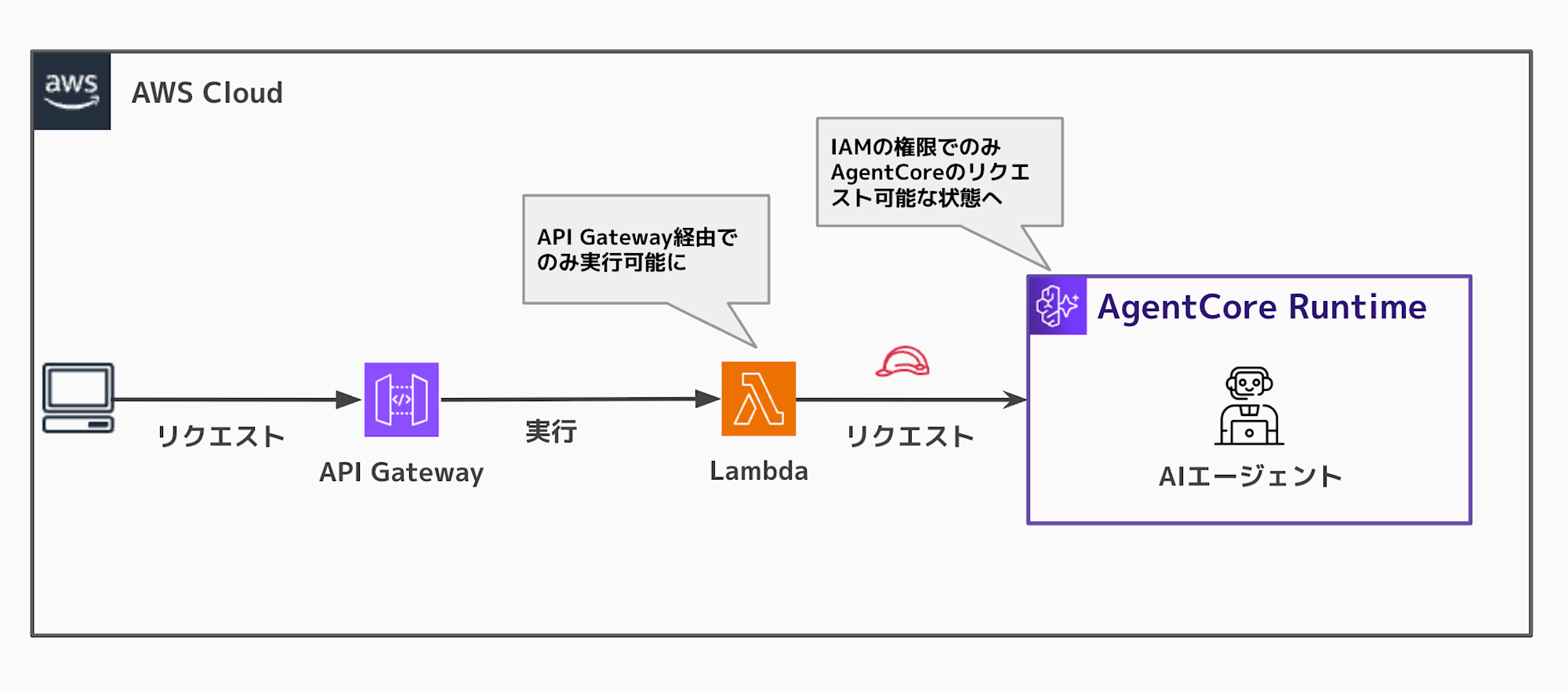
The Lambda function will be executable only from API Gateway, and AgentCore Runtime will be executable from Lambda via IAM authentication.
Compared to wrapping with just CloudFront, this architecture using IAM authentication reduces the risk of direct execution of the AgentCore URL. (Though it could still be directly executed if someone has IAM permissions... it would be nice if someday we could add resource-based permissions to restrict access to Lambda only. I thought this would be useful when wrapping.)
Prerequisites
This article was written with the following environment:
- AWS CDK 2.221.0
- Python 3.13.6
Repository
For the complete code implementation, please refer to the GitHub repository below:
In this implementation, AgentCore + Lambda are implemented with CDK, while API Gateway is configured manually through the console.
AgentCore Agent Implementation
Let's first look at the AgentCore agent implementation. I've kept it simple for this example.
main.py
from bedrock_agentcore.runtime import BedrockAgentCoreApp
from strands import Agent
from strands.models import BedrockModel

# Bedrock Model settings
model = BedrockModel(
    model_id="anthropic.claude-3-5-haiku-20241022-v1:0",
    params={"max_tokens": 4096, "temperature": 0.7},
    region="us-west-2",
)
agent = Agent(model=model)

app = BedrockAgentCoreApp()

@app.entrypoint
async def entrypoint(payload):
    message = payload.get("prompt", "")
    # Process messages with asynchronous streaming
    stream_messages = agent.stream_async(message)
    async for message in stream_messages:
        if "event" in message:
            yield message["event"]
We're using Strands Agents to call Haiku and the stream_async method for asynchronous streaming processing.
By using yield to return events sequentially, we provide a streaming response.
Lambda Function Implementation
Next is the Lambda function implementation.
Please refer to the complete code in the GitHub repository. Here, I'll explain the key points.
Using awslambda.streamifyResponse
To use Lambda Response Streaming, you need to wrap the handler with awslambda.streamifyResponse.
import type { APIGatewayProxyEvent, Context } from 'aws-lambda';

export const handler = awslambda.streamifyResponse(
  async (
    event: APIGatewayProxyEvent,
    responseStream: NodeJS.WritableStream,
    context: Context
  ) => {
    // Streaming process
  }
);
Unlike regular Lambda functions, a writable stream responseStream is passed, which is a key feature.
Server-Sent Events (SSE) Format Response Configuration
To return streaming responses to the client, we use the Server-Sent Events (SSE) format.
const responseMetadata = {
  statusCode: 200,
  headers: {
    'Content-Type': 'text/event-stream',
    'Cache-Control': 'no-cache',
    'X-Accel-Buffering': 'no',
  },
};

const httpStream = awslambda.HttpResponseStream.from(
  responseStream as Writable,
  responseMetadata
);
By setting Content-Type: text/event-stream, we enable SSE format responses that can be received by browsers using EventSource or Fetch API for streaming.
Using AgentCore Runtime SDK
To call AgentCore Runtime, we use @aws-sdk/client-bedrock-agentcore.
import {
  BedrockAgentCoreClient,
  InvokeAgentRuntimeCommand,
} from '@aws-sdk/client-bedrock-agentcore';

const agentCoreClient = new BedrockAgentCoreClient({
  region: process.env.AWS_REGION || 'us-west-2',
});

const invokeCommand = new InvokeAgentRuntimeCommand({
  agentRuntimeArn: agentCoreArn,
  runtimeSessionId: requestParams.sessionId,
  payload: new TextEncoder().encode(
    JSON.stringify({ prompt: requestParams.prompt })
  ),
  qualifier: 'DEFAULT',
});

const runtimeResponse = await agentCoreClient.send(invokeCommand);
The response is returned as a stream in runtimeResponse.response.
Data Transfer with Stream Pipeline
Finally, we transfer the stream from AgentCore Runtime directly to the client.
import { promisify } from 'util';
import { pipeline as streamPipeline, Readable } from 'stream';

const asyncPipeline = promisify(streamPipeline);

// AgentCore Runtime stream → client stream
await asyncPipeline(runtimeResponse.response as Readable, httpStream);
For the complete code, please refer to the GitHub repository.
In this implementation, we're directly returning the response from AgentCore, but you could also process or convert it to a custom format in the Lambda function before sending it to the frontend.
Deployment with CDK
Let's deploy AgentCore + Lambda function with AWS CDK.
In this CDK implementation, we can deploy both AgentCore Runtime and Lambda function together!
CDK Stack Implementation
Here's the complete code:
Complete Code (omitted due to length)
import * as cdk from "aws-cdk-lib";
import * as path from "path";
import * as lambda from "aws-cdk-lib/aws-lambda";
import * as iam from "aws-cdk-lib/aws-iam";
import * as nodejs from "aws-cdk-lib/aws-lambda-nodejs";
import * as logs from "aws-cdk-lib/aws-logs";
import * as agentcore from "@aws-cdk/aws-bedrock-agentcore-alpha";
import { Construct } from "constructs";

export class CdkStack extends cdk.Stack {
  constructor(scope: Construct, id: string, props?: cdk.StackProps) {
    super(scope, id, props);

    // =====================
    // AgentCore Runtime
    // =====================

    // Build local code
    const agentRuntimeArtifact = agentcore.AgentRuntimeArtifact.fromAsset(
      path.join(__dirname, "../agent"),
    );

    // Generate random Agent name
    const randomSuffix = Math.random().toString(36).substring(2, 8);
    const runtimeName = `agentcore_runtime_${randomSuffix}`;

    // Create AgentCore Runtime
    const runtime = new agentcore.Runtime(this, "AgentCoreRuntime", {
      runtimeName: runtimeName,
      agentRuntimeArtifact: agentRuntimeArtifact,
      description: "Strands Agent deployed via CDK L2 Construct",
    });

    // Add Bedrock invocation permissions
    runtime.addToRolePolicy(
      new iam.PolicyStatement({
        effect: iam.Effect.ALLOW,
        actions: [
          "bedrock:InvokeModel",
          "bedrock:InvokeModelWithResponseStream",
        ],
        resources: [`arn:aws:bedrock:${this.region}::foundation-model/*`],
      }),
    );

    // =====================
    // Lambda Function (AgentCore Proxy)
    // =====================

    // Lambda function log group
    const lambdaLogGroup = new logs.LogGroup(this, "LambdaLogGroup", {
      logGroupName: "/aws/lambda/agentcore-proxy",
      retention: logs.RetentionDays.ONE_WEEK,
      removalPolicy: cdk.RemovalPolicy.DESTROY,
    });

    // Create Lambda function
    const proxyFunction = new nodejs.NodejsFunction(
      this,
      "AgentCoreProxyFunction",
      {
        functionName: "agentcore-proxy",
        entry: path.join(__dirname, "../lambda/agentcore-proxy/index.ts"),
        handler: "handler",
        runtime: lambda.Runtime.NODEJS_24_X,
        timeout: cdk.Duration.minutes(15),
        memorySize: 512,
        environment: {
          AGENT_ARN: runtime.agentRuntimeArn,
        },
        logGroup: lambdaLogGroup,
      },
    );

    // Grant AgentCore Runtime invocation permissions
    proxyFunction.addToRolePolicy(
      new iam.PolicyStatement({
        effect: iam.Effect.ALLOW,
        actions: ["bedrock-agentcore:InvokeAgentRuntime"],
        resources: [
          runtime.agentRuntimeArn,
          `${runtime.agentRuntimeArn}/runtime-endpoint/*`,
        ],
      }),
    );

    // =====================
    // Outputs
    // =====================

    new cdk.CfnOutput(this, "RuntimeName", {
      value: runtimeName,
      description: "Name of the AgentCore Runtime",
    });

    new cdk.CfnOutput(this, "RuntimeArn", {
      value: runtime.agentRuntimeArn,
      description: "ARN of the AgentCore Runtime",
    });

    new cdk.CfnOutput(this, "RuntimeId", {
      value: runtime.agentRuntimeId,
      description: "ID of the AgentCore Runtime",
    });

    new cdk.CfnOutput(this, "ProxyFunctionName", {
      value: proxyFunction.functionName,
      description: "AgentCore Proxy Lambda Function Name",
    });

    new cdk.CfnOutput(this, "ProxyFunctionArn", {
      value: proxyFunction.functionArn,
      description: "AgentCore Proxy Lambda Function ARN",
    });
  }
}
Deployment
Let's deploy with CDK. Both AgentCore Runtime and Lambda function will be deployed together!
npm install
cdk bootstrap  # only for first time
cdk deploy
When deployment completes, the Lambda function name will be output:
 ✅  AgentCoreProxyStack

✨  Deployment time: 88.67s

Outputs:
AgentCoreProxyStack.ProxyFunctionArn = arn:aws:lambda:us-west-2:xxx:function:agentcore-proxy
AgentCoreProxyStack.ProxyFunctionName = agentcore-proxy
AgentCoreProxyStack.RuntimeArn = arn:aws:bedrock-agentcore:us-west-2:xxx:runtime/agentcore_runtime_xxx
AgentCoreProxyStack.RuntimeId = agentcore_runtime_xxx
AgentCoreProxyStack.RuntimeName = agentcore_runtime_xxx
Stack ARN:
arn:aws:cloudformation:us-west-2:xxx:stack/AgentCoreProxyStack/xxx
Make a note of this Lambda function name (agentcore-proxy).
We'll use it in the next API Gateway configuration.
Manual API Gateway Configuration
Let's configure API Gateway with streaming response enabled and integrate it with the Lambda function.
Creating a REST API
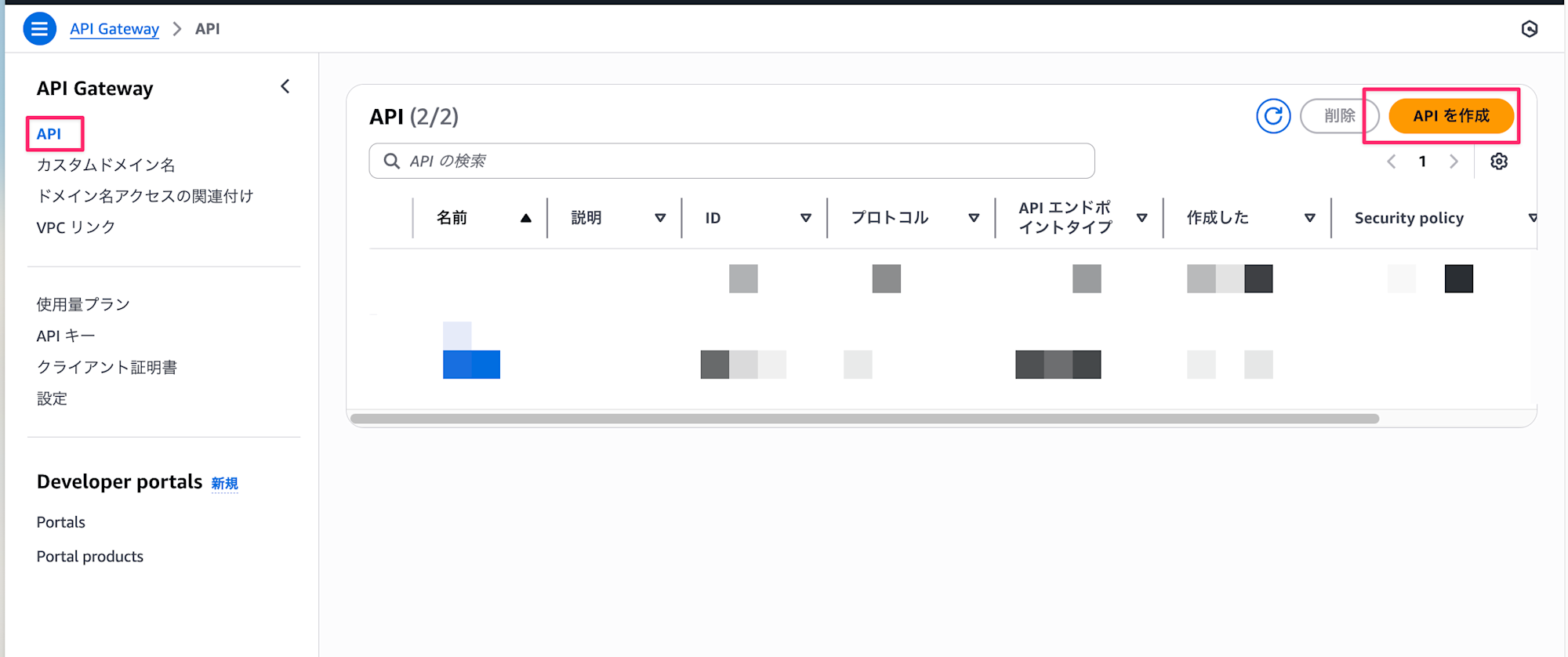
First, open the API Gateway console and create a REST API.
- Open the API Gateway service page in the console
- Click "Create API"
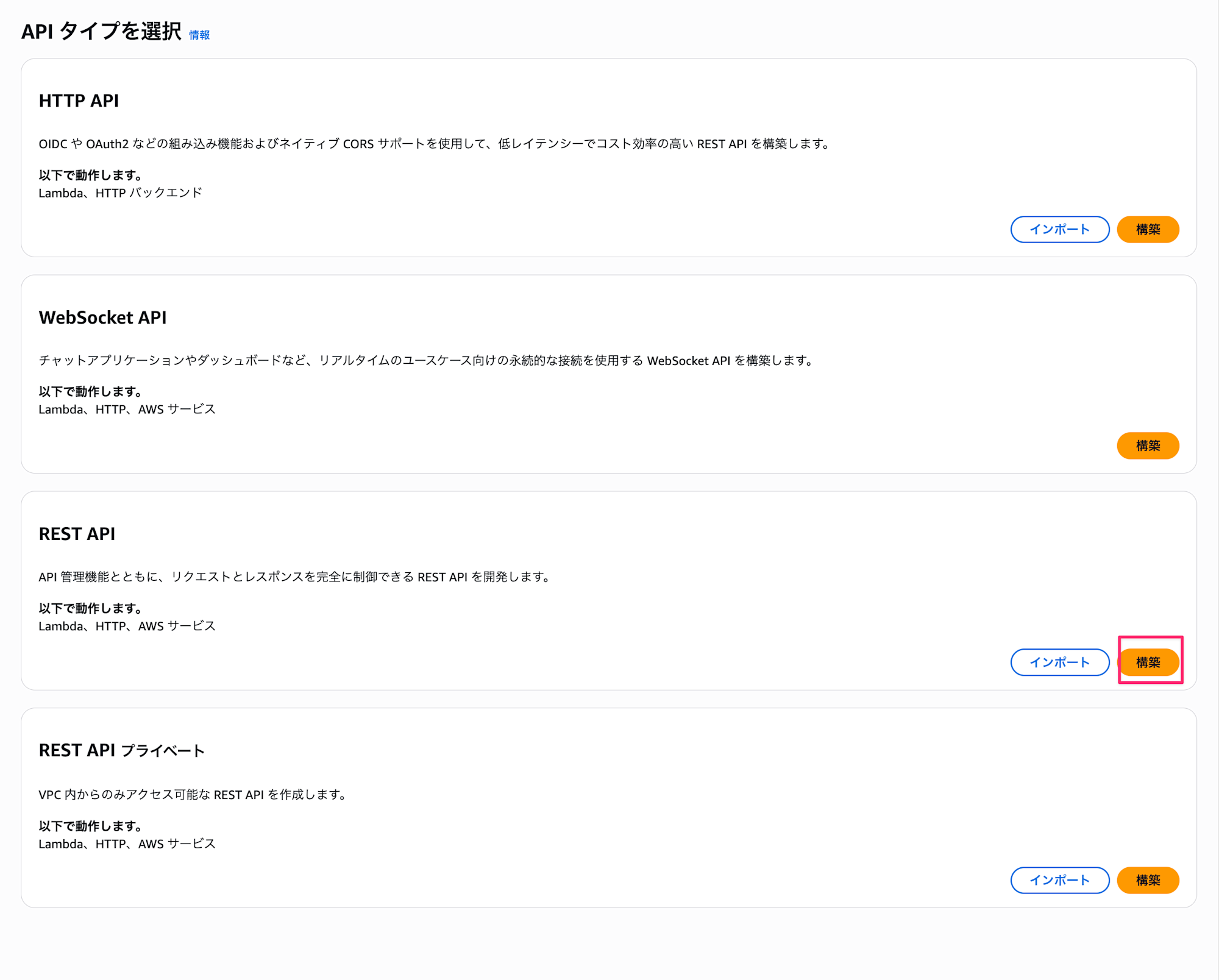
- Select "REST API" and click "Build"
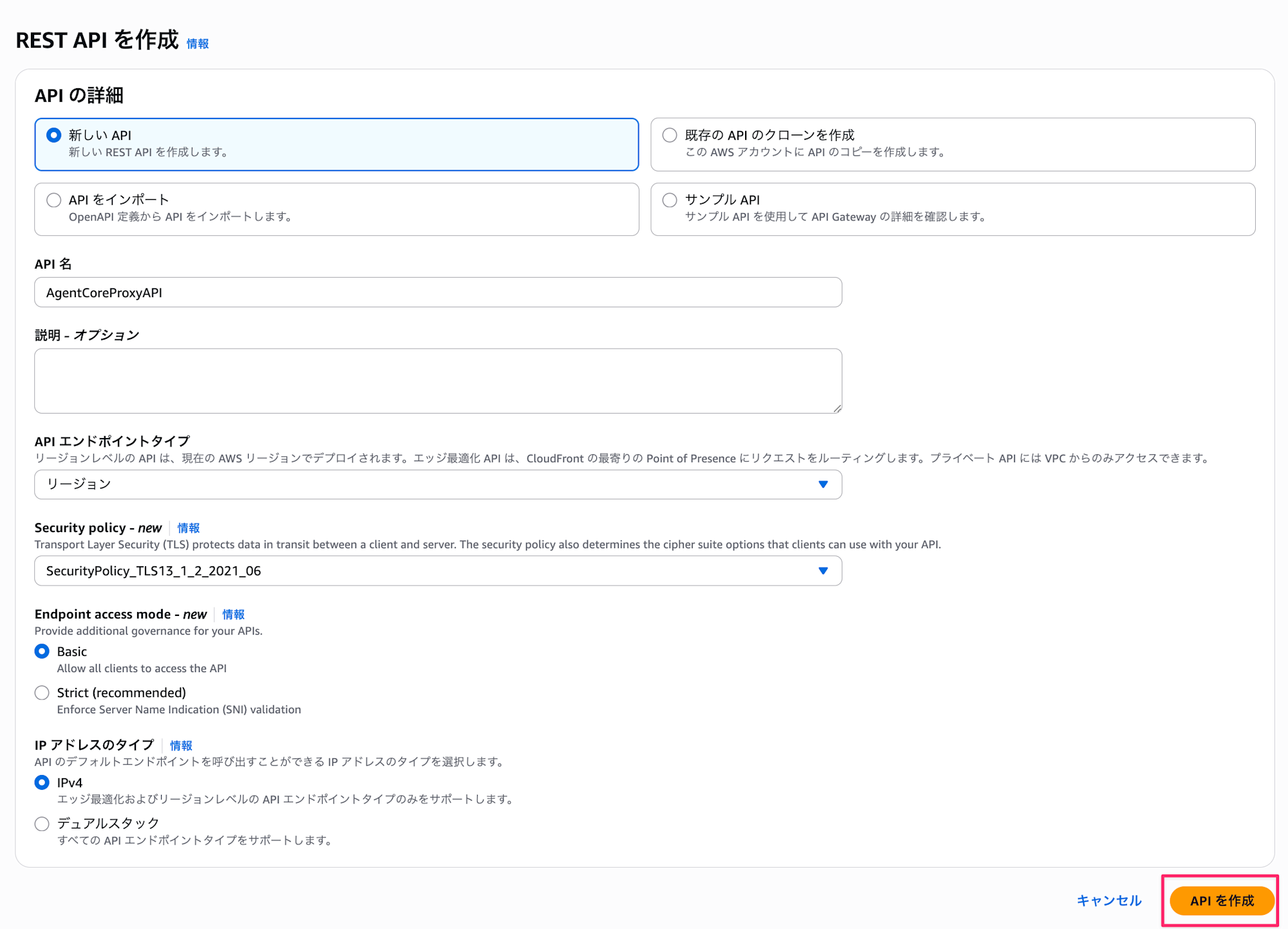
- Configure the following:
- New API: New API
- API name:
AgentCoreProxyAPI - Endpoint Type: Regional
- Security policy: Any policy (I selected SecurityPolicy_TLS13_1_2_2021_06 for this example)
- Click "Create API"
Creating Resources and Methods
Next, create the /invoke endpoint.
- Click "Resources" → "Create Resource"
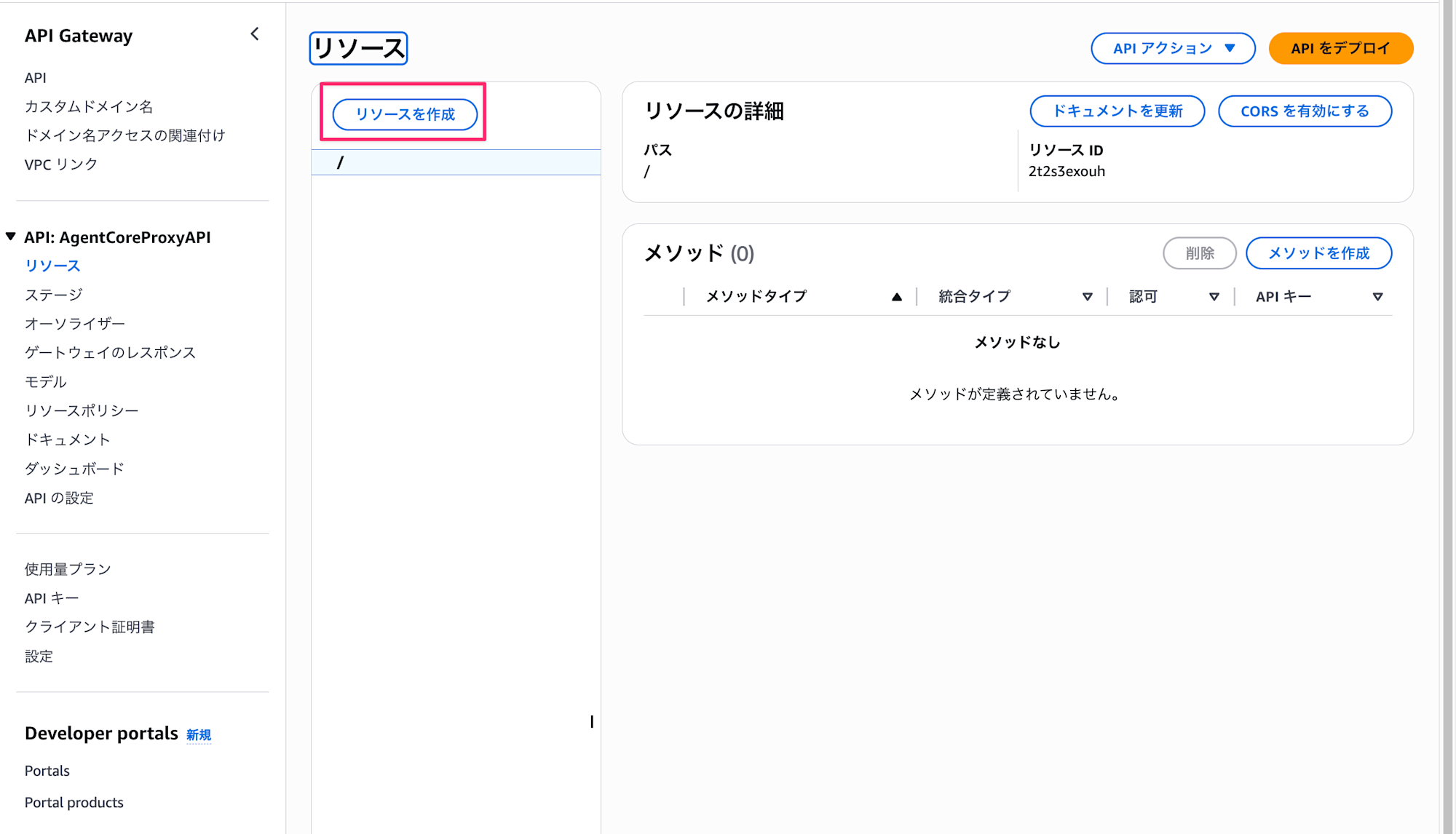
- Resource name:
invoke - Click "Create Resource"

If you're accessing from a different domain, enable CORS.
Lambda Integration Setup
Next, set up integration with the Lambda function.
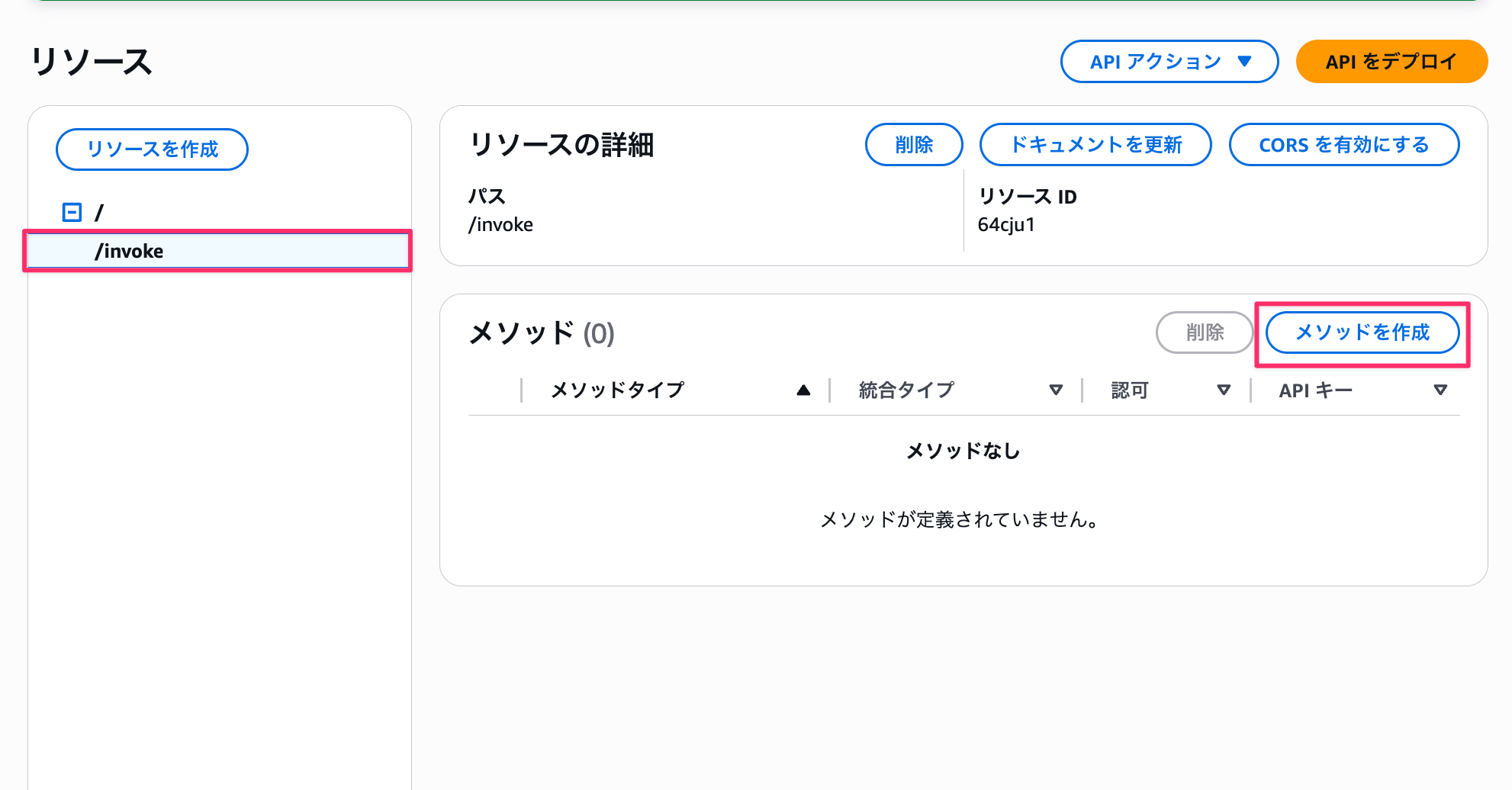
- Select the
/invokeresource - Click "Create Method"
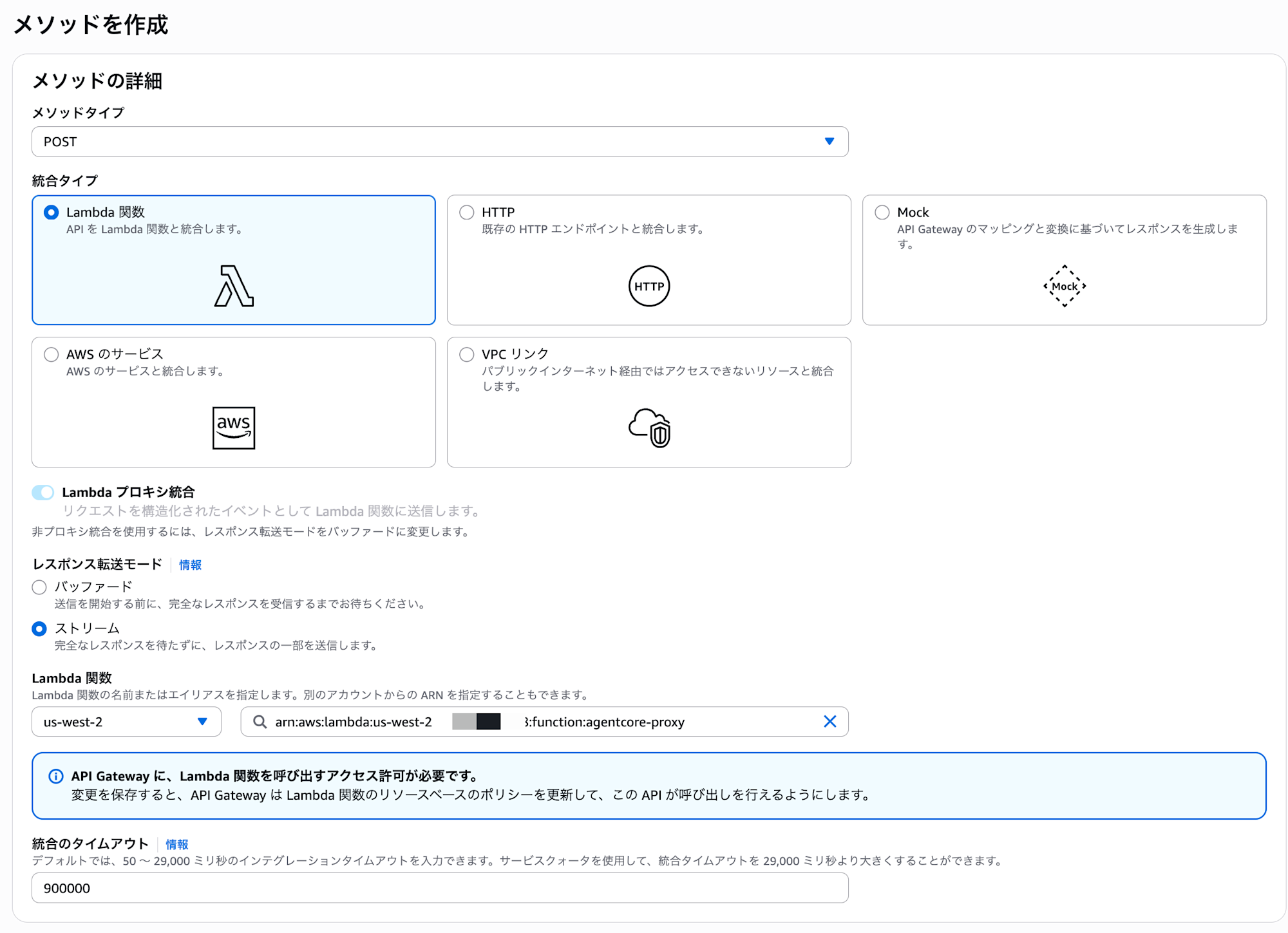
- Configure the following:
- Method type: POST
- Integration type: Lambda Function
- Lambda proxy integration: On
- Response transfer mode: Stream
- This is the item added in the recent update
- Lambda function:
agentcore-proxy - Lambda region: Your region (us-west-2 in this example)
- Integration timeout: 900000
- For streaming responses, I was able to set it up to 900000 (15 minutes).
- I got an error when trying to set it to 900001.
- For streaming responses, I was able to set it up to 900000 (15 minutes).
- Click "Create Method"
Now the streaming response configuration is complete!
API Deployment
Once the configuration is complete, deploy the API.
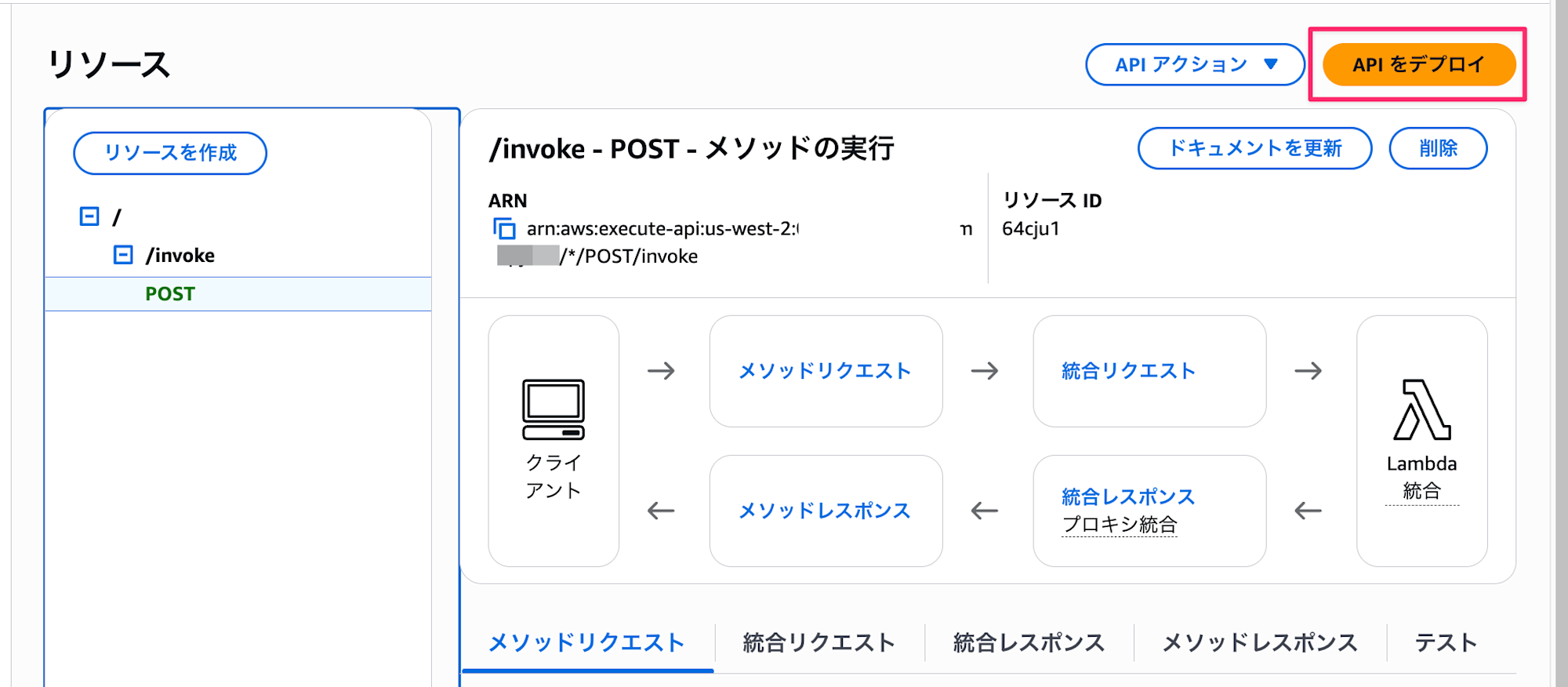
- Click "Deploy API"
- Stage: New Stage
- Stage name:
test - Click "Deploy"
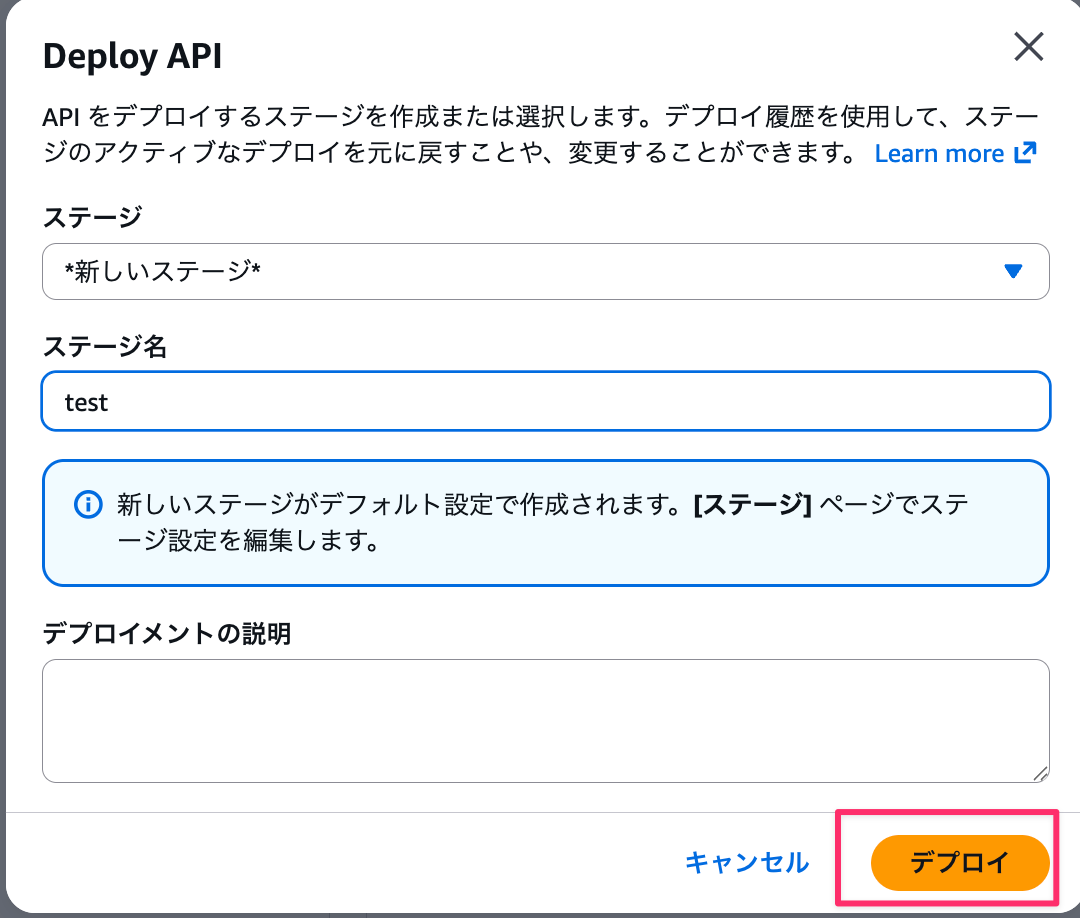
After deployment, the invocation URL will be displayed.
https://abc123xyz.execute-api.us-west-2.amazonaws.com/test
Make a note of this invocation URL.
Testing
Now, let's test our implementation!
Testing with curl
First, let's test using curl:
curl --no-buffer -X POST https://abc123xyz.execute-api.us-west-2.amazonaws.com/test/invoke \
  -H "Content-Type: application/json" \
  -d '{"prompt":"こんにちは、あなたは何ができますか?"}'
Actual Response
You'll get a streaming response in SSE format like this:
data: {"event": {"messageStart": {"role": "assistant"}}}

data: {"event": {"contentBlockDelta": {"delta": {"text": "こ"}, "contentBlockIndex": 0}}}

data: {"event": {"contentBlockDelta": {"delta": {"text": "んにちは"}, "contentBlockIndex": 0}}}

data: {"event": {"contentBlockDelta": {"delta": {"text": "!"}, "contentBlockIndex": 0}}}

data: {"event": {"contentBlockDelta": {"delta": {"text": "私は"}, "contentBlockIndex": 0}}}

data: {"event": {"contentBlockDelta": {"delta": {"text": "、"}, "contentBlockIndex": 0}}}

data: {"event": {"contentBlockDelta": {"delta": {"text": "天"}, "contentBlockIndex": 0}}}

...
Here's a video of the actual execution. (The URL is masked with a variable, but it's set to the API Gateway URL)
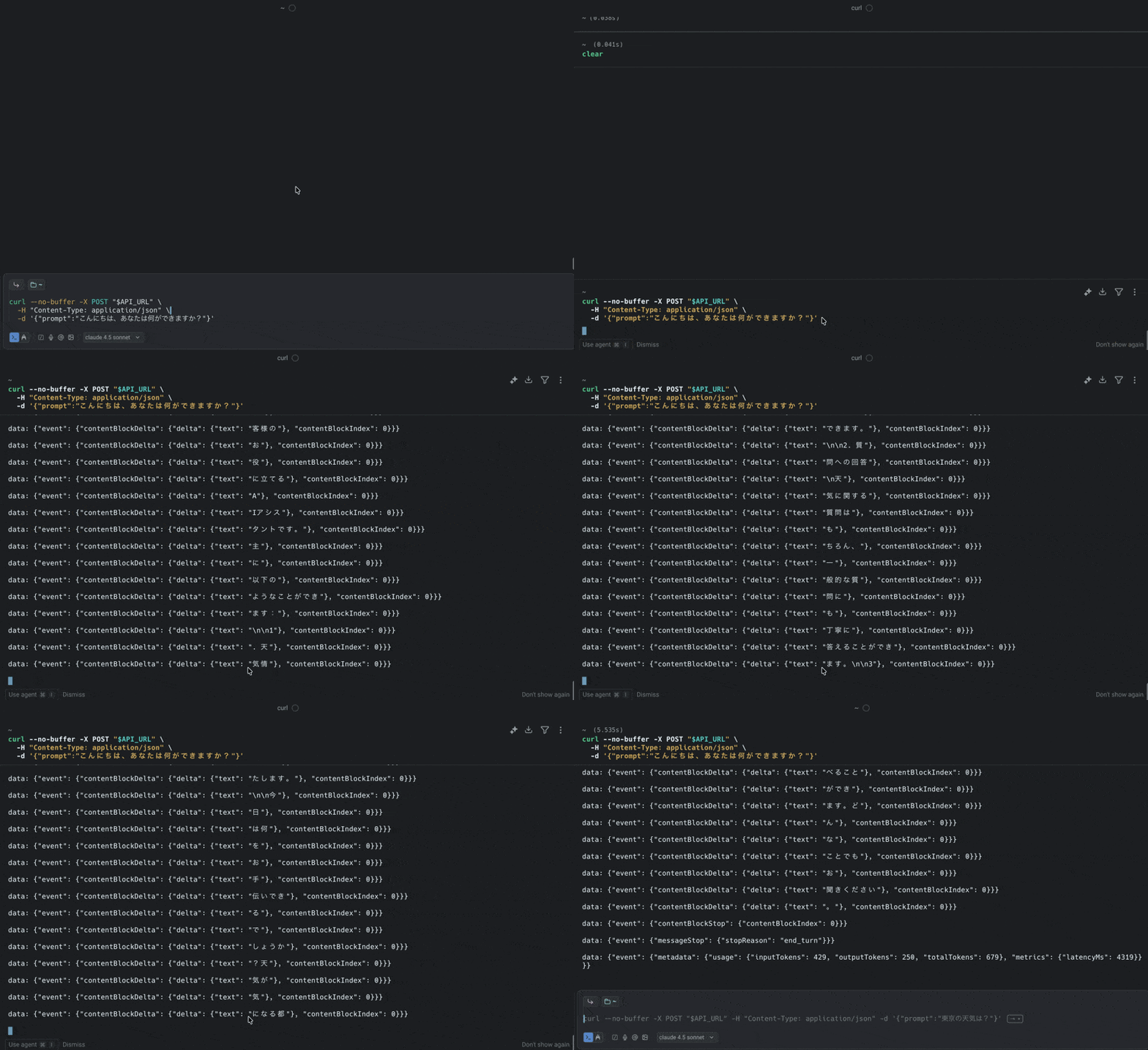
The streaming response worked perfectly! It was relatively easy to set up!
Conclusion
In this article, I implemented a streaming response process that wraps AgentCore Runtime using API Gateway's streaming response feature and Lambda functions!
By combining AgentCore with API Gateway + Lambda, you not only abstract the URL but also easily access API management features such as authentication, authorization, rate limiting, and WAF integration. While CloudFront and Lambda Function URLs are also options, from an API management perspective, combining API Gateway and Lambda with AgentCore might be a good choice!
I hope this article has been helpful. Thank you for reading!
Additional Information
Response Streaming Limitations
API Gateway's response streaming has some limitations.
Please check the official documentation when using it: