
I checked how the metadata synchronized with Amazon Bedrock Knowledge Bases is stored in Amazon OpenSearch Service

This page has been translated by machine translation. View original
Introduction
Hello, this is Jinno from the Consulting Department, a big fan of supermarkets.
When you set up a metadata file (.metadata.json) with Bedrock Knowledge Bases, the metadata is synchronized to Amazon OpenSearch Service, right?
While you typically use this metadata for filtering with the Retrieve or RetrieveAndGenerate commands, there are cases where you might want to query OpenSearch directly. At least I did...!
- When you want to filter by metadata using your own logic before making a request to Bedrock, and then perform custom processing afterward
- When you want to perform unsupported operations like document aggregation or grouping
In these cases, if you don't know how the information defined in .metadata.json is represented in the fields when synchronized to OpenSearch through Knowledge Bases, you won't know how to write your OpenSearch queries.
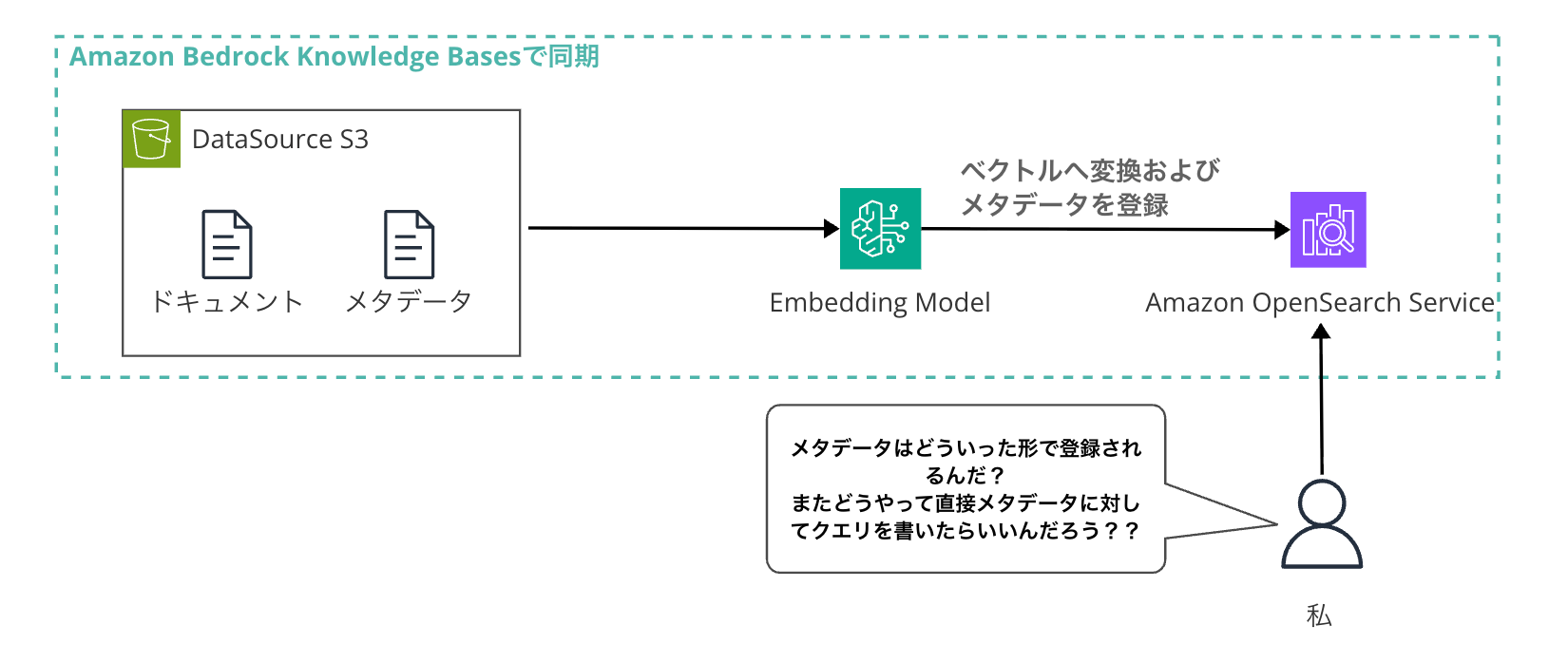
So, I decided to check this and verify the behavior by executing queries against the actual metadata I've set up.
What We'll Do
We'll check how metadata placed in S3 is synchronized to OpenSearch,
and confirm the behavior by directly executing queries from the Dev Tools in the OpenSearch dashboard.
Environment
- Amazon Bedrock Knowledge Bases (using OpenSearch Serverless as the vector store)
- Built with AWS CDK
The sample CDK code is available here:
Resources Created by CDK
This CDK stack uses @cdklabs/generative-ai-cdk-constructs to create the following resources:
| Resource | Description |
|---|---|
| S3 Bucket | For document storage. Sample documents are also automatically deployed |
| Bedrock Knowledge Bases | Automatically creates OpenSearch Serverless as vector store |
| S3 Data Source | Links Knowledge Base with S3 bucket |
| OpenSearch Serverless Collection | Vector store automatically built when creating Knowledge Base |
The main settings for the Knowledge Base are as follows:
| Setting | Value |
|---|---|
| Embedding Model | Amazon Titan Text Embeddings V2 (1024 dimensions) |
| Vector Store | OpenSearch Serverless |
| Chunking Strategy | Fixed Size |
| Max Tokens | 500 |
| Overlap Percentage | 20% |
We use VectorKnowledgeBase from generative-ai-cdk-constructs to create OpenSearch Serverless collections, indexes, data access policies, etc.
Sample Documents
We've prepared three types of documents and metadata files for testing:
| File | document_type | department | is_public | Notes |
|---|---|---|---|---|
| annual-report-2024.txt | report | finance | false | Annual report. Has year attribute |
| tech-blog-aws-bedrock.txt | blog | engineering | true | Technical blog. Has tags attribute (STRING_LIST) |
| product-manual-v2.txt | manual | product | true | Product manual. Has version attribute |
We've set different metadata attributes for each document to verify the behavior of each type.
The sample document metadata will also be uploaded when you deploy the CDK.
S3 Metadata File Format
To set metadata for Bedrock Knowledge Bases, place a metadata file named filename.extension.metadata.json in the same S3 path as the target document.
For example, for annual-report-2024.txt, place annual-report-2024.txt.metadata.json in the same location.
Let's look at an example of the metadata file we used:
{
  "metadataAttributes": {
    "document_type": {
      "value": { "type": "STRING", "stringValue": "report" }
    },
    "priority": {
      "value": { "type": "NUMBER", "numberValue": 95 }
    },
    "is_public": {
      "value": { "type": "BOOLEAN", "booleanValue": false }
    },
    "department": {
      "value": { "type": "STRING", "stringValue": "finance" }
    },
    "year": {
      "value": { "type": "NUMBER", "numberValue": 2024 }
    },
    "tags": {
      "value": {
        "type": "STRING_LIST",
        "stringListValue": ["aws", "bedrock", "generative-ai"]
      }
    }
  }
}
Four types can be specified for type: STRING, NUMBER, BOOLEAN, and STRING_LIST.
Note that there are constraints on metadata. You can have up to 50 attribute names, strings up to 2048 characters, and STRING_LIST elements up to 10.
Deployment Steps
Prerequisites and Versions Used
- Node.js v24.10.0
Installation
git clone https://github.com/yuu551/sample-knowledge.git
cd sample-knowledge
pnpm install
Parameter Configuration
In lib/parameter.ts, set access permissions for the OpenSearch Serverless dashboard.
Add the ARN of your IAM user or role:
export const parameter = {
  /**
   * IAM principals allowed to access the OpenSearch Serverless dashboard
   */
  opensearchAccessPrincipals: [
    'arn:aws:iam::123456789012:user/your-username',
    // 'arn:aws:iam::123456789012:role/Admin',
  ] as string[],

  // ... other settings
};
Deployment
If it's your first time, you need to bootstrap.
Run the deploy command to execute the deployment:
# First time only
cdk bootstrap

# Deploy
cdk deploy
After deployment is complete, the following output will be displayed:
Outputs:
SampleKnowledgeStack.KnowledgeBaseId = XXXXXXXXXX
SampleKnowledgeStack.DataSourceId = XXXXXXXXXX
SampleKnowledgeStack.DocumentBucketName = sampleknowledgestack-docbucket...
SampleKnowledgeStack.OpenSearchCollectionArn = arn:aws:aoss:...
The infrastructure environment is now created! Let's synchronize from the Knowledge Bases screen.
Data Synchronization
After deployment, execute data source synchronization from the console.
This will vectorize the data and store it in OpenSearch.
- Bedrock console → Knowledge bases → Select the created Knowledge Base
- Data source → Execute Sync
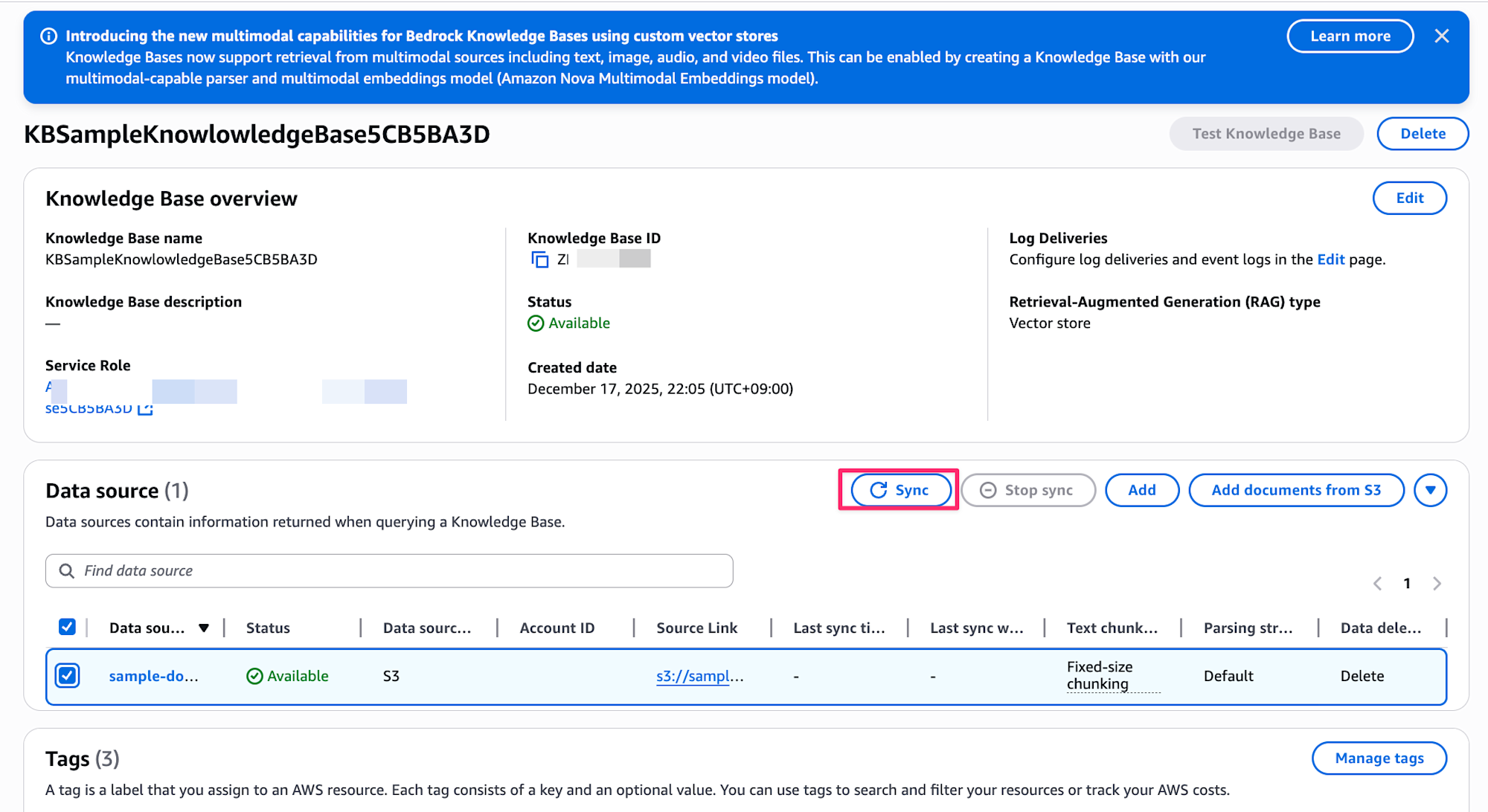
Accessing the OpenSearch Dashboard
After data source synchronization is complete, let's check how metadata is stored by accessing the OpenSearch Serverless dashboard.
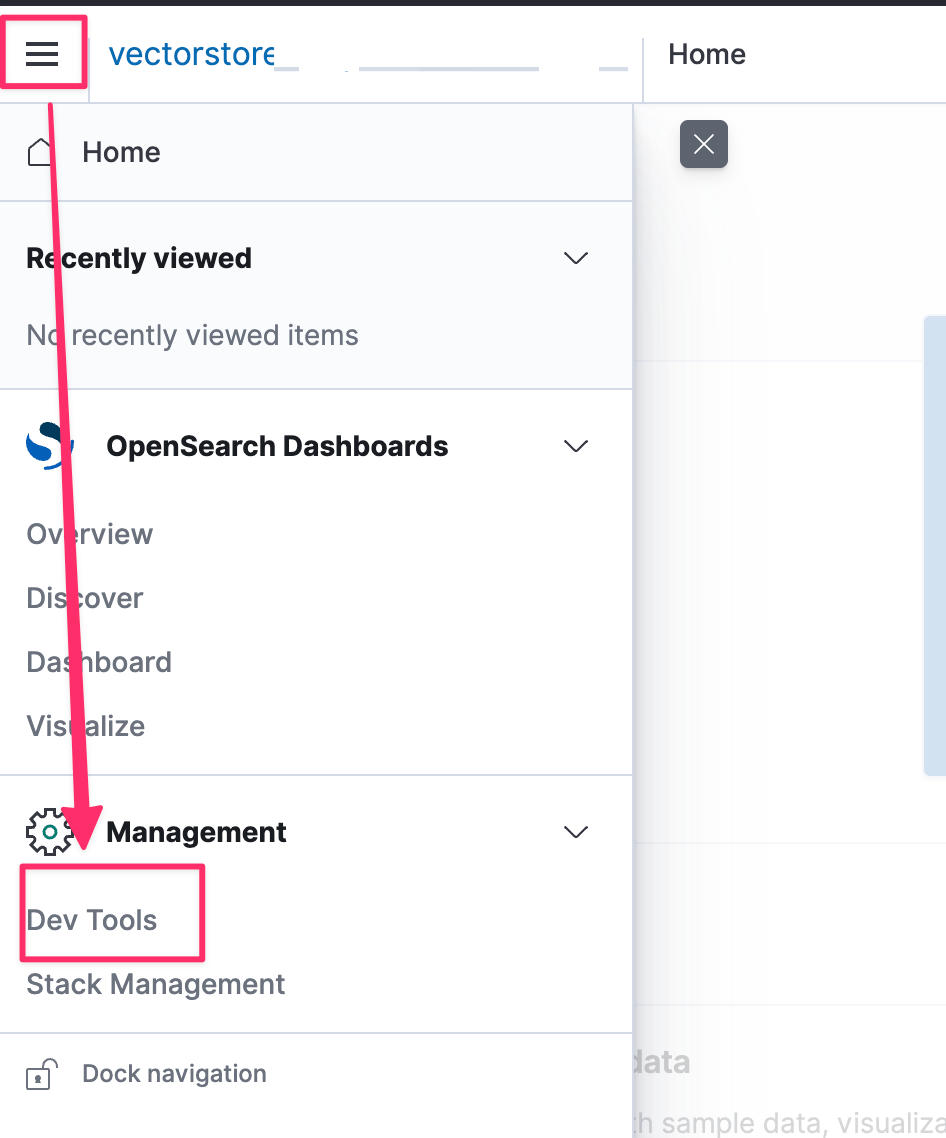
Open OpenSearch Service in the AWS console, select Serverless > Collections from the left menu. Select the collection created by CDK and click Dashboard.

Once you access the dashboard, open Dev Tools from the left menu.
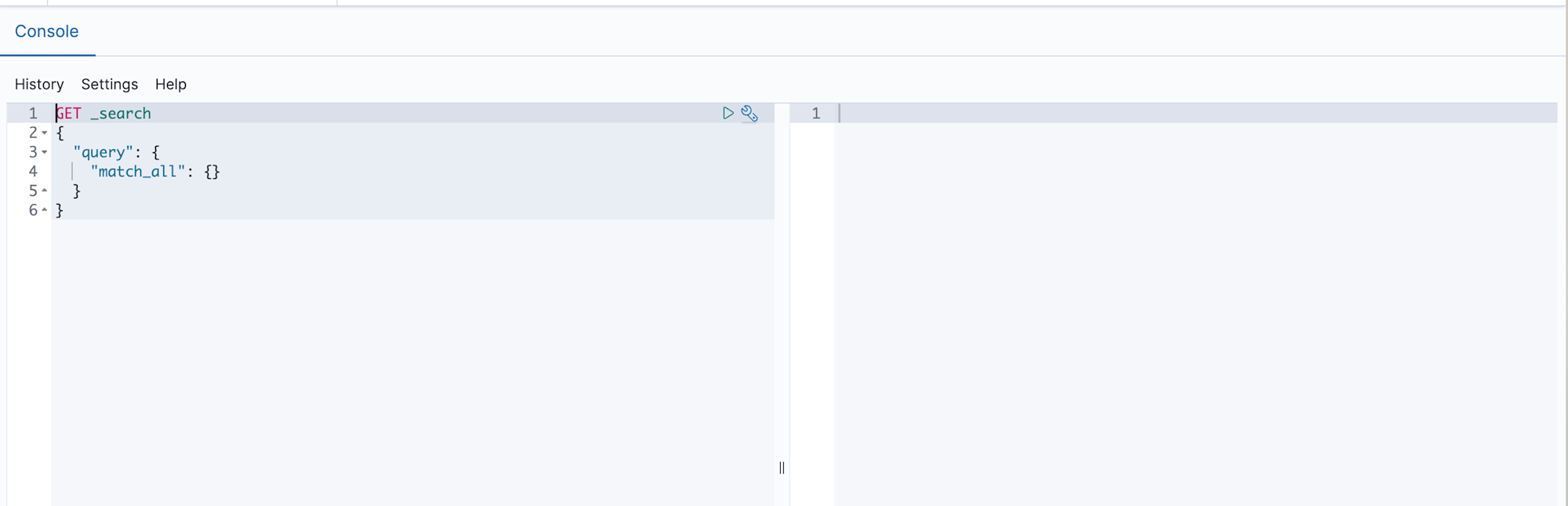
Here you can issue queries directly to OpenSearch.
Enter your query in the left editor and press the play button to see the results on the right.
If you can't access the dashboard, check if your IAM role has been added to the data access policy.
In this CDK, we grant access permissions to the roles specified in parameter.ts.
Checking the Storage Format in OpenSearch
Now let's see how metadata is actually stored in OpenSearch.
Checking the Mapping
First, let's check the index mapping. Run the following query in Dev Tools to see how data is registered with what mapping:
GET /bedrock-knowledge-base-default-index/_mapping
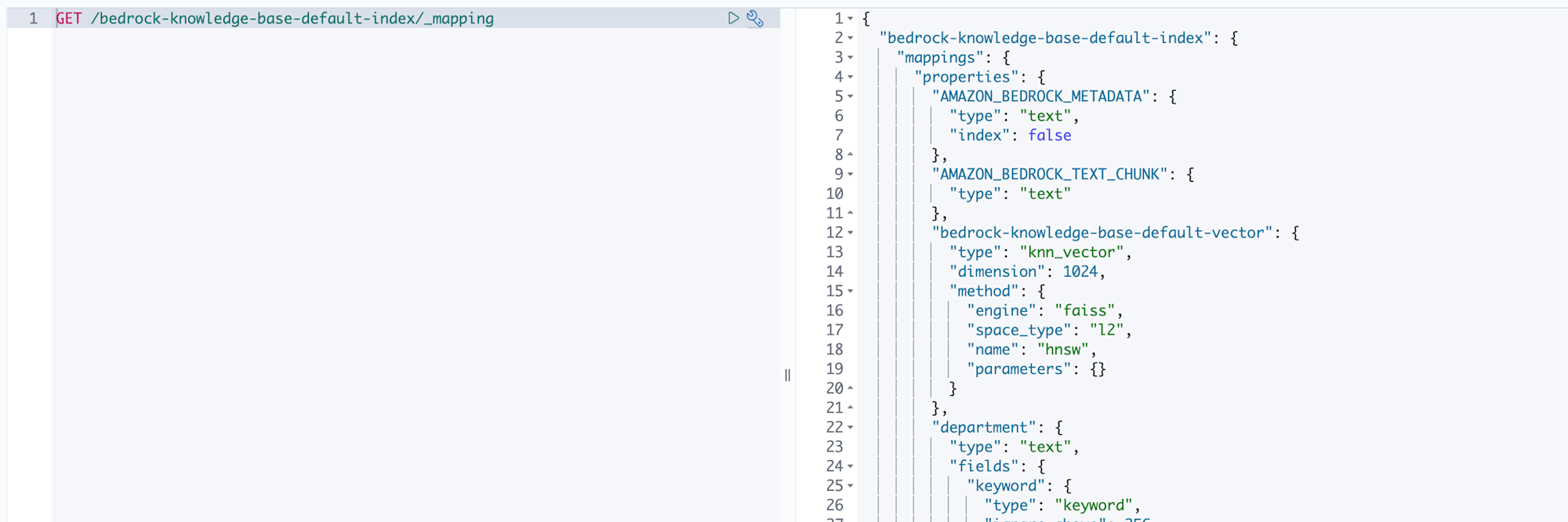
Looking at the results, we can see that in addition to the fields automatically created by Bedrock, attributes defined in metadata have been added as fields.
{
  "bedrock-knowledge-base-default-index": {
    "mappings": {
      "properties": {
        "AMAZON_BEDROCK_METADATA": {
          "type": "text",
          "index": false
        },
        "AMAZON_BEDROCK_TEXT_CHUNK": {
          "type": "text"
        },
        "bedrock-knowledge-base-default-vector": {
          "type": "knn_vector",
          "dimension": 1024,
          "method": {
            "engine": "faiss",
            "space_type": "l2",
            "name": "hnsw",
            "parameters": {}
          }
        },
        "document_type": {
          "type": "text",
          "fields": {
            "keyword": { "type": "keyword", "ignore_above": 256 }
          }
        },
        "department": {
          "type": "text",
          "fields": {
            "keyword": { "type": "keyword", "ignore_above": 256 }
          }
        },
        "priority": { "type": "float" },
        "is_public": { "type": "boolean" },
        "year": { "type": "float" },
        "tags": {
          "type": "text",
          "fields": {
            "keyword": { "type": "keyword", "ignore_above": 256 }
          }
        }
      }
    }
  }
}
I see how it's registered now.
AMAZON_BEDROCK_TEXT_CHUNK is the chunked document text, and bedrock-knowledge-base-default-vector is its vector representation. And attributes defined in metadata like document_type and priority are expanded as individual fields.
This shows that Bedrock reads the .metadata.json during data source synchronization and automatically creates fields for us.
Checking the Actual Data
Next, let's see how the actual documents are stored.
GET /bedrock-knowledge-base-default-index/_search
We can see that metadata is stored as individual attributes in the _source field.
{
  "_source": {
    "document_type": "report",
    "department": "finance",
    "priority": 95,
    "is_public": false,
    "year": 2024,
    "AMAZON_BEDROCK_TEXT_CHUNK": "Document text...",
    "bedrock-knowledge-base-default-vector": [...],
    "tags": ["aws", "bedrock", "generative-ai", "rag"]
  }
}
The metadata values are stored directly as field values!
This means we can filter and aggregate using standard OpenSearch queries.
Type Mapping
Let's summarize how metadata types are mapped in OpenSearch.
| Metadata Type | OpenSearch Mapping |
|---|---|
| STRING | text type (with keyword subfield) |
| NUMBER | float type |
| BOOLEAN | boolean type |
| STRING_LIST | text type (with keyword subfield) |
The key point is that string-based types become text type.
OpenSearch's text type is tokenized for full-text search, so if you want to search for an exact match, you need to use the .keyword subfield. For example, to search for documents where document_type is report, you query against document_type.keyword.
Also, direct mapping to date type is not supported. If you want to handle dates, store them as NUMBER type as UNIX timestamps or in YYYYMMDD format. In our sample, we defined year as a number.
Trying Queries in Dev Tools
Now let's actually issue some queries and see if we can filter by metadata.
Exact Match Search
First, let's search for documents where document_type is report and is_public is false.
GET /bedrock-knowledge-base-default-index/_search
{
  "query": {
    "bool": {
      "filter": [
        { "term": { "document_type.keyword": "report" } },
        { "term": { "is_public": false } }
      ]
    }
  }
}
Note that you need to add .keyword to string fields. As we saw in the mapping earlier, strings are stored as text type, so you need to use the keyword subfield for exact matching. If you forget this, you won't get the intended results.
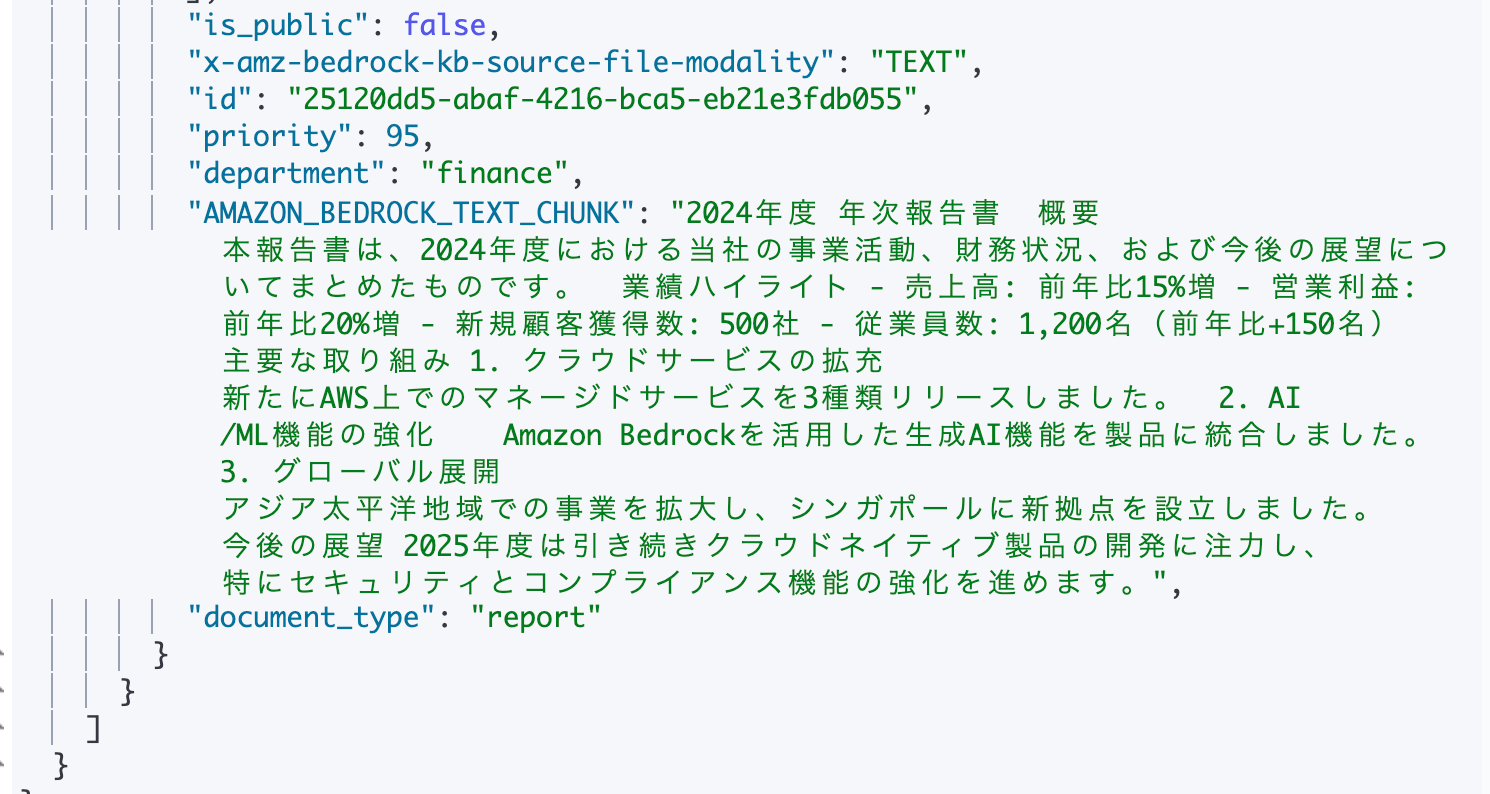
Looking at the execution results, we got one hit for the annual report document as expected.
{
  "hits": {
    "total": { "value": 1, "relation": "eq" },
    "hits": [
      {
        "_source": {
          "x-amz-bedrock-kb-source-uri": "s3://sampleknowledgestack-docbucket.../annual-report-2024.txt",
          "year": 2024,
          "is_public": false,
          "priority": 95,
          "department": "finance",
          "AMAZON_BEDROCK_TEXT_CHUNK": "2024 Annual Report  Overview This report summarizes our business activities, financial situation, and future outlook for the 2024 fiscal year...",
          "document_type": "report"
        }
      }
    ]
  }
}

Filtering by Numeric Fields
Next, let's search for documents from 2024 using the year field.
GET /bedrock-knowledge-base-default-index/_search
{
  "query": {
    "bool": {
      "filter": [
        { "term": { "year": 2024 } }
      ]
    }
  }
}
For numeric fields, .keyword is not needed. Metadata defined as NUMBER type is mapped as float type, so you can search directly with a number.
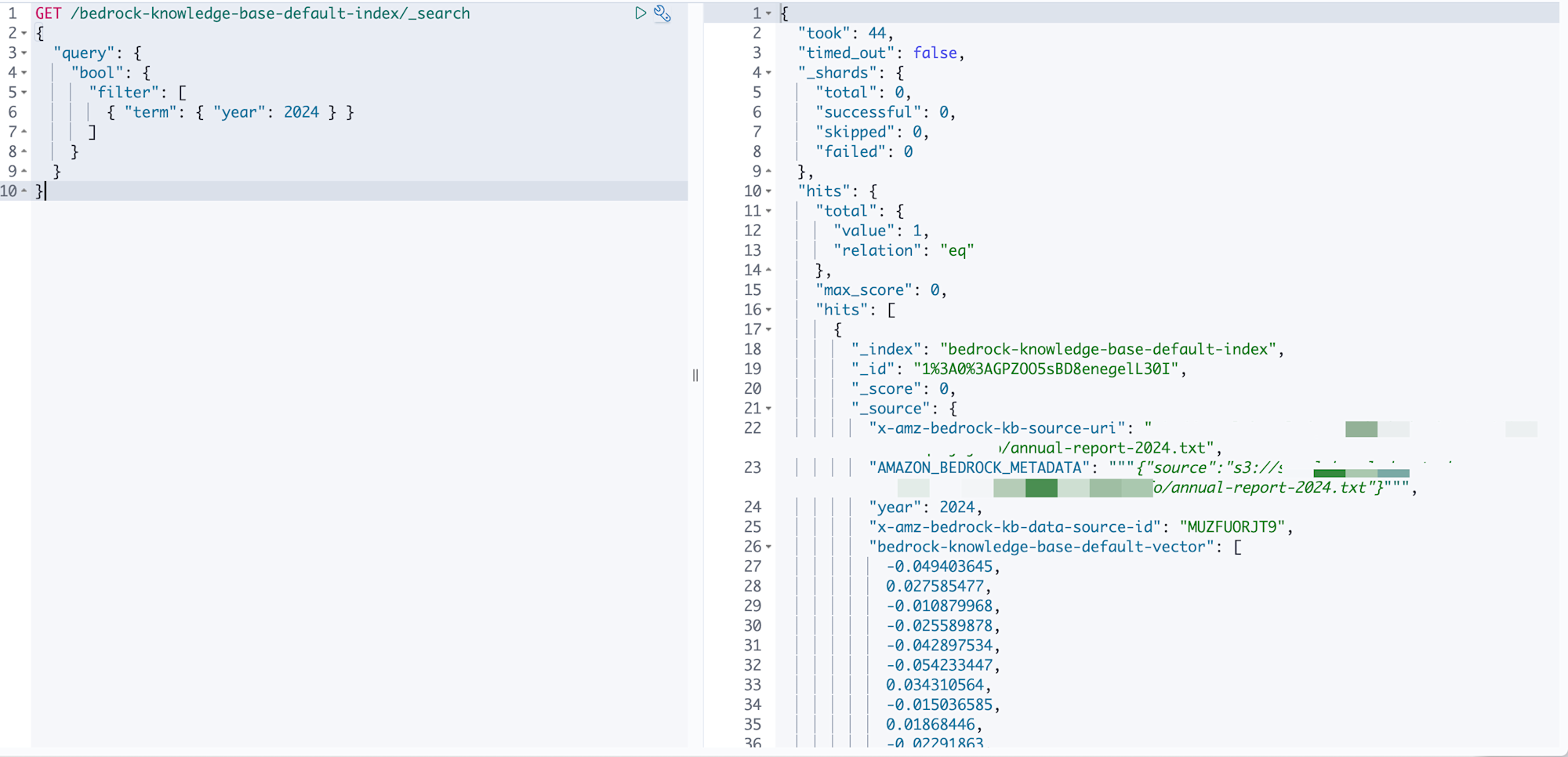
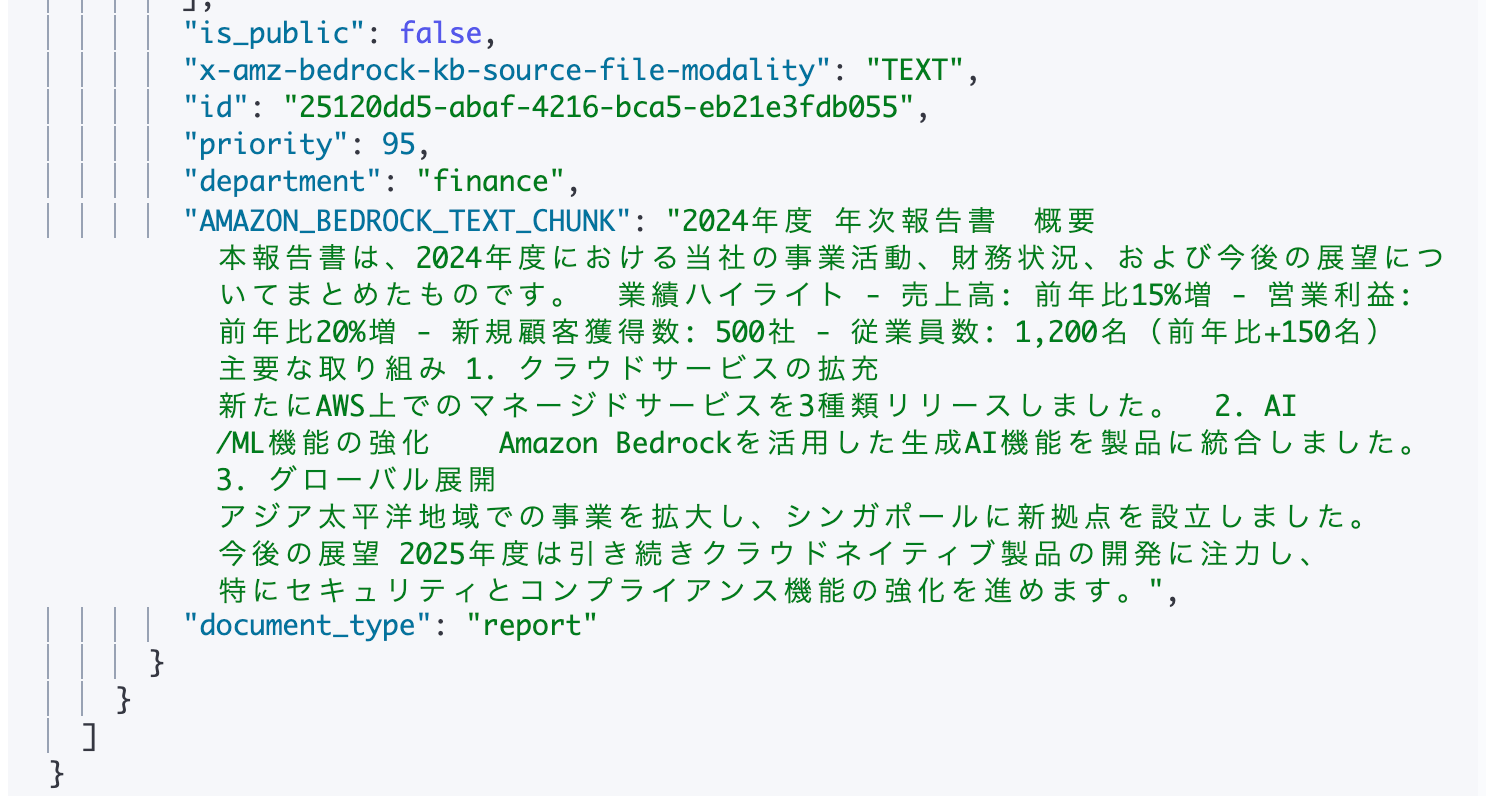
We've successfully retrieved the metadata for the 2024 data.
Searching STRING_LIST
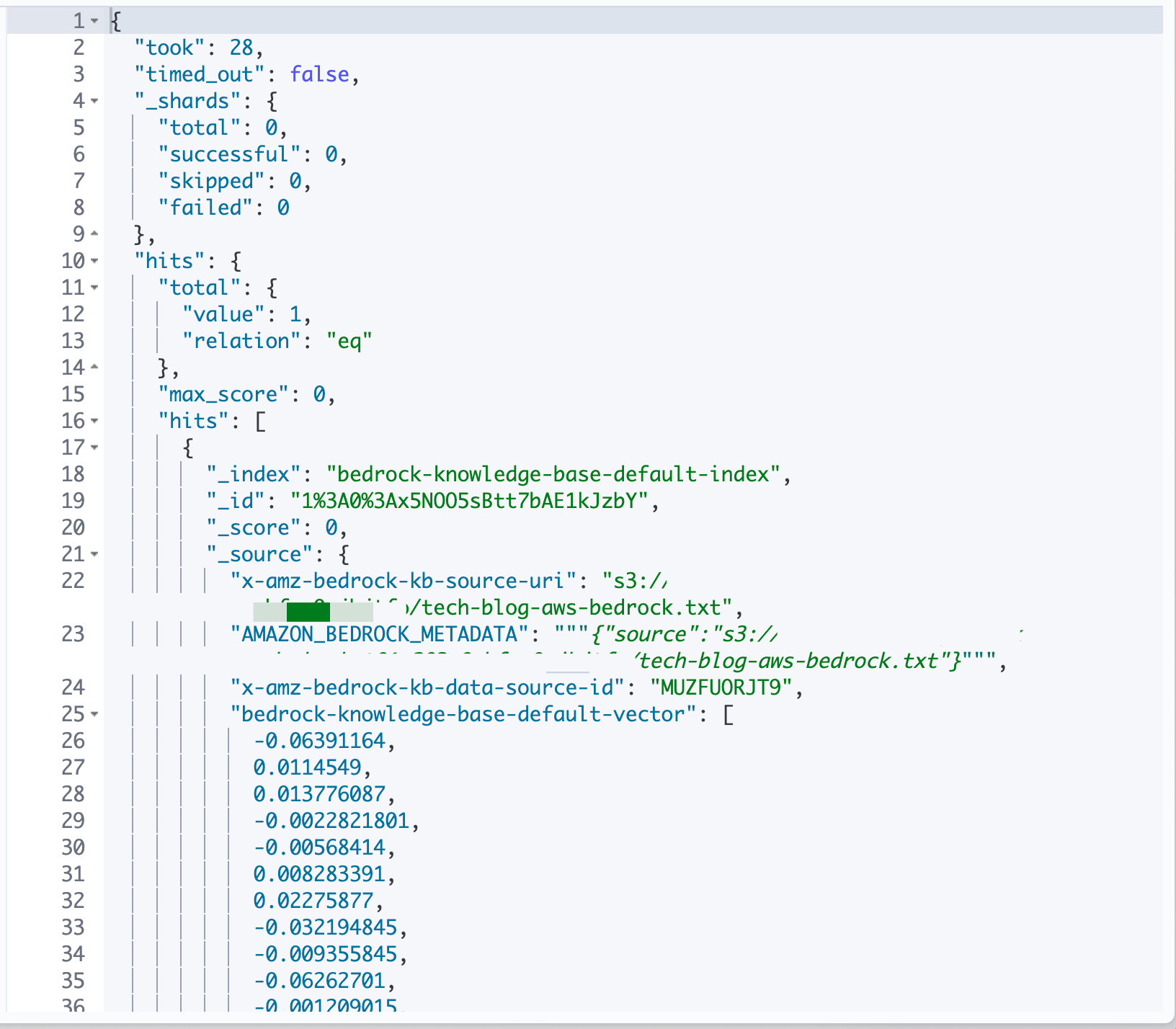
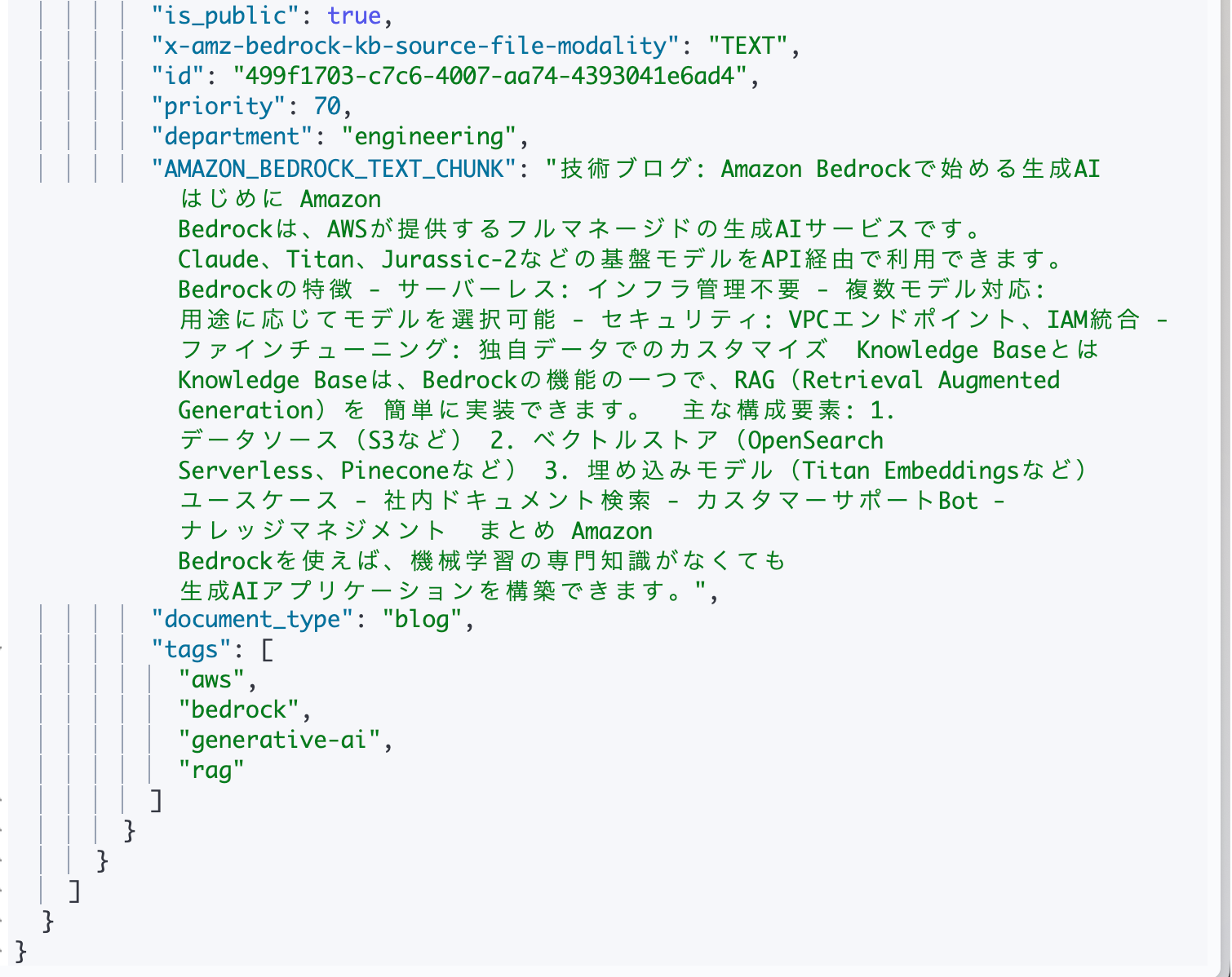
Let's also try fields like tags that are of STRING_LIST type. We'll search for documents where department is engineering and tags includes aws.
GET /bedrock-knowledge-base-default-index/_search
{
  "query": {
    "bool": {
      "filter": [
        { "term": { "department.keyword": "engineering" } },
        { "term": { "tags.keyword": "aws" } }
      ]
    }
  }
}
STRING_LIST is also stored internally as an array of text type, so .keyword is needed for exact matching.
If any element in the array matches, it will be a hit, so we can search for "documents containing the aws tag."
{
  "hits": {
    "total": { "value": 1, "relation": "eq" },
    "hits": [
      {
        "_source": {
          "x-amz-bedrock-kb-source-uri": "s3://sampleknowledgestack-docbucket.../tech-blog-aws-bedrock.txt",
          "is_public": true,
          "priority": 70,
          "department": "engineering",
          "AMAZON_BEDROCK_TEXT_CHUNK": "Tech Blog: Getting Started with Generative AI on Amazon Bedrock  Introduction Amazon Bedrock is a fully managed generative AI service provided by AWS...",
          "document_type": "blog",
          "tags": ["aws", "bedrock", "generative-ai", "rag"]
        }
      }
    ]
  }
}
Aggregation Queries
OpenSearch also supports aggregation queries.
You can group documents and get statistical information.
GET /bedrock-knowledge-base-default-index/_search
{
  "size": 0,
  "aggs": {
    "by_type": {
      "terms": { "field": "document_type.keyword" }
    },
    "by_department": {
      "terms": { "field": "department.keyword" }
    },
    "avg_priority": {
      "avg": { "field": "priority" }
    }
  }
}
Specifying size: 0 returns only the aggregation results without the documents themselves.
This can be useful for getting information like counts by document type or department, or average priority.
Here's what the results look like:
{
  "took": 80,
  "timed_out": false,
  "_shards": {
    "total": 0,
    "successful": 0,
    "skipped": 0,
    "failed": 0
  },
  "hits": {
    "total": {
      "value": 3,
      "relation": "eq"
    },
    "max_score": null,
    "hits": []
  },
  "aggregations": {
    "avg_priority": {
      "value": 81.66666666666667
    },
    "by_department": {
      "doc_count_error_upper_bound": 0,
      "sum_other_doc_count": 0,
      "buckets": [
        {
          "key": "engineering",
          "doc_count": 1
        },
        {
          "key": "finance",
          "doc_count": 1
        },
        {
          "key": "product",
          "doc_count": 1
        }
      ]
    },
    "by_type": {
      "doc_count_error_upper_bound": 0,
      "sum_other_doc_count": 0,
      "buckets": [
        {
          "key": "blog",
          "doc_count": 1
        },
        {
          "key": "manual",
          "doc_count": 1
        },
        {
          "key": "report",
          "doc_count": 1
        }
      ]
    }
  }
}
Conclusion
Today we looked at how Bedrock Knowledge Bases metadata is stored in OpenSearch Serverless!
Knowledge Bases reads the contents of .metadata.json and automatically expands it into OpenSearch fields. It's important to note that you need to use the .keyword subfield for exact string matching.
For cases where you need to issue queries directly to OpenSearch, it's essential to understand how the data is structured.
This has been educational for me! I hope this article was helpful to you too! Thank you for reading to the end!!