Performing basic operations with Amazon S3 Vectors in Python and Node.js

This page has been translated by machine translation. View original
Introduction
When creating AI chat or FAQ bots, there are often situations where you want the LLM to reference internal documents or product specifications. A representative method is RAG. RAG first searches for documents related to a question, then provides those documents to the LLM as context for answering. This makes it easier for the LLM to handle company-specific information or the latest information that would be difficult to answer with the LLM alone.
For RAG searches, it's common to convert documents into numerical vectors called embeddings and use vector search to find semantically similar documents.
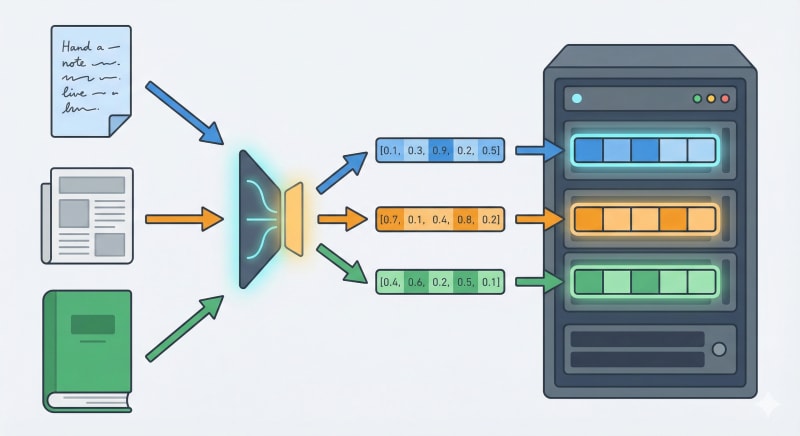
To start vector searching, you need a system to store vectors and an index for searching. Setting up a dedicated vector DB requires cluster preparation, capacity estimation, scale design, monitoring, and more.
Amazon S3 Vectors allows you to store vectors in S3 and perform vector searches with dedicated APIs. On the application side, you create vector buckets and vector indexes, add vectors, and search. This allows you to start testing vector searches without setting up infrastructure for a separate service.
In this article, we'll explore how to work with Amazon S3 Vectors using Python and Node.js. We'll divide the scripts by function and execute them in sequence. Note that this article doesn't cover embedding itself. For operational verification, we'll use fixed vector values.
Target Audience
- Those who can run the SDK using AWS authentication credentials
- Those who want to test with Python, Node.js, or both
- Those who want to understand Amazon S3 Vectors APIs
Test Environment
- AWS CLI: 2.31.31
- Python: 3.12.3
- Node.js: 22.16.0
- Region: ap-northeast-1
References
S3 Vectors Specifications
Amazon S3 Vectors creates vector indexes within vector buckets, and executes PutVectors / GetVectors / ListVectors / QueryVectors against those indexes.
Stored as float32, retrieved as float32
The data of vectors is handled as float32. Even if you pass a higher precision numeric type from the SDK, it will be converted to float32 on the S3 Vectors side, and GetVectors and QueryVectors will return float32 values.
Metadata has filterable and non-filterable types
Metadata filtering allows you to filter search results based on metadata values after searching by vector similarity. For example, you can target only vectors with a year of 2021 or higher. By default, metadata is filterable. Only keys specified during index creation can be made non-filterable.
Non-filterable metadata can be stored as additional information with vectors. It can be retrieved with returnMetadata in GetVectors and QueryVectors. However, it cannot be used as a filter condition in QueryVectors.
AWS Management Console Preparation
Here, we'll create a vector bucket and vector indexes in the console.
Creating a Vector Bucket
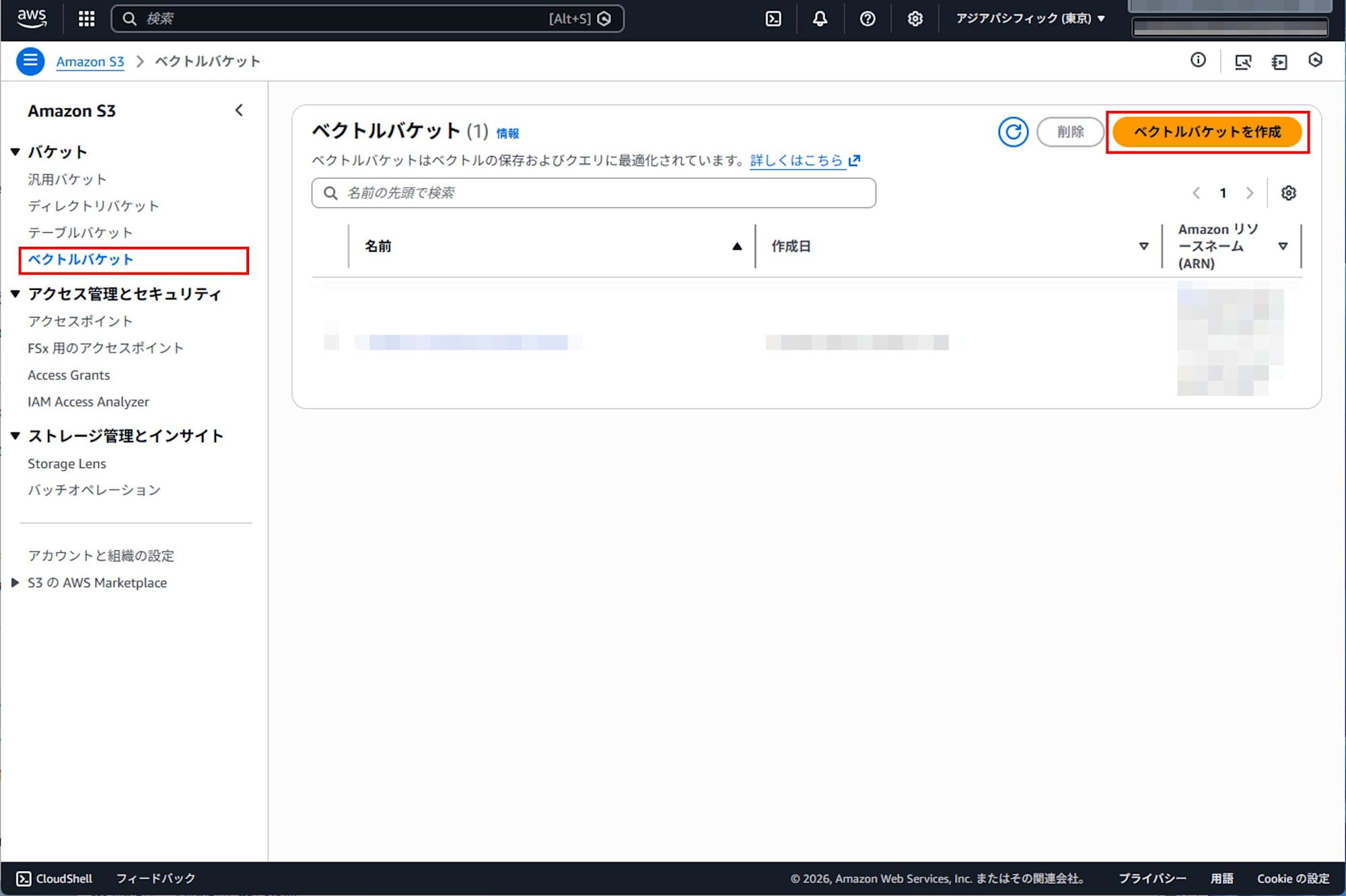
Open the Amazon S3 console and create a vector bucket from the S3 Vectors screen.
Creating a Vector Index
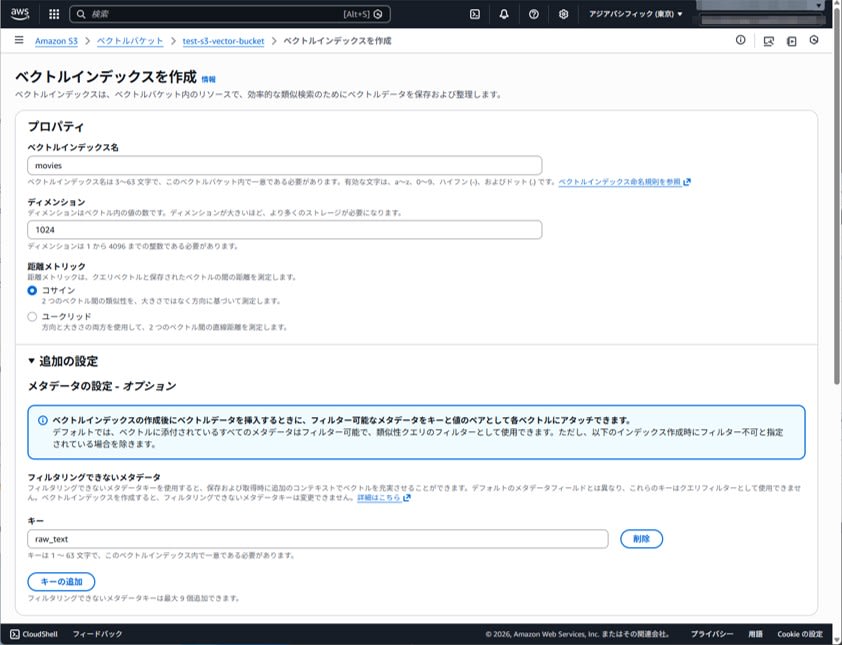
Create vector indexes within the created vector bucket.
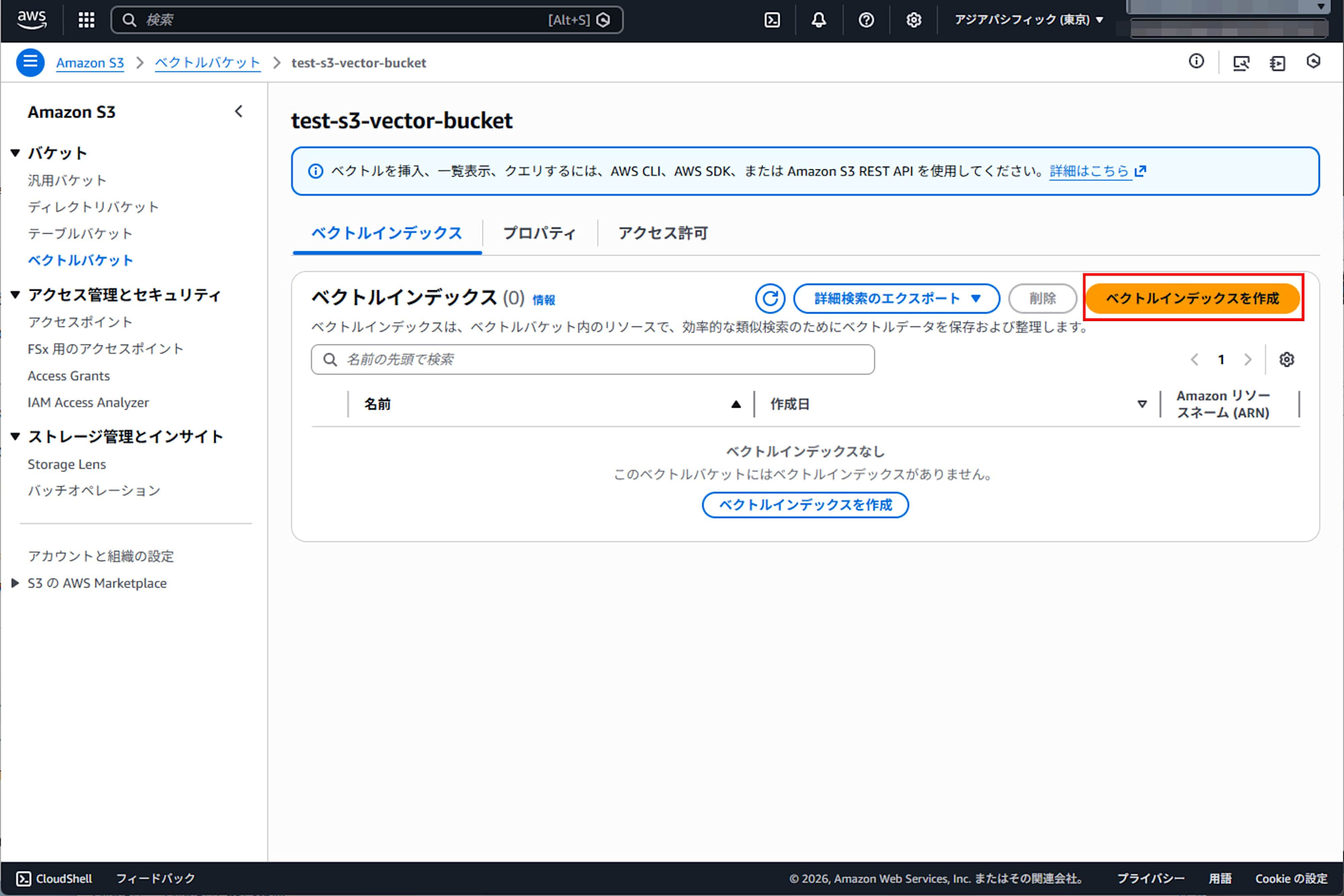
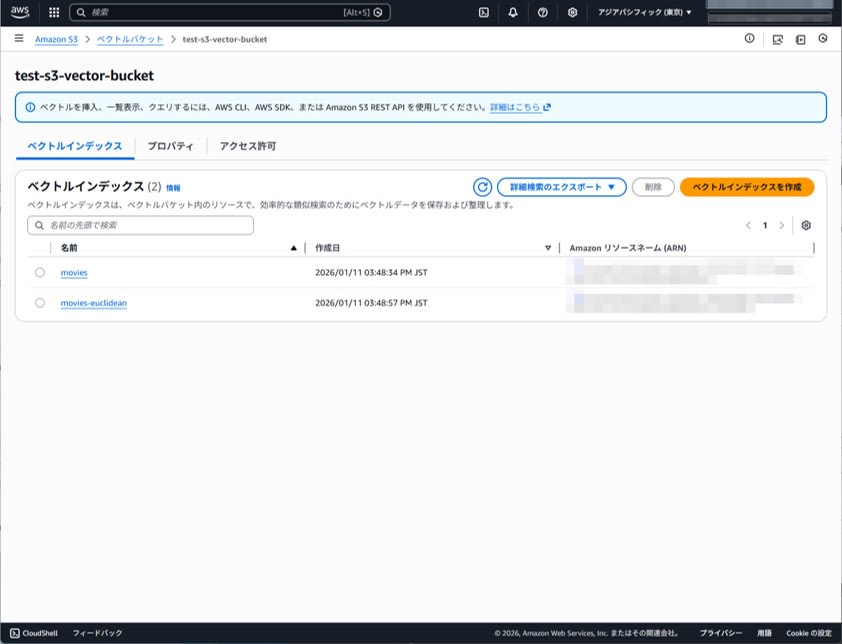
In this article, we'll create two indexes:
- movies (cosine)
- movies-euclidean (euclidean)
We decide on dimensions and distance metrics. For this test, we'll use 1024 dimensions.
Also, we'll specify raw_text as non-filterable metadata.
After creation, confirm that the indexes appear in the index list.
Environment Variables
In the following examples, we'll use these environment variables:
| Variable Name | Value |
|---|---|
| VECTOR_BUCKET_NAME | test-s3-vector-bucket |
| INDEX_NAME | movies |
| INDEX_NAME_EUC | movies-euclidean |
| DIMENSION | 1024 |
| AWS_REGION | ap-northeast-1 |
Operating with Python
Installing Dependencies
Create a virtual environment and install boto3.
python3 -m venv .venv
source .venv/bin/activate
pip install boto3
env_check.py
This script is used to detect missing environment variables early.
import os
import sys

REQUIRED = ["AWS_REGION", "VECTOR_BUCKET_NAME", "INDEX_NAME", "INDEX_NAME_EUC", "DIMENSION"]

missing = [k for k in REQUIRED if not os.getenv(k)]
if missing:
    print("Missing env:", ", ".join(missing))
    sys.exit(1)

print("OK")
Execution result
OK
put_vectors.py
Add a vector. Here we insert one record, doc1.
import os
import boto3

region = os.environ["AWS_REGION"]
bucket = os.environ["VECTOR_BUCKET_NAME"]
index_name = os.environ["INDEX_NAME"]
dim = int(os.environ["DIMENSION"])

def vec(first: float) -> list[float]:
    v = [0.0] * dim
    v[0] = first
    return v

client = boto3.client("s3vectors", region_name=region)

client.put_vectors(
    vectorBucketName=bucket,
    indexName=index_name,
    vectors=[
        {
            "key": "doc1",
            "data": {"float32": vec(0.1)},
            "metadata": {"genre": "mystery", "year": 2020, "raw_text": "hello"},
        }
    ],
)

print("put-vectors: done")
Execution result
put-vectors: done
get_vectors.py
Retrieve the added vector. If returnData and returnMetadata are not set to True, only the key is returned. When DIMENSION is 1024, data.float32 has 1024 elements, so for this test, we'll only display the first few elements.
import os
import boto3

region = os.environ["AWS_REGION"]
bucket = os.environ["VECTOR_BUCKET_NAME"]
index_name = os.environ["INDEX_NAME"]
dim = int(os.environ["DIMENSION"])

client = boto3.client("s3vectors", region_name=region)

res = client.get_vectors(
    vectorBucketName=bucket,
    indexName=index_name,
    keys=["doc1"],
    returnData=True,
    returnMetadata=True,
)

v = res["vectors"][0]
data = v.get("data", {}).get("float32", [])

print(f"key: {v['key']}")
print(f"dimension: {len(data)} / expected: {dim}")
print(f"data[0:8]: {data[:8]}")
print(f"metadata: {v.get('metadata')}")
Execution result
key: doc1
dimension: 1024 / expected: 1024
data[0:8]: [0.10000000149011612, 0.0, 0.0, 0.0, 0.0, 0.0, 0.0, 0.0]
metadata: {'raw_text': 'hello', 'genre': 'mystery', 'year': 2020}
list_vectors.py
Get a list of vectors in the index. Here we set returnMetadata to True to check the associated information.
import os
import boto3
import json

region = os.environ["AWS_REGION"]
bucket = os.environ["VECTOR_BUCKET_NAME"]
index_name = os.environ["INDEX_NAME"]

client = boto3.client("s3vectors", region_name=region)

res = client.list_vectors(
    vectorBucketName=bucket,
    indexName=index_name,
    returnMetadata=True,
)

print(json.dumps(res, ensure_ascii=False, indent=2))
Execution result
{
  "ResponseMetadata": {
    (abbreviated)
  },
  "vectors": [
    {
      "key": "doc1",
      "metadata": {
        "year": 2020,
        "genre": "mystery",
        "raw_text": "hello"
      }
    }
  ]
}
query_vectors.py
Perform similarity search without filtering. You need to provide a query vector with the same length as DIMENSION.
import os
import boto3
import json

region = os.environ["AWS_REGION"]
bucket = os.environ["VECTOR_BUCKET_NAME"]
index_name = os.environ["INDEX_NAME"]
dim = int(os.environ["DIMENSION"])

def vec(first: float) -> list[float]:
    v = [0.0] * dim
    v[0] = first
    return v

client = boto3.client("s3vectors", region_name=region)

res = client.query_vectors(
    vectorBucketName=bucket,
    indexName=index_name,
    topK=5,
    queryVector={"float32": vec(0.19)},
    returnDistance=True,
    returnMetadata=True,
)

print(json.dumps(res, ensure_ascii=False, indent=2))
Here, vec(0.19) is a DIMENSION-dimensional vector created by the helper function vec(first). Specifically, only the first element is 0.19, and the rest are all 0.0. Similarly, vec(0.1) has only the first element as 0.1, with the rest all being 0.0. These two are related by scalar multiplication and can be treated as vectors with the same direction.
Cosine similarity is defined by the following formula:
If
Execution result
{
  "ResponseMetadata": {
    (abbreviated)
  },
  "vectors": [
    {
      "distance": 0.0,
      "key": "doc1",
      "metadata": {
        "genre": "mystery",
        "raw_text": "hello",
        "year": 2020
      }
    }
  ],
  "distanceMetric": "cosine"
}
From the execution result, we can see that the distance is indeed calculated as 0.0.
query_vectors_filter.py
Use metadata filter to narrow down results. Here we target only those with year 2021 or higher. The filter syntax has examples on the metadata filtering page.
First, let's update doc1. PutVectors can be reinvested against the same key, so it can be treated as an update.
import os
import boto3

region = os.environ["AWS_REGION"]
bucket = os.environ["VECTOR_BUCKET_NAME"]
index_name = os.environ["INDEX_NAME"]
dim = int(os.environ["DIMENSION"])

def vec(first: float) -> list[float]:
    v = [0.0] * dim
    v[0] = first
    return v

client = boto3.client("s3vectors", region_name=region)

client.put_vectors(
    vectorBucketName=bucket,
    indexName=index_name,
    vectors=[
        {
            "key": "doc1",
            "data": {"float32": vec(0.2)},
            "metadata": {"genre": "mystery", "year": 2021, "raw_text": "hello2"},
        }
    ],
)

print("put-vectors: updated")
Next, query with a filter.
import os
import boto3
import json

region = os.environ["AWS_REGION"]
bucket = os.environ["VECTOR_BUCKET_NAME"]
index_name = os.environ["INDEX_NAME"]
dim = int(os.environ["DIMENSION"])

def vec(first: float) -> list[float]:
    v = [0.0] * dim
    v[0] = first
    return v

client = boto3.client("s3vectors", region_name=region)

res = client.query_vectors(
    vectorBucketName=bucket,
    indexName=index_name,
    topK=5,
    queryVector={"float32": vec(0.19)},
    returnDistance=True,
    returnMetadata=True,
    filter={"$and": [{"genre": {"$eq": "mystery"}}, {"year": {"$gte": 2021}}]},
)

print(json.dumps(res, ensure_ascii=False, indent=2))
Execution result
put-vectors: updated
{
  "ResponseMetadata": {
    (abbreviated)
  },
  "vectors": [
    {
      "distance": 0.0,
      "key": "doc1",
      "metadata": {
        "raw_text": "hello2",
        "year": 2021,
        "genre": "mystery"
      }
    }
  ],
  "distanceMetric": "cosine"
}
query_vectors_non_filterable.py
Including non-filterable metadata in a filter will fail. Since we made raw_text non-filterable, the following query will result in a ValidationException.
import os
import boto3

region = os.environ["AWS_REGION"]
bucket = os.environ["VECTOR_BUCKET_NAME"]
index_name = os.environ["INDEX_NAME"]
dim = int(os.environ["DIMENSION"])

def vec(first: float) -> list[float]:
    v = [0.0] * dim
    v[0] = first
    return v

client = boto3.client("s3vectors", region_name=region)

client.query_vectors(
    vectorBucketName=bucket,
    indexName=index_name,
    topK=5,
    queryVector={"float32": vec(0.19)},
    filter={"raw_text": {"$eq": "hello"}},
)
Execution result
Traceback (most recent call last):
  File "query_vectors_non_filterable.py", line 15, in <module>
    client.query_vectors(
  File ".venv/lib/python3.12/site-packages/botocore/client.py", line 602, in _api_call
    return self._make_api_call(operation_name, kwargs)
           ^^^^^^^^^^^^^^^^^^^^^^^^^^^^^^^^^^^^^^^^^^^
  File ".venv/lib/python3.12/site-packages/botocore/context.py", line 123, in wrapper
    return func(*args, **kwargs)
           ^^^^^^^^^^^^^^^^^^^^^
  File ".venv/lib/python3.12/site-packages/botocore/client.py", line 1078, in _make_api_call
    raise error_class(parsed_response, operation_name)
botocore.errorfactory.ValidationException: An error occurred (ValidationException) when calling the QueryVectors operation: Invalid use of non-filterable metadata in filter
delete_vectors.py
Delete vectors.
import os
import boto3

region = os.environ["AWS_REGION"]
bucket = os.environ["VECTOR_BUCKET_NAME"]
index_name = os.environ["INDEX_NAME"]

client = boto3.client("s3vectors", region_name=region)

client.delete_vectors(
    vectorBucketName=bucket,
    indexName=index_name,
    keys=["doc1"],
)

print("delete-vectors: done")
Execution result
delete-vectors: done
Run list_vectors.py after deletion to confirm it's empty.
Execution result
{
  "ResponseMetadata": {
    (abbreviated)
  },
  "vectors": []
}
check_euclidean.py
Insert vec(0.1) into movies-euclidean, search with vec(0.19), and check the distance.
Euclidean is a distance metric that uses straight-line distance. Euclidean distance is generally defined by the following formula:
However, the distance returned by S3 Vectors in the QueryVectors response is described as a computed distance or measure of similarity, and may not match the mathematical Euclidean distance. Therefore, this script calculates both Euclidean distance (L2) and squared distance (L2 squared) to see which one the returned distance is closer to.
Note that since our vec(first) has only the first element as non-zero, even with a DIMENSION of 1024, there's only one element with a difference. Therefore, the theoretical L2 is |0.19 - 0.1|.
import os
import time
import boto3

region = os.environ["AWS_REGION"]
bucket = os.environ["VECTOR_BUCKET_NAME"]
index_name = os.environ["INDEX_NAME_EUC"]
dim = int(os.environ["DIMENSION"])

KEY = "doc-euc-1"

def vec(first: float) -> list[float]:
    v = [0.0] * dim
    v[0] = first
    return v

client = boto3.client("s3vectors", region_name=region)

inserted = False

try:
    client.put_vectors(
        vectorBucketName=bucket,
        indexName=index_name,
        vectors=[
            {
                "key": KEY,
                "data": {"float32": vec(0.1)},
                "metadata": {"note": "euclidean quick check"},
            }
        ],
    )
    inserted = True

    # 1. Wait for reflection: Check existence with GetVectors (max 10 times)
    for _ in range(10):
        g = client.get_vectors(
            vectorBucketName=bucket,
            indexName=index_name,
            keys=[KEY],
        )
        if g.get("vectors"):
            break
        time.sleep(0.3)

    # 2. Wait for reflection: Search with QueryVectors (max 10 times)
    res = None
    for _ in range(10):
        res = client.query_vectors(
            vectorBucketName=bucket,
            indexName=index_name,
            topK=1,
            queryVector={"float32": vec(0.19)},
            returnDistance=True,
        )
        if res.get("vectors"):
            break
        time.sleep(0.3)

    if not res or not res.get("vectors"):
        # Even if empty, don't drop but output the situation
        print("distanceMetric:", (res or {}).get("distanceMetric"))
        print("vectors: []")
        print("note: QueryVectors returned no results. Try again, or check indexName and data presence.")
        raise SystemExit(1)

    returned = res["vectors"][0]["distance"]

    delta = 0.19 - 0.1
    expected_l2 = abs(delta)
    expected_l2_squared = delta * delta

    print("distanceMetric:", res.get("distanceMetric"))
    print("distance:", returned)
    print("expected_l2:", expected_l2)
    print("expected_l2_squared:", expected_l2_squared)

finally:
    if inserted:
        client.delete_vectors(
            vectorBucketName=bucket,
            indexName=index_name,
            keys=[KEY],
        )
Execution result (example)
distanceMetric: euclidean
distance: 0.007821191102266312
expected_l2: 0.09
expected_l2_squared: 0.0081
In actual measurement, the distance returned by S3 Vectors was closer to L2 squared than L2. It's safer to treat S3 Vectors' distance as an indicator for ranking rather than assuming it perfectly matches mathematical distance. If you need to compare values, it's better to make relative comparisons between data with the same distanceMetric and scale.
Operating with Node.js
Installing Dependencies
Use the AWS SDK for JavaScript's S3 Vectors client.
npm init -y
npm install @aws-sdk/client-s3vectors
env_check.js
Similar to Python, we detect missing environment variables early. In the Node.js section, we'll use only the cosine index and omit euclidean.
const required = ["AWS_REGION", "VECTOR_BUCKET_NAME", "INDEX_NAME", "DIMENSION"];
const missing = required.filter((k) => !process.env[k]);

if (missing.length) {
  console.error(`Missing env: ${missing.join(", ")}`);
  process.exit(1);
}

console.log("OK");
Execution result
OK
put_vectors.js
Add a vector. Here we insert one record, doc1.
const { S3VectorsClient, PutVectorsCommand } = require("@aws-sdk/client-s3vectors");

const region = process.env.AWS_REGION;
const vectorBucketName = process.env.VECTOR_BUCKET_NAME;
const indexName = process.env.INDEX_NAME;
const dim = Number(process.env.DIMENSION);

const vec = (first) => {
  const v = Array(dim).fill(0);
  v[0] = first;
  return v;
};

(async () => {
  const client = new S3VectorsClient({ region });

  await client.send(
    new PutVectorsCommand({
      vectorBucketName,
      indexName,
      vectors: [
        {
          key: "doc1",
          data: { float32: vec(0.1) },
          metadata: { genre: "mystery", year: 2020, raw_text: "hello" },
        },
      ],
    })
  );

  console.log("put-vectors: done");
})().catch((e) => {
  console.error(e?.name, e?.message);
  process.exit(1);
});
Execution result
put-vectors: done
get_vectors.js
Retrieve the added vector. If returnData and returnMetadata are not set to true, only the key is returned. For large DIMENSION values, we display only the first few elements.
const { S3VectorsClient, GetVectorsCommand } = require("@aws-sdk/client-s3vectors");

const region = process.env.AWS_REGION;
const vectorBucketName = process.env.VECTOR_BUCKET_NAME;
const indexName = process.env.INDEX_NAME;
const dim = Number(process.env.DIMENSION);

(async () => {
  const client = new S3VectorsClient({ region });

  const res = await client.send(
    new GetVectorsCommand({
      vectorBucketName,
      indexName,
      keys: ["doc1"],
      returnData: true,
      returnMetadata: true,
    })
  );

  const v = res.vectors?.[0];
  const data = v?.data?.float32 ?? [];

  console.log(`key: ${v?.key}`);
  console.log(`dimension: ${data.length} / expected: ${dim}`);
  console.log(`data[0:8]: ${JSON.stringify(data.slice(0, 8))}`);
  console.log(`metadata: ${JSON.stringify(v?.metadata)}`);
})().catch((e) => {
  console.error(e?.name, e?.message);
  process.exit(1);
});
Execution result
key: doc1
dimension: 1024 / expected: 1024
data[0:8]: [0.10000000149011612,0,0,0,0,0,0,0]
metadata: {"year":2020,"raw_text":"hello","genre":"mystery"}
list_vectors.js
Get a list of vectors in the index. Here we set returnMetadata to true to check the associated information.
const { S3VectorsClient, ListVectorsCommand } = require("@aws-sdk/client-s3vectors");

const region = process.env.AWS_REGION;
const vectorBucketName = process.env.VECTOR_BUCKET_NAME;
const indexName = process.env.INDEX_NAME;

(async () => {
  const client = new S3VectorsClient({ region });

  const res = await client.send(
    new ListVectorsCommand({
      vectorBucketName,
      indexName,
      returnMetadata: true,
    })
  );

  console.log(JSON.stringify(res, null, 2));
})().catch((e) => {
  console.error(e?.name, e?.message);
  process.exit(1);
});
Execution result
{
  "vectors": [
    {
      "key": "doc1",
      "metadata": {
        "raw_text": "hello",
        "genre": "mystery",
        "year": 2020
      }
    }
  ],
  "$metadata": {
    (abbreviated)
  }
}
query_vectors.js
Perform similarity search without filtering. You need to provide a query vector with the same length as DIMENSION.
const { S3VectorsClient, QueryVectorsCommand } = require("@aws-sdk/client-s3vectors");

const region = process.env.AWS_REGION;
const vectorBucketName = process.env.VECTOR_BUCKET_NAME;
const indexName = process.env.INDEX_NAME;
const dim = Number(process.env.DIMENSION);

const vec = (first) => {
  const v = Array(dim).fill(0);
  v[0] = first;
  return v;
};

(async () => {
  const client = new S3VectorsClient({ region });

  const res = await client.send(
    new QueryVectorsCommand({
      vectorBucketName,
      indexName,
      topK: 5,
      queryVector: { float32: vec(0.19) },
      returnDistance: true,
      returnMetadata: true,
    })
  );

  console.log(JSON.stringify(res, null, 2));
})().catch((e) => {
  console.error(e?.name, e?.message);
  process.exit(1);
});
Execution result
{
  "vectors": [
    {
      "distance": 0,
      "key": "doc1",
      "metadata": {
        "year": 2020,
        "genre": "mystery",
        "raw_text": "hello"
      }
    }
  ],
  "distanceMetric": "cosine",
  "$metadata": {
    (abbreviated)
  }
}
query_vectors_non_filterable.js
If raw_text is set as non-filterable metadata, including it in a filter will fail.
const { S3VectorsClient, QueryVectorsCommand } = require("@aws-sdk/client-s3vectors");

const region = process.env.AWS_REGION;
const vectorBucketName = process.env.VECTOR_BUCKET_NAME;
const indexName = process.env.INDEX_NAME;
const dim = Number(process.env.DIMENSION);

const vec = (first) => {
  const v = Array(dim).fill(0);
  v[0] = first;
  return v;
};

(async () => {
  const client = new S3VectorsClient({ region });

  try {
    await client.send(
      new QueryVectorsCommand({
        vectorBucketName,
        indexName,
        topK: 5,
        queryVector: { float32: vec(0.19) },
        filter: { raw_text: { $eq: "hello" } },
      })
    );
  } catch (e) {
    console.error("expected error:", e?.name, e?.message);
  }
})().catch((e) => {
  console.error(e?.name, e?.message);
  process.exit(1);
});
Execution result
expected error: ValidationException Invalid use of non-filterable metadata in filter
delete_vectors.js
As cleanup, we delete the added vectors.
const { S3VectorsClient, DeleteVectorsCommand } = require("@aws-sdk/client-s3vectors");

const region = process.env.AWS_REGION;
const vectorBucketName = process.env.VECTOR_BUCKET_NAME;
const indexName = process.env.INDEX_NAME;

(async () => {
  const client = new S3VectorsClient({ region });

  await client.send(
    new DeleteVectorsCommand({
      vectorBucketName,
      indexName,
      keys: ["doc1"],
    })
  );

  console.log("delete-vectors: done");
})().catch((e) => {
  console.error(e?.name, e?.message);
  process.exit(1);
});
Execution result
delete-vectors: done
Considerations
Division of Roles Between Console and SDK
Currently, the console can handle the creation of vector buckets and vector indexes. However, vector insertion, listing, and querying require the use of the AWS SDK / AWS CLI / REST API. While console functionality may be expanded in the future, it's valuable to establish SDK-based procedures first when considering operations. For example, vector insertion and updates work well with batch processing and CI, and procedures can be preserved along with logs. This can minimize the differences between verification and production migration compared to UI-only procedures.
Handling distanceMetric and distance
distanceMetric is the method for calculating similarity. Cosine evaluates similarity based on angles, while Euclidean evaluates similarity based on straight-line distance.
In this article's verification, the distance was 0.0 in the cosine example. In the Euclidean example, the value did not match the expected mathematical Euclidean distance (L2). Therefore, in implementation, it's safer not to rely too heavily on the absolute value of distance.
For example, L2 and L2 squared have a monotonically increasing relationship, so as long as you're ranking the same data, the top results won't fundamentally change. What's important is to relatively compare results with the same distanceMetric to extract the top ones.
However, caution is needed when setting thresholds on distances for pass/fail determinations. In such cases, it's safer to determine threshold values after observing distributions in actual data.
Scenarios for Choosing S3 Vectors
I found that S3 Vectors is a good choice in the following scenarios:
- When you're already using S3 as a data lake and don't want to increase operational targets with a separate service just for vector search
- When you want to start with small verifications without spending time on infrastructure design or cluster operations
- When you want to use vector search as a component and freely design pre-processing and post-processing on the application side
However, if you just want to set up RAG with minimal steps, mechanisms like Amazon Bedrock Knowledge Bases that handle ingestion, segmentation, embedding, and search together are more suitable. Since S3 Vectors can also be used as a vector store for Knowledge Bases, you can first try with Knowledge Bases and later adjust based on requirements.
If you prioritize advanced search features or hybrid search, it may be more appropriate to design based on services with strong search capabilities, such as Amazon OpenSearch Service or DocumentDB. While DynamoDB is oriented toward transaction-based data placement, when focusing on vector search, many configuration examples combine it with OpenSearch, requiring selection based on requirements.
Summary
This article introduced how to create vector buckets and vector indexes with Amazon S3 Vectors, and how to manipulate vector data using PutVectors / GetVectors / ListVectors / QueryVectors. While the current console allows for resource creation and index listing, vector insertion and searching must be done through the AWS SDK / AWS CLI. In this article, we executed vector insertion and searching using both Python and Node.js, and confirmed actual behavior from the execution results. I hope this serves as a reference for verification and implementation of RAG.