
Managing feature flags as enum values rather than simply ON/OFF using AWS AppConfig's attribute feature

This page has been translated by machine translation. View original
I'm Sato from the Service Development Department of the Cloud Business Division.
Introduction
Feature flags are a useful mechanism that allows you to toggle features on and off without deploying code. Using AWS AppConfig, you can manage feature flags on AWS.
However, in actual operations, simple ON/OFF toggles are sometimes insufficient. For example, in a recent development case, when implementing a rate limiting feature, we needed a phased rollout with multiple modes like the following:
- disabled: Disable rate limiting
- count only (count): Don't apply rate limiting, only record in logs
- enabled: Enable rate limiting
This article introduces how to solve the above challenges by using AWS AppConfig's attribute feature to manage feature flags as enum types rather than default Boolean flags. The implementation is demonstrated using Kotlin as a sample.
I'll omit the introduction of AppConfig itself and the AppConfig Agent. This configuration assumes that the AppConfig Agent is configured as a sidecar in ECS.
Initial Implementation
Initially, to manage these three values, we were managing the feature state by combining two flags as follows:
{
    "ratelimit": {
      "enabled": true
    },
    "ratelimit_countmode": {
      "enabled": true
    }
}
fun doFilterInternal(request: HttpServletRequest, response: HttpServletResponse, filterChain: FilterChain) {
      // ON/OFF for the rate limit feature itself
      if (!featureFlagService.isEnabled("ratelimit")) {
          filterChain.doFilter(request, response)
          return
      }

      // Mode when rate limit feature is ON
      if (featureFlagService.isEnabled("ratelimit_countmode")) {
          // COUNT mode: logging only
      } else {
          // Normal mode: return 429 response
      }
}
Problems
- Using a combination of two flags to represent three states is confusing
- When ratelimit=false, the feature is disabled regardless of the ratelimit_countmode value
- As flags increase, combinations become more complex
When investigating if AppConfig could solve this, we found that there is a feature called attributes.
Implementation Using AppConfig's Attribute Feature
To use AppConfig's attribute feature, you first need to create a flag. When you create a flag, there is a section called attribute definition in the flag detail screen.
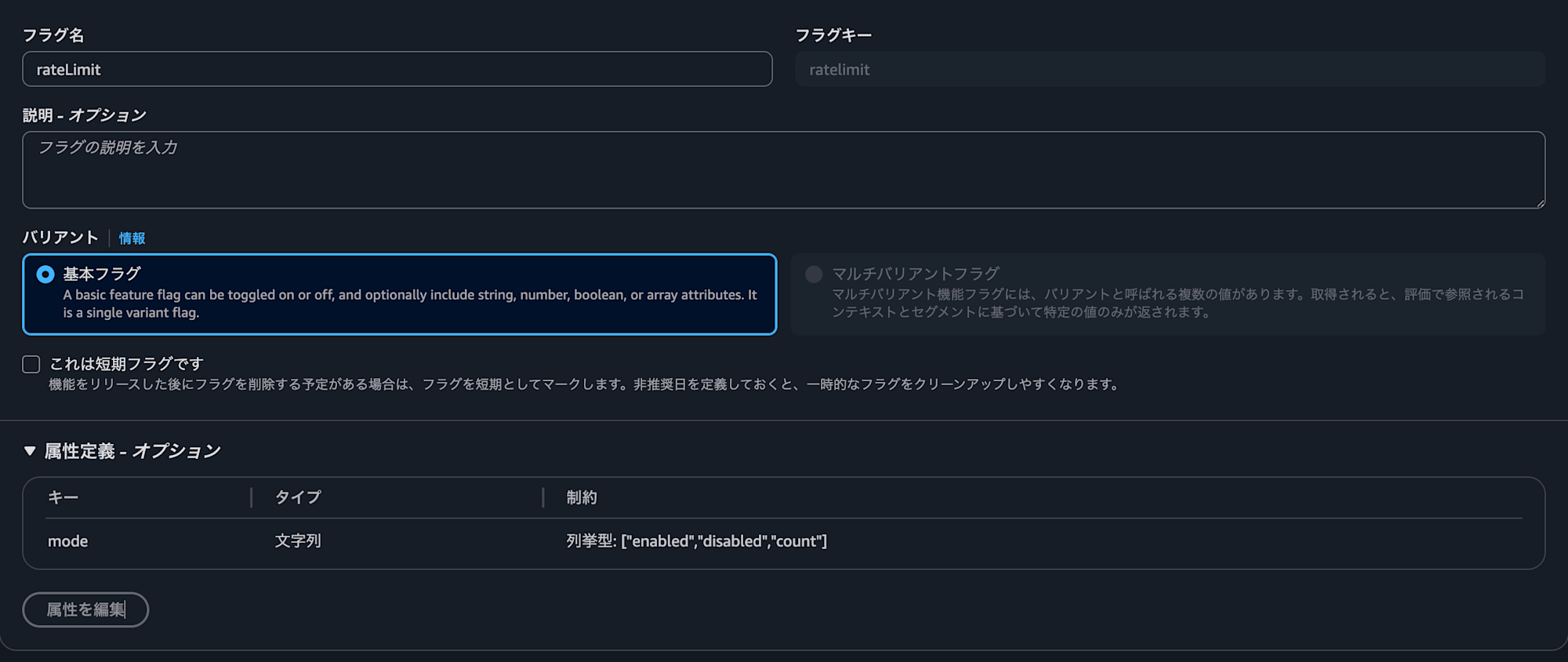
While the feature flag itself is only Boolean (true or false), attributes can be defined with various types including numeric and string types, allowing flexible settings. Since we want to manage enum values, we defined it as a string type with enumeration constraints (enabled, disabled, count).
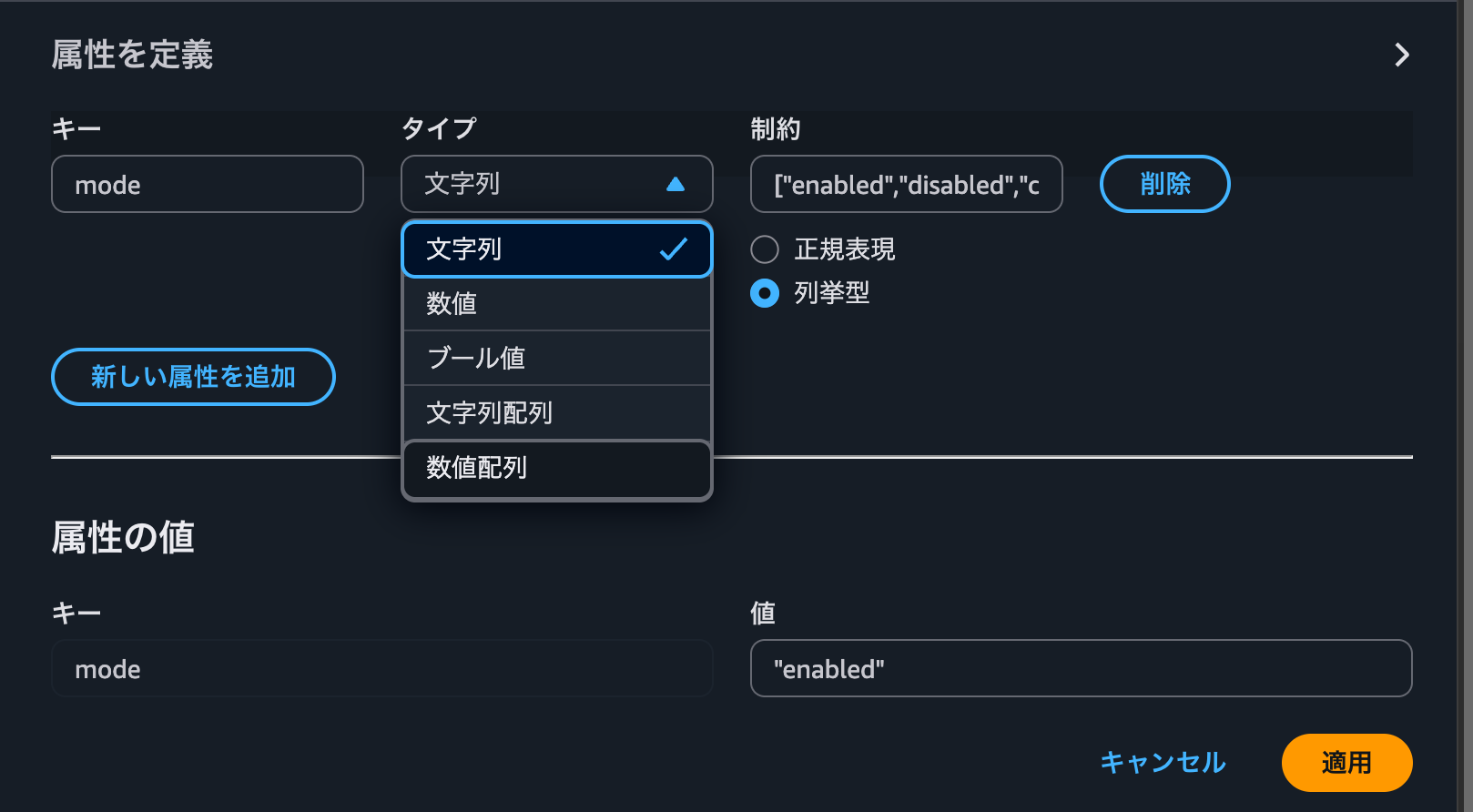
Now that we've defined the flag and attributes in AppConfig, we'll retrieve them on the application side. While this is written in Kotlin, it should be similar in other languages.
Enum Type Definition
We define an enum to represent the feature flag states.
enum class RateLimitMode {
    /** Disable rate limiting feature */
    DISABLED,

    /** Enable rate limiting (returns 429) */
    ENABLED,

    /** Monitoring mode (count only, no actual limits) */
    COUNT,
    ;

    // Mapping from AppConfig enum values to enum class
    companion object {
        fun fromString(value: String?): RateLimitMode = when (value?.lowercase()) {
            "enabled" -> ENABLED
            "count" -> COUNT
            "disabled" -> DISABLED
            else -> DISABLED
        }
    }
}
Retrieving the Flag
Since we're running the AppConfig Agent as a sidecar in ECS, we can retrieve the flag via the REST API at http://localhost:xxxx//applications/{app name}/environments/{environment name}/configurations/{config name}?flag={flag name}.
First, create a function to retrieve flags from AppConfig:
// For attribute enum type flags
data class RateLimitFlag(
    val mode: String?,
)

val rateLimitFlagResponseType = object : ParameterizedTypeReference<RateLimitFlag>() {}
val headers = HttpHeaders().apply {
    contentType = MediaType.APPLICATION_JSON
}

// Get flag from AppConfig via REST API
fun getRateLimitMode(): RateLimitMode = try {
    val res = restTemplate.exchange(
        String.format(APPCONFIG_URL_TEMPLATE, appconfigAgent.endpoint, appconfigAgent.app, appconfigAgent.env, appconfigAgent.profile, "flag=$flagName"),
        HttpMethod.GET,
        HttpEntity<String>(headers),
        responseType,
    )
        return RateLimitMode.fromString(res.body?.mode)
    } catch (e: Exception) {
        logger.warn("Failed to get ratelimit flag, defaulting to DISABLED", e)
        RateLimitMode.DISABLED
    }
}
Then retrieve it from the application code and write the necessary branches:
val rateLimitMode = getRateLimitMode()

when (rateLimitMode) {
    RateLimitMode.COUNT -> {
    // Count mode: Record in logs and metrics without returning 429
    }
    RateLimitMode.ENABLED -> {
    // Normal mode: Return 429
    }
    // Disabled
    RateLimitMode.DISABLE -> {}
}
By doing this, we can consolidate multiple flags into one, making the flag management simpler compared to the initial approach.
Conclusion
Using AWS AppConfig's attribute feature allows you to add flexible configuration values beyond simple ON/OFF feature flags. Since you can manage the configuration values needed for a feature together, it enables simpler operations.