![[AWS CDK] I tried cross-account integration of DynamoDB data to Iceberg Table using AWS Glue zero-ETL](https://images.ctfassets.net/ct0aopd36mqt/wp-thumbnail-5cf97530609f228b0c0aa35bb42ef118/177aae4f779b47783f481bd82859ff0b/aws-cdk?w=3840&fm=webp)
[AWS CDK] I tried cross-account integration of DynamoDB data to Iceberg Table using AWS Glue zero-ETL

This page has been translated by machine translation. View original
Introduction
I am kasama from the Data Business Division.
In this post, I'd like to implement a DynamoDB to SageMaker Lakehouse cross-account Zero-ETL integration using CDK.
Prerequisites
This article is a CDK implementation of the configuration from the previous blog (CLI version). Please refer to the previous article for details about the Zero-ETL integration mechanism and background.
Architecture
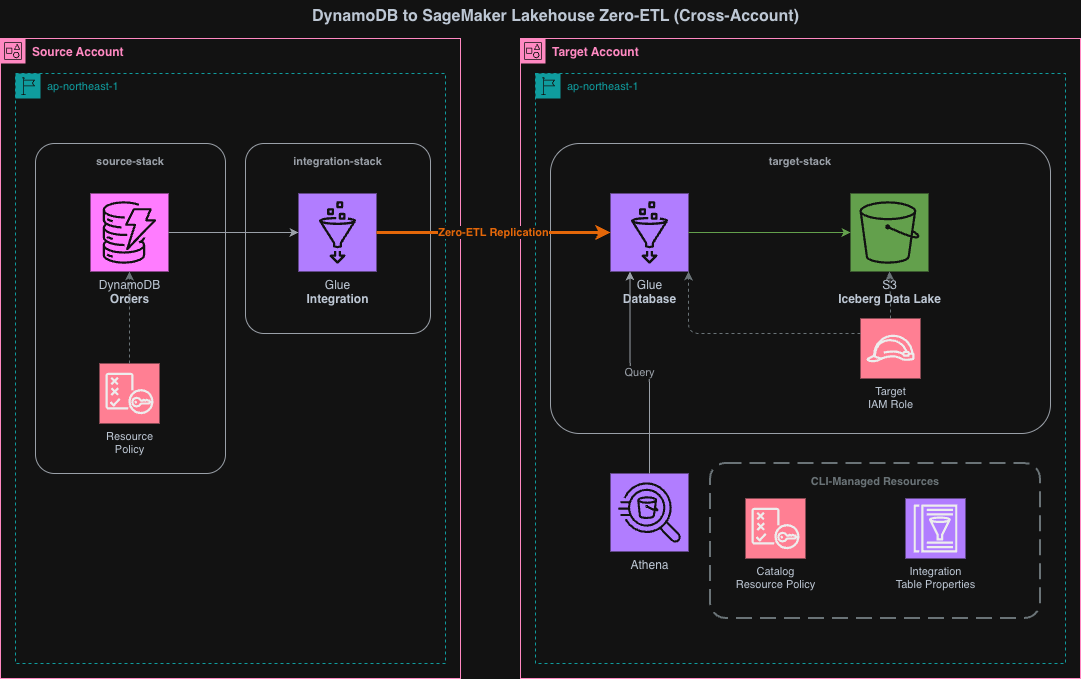
This CDK project consists of three stacks:
- source-stack (deployed to source account): DynamoDB table and resource policy
- target-stack (deployed to target account): S3, Glue Database, IAM Role, IntegrationResourceProperty
- integration-stack (deployed to source account): Zero-ETL Integration
It's important to note that the Integration Stack is deployed to the source account, not the target account. For DynamoDB cross-account Zero-ETL integration, the integration resource must be created on the source side.
The deployment sequence is source-stack → target-stack → shell scripts → integration-stack. Each step depends on the artifacts from the previous step.
- source-stack → target-stack: The IntegrationResourceProperty in the target-stack assumes the existence of the source DynamoDB table
- target-stack → shell scripts: Glue catalog resource policy and IntegrationTableProperties are configured for the Glue database created in target-stack
- shell scripts → integration-stack: Integration creation requires cross-account access permissions (catalog resource policy) and table mapping configuration (IntegrationTableProperties)
Implementation
The implementation code is stored in GitHub.
63_dynamodb_glue_zeroetl_cross_account/
├── cdk/
│   ├── bin/
│   │   └── app.ts
│   ├── lib/
│   │   ├── parameter.ts
│   │   ├── source-stack.ts
│   │   ├── target-stack.ts
│   │   └── integration-stack.ts
│   ├── package.json
│   ├── tsconfig.json
│   └── cdk.json
├── scripts/
│   ├── config.sh
│   ├── setup-glue-resource-policy.sh
│   └── setup-integration-table-properties.sh
└── README.md
CDK
import type { Environment } from "aws-cdk-lib";

export interface AppParameter {
  envName: string;
  projectName: string;
  refreshIntervalMinutes: number;
  sourceEnv: Required<Environment>;
  targetEnv: Required<Environment>;
}

export const devParameter: AppParameter = {
  envName: "dev",
  projectName: "cm-kasama-dynamodb-zeroetl",
  refreshIntervalMinutes: 15,
  sourceEnv: {
    account: "<SOURCE_ACCOUNT_ID>",
    region: "ap-northeast-1",
  },
  targetEnv: {
    account: "<TARGET_ACCOUNT_ID>",
    region: "ap-northeast-1",
  },
};
In parameter.ts, I define the deployment destinations for each stack. I use Required<Environment> for sourceEnv and targetEnv to make account and region required. In a cross-account configuration, environment information is explicitly needed as each stack is deployed to a different account. refreshIntervalMinutes is the synchronization interval (in minutes) for Zero-ETL integration. Incremental changes from DynamoDB are reflected to the target at this interval.
#!/usr/bin/env node
import * as cdk from 'aws-cdk-lib';
import { SourceStack } from '../lib/source-stack';
import { TargetStack } from '../lib/target-stack';
import { IntegrationStack } from '../lib/integration-stack';
import { devParameter } from '../lib/parameter';

const app = new cdk.App();

const databaseName = `${devParameter.projectName.replace(/-/g, '_')}_${devParameter.envName}`;
const sourceTableArn = `arn:aws:dynamodb:${devParameter.sourceEnv.region}:${devParameter.sourceEnv.account}:table/Orders`;
const targetDatabaseArn = `arn:aws:glue:${devParameter.targetEnv.region}:${devParameter.targetEnv.account}:database/${databaseName}`;

new SourceStack(
  app,
  `${devParameter.projectName}-source-stack`,
  {
    env: devParameter.sourceEnv,
    description:
      'DynamoDB Zero-ETL Source Account: DynamoDB table with PITR and resource policy',
    parameter: devParameter,
  }
);

new TargetStack(app, `${devParameter.projectName}-target-stack`, {
  env: devParameter.targetEnv,
  description:
    'DynamoDB Zero-ETL Target Account: S3, Glue Database, IAM Role',
  parameter: devParameter,
});

new IntegrationStack(
  app,
  `${devParameter.projectName}-integration-stack`,
  {
    env: devParameter.sourceEnv,
    description: 'DynamoDB Zero-ETL Integration (deploy after scripts)',
    parameter: devParameter,
    sourceTableArn,
    targetDatabaseArn,
  }
);
In app.ts, I instantiate the three stacks and define their deployment destinations. SourceStack and IntegrationStack are deployed to devParameter.sourceEnv, while TargetStack is deployed to devParameter.targetEnv. IntegrationStack is deployed to the source account because in DynamoDB cross-account Zero-ETL, the Integration resource must be created on the source side. sourceTableArn and targetDatabaseArn are constructed in app.ts and passed to IntegrationStack.
import * as cdk from 'aws-cdk-lib';
import * as dynamodb from 'aws-cdk-lib/aws-dynamodb';
import * as iam from 'aws-cdk-lib/aws-iam';
import type { Construct } from 'constructs';
import type { AppParameter } from './parameter';

interface SourceStackProps extends cdk.StackProps {
  parameter: AppParameter;
}

export class SourceStack extends cdk.Stack {
  public readonly table: dynamodb.TableV2;

  constructor(scope: Construct, id: string, props: SourceStackProps) {
    super(scope, id, props);

    const { parameter } = props;

    // ========================================
    // DynamoDB TableV2 with PITR
    // ========================================
    this.table = new dynamodb.TableV2(this, 'ZeroETLSourceTable', {
      tableName: 'Orders',
      partitionKey: { name: 'PK', type: dynamodb.AttributeType.STRING },
      sortKey: { name: 'SK', type: dynamodb.AttributeType.STRING },
      billing: dynamodb.Billing.onDemand(),
      pointInTimeRecoverySpecification: { pointInTimeRecoveryEnabled: true },
      removalPolicy: cdk.RemovalPolicy.DESTROY,
    });

    // ========================================
    // Resource Policy: Allow Glue service to export via Zero-ETL
    // Integration is created in the source account, so SourceAccount/SourceArn
    // reference this (source) account, not the target account.
    // ========================================
    this.table.addToResourcePolicy(
      new iam.PolicyStatement({
        sid: 'AllowGlueZeroETLExport',
        effect: iam.Effect.ALLOW,
        principals: [new iam.ServicePrincipal('glue.amazonaws.com')],
        actions: [
          'dynamodb:ExportTableToPointInTime',
          'dynamodb:DescribeTable',
          'dynamodb:DescribeExport',
        ],
        resources: ['*'],
        conditions: {
          StringEquals: {
            'aws:SourceAccount': parameter.sourceEnv.account,
          },
          ArnLike: {
            'aws:SourceArn': `arn:aws:glue:${parameter.sourceEnv.region}:${parameter.sourceEnv.account}:integration:*`,
          },
        },
      })
    );

    // ========================================
    // Outputs
    // ========================================
    new cdk.CfnOutput(this, 'TableArn', {
      value: this.table.tableArn,
      description: 'DynamoDB Table ARN (use in Target Stack)',
    });

    new cdk.CfnOutput(this, 'TableName', {
      value: this.table.tableName,
      description: 'DynamoDB Table Name',
    });
  }
}
In source-stack.ts, I define the DynamoDB table and resource policy. The resource policy's Condition includes an AND condition with aws:SourceAccount and aws:SourceArn. Since the Integration is created in the source account, both SourceAccount and SourceArn reference the source account. The target account information is not included in the Condition. pointInTimeRecoveryEnabled: true is a mandatory requirement for Zero-ETL integration.
import * as cdk from 'aws-cdk-lib';
import * as glue from 'aws-cdk-lib/aws-glue';
import * as iam from 'aws-cdk-lib/aws-iam';
import * as s3 from 'aws-cdk-lib/aws-s3';
import type { Construct } from 'constructs';
import type { AppParameter } from './parameter';

interface TargetStackProps extends cdk.StackProps {
  parameter: AppParameter;
}

export class TargetStack extends cdk.Stack {
  constructor(scope: Construct, id: string, props: TargetStackProps) {
    super(scope, id, props);

    const { parameter } = props;

    const databaseName = `${parameter.projectName.replace(/-/g, '_')}_${parameter.envName}`;

    // ========================================
    // 1. S3 Bucket for Iceberg data
    // ========================================
    const dataLakeBucket = new s3.Bucket(this, 'DataLakeBucket', {
      bucketName: `${parameter.projectName}-${parameter.envName}-datalake`,
      encryption: s3.BucketEncryption.S3_MANAGED,
      blockPublicAccess: s3.BlockPublicAccess.BLOCK_ALL,
      removalPolicy: cdk.RemovalPolicy.DESTROY,
      // Adds a Lambda-backed custom resource that empties the bucket on stack deletion,
      // so cdk destroy works even when Iceberg data exists in the bucket.
      autoDeleteObjects: true,
    });

    // ========================================
    // 2. Glue Database
    // ========================================
    const database = new glue.CfnDatabase(this, 'GlueDatabase', {
      catalogId: this.account,
      databaseInput: {
        name: databaseName,
        description: 'DynamoDB Zero-ETL target database (Iceberg)',
        locationUri: dataLakeBucket.s3UrlForObject(),
      },
    });

    const databaseArn = `arn:aws:glue:${this.region}:${this.account}:database/${databaseName}`;

    // ========================================
    // 3. Target IAM Role
    // ========================================
    const targetRole = new iam.Role(this, 'ZeroETLTargetRole', {
      roleName: `${parameter.projectName}-${parameter.envName}-target-role`,
      assumedBy: new iam.ServicePrincipal('glue.amazonaws.com'),
    });

    // S3 permissions
    dataLakeBucket.grantReadWrite(targetRole);

    // Glue Data Catalog permissions
    targetRole.addToPolicy(
      new iam.PolicyStatement({
        effect: iam.Effect.ALLOW,
        actions: [
          'glue:GetDatabase',
          'glue:GetDatabases',
          'glue:GetTable',
          'glue:GetTables',
          'glue:CreateTable',
          'glue:UpdateTable',
          'glue:DeleteTable',
          'glue:GetPartitions',
          'glue:BatchCreatePartition',
          'glue:BatchDeletePartition',
        ],
        resources: [
          `arn:aws:glue:${this.region}:${this.account}:catalog`,
          databaseArn,
          `arn:aws:glue:${this.region}:${this.account}:table/${databaseName}/*`,
        ],
      })
    );

    // CloudWatch Logs permissions
    targetRole.addToPolicy(
      new iam.PolicyStatement({
        effect: iam.Effect.ALLOW,
        actions: [
          'logs:CreateLogGroup',
          'logs:CreateLogStream',
          'logs:PutLogEvents',
        ],
        resources: [
          `arn:aws:logs:${this.region}:${this.account}:log-group:/aws-glue/*`,
          `arn:aws:logs:${this.region}:${this.account}:log-group:/aws-glue/*:*`,
        ],
      })
    );

    // ========================================
    // 4. Integration Resource Property (target only)
    // ========================================
    const targetResourceProperty = new glue.CfnIntegrationResourceProperty(
      this,
      'TargetResourceProperty',
      {
        resourceArn: databaseArn,
        targetProcessingProperties: {
          roleArn: targetRole.roleArn,
        },
      }
    );
    targetResourceProperty.node.addDependency(database);

    // ========================================
    // Outputs
    // ========================================
    new cdk.CfnOutput(this, 'TargetRoleArn', {
      value: targetRole.roleArn,
      description: 'Target Role ARN',
    });

    new cdk.CfnOutput(this, 'DataLakeBucketName', {
      value: dataLakeBucket.bucketName,
      description: 'S3 Data Lake Bucket Name',
    });

    new cdk.CfnOutput(this, 'DatabaseName', {
      value: databaseName,
      description: 'Glue Database Name',
    });
  }
}
In target-stack.ts, I define the target stack. Setting autoDeleteObjects: true adds a Lambda-based custom resource that automatically deletes objects in the bucket when the stack is deleted. Without this setting, cdk destroy would fail to delete the bucket because the Zero-ETL integration writes Iceberg data to the bucket.
import * as cdk from 'aws-cdk-lib';
import * as glue from 'aws-cdk-lib/aws-glue';
import type { Construct } from 'constructs';
import type { AppParameter } from './parameter';

interface IntegrationStackProps extends cdk.StackProps {
  parameter: AppParameter;
  sourceTableArn: string;
  targetDatabaseArn: string;
}

export class IntegrationStack extends cdk.Stack {
  constructor(scope: Construct, id: string, props: IntegrationStackProps) {
    super(scope, id, props);

    const { parameter, sourceTableArn, targetDatabaseArn } = props;

    // ========================================
    // Zero-ETL Integration
    // ========================================
    const zeroEtlIntegration = new glue.CfnIntegration(
      this,
      'ZeroETLIntegration',
      {
        integrationName: `${parameter.projectName}-${parameter.envName}-integration`,
        sourceArn: sourceTableArn,
        targetArn: targetDatabaseArn,
        description:
          'DynamoDB to SageMaker Lakehouse Zero-ETL Integration (Cross-Account)',
        integrationConfig: {
          refreshInterval: `${parameter.refreshIntervalMinutes}`,
        },
        tags: [
          { key: 'Environment', value: parameter.envName },
          { key: 'Project', value: parameter.projectName },
        ],
      }
    );

    // ========================================
    // Outputs
    // ========================================
    new cdk.CfnOutput(this, 'IntegrationArn', {
      value: zeroEtlIntegration.attrIntegrationArn,
      description: 'Zero-ETL Integration ARN',
    });
  }
}
In integration-stack.ts, I define the Zero-ETL Integration itself. For DynamoDB cross-account Zero-ETL, the Integration resource must be owned by the source account, so I specify env: devParameter.sourceEnv in app.ts to deploy it to the source account. I specify the DynamoDB table ARN as sourceArn and the Glue database ARN in the target account as targetArn. integrationConfig.refreshInterval sets the interval for incremental synchronization in minutes as a string.
Shell Scripts
Resources that cannot be managed by CDK are handled with shell scripts.
#!/bin/bash
# Configuration for DynamoDB Zero-ETL Cross-Account Integration
# Edit these values before deployment
# NOTE: Keep PROJECT_NAME, ENV_NAME, and account IDs in sync with cdk/lib/parameter.ts

PROJECT_NAME="cm-kasama-dynamodb-zeroetl"
ENV_NAME="dev"
SOURCE_ACCOUNT_ID="<SOURCE_ACCOUNT_ID>"
TARGET_ACCOUNT_ID="<TARGET_ACCOUNT_ID>"
UNNEST_SPEC="TOPLEVEL"
# REGION="us-east-1"  # Optional - defaults to AWS CLI region

# Derived values (do not edit)
DATABASE_NAME="${PROJECT_NAME//-/_}_${ENV_NAME}"
In config.sh, I define common configuration values for shell scripts.
#!/bin/bash
# Setup Glue Catalog Resource Policy (Target Account)
#
# Prerequisites:
#   - Target Stack must be deployed first (Glue database must exist)
#   - Run with Target Account credentials
# AWS::Glue::ResourcePolicy has no CloudFormation support, so this is handled via CLI.
set -e

SCRIPT_DIR="$(cd "$(dirname "$0")" && pwd)"
source "${SCRIPT_DIR}/config.sh"

# Use REGION from config.sh if set, otherwise use AWS CLI default
if [ -z "$REGION" ]; then
  REGION=$(aws configure get region)
fi

echo "=== Glue Catalog Resource Policy Setup ==="
echo "Target Account: ${TARGET_ACCOUNT_ID}"
echo "Source Account: ${SOURCE_ACCOUNT_ID}"
echo "Database:       ${DATABASE_NAME}"
echo "Region:         ${REGION}"
echo ""

CATALOG_ARN="arn:aws:glue:${REGION}:${TARGET_ACCOUNT_ID}:catalog"
DATABASE_ARN="arn:aws:glue:${REGION}:${TARGET_ACCOUNT_ID}:database/${DATABASE_NAME}"

POLICY_FILE=$(mktemp)
trap "rm -f ${POLICY_FILE}" EXIT

cat > "${POLICY_FILE}" << EOF
{
  "Version": "2012-10-17",
  "Statement": [
    {
      "Sid": "AllowGlueAuthorizeInboundIntegration",
      "Effect": "Allow",
      "Principal": { "Service": "glue.amazonaws.com" },
      "Action": "glue:AuthorizeInboundIntegration",
      "Resource": [
        "${CATALOG_ARN}",
        "${DATABASE_ARN}"
      ]
    },
    {
      "Sid": "AllowSourceAccountCreateInboundIntegration",
      "Effect": "Allow",
      "Principal": { "AWS": "arn:aws:iam::${SOURCE_ACCOUNT_ID}:root" },
      "Action": "glue:CreateInboundIntegration",
      "Resource": [
        "${CATALOG_ARN}",
        "${DATABASE_ARN}"
      ]
    }
  ]
}
EOF

echo "Applying Glue Catalog Resource Policy..."
aws glue put-resource-policy --policy-in-json "file://${POLICY_FILE}" --region "${REGION}"

echo ""
echo "Done. Verify with: aws glue get-resource-policy --region ${REGION}"
In setup-glue-resource-policy.sh, I configure the Glue catalog resource policy. This script sets up two policy statements:
AllowGlueAuthorizeInboundIntegration: Allows the Glue service principal to performglue:AuthorizeInboundIntegration. This is used for inbound authentication of Zero-ETL integration.AllowSourceAccountCreateInboundIntegration: Allows the root principal of the source account to performglue:CreateInboundIntegration. This enables cross-account integration creation from the source account.
Both statements specify the Glue catalog and database in the target account as resources.
#!/bin/bash
# Setup Integration Table Properties (Target Account)
#
# Prerequisites:
#   - Target Stack must be deployed first (IntegrationResourceProperty must exist)
#   - Run with Target Account credentials
#   - Run BEFORE deploying the Integration Stack
# AWS::Glue::IntegrationTableProperties has no CloudFormation support, so this is handled via CLI.
set -e

SCRIPT_DIR="$(cd "$(dirname "$0")" && pwd)"
source "${SCRIPT_DIR}/config.sh"

# Use REGION from config.sh if set, otherwise use AWS CLI default
if [ -z "$REGION" ]; then
  REGION=$(aws configure get region)
fi

echo "=== Integration Table Properties Setup ==="
echo "Table Name:   Orders"
echo "UnnestSpec:   ${UNNEST_SPEC}"
echo "Database:     ${DATABASE_NAME}"
echo "Region:       ${REGION}"
echo ""

echo "Creating integration table properties..."
aws glue create-integration-table-properties \
  --resource-arn "arn:aws:glue:${REGION}:${TARGET_ACCOUNT_ID}:database/${DATABASE_NAME}" \
  --table-name "Orders" \
  --target-table-config "{\"UnnestSpec\":\"${UNNEST_SPEC}\"}" \
  --region "${REGION}"

echo ""
echo "=== Verifying integration table properties ==="
aws glue get-integration-table-properties \
  --resource-arn "arn:aws:glue:${REGION}:${TARGET_ACCOUNT_ID}:database/${DATABASE_NAME}" \
  --table-name "Orders" \
  --region "${REGION}"
In setup-integration-table-properties.sh, I configure the IntegrationTableProperties. UnnestSpec is a parameter that controls how DynamoDB's nested structures (Map, List) are represented in the Glue table.
| Value | Behavior |
|---|---|
| TOPLEVEL | Only top-level Map keys are expanded into columns |
| FULL | All nested structures are recursively expanded (default) |
| NOUNNEST | Non-key attributes are stored in a single value column |
This configuration uses TOPLEVEL. FULL may lead to unpredictable column counts due to recursive expansion, while NOUNNEST is suitable when access to individual columns is not required. Note that to change the UnnestSpec setting for an existing integration, you need to delete the Glue table, S3 Iceberg data, and Zero-ETL Integration, then redeploy.
Deployment
Installing CDK Dependencies
cd 63_dynamodb_glue_zeroetl_cross_account/cdk
pnpm install
Deploying the Source Stack (Source Account)
Deploy the DynamoDB table and resource policy.
pnpm run cdk deploy cm-kasama-dynamodb-zeroetl-source-stack \
  --profile SOURCE_ACCOUNT_PROFILE
Deploying the Target Stack (Target Account)
Deploy the S3 bucket, Glue database, IAM role, and IntegrationResourceProperty.
pnpm run cdk deploy cm-kasama-dynamodb-zeroetl-target-stack \
  --profile TARGET_ACCOUNT_PROFILE
Running Shell Scripts (Target Account)
Configure the Glue catalog resource policy and IntegrationTableProperties. This must be done before deploying the Integration Stack.
cd ../scripts
AWS_PROFILE=TARGET_ACCOUNT_PROFILE ./setup-glue-resource-policy.sh
AWS_PROFILE=TARGET_ACCOUNT_PROFILE ./setup-integration-table-properties.sh
Integration Stack Deployment (Source Account)
Deploy the Zero-ETL Integration.
cd ../cdk
pnpm run cdk deploy cm-kasama-dynamodb-zeroetl-integration-stack \
  --profile SOURCE_ACCOUNT_PROFILE
Verification After Deployment
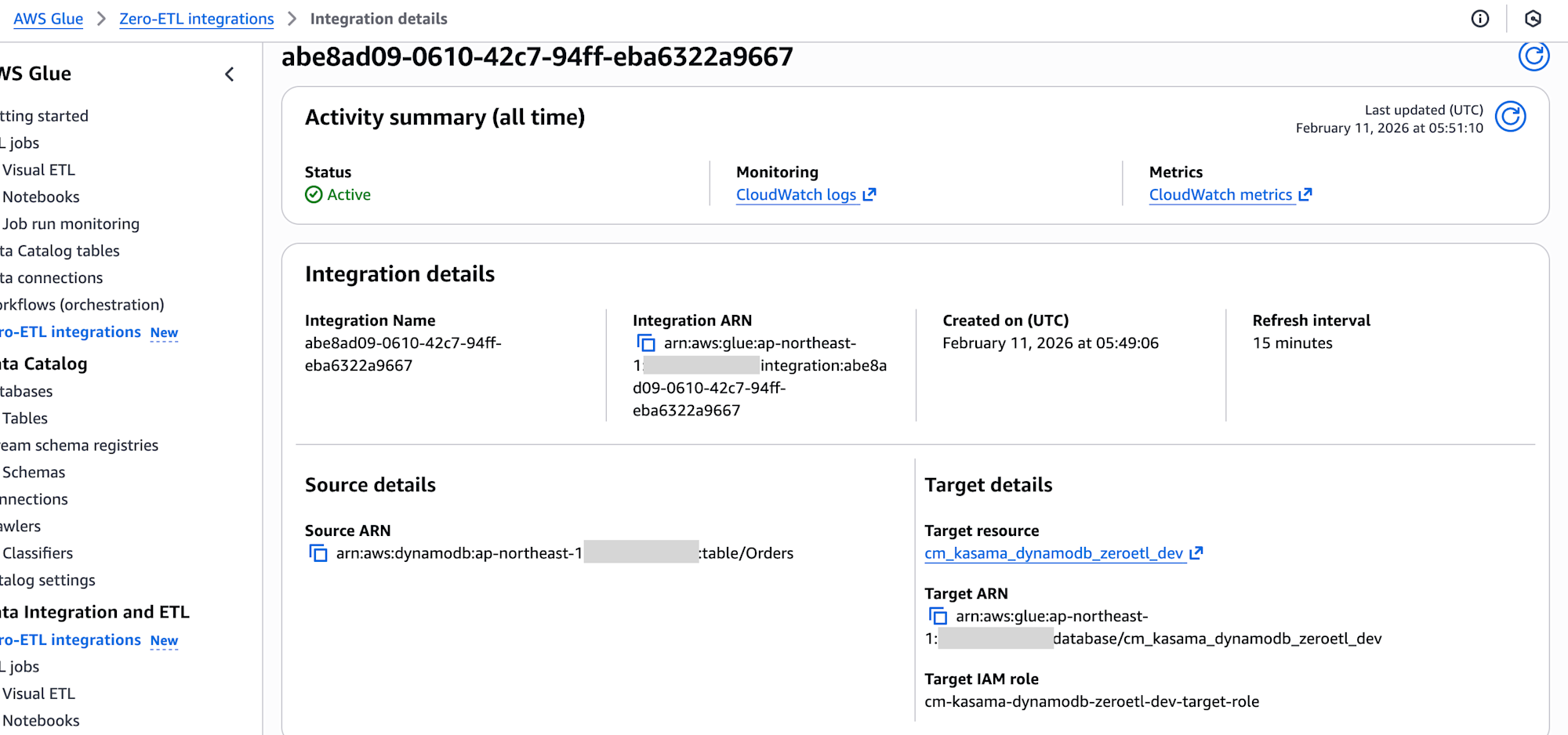
After deployment completion, I confirmed that the integration status shows as Active in the AWS Glue console in the target account.
Inserting Test Data
Insert test data into the DynamoDB table in the source account. The data includes nested structures with Map and List types to verify type preservation.
aws dynamodb batch-write-item \
  --request-items '{
    "Orders": [
      {
        "PutRequest": {
          "Item": {
            "PK":{"S":"order-001"},
            "SK":{"S":"2024-01-01"},
            "amount":{"N":"1500"},
            "customer_name":{"S":"Tanaka"},
            "attributes":{"M":{
              "color":{"S":"red"},"size":{"S":"L"},"weight":{"N":"2.5"}
            }},
            "category_scores":{"M":{
              "quality":{"L":[{"N":"3"}]},
              "design":{"L":[{"N":"2"}]},
              "usability":{"L":[{"N":"2"}]},
              "features":{"L":[{"N":"1"},{"N":"2"},{"N":"3"}]}
            }}
          }
        }
      },
      {
        "PutRequest": {
          "Item": {
            "PK":{"S":"order-002"},
            "SK":{"S":"2024-01-02"},
            "amount":{"N":"3200"},
            "customer_name":{"S":"Suzuki"},
            "attributes":{"M":{
              "color":{"S":"blue"},"size":{"S":"M"},"weight":{"N":"1.8"}
            }},
            "category_scores":{"M":{
              "quality":{"L":[{"N":"1"},{"N":"4"}]},
              "design":{"L":[{"N":"5"}]},
              "usability":{"L":[{"N":"3"},{"N":"1"}]},
              "features":{"L":[{"N":"2"}]}
            }}
          }
        }
      }
    ]
  }' \
  --profile SOURCE_ACCOUNT_PROFILE

Verifying Data with Athena Queries
After the initial synchronization, use Athena in the target account to verify the data.
-- Check all columns
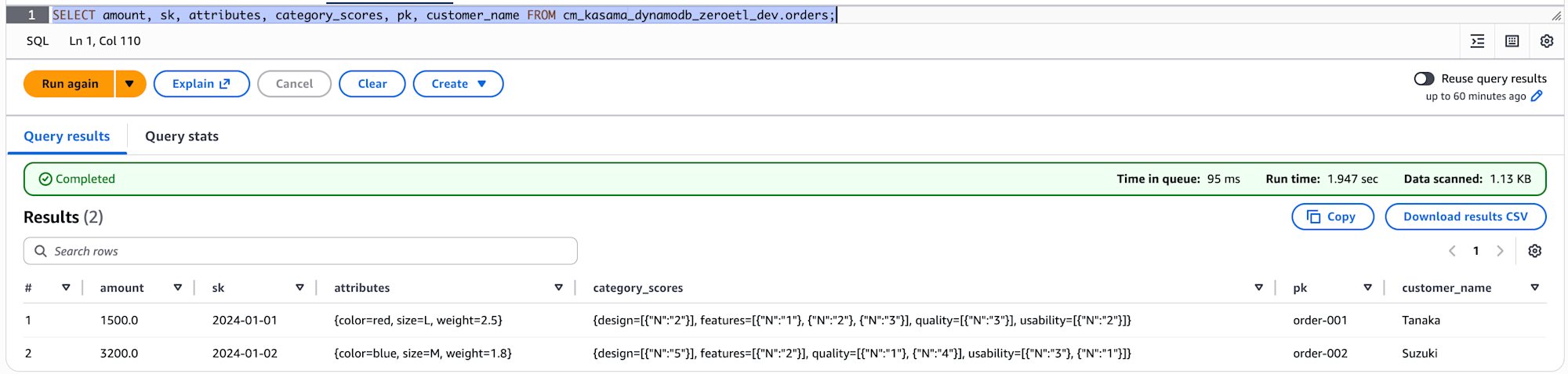
SELECT amount, sk, attributes, category_scores, pk, customer_name FROM cm_kasama_dynamodb_zeroetl_dev.orders;
The column names and number of columns match DynamoDB.
-- Check the actual types
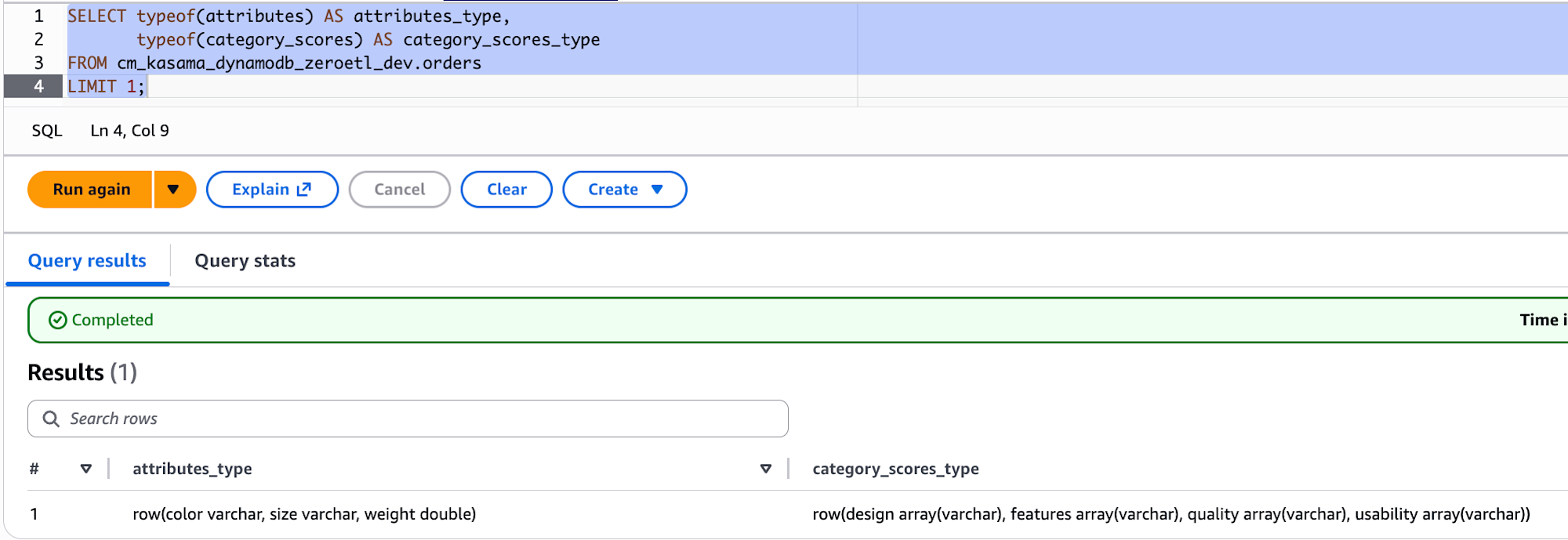
SELECT typeof(attributes) AS attributes_type,
       typeof(category_scores) AS category_scores_type
FROM cm_kasama_dynamodb_zeroetl_dev.orders
LIMIT 1;
When checking the data types with typeof(), attributes shows as row(color varchar, size varchar, weight double), indicating that scalar values within DynamoDB Maps maintain their original types (S→varchar, N→double). However, for category_scores, even Numbers within List types were all converted to varchar.
Conclusion
I implemented a cross-account Zero-ETL integration from DynamoDB to SageMaker Lakehouse using CDK. Compared to the previous CLI-based configuration, the main advantage is that CDK support allows us to manage most of the Zero-ETL integration as IaC. While Glue catalog resource policies and IntegrationTableProperties still require CLI, bundling them into shell scripts minimizes operational overhead. I hope this is helpful.