![[AWS CDK] Attempting to retrieve Glue Data Catalog data across accounts using Step Functions and Athena](https://images.ctfassets.net/ct0aopd36mqt/wp-thumbnail-545ba5dfbc8fa4c7760dd9872ef835f9/665944e579f487b4434cb289305767b3/aws-glue?w=3840&fm=webp)
[AWS CDK] Attempting to retrieve Glue Data Catalog data across accounts using Step Functions and Athena

This page has been translated by machine translation. View original
Introduction
This is kasama from the Data Business Division.
In this post, I will implement a mechanism using AWS Step Functions and Athena to insert data from a Glue Data Catalog in a separate account (data source) into a Glue Table in our own account (target) using AWS CDK.
Prerequisites
First, I considered two approaches to implement this architecture.
Assume Role Method
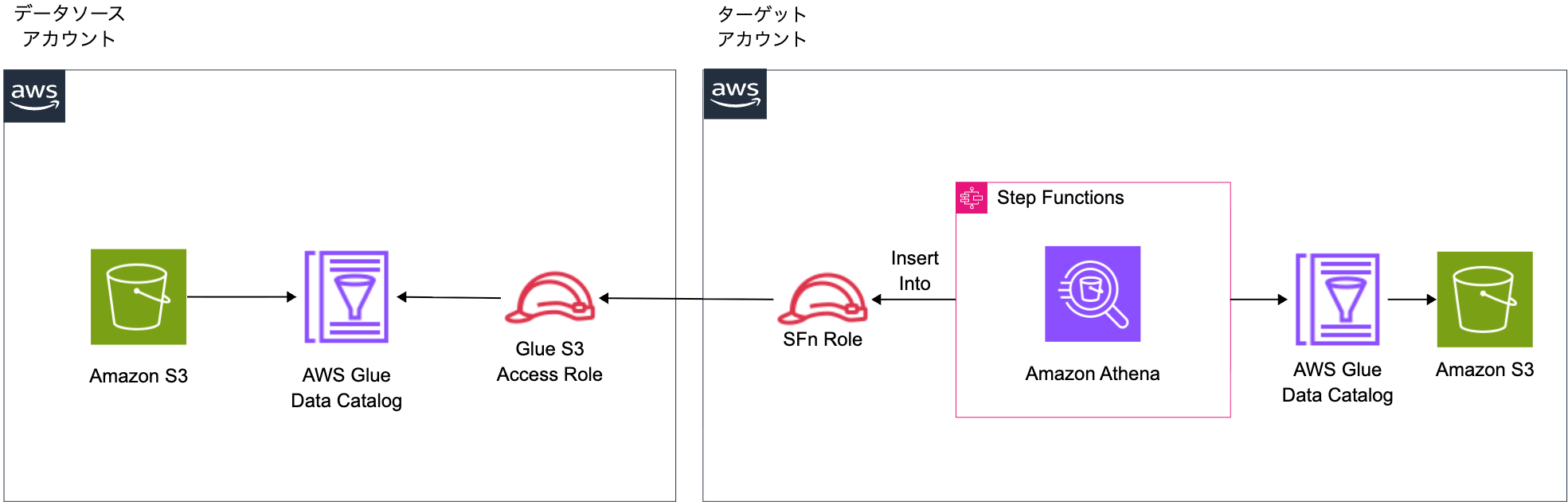
This method involves creating an IAM Role in the source account to access the Catalog and S3, and having the Step Functions in the target account assume that Role to execute queries. For Select queries only, the process succeeds because the Source Role only needs to read from the Source Catalog. However, for Insert operations, the Source Role attempts to write to the Target Catalog and S3, which fails due to insufficient permissions.
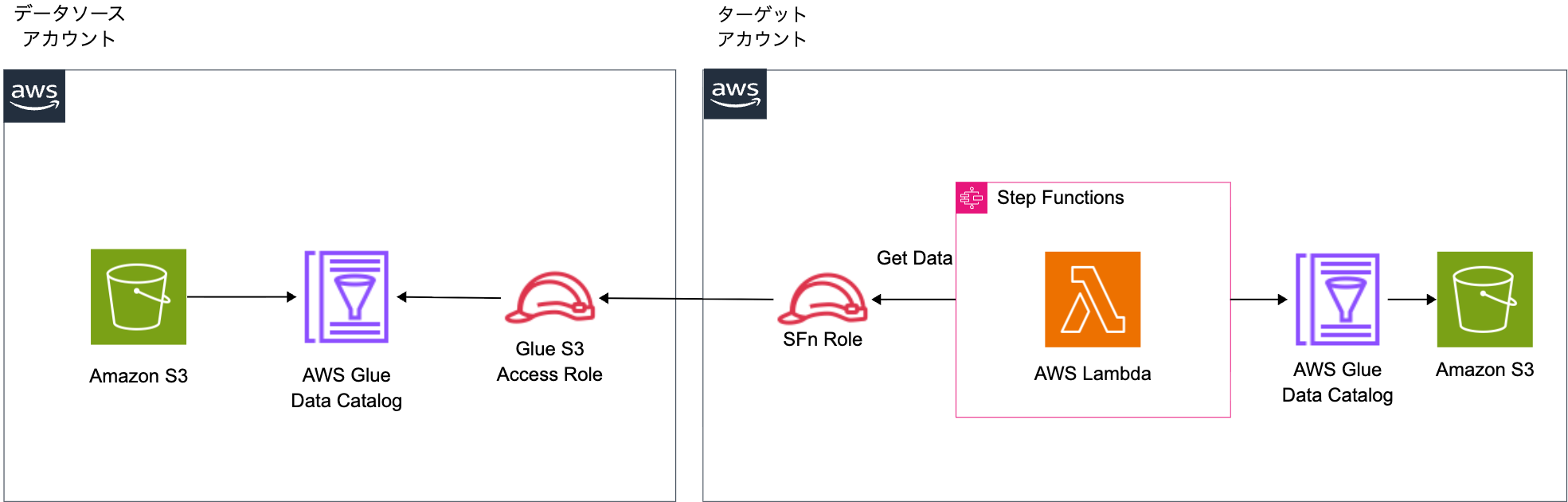
To work around this issue with the Assume Role method, we can use Lambda or Glue Python Shell.
Specifically, we would first assume the Source Role to retrieve data from the source account, then switch to the Target Role to insert into the target account's table by implementing this logic within Lambda. This method avoids permission issues as each Role accesses resources in its own account. However, for this implementation, I prioritized simplicity and chose the Glue Data Catalog Resource Policy method. The Lambda approach remains a valid option when more granular control is needed or when Glue Data Catalog Resource Policy cannot be configured in your environment.
Glue Data Catalog Resource Policy Method
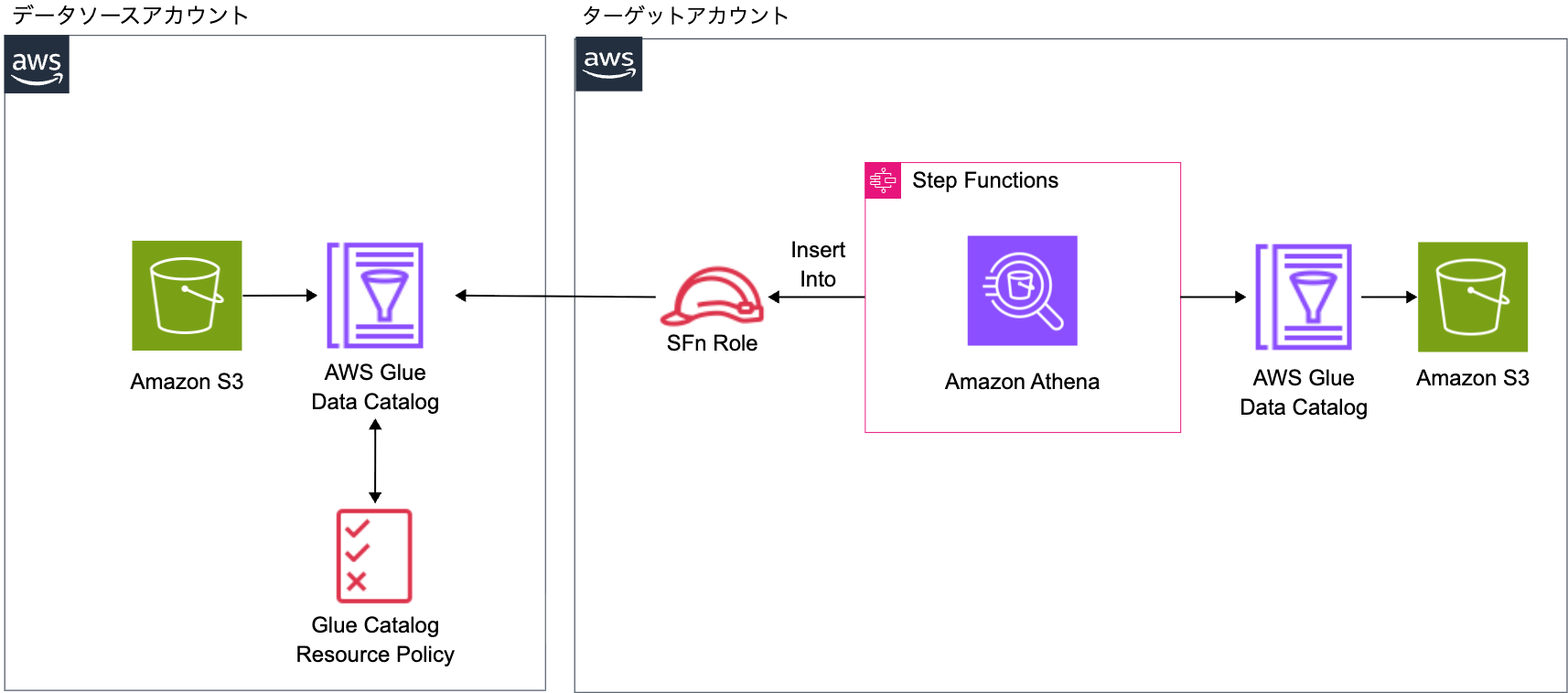
In this method, the Step Functions in the target account executes Athena queries directly using the Target Role. A Glue Data Catalog Resource Policy is configured in the source account to allow the Target Role access to the Source Catalog. This approach enables the Target Role to both write to the Target Catalog and S3 (permissions in its own account) and read from the Source Catalog (permissions via Resource Policy). I chose this method for its implementation simplicity.
This follows the same procedure as the official documentation.
Implementation
The following is the implementation of the Glue Data Catalog Resource Policy method.
The implementation code is stored on GitHub.
Project Structure
$ tree
.
├── cdk
│   ├── bin
│   │   └── app.ts
│   ├── cdk.json
│   ├── lib
│   │   └── cross-account-glue-athena-stack.ts
│   ├── package-lock.json
│   ├── package.json
│   ├── parameter.ts
│   └── tsconfig.json
├── README.md
├── source
│   ├── create-database-and-table.sql
│   ├── glue-resource-policy.json
│   ├── s3.yml
│   └── sample-data
│       └── sales.csv
└── target
    ├── create-database-and-table.sql
    └── insert-query.sql
The source account resources and the target account's Glue Database and Table are defined with CloudFormation.
Target Account
#!/usr/bin/env node
import * as cdk from 'aws-cdk-lib';
import { CrossAccountGlueAthenaStack } from '../lib/cross-account-glue-athena-stack';
import { devParameter } from '../parameter';

const app = new cdk.App();

// Get sourceAccountId from context (runtime argument)
const sourceAccountId = app.node.tryGetContext('sourceAccountId');

// Validate sourceAccountId
if (!sourceAccountId) {
  throw new Error(
    `sourceAccountId is required. Please provide it via context:
  npx cdk deploy --context sourceAccountId=111111111111`
  );
}

// Stack name using project name
const stackName = `${devParameter.projectName}-stack`;

new CrossAccountGlueAthenaStack(app, stackName, {
  stackName: stackName,
  description:
    'Target Account - Cross-account Glue Data Catalog access with Athena and Step Functions (tag:cross-account-glue)',
  env: {
    account: devParameter.env?.account || process.env.CDK_DEFAULT_ACCOUNT,
    region: devParameter.env?.region || process.env.CDK_DEFAULT_REGION,
  },
  tags: {
    Project: devParameter.projectName,
    Environment: devParameter.envName,
    Repository: 'blog-code-58',
  },
  projectName: devParameter.projectName,
  envName: devParameter.envName,
  parameter: devParameter,
  sourceAccountId,
});
app.ts defines the stack.
import * as fs from 'node:fs';
import * as path from 'node:path';
import * as cdk from 'aws-cdk-lib';
import * as athena from 'aws-cdk-lib/aws-athena';
import * as iam from 'aws-cdk-lib/aws-iam';
import * as s3 from 'aws-cdk-lib/aws-s3';
import * as sfn from 'aws-cdk-lib/aws-stepfunctions';
import * as tasks from 'aws-cdk-lib/aws-stepfunctions-tasks';
import type { Construct } from 'constructs';
import type { AppParameter } from '../parameter';

export interface CrossAccountGlueAthenaStackProps extends cdk.StackProps {
  projectName: string;
  envName: string;
  parameter: AppParameter;
  sourceAccountId: string;
}

export class CrossAccountGlueAthenaStack extends cdk.Stack {
  constructor(scope: Construct, id: string, props: CrossAccountGlueAthenaStackProps) {
    super(scope, id, props);

    const { projectName, envName, sourceAccountId } = props;

    // ========================================
    // IAM Role - Step Functions Execution Role
    // ========================================
    const stepFunctionsExecutionRole = new iam.Role(this, 'StepFunctionsExecutionRole', {
      roleName: `${projectName}-${envName}-sfn-execution-role`,
      assumedBy: new iam.ServicePrincipal('states.amazonaws.com'),
      description: 'Execution role for Step Functions to execute cross-account Athena queries',
    });

    // ========================================
    // Target Account - S3 Bucket for data storage
    // ========================================
    const targetDataBucket = new s3.Bucket(this, 'TargetDataBucket', {
      bucketName: `${projectName}-${envName}-target-data`,
      encryption: s3.BucketEncryption.S3_MANAGED,
      blockPublicAccess: s3.BlockPublicAccess.BLOCK_ALL,
      removalPolicy: cdk.RemovalPolicy.DESTROY,
      autoDeleteObjects: true,
    });

    // Grant Step Functions execution role access to target bucket
    targetDataBucket.grantReadWrite(stepFunctionsExecutionRole);

    // Target database name (created manually via SQL)
    const targetDatabaseName = 'cm_kasama_cross_account_target_db';

    // ========================================
    // Target Account - Athena Workgroup with AWS Managed Storage
    // ========================================
    const targetWorkgroup = new athena.CfnWorkGroup(this, 'TargetAthenaWorkgroup', {
      name: `${projectName}-${envName}-target-workgroup`,
      description: 'Athena workgroup with AWS managed storage for target account queries',
      workGroupConfiguration: {
        enforceWorkGroupConfiguration: true,
        publishCloudWatchMetricsEnabled: true,
        engineVersion: {
          selectedEngineVersion: 'AUTO',
        },
        managedQueryResultsConfiguration: {
          enabled: true,
        },
      },
    });

    // Grant Athena permissions to Step Functions execution role
    stepFunctionsExecutionRole.addToPolicy(
      new iam.PolicyStatement({
        sid: 'AllowAthenaQueryExecution',
        effect: iam.Effect.ALLOW,
        actions: [
          'athena:StartQueryExecution',
          'athena:GetQueryExecution',
          'athena:GetQueryResults',
          'athena:StopQueryExecution',
          'athena:GetDataCatalog',
        ],
        resources: [
          `arn:aws:athena:${this.region}:${this.account}:workgroup/${targetWorkgroup.name}`,
          `arn:aws:athena:${this.region}:${this.account}:datacatalog/*`,
        ],
      })
    );

    // Grant Glue permissions to Step Functions execution role
    // - Target Catalog: Read/Write for INSERT query
    // - Source Catalog: Read-only via registered Data Catalog (enabled by Source Account's Resource Policy)
    stepFunctionsExecutionRole.addToPolicy(
      new iam.PolicyStatement({
        sid: 'AllowTargetGlueCatalogAccess',
        effect: iam.Effect.ALLOW,
        actions: [
          'glue:GetDatabase',
          'glue:GetTable',
          'glue:GetPartitions',
          'glue:BatchCreatePartition',
        ],
        resources: [
          `arn:aws:glue:${this.region}:${this.account}:catalog`,
          `arn:aws:glue:${this.region}:${this.account}:database/${targetDatabaseName}`,
          `arn:aws:glue:${this.region}:${this.account}:table/${targetDatabaseName}/*`,
        ],
      })
    );

    stepFunctionsExecutionRole.addToPolicy(
      new iam.PolicyStatement({
        sid: 'AllowSourceGlueCatalogReadAccess',
        effect: iam.Effect.ALLOW,
        actions: ['glue:GetDatabase', 'glue:GetTable', 'glue:GetPartitions'],
        resources: [
          `arn:aws:glue:${this.region}:${sourceAccountId}:catalog`,
          `arn:aws:glue:${this.region}:${sourceAccountId}:database/*`,
          `arn:aws:glue:${this.region}:${sourceAccountId}:table/*/*`,
        ],
      })
    );

    // Grant S3 read access to Source Account bucket
    stepFunctionsExecutionRole.addToPolicy(
      new iam.PolicyStatement({
        sid: 'AllowSourceS3BucketReadAccess',
        effect: iam.Effect.ALLOW,
        actions: ['s3:GetObject', 's3:ListBucket'],
        resources: [
          `arn:aws:s3:::${projectName}-${envName}-data`,
          `arn:aws:s3:::${projectName}-${envName}-data/*`,
        ],
      })
    );

    // ========================================
    // Athena Data Catalog - Register Source Account Catalog
    // ========================================
    const sourceCatalogName = 'source_catalog';
    new athena.CfnDataCatalog(this, 'SourceDataCatalog', {
      name: sourceCatalogName,
      type: 'GLUE',
      description: 'Cross-account Glue Data Catalog from Source Account',
      parameters: {
        'catalog-id': sourceAccountId,
      },
    });

    // ========================================
    // Step Functions - Athena Query State Machine
    // ========================================
    // Load INSERT query from file
    const insertTemplate = fs.readFileSync(
      path.join(__dirname, '../../target/insert-query.sql'),
      'utf-8'
    );
    const insertQuery = insertTemplate
      .replace('${TARGET_DATABASE}', targetDatabaseName)
      .replace('${SOURCE_CATALOG}', sourceCatalogName);

    // Execute INSERT query with .sync integration (waits for completion automatically)
    const executeInsertQuery = new tasks.AthenaStartQueryExecution(this, 'ExecuteInsertQuery', {
      queryString: insertQuery,
      workGroup: targetWorkgroup.name,
      integrationPattern: sfn.IntegrationPattern.RUN_JOB,
      comment: 'Execute cross-account INSERT query and wait for completion',
    });

    // Create state machine
    new sfn.StateMachine(this, 'AthenaInsertStateMachine', {
      stateMachineName: `${projectName}-${envName}-athena-insert`,
      definitionBody: sfn.DefinitionBody.fromChainable(executeInsertQuery),
      role: stepFunctionsExecutionRole,
      timeout: cdk.Duration.minutes(10),
      comment:
        'Cross-account Athena INSERT: Copy data from Source Account Glue Catalog to Target Account table',
    });
  }
}
In cross-account-glue-athena-stack.ts, the following resources are created:
- IAM Role for Step Functions execution
- Target account S3 bucket (for INSERT destination data storage)
- Athena Workgroup
- Athena Data Catalog (Source Account Catalog registration)
- Step Functions State Machine
In the Athena Workgroup, managedQueryResultsConfiguration.enabled: true is configured. This feature stores Athena query results in AWS managed storage. Previously, an S3 bucket had to be manually specified, but this feature simplifies operations. For more details, refer to the following article.
The Step Functions execution role is granted the following permissions:
- Read and write permissions to the target account's Glue Catalog
- Read-only permissions to the source account's Glue Catalog
- Read and write permissions to the target account's S3
- Read permissions to the source account's S3
IAM Role permissions alone are insufficient, and explicit permission via Glue Data Catalog Resource Policy in the source account is required.
In Athena Data Catalog, the AWS::Athena::DataCatalog resource is used to register the Source Account Catalog. By specifying the source account ID in the catalog-id parameter, cross-account references in the format source_catalog.database.table become possible from the target account. By the way, by specifying the ARN like glue:arn:aws:glue:us-east-1:999999999999:catalog, this registration process becomes unnecessary. This is also mentioned in the AWS official documentation introduced earlier.
In the Step Functions State Machine, integrationPattern: sfn.IntegrationPattern.RUN_JOB is specified to automatically wait until the Athena query is completed.
import { Environment } from 'aws-cdk-lib';

export interface AppParameter {
  env?: Environment;
  envName: string;
  projectName: string;
}

export const devParameter: AppParameter = {
  envName: 'dev',
  projectName: 'cm-kasama-cross-account',
  env: {},
};

export const prodParameter: AppParameter = {
  envName: 'prod',
  projectName: 'cm-kasama-cross-account',
  env: {},
};
parameter.ts defines parameters to be used for each environment.
-- Insert data from source account to target account
-- Using registered Athena Data Catalog to access cross-account Glue Catalog
INSERT INTO ${TARGET_DATABASE}.sales_copy
SELECT * FROM ${SOURCE_CATALOG}.cm_kasama_cross_account_db.sales;
This defines the Insert statement to be executed by Athena.
Source Account
AWSTemplateFormatVersion: "2010-09-09"
Description: "S3 Bucket for data storage"

Parameters:
  ProjectName:
    Type: String
    Default: cm-kasama-cross-account
    Description: Project name for resource naming
  EnvName:
    Type: String
    Default: dev
    Description: Environment name (dev, prod, etc.)
  TargetAccountId:
    Type: String
    Description: Target Account ID for cross-account access

Resources:
  DataBucket:
    Type: AWS::S3::Bucket
    Properties:
      BucketName: !Sub "${ProjectName}-${EnvName}-data"
      PublicAccessBlockConfiguration:
        BlockPublicAcls: true
        BlockPublicPolicy: true
        IgnorePublicAcls: true
        RestrictPublicBuckets: true
      BucketEncryption:
        ServerSideEncryptionConfiguration:
          - ServerSideEncryptionByDefault:
              SSEAlgorithm: AES256

  DataBucketPolicy:
    Type: AWS::S3::BucketPolicy
    Properties:
      Bucket: !Ref DataBucket
      PolicyDocument:
        Version: "2012-10-17"
        Statement:
          - Sid: AllowTargetAccountRead
            Effect: Allow
            Principal:
              AWS: !Sub "arn:aws:iam::${TargetAccountId}:role/${ProjectName}-${EnvName}-sfn-execution-role"
            Action:
              - s3:GetObject
              - s3:ListBucket
            Resource:
              - !GetAtt DataBucket.Arn
              - !Sub "${DataBucket.Arn}/*"
This creates an S3 bucket and Bucket Policy in the source account. It takes TargetAccountId as a parameter and grants s3:GetObject and s3:ListBucket permissions to the Step Functions execution role in the target account.
id,product,amount,date
1,ProductA,1000,2025-01-01
2,ProductB,2000,2025-01-02
3,ProductC,1500,2025-01-03
4,ProductA,1200,2025-01-04
5,ProductD,3000,2025-01-05
6,ProductB,1800,2025-01-06
7,ProductC,2200,2025-01-07
8,ProductE,2500,2025-01-08
9,ProductA,1100,2025-01-09
10,ProductD,2800,2025-01-10
This is sample data for testing.
{
  "Version": "2012-10-17",
  "Statement": [
    {
      "Effect": "Allow",
      "Principal": {
        "AWS": "arn:aws:iam::<TARGET_ACCOUNT_ID>:role/cm-kasama-cross-account-dev-sfn-execution-role"
      },
      "Action": ["glue:GetDatabase", "glue:GetTable", "glue:GetPartitions"],
      "Resource": [
        "arn:aws:glue:ap-northeast-1:<SOURCE_ACCOUNT_ID>:catalog",
        "arn:aws:glue:ap-northeast-1:<SOURCE_ACCOUNT_ID>:database/*",
        "arn:aws:glue:ap-northeast-1:<SOURCE_ACCOUNT_ID>:table/*/*"
      ]
    }
  ]
}
This Resource Policy grants read-only permissions (glue:GetDatabase, glue:GetTable, glue:GetPartitions) to the source account's Glue Catalog for the Step Functions execution role in the target account. It can be set up using AWS CLI or the AWS console.
Deployment
To create the IAM Role first, we deploy to the target account first.
Target Account CDK Deployment
cd cdk

# Install dependencies
npm install

# CDK Deploy (specify source account ID)
npx cdk deploy \
  --context sourceAccountId=<SOURCE_ACCOUNT_ID> \
  --require-approval never \
  --profile <TARGET_ACCOUNT_PROFILE>
After execution, the CloudFormation stack is generated.
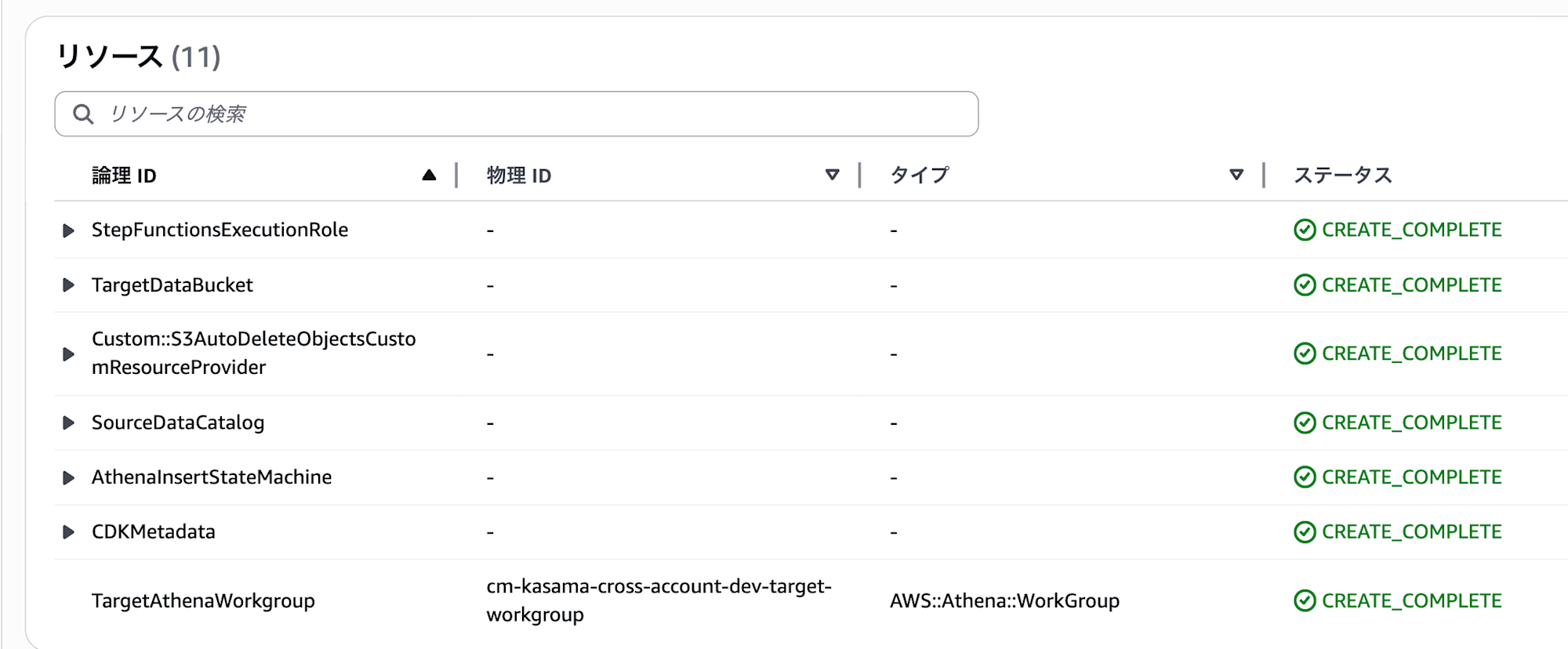
Source Account S3 Bucket Creation
cd source

aws cloudformation create-stack \
  --stack-name cm-kasama-cross-account-s3 \
  --template-body file://s3.yml \
  --parameters \
    ParameterKey=TargetAccountId,ParameterValue=<TARGET_ACCOUNT_ID> \
    ParameterKey=EnvName,ParameterValue=dev \
  --profile <SOURCE_ACCOUNT_PROFILE>
Upload Sample Data to Source Account
aws s3 cp sample-data/sales.csv s3://<SOURCE_BUCKET_NAME>/data/sales.csv \
  --profile <SOURCE_ACCOUNT_PROFILE>
Create Glue Database/Table in Source Account
Execute SQL in the source account's Athena console.
CREATE DATABASE IF NOT EXISTS cm_kasama_cross_account_db
COMMENT 'Database for cross-account access testing'
LOCATION 's3://<SOURCE_BUCKET_NAME>/data/';

CREATE EXTERNAL TABLE IF NOT EXISTS cm_kasama_cross_account_db.sales (
  id INT COMMENT 'Sales ID',
  product STRING COMMENT 'Product name',
  amount INT COMMENT 'Sales amount',
  date STRING COMMENT 'Sales date'
)
ROW FORMAT DELIMITED
FIELDS TERMINATED BY ','
STORED AS TEXTFILE
LOCATION 's3://<SOURCE_BUCKET_NAME>/data/'
TBLPROPERTIES (
  'skip.header.line.count' = '1',
  'classification' = 'csv'
);
You can verify the data with a Select query.
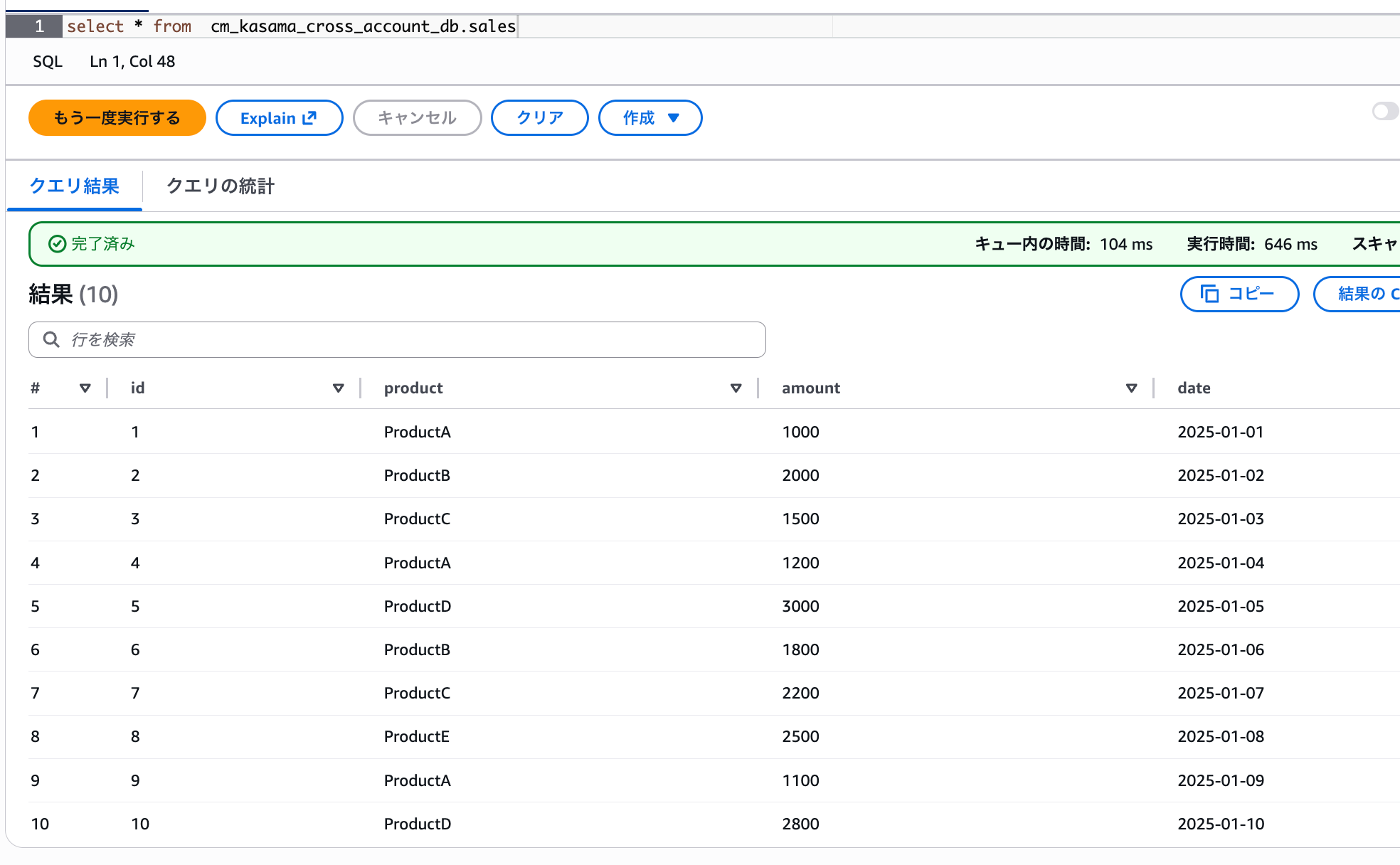
Create Glue Database/Table in Target Account
Execute SQL in the target account's Athena console.
CREATE DATABASE IF NOT EXISTS cm_kasama_cross_account_target_db
COMMENT 'Target database for cross-account data copy'
LOCATION 's3://<TARGET_BUCKET_NAME>/';

CREATE EXTERNAL TABLE IF NOT EXISTS cm_kasama_cross_account_target_db.sales_copy (
  id INT COMMENT 'Sales ID',
  product STRING COMMENT 'Product name',
  amount INT COMMENT 'Sales amount',
  date STRING COMMENT 'Sales date (YYYY-MM-DD)'
)
ROW FORMAT DELIMITED
FIELDS TERMINATED BY ','
STORED AS TEXTFILE
LOCATION 's3://<TARGET_BUCKET_NAME>/sales_copy/'
TBLPROPERTIES (
  'classification' = 'csv'
);
Configure Glue Data Catalog Resource Policy in Source Account
Replace the placeholders in source/glue-resource-policy.json with actual values and run the following command:
cd source

aws glue put-resource-policy \
  --policy-in-json file://glue-resource-policy.json \
  --enable-hybrid TRUE \
  --profile <SOURCE_ACCOUNT_PROFILE>
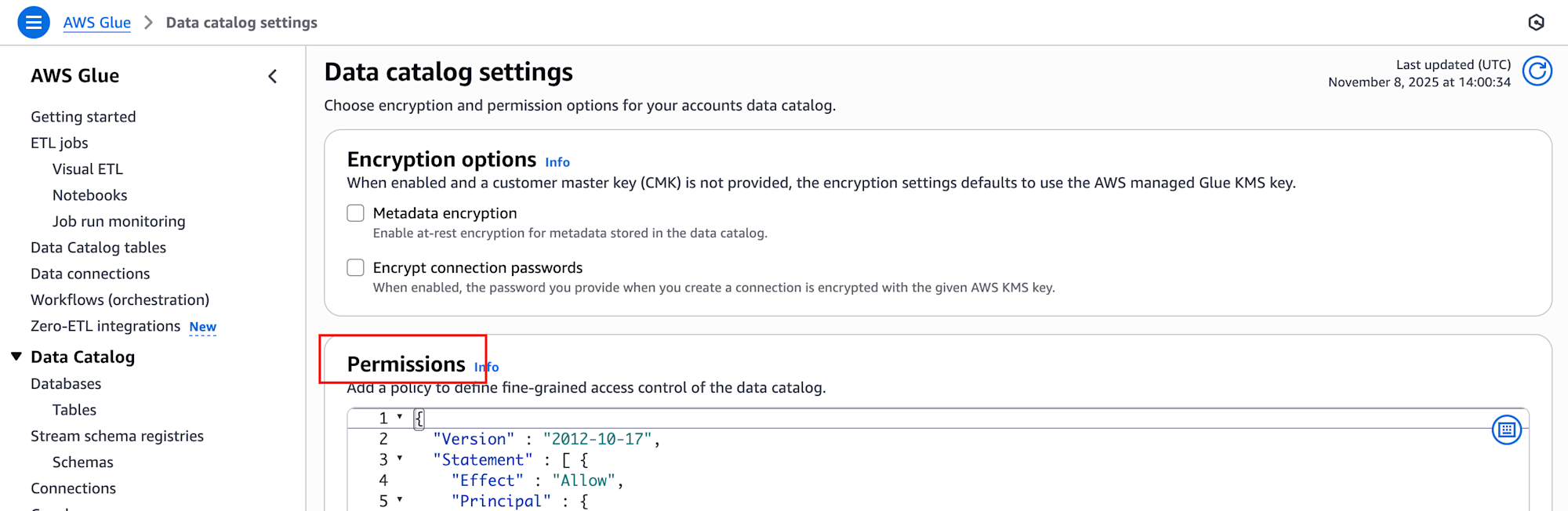
Alternatively, you can set this up through the AWS Glue console by navigating to "Data catalog" → "Catalog settings" → "Permissions" and configuring the content of source/glue-resource-policy.json.
Post-Deployment Verification
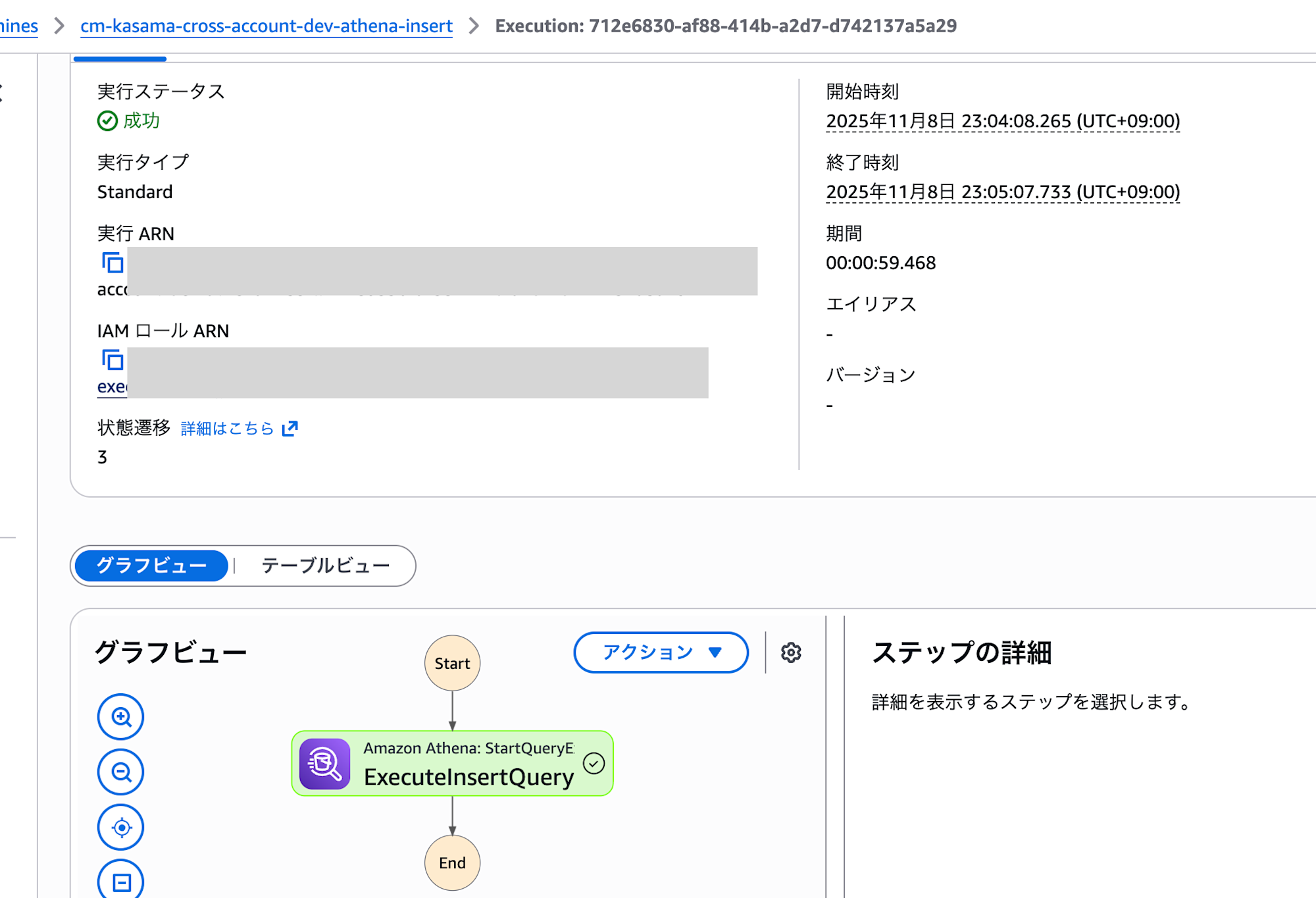
I executed Step Functions from the AWS console. The process completed successfully in about a minute.
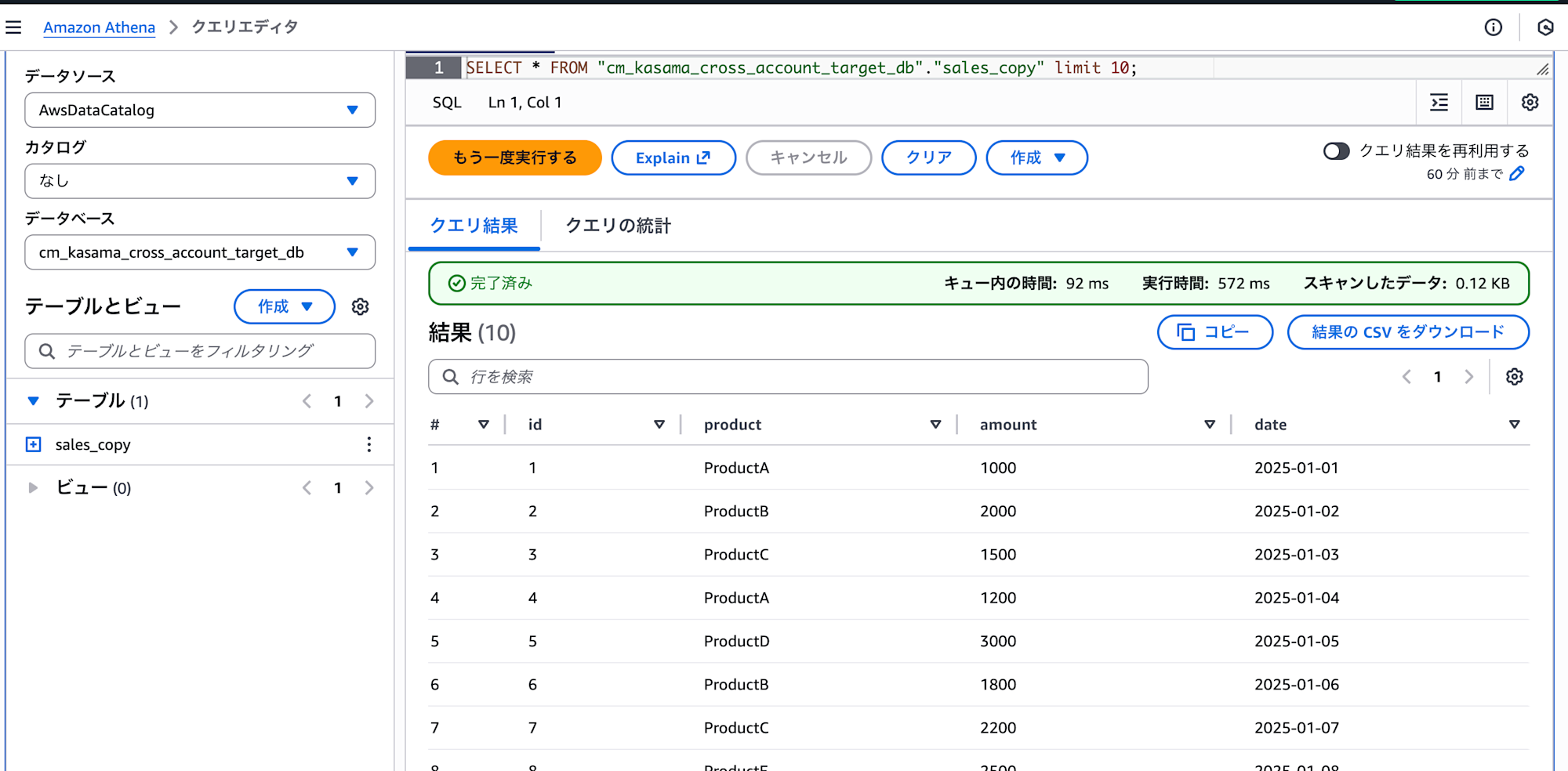
I confirmed that data was successfully inserted using the following query:
SELECT * FROM cm_kasama_cross_account_target_db.sales_copy;
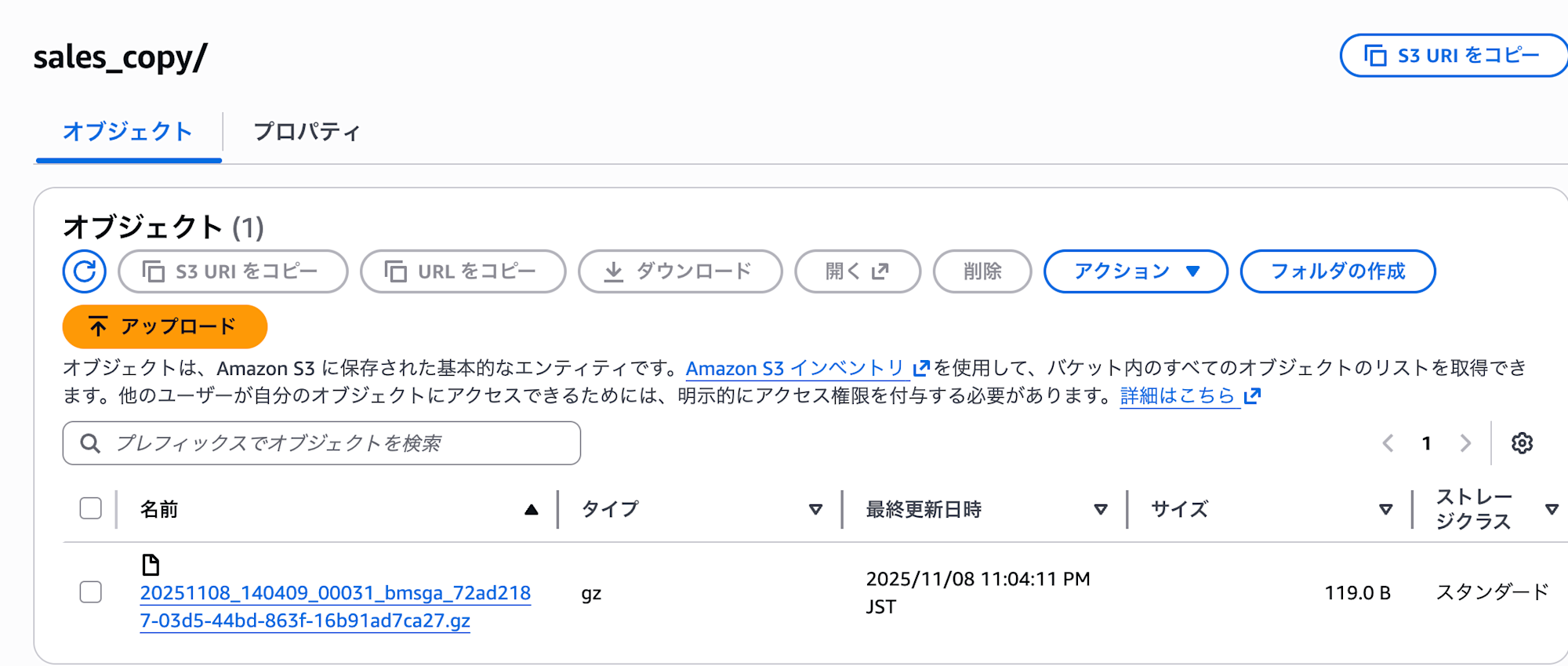
We can also confirm that the copied data files are stored in the target account's S3 bucket.
Conclusion
Through this verification, I've gained an understanding of multiple approaches to cross-account access for Glue Data Catalogs and their respective characteristics. I hope this will be helpful for those working on similar challenges.