![[AWS CDK] I tried connecting Salesforce data to Iceberg Table using AWS Glue zero-ETL](https://images.ctfassets.net/ct0aopd36mqt/wp-thumbnail-5cf97530609f228b0c0aa35bb42ef118/177aae4f779b47783f481bd82859ff0b/aws-cdk?w=3840&fm=webp)
[AWS CDK] I tried connecting Salesforce data to Iceberg Table using AWS Glue zero-ETL

This page has been translated by machine translation. View original
Introduction
I am kasama from the Data Business Division.
In this article, I will implement a system that integrates data from Salesforce to S3 using AWS Glue Zero-ETL, with AWS CDK which has been supported since November 2025.
Prerequisites
It is assumed that you have already registered for Salesforce Developer Edition. If not yet, the following document would be helpful.
Comparison between AppFlow and Zero-ETL
Previously, I implemented Salesforce to S3 data integration using Amazon AppFlow with CDK. Since AppFlow allowed for simple implementation, I wondered what the benefits of Zero-ETL are, and if AppFlow is sufficient, so I compared them.
| Aspect | Amazon AppFlow | AWS Glue Zero-ETL |
|---|---|---|
| Use Case | Low-code SaaS integration | Near real-time ETL |
| Salesforce Support | Bidirectional (source/destination) | Source only |
| Data Format | Parquet, JSON, CSV, etc. | Iceberg (ACID transactions) |
| Minimum Cost | $0.02/flow execution | $0.44/hour |
| Key Features | Rich data sources, GUI | CDC, incremental sync, time travel |
| Latency | Schedule or event-driven | Continuous sync (minimum 15-minute intervals) |
As shown in the comparison table, Zero-ETL offers benefits not available in AppFlow.
It can output directly to Iceberg, and the synchronization method is continuous sync configurable from 15-minute intervals. Compared to AppFlow's scheduled execution, it enables data integration closer to near real-time. Furthermore, Change Data Capture (CDC) automatically detects INSERT/UPDATE/DELETE changes for efficient differential synchronization.
On the cost side, Zero-ETL charges $1.50/GB for data ingestion and $0.44/DPU hour for S3 write processing. AppFlow can be used from $0.001/flow execution and $0.02/GB for data processing, so Zero-ETL may be more expensive depending on data volume and synchronization frequency.
Authentication Method Selection
There are two OAuth grant types for connecting with Salesforce: JWT Bearer flow and Authorization Code flow.
JWT Bearer flow is server-to-server authentication requiring no user operation, enabling complete IaC. On the other hand, Authorization Code flow requires user login via browser.
When choosing Authorization Code flow, you can further select between AWS Managed Connected App and Customer Managed Connected App. AWS Managed Connected App doesn't require OAuth configuration and is simpler but requires console operation. Customer Managed Connected App requires creating a Connected App in Salesforce and managing client ID/secret, but allows for more detailed control.
For this implementation, I chose Authorization Code flow with AWS Managed Connected App. While JWT Bearer flow would allow complete IaC, it requires certificate configuration in Salesforce and JWT token management. AWS Managed Connected App requires console operation, but simplifies configuration by delegating OAuth token management to AWS.
Architecture
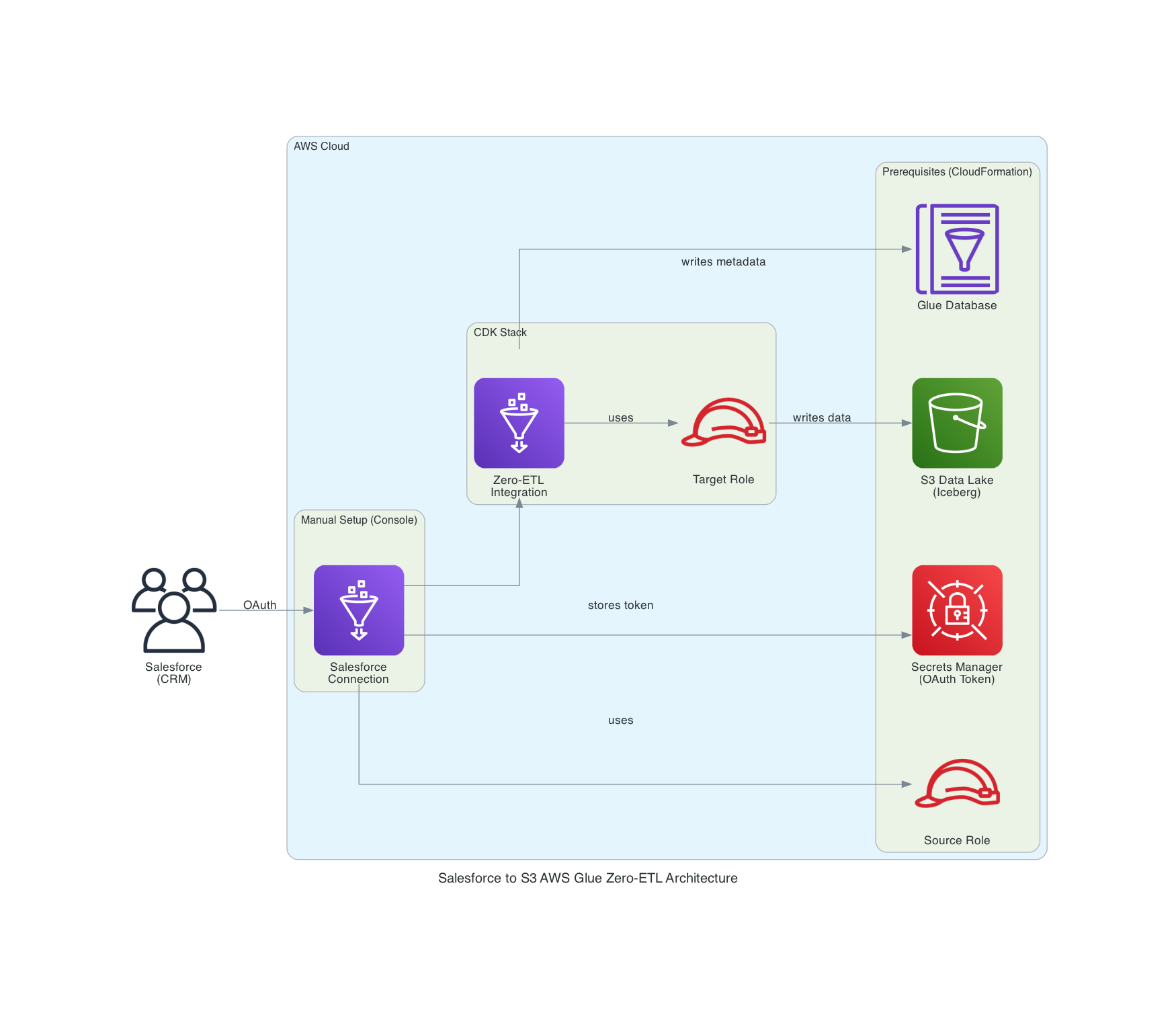
I adopted a deployment configuration combining CloudFormation, console, and CDK. Each resource is created using the optimal method based on deployment constraints.
CloudFormation (cfn/prerequisites.yaml)
  ├── S3 Data Lake Bucket
  ├── Source IAM Role
  ├── Glue Database
  └── Secrets Manager

AWS Console (manual)
  └── Salesforce Connection (AWS Managed App)

Shell Script (scripts/setup-prereqs.sh)
  └── Catalog Resource Policy

CDK (cdk/)
  ├── Target IAM Role
  ├── Integration Resource Property
  └── Zero-ETL Integration
The reason for separating deployment methods by resource is due to dependencies and service constraints. S3 bucket, Source Role, and Glue Database need to exist before CDK deployment, so they are created with CloudFormation first. Salesforce Connection is created via console because AWS Managed App requires browser OAuth authentication. Glue Data Catalog Resource Policy is not supported by CloudFormation, so it's configured using a shell script with AWS CLI. After these prerequisite resources are in place, Zero-ETL Integration is created with CDK.
Implementation
The implementation code is stored on GitHub.
Project Structure
59_salesforce_glue_zeroetl/
├── cdk/                    # CDK infrastructure code
│   ├── bin/app.ts
│   ├── lib/
│   │   ├── parameter.ts
│   │   └── main-stack.ts
│   ├── package.json
│   └── tsconfig.json
├── cfn/
│   └── prerequisites.yaml  # CloudFormation prerequisite resources
├── scripts/
│   ├── config.sh
│   ├── setup-prereqs.sh
│   └── cleanup-prereqs.sh
└── README.md
CloudFormation
cfn/prerequisites.yaml creates prerequisite resources needed before CDK deployment.
AWSTemplateFormatVersion: "2010-09-09"
Description: Prerequisites for Salesforce Zero-ETL Integration

Parameters:
  ProjectName:
    Type: String
    Default: my-sf-zeroetl
    Description: Project name prefix
  EnvName:
    Type: String
    Default: dev
    Description: Environment name

Resources:
  # ========================================
  # S3 Data Lake Bucket
  # ========================================
  DataLakeBucket:
    Type: AWS::S3::Bucket
    DeletionPolicy: Delete
    Properties:
      BucketName: !Sub ${ProjectName}-${EnvName}-datalake
      BucketEncryption:
        ServerSideEncryptionConfiguration:
          - ServerSideEncryptionByDefault:
              SSEAlgorithm: AES256
      PublicAccessBlockConfiguration:
        BlockPublicAcls: true
        BlockPublicPolicy: true
        IgnorePublicAcls: true
        RestrictPublicBuckets: true

  # ========================================
  # Secrets Manager (for OAuth token storage)
  # ========================================
  SalesforceOAuthSecret:
    Type: AWS::SecretsManager::Secret
    DeletionPolicy: Delete
    UpdateReplacePolicy: Delete
    Properties:
      Description: Stores OAuth tokens for Salesforce connection (auto-populated by AWS Glue)
      SecretString: "{}"

  # ========================================
  # Source IAM Role (for Salesforce Connection)
  # ========================================
  ZeroETLSourceRole:
    Type: AWS::IAM::Role
    Properties:
      RoleName: !Sub ${ProjectName}-${EnvName}-source-role
      AssumeRolePolicyDocument:
        Version: "2012-10-17"
        Statement:
          - Effect: Allow
            Principal:
              Service: glue.amazonaws.com
            Action: sts:AssumeRole
      Policies:
        - PolicyName: GlueConnectionAccess
          PolicyDocument:
            Version: "2012-10-17"
            Statement:
              - Effect: Allow
                Action:
                  - glue:GetConnection
                  - glue:GetConnections
                  - glue:ListConnectionTypes
                  - glue:DescribeConnectionType
                  - glue:RefreshOAuth2Tokens
                  - glue:ListEntities
                  - glue:DescribeEntity
                Resource: "*"
        - PolicyName: SecretsManagerAccess
          PolicyDocument:
            Version: "2012-10-17"
            Statement:
              - Effect: Allow
                Action:
                  - secretsmanager:DescribeSecret
                  - secretsmanager:GetSecretValue
                  - secretsmanager:PutSecretValue
                Resource: "*"

  # ========================================
  # Glue Database (for Zero-ETL target)
  # ========================================
  GlueDatabase:
    Type: AWS::Glue::Database
    Properties:
      CatalogId: !Ref AWS::AccountId
      DatabaseInput:
        Name: !Sub
          - ${ProjectNameUnderscore}_${EnvName}
          - ProjectNameUnderscore: !Join ["_", !Split ["-", !Ref ProjectName]]
        Description: Zero-ETL target database with Iceberg tables
        LocationUri: !Sub s3://${DataLakeBucket}/data/

Outputs:
  DataLakeBucketName:
    Value: !Ref DataLakeBucket
  SourceRoleArn:
    Value: !GetAtt ZeroETLSourceRole.Arn
  GlueDatabaseName:
    Value: !Sub
      - ${ProjectNameUnderscore}_${EnvName}
      - ProjectNameUnderscore: !Join ["_", !Split ["-", !Ref ProjectName]]
  SalesforceOAuthSecretName:
    Value: !Ref SalesforceOAuthSecret
    Description: Select this secret in Glue Console when creating Salesforce connection
The S3 bucket needs to be created first as it's referenced as the LocationUri for the Glue Database. The Source Role is the IAM role specified in the Salesforce Connection, with permissions for Glue Connection operations and Secrets Manager operations. Secrets Manager needs to be created in advance as it's selected as the OAuth token storage destination when creating the Salesforce Connection in the console.
Catalog Resource Policy Setup Script
Since Glue Data Catalog Resource Policy is not supported by CloudFormation, it's configured using a shell script.
#!/bin/bash
set -e

SCRIPT_DIR="$(cd "$(dirname "$0")" && pwd)"
source "${SCRIPT_DIR}/config.sh"

# Use REGION from config.sh if set, otherwise use AWS CLI default
if [ -z "$REGION" ]; then
  REGION=$(aws configure get region)
fi
ACCOUNT_ID=$(aws sts get-caller-identity --query Account --output text)

echo "Setting Glue Catalog Resource Policy (Database: ${DATABASE_NAME})..."

# Glue Resource Policy has no CloudFormation support - must use CLI
cat > /tmp/catalog-policy.json << EOF
{
  "Version": "2012-10-17",
  "Statement": [
    {
      "Effect": "Allow",
      "Principal": { "Service": "glue.amazonaws.com" },
      "Action": "glue:AuthorizeInboundIntegration",
      "Resource": "arn:aws:glue:${REGION}:${ACCOUNT_ID}:database/${DATABASE_NAME}"
    },
    {
      "Effect": "Allow",
      "Principal": { "AWS": "arn:aws:iam::${ACCOUNT_ID}:root" },
      "Action": "glue:CreateInboundIntegration",
      "Resource": "arn:aws:glue:${REGION}:${ACCOUNT_ID}:database/${DATABASE_NAME}"
    }
  ]
}
EOF

aws glue put-resource-policy --policy-in-json file:///tmp/catalog-policy.json
rm -f /tmp/catalog-policy.json

echo "Done."
This script sets up two permissions necessary for creating Zero-ETL Integration:
glue:AuthorizeInboundIntegration- Permission for the Glue service to authorize inbound integrationglue:CreateInboundIntegration- Permission to create inbound integration within the account
CDK Implementation
import type { Environment } from 'aws-cdk-lib';

export interface AppParameter {
  env?: Environment;
  envName: string;
  projectName: string;
  syncFrequencyMinutes: number;
  dataFilter: string;
}

export const devParameter: AppParameter = {
  envName: 'dev',
  projectName: 'my-sf-zeroetl',
  syncFrequencyMinutes: 15, // 15 minutes
  // syncFrequencyMinutes: 1440,  // 24 hours
  dataFilter: 'include:Account,include:Contact',
  env: {
    account: process.env.CDK_DEFAULT_ACCOUNT,
    region: process.env.CDK_DEFAULT_REGION,
  },
};
cdk/lib/parameter.ts defines parameters for each environment.
The dataFilter specifies which objects to synchronize from Salesforce. In the format include:Account,include:Contact, Account and Contact objects are targeted for synchronization. If you deploy without setting this, the deployment itself succeeds with dataFilter set to *, but data ingestion will fail, so I believe specific object designation is required for Salesforce.
import * as cdk from 'aws-cdk-lib';
import * as glue from 'aws-cdk-lib/aws-glue';
import * as iam from 'aws-cdk-lib/aws-iam';
import * as s3 from 'aws-cdk-lib/aws-s3';
import type { Construct } from 'constructs';
import type { AppParameter } from './parameter';

interface MainStackProps extends cdk.StackProps {
  parameter: AppParameter;
}

export class MainStack extends cdk.Stack {
  constructor(scope: Construct, id: string, props: MainStackProps) {
    super(scope, id, props);

    const { parameter } = props;

    // Resource naming conventions
    const dataLakeBucketName = `${parameter.projectName}-${parameter.envName}-datalake`;
    const databaseName = `${parameter.projectName.replace(/-/g, '_')}_${parameter.envName}`;
    const integrationName = `${parameter.projectName}-${parameter.envName}-integration`;
    const connectionName = `${parameter.projectName}-${parameter.envName}-salesforce-connection`;

    // Reference S3 bucket created by Prerequisites stack
    const dataLakeBucket = s3.Bucket.fromBucketName(this, 'DataLakeBucket', dataLakeBucketName);

    // External resource ARNs (created via CloudFormation / AWS Console)
    const databaseArn = `arn:aws:glue:${this.region}:${this.account}:database/${databaseName}`;
    const connectionArn = `arn:aws:glue:${this.region}:${this.account}:connection/${connectionName}`;
    const sourceRoleArn = `arn:aws:iam::${this.account}:role/${parameter.projectName}-${parameter.envName}-source-role`;

    // ========================================
    // 1. Target IAM Role (for S3/Glue Catalog)
    // ========================================
    const targetRole = new iam.Role(this, 'ZeroETLTargetRole', {
      roleName: `${parameter.projectName}-${parameter.envName}-target-role`,
      assumedBy: new iam.ServicePrincipal('glue.amazonaws.com'),
    });

    // S3 permissions
    dataLakeBucket.grantReadWrite(targetRole);

    // Glue Data Catalog permissions
    targetRole.addToPolicy(
      new iam.PolicyStatement({
        effect: iam.Effect.ALLOW,
        actions: [
          'glue:GetDatabase',
          'glue:GetDatabases',
          'glue:GetTable',
          'glue:GetTables',
          'glue:CreateTable',
          'glue:UpdateTable',
          'glue:DeleteTable',
          'glue:GetPartitions',
          'glue:BatchCreatePartition',
          'glue:BatchDeletePartition',
        ],
        resources: [
          `arn:aws:glue:${this.region}:${this.account}:catalog`,
          `arn:aws:glue:${this.region}:${this.account}:database/${databaseName}`,
          `arn:aws:glue:${this.region}:${this.account}:table/${databaseName}/*`,
        ],
      })
    );

    // CloudWatch Logs permissions
    targetRole.addToPolicy(
      new iam.PolicyStatement({
        effect: iam.Effect.ALLOW,
        actions: ['logs:CreateLogGroup', 'logs:CreateLogStream', 'logs:PutLogEvents'],
        resources: [
          `arn:aws:logs:${this.region}:${this.account}:log-group:/aws-glue/*`,
          `arn:aws:logs:${this.region}:${this.account}:log-group:/aws-glue/*:*`,
        ],
      })
    );

    // ========================================
    // 2. Integration Resource Properties (source and target)
    // ========================================
    // Source: Salesforce Connection with Source Role
    const sourceResourceProperty = new glue.CfnIntegrationResourceProperty(
      this,
      'SourceResourceProperty',
      {
        resourceArn: connectionArn,
        sourceProcessingProperties: {
          roleArn: sourceRoleArn,
        },
      }
    );

    // Target: Glue Database with Target Role
    const targetResourceProperty = new glue.CfnIntegrationResourceProperty(
      this,
      'TargetResourceProperty',
      {
        resourceArn: databaseArn,
        targetProcessingProperties: {
          roleArn: targetRole.roleArn,
        },
      }
    );

    // ========================================
    // 3. Zero ETL Integration
    // ========================================
    // Note: Salesforce Connection must be created via AWS Console before CDK deploy
    const zeroEtlIntegration = new glue.CfnIntegration(this, 'ZeroETLIntegration', {
      integrationName: integrationName,
      sourceArn: connectionArn,
      targetArn: databaseArn,
      description: 'Salesforce to S3 (Iceberg) Zero-ETL Integration',
      dataFilter: parameter.dataFilter,

      integrationConfig: {
        continuousSync: true,
        refreshInterval: `${parameter.syncFrequencyMinutes}`,
      },
      tags: [
        { key: 'Environment', value: parameter.envName },
        { key: 'DataFormat', value: 'Iceberg' },
      ],
    });

    zeroEtlIntegration.node.addDependency(sourceResourceProperty);
    zeroEtlIntegration.node.addDependency(targetResourceProperty);

    // ========================================
    // Outputs
    // ========================================
    new cdk.CfnOutput(this, 'IntegrationArn', {
      value: zeroEtlIntegration.attrIntegrationArn,
      description: 'Zero-ETL Integration ARN',
    });

    new cdk.CfnOutput(this, 'TargetRoleArn', {
      value: targetRole.roleArn,
      description: 'Target Role ARN',
    });
  }
}
In cdk/lib/main-stack.ts, Target Role and Zero-ETL Integration are created.
- Target Role
- Read/write permissions to S3
- Permissions to create/update tables in Glue Data Catalog
- Permissions to write to CloudWatch Logs
- CfnIntegrationResourceProperty
- Source side (Salesforce Connection + Source Role)
- Target side (Glue Database + Target Role)
- CfnIntegration
- Zero-ETL integration body
- Enable continuous sync with
continuousSync: true - Specify sync interval with
refreshInterval(in minutes) - Specify target objects with
dataFilter
Deployment
CloudFormation Resources
Create S3 bucket, Source Role, and Glue Database.
aws cloudformation deploy \
  --template-file cfn/prerequisites.yaml \
  --stack-name my-sf-zeroetl-dev-prerequisites \
  --capabilities CAPABILITY_NAMED_IAM \
  --profile YOUR_AWS_PROFILE
Create Salesforce Connection in AWS Console
Follow these steps to create a Salesforce Connection:
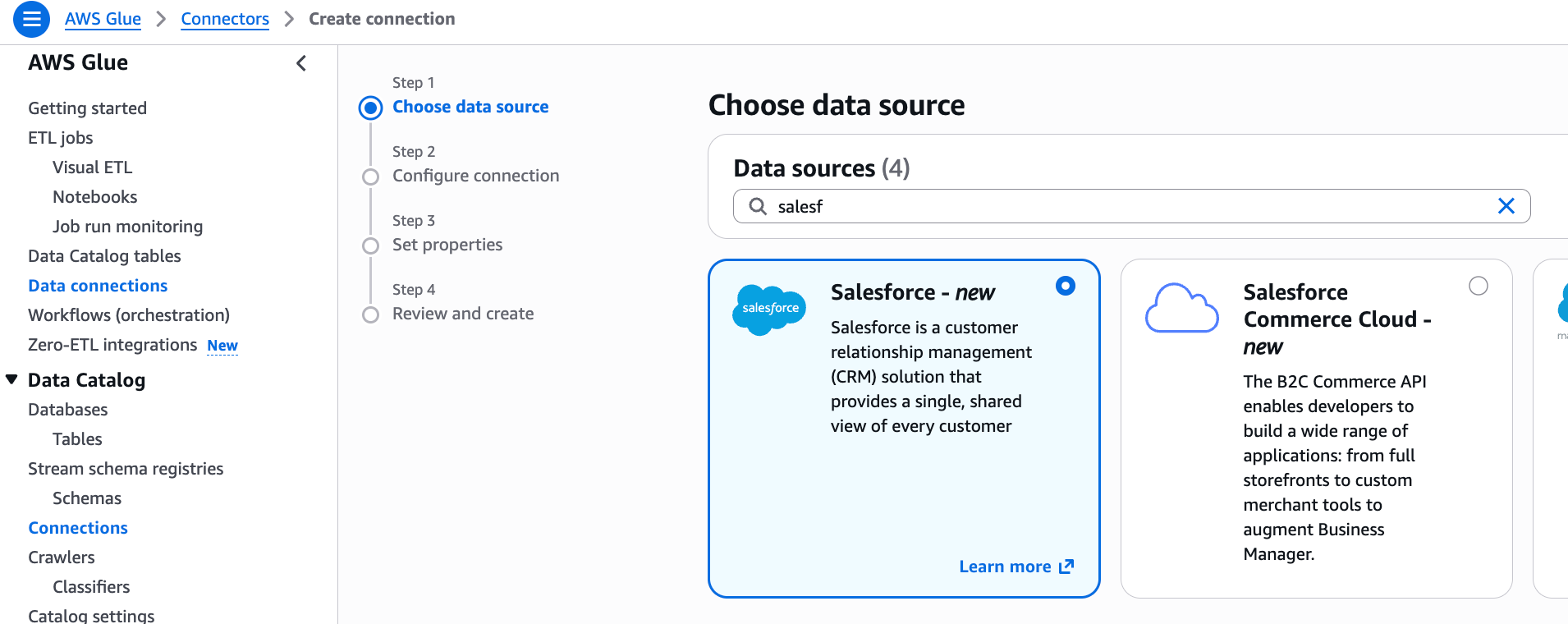
Go to AWS Glue console > Data Catalog > Connections, click "Create connection", and select "Salesforce".
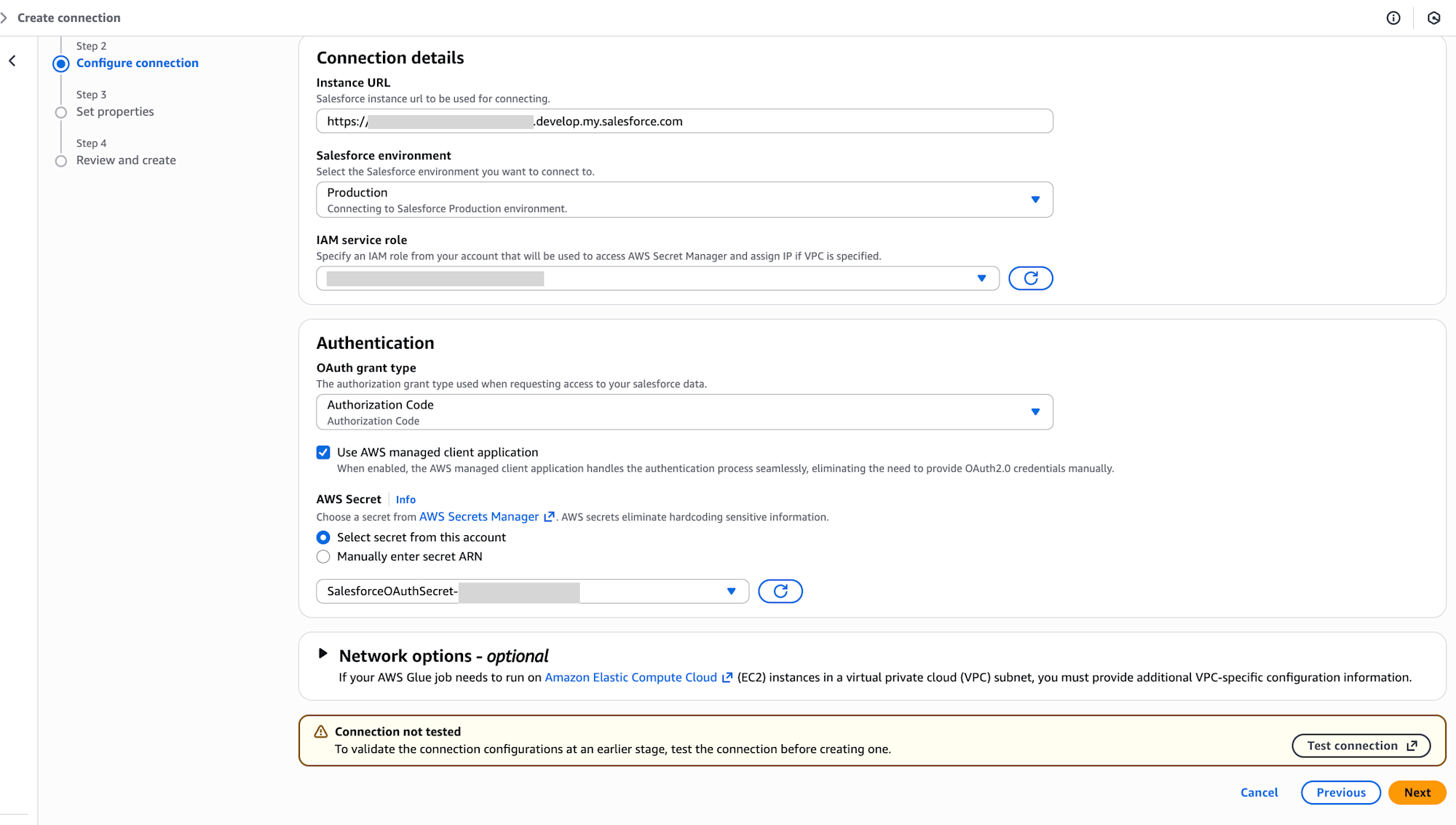
Enter the following settings and execute "Test Connection":
- Instance URL:
https://<your-domain>.my.salesforce.com(Salesforce login URL) - Salesforce environment: Production
- IAM service role:
my-sf-zeroetl-dev-source-role - OAuth grant type: Authorization Code
- Check "Use AWS managed client application"
- AWS Secret: Select the
SalesforceOAuthSecretNamefrom CloudFormation Outputs
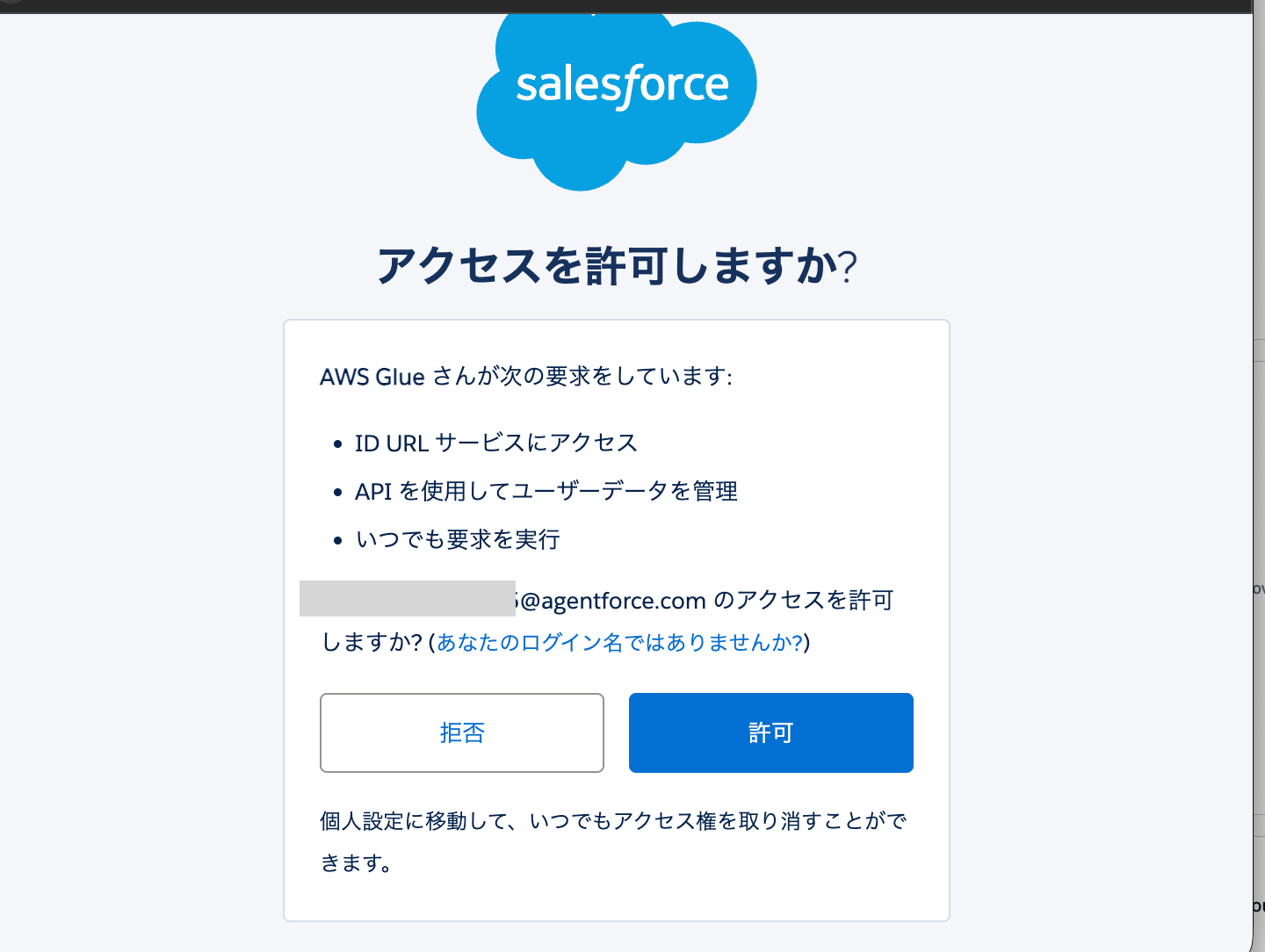
If you're already logged into Salesforce, you'll see a permission pop-up for the login user. Please allow if there's no issue.
After allowing, when you return to the AWS screen, the connection will show as successful.
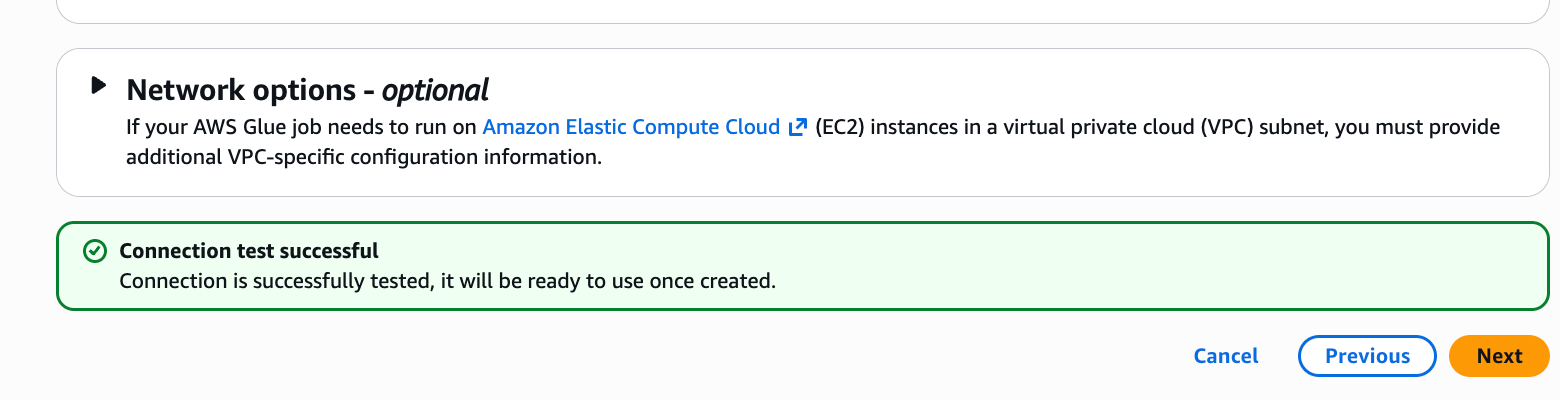
Enter the connection name in the format my-sf-zeroetl-dev-salesforce-connection to complete the creation.
Configure Catalog Resource Policy
Set up the Catalog Resource Policy with the following command:
cd scripts
AWS_PROFILE=YOUR_AWS_PROFILE ./setup-prereqs.sh
CDK Deployment
Next, create the Zero-ETL integration with the cdk deploy command:
cd cdk
pnpm install
pnpm cdk deploy --all --require-approval never --profile YOUR_AWS_PROFILE
Post-Deployment Verification
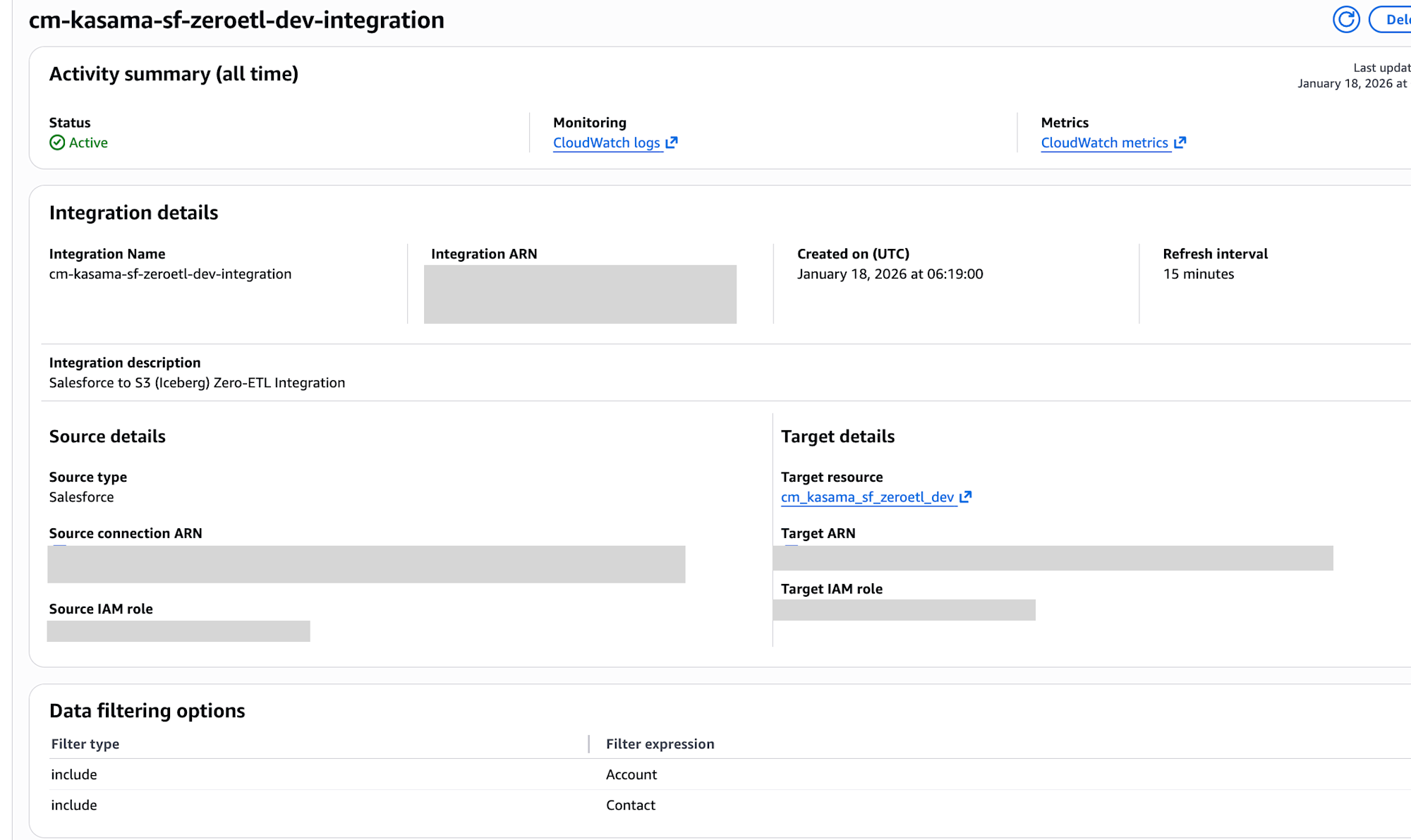
Navigate to Zero-ETL integrations in the AWS Glue console and verify that the status of the integration you created is "Active".
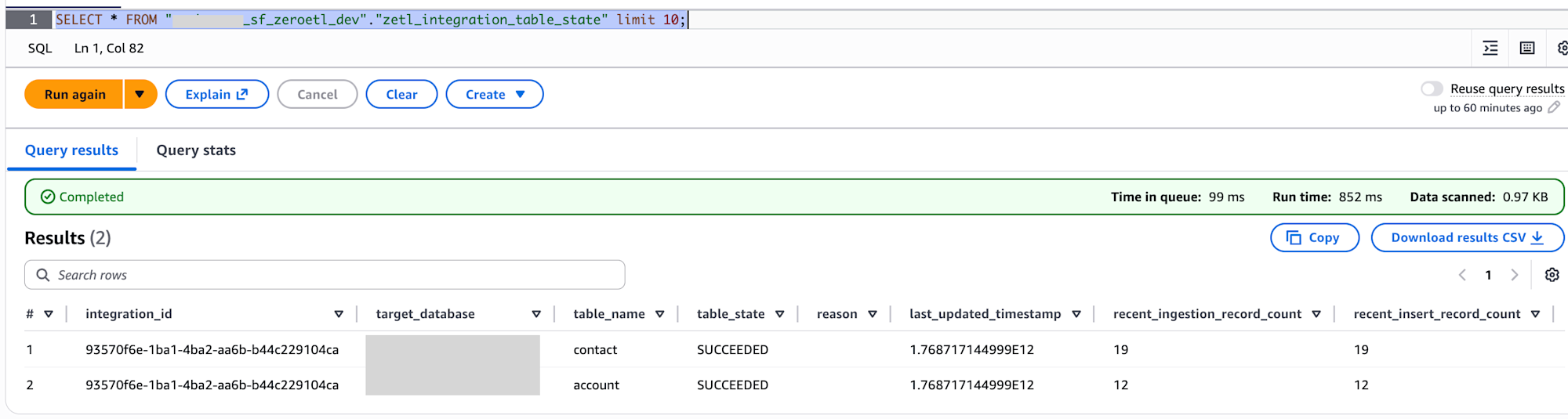
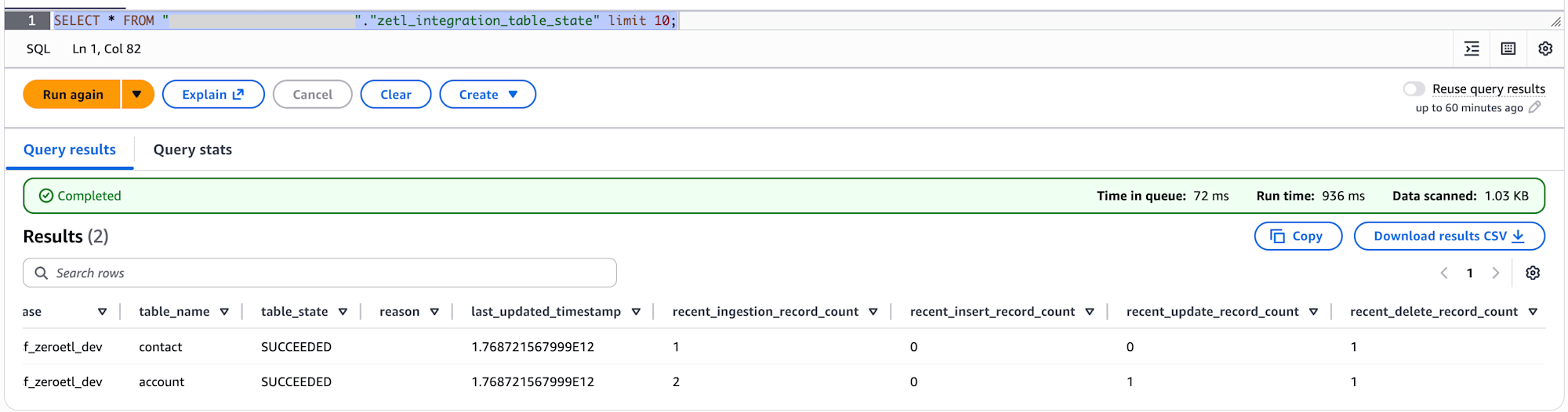
SELECT * FROM "my_sf_zeroetl_dev"."zetl_integration_table_state" limit 10;
It appears that zetl_integration_table_state records the count of inserted, updated, and deleted records for each table.
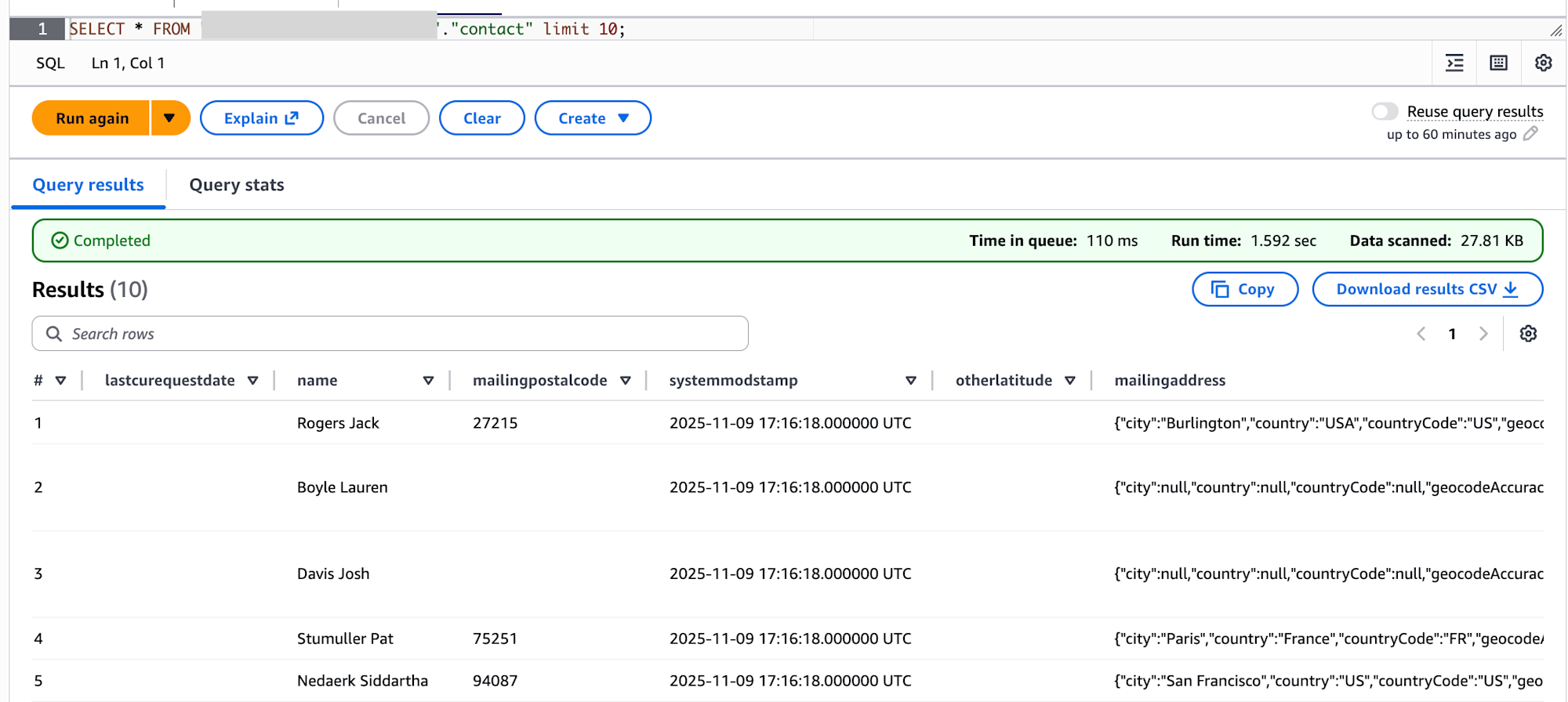
Data has been successfully retrieved for both contact and account tables.
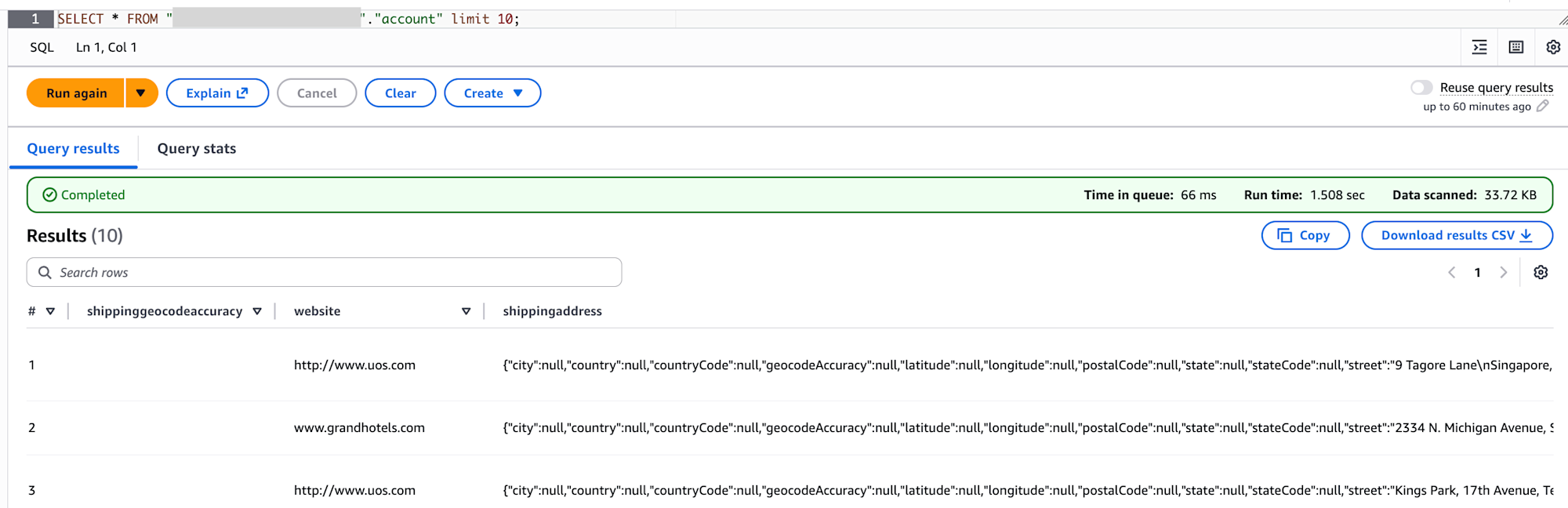
I also checked the data in S3. It shows that all 3 tables are managed in Iceberg format.
s3 ls
aws s3 ls s3://my-sf-zeroetl-dev-datalake/ --recursive
2026-01-18 06:26:00      22369 data/account/data/id_bucket=0/00000-43-887a92b7-99b4-4289-88aa-d0ddd98fd7fd-0-00001.parquet
2026-01-18 06:26:00      22203 data/account/data/id_bucket=10/00000-43-887a92b7-99b4-4289-88aa-d0ddd98fd7fd-0-00004.parquet
2026-01-18 06:26:00      22369 data/account/data/id_bucket=0/00000-43-887a92b7-99b4-4289-88aa-d0ddd98fd7fd-0-00001.parquet
2026-01-18 06:26:00      22203 data/account/data/id_bucket=10/00000-43-887a92b7-99b4-4289-88aa-d0ddd98fd7fd-0-00004.parquet
2026-01-18 06:26:00      21992 data/account/data/id_bucket=11/00000-43-887a92b7-99b4-4289-88aa-d0ddd98fd7fd-0-00005.parquet
2026-01-18 06:26:00      17105 data/account/data/id_bucket=12/00000-43-887a92b7-99b4-4289-88aa-d0ddd98fd7fd-0-00006.parquet
2026-01-18 06:25:58      20172 data/account/data/id_bucket=13/00001-44-887a92b7-99b4-4289-88aa-d0ddd98fd7fd-0-00001.parquet
2026-01-18 06:26:00      22438 data/account/data/id_bucket=14/00000-43-887a92b7-99b4-4289-88aa-d0ddd98fd7fd-0-00007.parquet
2026-01-18 06:26:00      22781 data/account/data/id_bucket=15/00000-43-887a92b7-99b4-4289-88aa-d0ddd98fd7fd-0-00008.parquet
2026-01-18 06:26:00      21402 data/account/data/id_bucket=17/00000-43-887a92b7-99b4-4289-88aa-d0ddd98fd7fd-0-00009.parquet
2026-01-18 06:26:00      20842 data/account/data/id_bucket=2/00000-43-887a92b7-99b4-4289-88aa-d0ddd98fd7fd-0-00002.parquet
2026-01-18 06:26:00      22103 data/account/data/id_bucket=21/00000-43-887a92b7-99b4-4289-88aa-d0ddd98fd7fd-0-00010.parquet
2026-01-18 06:26:01      22620 data/account/data/id_bucket=25/00000-43-887a92b7-99b4-4289-88aa-d0ddd98fd7fd-0-00011.parquet
2026-01-18 06:26:00      18800 data/account/data/id_bucket=8/00000-43-887a92b7-99b4-4289-88aa-d0ddd98fd7fd-0-00003.parquet
2026-01-18 06:26:05       9482 data/account/metadata/00000-4b06aead-151f-40f7-925c-194a5cb45e43.metadata.json
2026-01-18 06:26:05      14882 data/account/metadata/84df3740-a022-4cae-876b-12043faa9303-m0.avro
2026-01-18 06:26:05       4252 data/account/metadata/snap-7528348945578359596-1-84df3740-a022-4cae-876b-12043faa9303.avro
2026-01-18 06:25:19      18177 data/contact/data/id_bucket=1/00000-15-2137d242-4d9f-4489-9593-e0cf6c71dee7-0-00001.parquet
2026-01-18 06:25:19      19273 data/contact/data/id_bucket=10/00000-15-2137d242-4d9f-4489-9593-e0cf6c71dee7-0-00005.parquet
2026-01-18 06:25:19      18891 data/contact/data/id_bucket=12/00000-15-2137d242-4d9f-4489-9593-e0cf6c71dee7-0-00006.parquet
2026-01-18 06:25:19      18757 data/contact/data/id_bucket=14/00000-15-2137d242-4d9f-4489-9593-e0cf6c71dee7-0-00007.parquet
2026-01-18 06:25:19      19379 data/contact/data/id_bucket=17/00000-15-2137d242-4d9f-4489-9593-e0cf6c71dee7-0-00008.parquet
2026-01-18 06:25:19      19125 data/contact/data/id_bucket=19/00000-15-2137d242-4d9f-4489-9593-e0cf6c71dee7-0-00009.parquet
2026-01-18 06:25:20      19114 data/contact/data/id_bucket=20/00000-15-2137d242-4d9f-4489-9593-e0cf6c71dee7-0-00010.parquet
2026-01-18 06:25:20      19057 data/contact/data/id_bucket=22/00000-15-2137d242-4d9f-4489-9593-e0cf6c71dee7-0-00011.parquet
2026-01-18 06:25:20      19476 data/contact/data/id_bucket=24/00000-15-2137d242-4d9f-4489-9593-e0cf6c71dee7-0-00012.parquet
2026-01-18 06:25:20      18973 data/contact/data/id_bucket=25/00000-15-2137d242-4d9f-4489-9593-e0cf6c71dee7-0-00013.parquet
2026-01-18 06:25:20      19059 data/contact/data/id_bucket=27/00000-15-2137d242-4d9f-4489-9593-e0cf6c71dee7-0-00014.parquet
2026-01-18 06:25:20      18693 data/contact/data/id_bucket=30/00000-15-2137d242-4d9f-4489-9593-e0cf6c71dee7-0-00015.parquet
2026-01-18 06:25:20      19159 data/contact/data/id_bucket=31/00000-15-2137d242-4d9f-4489-9593-e0cf6c71dee7-0-00016.parquet
2026-01-18 06:25:19      16564 data/contact/data/id_bucket=6/00000-15-2137d242-4d9f-4489-9593-e0cf6c71dee7-0-00002.parquet
2026-01-18 06:25:19      18789 data/contact/data/id_bucket=8/00000-15-2137d242-4d9f-4489-9593-e0cf6c71dee7-0-00003.parquet
2026-01-18 06:25:19      20324 data/contact/data/id_bucket=9/00000-15-2137d242-4d9f-4489-9593-e0cf6c71dee7-0-00004.parquet
2026-01-18 06:25:25       9154 data/contact/metadata/00000-0ef9e4c5-80a0-4bc3-8771-5de2c4f43223.metadata.json
2026-01-18 06:25:24      15094 data/contact/metadata/b2f23ae0-337a-4078-93f9-e74a69cda51f-m0.avro
2026-01-18 06:25:25       4251 data/contact/metadata/snap-1009671950301006008-1-b2f23ae0-337a-4078-93f9-e74a69cda51f.avro
2026-01-18 06:26:20       3534 data/zetl_integration_table_state/data/00000-80-b7f0862a-7147-48a4-834e-26fd0a2fd610-0-00001.parquet
2026-01-18 06:25:29       3449 data/zetl_integration_table_state/data/00015-31-59ebc11f-f5b6-4f7a-a8ce-9a0de184ab82-0-00001.parquet
2026-01-18 06:25:38       2979 data/zetl_integration_table_state/metadata/00000-b0cd506f-00e1-4a4f-9de8-66dc123f52ce.metadata.json
2026-01-18 06:26:20       4078 data/zetl_integration_table_state/metadata/00001-e5b837fe-39c4-439b-b379-2db3b25008d7.metadata.json
2026-01-18 06:26:20       7408 data/zetl_integration_table_state/metadata/244b9cc2-d32a-481e-9ede-d45422cdcc3f-m0.avro
2026-01-18 06:25:38       7413 data/zetl_integration_table_state/metadata/638fc5be-1273-422a-b512-fd32c12f0e7c-m0.avro
2026-01-18 06:26:20       4325 data/zetl_integration_table_state/metadata/snap-2216260906034196567-1-244b9cc2-d32a-481e-9ede-d45422cdcc3f.avro
2026-01-18 06:25:38       4255 data/zetl_integration_table_state/metadata/snap-2858764749464102138-1-638fc5be-1273-422a-b512-fd32c12f0e7c.avro
Verifying Incremental Synchronization (UPDATE/DELETE)
Finally, I'll verify that changes in Salesforce are automatically synchronized.
In the Salesforce interface, I select Accounts from the application launcher.
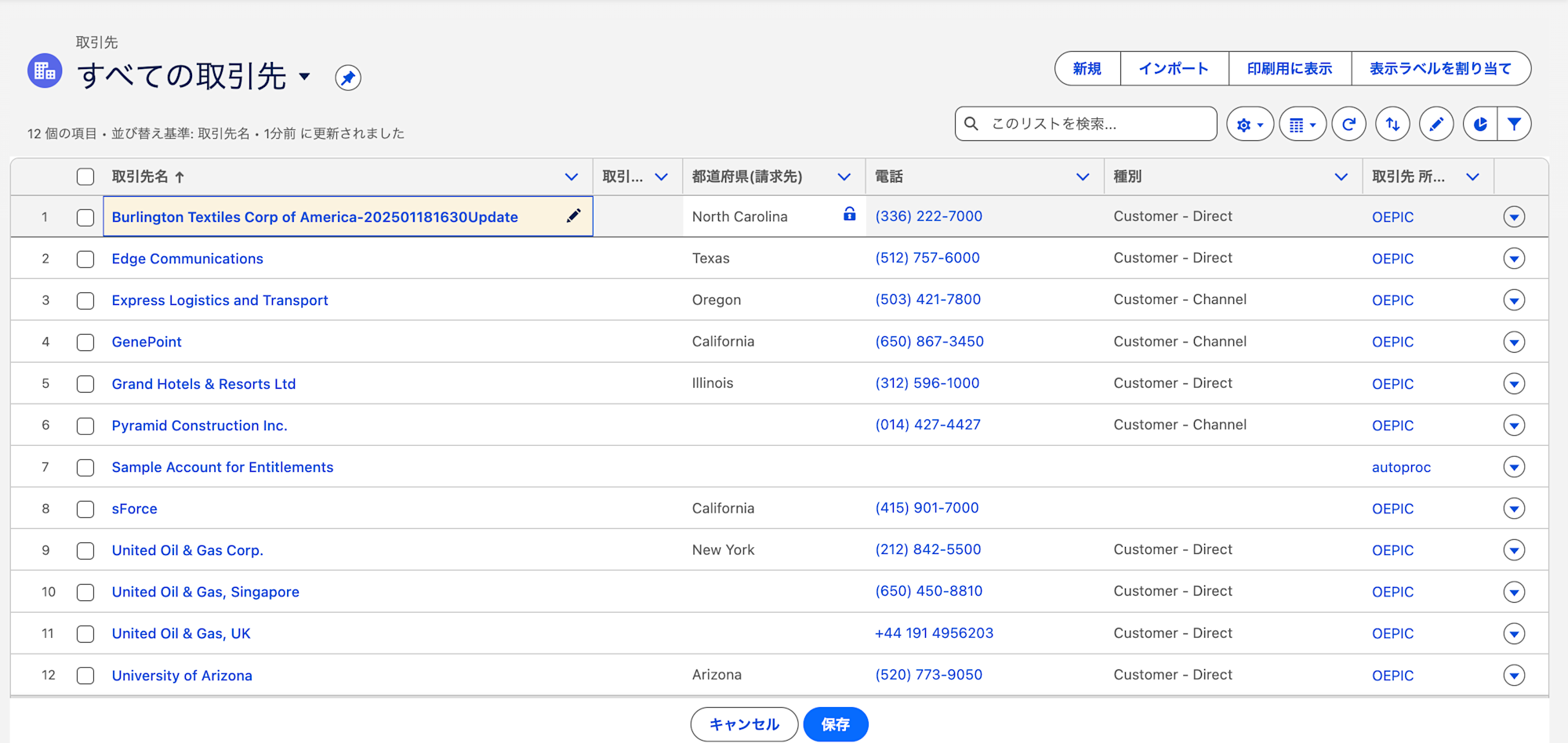
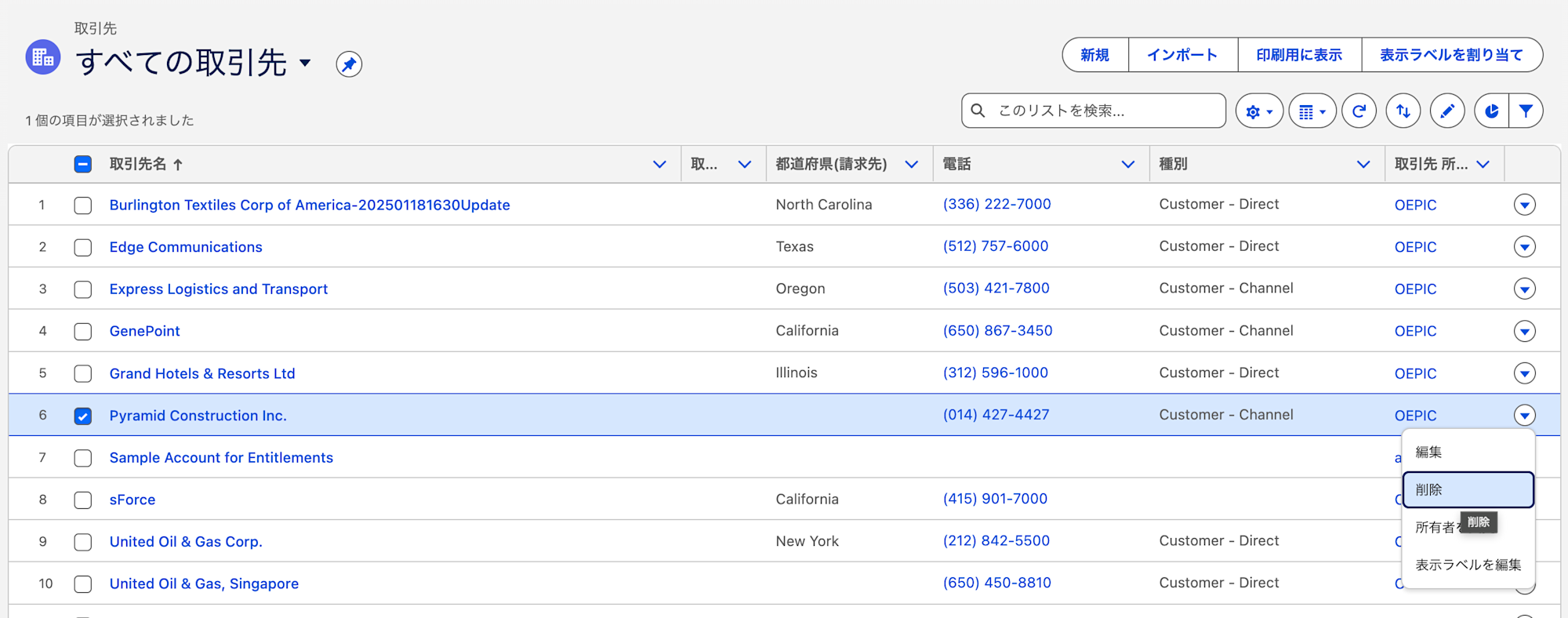
I UPDATE and DELETE arbitrary records.
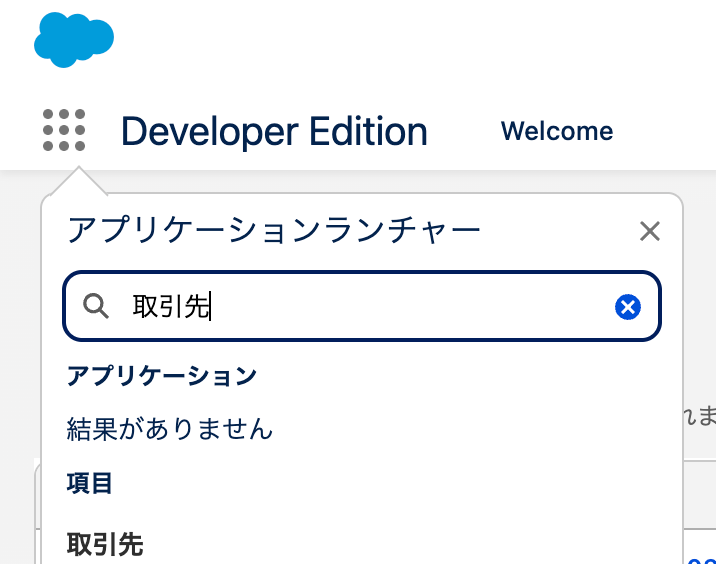
UPDATE
DELETE
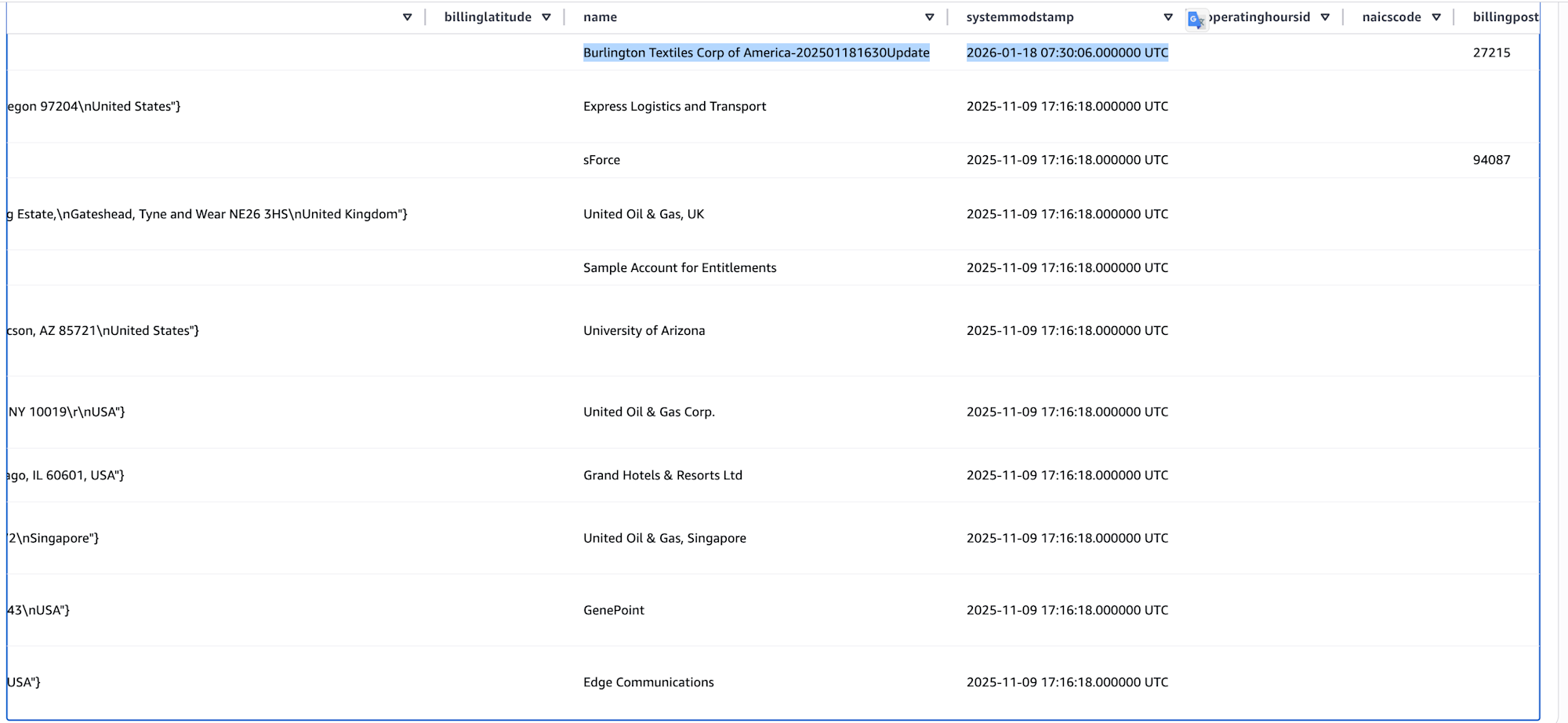
After some time, I confirmed that the UPDATE and DELETE counts for the account table had each increased by 1.
When selecting from the account table, I confirmed that the target record was UPDATED and the DELETED record no longer appears.
In Conclusion
Once the system is set up, you can perform CDC data ingestion into Iceberg Tables without ETL scripts. It's a convenient feature, although cost considerations should be compared with other services like AppFlow. I hope this information is helpful.