I want to simplify cross-account Config searches in AWS Organizations using Claude Code skills

This page has been translated by machine translation. View original
Have you ever used AWS Config's query feature? This feature allows you to run queries against resource configuration information stored by AWS Config and retrieve information. By utilizing Config aggregators, you can also perform cross-account resource searches in multi-account environments.
However, recently I've had far fewer opportunities to write SQL or scripts manually, and I've become completely dependent on AI. Config queries are no exception, but they have many unique SQL limitations, and property paths can be long and complex. Simply asking an LLM doesn't always return the correct query.
Since I often need to perform cross-account searches in multi-account environments, I thought it would be convenient to turn this into a skill, so I created a Claude Code Skill. I've packed it with Config query methods and references to generate and execute accurate queries from natural language.
The Skill I Created
Without further ado, here's the skill I created.
The full text of SKILL.md is here.
---
name: aws-config-org-search
description: AWS Config高度なクエリでマルチアカウントリソースを検索
---

# AWS Config 高度なクエリ

## 前提条件
- AWS CLI v2 がインストール済みであること
- AWS Organizations で組織アグリゲーターがセットアップ済みであること
- リソーススキーマ(サブモジュール)が取得済みであること:
  ```bash
  git submodule update --init
  ```

## 実行フロー

### 1. 組織アグリゲーター名の取得

```bash
aws configservice describe-configuration-aggregators --output json
```

**判定方法:**
- `OrganizationAggregationSource` キーが存在する → 組織アグリゲーター
- `AccountAggregationSources` キーが存在する → アカウント個別アグリゲーター

### 2. クエリ実行

プロセス置換でJSONを渡す(SQLのカンマ問題回避):

```bash
aws configservice select-aggregate-resource-config \
  --configuration-aggregator-name "<AGGREGATOR_NAME>" \
  --output json \
  --expression "$(cat <<'EOF'
SELECT ... WHERE ...
EOF
)"
```

## SQL構文リファレンス

### 基本構文

```sql
SELECT property [, ...]
[ WHERE condition ]
[ GROUP BY property ]
[ ORDER BY property [ ASC | DESC ] [, ...] ]
```

### 演算子

| 種類 | 使用可能 |
|------|----------|
| 比較 | `=`, `IN`, `BETWEEN` |
| 論理 | `AND`, `OR`, `NOT` |
| パターン | `LIKE`(後述の制限あり) |

### LIKE とワイルドカード制限

- `%`: 0文字以上にマッチ
- `_`: 1文字にマッチ

**制限:**
- **サフィックスワイルドカードのみ** - `LIKE 'AWS::EC2::%'` ✓ / `LIKE '%::Instance'` ✗
- **3文字以上必須** - `LIKE 'abc%'` ✓ / `LIKE 'ab%'` ✗
- **プロパティ値のみ** - キー名にはワイルドカード使用不可

### 集計関数

`COUNT`, `SUM`, `AVG`, `MIN`, `MAX`

**制限:**
- 引数は単一プロパティのみ
- `GROUP BY` は最大3プロパティ
- `GROUP BY` + `ORDER BY`(集計関数参照)は単一プロパティのみ
- `HAVING` はサポートなし

### 使用不可

`ALL`, `AS`, `DISTINCT`, `FROM`, `HAVING`, `JOIN`, `UNION`, `NULL`, 複雑な`CASE`

※ `LIMIT` → `--max-results` オプションを使用

### SELECT * の動作

トップレベルのスカラープロパティのみ返却:
`accountId`, `awsRegion`, `arn`, `availabilityZone`, `configurationItemCaptureTime`, `resourceCreationTime`, `resourceId`, `resourceName`, `resourceType`, `version`

### 注意事項

**クエリ文字数制限:** SQLクエリの最大長は **4,096文字**

**配列内プロパティ:** 条件は全要素に対して評価される(AND条件でも異なる要素にマッチ可能)

**CIDR/IP検索:** 範囲に変換されるため、完全一致には追加条件が必要:
```sql
WHERE configuration.ipPermissions.ipRanges BETWEEN '10.0.0.0' AND '10.0.0.255'
  AND NOT configuration.ipPermissions.ipRanges < '10.0.0.0'
  AND NOT configuration.ipPermissions.ipRanges > '10.0.0.255'
```

### 公式ドキュメント
- [Query Components](https://docs.aws.amazon.com/config/latest/developerguide/query-components.html)
- [Querying AWS Resources](https://docs.aws.amazon.com/config/latest/developerguide/querying-AWS-resources.html)

## リソーススキーマ

このSKILL.mdと同じディレクトリにサブモジュールとして配置:
```
<SKILL_DIR>/aws-config-resource-schema/config/properties/resource-types/
```
※ `<SKILL_DIR>` はこの SKILL.md が存在するディレクトリ。

### スキーマ探索

```bash
# リソースタイプ一覧(413種類)
ls <SKILL_DIR>/aws-config-resource-schema/config/properties/resource-types/

# 特定リソースのプロパティ確認
cat <SKILL_DIR>/aws-config-resource-schema/config/properties/resource-types/AWS::EC2::Instance.properties.json | jq .

# プロパティ名のみ抽出
cat <SKILL_DIR>/aws-config-resource-schema/config/properties/resource-types/AWS::RDS::DBInstance.properties.json | jq 'keys'
```

## 実用クエリ例

### RDS DBインスタンス(エンジン情報、自動アップグレード設定)

```bash
aws configservice select-aggregate-resource-config \
  --configuration-aggregator-name "<AGGREGATOR_NAME>" \
  --output json \
  --expression "$(cat <<'EOF'
SELECT
  accountId,
  awsRegion,
  resourceId,
  configuration.dBInstanceIdentifier,
  configuration.engine,
  configuration.engineVersion,
  configuration.autoMinorVersionUpgrade
WHERE
  resourceType = 'AWS::RDS::DBInstance'
EOF
)"
```

### EC2インスタンス(特定インスタンスタイプ)

```bash
aws configservice select-aggregate-resource-config \
  --configuration-aggregator-name "<AGGREGATOR_NAME>" \
  --output json \
  --expression "$(cat <<'EOF'
SELECT
  accountId,
  awsRegion,
  resourceId,
  configuration.instanceId,
  configuration.instanceType,
  configuration.state.name
WHERE
  resourceType = 'AWS::EC2::Instance'
  AND configuration.instanceType LIKE 't2.%'
EOF
)"
```

### Lambda関数(ランタイム、最終更新日)

```bash
aws configservice select-aggregate-resource-config \
  --configuration-aggregator-name "<AGGREGATOR_NAME>" \
  --output json \
  --expression "$(cat <<'EOF'
SELECT
  accountId,
  awsRegion,
  resourceId,
  configuration.functionName,
  configuration.runtime,
  configuration.lastModified
WHERE
  resourceType = 'AWS::Lambda::Function'
ORDER BY
  configuration.lastModified DESC
EOF
)"
```
Skill Description
As a prerequisite, you need to set up authentication credentials for an "AWS account with an organization aggregator." The required tools are AWS CLI v2 and jq.
The skill flow itself is simple. It retrieves the organization aggregator name, references the resource schema to build a query, and then executes it. Since Config queries have unique constraints such as LIKE suffix wildcard limitations and lack of HAVING support, I've embedded an SQL syntax reference in the skill to ensure accurate query generation.
Additionally, to specify resource property paths accurately, I've included awslabs/aws-config-resource-schema as a submodule. This allows for accurate reference of long paths such as supplementaryConfiguration.ServerSideEncryptionConfiguration.rules... from the schema.
Setup Method
Here's how to set it up as a user-scoped skill. Simply clone the repository to ~/.claude/skills/. Adding --recursive will also fetch the resource schema submodule.
mkdir -p ~/.claude/skills
cd ~/.claude/skills
git clone --recursive https://github.com/MasahiroKawahara/aws-config-org-search.git
After that, you can run /aws-config-org-search in Claude Code.
Also, the resource schema can be updated with the following commands:
git submodule update --remote
git add aws-config-resource-schema
git commit -m "Update aws-config-resource-schema"
Using the Skill
Here are some examples of using the skill.
Check S3 bucket encryption settings
I manually executed the skill and asked to "check encryption settings for S3 buckets across the organization." First, it retrieves the Config aggregator and reads the schema (JSON).
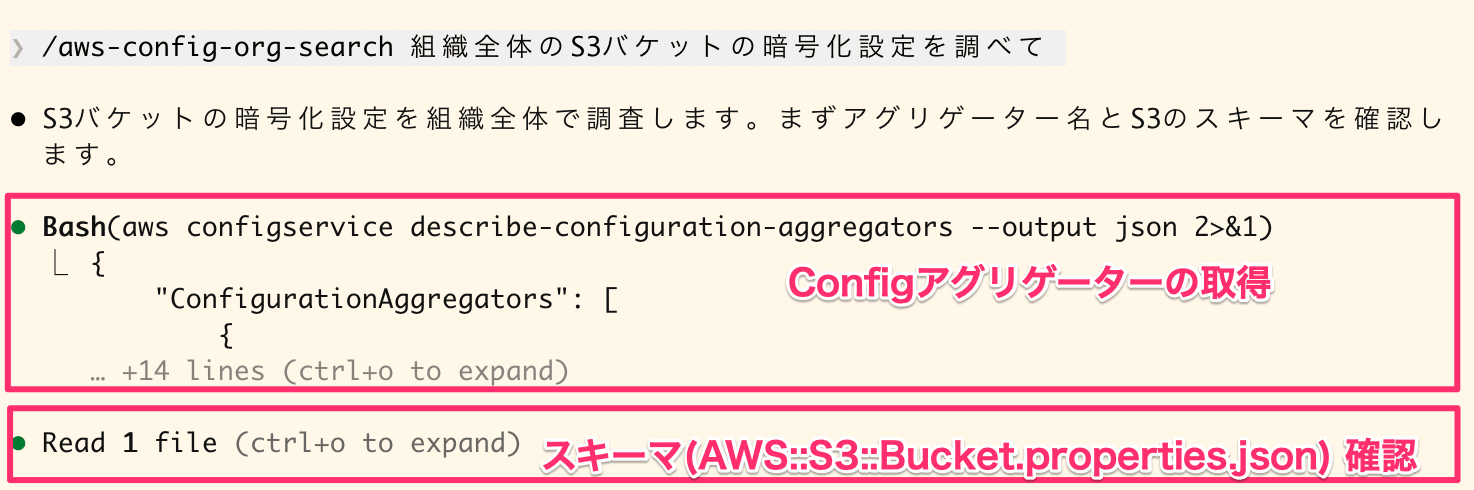
Retrieving Config aggregator and reading S3 bucket schema
Then, it executes the select-aggregate-resource-config command.
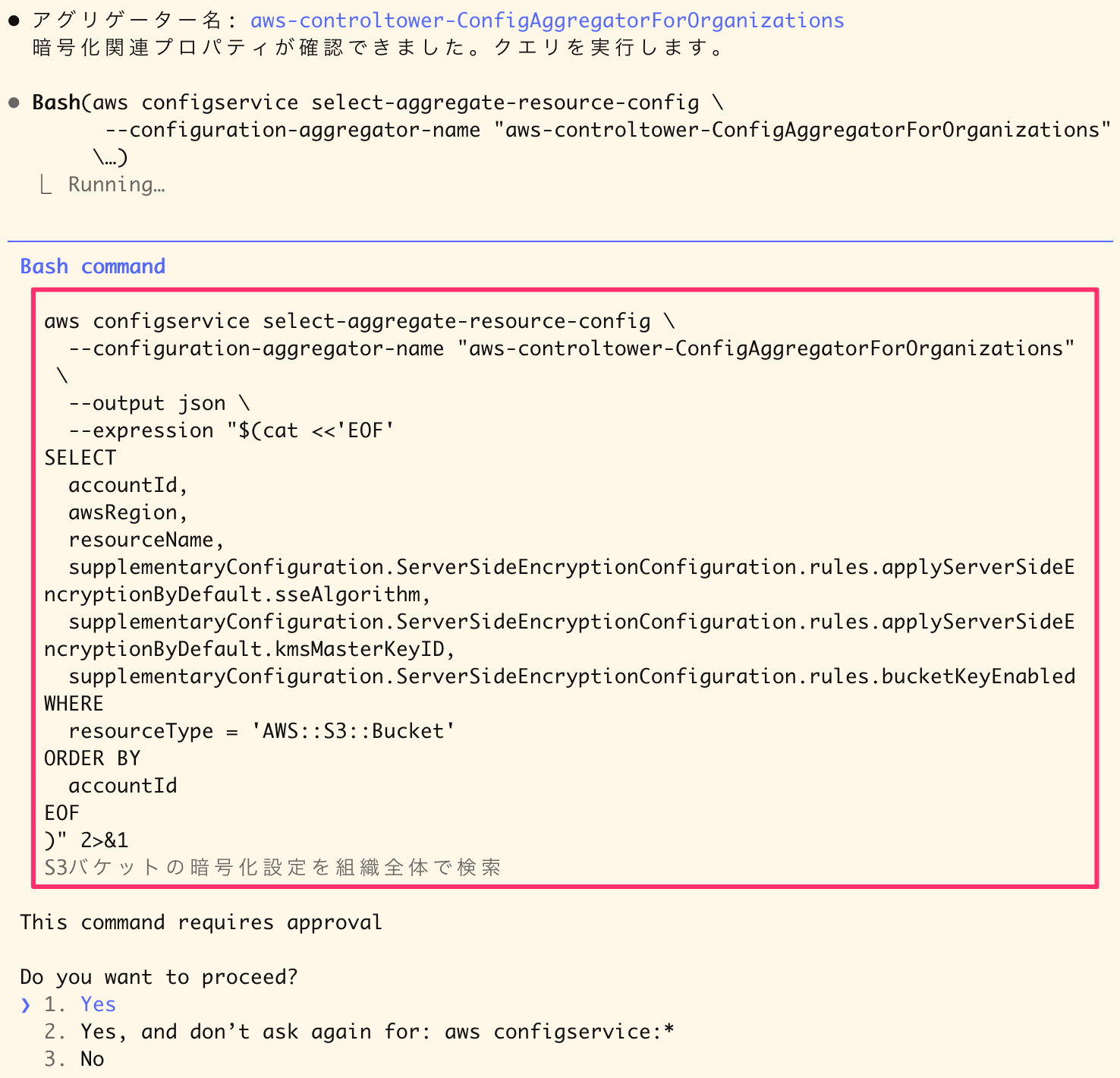
Executing a query to retrieve S3 bucket encryption settings
The final answer looks like this:
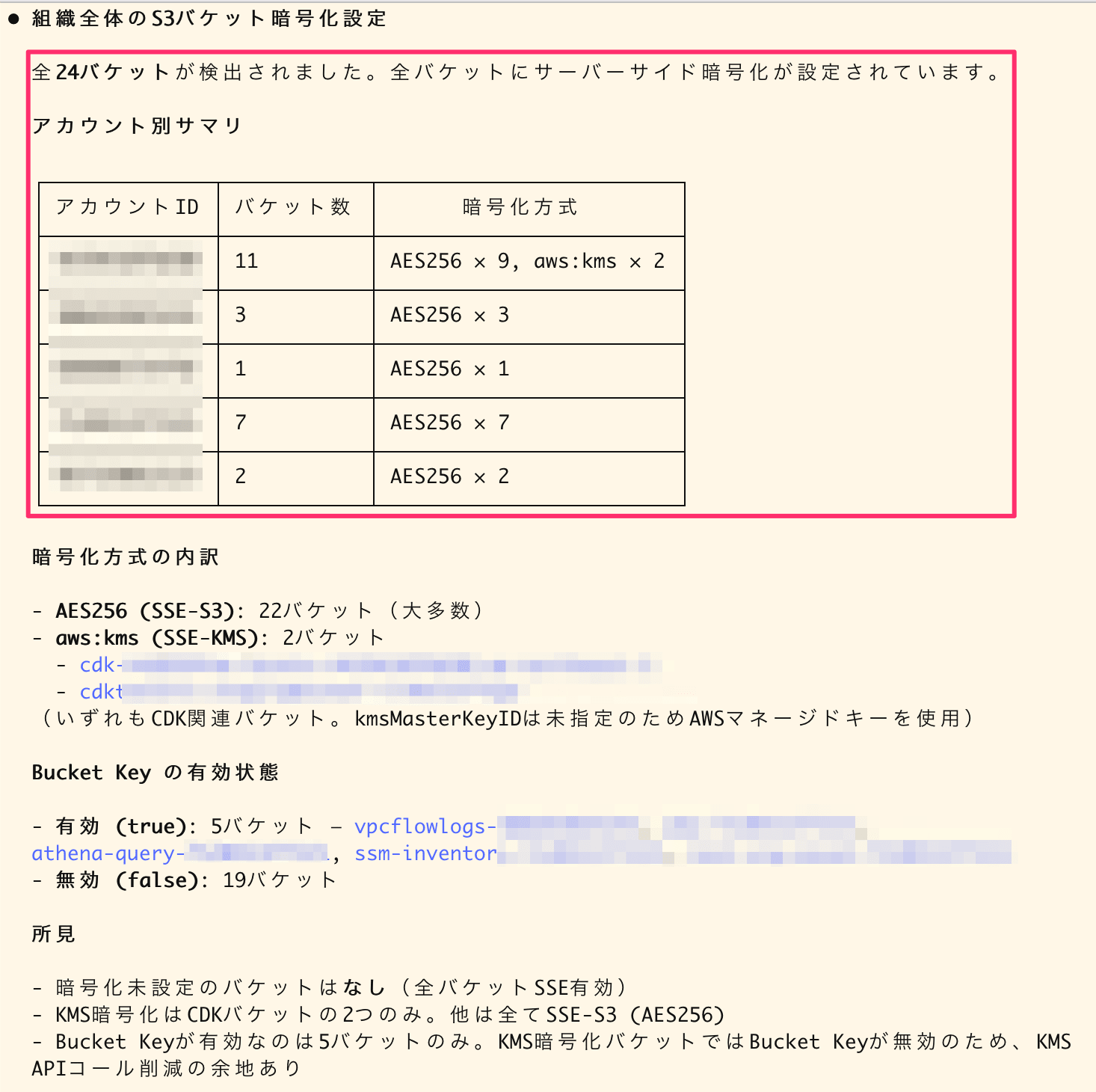
Summary of S3 bucket encryption settings across the organization
I think it does a good job of inventory. In this query, it specifies very long paths like supplementaryConfiguration.ServerSideEncryptionConfiguration.rules.applyServerSideEncryptionByDefault.sseAlgorithm. It's nice that the AI automatically completes these accurate paths.
Investigate policies of IAM roles with a specific prefix
I made a request like this:
Find IAM roles starting with `cm-`, check their creation date, attached managed policies, and inline policies, and output to CSV (`./tmp/test-iam-roles-inventory.csv`)
Similarly, it retrieves the organization aggregator name, checks the schema, and executes the query. It identifies properties from the schema.
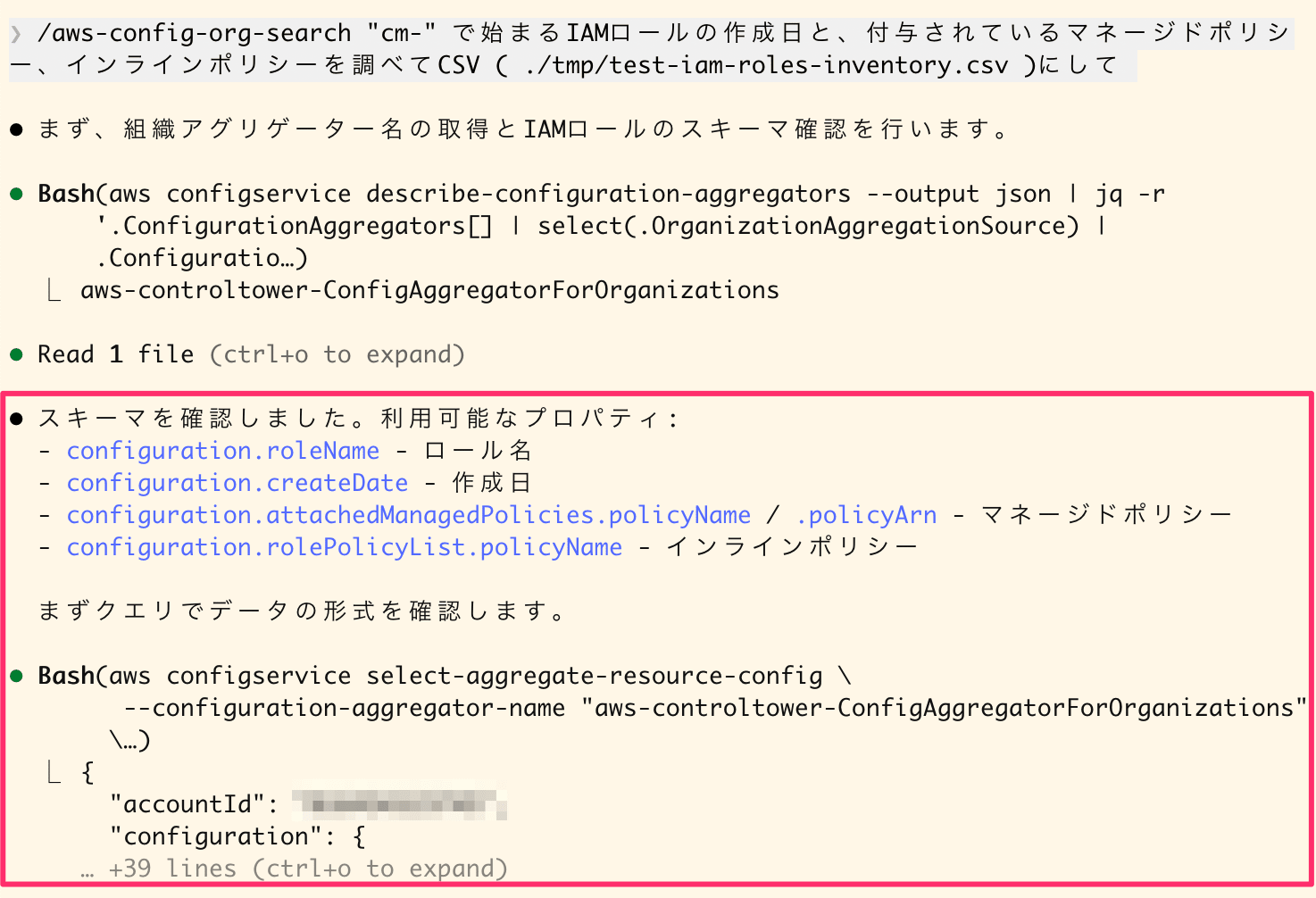
Retrieving aggregator name, checking IAM role schema, and executing query
Since I asked for CSV output, it generated a script and compiled the results into a file.
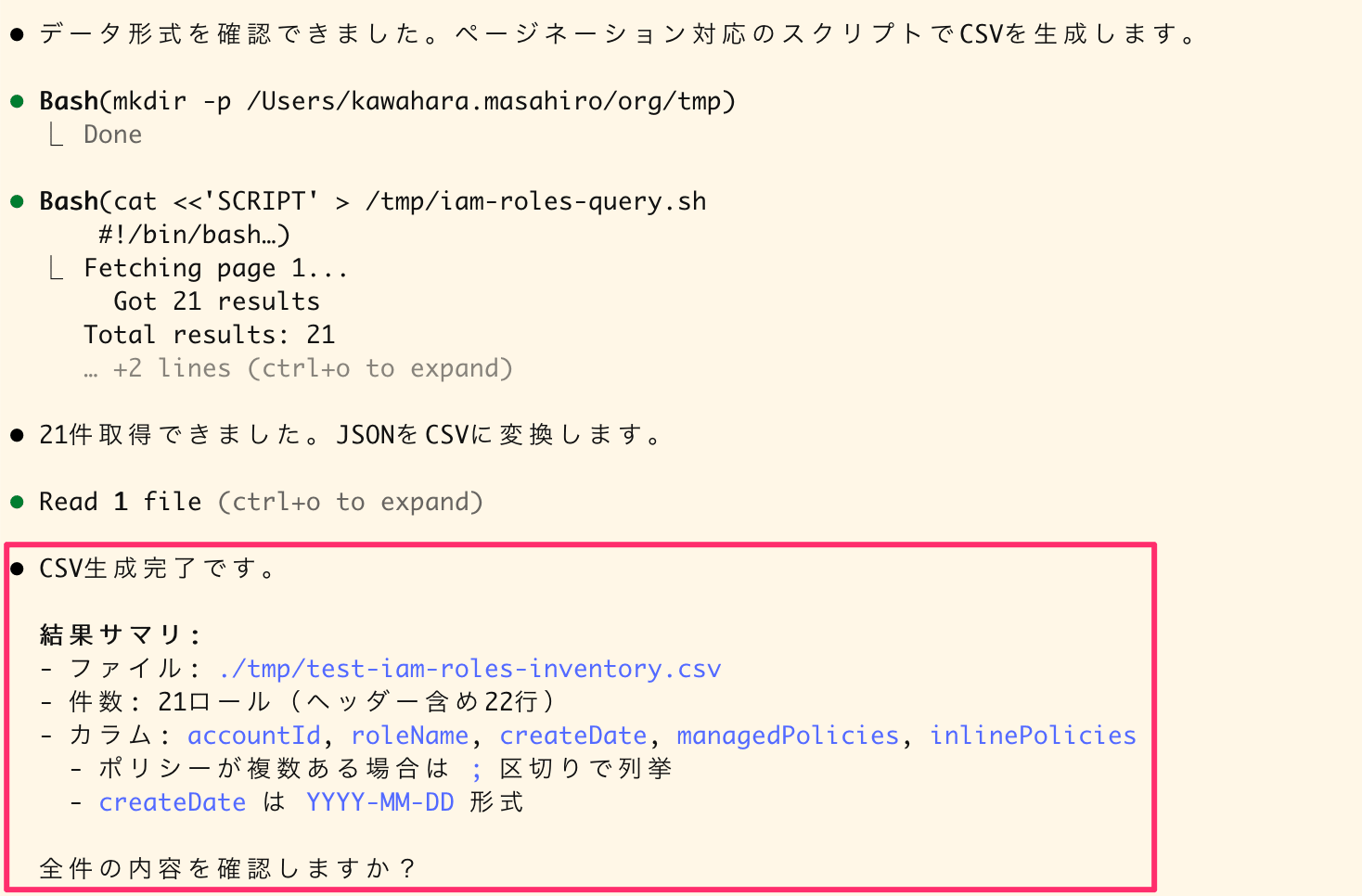
Executing CSV generation script and result summary
Here's what it looks like when imported into a spreadsheet:
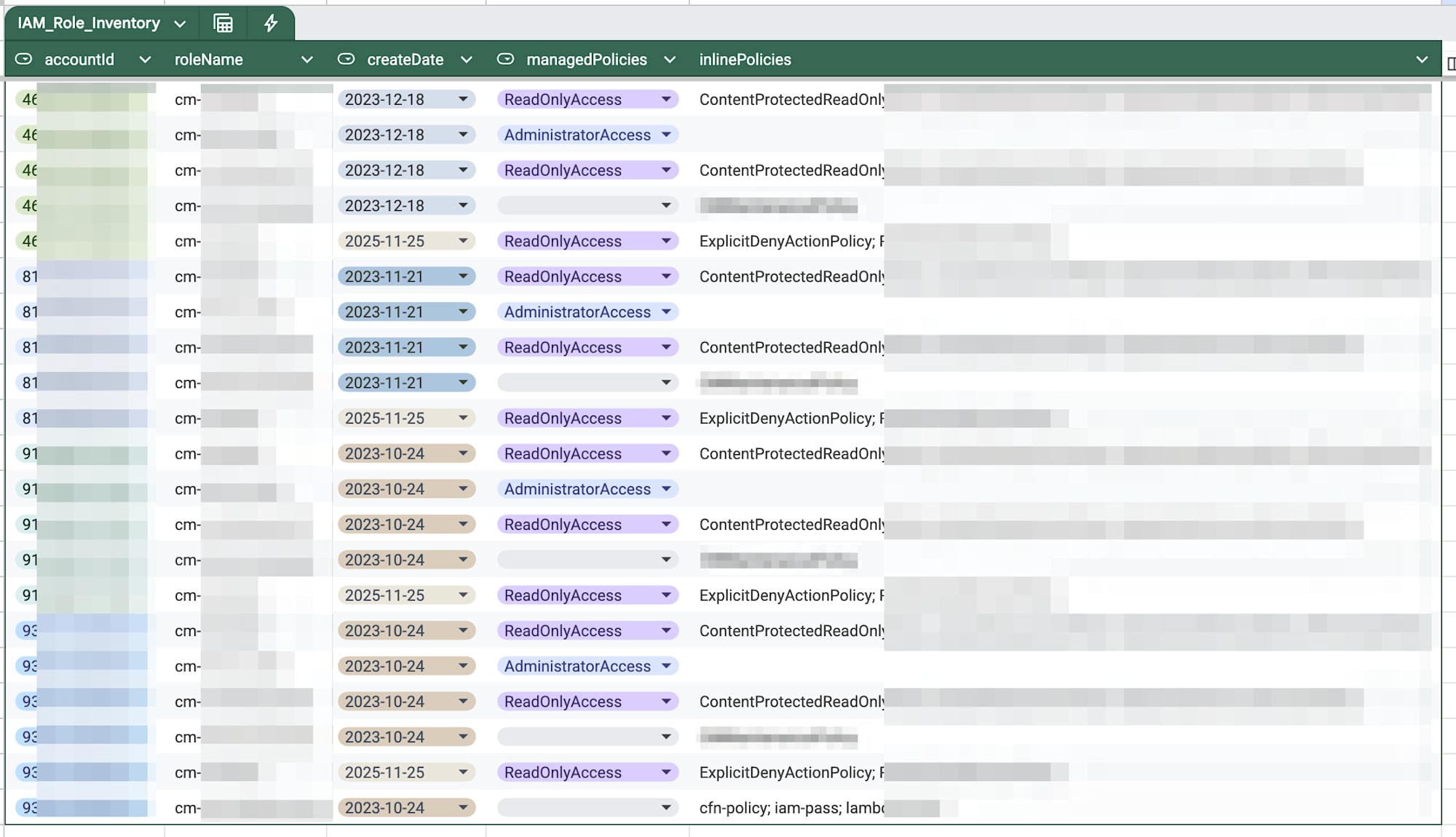
Result of importing CSV into a spreadsheet
This also provides a good inventory. When doing resource inventories, it's often necessary to compile results into spreadsheets (or Excel) to share, so it's helpful that it can handle everything from query to CSV generation in one go.
Conclusion
I've turned AWS Config cross-account searching into a skill. I think embedding knowledge and schemas into the skill successfully overcomes Config query's unique limitations and long property paths.
Being able to say "investigate/inventory..." and have it automatically handle everything from query generation to CSV output will be extremely helpful for future multi-account operations.
I hope this has been useful.