What AWS Cost Anomaly Detection is good at and what it's not good at

This page has been translated by machine translation. View original
Introduction
Hello, this is Kodaka from the Data Business Division.
While exploring cost monitoring services for managing multiple AWS accounts,
I came across AWS Cost Anomaly Detection as a managed cost anomaly detection service from AWS.
This is an ML-based monitoring service that is available for free.
While this sounds like there's no reason not to implement it, after actually testing it, I discovered what it "can do" and "cannot do".
In this article, based on actual verification results, I've summarized Cost Anomaly Detection's strengths and weaknesses.
What is Cost Anomaly Detection?
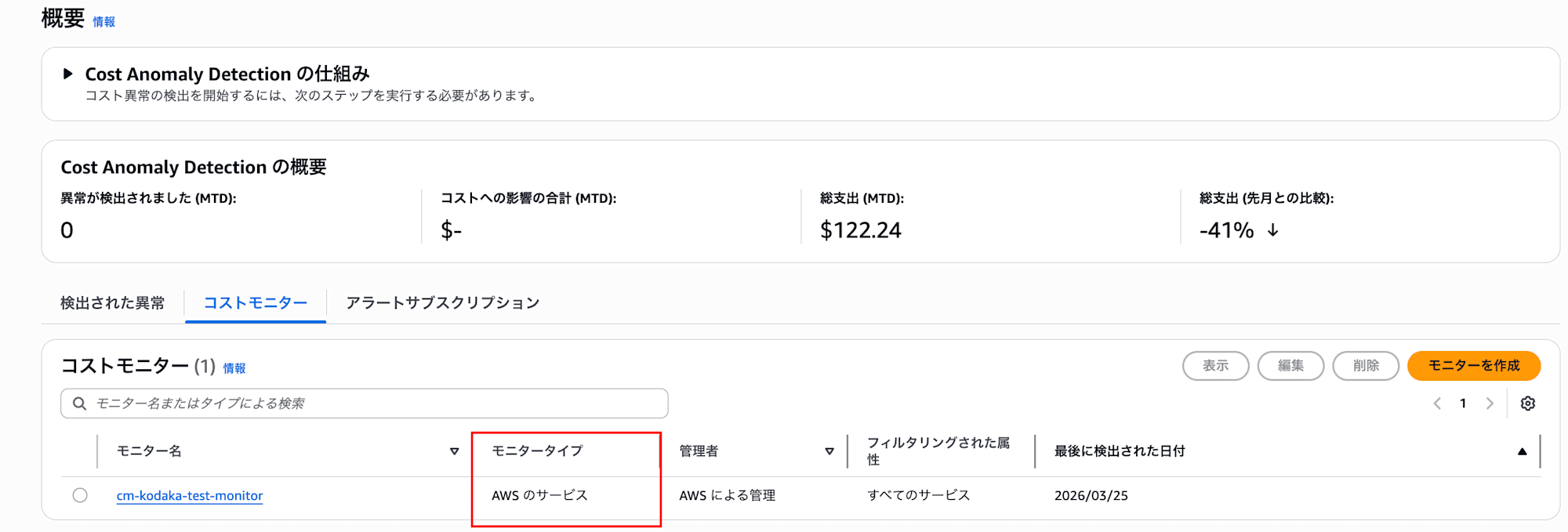
It's a managed service where ML learns past cost patterns and detects cost fluctuations that deviate from these patterns as "anomalies." At least 10 days of historical data is required to detect new services. It's included in Cost Explorer and can be used without additional charges. Detection runs approximately 3 times per day after Cost Explorer data updates.
Detection Mechanism (2 stages)
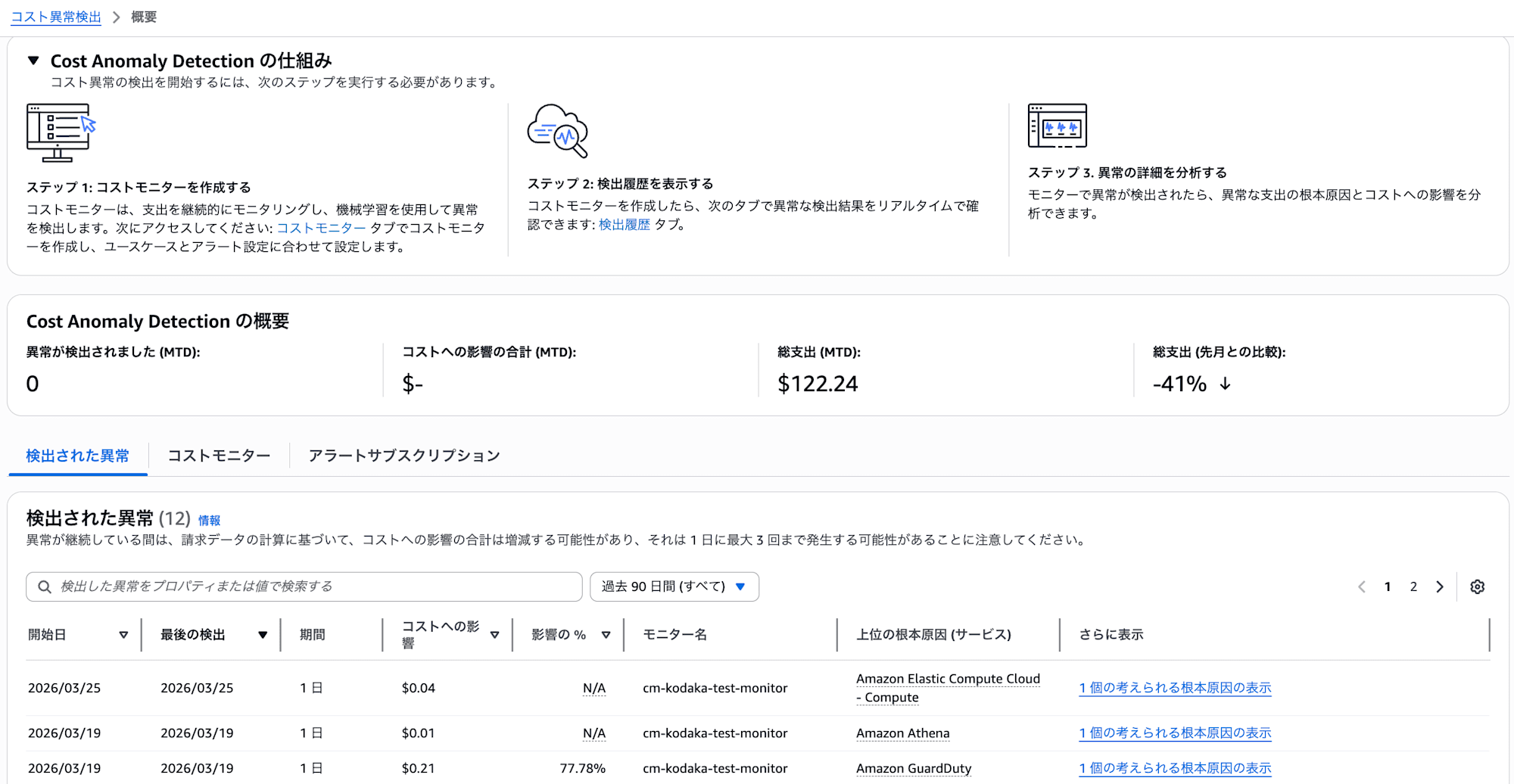
Detection works in 2 stages.
- Anomaly Detection: ML judges whether something is anomalous by comparing to past patterns
- Notification Threshold Judgment: Notifications are sent when the Total Impact of an anomaly exceeds the threshold
This 2-stage mechanism will be explained in detail with examples in the verification results section.
Monitor Types
Four types of monitors are available depending on the granularity of the monitoring target.
| Monitor Type | Monitoring Target | Notes |
|---|---|---|
| AWS Service Monitor | Tracks each AWS service individually | Only one can be created per account |
| Linked Account Monitor | Individual or grouped accounts | For Organizations environments |
| Cost Allocation Tag Monitor | Tracking by tag key/value pairs | Effective when tag operations are organized |
| Cost Category Monitor | Tracking by custom classification | Requires pre-definition of cost categories |
For this verification, I used the AWS Service Monitor.
Alert Subscriptions
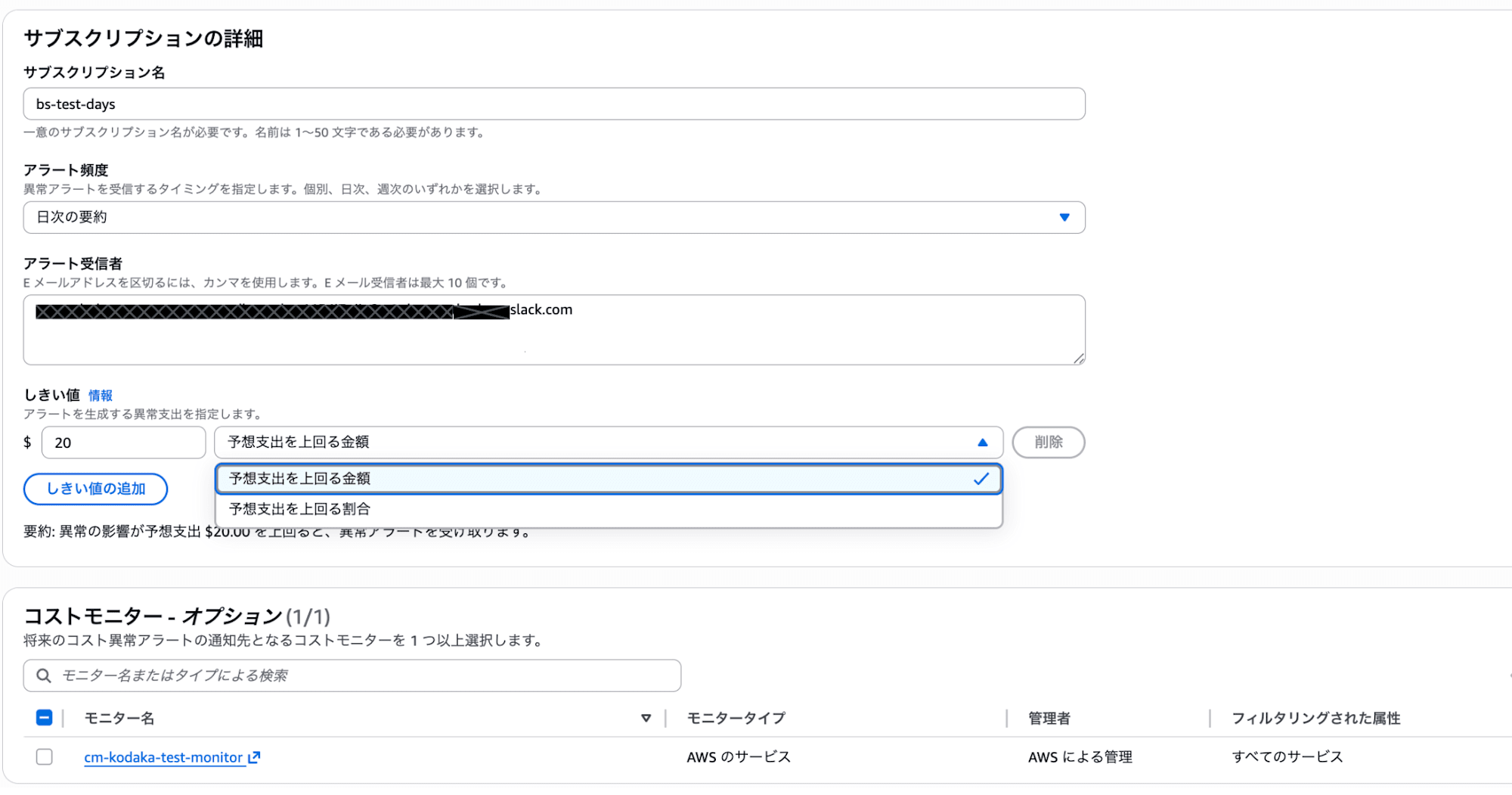
In alert subscriptions, you set the following:
- Threshold: Amount (e.g., $20 or more), percentage (e.g., exceeding 80%), or AND/OR conditions of both
- Notification Frequency: Individual alerts / Daily summary / Weekly summary. Individual alerts require an SNS topic (email not available)
- Notification Destination: Email (up to 10 addresses), SNS topic, or both.
Testing It Out
Test Configuration
| Item | Setting |
|---|---|
| Monitor Type | AWS Service Monitor |
| Subscription Name | bs-test-days |
| Threshold | $20 (amount exceeding expected expenditure) |
| Notification Frequency | Daily summary |
| Notification Destination | Slack channel email address registered |
What Happened
During the test period, abnormal costs of about $4-5/day occurred in VPC endpoints (Tokyo region). Through this example, we'll see how the 2-stage detection mechanism mentioned earlier works.
Stage 1: Anomaly Detection
First, ML identified the VPC endpoint cost fluctuation as an "anomaly." Looking at the "Detected Anomalies" screen in the console, you can see that small anomalies of $0.01 or $0.04 were also detected besides the VPC endpoint.
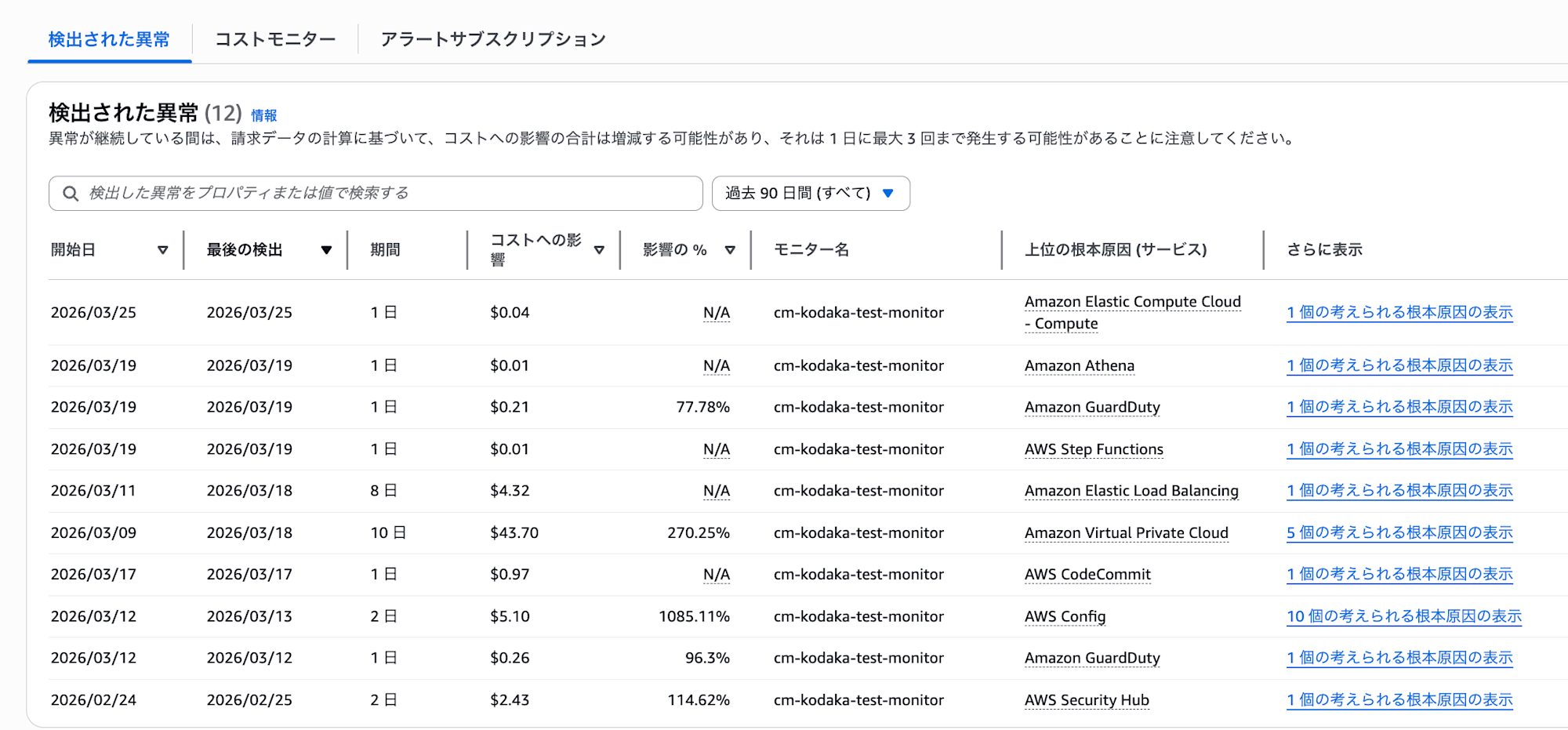
However, at this stage, no notifications are sent yet. They've only been detected.
Stage 2: Notification Threshold Judgment
Only when the total impact amount of the detected anomalies exceeds the alert subscription threshold (in this case $20), a notification is sent. Conversely, even if anomalies are detected, if they're below the threshold, no notification is sent and they can only be confirmed in the "Detected Anomalies" console.
Also, if ML doesn't judge something as an anomaly, it won't be subject to notification no matter how low the threshold is set.
Here's the timeline:
| Date | Event |
|---|---|
| 3/9 | Abnormal costs begin (about $4-5/day) |
| 3/9-15 | ML already detected anomalies in Stage 1. However, since the total impact amount was below the $20 threshold, no notification was sent in Stage 2 |
| 3/16 | Total impact amount reached $28.99, exceeding the $20 threshold. First notification sent |
| 3/16 | VPC endpoint deleted |
| 3/16-20 | Alerts continued daily even after deletion. Total impact amount was $43.70 as of 3/19 |
| 3/21- | ML re-learned and notifications stopped |
Threshold and Notification Timing
In this case, for an anomaly of about $4-5/day, with the threshold set at $20, no notification was sent until 3/16 when the total impact amount exceeded $20. This resulted in notification 7 days after the anomaly began. Lowering the threshold would result in earlier notifications, but also more noise, so a balance needs to be adjusted.
Note that during this time, the anomalies were recorded in the "Detected Anomalies" console, so you could have noticed by checking the console.
Slack Notification Content
The notification sent to Slack included the following information:
- Anomaly Detected For: Service name where anomaly was detected (Amazon Virtual Private Cloud)
- Date: Start date, last detection date, period
- Cost Impact: Max Daily Impact and Total Impact
- Root Cause(s): Potential root causes (service, account, region, UsageType, impact amount)
- Monitor Details: Monitor name and type
- Next Steps: Link to root cause details
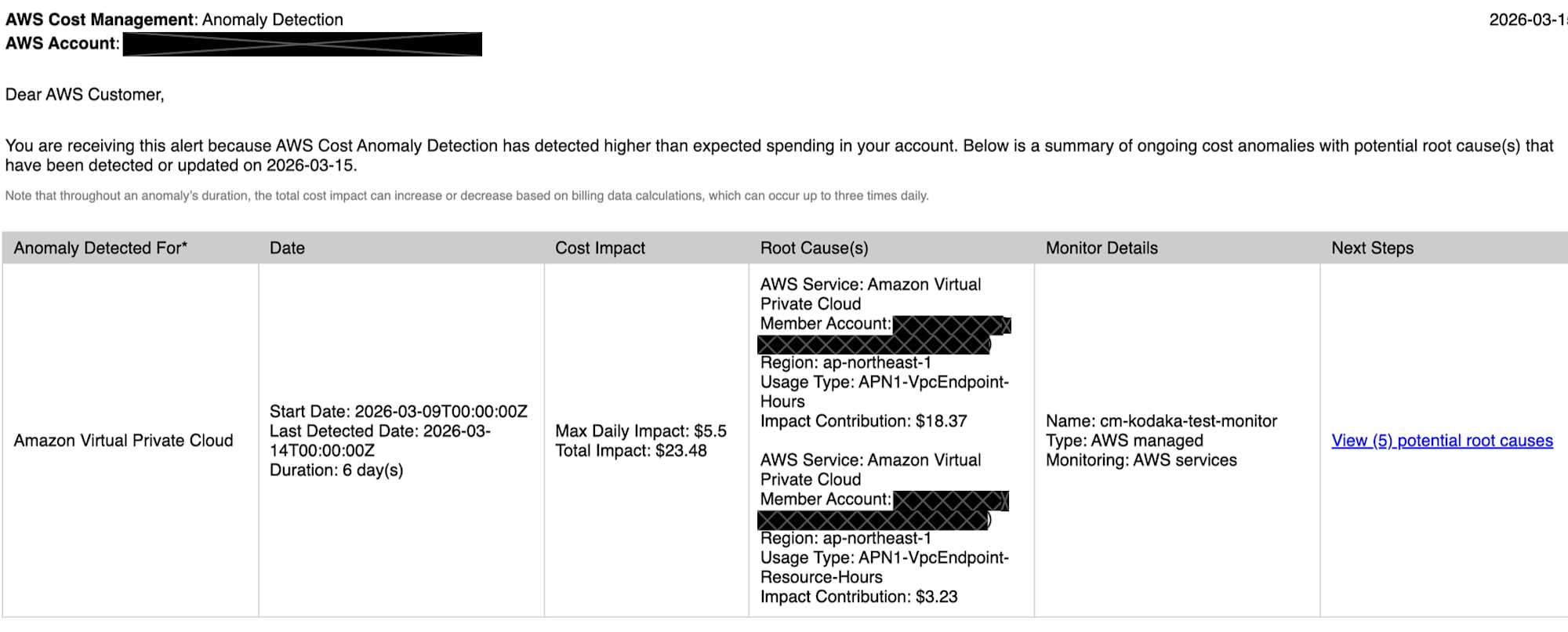
The notification granularity goes up to UsageType. Resource ID level information like "which VPC endpoint is causing this" is not included.
Notifications Continued After Resource Deletion
The VPC endpoint was deleted on 3/16, but alerts continued daily until 3/20. Notifications finally stopped after 3/21. This is because ML re-learned the pattern of cost changes and stopped judging it as an anomaly.
This is behavior unique to ML-based detection. Notifications don't stop immediately after you take action. Conversely, if you had left it without deleting, ML would eventually learn it as "normal" and stop notifications.
Strengths
1. Automatically catches unexpected cost increases
Without defining rules in advance, ML detects variations that are "different from usual." When you start using a new service, it's automatically tracked, so there's no "forgetting to monitor."
2. Free, with no operational maintenance required
Provided as a Cost Explorer feature, so there's zero additional cost. As a managed service, no code maintenance or runtime updates are needed. Once set up, it basically runs on its own.
3. Can monitor the entire Organizations at once
If you set up monitors from the management account, new accounts are automatically tracked. No need to add monitoring settings every time an account is added.
4. Takes seasonality and trends into account
ML learns weekly/monthly seasonality and natural growth trends, making it less likely to falsely detect patterns like costs increasing at the end of each month.
Weaknesses
1. Small, gradual increases are difficult to detect
ML judges anomalies based on deviation from past patterns, so cases where costs increase little by little might not be detected as "anomalies" in the first place. If not detected, no notification will come regardless of threshold settings.
2. Can't be used for regular monitoring
It can't be used for daily cost understanding like "how much is being spent this month" or "what's the breakdown by service." Cost Anomaly Detection is strictly an anomaly detection service, with the basic operation of "no notification if there's no anomaly."
If you want to regularly check daily/monthly cost status, a separate mechanism is needed.
Right when I was writing this blog, a member shared a perfect article with me.
I won't go into details here, but it might be useful:
3. Can't notice continuously wasted resources
ML learns continuously occurring costs as "normal."
For example, if unused QuickSight users or EBS volumes are being billed monthly, if the cost is stable, it won't be detected. In this test too, if we had left the VPC endpoint running, ML would eventually have judged it as normal and stopped notifications.
4. Can't set thresholds at the resource level
Thresholds can only be set at the alert subscription level. It's impossible to control at the granularity of "$5 for this service, $50 for that service." You can set AND/OR conditions for amount and percentage, but these apply to the entire subscription.
5. Root cause identification only goes to UsageType
The information provided in root cause analysis is at the level of service, region, and usage type (UsageType). You can't identify "which resource (resource ID) is the cause." In this test too, we could tell "VPC endpoint is the cause," but had to check the console ourselves to determine which endpoint.
How Should It Be Used?
The essence of Cost Anomaly Detection is as a "safety net against unexpected cost spikes." It's not a service for comprehensive regular monitoring or inventory of unnecessary resources.
The following usage is recommended:
A guardrail for teams/accounts without their own cost monitoring. If you're not monitoring anything yet, just implementing this gives you minimal anomaly detection. It's free and takes only minutes to set up, so there's virtually no barrier to implementation.
Use as a safety net in conjunction with existing monitoring. Even if you already have rule-based or custom monitoring methods, this can be added as a role to cover unexpected anomalies not defined in rules. Since it's free, there's no cost to use it alongside other tools.
Summary
AWS Cost Anomaly Detection is a free ML-based cost anomaly detection service. It's effective as a safety net that automatically catches unexpected spikes. Being free with no operational burden makes it easy to implement.
However, it doesn't provide complete cost management on its own. Combining it with other services allows you to cover anomaly detection, budget management, and regular monitoring.