![[Update] CloudWatch metrics for BGP on Direct Connect VIFs have been added](https://images.ctfassets.net/ct0aopd36mqt/wp-thumbnail-a25fe53c4e0e62cddd4b3619d3e7b27d/ca05eb372480507504b0ea6d9d0bfbe9/aws-direct-connect?w=3840&fm=webp)
[Update] CloudWatch metrics for BGP on Direct Connect VIFs have been added

This page has been translated by machine translation. View original
I Want to Monitor the BGP State
Hello, this is nonPi (@non____97).
Have you ever wanted to monitor the BGP state of your Direct Connect? I have.
For Direct Connect monitoring, you are probably looking at ConnectionState, right?
This is a metric that indicates the Up/Down status of Direct Connect Connection.
However, Direct Connect failures aren't just related to the Connection. There can also be issues caused by BGP.
For example, if you try to send more than 100 prefixes from on-premises to AWS via BGP, the BGP status will go down.
If you advertise more than 100 routes for IPv4 and IPv6 respectively on a BGP session, the BGP session will go to idle state and the BGP session will be DOWN.
Additionally, BGP status can go down due to configuration changes in on-premises routers or firewalls.
In other words, monitoring BGP is also important for operations.
Until now, there hasn't been an easy way to check how many routes are being advertised/received via BGP in AWS. For the former, you would need to enable propagation from VGW in VPC route tables or enable propagation from Direct Connect Gateway attachments in Transit Gateway route tables, and then check the number of routes added from VIFs in the route tables. For the latter, you would need to check on the on-premises router using commands like show ip bgp summary.
With this update, three CloudWatch metrics have been added that will help with Direct Connect BGP monitoring:
- VirtualInterfaceBgpStatus
- VirtualInterfaceBgpPrefixesAccepted
- VirtualInterfaceBgpPrefixesAdvertised
Let me introduce these below.
Checking the Documentation
Let's check the documentation.
The newly added metrics are as follows:
| Metric | Description |
|---|---|
| VirtualInterfaceBgpStatus | The status of the BGP peering session for the VIF 1 indicates up, 0 indicates down Units: None |
| VirtualInterfaceBgpPrefixesAccepted | The number of BGP prefixes accepted from the BGP peer on the VIF The value reported is the aggregated (average) value for the specified period (default is 5 minutes) Units: Count |
| VirtualInterfaceBgpPrefixesAdvertised | The number of BGP prefixes advertised to the BGP peer on the VIF The value reported is the aggregated (average) value for the specified period (default is 5 minutes) Units: Count |
Excerpt from: Monitor with Amazon CloudWatch - AWS Direct Connect
Setting up CloudWatch Alarms for VirtualInterfaceBgpStatus should be considered essential.
In many environments, multiple VIFs are set up in an Active/Standby configuration. You should monitor to ensure that both BGP statuses of paired VIFs don't become 0.
Also, it's great that we can now check the number of prefixes per VIF, making it possible to see how many are being advertised from each VIF.
In the hosted connection environment I checked, all three metrics had these three dimensions:
- ConnectionId
- IpAddressFamily
- VirtualInterfaceId
Since ConnectionState is a metric that can be checked even with hosted VIFs, I imagine that hosted VIFs would also need to specify the ConnectionId dimension.
Checking the AWS Management Console
Let's check the actual metrics from the AWS Management Console.
From the Direct Connect console, I selected a VIF, opened the Monitoring tab, and was able to confirm the newly added metrics.
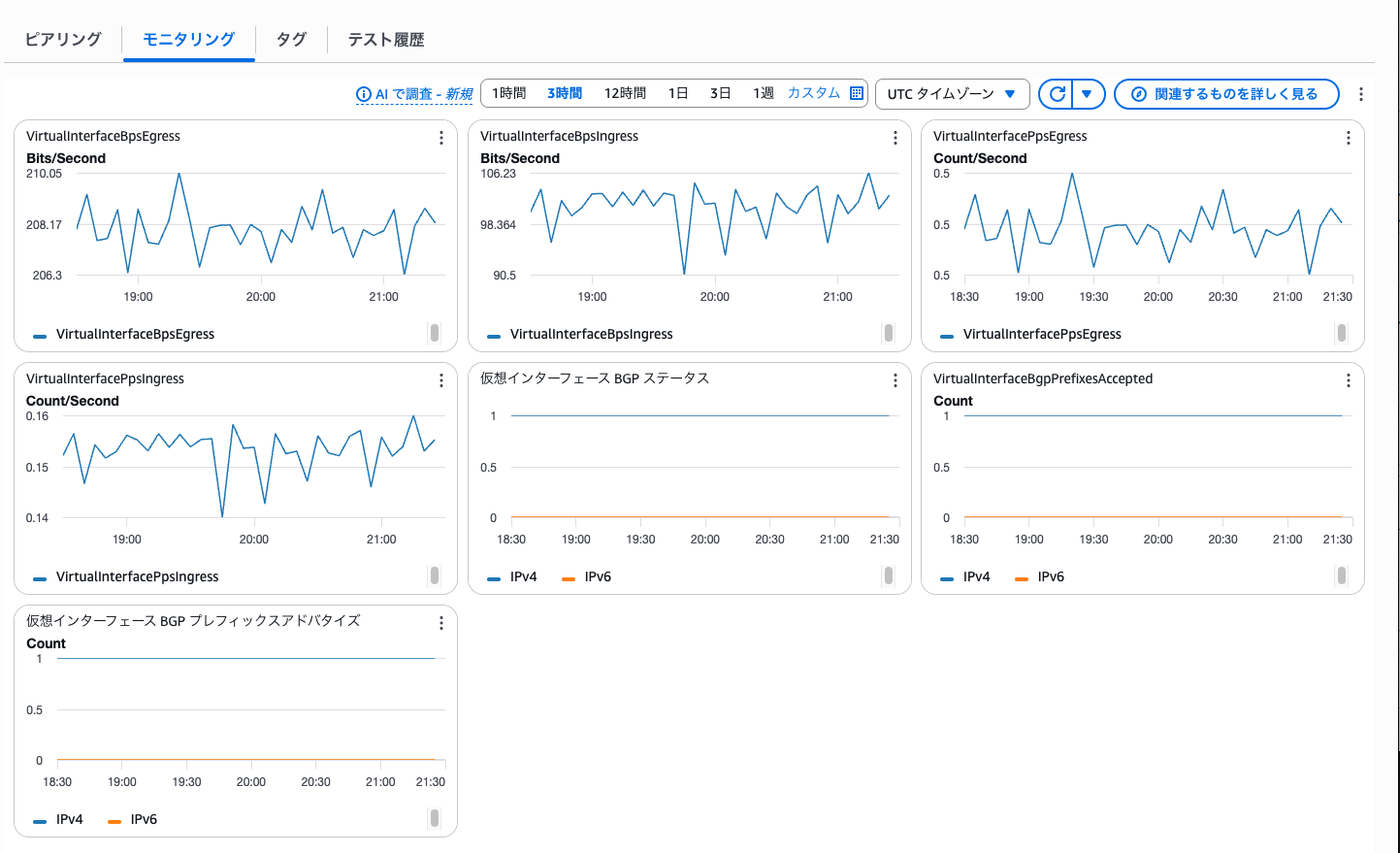
From these metrics, we can see that:
- BGP status is Up
- The number of routes advertised from on-premises → AWS is 1
- The number of routes advertised from AWS → on-premises is 1
Let's Set Up CloudWatch Alarms to Monitor BGP Status
I've introduced the update that added CloudWatch metrics for Direct Connect VIF's BGP.
Personally, I find this update extremely helpful. Setting up CloudWatch Alarms to monitor BGP status should be considered essential, so please make sure to configure them.
I hope this article helps someone.
This has been nonPi (@non____97) from the Cloud Business Division, Consulting Department!