![I want to streamline the "obsolescence check" of AWS technical articles using Claude Code's skills [AWS Knowledge MCP Server]](https://images.ctfassets.net/ct0aopd36mqt/3KBTm8tdpO9RJJuaVvVzod/a9964bb03097b448b2327edc6920bf9f/Claude.png?w=3840&fm=webp)
I want to streamline the "obsolescence check" of AWS technical articles using Claude Code's skills [AWS Knowledge MCP Server]

This page has been translated by machine translation. View original
AWS technical articles tend to become outdated due to AWS service updates. Limit increases, new feature additions, regional expansions - the patterns of change are diverse. (Especially around re:Invent, there are many updates and content can become obsolete quickly...)
We're considering "document obsolescence countermeasures" internally. However, with many documents to review, checking each one manually is challenging. On the other hand, there are patterns in areas prone to obsolescence, such as "hardcoded limits," "cannot do" statements, and "region-limited" descriptions.
So I thought it would be good to efficiently identify potential obsolescence patterns and verify them against official AWS documentation, and I created a Claude Code skill for this.
After trying it out, it worked quite well, so I'm sharing it in this blog.
The Skill I Created
It's a simple skill with just SKILL.md.
---
name: aws-doc-staleness-checker
description: AWS技術記事の「陳腐化チェック」を効率化するスキル。対象ドキュメントから陳腐化の可能性がある箇所をパターンで洗い出し、AWS公式ドキュメントと照合する。
disable-model-invocation: true
---

# ドキュメント陳腐化チェック

## 目的

AWS技術記事の「間違っている可能性がある箇所」を効率的に洗い出す。
AWS Knowledge MCP Server (or AWS Documentation MCP Server)での利用を想定。

## Workflow

### Step 1: 対象ドキュメントを指定する

ユーザーから対象ドキュメントの指定を受ける。インプットがなければヒアリングする。

### Step 2: 陳腐化の「あたり」を洗い出す

以下のパターンに該当する箇所を対象ドキュメントから抽出する。

| パターン                 | 変化の可能性             | 例                                           |
| ------------------------ | ------------------------ | -------------------------------------------- |
| ハードリミット直打ち     | 上限緩和                 | 「最大100個まで」                            |
| 「XXXができない」        | 今はできるかも           | 「クロスリージョンはサポートされていません」 |
| 機能の列挙               | 新機能追加               | 「主な機能はA, B, Cです」                    |
| 「プレビュー」「ベータ」 | GA化 or 廃止             | 「現在プレビューで提供」                     |
| 時点情報                 | 陳腐化                   | 「2024年1月時点では」                        |
| リージョン限定           | リージョン拡大           | 「バージニア北部のみ」                       |
| 数の断定                 | 種類の追加               | 「2種類あります」                            |
| 設定名称・オプション名   | 名称変更                 | 「"すべて記録"を選択」                       |
| 課金に関する記述         | 課金ロジック変更         | 「複数リージョンで有効化すると二重課金」     |
| 推奨・ベストプラクティス | ベスプラ更新             | 「XXXを推奨します」                          |
| 連携サービス列挙         | 新しい連携先追加         | 「Security Hub, GuardDutyと連携」            |
| CLI/APIコマンド例        | パラメータ追加・非推奨化 | `aws config put-configuration-recorder`      |
| 参照ブログリンク         | より新しい記事がある     | 「詳細は以下のブログを参照」                 |

**出力形式:**

| #  | 行 | 該当パターン | 記述内容 | 確認ポイント   |
| -- | -- | ------------ | -------- | -------------- |
| 1  | XX | パターン名   | 「...」  | 〜かもしれない |

### Step 3: AWS公式ドキュメントと照合する

- 洗い出した結果をユーザーに提示し、調査する項目をヒアリングする
- 選択された項目について AWS Knowledge MCP (or AWS Documentation MCP Server) や Web Search を使って調査する
  - サブエージェントを使って並列で調べること
- 調査結果をユーザーに報告する
The skill workflow has 3 steps:
- Specify the target document — Specify the file or URL of the article to check
- Identify potential obsolescence — Identify areas prone to becoming obsolete
- Verify against AWS official documentation — Compare with the latest information using AWS Knowledge MCP Server
In step 2, I identify areas prone to obsolescence using these patterns:
| Pattern | Potential Change | Example |
|---|---|---|
| Hardcoded limits | Limit relaxation | "Maximum of 100" |
| "XXX is not possible" statements | May be possible now | "Cross-region is not supported" |
| Feature enumeration | New features added | "Main features are A, B, C" |
| "Preview" or "Beta" mentions | GA release or discontinuation | "Currently provided in preview" |
| Time-specific information | Outdated | "As of January 2024" |
| Region-limited descriptions | Region expansion | "Only in Northern Virginia" |
| Definitive numerical statements | Types added | "There are 2 types" |
| Setting/option names | Name changes | "Select 'Record all'" |
| Billing descriptions | Billing logic changes | "Enabling in multiple regions results in double billing" |
| Recommendations/Best practices | Best practices updated | "We recommend XXX" |
| Integration service lists | New integration partners | "Integrates with Security Hub, GuardDuty" |
| CLI/API command examples | Parameters added/deprecated | aws config put-configuration-recorder |
| Reference blog links | Newer articles available | "See the following blog for details" |
From the results, you select items to compare with the latest information. For selected items, I perform obsolescence checks using AWS Knowledge MCP Server.
Finally, I present the investigation results to the user.
Trying It Out
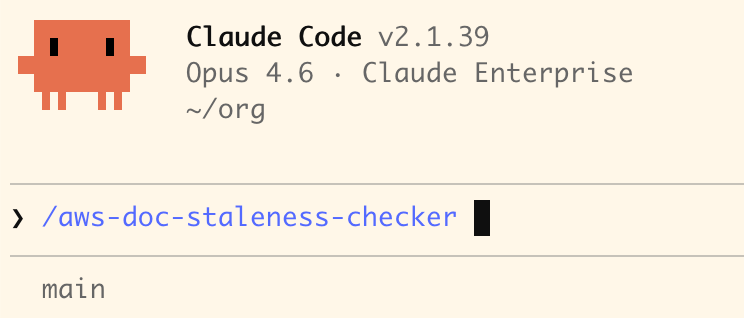
Let's actually invoke the skill and check how it works. I invoked the skill by entering /aws-doc-staleness-checker in the Claude Code prompt.
1. Specify the target document
After invoking the skill, you'll first be asked for the document to check. You can specify the target by file path or URL.
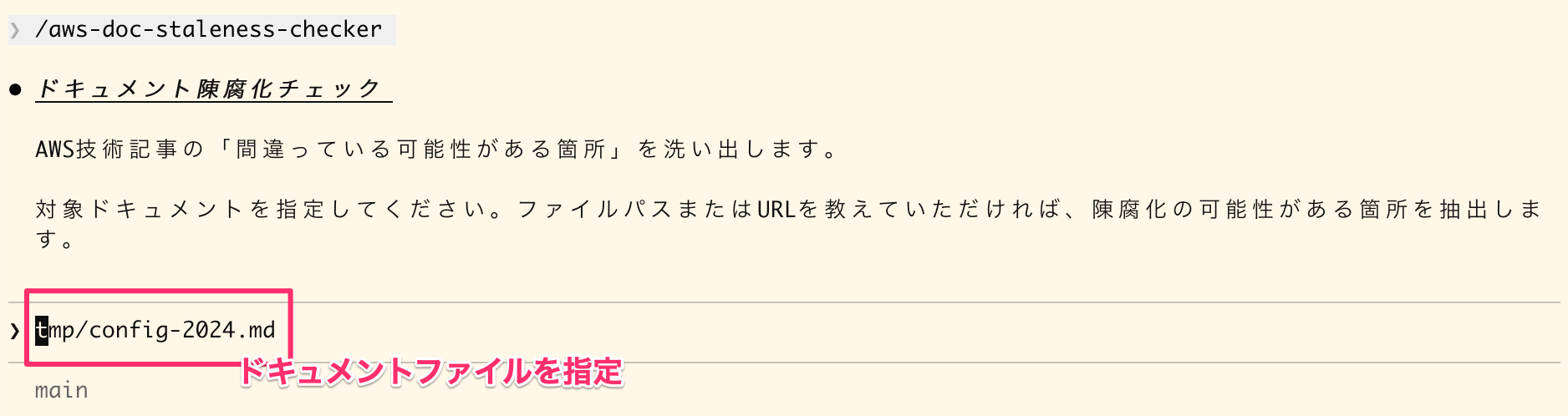
For this demonstration, I input the content of this blog as of January 2026.
2. Identify potential obsolescence
The skill reads the target document and identifies areas that may have become obsolete.
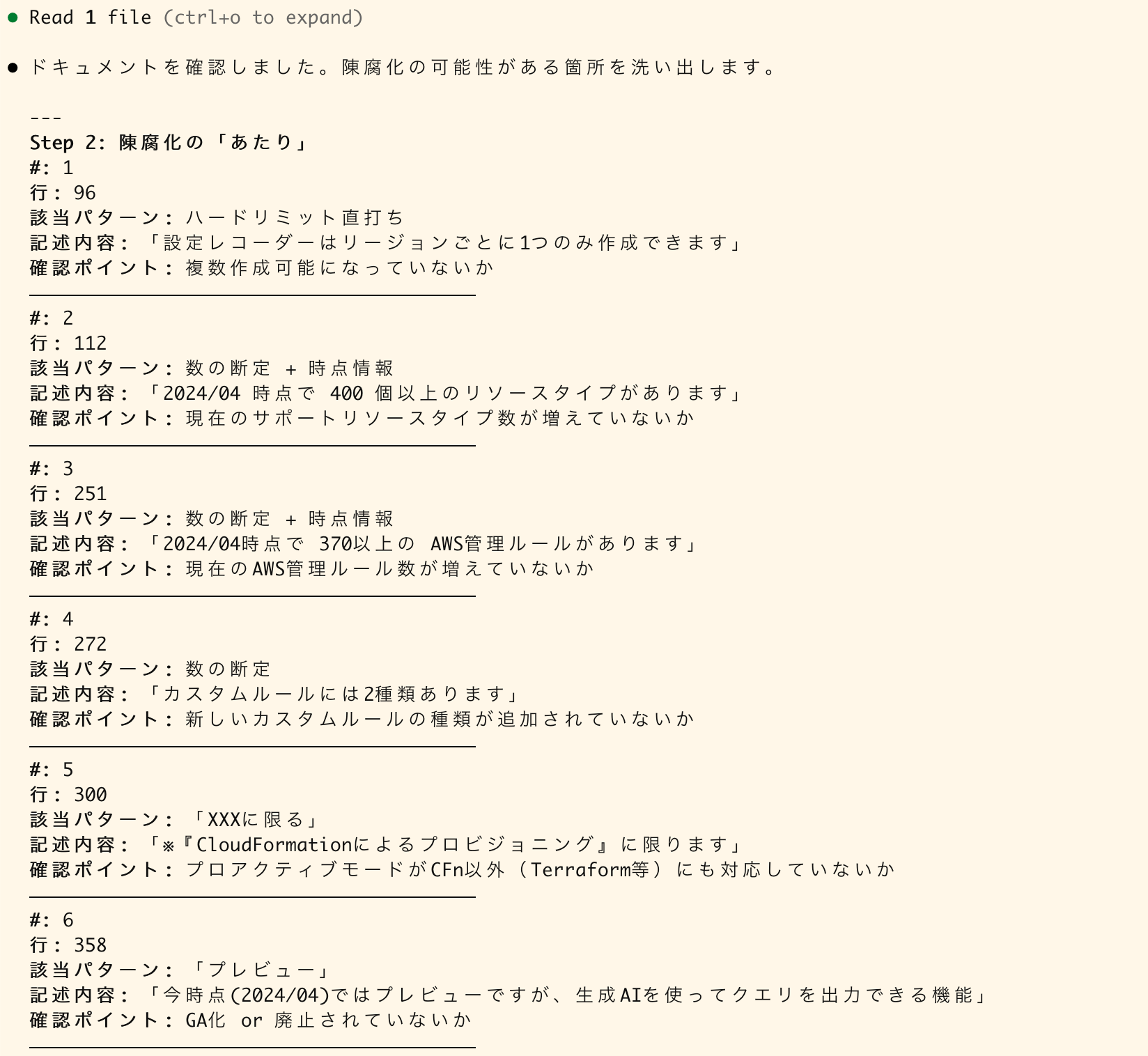
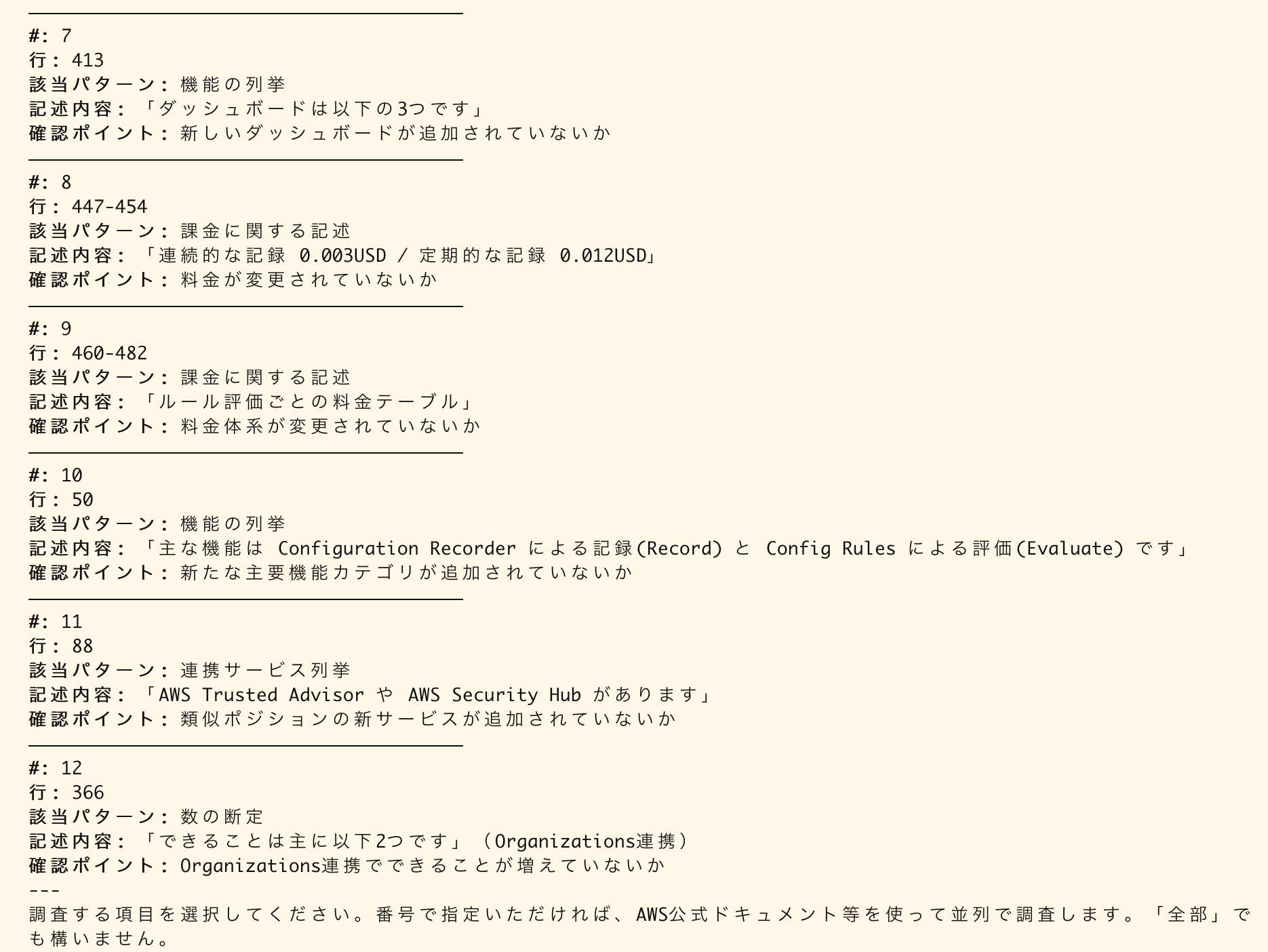
3. Verify against AWS official documentation (+ make corrections)
From the results, you choose which items to investigate. This time I selected [All].
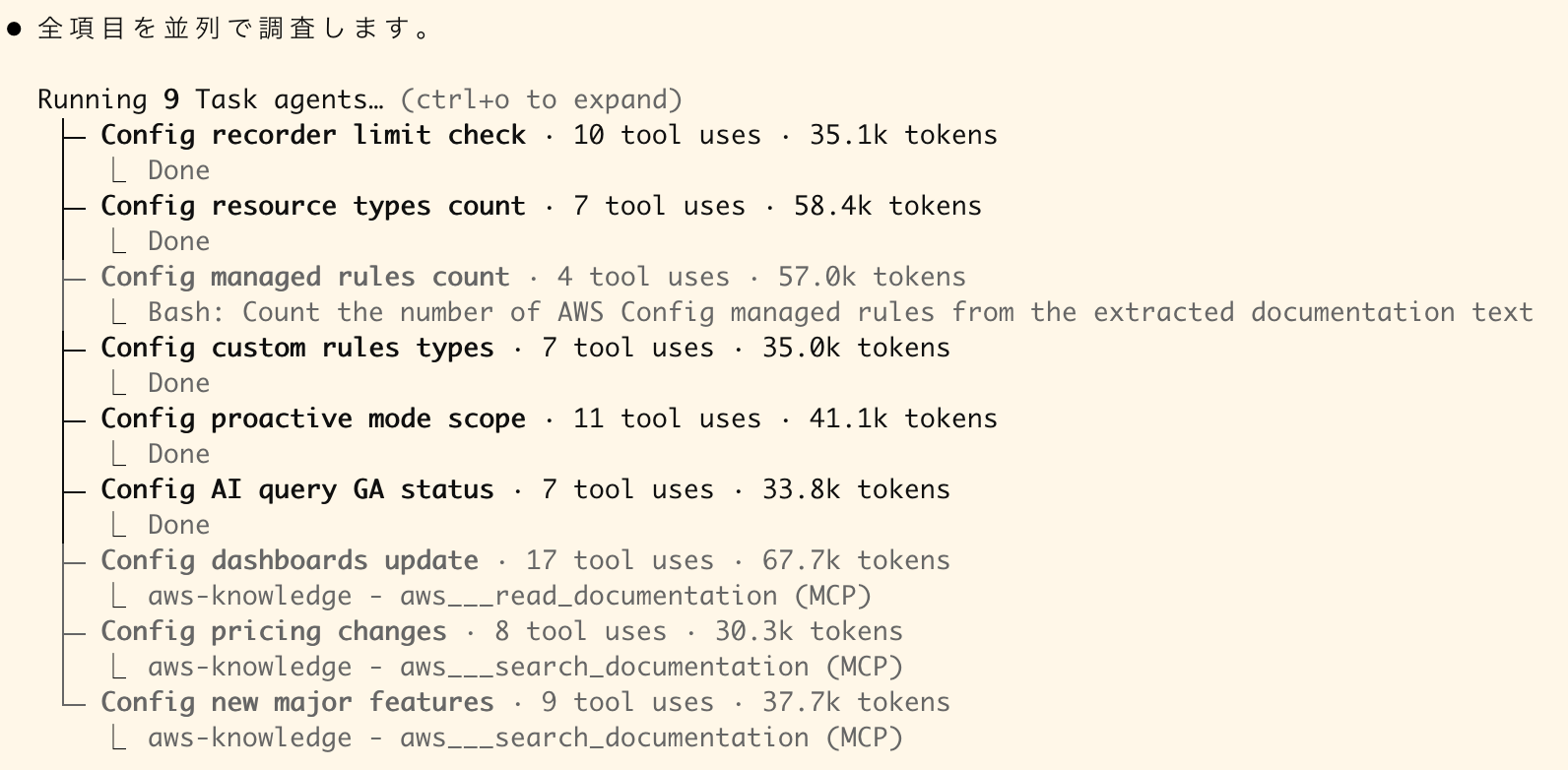
For the selected items, the skill uses AWS Knowledge MCP Server to verify against AWS official documentation. It investigates in parallel using subagents.
Here are the results. (I've added red boxes to highlight areas I found particularly useful for identifying corrections.)
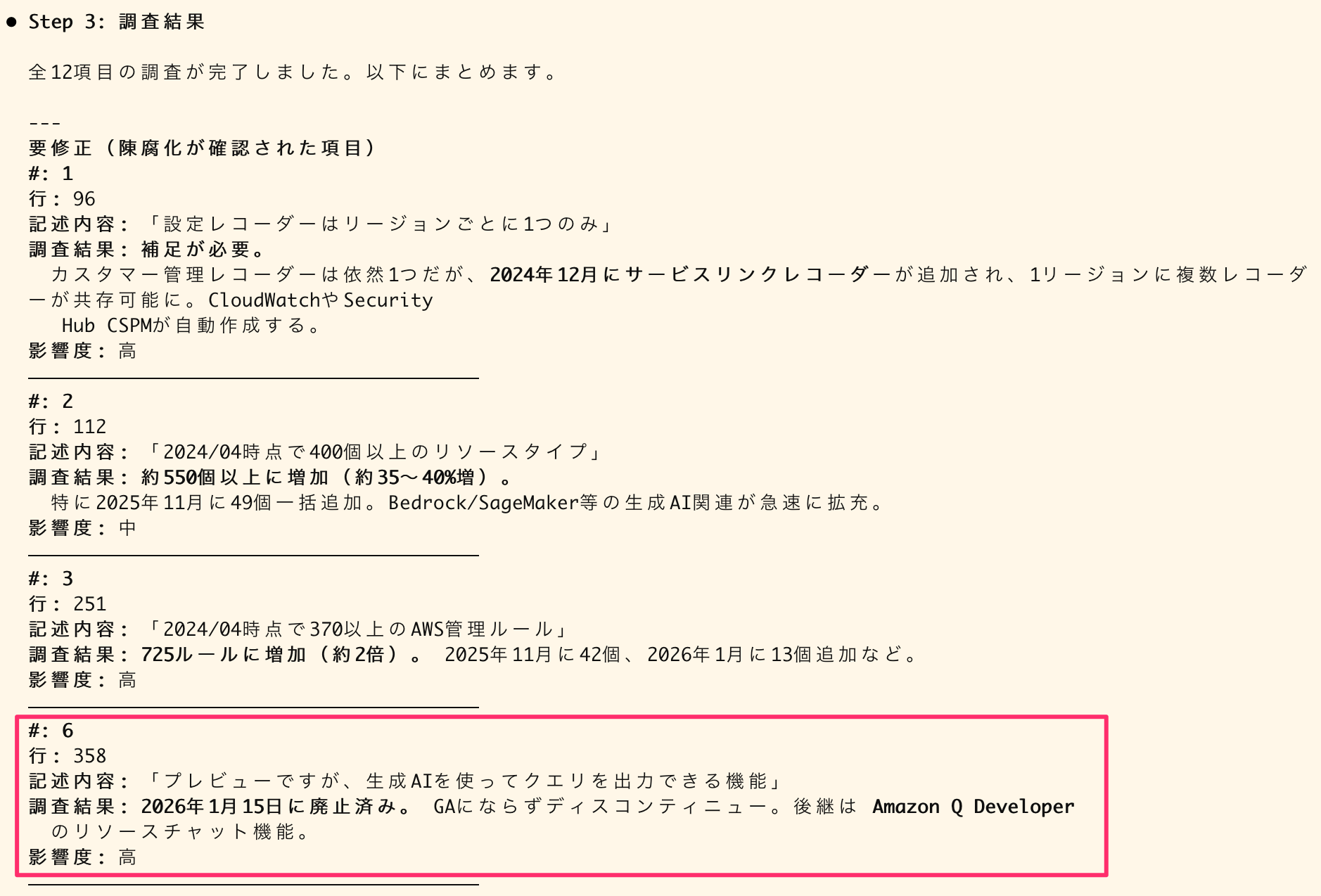
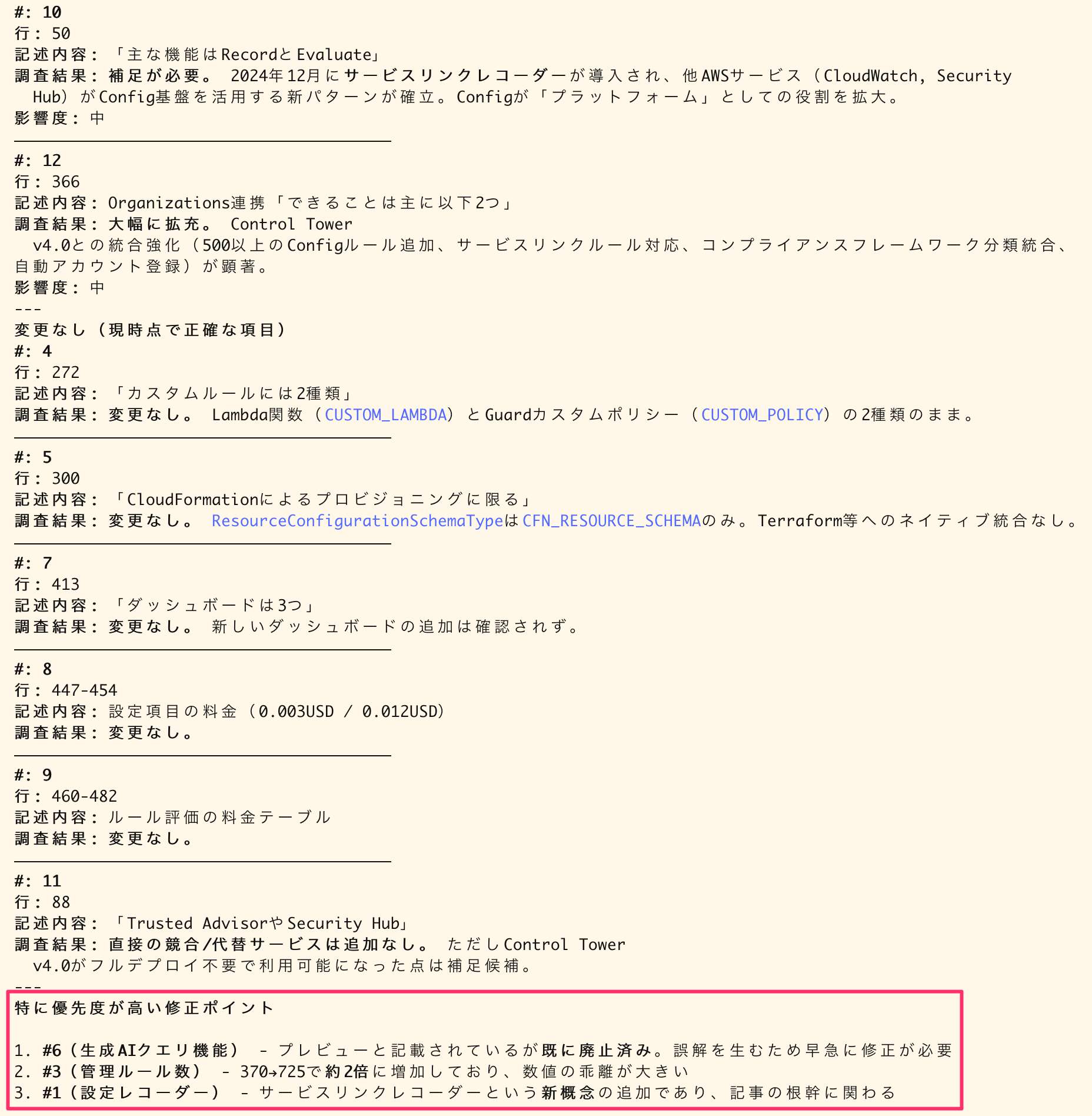
Based on these results, I corrected the following high-priority items (and have updated the original blog as well!):
- #6 (AI-powered queries feature) - It was listed as in preview but has actually been discontinued. This needs urgent correction to avoid misunderstandings
- #3 (Number of managed rules) - Increased from 370 to 725, approximately doubling, which is a significant discrepancy
- #1 (Configuration recorder) - Addition of the new service-linked recorder concept, which affects the core content of the article
Conclusion
By combining pattern-based identification with verification using AWS Knowledge MCP Server, I was able to make the obsolescence checking process fairly efficient.
Since it's not a fully automated check, final judgments and fine-tuning still need to be done by humans. However, just having help identifying areas that need checking significantly reduces the burden of manual checking and correction.
I hope this is helpful.