![[Update] I tried out the newly added code-based Evaluator in Amazon Bedrock AgentCore Evaluations](https://images.ctfassets.net/ct0aopd36mqt/7M0d5bjsd0K4Et30cVFvB6/5b2095750cc8bf73f04f63ed0d4b3546/AgentCore2.png?w=3840&fm=webp)
[Update] I tried out the newly added code-based Evaluator in Amazon Bedrock AgentCore Evaluations

This page has been translated by machine translation. View original
Introduction
I am Kanno from the Consulting department.
While looking at the Amazon Bedrock AgentCore Evaluations console, I noticed that code-based Evaluators using AWS Lambda have become available!
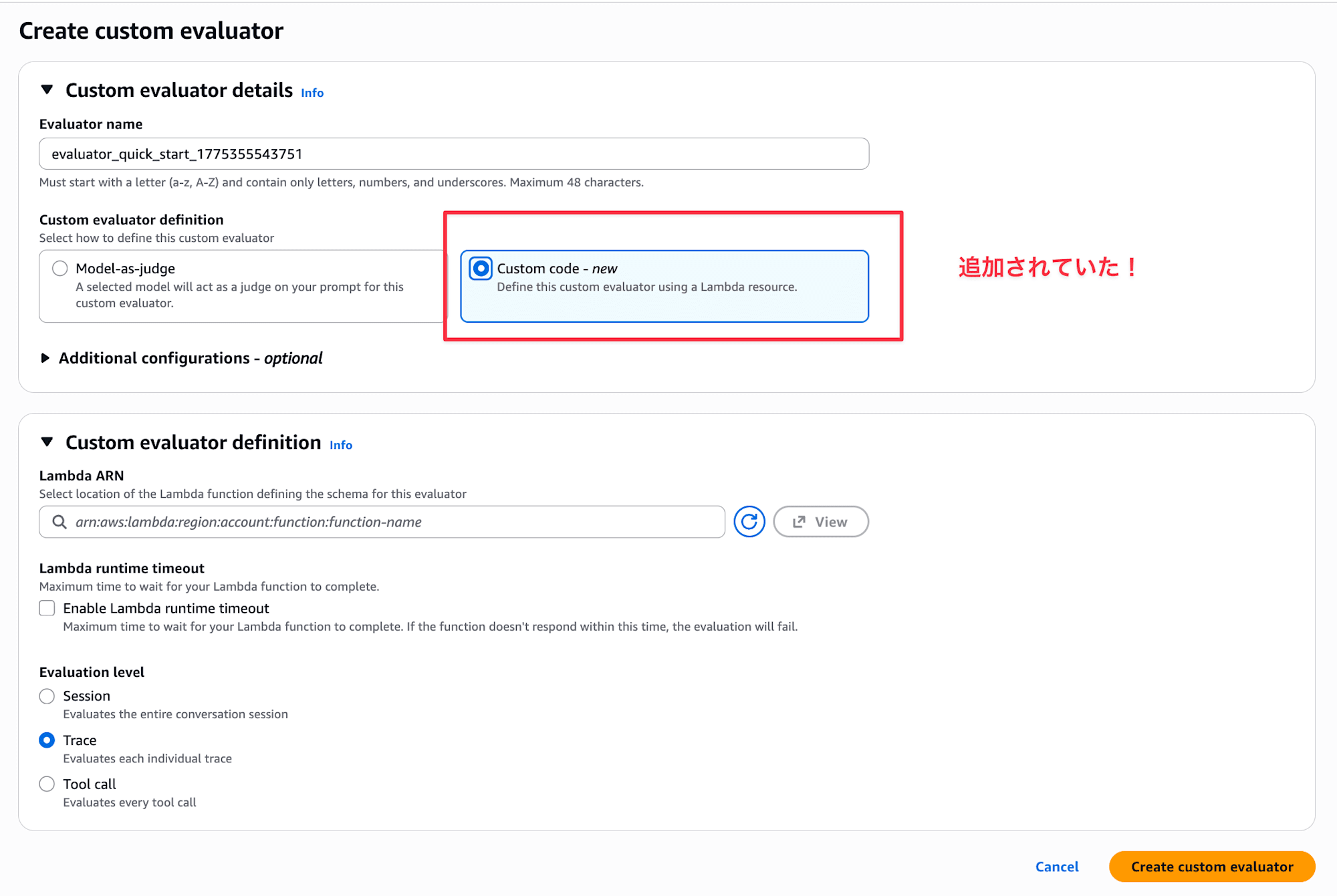
Until now, custom Evaluators only supported LLM-as-a-Judge, but now we can write evaluation logic in code. I imagine this would be useful when you want to evaluate based on deterministic aspects like format checking.
In this article, I deployed a simple agent to AgentCore Runtime and used a Lambda code-based Evaluator to check the response character count.
When to Use Code-Based Evaluators
I personally had trouble imagining use cases, but the official documentation states:
Custom code-based evaluators let you use your own AWS Lambda function to programmatically evaluate agent performance, instead of using an LLM as a judge. This gives you full control over the evaluation logic — you can implement deterministic checks, call external APIs, run regex matching, compute custom metrics, or apply any business-specific rules.
I feel like the distinction is: use code-based evaluators for deterministic checks, and LLM-as-a-Judge for non-deterministic ones.
- Deterministic checks (Is the response valid JSON? Are required fields present?)
- Regular expression matching (Does it follow a specific format?)
- External API calls (Checking correctness against a DB or knowledge base)
- Custom metrics (Checking token usage or latency thresholds)
- Business-specific rules (Industry-specific compliance checks, etc.)
The official documentation sample code also shows an example of verifying whether an agent's response is valid JSON. Conversely, evaluations requiring human subjective judgment like naturalness or accuracy would still use LLM-as-a-Judge.
If I find a perfect use case, I'd love to share it in a blog...!
Prerequisites
Here's my environment:
- AWS CLI 1.44.71
- Python 3.13.11
- uv 0.9.26
- strands-agents 1.34.1
- bedrock-agentcore 1.6.0
- bedrock-agentcore-starter-toolkit 0.3.4
- Region:
us-east-1 - CloudWatch Transaction Search enabled
Implementation
Project Setup
First, I'll create a project with uv and add the necessary packages.
uv init custom-eval-lambda
cd custom-eval-lambda

uv add strands-agents bedrock-agentcore bedrock-agentcore-starter-toolkit
| Package | Purpose |
|---|---|
strands-agents |
Used for implementing the agent |
bedrock-agentcore |
Used for deploying to AgentCore Runtime |
bedrock-agentcore-starter-toolkit |
Used for agentcore CLI (deploy and run evaluations) |
Now the project is ready!
Preparing the Agent
Next, let's prepare the agent to be evaluated.
from bedrock_agentcore import BedrockAgentCoreApp
from strands import Agent

app = BedrockAgentCoreApp()
agent = Agent()

@app.entrypoint
def invoke(payload):
    prompt = payload.get("prompt", "AWSのS3とEBSの違いを教えてください")
    result = agent(prompt)
    return {"message": result.message}

if __name__ == "__main__":
    app.run()
This is a simple configuration that passes the input prompt to Strands' Agent and returns the response.
Once implementation is complete, let's deploy it as a container. We'll use mostly default settings for the questions asked during setup.
# Configure deployment
uv run agentcore configure \
  -e my_agent.py \
  -r us-east-1 \
  -dt container \
  --disable-memory

# Just press Enter for the defaults

# Deploy
uv run agentcore deploy
Creating Sessions for Evaluation
After deploying, let's create some sessions to evaluate by making a few calls. I'll try a question that should generate a short answer and another that should generate a long answer.
uv run agentcore invoke '{"prompt": "AWSのS3とEBSの違いを一言で教えてください"}'

Response:
{"message": {"role": "assistant", "content": [{"text":
"**S3はファイル保存用のオブジェクトストレージ、EBSはEC2インスタンス用のディスクストレージ**です。"}]}}

uv run agentcore invoke '{"prompt": "AWSのS3、EBS、EFSの違いをユースケース・料金体系・パフォーマンス特性の観点から詳しく比較して教えてください"}'

Response:
{"message": {"role": "assistant", "content": [{"text": "# AWS S3・EBS・EFS の詳細比較\n\n## 1. ユースケース\n\n### S3 (Simple
Storage Service)\n- **Webサイトの静的コンテンツ配信**(画像、CSS、JS)\n- **データバックアップ・アーカイブ**\n-
**データレイクの構築**\n- **アプリケーションログの保存**\n- **機械学習用データセットの保存**\n-
**災害復旧用データ保管**\n\n### EBS (Elastic Block Store)\n- **EC2インスタンスのルートボリューム**\n-
**データベースストレージ**(MySQL、PostgreSQL等)\n- **ファイルシステム**\n- **高IOPSが必要なアプリケーション**\n-
**スナップショット機能を使ったバックアップ**\n\n### EFS (Elastic File System)\n-
**複数のEC2インスタンス間でのファイル共有**\n- **コンテナアプリケーションの共有ストレージ**\n-
**WebサーバーやCMSの共有コンテンツ**\n- **ビッグデータ分析での並列処���**\n- **開発環境での共有作業領域**\n\n## 2.
料金体系\n\n### S3\n```\n- ストレージ料金: 使用容量に応じた従量課金\n  - Standard: ~$0.023/GB/月\n  - IA (Infrequent Access):
~$0.0125/GB/月\n  - Glacier: ~$0.004/GB/月\n- リクエスト料金: API呼び出し回数\n- データ転送料金: 外部への転送時\n```\n\n###
EBS\n```\n- ボリューム料金: プロビジョニング容量での課金\n  - gp3: ~$0.08/GB/月\n  - io2: ~$0.125/GB/月 + IOPS料金\n-
スナップショット料金: ~$0.05/GB/月(差分のみ)\n- 使わなくてもプロビジョニング分は課金\n```\n\n### EFS\n```\n- ストレージ料金:
使用容量に応じた従量課金\n  - Standard: ~$0.30/GB/月\n  - IA: ~$0.025/GB/月\n- プロビジョンドスループット: 追加料金\n-
最も高価だが使った分だけ課金\n```\n\n## 3. パフォーマンス特性\n\n### S3\n| 項目 | 特性 |\n|------|------|\n| **スループット**
| 3,500 PUT/POST/DELETE、5,500 GET/秒 |\n| **レイテンシ** | 100-200ms(初回リクエスト) |\n| **耐久性** |
99.999999999%(イレブンナイン) |\n| **可用性** | 99.9%(Standard) |\n| **制限** | オブジェクトサイズ最大5TB |\n\n### EBS\n|
項目 | gp3 | io2 |\n|------|-----|-----|\n| **IOPS** | 3,000-16,000 | 100-64,000 |\n| **スループット** | 125-1,000 MB/s |
1,000 MB/s |\n| **レイテンシ** | 単一桁ms | サブms |\n| **耐久性** | 99.999% | 99.999% |\n| **可用性** | 99.999% | 99.999%
|\n\n### EFS\n| 項目 | 汎用モード | 最大I/Oモード |\n|------|-----------|---------------|\n| **スループット** |
7,000ファイル操作/秒 | >7,000ファイル操作/秒 |\n| **レイテンシ** | 単一桁ms | 若干高い |\n| **同時接続** |
数千のEC2インスタンス | 数千のEC2インスタンス |\n| **スケール** | ペタバイト級まで自動拡張 | ペタバイト級まで自動拡張 |\n\n##
4. 選択指針\n\n**S3を選ぶべき場合:**\n- 静的コンテンツやバ��クアップデータ\n- コスト重視で頻繁なアクセスが不要\n-
インターネット経由でのアクセスが必要\n\n**EBSを選ぶべき場合:**\n- 単一インスタンスで高性能が必要\n- データベースやOS用途\n-
低レイテンシが重要\n\n**EFSを選ぶべき場合:**\n- 複数インスタンス間でのファイル共有が必要\n- 容量の予測が困難\n-
POSIX準拠のファイルシステムが必要"}]}}
Writing Evaluation Logic in Lambda
Next, let's prepare the Lambda function that will be our code-based Evaluator.
First, let's examine the request passed to Lambda (I've narrowed it down to 1 span):
{
    "schemaVersion": "1.0",
    "evaluationLevel": "TRACE",
    "evaluationInput": {
        "sessionSpans": [
            {
                "name": "invoke_agent Strands Agents",
                "kind": "INTERNAL",
                "trace_id": "69d1d6635a99baa94f465b8b607e2d0f",
                "span_id": "6e6a73c41262e9d9",
                "session_id": "fa6759fb-6782-464e-941d-8bc1b80b5b12",
                "attributes": {
                    "gen_ai.usage.input_tokens": 24,
                    "gen_ai.usage.output_tokens": 732,
                    "gen_ai.request.model": "us.anthropic.claude-sonnet-4-20250514-v1:0",
                    "gen_ai.operation.name": "invoke_agent",
                    "gen_ai.system": "strands-agents",
                    "session.id": "fa6759fb-6782-464e-941d-8bc1b80b5b12"
                },
                "span_events": [
                    {
                        "body": {
                            "output": {
                                "messages": [
                                    {
                                        "content": {
                                            "message": "AWSのS3とEBSの主な違いについて説明します。...",
                                            "finish_reason": "end_turn"
                                        },
                                        "role": "assistant"
                                    }
                                ]
                            },
                            "input": {
                                "messages": [
                                    {
                                        "content": {
                                            "content": "[{\"text\": \"AWSのS3とEBSの違いを教えてください\"}]"
                                        },
                                        "role": "user"
                                    }
                                ]
                            }
                        }
                    }
                ],
                "traceId": "69d1d6635a99baa94f465b8b607e2d0f"
            }
        ]
    },
    "evaluationTarget": {
        "traceIds": [
            "69d1d6635a99baa94f465b8b607e2d0f"
        ]
    }
}
I can see that the response text is in span_events[].body.output.messages, so I'll extract messages with the assistant role from there and evaluate their length.
import json
import logging

logger = logging.getLogger()
logger.setLevel(logging.INFO)

def lambda_handler(event, context):
    logger.info(json.dumps(event, ensure_ascii=False))

    spans = event.get("evaluationInput", {}).get("sessionSpans", [])
    trace_ids = set((event.get("evaluationTarget") or {}).get("traceIds", []))
    response = extract_response(spans, trace_ids)

    if not response:
        return {
            "label": "Fail",
            "value": 0.0,
            "explanation": "評価対象 trace から応答を取得できませんでした。"
        }

    if len(response) < 100:
        return {
            "label": "TooShort",
            "value": 0.4,
            "explanation": "応答が短すぎます。100文字以上を目安にしたいです。"
        }

    if len(response) > 3000:
        return {
            "label": "TooLong",
            "value": 0.7,
            "explanation": "応答が長すぎます。3000文字以内に収めたいです。"
        }

    return {
        "label": "Pass",
        "value": 1.0,
        "explanation": "応答長は想定範囲でした。"
    }

def extract_response(spans, trace_ids):
    for span in spans:
        trace_id = span.get("traceId") or span.get("trace_id")
        if trace_ids and trace_id not in trace_ids:
            continue

        for span_event in span.get("span_events", []):
            messages = span_event.get("body", {}).get("output", {}).get("messages", [])
            for msg in reversed(messages):
                if msg.get("role") != "assistant":
                    continue
                content = msg.get("content", {})
                if isinstance(content, str):
                    return content.strip()
                if isinstance(content, dict):
                    return content.get("message", "").strip()

    return ""
In extract_response, we look for assistant messages in span_events[].body.output.messages. Since content can be either a string or dictionary depending on the framework, we handle both cases.
Next, let's create an execution role for Lambda and deploy it.
First, create an IAM role and attach AWSLambdaBasicExecutionRole to it:
aws iam create-role \
  --role-name agentcore-custom-evaluator-role \
  --assume-role-policy-document '{
    "Version": "2012-10-17",
    "Statement": [
      {
        "Effect": "Allow",
        "Principal": {
          "Service": "lambda.amazonaws.com"
        },
        "Action": "sts:AssumeRole"
      }
    ]
  }'

aws iam attach-role-policy \
  --role-name agentcore-custom-evaluator-role \
  --policy-arn arn:aws:iam::aws:policy/service-role/AWSLambdaBasicExecutionRole
After creating the role, zip the target file and upload it:
FUNCTION_NAME=agentcore-custom-evaluator

ROLE_ARN=$(aws iam get-role \
  --role-name agentcore-custom-evaluator-role \
  --query 'Role.Arn' \
  --output text)

zip function.zip lambda_function.py

aws lambda create-function \
  --function-name "$FUNCTION_NAME" \
  --runtime python3.12 \
  --role "$ROLE_ARN" \
  --handler lambda_function.lambda_handler \
  --zip-file fileb://function.zip \
  --timeout 60 \
  --region us-east-1

LAMBDA_ARN=$(aws lambda get-function \
  --function-name "$FUNCTION_NAME" \
  --query 'Configuration.FunctionArn' \
  --output text)
Now we're ready! Let's register a code-based Evaluator.
Registering a Code-Based Evaluator
The Evaluator configuration is simple. Just specify the level (in this case TRACE), Lambda ARN, and timeout:
| Setting | Value | Description |
|---|---|---|
lambdaArn |
"$LAMBDA_ARN" |
Function to call for evaluation logic |
lambdaTimeoutInSeconds |
120 |
Timeout in seconds for Lambda invocation |
EVALUATOR_ID=$(aws bedrock-agentcore-control create-evaluator \
  --evaluator-name response_quality_checker \
  --level TRACE \
  --description "Lambda-based response quality evaluator" \
  --evaluator-config "{\"codeBased\":{\"lambdaConfig\":{\"lambdaArn\":\"${LAMBDA_ARN}\",\"lambdaTimeoutInSeconds\":120}}}" \
  --region us-east-1 \
  --query 'evaluatorId' \
  --output text)
Let's keep the EVALUATOR_ID variable for later use in testing.
Testing
Running the Evaluation
Now that we've created the Evaluator, let's run it with the Starter Toolkit's eval command. The agent's sessions we just deployed will automatically be the evaluation targets.
uv run agentcore eval run \
  --evaluator "$EVALUATOR_ID"
✓ Successful Evaluations

Evaluator: response_quality_checker
  Score: 1.00
  Label: Pass
  Explanation: 応答長は想定範囲でした。
  Evaluated:
    - Session: fa6759fb-6782-464e-941d-8bc1b80b5b12
    - Trace: 69dba023661f60fe07171f6d55e71564

Evaluator: response_quality_checker
  Score: 0.40
  Label: TooShort
  Explanation: 応答が短すぎます。100文字以上を目安にしたいです。
  Evaluated:
    - Session: fa6759fb-6782-464e-941d-8bc1b80b5b12
    - Trace: 69dba01224d6de5d14f6424a00d8cf7d
Testing successful! The detailed comparison question received a Pass (1.00), while the one-sentence question received TooShort (0.40). The response length varies based on the question type, confirming that our Evaluator is working properly!
I also tried to use this with online evaluation, but code-based Evaluators don't appear as options in the console when setting up online evaluation. When I tried creating one via CLI, I got the error Code-based evaluator(s) cannot be used in online evaluation. Code-based evaluators support on-demand evaluation only. It seems they currently only support on-demand evaluation.
Conclusion
This was a simple example of checking response length, but since we can write any logic in Lambda, the range of evaluations is quite broad. I'm still exploring what use cases would be best for this... but I hope to use it in situations where it can be helpful! I'll share those experiences in future blogs!
I hope this article was useful. Thank you for reading!