
I tried implementing authorization controls for tool execution using the Request Interceptor in Amazon Bedrock AgentCore Gateway

This page has been translated by machine translation. View original
Hello, I'm Shinno from the Consulting Department, and I love supermarkets.
It's already the end of the year. During this season, I want to stock up at the supermarket and relax at home.
In my previous article, I introduced how to filter the tools/list response using Response Interceptor. This time, as a continuation, I've tried implementing authorization control for tool execution using Request Interceptor, and I've summarized the details in this article.
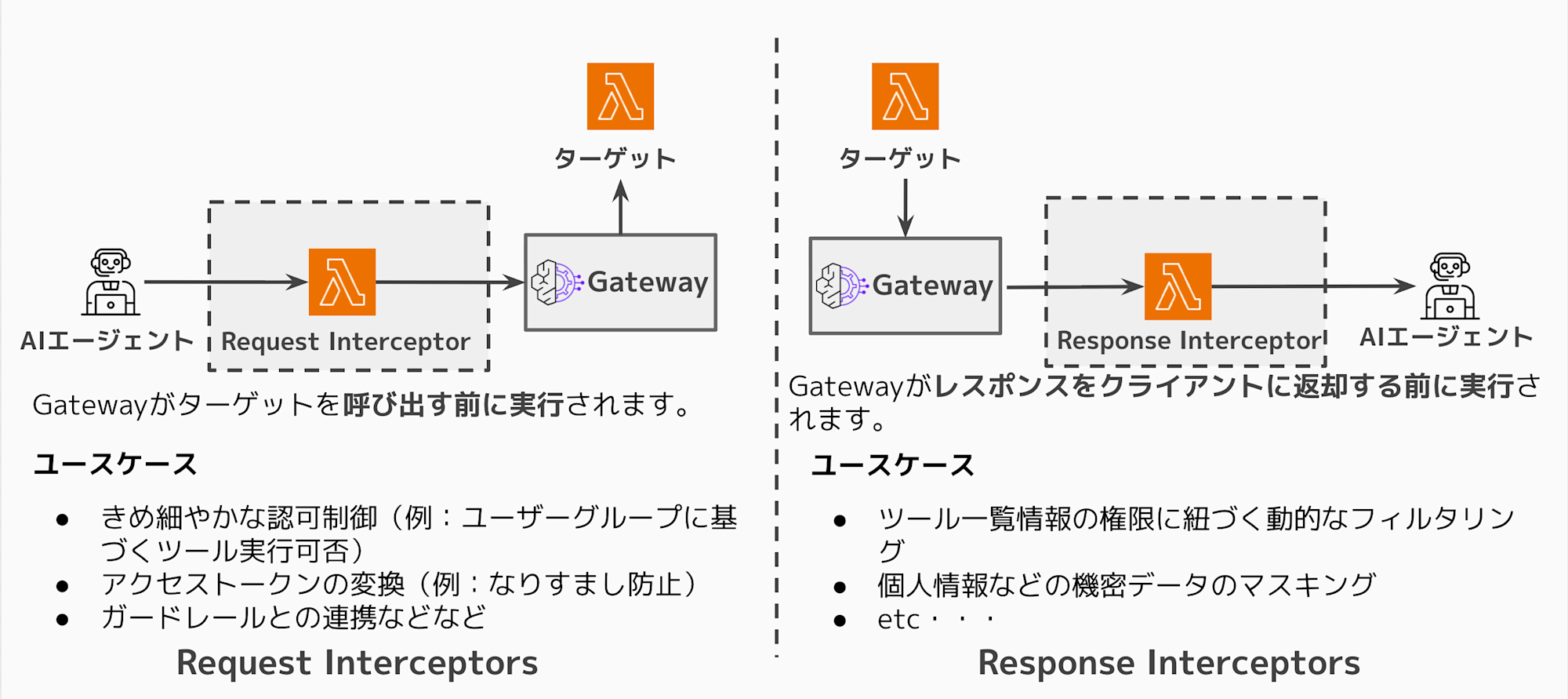
In the previous article, I explained the differences between Request/Response Interceptors using diagrams. I'll skip that this time, so if you're interested, please take a look.
Differences between Request Interceptor and Response Interceptor
Let me again clarify the differences between Request Interceptor and Response Interceptor.
The image roughly looks like the following:
With the Request Interceptor I'm testing this time, if a user without permissions tries to call a tool,
it can return an early error response without calling the target (Lambda).
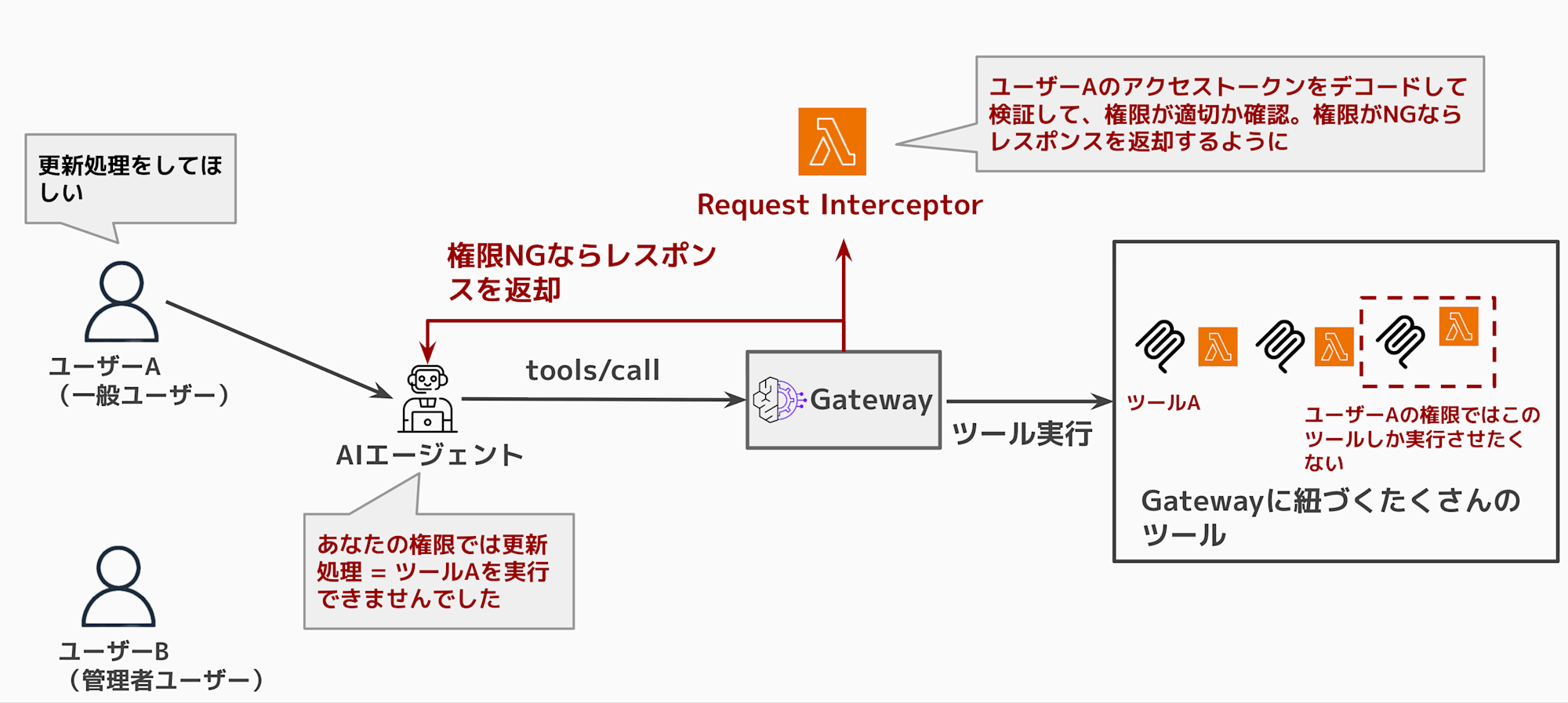
As shown in the above diagram, it's not desirable for a general user to be able to execute tools that only administrators should be able to use.
So I tried a use case where the Request Interceptor extracts attributes from the access token, and if the user's attributes indicate insufficient permissions, they aren't allowed to execute the tool. I tested this in an actual verification environment.
Verification environment created for this test
I'll use Terraform again to create the environment.
The source code is uploaded to the repository below, so please refer to it as needed.
I'll create the environment shown in the following structure diagram with Terraform.
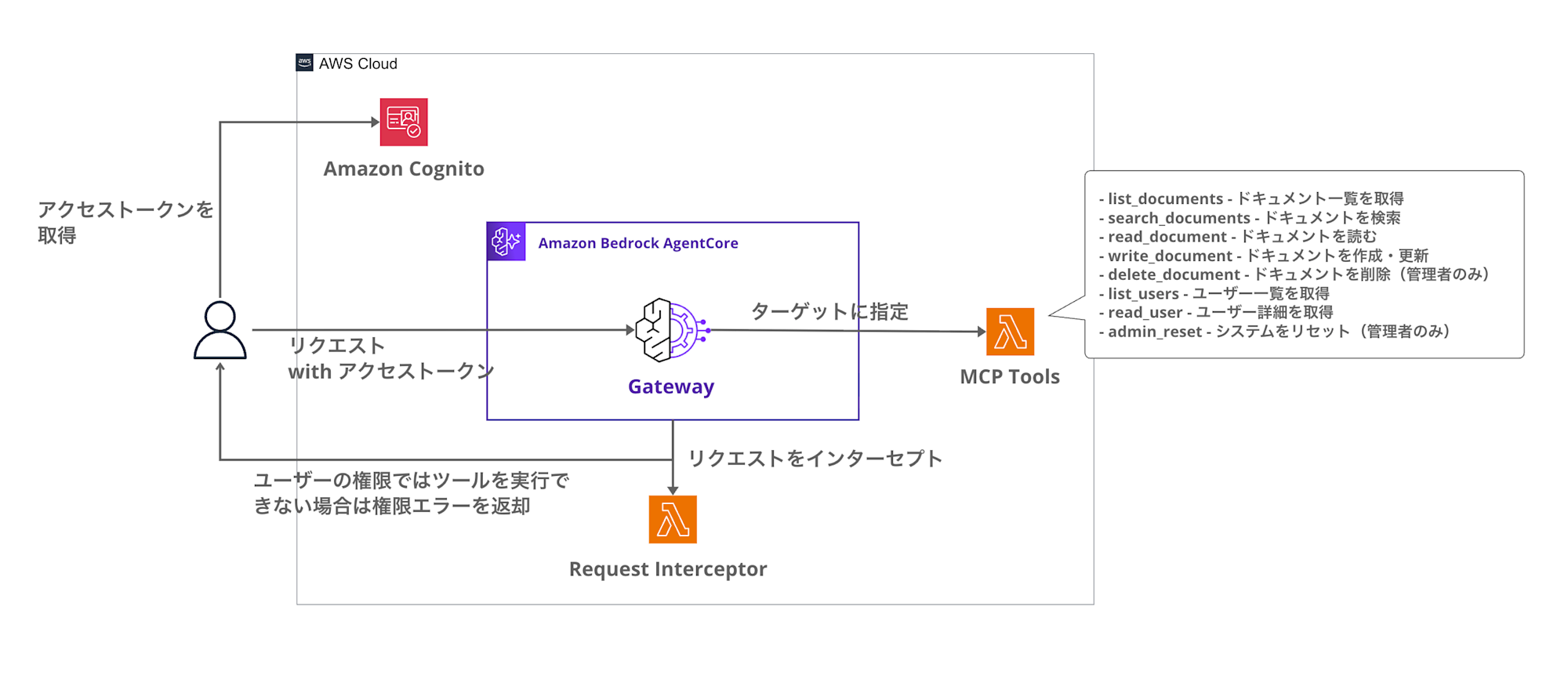
This structure uses Cognito for authentication and Request Interceptor Lambda for tool execution authorization.
You get an access token from Cognito, and the AgentCore Gateway verifies that token with JWT authentication.
The Request Interceptor checks permissions when tools/call is requested, and if denied, it returns an error without calling the target.
Permission Model
As before, I've prepared four groups, each with different permissions.
| Group | Allowed Tools | Description |
|---|---|---|
| admin | All tools | For system administrators |
| power_user | search, read, write, list | Users who can read and write |
| reader | search, read, list | Read-only users |
| guest | list | List display only |
This time, permission checks are performed during tools/call requests, and execution of unauthorized tools is rejected.
I'll compare the behavior between admin and reader to confirm the operation.
Prerequisites
The environment I'm using is as follows:
| Item | Version |
|---|---|
| Terraform | >= 1.5.0 |
| AWS Provider | >= 6.25.0 |
| hashicorp/archive | >= 2.4.0 |
| hashicorp/random | >= 3.5.0 |
Implementation
Directory Structure
The directory structure for this project is as follows:
request-interceptor-demo/
├── gateway.tf           # AgentCore Gateway and Request Interceptor
├── lambda.tf            # Lambda function definitions
├── cognito.tf           # Cognito User Pool and groups
├── variables.tf         # Variable definitions
├── outputs.tf           # Output values
├── versions.tf          # Provider settings
└── lambda/
    ├── request_interceptor/  # Request Interceptor
    │   └── handler.py
    └── mcp_tools/            # MCP Tools Target
        └── handler.py
Request Interceptor Configuration
Let's check the Request Interceptor configuration in the Terraform code.
# Request Interceptor configuration
interceptor_configuration {
  # Set as REQUEST interceptor (executed before target invocation)
  interception_points = ["REQUEST"]

  # Lambda interceptor
  interceptor {
    lambda {
      arn = aws_lambda_function.request_interceptor.arn
    }
  }

  # Pass request headers (to get JWT from Authorization header)
  input_configuration {
    pass_request_headers = true
  }
}
By setting interception_points = ["REQUEST"], the Interceptor Lambda is executed before calling the target.
Also, setting pass_request_headers to true enables forwarding request headers to the Interceptor, making it possible to verify access tokens like we're doing in this case.
Request Interceptor Operation
The processing flow of the Request Interceptor was implemented as follows:
- Gateway calls the Interceptor Lambda
- Execute permission check only for the
tools/callmethod - Get user groups from the
cognito:groupsclaim in the JWT - Get the tool name from the request
- Compare with allowed tools based on group
- If authorized → Pass the request through (call the target)
- If not authorized → Return a rejection response (skip target invocation)
Let's look at the key implementation points.
Pass-through format for permission granted
When permission check passes in the Request Interceptor, the request body is simply returned in transformedGatewayRequest, and the Gateway calls the target (Lambda).
{
    "interceptorOutputVersion": "1.0",
    "mcp": {
        "transformedGatewayRequest": {
            "body": {
                "jsonrpc": "2.0",
                "id": 1,
                "method": "tools/call",
                "params": {
                    "name": "request-interceptor-demo-delete-document___delete_document",
                    "arguments": {"document_id": "doc1"}
                }
            }
        }
    }
}
By returning transformedGatewayRequest like this, the Gateway forwards the request to the target, and the normal tool execution flow continues.
Rejection response format
When the Request Interceptor returns status code 403 and error fields in the body of transformedGatewayResponse,
the Gateway returns that response without calling the target.
{
    "interceptorOutputVersion": "1.0",
    "mcp": {
        "transformedGatewayResponse": {
            "statusCode": 403,
            "body": {
                "jsonrpc": "2.0",
                "id": 1,
                "error": {
                    "code": -32000,
                    "message": "Permission denied: Tool 'delete_document' is not allowed for groups ['reader']"
                }
            }
        }
    }
}
With this implementation, requests from users without permission return errors without calling the Lambda (target).
The Interceptor source code is below. It's long, so I've collapsed it.
Complete Request Interceptor Code
"""
Request Interceptor Lambda for AgentCore Gateway

Authorize tools/call requests based on user permissions,
and return early rejection response if user doesn't have permission
"""

import json
import logging
import base64
import os
from typing import Any

logger = logging.getLogger()
logger.setLevel(logging.INFO)

# Get tool permissions mapping from environment variables
TOOL_PERMISSIONS = json.loads(os.environ.get('TOOL_PERMISSIONS', '{}'))

def decode_jwt_payload(token: str) -> dict:
    """Decode JWT payload portion (Gateway has already verified signature)"""
    try:
        # Remove Bearer prefix
        if token.startswith('Bearer '):
            token = token[7:]

        # Get JWT payload section (header.payload.signature)
        parts = token.split('.')
        if len(parts) != 3:
            return {}

        # Base64 decode (adjust padding)
        payload = parts[1]
        padding = 4 - len(payload) % 4
        if padding != 4:
            payload += '=' * padding

        decoded = base64.urlsafe_b64decode(payload)
        return json.loads(decoded)
    except Exception as e:
        logger.warning(f"Failed to decode JWT: {e}")
        return {}

def get_user_groups(event: dict) -> list[str]:
    """Get Cognito groups from the request"""
    try:
        gateway_request = event.get('mcp', {}).get('gatewayRequest', {})
        headers = gateway_request.get('headers', {})

        # Get JWT from Authorization header
        auth_header = headers.get('Authorization', '') or headers.get('authorization', '')
        if not auth_header:
            logger.info("No Authorization header found")
            return ['guest']

        payload = decode_jwt_payload(auth_header)

        # Get cognito:groups claim
        groups = payload.get('cognito:groups', [])
        if not groups:
            # Also check custom attributes
            custom_groups = payload.get('custom:groups', '')
            if custom_groups:
                groups = custom_groups.split(',')

        logger.info(f"User groups: {groups}")
        return groups if groups else ['guest']

    except Exception as e:
        logger.error(f"Error getting user groups: {e}")
        return ['guest']

def get_allowed_tools(groups: list[str]) -> set[str]:
    """Return a set of allowed tool names based on groups"""
    allowed = set()

    for group in groups:
        group_tools = TOOL_PERMISSIONS.get(group, [])
        if '*' in group_tools:
            # Access to all tools
            return {'*'}
        allowed.update(group_tools)

    # Default guest permissions
    if not allowed:
        allowed.update(TOOL_PERMISSIONS.get('guest', ['list']))

    return allowed

def get_tool_name_from_request(request_body: dict) -> str:
    """Get tool name from tools/call request"""
    params = request_body.get('params', {})
    full_tool_name = params.get('name', '')

    # AgentCore Gateway tool name format: {target-name}___{tool-name}
    if '___' in full_tool_name:
        return full_tool_name.split('___')[-1]
    return full_tool_name

def is_tool_allowed(tool_name: str, allowed_tools: set[str]) -> bool:
    """Check if tool is allowed"""
    if '*' in allowed_tools:
        return True

    # Match by tool category name
    tool_category = tool_name.split('_')[0] if '_' in tool_name else tool_name

    return tool_name in allowed_tools or tool_category in allowed_tools

def passthrough_request(gateway_request: dict) -> dict:
    """Pass request through unchanged"""
    return {
        "interceptorOutputVersion": "1.0",
        "mcp": {
            "transformedGatewayRequest": {
                "body": gateway_request.get('body', {})
            }
        }
    }

def deny_response(request_body: dict, tool_name: str, user_groups: list[str]) -> dict:
    """Return permission denied response (skip target invocation)"""
    request_id = request_body.get('id', 1)

    return {
        "interceptorOutputVersion": "1.0",
        "mcp": {
            "transformedGatewayResponse": {
                "statusCode": 403,
                "body": {
                    "jsonrpc": "2.0",
                    "id": request_id,
                    "error": {
                        "code": -32000,
                        "message": f"Permission denied: Tool '{tool_name}' is not allowed for groups {user_groups}"
                    }
                }
            }
        }
    }

def lambda_handler(event: dict, context: Any) -> dict:
    """
    AgentCore Gateway Request Interceptor

    Authorize tools/call requests based on user permissions
    """
    logger.info(f"Request Interceptor invoked with event keys: {list(event.keys())}")

    mcp_data = event.get('mcp', {})
    gateway_request = mcp_data.get('gatewayRequest', {})
    request_body = gateway_request.get('body', {})

    # Check MCP method
    mcp_method = request_body.get('method', '')
    logger.info(f"MCP method: {mcp_method}")

    # Pass through for methods other than tools/call
    if mcp_method != 'tools/call':
        logger.info(f"Method '{mcp_method}' - passing through unchanged")
        return passthrough_request(gateway_request)

    # For tools/call: check permissions
    logger.info("Processing tools/call - checking permissions")

    # Get user groups
    user_groups = get_user_groups(event)

    # Get tool name being called
    tool_name = get_tool_name_from_request(request_body)

    # Get allowed tools
    allowed_tools = get_allowed_tools(user_groups)

    # Check permissions
    if is_tool_allowed(tool_name, allowed_tools):
        logger.info(f"Permission granted: Tool '{tool_name}' is allowed")
        return passthrough_request(gateway_request)
    else:
        logger.warning(f"Permission denied: Tool '{tool_name}' is NOT allowed")
        return deny_response(request_body, tool_name, user_groups)
Testing
Let's deploy and test the functionality.
Deploying the Environment
First, deploy the environment with Terraform.
cd request-interceptor-demo
terraform init
terraform apply --auto-approve
After deployment completes, you'll see output like this:
Apply complete! Resources: 30 added, 0 changed, 0 destroyed.

Outputs:

cognito_client_id = "xxxxxxxxxxxxxxxxxxxxxxxxxx"
cognito_user_pool_id = "us-east-1_XXXXXXXXX"
gateway_url = "https://xxxxxxxxxx.gateway.bedrock-agentcore.us-east-1.amazonaws.com/mcp"
gateway_id = "XXXXXXXXXX"
Now the environment is ready. Let's set the output values as environment variables.
# Save to environment variables
export AWS_REGION=us-east-1
export GATEWAY_URL=$(terraform output -raw gateway_url)
export USER_POOL_ID=$(terraform output -raw cognito_user_pool_id)
export CLIENT_ID=$(terraform output -raw cognito_client_id)
Creating Test Users
Next, let's create test users in Cognito.
I'll create users in the admin group and reader group for comparison.
# Create Admin user
aws cognito-idp admin-create-user \
  --user-pool-id ${USER_POOL_ID} \
  --username admin-user \
  --user-attributes Name=email,Value=admin@example.com \
  --temporary-password 'TempPass123!'

# Add to Admin group
aws cognito-idp admin-add-user-to-group \
  --user-pool-id ${USER_POOL_ID} \
  --username admin-user \
  --group-name admin

# Create Reader user
aws cognito-idp admin-create-user \
  --user-pool-id ${USER_POOL_ID} \
  --username reader-user \
  --user-attributes Name=email,Value=reader@example.com \
  --temporary-password 'TempPass123!'

# Add to Reader group
aws cognito-idp admin-add-user-to-group \
  --user-pool-id ${USER_POOL_ID} \
  --username reader-user \
  --group-name reader
Changing Passwords
Users created with admin-create-user are in FORCE_CHANGE_PASSWORD state, so we need to change their passwords.
# Change Admin user password
aws cognito-idp admin-set-user-password \
  --user-pool-id ${USER_POOL_ID} \
  --username admin-user \
  --password 'NewPass123!' \
  --permanent

# Change Reader user password
aws cognito-idp admin-set-user-password \
  --user-pool-id ${USER_POOL_ID} \
  --username reader-user \
  --password 'NewPass123!' \
  --permanent
Getting Access Tokens
Authenticate as each user to get access tokens.
# Get Admin user token
ADMIN_TOKEN=$(aws cognito-idp admin-initiate-auth \
  --user-pool-id ${USER_POOL_ID} \
  --client-id ${CLIENT_ID} \
  --auth-flow ADMIN_USER_PASSWORD_AUTH \
  --auth-parameters USERNAME=admin-user,PASSWORD='NewPass123!' \
  --query 'AuthenticationResult.AccessToken' \
  --output text)

# Get Reader user token
READER_TOKEN=$(aws cognito-idp admin-initiate-auth \
  --user-pool-id ${USER_POOL_ID} \
  --client-id ${CLIENT_ID} \
  --auth-flow ADMIN_USER_PASSWORD_AUTH \
  --auth-parameters USERNAME=reader-user,PASSWORD='NewPass123!' \
  --query 'AuthenticationResult.AccessToken' \
  --output text)
Comparing tools/call Execution
Let's execute tools/call with each user to check the differences based on permissions.
This time, I'll try calling the delete_document tool.
This tool is in the admin category, so users in the reader group are not allowed to use it.
Let's see if the Interceptor properly returns an error.
Admin User Case (Success)
curl -s -X POST ${GATEWAY_URL} \
  -H "Content-Type: application/json" \
  -H "Authorization: Bearer ${ADMIN_TOKEN}" \
  -d '{
    "jsonrpc": "2.0",
    "id": 1,
    "method": "tools/call",
    "params": {
      "name": "request-interceptor-demo-delete-document___delete_document",
      "arguments": {"document_id": "doc1"}
    }
  }' | jq .
{
  "jsonrpc": "2.0",
  "id": 1,
  "result": {
    "content": [
      {
        "type": "text",
        "text": "{\"success\": true, \"id\": \"doc1\", \"message\": \"Document doc1 has been deleted.\"}"
      }
    ]
  }
}
The Admin user is allowed to execute delete_document, so the tool was executed successfully! Next, let's check if the Reader user's execution is denied.
Reader User Case (Rejected)
curl -s -X POST ${GATEWAY_URL} \
  -H "Content-Type: application/json" \
  -H "Authorization: Bearer ${READER_TOKEN}" \
  -d '{
    "jsonrpc": "2.0",
    "id": 1,
    "method": "tools/call",
    "params": {
      "name": "request-interceptor-demo-delete-document___delete_document",
      "arguments": {"document_id": "doc1"}
    }
  }' | jq .
{
  "jsonrpc": "2.0",
  "id": 1,
  "error": {
    "code": -32000,
    "message": "Permission denied: Tool 'delete_document' is not allowed for groups ['reader']"
  }
}
The Reader user got a Permission denied error as intended!!
The Request Interceptor intercepted the tools/call request, checked permissions, and rejected the specific tool execution without calling the target (Lambda).
Just to be sure, I checked the CloudWatch logs for the MCP tool. There was an execution record for the Admin user, but no execution logs for the Reader user.
MCP Tool Lambda Logs
INIT_START Runtime Version: python:3.12.v101
START RequestId: 92eac701-cada-40c2-84eb-666add709e92 Version: $LATEST
[INFO] Tool invocation received: {"document_id": "doc1"}
[INFO] Original tool name from context: request-interceptor-demo-delete-document___delete_document
[INFO] Extracted tool name: delete_document
[INFO] Tool name resolved: delete_document
[INFO] Tool delete_document executed successfully
END RequestId: 92eac701-cada-40c2-84eb-666add709e92
REPORT RequestId: 92eac701-cada-40c2-84eb-666add709e92 Duration: 2.35 ms Billed Duration: 94 ms
Conversely, looking at the Request Interceptor Lambda logs, it was executed both times, and there is a rejection log for the reader case, which is as expected.
Request Interceptor Lambda Logs
START RequestId: 3fc525b4-7755-49fb-9af1-cd3e03950546 Version: $LATEST
[INFO] Request Interceptor invoked with event keys: ['interceptorInputVersion', 'mcp']
[INFO] MCP method: tools/call
[INFO] Processing tools/call - checking permissions
[INFO] User groups: ['admin']
[INFO] Tool name from request: delete_document
[INFO] Allowed tools for groups ['admin']: {'*'}
[INFO] Permission granted: Tool 'delete_document' is allowed for groups ['admin']
END RequestId: 3fc525b4-7755-49fb-9af1-cd3e03950546
REPORT RequestId: 3fc525b4-7755-49fb-9af1-cd3e03950546 Duration: 2.48 ms Billed Duration: 95 ms
START RequestId: 5f520523-373d-4684-ab2d-bc8976d5c0f7 Version: $LATEST
[INFO] Request Interceptor invoked with event keys: ['interceptorInputVersion', 'mcp']
[INFO] MCP method: tools/call
[INFO] Processing tools/call - checking permissions
[INFO] User groups: ['reader']
[INFO] Tool name from request: delete_document
[INFO] Allowed tools for groups ['reader']: {'read', 'list', 'search'}
[INFO] Checking tool: delete_document -> category: delete
[INFO] Allowed tools: {'read', 'list', 'search'}
[WARNING] Permission denied: Tool 'delete_document' is NOT allowed for groups ['reader']
END RequestId: 5f520523-373d-4684-ab2d-bc8976d5c0f7
REPORT RequestId: 5f520523-373d-4684-ab2d-bc8976d5c0f7 Duration: 2.00 ms Billed Duration: 3 ms
Results Comparison
| Group | delete_document execution | Result |
|---|---|---|
| admin | Allowed | Success (document deleted) |
| reader | Denied | Permission denied error |
As expected, the authorization control using the Request Interceptor is working properly!
Conclusion
In this article, I tried tool execution authorization control using a Request Interceptor!!
By combining it with the Response Interceptor from the previous article, you can achieve more fine-grained authorization control over tool execution and list retrieval.
I would like to try and introduce an environment combining both Interceptors, as well as other use cases I haven't tried yet!
I hope this article was helpful to you. Thank you for reading to the end!
Supplement
Authorization Control Using Custom Attributes
In this example, I implemented group-based authorization control, but you can also use custom attributes for more detailed control if needed.
However, what's sent to the Gateway is the access token, and to include custom attributes in the access token, you need a pre-token generation trigger.
If you need more detailed control, consider combining it with Cognito's Lambda trigger functionality.
If you want to use a pre-token generation trigger with M2M authentication, you need to use event version v3, which requires either the Essentials or Plus plan in Cognito, so be aware of this requirement.
Reference Articles
If you want to learn more about Gateway Interceptors, the following article is helpful!! I also referenced it for this article!!