![[Update] I tried the bidirectional streaming of Amazon Bedrock AgentCore Runtime](https://images.ctfassets.net/ct0aopd36mqt/33a7q65plkoztFWVfWxPWl/a718447bea0d93a2d461000926d65428/reinvent2025_devio_update_w1200h630.png?w=3840&fm=webp)
[Update] I tried the bidirectional streaming of Amazon Bedrock AgentCore Runtime

This page has been translated by machine translation. View original
Introduction
Hello, I'm Jinno from the Consulting Department, and I like supermarkets. I'm relieved to be safely back home after re:Invent.
Recently, an update was announced that Amazon Bedrock AgentCore Runtime (hereafter AgentCore Runtime) now supports bidirectional streaming!
Overview (Translation)
Amazon Bedrock AgentCore Runtime now supports bidirectional streaming, allowing agents to interact in real-time simultaneously while handling interruptions and context changes during conversations. This feature enables continuous two-way communication that maintains context throughout the interaction, eliminating friction in conversations.
With traditional agents, users couldn't provide clarifications or corrections until the agent's response was complete, leading to disjointed conversation flow and stop-and-start interactions that felt unnatural, especially in voice applications. Bidirectional streaming addresses this limitation by enabling continuous context processing. This enhances voice agents that provide a natural conversational experience where users can interrupt, clarify, or change direction mid-conversation, while also improving text-based interactions through increased responsiveness. With this capability built into AgentCore Runtime, developers can focus on building innovative agent experiences rather than managing complex streaming infrastructure, eliminating months of engineering work previously required to build real-time streaming capabilities.
This feature is available in all 9 AWS Regions where Amazon Bedrock AgentCore Runtime is available (US East (N. Virginia), US East (Ohio), US West (Oregon), Asia Pacific (Mumbai), Asia Pacific (Singapore), Asia Pacific (Sydney), Asia Pacific (Tokyo), Europe (Frankfurt), and Europe (Ireland)).
To learn more about bidirectional streaming in AgentCore Runtime, read the blog post, refer to the AgentCore documentation, and get started with the AgentCore Starter Toolkit. AgentCore Runtime's pay-as-you-go pricing model only charges for active resources consumed while your agent is running, with no idle time or upfront costs.
This means real-time bidirectional communication using WebSocket is now possible!
This should make implementing voice conversation agents and interactive chat applications easier! In this article, I tried creating and deploying a real-time conversation agent using AgentCore Runtime's bidirectional streaming feature to see how it works!
Bidirectional Streaming
Difference from Traditional HTTP Communication
Traditionally, AgentCore Runtime primarily used HTTP request/response communication with the /invocations endpoint.
In this method, the client sends a request and waits until the agent completes processing before receiving a response. Of course, it was possible to receive the response as a stream.
On the other hand, bidirectional streaming using WebSocket has the following characteristics:
- Clients and agents can send and receive data simultaneously
- Less connection overhead as the connection is maintained during communication
- Users can interrupt or redirect the agent during a conversation
This bidirectional streaming is particularly useful for applications requiring real-time interaction, such as voice agents!
WebSocket Support in AgentCore Runtime
AgentCore Runtime is designed to listen for WebSocket endpoints on the /ws path of container port 8080.
wss://bedrock-agentcore.<region>.amazonaws.com/runtimes/<EncodedRuntimeArn>/ws
Three authentication methods are supported:
- SigV4 headers
- Signed requests using AWS credentials
- SigV4 presigned URLs
- URLs with signatures included as query parameters
- OAuth 2.0
- Authentication using Bearer tokens
Additional Requirements
When using WebSockets with AgentCore Runtime, you need to meet the following requirements.
A distinctive feature for WebSocket is the need to provide a /ws endpoint.
- Platform
- ARM64 (linux/arm64)
- Port
- Expose port 8080
- Endpoints
/ws- WebSocket endpoint/ping- Health check endpoint (required)
Prerequisites
For the procedures in this article, I used the following environment:
- Python
- 3.13.6
- uv
- Already installed (Installation method)
- AWS Account
- Appropriate IAM permissions to use AgentCore Runtime and Bedrock models
- Region
- us-west-2 (Oregon)
- Model used
- Claude Haiku 4.5 (
us.anthropic.claude-haiku-4-5-20251001-v1:0)
- Claude Haiku 4.5 (
Let's Try It Out
Now, let's create a bidirectional streaming-enabled agent using Strands Agents.
Project Setup
First, let's create a project using uv and install the necessary packages.
# Create and initialize the project
uv init agentcore-websocket-strands
cd agentcore-websocket-strands

# Install necessary packages
uv add bedrock-agentcore strands-agents bedrock-agentcore-starter-toolkit
This will automatically generate pyproject.toml and add the dependencies.
Creating the Strands Agent Code
Next, let's create the code for a Strands agent that supports WebSocket bidirectional streaming.
Create a file named websocket_strands_agent.py.
import asyncio
import json
from bedrock_agentcore import BedrockAgentCoreApp
from strands import Agent
from strands.models.bedrock import BedrockModel
from starlette.websockets import WebSocketDisconnect

app = BedrockAgentCoreApp()

# Configure Bedrock model (Claude Haiku 4.5)
model = BedrockModel(
    model_id="us.anthropic.claude-haiku-4-5-20251001-v1:0",
    region_name="us-west-2"
)

# Initialize Strands agent
agent = Agent(
    model=model,
    system_prompt="""あなたは親切で知識豊富なAIアシスタントです。
ユーザーの質問に対して、簡潔かつ分かりやすく回答してください。
日本語で回答してください。""",
    callback_handler=None
)

@app.websocket
async def websocket_handler(websocket, context):
    """Interruptible WebSocket handler"""
    await websocket.accept()
    print("WebSocket 接続を受け入れました")

    # Currently running streaming task
    current_task: asyncio.Task | None = None

    async def stream_response(user_message: str):
        """Send streaming response (cancellable)"""
        full_response = ""
        try:
            async for event in agent.stream_async(user_message):
                if "data" in event:
                    chunk = event["data"]
                    full_response += chunk
                    await websocket.send_json({
                        "type": "chunk",
                        "data": chunk
                    })

            # Normal completion
            await websocket.send_json({
                "type": "complete",
                "fullResponse": full_response
            })
            print("レスポンス完了")

        except asyncio.CancelledError:
            # Cancellation due to interruption
            await websocket.send_json({
                "type": "interrupted",
                "partialResponse": full_response
            })
            print("割り込みでキャンセルされました")
            raise  # Always re-raise CancelledError

    try:
        while True:
            # Receive message from client
            raw_data = await websocket.receive_text()
            data = json.loads(raw_data)
            user_message = data.get("inputText", "")

            if not user_message:
                await websocket.send_json({"error": "inputText が見つかりません"})
                continue

            print(f"受信: {user_message}")

            # Cancel existing task if any (interruption)
            if current_task and not current_task.done():
                print("割り込み: 現在の回答をキャンセルします")
                current_task.cancel()
                try:
                    await current_task  # Wait for cancellation to complete
                except asyncio.CancelledError:
                    pass  # Expected exception

            # Start new streaming task in background
            current_task = asyncio.create_task(stream_response(user_message))

    except WebSocketDisconnect:
        print("クライアントが切断しました")
    except Exception as e:
        print(f"エラー: {e}")
        try:
            await websocket.send_json({"error": str(e)})
        except Exception:
            pass
    finally:
        # Cleanup: Cancel any remaining task
        if current_task and not current_task.done():
            current_task.cancel()
            try:
                await current_task
            except asyncio.CancelledError:
                pass

if __name__ == "__main__":
    app.run(log_level="info")
This code accomplishes the following:
- Background Task
- Runs streaming processing in the background using
asyncio.create_task()
- Runs streaming processing in the background using
- Interruption Handling
- When a new message is received, cancels the existing task with
cancel()before starting a new one
- When a new message is received, cancels the existing task with
- Cancellation Notification
- Catches
asyncio.CancelledErrorand sends aninterruptedmessage
- Catches
One notable feature is that you can simply specify the WebSocket entry point using the @app.websocket decorator without having to worry about complex details. This implements the /ws endpoint mentioned in the requirements.
Local Testing
Before deployment, let's test it locally.
Starting the Agent
Open a terminal and start the agent.
uv run websocket_strands_agent.py
If it starts successfully, you'll see the following log output:
INFO:     Started server process [xxxxx]
INFO:     Waiting for application startup.
INFO:     Application startup complete.
INFO:     Uvicorn running on http://0.0.0.0:8080 (Press CTRL+C to quit)
Creating a Test Client
Open another terminal and create a WebSocket client. Let's test if the interruption feature works as expected. Create a file named websocket_client_local.py.
import asyncio
import websockets
import json

async def test_interruption():
    """Client for testing interruptions"""
    uri = "ws://localhost:8080/ws"

    async with websockets.connect(uri) as websocket:

        async def receive_responses():
            """Response reception loop"""
            while True:
                response = await websocket.recv()
                data = json.loads(response)

                if data.get("type") == "chunk":
                    print(data["data"], end="", flush=True)
                elif data.get("type") == "complete":
                    print("\n\n[完了]")
                elif data.get("type") == "interrupted":
                    print(f"\n\n[割り込み中断] 途中経過: {data['partialResponse'][:50]}...")
                elif "error" in data:
                    print(f"\n[エラー] {data['error']}")

        # Start receiving task in background
        receive_task = asyncio.create_task(receive_responses())

        try:
            # Send initial question (one that will generate a long response)
            print("送信: 日本の歴史について詳しく教えてください")
            print("-" * 50)
            await websocket.send(json.dumps({
                "inputText": "日本の歴史について詳しく教えてください"
            }))

            # Interrupt after 2 seconds
            await asyncio.sleep(2)

            print("\n" + "=" * 50)
            print(">>> 割り込み送信: やっぱりPythonについて教えて")
            print("=" * 50 + "\n")
            await websocket.send(json.dumps({
                "inputText": "やっぱりPythonについて教えて"
            }))

            # Wait for response to complete (fixed time for the sample)
            await asyncio.sleep(15)

        finally:
            receive_task.cancel()
            try:
                await receive_task
            except asyncio.CancelledError:
                pass

if __name__ == "__main__":
    asyncio.run(test_interruption())
This client implementation has three key points:
-
Concurrent Send/Receive
- Runs the reception loop in the background using
asyncio.create_task()
- Runs the reception loop in the background using
-
Interruption Test
- Sends a different question after 2 seconds to interrupt the first response
-
Message Type Handling
- Properly processes
chunk,complete, andinterruptedtypes- Response types defined by the Runtime are categorized and processed
- Display directly for
chunk, show[完了]forcomplete, show割り込み中断forinterruptedand extract first 50 characters of the partial message
- Display directly for
- Response types defined by the Runtime are categorized and processed
- Properly processes
Run the test client.
uv run websocket_client_local.py
If you get output like the following, it's successful!
送信: 日本の歴史について詳しく教えてください
--------------------------------------------------
# 日本の歴史について

日本の歴史を主要な時代別にご説明します。

## 主な時代区分

**古代**
- 縄文時代(約12,000年前~):狩猟採集社会
- 弥生時代(紀元前3世紀~3世紀):稲作農業の開始
- 古墳時代~飛鳥時代:国家形
==================================================
>>> 割り込み送信: やっぱりPythonについて教えて
==================================================

[割り込み中断] 途中経過: # 日本の歴史について

日本の歴史を主要な時代別にご説明します。

## 主な時代区分

**古代...
The agent was successfully interrupted during its response! The [割り込み中断] message is displayed, and the partial response so far is returned.
Deploying to AgentCore Runtime
After confirming that it works locally, let's deploy it to AgentCore Runtime.
For deployment, we'll use the Amazon Bedrock AgentCore Starter Toolkit that we installed during setup.
Configuration and Deployment
Configure the agent.
uv run agentcore configure -e websocket_strands_agent.py
When you run this command, you'll answer several questions interactively.
The default values should be fine for most questions. Configuration information is saved in .bedrock_agentcore.yaml.
Next, execute the deployment.
uv run agentcore launch
When deployment is complete, an ARN like the following will be output:
arn:aws:bedrock-agentcore:us-west-2:123456789012:runtime/websocket_strands_agent-abc123
Make note of this ARN as we'll use it later!
Calling the Deployed Agent
Once deployment is complete, let's connect to the deployed agent.
Setting Environment Variables
First, set the agent's ARN as an environment variable.
export AGENT_ARN="arn:aws:bedrock-agentcore:us-west-2:123456789012:runtime/websocket_strands_agent-abc123"
Client Implementation
Create a connection URL to the Runtime using client.generate_ws_connection, and connect via WebSocket.
After connecting, ask a different question after 2 seconds to test interruption.
import asyncio
import json
import os

import websockets
from bedrock_agentcore.runtime import AgentCoreRuntimeClient

async def main():
    # Get ARN from environment variable
    runtime_arn = os.getenv("AGENT_ARN")
    if not runtime_arn:
        raise ValueError("AGENT_ARN environment variable is not set")

    # Initialize AgentCoreRuntimeClient
    client = AgentCoreRuntimeClient(region="us-west-2")

    # Create connection URL and headers
    ws_url, headers = client.generate_ws_connection(
        runtime_arn=runtime_arn, session_id=None
    )

    print("Connecting to AgentCore Runtime...\n")

    try:
        async with websockets.connect(ws_url, additional_headers=headers) as ws:

            async def receive_responses():
                """Response reception loop"""
                while True:
                    response = await ws.recv()
                    data = json.loads(response)

                    if data.get("type") == "chunk":
                        print(data["data"], end="", flush=True)
                    elif data.get("type") == "complete":
                        print("\n\n[完了]")
                    elif data.get("type") == "interrupted":
                        print(
                            f"\n\n[割り込み中断] 途中経過: {data['partialResponse'][:50]}..."
                        )
                    elif "error" in data:
                        print(f"\n[エラー] {data['error']}")

            # Start receiving task in background
            receive_task = asyncio.create_task(receive_responses())

            try:
                # Send initial question
                print("送信: AWSの主要サービスについて詳しく教えてください")
                print("-" * 50)
                await ws.send(
                    json.dumps(
                        {"inputText": "AWSの主要サービスについて詳しく教えてください"}
                    )
                )

                # Interrupt after 2 seconds
                await asyncio.sleep(2)

                print("\n" + "=" * 50)
                print(">>> 割り込み送信: やっぱりEC2だけ教えて")
                print("=" * 50 + "\n")
                await ws.send(json.dumps({"inputText": "やっぱりEC2だけ教えて"}))

                # Wait for response to complete (fixed time for the sample)
                await asyncio.sleep(15)

            finally:
                receive_task.cancel()
                try:
                    await receive_task
                except asyncio.CancelledError:
                    pass

    except websockets.exceptions.InvalidStatus as e:
        print(f"WebSocket handshake failed: {e.response.status_code}")
    except Exception as e:
        print(f"Connection error: {e}")

if __name__ == "__main__":
    asyncio.run(main())
Run the client. Note that you'll need the bedrock-agentcore:InvokeAgentRuntimeWithWebSocketStream permission to run it.
uv run websocket_client_deployed.py
If you get output like the following, it's successful!
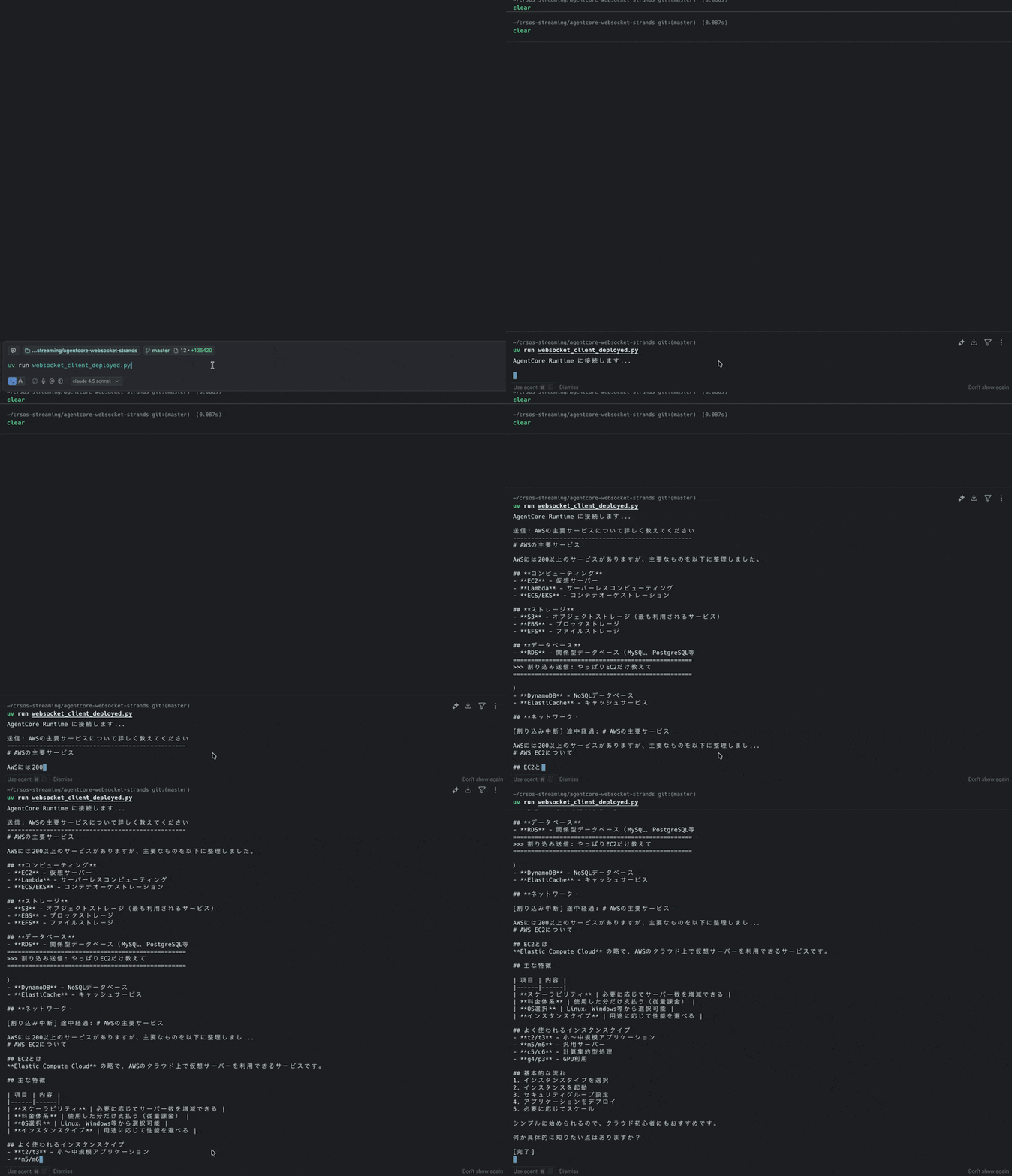
uv run websocket_client_deployed.py
AgentCore Runtime に接続します...

送信: AWSの主要サービスについて詳しく教えてください
--------------------------------------------------
# AWSの主要サービス

AWSには200以上のサービスがありますが、主要なものを以下に整理しました。

## **コンピューティング**
- **EC2** - 仮想サーバー
- **Lambda** - サーバーレスコンピューティング
- **ECS/EKS** - コンテナオーケストレーション

## **ストレージ**
- **S3** - オブジェクトストレージ(最も利用されるサービス)
- **EBS** - ブロックストレージ
- **EFS** - ファイルストレージ

## **データベース**
- **RDS** - 関係型データベース(MySQL、PostgreSQL等
==================================================
>>> 割り込み送信: やっぱりEC2だけ教えて
==================================================

)
- **DynamoDB** - NoSQLデータベース
- **ElastiCache** - キャッシュサービス

## **ネットワーク・

[割り込み中断] 途中経過: # AWSの主要サービス

AWSには200以上のサービスがありますが、主要なものを以下に整理しまし...
# AWS EC2について

## EC2とは
**Elastic Compute Cloud** の略で、AWSのクラウド上で仮想サーバーを利用できるサービスです。

## 主な特徴

| 項目 | 内容 |
|------|------|
| **スケーラビリティ** | 必要に応じてサーバー数を増減できる |
| **料金体系** | 使用した分だけ支払う(従量課金) |
| **OS選択** | Linux、Windows等から選択可能 |
| **インスタンスタイプ** | 用途に応じて性能を選べる |

## よく使われるインスタンスタイプ
- **t2/t3** - 小~中規模アプリケーション
- **m5/m6** - 汎用サーバー
- **c5/c6** - 計算集約型処理
- **g4/p3** - GPU利用

## 基本的な流れ
1. インスタンスタイプを選択
2. インスタンスを起動
3. セキュリティグループ設定
4. アプリケーションをデプロイ
5. 必要に応じてスケール

シンプルに始められるので、クラウド初心者にもおすすめです。

何か具体的に知りたい点はありますか?

[完了]
The interruption is working correctly with the agent deployed to AgentCore Runtime!
After the interruption, it responds to the new question (about EC2).
In bidirectional streaming, you can also specify a session_id (runtimeSessionId) just as before. By connecting with the same session_id, it becomes easier to maintain conversation context while the WebSocket connection continues. Note that if you want to maintain long-term memory after disconnection, you need to design a system that incorporates Memory or similar mechanisms, just as before.
Conclusion
In this article, I created an agent using Amazon Bedrock AgentCore Runtime's bidirectional streaming feature!
After actually using it, I appreciated how easy it is to implement bidirectional communication just by using a decorator, without having to worry about complex WebSocket implementation.
Real-time voice conversations leveraging this bidirectionality would be interesting too. It might be fun to combine this with Takakuni-san's blog and host it on AgentCore Runtime.
In the future, I'd like to try using this in more practical use cases! I hope this article was helpful.
Thank you for reading to the end!!
Additional Information
When creating AI agents that utilize WebSocket, the following official documentation is a helpful reference: