![[Event Report] Kurameso Osaka IT Study Meeting Midosuji Tech #8 ~Level 300+ Limited Lightning Talks~ I presented on the topic "Enforcing Amazon Bedrock Guardrails Usage with Bedrock Policy"!](https://images.ctfassets.net/ct0aopd36mqt/2LjDMamDYbP440BfhL0UoW/42925308151674beed01ffe67cec3b16/Midosuji-Tech.png?w=3840&fm=webp)
[Event Report] Kurameso Osaka IT Study Meeting Midosuji Tech #8 ~Level 300+ Limited Lightning Talks~ I presented on the topic "Enforcing Amazon Bedrock Guardrails Usage with Bedrock Policy"!

This page has been translated by machine translation. View original
Introduction
Hello, I'm Kamino from the Consulting Department, and I'm a huge fan of cheese naan.
I gave a presentation titled "Enforcing Amazon Bedrock Guardrails with Bedrock Policy" at Midosuji Tech #8 held at the Classmethod Osaka Office on Wednesday, February 4, 2026!
(The actual presentation title was "Methods for Sharing Bedrock Guardrails Across Accounts (AWS Organizations Prerequisite)" but I changed it to a more intuitive title)
When using Bedrock in a multi-account environment, you might wonder if there's a way to enforce common Guardrails across all accounts in your organization. Although it's currently in preview, I presented a method to achieve this using Bedrock Policy.
Presentation Materials
Recap of Amazon Bedrock Guardrails
Before diving into the main topic, let's briefly review Amazon Bedrock Guardrails.
Amazon Bedrock Guardrails is an AWS managed service for implementing safety measures in generative AI applications. It comes with various features such as harmful content filtering, blocking specific topics, and more.
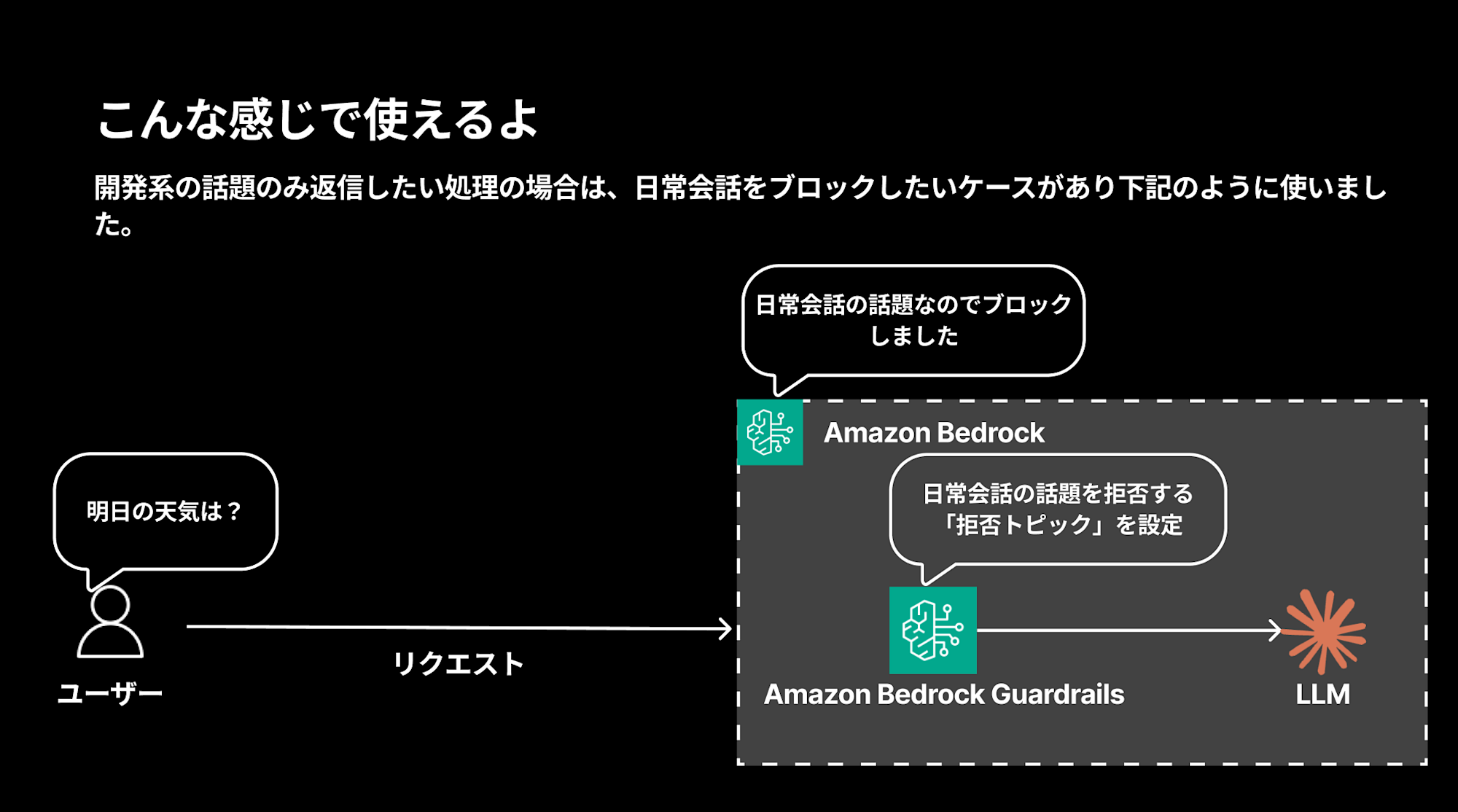
For example, if you want to create a chatbot that only responds to development-related topics, you can set up rejected topics to block everyday conversations, which would block queries like "What's the weather tomorrow?"
Easy to Use with Strands Agents
In my favorite Strands Agents, you can easily use Guardrails by simply specifying guardrail_id and guardrail_version to the BedrockModel.
bedrock_model = BedrockModel(
    model_id="global.anthropic.claude-sonnet-4-5-20250929-v1:0",
    guardrail_id="your-guardrail-id",
    guardrail_version="1",
    guardrail_trace="enabled",
)

agent = Agent(
    system_prompt="You are a helpful assistant.",
    model=bedrock_model,
)
You just need to specify the guardrail id and version. I've verified this in detail in the blog post below.
Sharing Guardrails Across Multiple Accounts in an Organization
I've frequently wondered if it's possible to share and enforce the same Guardrails across multiple accounts in an organization.
For instance, when creating a common generative AI platform for an organization, you might not want to create and manage Guardrails individually in each account. Instead, you'd prefer to manage them centrally in an administrative account and have them automatically applied to user accounts.
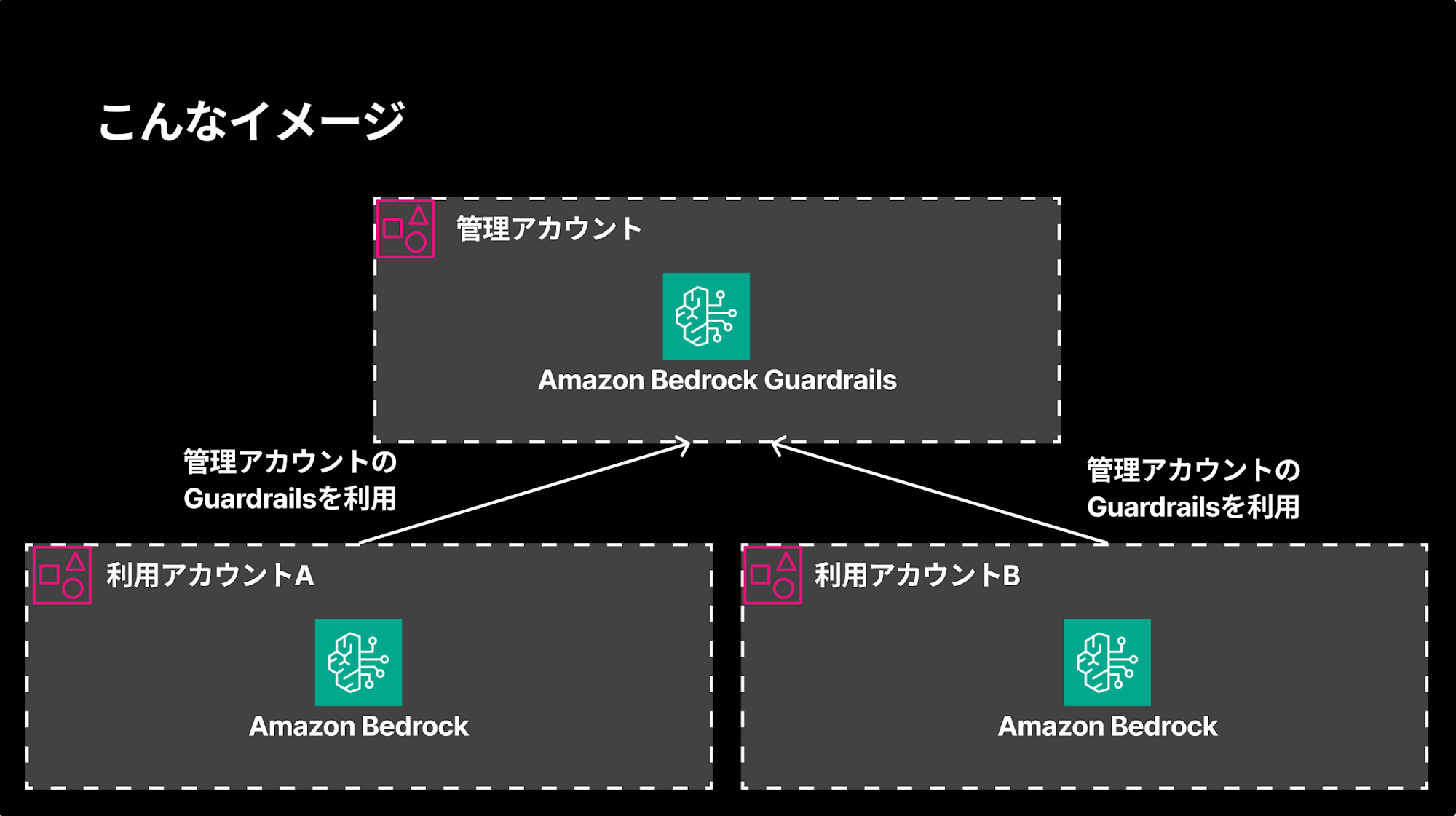
The conclusion is that this can be achieved using Bedrock Policy (Preview)!
The Conclusion First
Here are the key points:
- Bedrock Policy allows you to enforce the same Guardrails across your entire organization
- You can specify not just the entire AWS Organization but also specific OUs or individual accounts
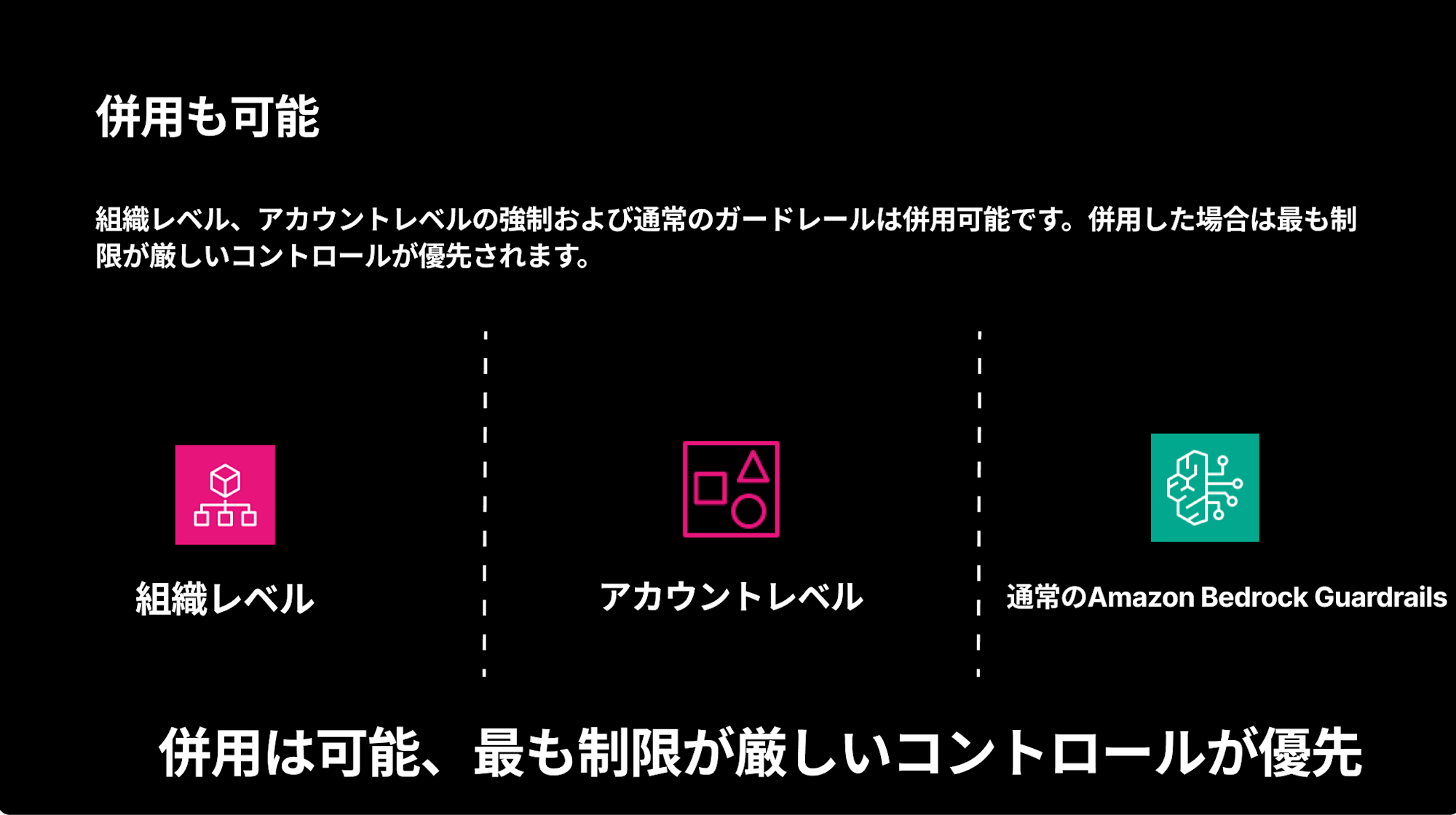
- Enforcement at the account level is also possible and can be combined with organization-level enforcement (the strictest control takes precedence)
- This is limited to accounts within the same Organization; sharing between different Organizations or between individual accounts is not possible
In the next sections, I'll break down the steps to actually apply Bedrock Policy.
Applying Bedrock Policy in Practice
Architecture
We'll create Guardrails in the management account and set up enforcement in user accounts.
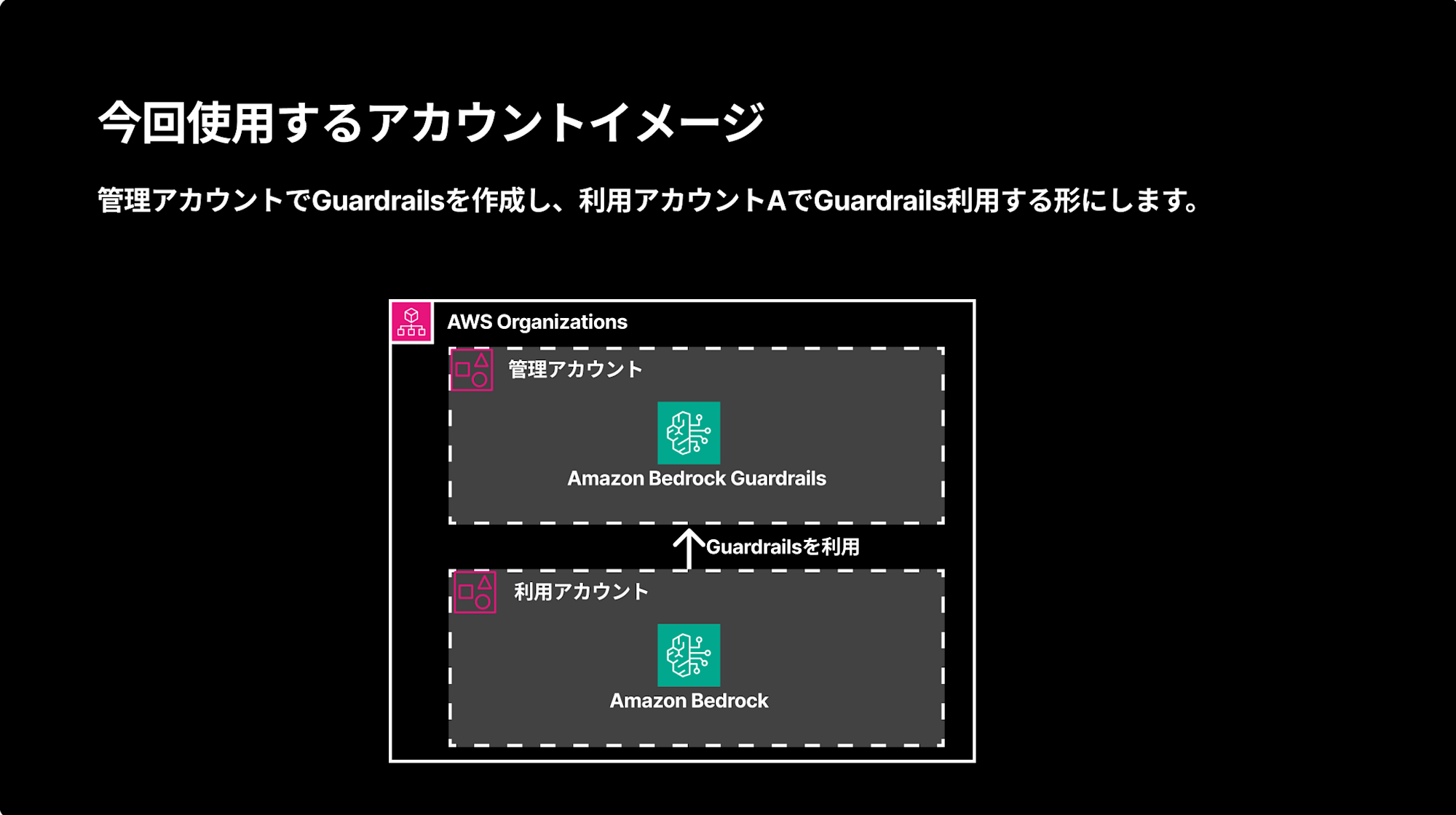
There are three main steps:
- Create Guardrails in the management account and set up resource-based policies
- Enable, create, and attach Bedrock Policy in AWS Organizations
- Verify functionality in the user account
Creating Guardrails in the Management Account
First, we create Guardrails in the management account.
For clarity, I set up a rejected topic that blocks conversations about "cheese naan." (I actually love cheese naan and have no grudge against it... I chose it for clarity... sorry...)
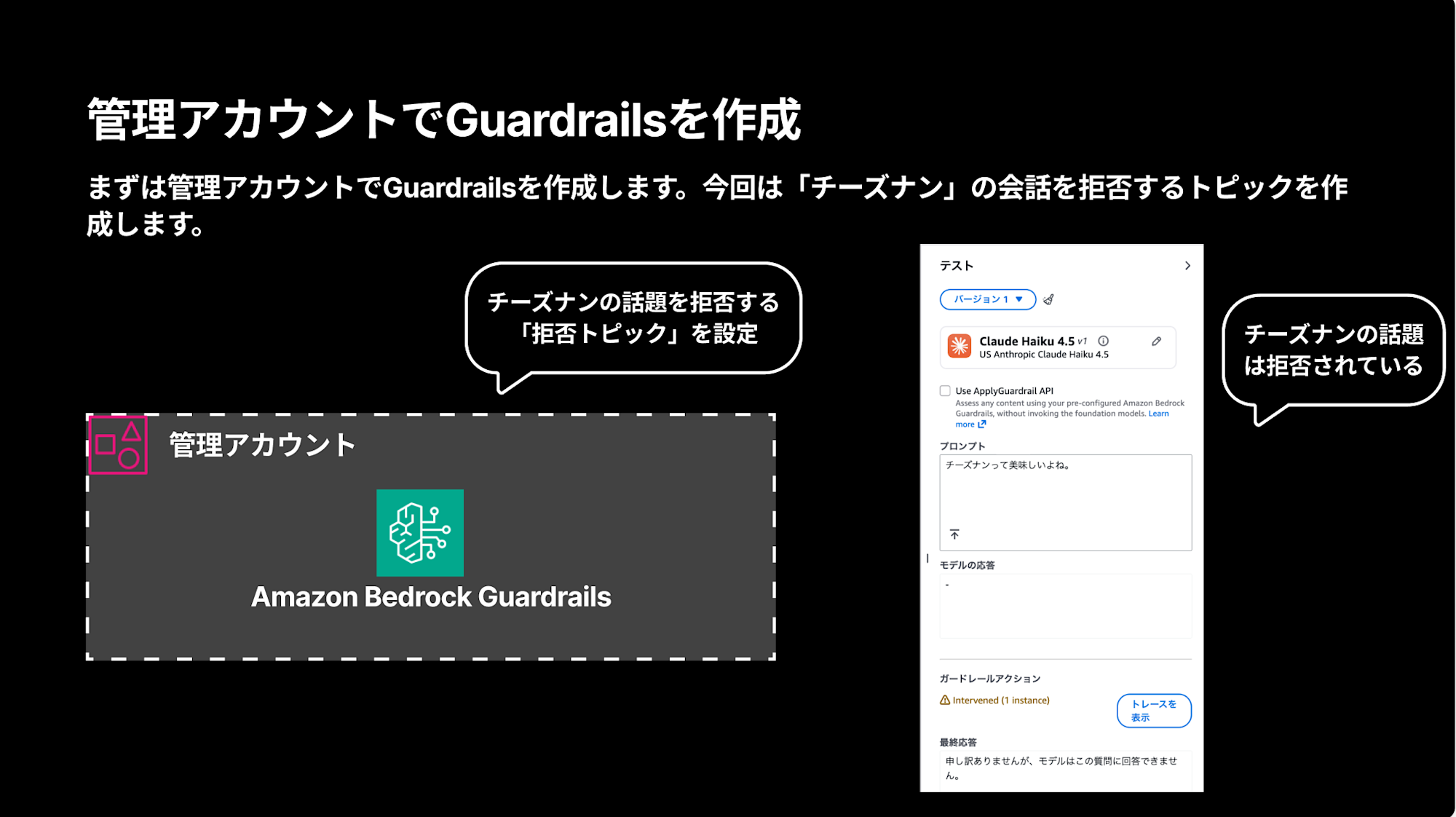
Next, we create a resource-based policy to allow accounts within our organization to use these Guardrails. We specify aws:PrincipalOrgID in the Condition clause to make it available to the entire Organization.
{
    "Version": "2012-10-17",
    "Statement": [
        {
            "Sid": "AllowOrganizationAccess",
            "Effect": "Allow",
            "Principal": "*",
            "Action": [
                "bedrock:ApplyGuardrail",
                "bedrock:GetGuardrail"
            ],
            "Resource": "*",
            "Condition": {
                "StringEquals": {
                    "aws:PrincipalOrgID": "o-xxxxxxxxxx"
                }
            }
        }
    ]
}
The Condition narrows access to accounts within your organization using the Organization ID. This makes the Guardrails accessible to accounts in your organization.
If you want to limit access to specific OUs, you can use aws:PrincipalOrgPaths in your policy:
{
    "Version": "2012-10-17",
    "Statement": [{
        "Effect": "Allow",
        "Principal": "*",
        "Action": [
            "bedrock:ApplyGuardrail",
            "bedrock:GetGuardrail"
        ],
        "Resource": "arn:aws:bedrock:us-east-1:xxxxxxxxxxxx:guardrail/guardrail-id",
        "Condition": {
            "ForAnyValue:StringLike": {
                "aws:PrincipalOrgPaths": [
                    "org-id/*/org-unit-id/*"
                ]
            }
        }
    }]
}
This Condition specifies OU paths.
Enabling, Creating, and Attaching Bedrock Policy in AWS Organizations
From the AWS Organizations management console, enable Bedrock Policy.
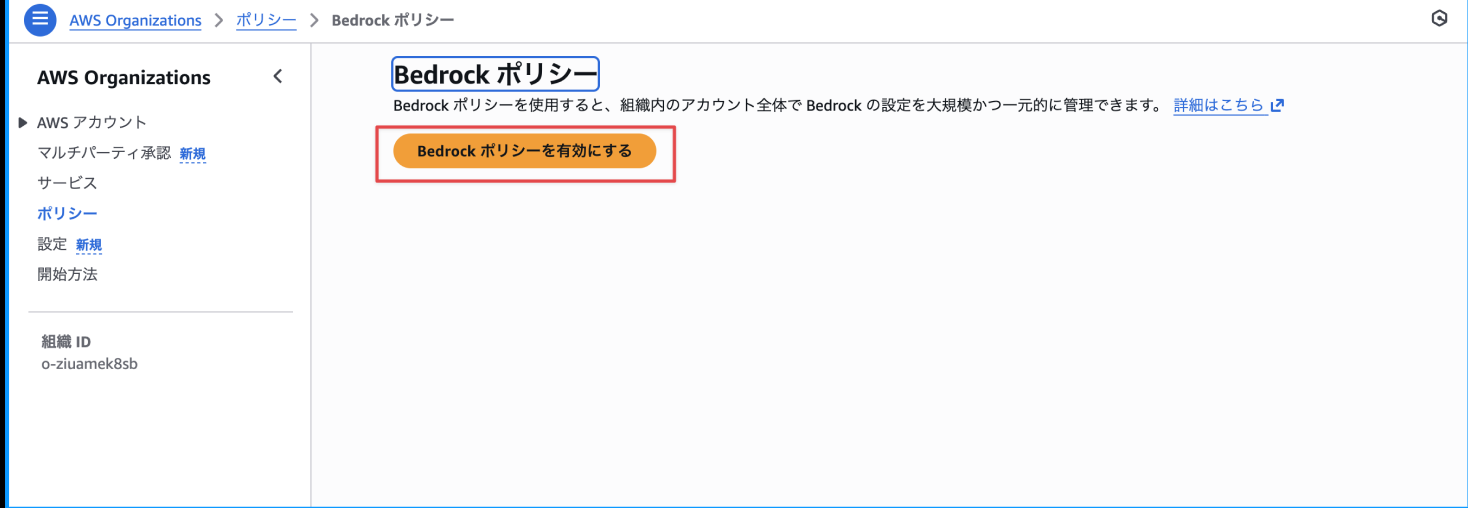
After enabling it, create a specific policy. In the policy, specify the target Guardrails ARN for each region.
{
  "bedrock": {
    "guardrail_inference": {
      "us-east-1": {
        "config_1": {
          "identifier": {
            "@@assign": "arn:aws:bedrock:us-east-1:12345678901:guardrail/xxx:1"
          },
          "input_tags": {
            "@@assign": "ignore"
          }
        }
      }
    }
  }
}
Finally, attach the created policy. You can attach it to the Root, specific OUs, or individual accounts. In this case, I attached it to Root. (Be careful not to forget this step, as I once did and wondered why the policy wasn't taking effect)
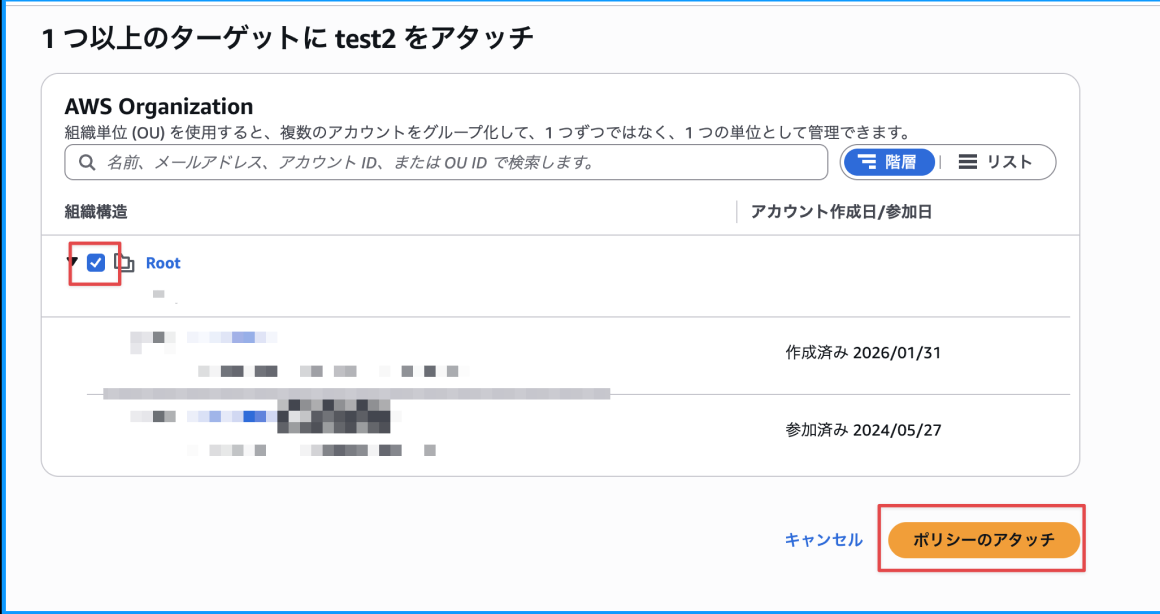
With this, the preparation is complete!
Verifying in the User Account
Checking the User Account Status
Looking at the Bedrock console in the user account, we can see that while there are no Guardrails in the account itself, the Guardrails we created in the management account appear under "Organization-level enforced guard rails."
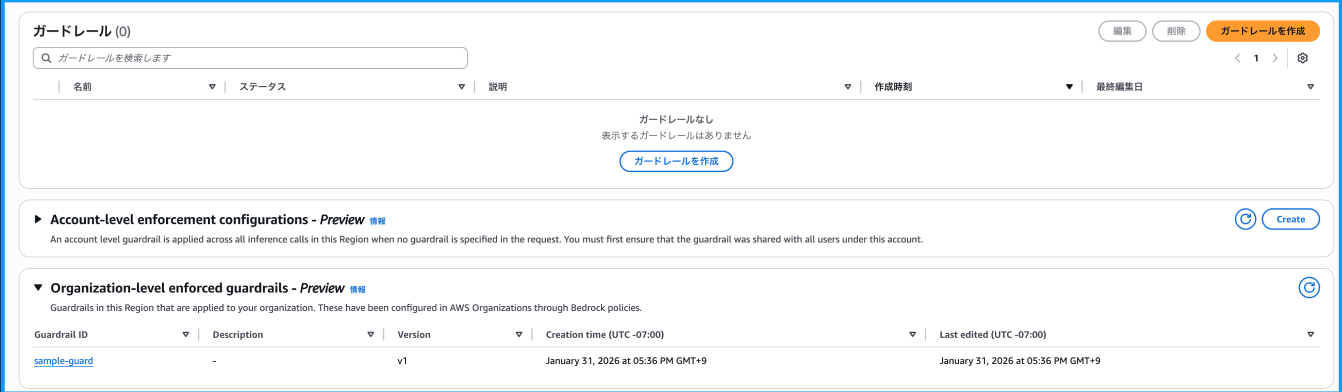
This looks promising.
Testing with Converse API
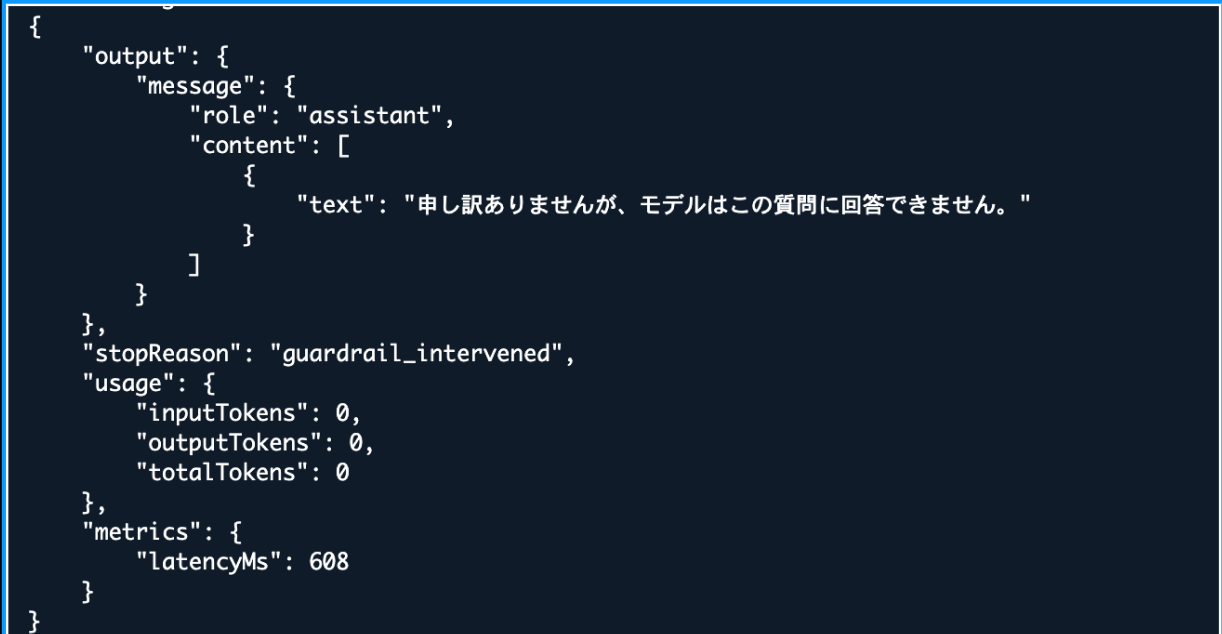
Let's test this using the Converse API. We'll ask about cheese naan without explicitly specifying any guardrails.
aws bedrock-runtime converse \
    --model-id us.anthropic.claude-haiku-4-5-20251001-v1:0 \
    --messages '[{"role":"user","content":[{"text":"チーズナンって美味しいよね"}]}]' \
    --region us-east-1
The fixed message from Guardrails is returned!
{
    "output": {
        "message": {
            "role": "assistant",
            "content": [
                {
                    "text": "申し訳ありませんが、モデルはこの質問に回答できません。"
                }
            ]
        }
    },
    "stopReason": "guardrail_intervened",
    "usage": {
        "inputTokens": 0,
        "outputTokens": 0,
        "totalTokens": 0
    },
    "metrics": {
        "latencyMs": 608
    }
}
The stopReason is guardrail_intervened. Even though the account itself doesn't have Guardrails, they are enforced at the organization level!
Rejection in Strands Agents Too
Let's also try using Strands Agents without specifying any Guardrails.
from strands import Agent
from strands.models.bedrock import BedrockModel

# Setting up Bedrock model (Claude Sonnet)
model = BedrockModel(
    model_id="us.anthropic.claude-sonnet-4-5-20250929-v1:0",
    region_name="us-east-1",
)

# Creating an agent
agent = Agent(model=model)
# Asking about cheese naan
response = agent("チーズナンについて教えて")
print(response)
Here too, despite not specifying any Guardrails, when executed, it returns "I'm sorry, but the model cannot answer this question." (The message appears twice because of a print statement)

It's great that when you want to enforce Guardrails at the organization level for AI agents, users don't need to do anything special as they are automatically applied.
Account-Level Enforcement is Also Possible
While we enforced Guardrails at the organization level in this example, the same can be done at the account level. You can set it up by configuring resource-based policies and selecting the enforcement option from the console. This is also a preview feature.
For account-level enforcement, the resource-based policy grants access only to your own account.
{
    "Version": "2012-10-17",
    "Statement": [{
        "Effect": "Allow",
        "Principal": {
            "AWS": "arn:aws:iam::111222333333:root"
        },
        "Action": [
            "bedrock:ApplyGuardrail",
            "bedrock:SetGuardrail"
        ],
        "Resource": "arn:aws:bedrock:us-east-1:111222333333:guardrail/guardrail-id"
    }]
}
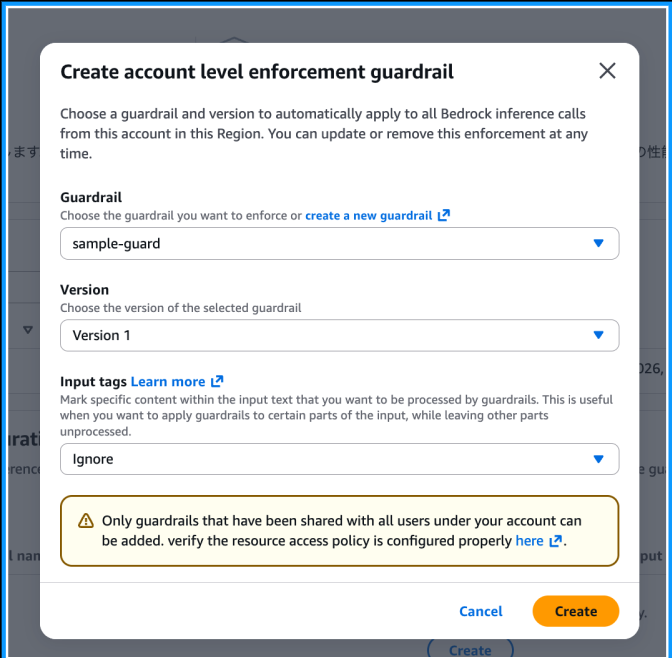
Just configure Create account level enforcement guardrail from the console.
Furthermore, organization-level, account-level, and regular Guardrails can be used together. When combined, the strictest control takes precedence. This allows you to set common safety standards across the organization while adding additional rules for specific accounts.
IaC is an Option When Not Using Organizations
If you're not using AWS Organizations but want to apply the same Guardrails to multiple accounts, a practical option is to deploy identical configurations using IaC tools like CDK or Terraform.
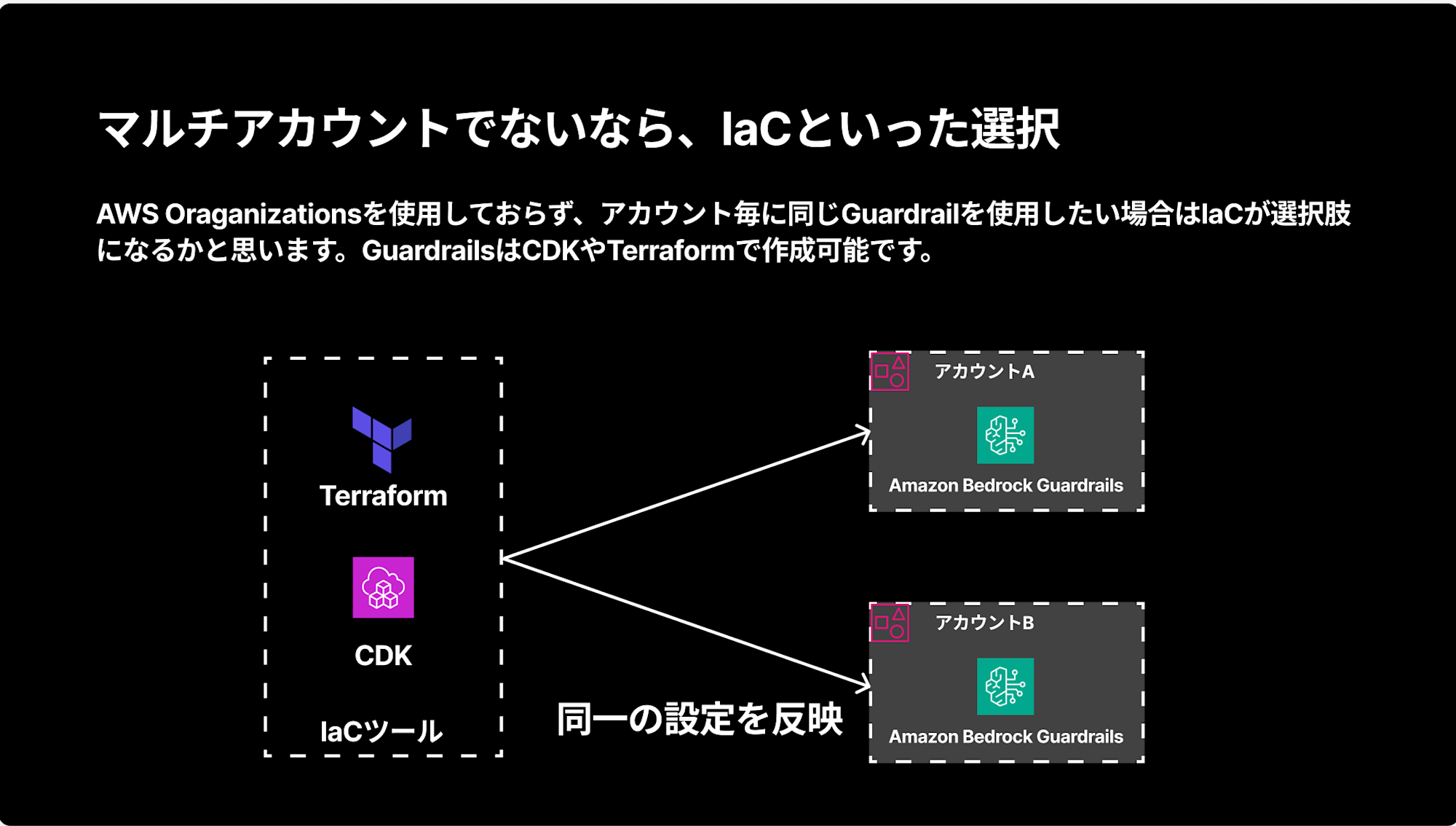
You can implement this simply using L2 Construct from the CDK Bedrock alpha package:
const guardrail = new bedrock.Guardrail(this, 'CheeseNaanGuardrail', {
    guardrailName: 'cheese-naan-blocker',
    description: 'チーズナンに関する話題を拒否するガードレール',
    blockedInputMessaging: 'チーズナンの話はお答えできません。',
    blockedOutputsMessaging: 'チーズナンに関する情報は提供できません。',
});

// Adding a custom topic (prohibiting cheese naan topics)
guardrail.addDeniedTopicFilter(
    bedrock.Topic.custom({
        name: 'Cheese_Naan_Topic',
        definition: 'チーズナンに関する話題、チーズナンの作り方、レシピ、おすすめ店、チーズナンの歴史などを含む。',
        examples: [
            'チーズナンの作り方を教えて'
        ],
        inputAction: bedrock.GuardrailAction.BLOCK,
        inputEnabled: true,
        outputAction: bedrock.GuardrailAction.BLOCK,
        outputEnabled: true,
    }),
);

// Creating a version (recommended for production use)
guardrail.createVersion('v1');
You add a rejected topic with addDeniedTopicFilter and create a version with createVersion.
Using Guardrails Within Organizations Without Bedrock Policy
You might wonder if you can use Guardrails from another account within the same Organization by just setting up resource-based policies without Bedrock Policy, but there are some constraints.
Errors Occur with Converse API
If you try to specify Guardrails from another account within the same Organization in Converse API, you'll get an error saying it doesn't exist.
aws bedrock-runtime converse \
    --model-id "us.anthropic.claude-haiku-4-5-20251001-v1:0" \
    --messages '[{"role":"user","content":[{"text":"こんにちは"}]}]' \
    --guardrail-config '{
        "guardrailIdentifier": "arn:aws:bedrock:us-east-1:xxxxxxxxxxxx:guardrail/xxxxxxxxxx",
        "guardrailVersion": "1",
        "trace": "enabled"
    }' \
    --region us-east-1
An error occurred (ValidationException) when calling the Converse operation:
The model returned the following errors:
The guardrail identifier or version provided in the request does not exist.
The same issue occurs when using Strands Agents.
ApplyGuardrail API Works
On the other hand, the ApplyGuardrail API, which only evaluates Guardrails without performing inference, can use Guardrails from another account within the same Organization.
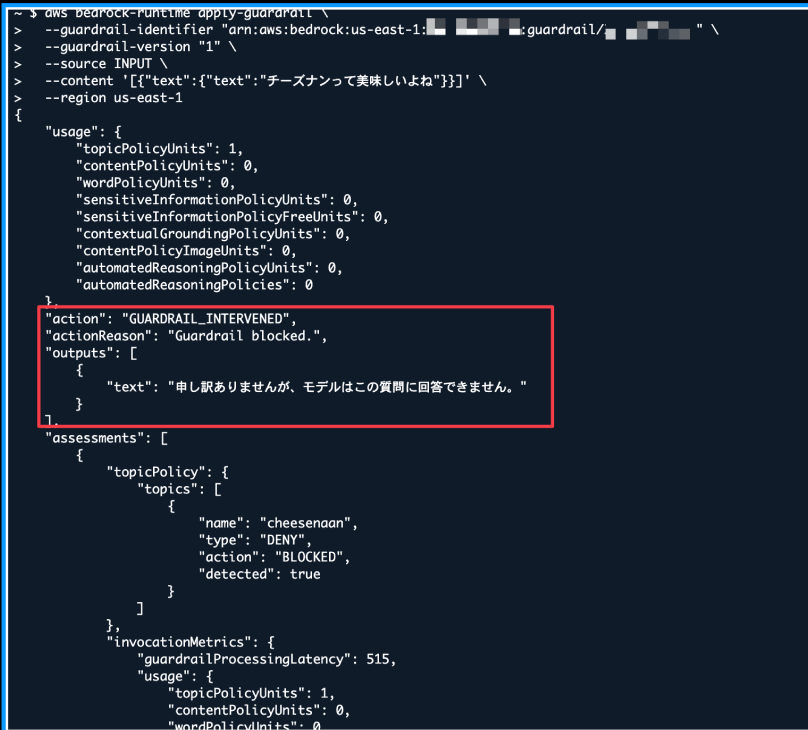
It's also possible to block content in AI agents by combining ApplyGuardrail API with Hooks in Strands Agents. Though this is somewhat tricky...
From my experience, I don't see much benefit in using this approach over Bedrock Policy. I recommend simply using Bedrock Policy.
Question 1: How About Deploying the Same Guardrails with CloudFormation StackSets?
During the presentation, I received a question: "Couldn't you just deploy the same Guardrails to each account using CloudFormation StackSets?"
Since the AWS::Bedrock::Guardrail resource type exists in CloudFormation, it is possible to deploy identical Guardrails configurations to multiple accounts using StackSets. It supports Guardrails features like content filters, rejected topics, word filters, sensitive information filters, and context grounding checks.
However, StackSets is a mechanism to "distribute the same Guardrails configuration to each account," not to "enforce the use of Guardrails." Even with StackSets deployment, users could bypass the Guardrails by calling the Converse API without specifying them.
If you prioritize having Guardrails automatically applied without users having to explicitly specify them, Bedrock Policy is the better choice.
That said, it's important to consider that Bedrock Policy is still a preview feature and requires AWS Organizations.
In addition to deployment via StackSets, CDK, or Terraform, you can also force the specification of Guardrails using the bedrock:GuardrailIdentifier condition key in IAM policies.
This provides another way to enforce Guardrails by making them required for API calls.
Question 2: Do Other Bedrock Services Support Multi-Account Access?
Another question I received was: "Do other Bedrock services, such as Prompt Management, support multi-account access?"
Unfortunately, they do not.
Guardrails may be leading the way in cross-account support because, due to its nature as a safety measure, there's a strong need to enforce it across an entire organization. I hope cross-account support expands to other services in the future.
Conclusion
Although Bedrock Policy is currently a preview feature, it's a powerful option for enforcing generative AI governance in multi-account environments.
It's particularly convenient that once configured in Organizations, Guardrails are automatically applied without users having to be aware of them.
I hope this article has been helpful. Thank you for reading!