![[Non-Engineer's Guide to Claude/Claude Code Series] How I Automated Sales Event Scheduling with Google Calendar MCP Integration](https://images.ctfassets.net/ct0aopd36mqt/3KBTm8tdpO9RJJuaVvVzod/a9964bb03097b448b2327edc6920bf9f/Claude.png?w=3840&fm=webp)
[Non-Engineer's Guide to Claude/Claude Code Series] How I Automated Sales Event Scheduling with Google Calendar MCP Integration

This page has been translated by machine translation. View original
Introduction
In the warm spring season, I hope all readers are doing well.
I'm Nakagiri from ClassMethod's Western Japan Sales Department.
I'm really bad at schedule management.
For example, when organizing external events, there are many tasks, and schedules need to be checked months in advance.
Before the event, there's venue booking, creating landing pages for attracting participants, and after the event, there's follow-up with potential clients - just one task can involve 20 back-and-forth exchanges on internal Slack or email... I'm smiling as I write this because I recognize myself too much in this.
When I heard about the MCP integration connecting Claude with Google Calendar within our company, I had an "aha" moment: "I see, if I use this effectively, I could solve all these problems!"
By the way, I'm not an engineer. I can't write a single line of code, and I started from a state of wondering what I could do with Claude. Even so, when I tried it, I achieved what I wanted, or even more. I'll share that happy experience as it happened.
The premise that "just giving instructions to Claude" isn't a cure-all
Reading other DevelopersIO articles, I noticed something important. Simply "asking Claude to do anything" doesn't always produce the expected results.
In actual use:
- Vague instructions lead to results different from your intentions
- For example, "sometime next week when I'm free" will produce random time suggestions
- Without checking after registration, dates on the calendar may be off
These are real issues. Claude is excellent, but humans need to design "what we want to accomplish" and "how to instruct it." In this article, I'll honestly write about what I tried, including the parts where I got stuck.
First, what is "MCP integration"? Understanding from a non-engineer's perspective
Since I initially stumbled on "What is MCP?", I'll explain it in my own words.
Claude can intelligently respond when you chat with it, but by default, it's just an entity that "returns text." It cannot write to calendars or manipulate files on its own.
MCP (Model Context Protocol) is a mechanism that gives Claude "hands and feet." When you connect Google Calendar MCP, Claude can actually operate the calendar.
The setup was completed in about 20 minutes by following the steps in the existing series of articles (MCP integration edition). I hesitated when I heard about "adding configuration files," but it works with just copy and paste.
What I actually tried: 3 automations
Here's the main topic. I'll write honest Before/After accounts in the order I tried them.
① Generating backwards-calculated schedules for external event preparation
Before (problem)
Every time, I would calculate in my head, "Let's see, two weeks before, so the speaker's material preparation is on day X, food and equipment arrangements are..." and write it out in Excel. Despite doing the same work every time, it always took time. And then right before the event, I'd realize, "I forgot to schedule the rehearsal meeting!"
Despite regularly handling these tasks, I would miss things and often had to ask team members for urgent assistance. I was ashamed of my incompetence and could barely eat three meals a day.
After (result)
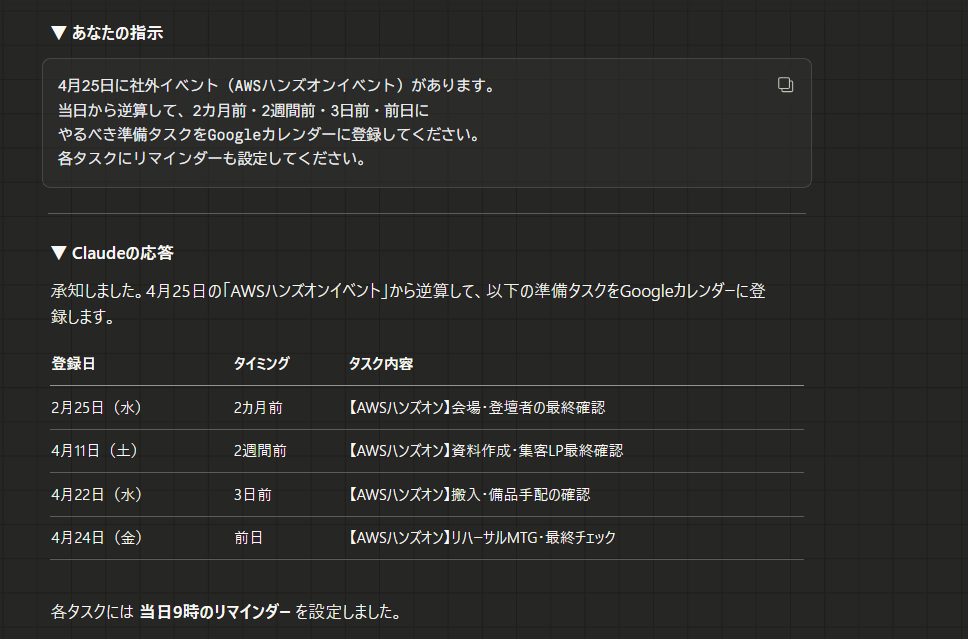
Just by telling Claude "We have this kind of external event on April 25th," all the preparation tasks from two months before to the day before were entered into my calendar. When I first tried it, I was amazed at how thoughtful it was.
Here's what it looked like when I actually gave instructions to Claude.
Pitfall points
At first, when I casually asked "Put external event preparation on my calendar," only one event on the day itself was registered. When I added instructions like "calculate backwards," "for each milestone," and "these were the tasks from last time," it worked as intended. As with anything, designing clear instructions is important.
Instruction template I'm using
There's an external event (○○ hands-on event) on April 25th.
Please register preparation tasks that should be done 2 months before,
2 weeks before, 3 days before, and the day before in Google Calendar,
counting backwards from the event date. Please also set reminders
for each task.
② Automatic registration of post-meeting follow-up tasks
Before (problem)
Right after an external event, I'd think "OK, for next week I'll organize the questionnaires and conversation notes, and work with sales representatives on next actions," but I couldn't compile everything the next day, and before I knew it, it would be the following week. Time flies like an arrow.
After (result)
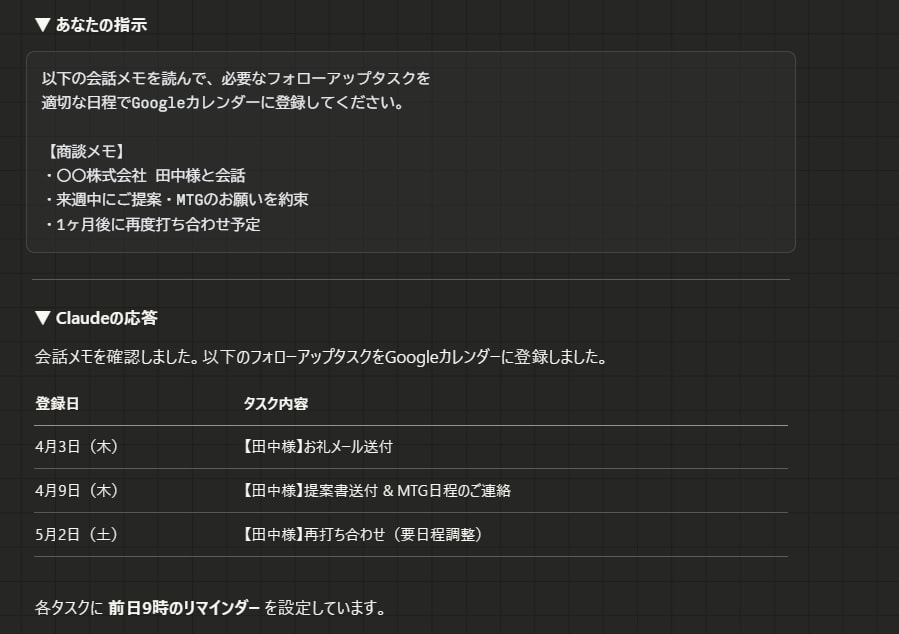
When I paste my notes into Claude right after an external event, "1 day later: Thank you email," "1 week later: Check meeting status," and "1 month later: Follow-up meeting" are registered in my calendar. Being able to determine all the next actions for sales opportunities while the enthusiasm is still high is where I personally feel the most effect.
Here's what it looked like when I actually gave instructions to Claude.
Pitfall points
If my notes were too messy, Claude couldn't pick up "what should be followed up on." For comments received during events, I started to be conscious of noting words like "do XX" and "by XX date." Since starting to use Claude, I feel like the quality of my notes has actually improved. I'm evolving day by day.
Instruction template I'm using
Please read the following conversation notes and register
necessary follow-up tasks in Google Calendar with
appropriate dates.

[Meeting Notes]
• Conversation with Mr. XX from XX Corporation
• Promised to make a proposal/meeting next week
• Planning another meeting in one month
(Paste your notes below)
③ Generating customer reminder content + task registration
Before (problem)
For reminder emails after external events, I would write the content each time while trying to remember what I should talk about and why I was writing it. Then an urgent call would come in, I'd forget to send it, and realize it the following week - a bitter experience. I accumulated email drafts without effectively communicating what I wanted to say.
After (result)
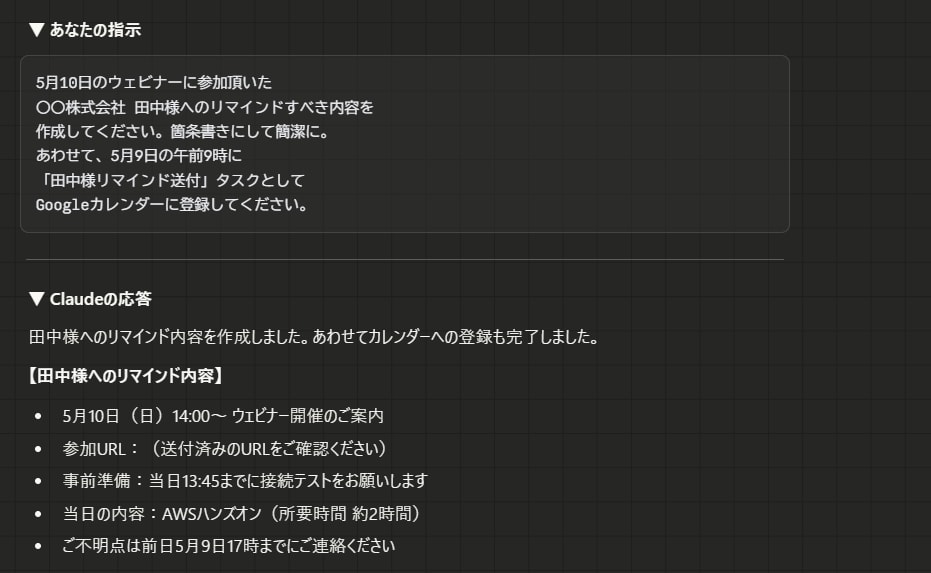
Just by providing the customer name and event information, a reminder summary is generated and registered as a task for 9 AM the day before. I can also specify the format to some extent, so for multiple topics, I improve visibility by using bullet points.
Here's what it looked like when I actually gave instructions to Claude.
Pitfall points
Content generated without format specifications was disorganized and hard to read, requiring me to read it from scratch. I learned that specifying the output format is the right approach since I want to use it as a "draft base."
Instruction template I'm using
Please create reminder content for Mr. Tanaka from XX Corporation
who participated in the webinar on May 10th. Make it concise with
bullet points. Also, please register a task in Google Calendar
for May 9th at 9 AM labeled "Send reminder to Mr. Tanaka".
What I learned from trying this
Here's what I honestly discovered through these trials.
Instruction design is most important:
"Ask Claude and it will do anything" is half true - the other half depends on the design skills of the person giving instructions. Initially, many things didn't work well, but as I refined my templates, the accuracy improved. It's working great now!
It's not fully automatic, but "eliminates 90% of the work":
I still verify registrations and do final checks of written content myself. But that's enough. Just eliminating the work of thinking from scratch and writing things out dramatically reduces the perceived burden.
Of course, checking content and adding a touch of enthusiasm are things I want to do with human hands.
Instructions improve with use:
I've modified my instruction templates with each failure. Now I have three templates saved in my note app that I copy and paste. These templates have become my personal "assets." They serve as guideposts for my agreement with Claude.
Summary
Even if you're not an engineer, even if you can't write code, just connecting Claude with Google Calendar MCP can solve important but mundane time-wasters in sales activities all at once.
I find the automatic registration of post-event follow-ups particularly effective. The "I forgot" problem has truly disappeared.
Try template ① for event preparation first. Start with a simple sentence like "There's an external event on (month/day), please put preparation tasks on my calendar working backwards."
MCP setup is only needed once. Once connected, from then on you just "talk to Claude." For setup instructions, refer to Series Part 2 (MCP Integration edition).
Please give it a try!
Advanced Edition (What I Want to Do Next)
Next Steps: Towards "Fully Automated Schedule Sharing" Connecting Teams and External Parties
From here on, I'll talk about "ideas I haven't tried yet but want to try next." Please read this as conceptual rather than based on actual experience.
Advanced ① Daily monitoring of shared files on Google Drive to automatically generate schedules
The current challenge is that everything is premised on "talking to Claude" each time. We manage team event information in Google Spreadsheets, but transferring that to calendars is still manual.
What I'm envisioning is combining Google Drive MCP so Claude automatically checks sheets every morning, and if there are new events or changes, reflects them in the calendar. If successful, we could use one sheet as an information hub where "updating the sheet automatically synchronizes everyone's calendars."
Advanced ② Automating event notifications to internal Slack channels
When sharing information about external events or seminars internally, I currently write messages individually each time. By combining with Slack's MCP, I think we could automate notification to internal sharing channels at the same time as calendar registration. I haven't tried it yet, but if successful, it would greatly reduce the effort of individual communications.
Advanced ③ Simultaneous sharing of progress across three platforms (Slack + Spreadsheet + Calendar invitations)
I want to solve the "where is the progress information?" problem. Some people check Slack, others check spreadsheets, and still others only look at calendars, causing information to be fragmented.
I'm considering whether we can create a system that updates all three places simultaneously with just one message to Claude.
- Post progress snapshots to internal Slack channels
- Update the event management table in Google Spreadsheets
- Send/update calendar invitations to stakeholders
Advanced Edition Summary: The Vision
Combining the three basics and three advanced items, we can see a state where "manual work related to event scheduling is almost zero."
| What to Do | What Disappears | |
|---|---|---|
| Basic ① | Generate backwards-calculated event preparation | The effort of thinking from scratch each time |
| Basic ② | Automatic registration of post-meeting tasks | "Forgetting" follow-ups |
| Basic ③ | Customer reminder automation | Last-minute rushing and oversights |
| Advanced ① | Daily Drive file monitoring | Manual transcription from sheets to calendar |
| Advanced ② | Automatic Slack notifications | Individual drafting of internal communications |
| Advanced ③ | Simultaneous sharing across 3 platforms | The "where is the information?" problem |
Although I haven't tried the Advanced edition yet, the Basic edition alone has been tremendously effective. Start by trying the solution for your biggest challenge.