![[Small tip] Want to change iTerm2 background color while Claude Code is running](https://images.ctfassets.net/ct0aopd36mqt/3KBTm8tdpO9RJJuaVvVzod/a9964bb03097b448b2327edc6920bf9f/Claude.png?w=3840&fm=webp)
[Small tip] Want to change iTerm2 background color while Claude Code is running

This page has been translated by machine translation. View original
When using Claude Code, it can be difficult to tell at a glance whether the terminal is in its normal state or if Claude Code is running. I often find myself accidentally sending Claude Code prompts to a regular terminal, or conversely, typing normal commands inside Claude Code.
This blog will show you how to change the iTerm2 background color while Claude Code is running, making it visually easy to distinguish the execution state. We'll use Claude Code Hooks and AppleScript (osascript).
Background Information
Claude Code Hooks
Claude Code's Hooks are a feature for executing shell commands at specific points. They allow you to run user-defined shell commands during the Claude Code lifecycle, such as "at session start" or "after a subagent completes a task."
For syntax details, refer to the Hooks reference. They're managed as configuration files (settings.json, settings.local.json).
| Configuration file path | Notes |
|---|---|
~/.claude/settings.json |
User settings |
.claude/settings.json |
Project settings |
.claude/settings.local.json |
Local project settings |
Changing iTerm2 background with AppleScript
AppleScript is a scripting language built into macOS. It helps automate various tasks in macOS (such as creating shortcuts, repetitive tasks, application operations, etc.).
iTerm2 supports AppleScript. You can execute various iTerm2 settings/operations from shell scripts. For example, the following command launches a new iTerm2 window with the default profile:
osascript <<EOF
tell application "iTerm2"
  create window with default profile
end tell
EOF
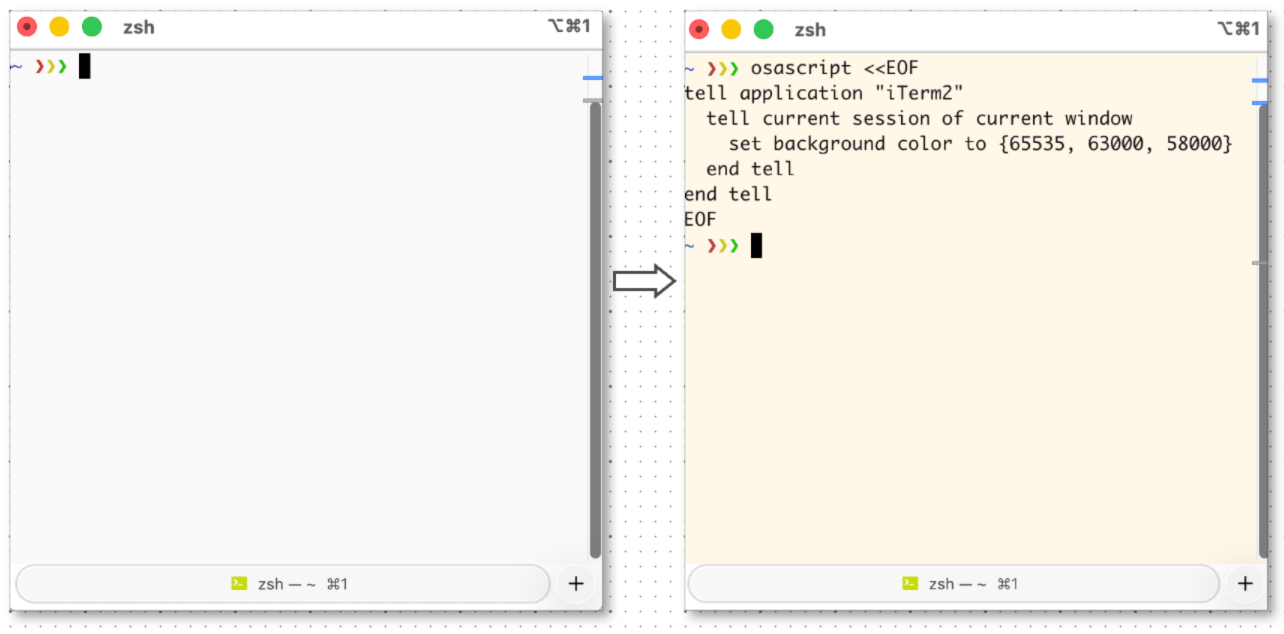
And you can change the iTerm2 background with the following command:
osascript <<EOF
tell application "iTerm2"
  tell current session of current window
    set background color to {65535, 63000, 58000}
  end tell
end tell
EOF
Changing iTerm2 background while Claude Code is running
With the background information covered, we've almost got all the elements we need. We just need to create a shell script to "change iTerm2's background color" and execute that shell script when Claude Code sessions start/end.
This translates to the following Hooks configuration:
{
  "hooks": {
    "SessionStart": [
      {
        "hooks": [
          {
            "type": "command",
            "command": "{Shell script to change iTerm2 background color (start)}"
          }
        ]
      }
    ],
    "SessionEnd": [
      {
        "hooks": [
          {
            "type": "command",
            "command": "{Shell script to change iTerm2 background color (end)}"
          }
        ]
      }
    ]
  }
}
I created a shell script to change iTerm2's background color at ~/.claude/scripts/set-iterm2-bg.sh. It switches the background color based on the argument start / end. Please adjust the colors to your preference.
#!/bin/bash

case "$1" in
  start) color="{65535, 63000, 58000}" ;; # Light orange: please update as needed
  end)   color="{65535, 65535, 65535}" ;; # White: please update as needed
  *)     echo "Usage: $0 {start|end}" >&2; exit 1 ;;
esac

osascript <<EOF
tell application "iTerm2"
  tell current session of current window
    set background color to $color
  end tell
end tell
EOF
Let's make it executable:
chmod +x ~/.claude/scripts/set-iterm2-bg.sh
The final Hooks configuration looks like this:
{
  "hooks": {
    "SessionStart": [
      {
        "hooks": [
          {
            "type": "command",
            "command": "~/.claude/scripts/set-iterm2-bg.sh start"
          }
        ]
      }
    ],
    "SessionEnd": [
      {
        "hooks": [
          {
            "type": "command",
            "command": "~/.claude/scripts/set-iterm2-bg.sh end"
          }
        ]
      }
    ]
  }
}
Verification
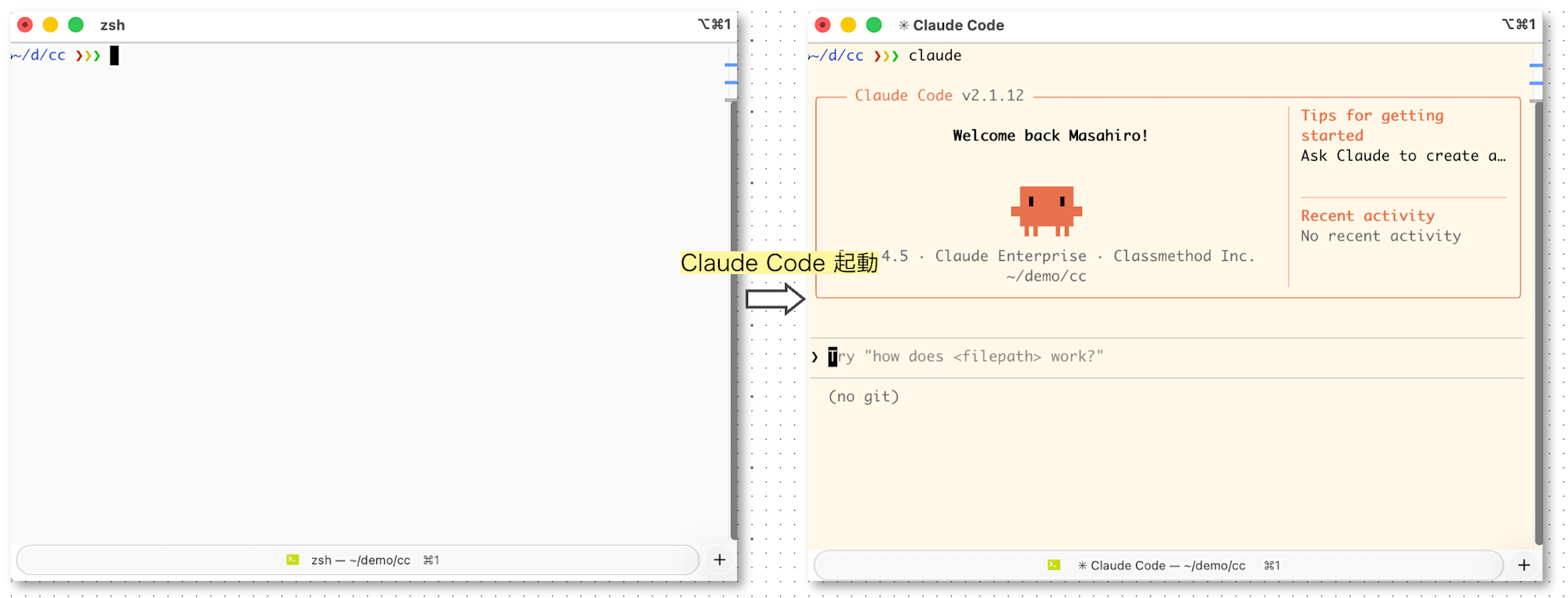
I confirmed that the background color changes when Claude Code starts.
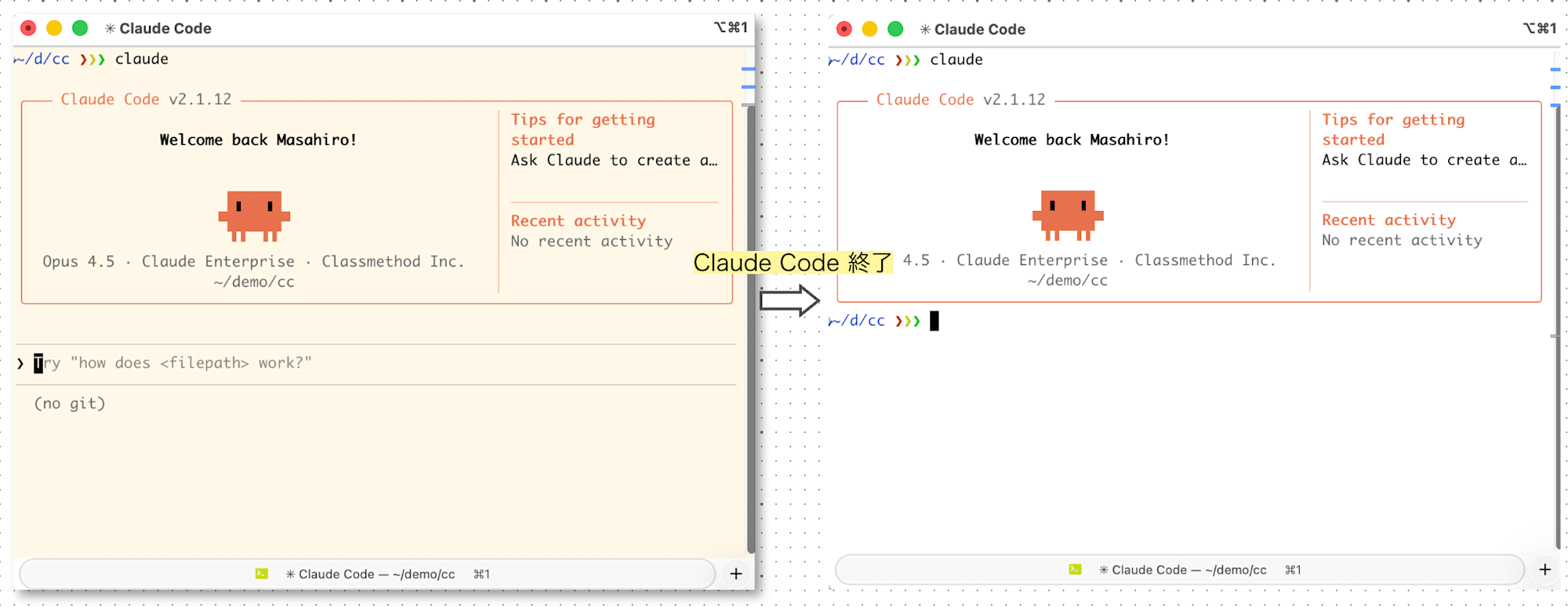
And returns to normal when Claude Code exits.
Conclusion
I've shown how to make the Claude Code active state visually easy to identify.
It's a small tweak, but might be useful for those who frequently switch between Claude Code and normal shell operations[1].
I hope you find this helpful.
References
- Getting Started with Claude Code Hooks - Claude Code Docs
- Hooks Reference - Claude Code Docs
- Scripting - Documentation - iTerm2 - macOS Terminal Replacement
Although you can execute shell commands in Claude Code with
!, I don't use it much because the completion features are lacking. ↩︎