![[Non-Engineer's Guide to Claude/Claude Code Series] What I Realized When Trying to Automate Regular Tasks with Claude Code as a Non-Engineer](https://images.ctfassets.net/ct0aopd36mqt/3KBTm8tdpO9RJJuaVvVzod/a9964bb03097b448b2327edc6920bf9f/Claude.png?w=3840&fm=webp)
[Non-Engineer's Guide to Claude/Claude Code Series] What I Realized When Trying to Automate Regular Tasks with Claude Code as a Non-Engineer

This page has been translated by machine translation. View original
About this Series
I'm Jinno from the Account Sales Department at Classmethod. I usually work as an account sales representative for public cloud services like AWS and cloud services like Claude.
This article is part of the "Claude/Claude Code Series for Non-Engineers." In this series, we share experiences of using Claude from a non-engineer's perspective.
This is my second article in this series, and I'll be writing about something that didn't go well. It's about "Trying to completely automate my morning and evening routine tasks with Claude Code, and why it didn't quite work out."
While it wasn't successful, I think the insights I gained might be helpful for non-engineers, so I'd be happy if you'd read this for reference.
What I Wanted to Do
My daily morning and evening routine tasks look like this:
Morning Routine:
- Clock in using KING OF TIME (KoT)
- Check today's schedule on Google Calendar
- Check team members' activities from yesterday on HubSpot and daily reports (Slack)
Evening Routine:
- Clock out using KoT
- Create daily report based on Google Calendar schedule and HubSpot activity logs
None of these tasks are particularly difficult on their own, but since I repeat them every day, I thought "it would be amazing if I could completely automate this whole process with Claude Code." The vision was to have everything—from clocking in to checking schedules to reviewing team activities—completed with a single command.
What I Created with Claude Code
I consulted Claude Code about "automating my routine tasks for when I arrive at and leave work," starting with automating KoT time tracking.
After several exchanges to finalize the details, the resulting structure looked like this:
kot-agent/
├── agent.py           # Main (start=clock in / end=clock out command)
├── kot.py             # Automate browser operations for KoT using Playwright
├── secrets.py         # Securely retrieve authentication info with 1Password CLI
├── calendar_client.py # Google Calendar API integration
├── reporter.py        # Auto-generate daily reports using Claude API
└── SETUP.md           # Setup instructions (for non-engineers)
The flow works like this:
python3 agent.py start
  ↓
1. Retrieve KoT ID/password from 1Password CLI
2. Auto-launch browser with Playwright and log in to KoT
3. Overcome two-factor authentication using 1Password TOTP code
4. Click the clock-in button
5. Save screenshot and complete
The browser launched by itself, smoothly performed operations, and it was amazing. This only took about 15 minutes to set up.
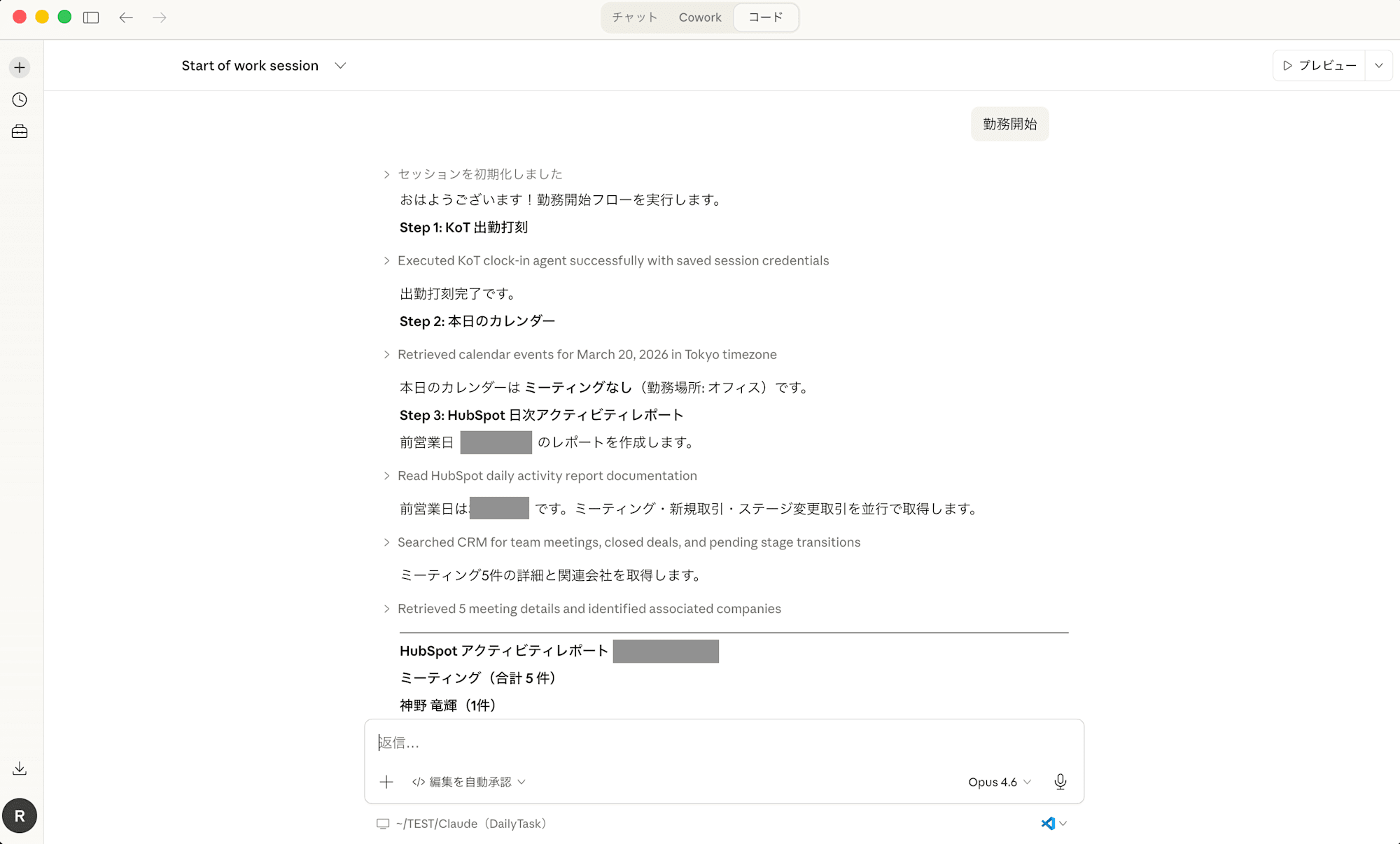
As you can see from the Claude Code screen above, it automatically progresses through each step.
The Importance of "Defining Requirements" as a Non-Engineer
I'd like to share an episode I experienced during development that I think is important for non-engineers.
When I first consulted with Claude Code, it suggested "writing ID and password directly in a .env file" to handle authentication credentials. While technically simple and functional, storing passwords as plaintext in files isn't good from a security perspective. We have security awareness training at our company about handling authentication information, so I recognized this risk. I specified to Claude, "Please use 1Password CLI so that authentication information isn't stored in the code." This is a case where I assessed and modified what Claude proposed based on what I knew we should protect as users.
On the other hand, I accepted Claude Code's suggestions as-is for technical choices like using Playwright for browser automation, Google Calendar API for retrieving schedules, and Claude API for daily report formatting. Honestly, I didn't even know what Playwright was, but Claude explained it as "a library for automating browser operations," which made sense to me.
What I realized from this experience is that even if you don't understand the technical aspects, you as a user need to properly define "what you want to do" and "what must be protected." You can leave "how to do it" mostly to Claude Code, but you need to clearly instruct "what to do" and "what not to do."
The authentication part might seem challenging, but (in my case, I just happened to remember our company's security awareness training) you can ask Claude, "Is this approach generally acceptable from a security perspective? Please check and report any potential vulnerabilities or risks," and it will research and provide a report before implementation. I recommend checking whenever you feel uncertain.
Using It the Next Morning - It Didn't Work
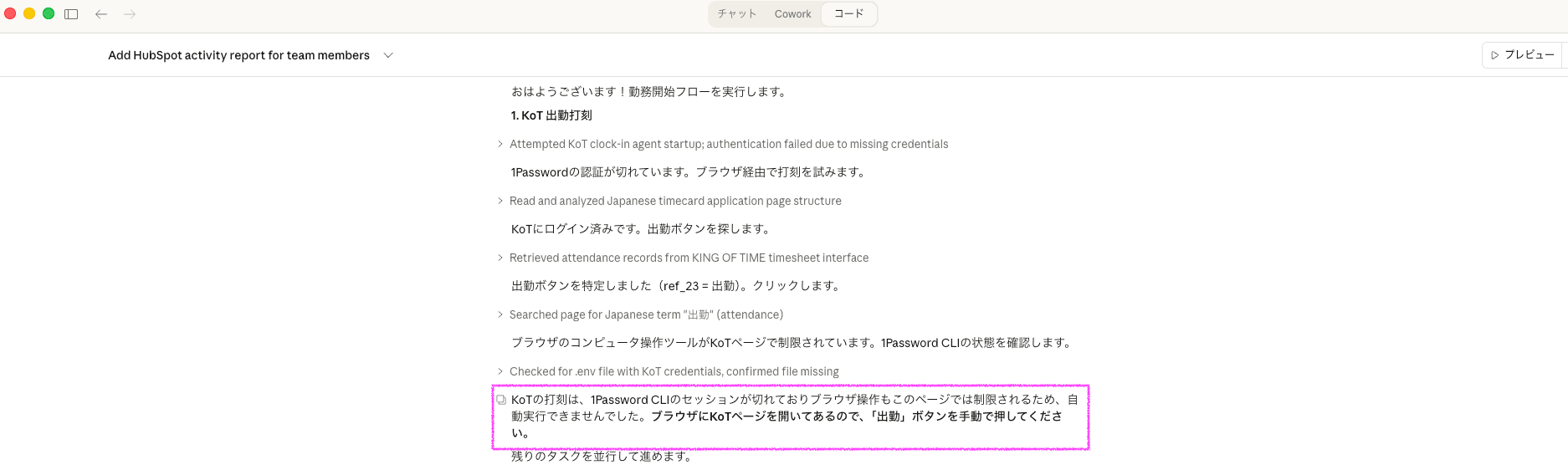
The next morning, when I enthusiastically told Claude Code "I'm starting work!", I encountered numerous errors with the KoT time tracking. While troubleshooting with Claude Code, I had some realizations.
1Password CLI Authentication Expired, Preventing Clock-In
It makes sense in retrospect, but 1Password CLI sessions expire after a certain period for security reasons. When I ran the script the next morning, the 1Password CLI session had expired, so it couldn't retrieve the KoT authentication information.
I was told to run op signin for re-authentication, but this required Touch ID or interactive password entry, which failed with an "operation not supported by device" error from the Claude Code terminal.
❌ 1Password CLI authentication expired → credential retrieval failed → couldn't clock in
Ironically, the security features of 1Password CLI—which I had chosen for security reasons—became a barrier to automation.
Alternative Solutions Proposed by Claude Code Also Failed
When Playwright-based clock-in failed, I asked Claude Code "Is there any way around this?" It suggested using Claude Code's own browser operation feature (Chrome MCP) to directly interact with KoT. Having alternative solutions offered was genuinely helpful.
When I tried it, Chrome MCP successfully opened a new tab and navigated to the KoT page. The page loaded in a logged-in state, and I could see the clock-in/clock-out buttons as text.
However, there were problems:
- Buttons didn't appear in the accessibility tree: While "Clock In" and "Clock Out" text was visible on the page, Claude Code's search tool couldn't detect them as elements
- Click operations were rejected: When trying mouse operations, they failed with a
Cannot access a chrome-extension:// URL of different extensionerror
In the end, Claude could see the screen but couldn't press the buttons, as it reported to me, so this approach also failed.
Realizing "Manual Is Faster" During the Troubleshooting Process
While troubleshooting these issues with Claude Code, I noticed that for safety reasons, Claude Code requires user approval for each command execution. A confirmation like "Is it okay to execute this command?" appears every time, requiring me to click "Yes."
This wasn't noticeable when everything was running smoothly, but while going back and forth troubleshooting, I realized "Wait, wouldn't it be faster to just open KoT and press the button myself?"
What didn't feel like a hassle when automating the entire business process became apparent only when focusing on a single task during troubleshooting. (Looking back, I feel I should have noticed sooner.)
Incidentally, Claude eventually started telling me to "just press it yourself." (Laughs)
Reflection: Did I Really Need to Delegate This to Claude Code?
While researching, I found that there were ways to link the 1Password desktop app with the 1Password CLI, requiring the user to authenticate each time.
While considering how to make it work properly, I had some insights about using Claude Code for automation in the future.
There's Little Point in Automating Tasks That Aren't Time-Consuming
Clocking in with KoT only takes about 30 seconds—just accessing a specific URL and pressing a button.
Trying to automate such service operations through Claude Code adds the complexity of authentication barriers, unstable browser operations, and approval clicks, making it more complicated.
The honest conclusion is that there was no need to forcibly automate tasks that weren't particularly burdensome to begin with.
The Ideal vs. Reality of "Automating an Entire Routine"
The concept of "completing all morning tasks with a single command" was attractive. However, to automate a sequence of tasks, every step needs to work reliably. If any part fails, it triggers interactive troubleshooting with Claude Code.
For non-engineers, this troubleshooting itself requires consulting with Claude Code, so the cost incurred when something goes wrong greatly exceeds the cost of doing it manually.
Saving a few dozen seconds when it works well versus spending dozens of minutes troubleshooting when it fails—considering this asymmetry, I personally think it's more reasonable to manually and reliably complete morning routine tasks.
Lessons Learned from Failure
This failure wasn't wasted. Rather, it provided important insights.
1. How to Identify Tasks That Don't Need Claude Code
From this experience, I developed criteria for tasks that don't need to be delegated to Claude Code:
- Operations on external services requiring authentication: The service itself already provides an easy-to-use UI
- Tasks that can be completed manually within minutes: The benefits of automation are outweighed by setup and maintenance costs
Conversely, "tasks that are time-consuming manually," "complex procedures," or "processing and editing local files" might be better suited for Claude Code.
2. Defining "What You Want" and "What to Protect" Is Human Work
As mentioned in the 1Password episode, Claude Code excels at proposing "how to do things." However, defining "what to do" and "what must be protected" needs to be done by humans.
Even as a non-engineer, rather than leaving everything to Claude Code, it's important to articulate requirements and constraints. Even without technical knowledge, you should be aware of requirements like "I don't want to store passwords in plaintext" or "I want to comply with our company's security policy."
3. Excellent as a Consultant Who Offers Alternatives
Although the automation itself wasn't successful, the process of interacting with Claude Code was valuable.
When Playwright stopped working, it suggested an alternative using Chrome MCP; when the 1Password CLI authentication issue arose, it implemented a fallback mechanism to environment variables. Being able to have a dialog like "That didn't work, so let's try this" is much more efficient than quietly researching and experimenting on your own.
While I ultimately abandoned automating the clock-in process, I gained technical knowledge about "1Password CLI," "Playwright," and "Google Calendar API integration." This knowledge will likely be useful in other contexts in the future.
Conclusion
I've shared my story about "trying to automate my morning and evening routine tasks with Claude Code, and why it didn't quite work out."
My personal conclusion: Tasks that already have user-friendly designs from the service provider, like operations on web services involving authentication, don't need to be forcibly automated with Claude Code.
This isn't to say "Claude Code is unusable." Rather, Claude Code has tasks it excels at and tasks that don't need to be delegated to it.
For non-engineers considering automation with Claude Code, there's one thing I'd like you to remember:
Try to imagine "the cost when things don't go well."
If a task takes 5 minutes manually, you'll still finish it in 5 minutes if automation fails.
But troubleshooting when an automation system breaks can take tens of minutes to hours for non-engineers.It's important to consider this asymmetry when deciding "should this really be automated?"
I hope this helps non-engineers with their Claude usage, including the failures.