
I tried automating ETL job execution tests with Claude Code

This page has been translated by machine translation. View original
Introduction
I'm kasama from the Data Business Division.
In this article, I'll demonstrate how to automate a series of tests from Step Functions job execution to data validation with Athena and evidence recording using Claude Code's Skills and Hooks, using a simple AWS ETL pipeline as an example.
Prerequisites
- AWS CLI v2, Python 3.9+, Node.js 18+, pnpm
- IAM user with MFA device configured
- Authentication method supporting AWS CLI's
credential_process(authentication completed withaws ... --profile <your-profile>). I'm using aws-vault + 1Password CLI
ETL Pipeline Overview
The test target is a simple ETL pipeline built with EventBridge + Step Functions + Lambda (DuckDB).
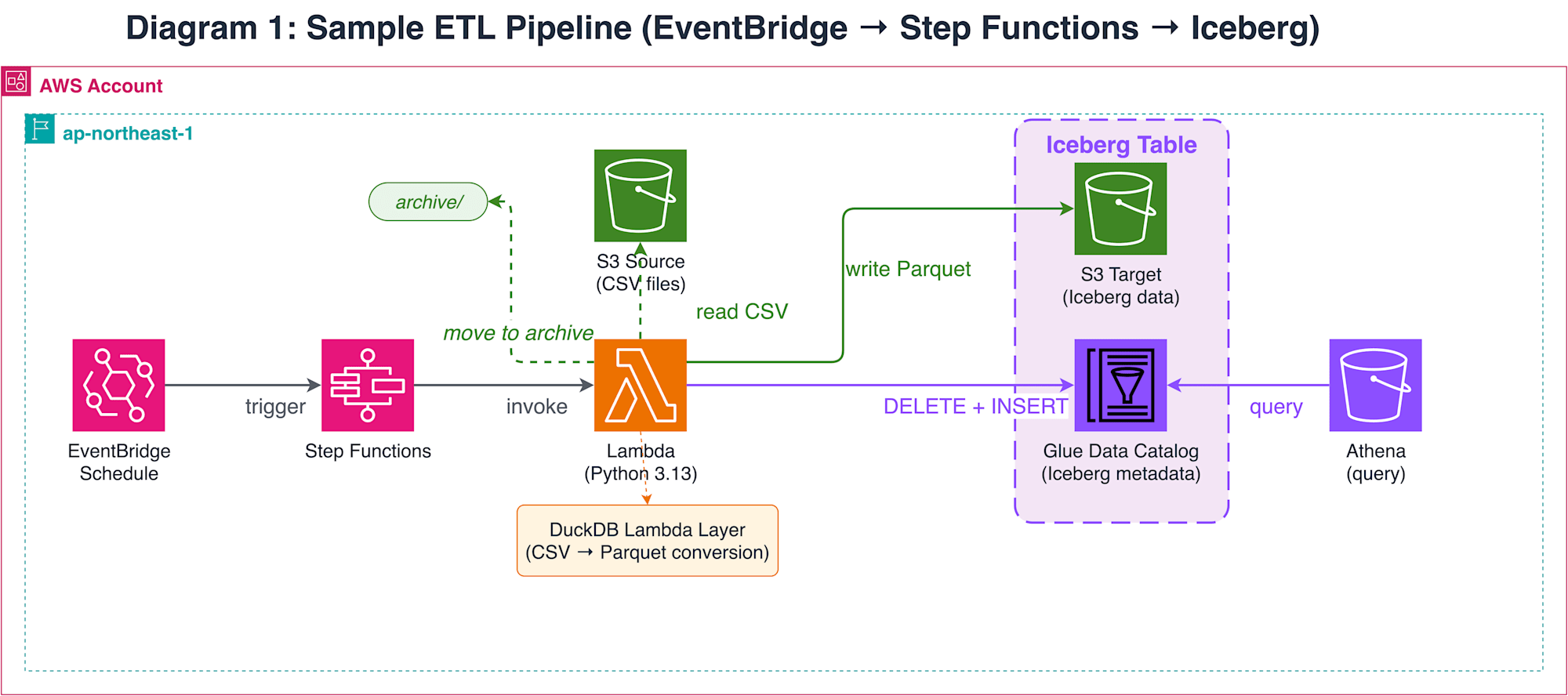
Lambda reads CSV files placed in S3 and writes to an Iceberg table on Glue Data Catalog using DuckDB's Iceberg Write feature. Processed CSV files are moved to an archive path. While this pipeline is simple, testing requires execution and verification of a sequence of operations across AWS resources, from Step Functions job launch to Iceberg table writing and S3 file movement.
Test Automation Approach
Testing this pipeline requires sequential execution of multiple AWS operations: Step Functions job launch → polling → Athena query → S3 file verification. While this is possible in a Claude Code interactive session, having to approve permission prompts for each AWS CLI call is impractical during testing.
There are two main methods to automate permission confirmations. The first is claude -p (pipe mode) + --allowedTools. This pattern, called the Ralph Loop, repeatedly calls claude -p from a shell script. You can specify allowed tools with glob patterns (e.g., Bash(aws *)), and tool calls not matching the pattern are blocked. The Anthropic official repository provides this as the ralph-wiggum plugin.
The second method is --dangerously-skip-permissions + PreToolUse hooks. This skips all permission confirmations but validates commands with hooks scripts.
Both methods bypass permission confirmations, differing in "what guards the execution":
| Method | Permission Control | Guard Mechanism | Command Verification Granularity |
|---|---|---|---|
claude -p+--allowedTools |
Allow by glob pattern | Pattern matching | Tool name + argument prefix match |
--dangerously-skip-permissions + hooks |
Skip all | PreToolUse hook script | Arbitrary parsing of command string |
I chose the hooks pattern because glob matching with --allowedTools makes it difficult to validate shell operators. I encountered cases where commands like this matched Bash(aws *) and passed:
aws s3 ls && rm -rf /
The official documentation's Permissions page also notes:
Bash permission patterns that try to constrain command arguments are fragile.
On the other hand, --dangerously-skip-permissions is risky as its name suggests. The official documentation recommends using it in isolated environments like containers or VMs. Since I'm using it in a local environment, I'm mitigating risk with multiple layers of defense:
- PreToolUse hooks (
validate_commands.py) verify commands with a default-deny policy. After tokenizing withshlex.shlex(punctuation_chars=True), it splits by operator tokens and validates each segment against an allow-list. Per-skill hooks automatically enable this only during/run-integration-testskill execution - The IAM role also denies destructive AWS operations
The official documentation offers /sandbox (OS-level filesystem and network restrictions) as a safer alternative to --dangerously-skip-permissions. Consider using /sandbox if you want more secure operations. I'm using --dangerously-skip-permissions for this simple local verification.
If you want to ensure safety with just --allowedTools, combining Ralph Loop with PreToolUse hooks is an option. This provides double protection (glob matching + hooks) without using --dangerously-skip-permissions, but requires workflow management with shell scripts. I chose the hooks pattern for declarative workflow management with skills and maintaining context in a single session.
Architecture
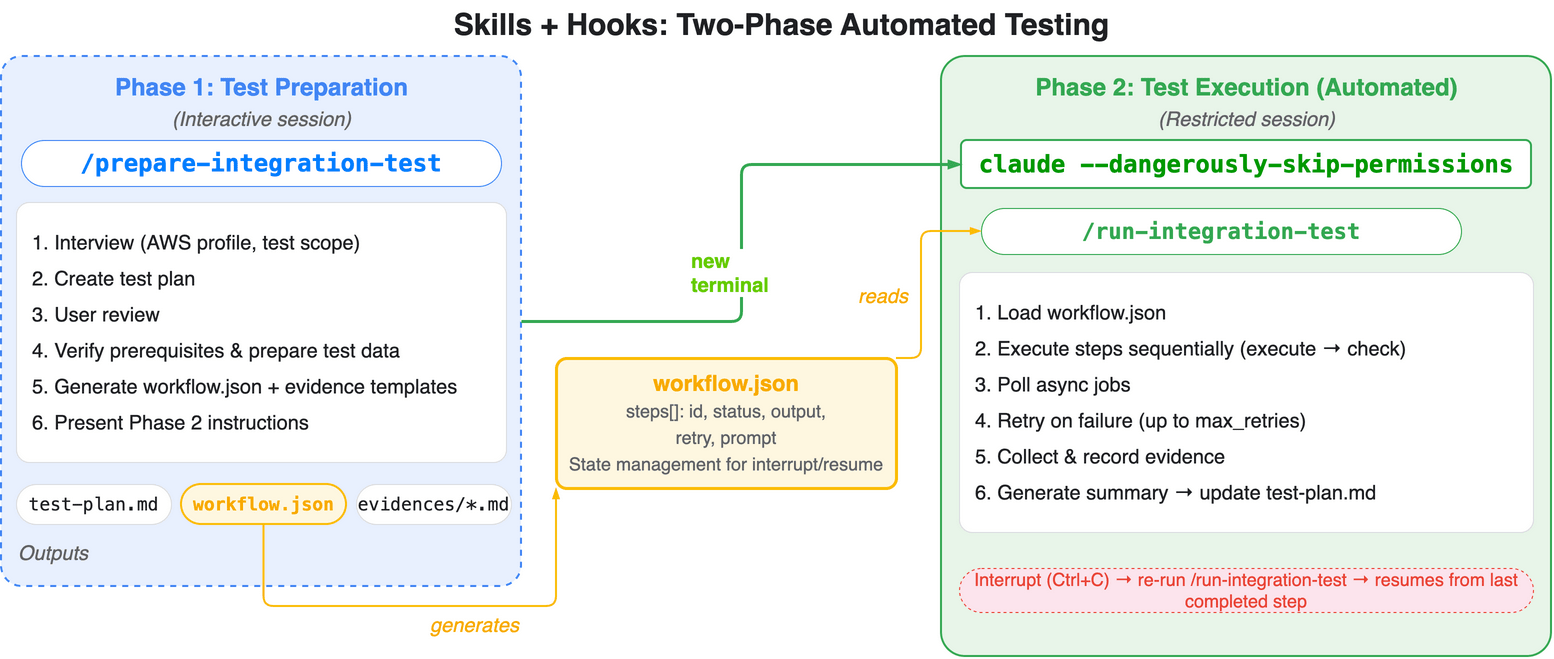
The overall solution consists of two phases:
| Phase | Launch Method | Component | Content |
|---|---|---|---|
| Phase 1 (Preparation) | claude |
/prepare-integration-test |
Test plan generation + prerequisite verification + workflow.json generation |
| Phase 2 (Execution) | claude --dangerously-skip-permissions |
/run-integration-test |
Step execution + evidence recording + summary creation |
Phase 1 is handled by Claude Code's skill (/prepare-integration-test). It analyzes CDK code and design documents to generate a test plan (test-outputs/test-plan.md), verifies prerequisites (authentication, infrastructure existence, test data placement) after user review and approval, and outputs test-outputs/workflow.json and evidence templates (test-outputs/evidences/), then presents the launch command for Phase 2. User interactions (test scope confirmation, profile selection, etc.) are completed in this phase.
For Phase 2, the user launches a session with claude --dangerously-skip-permissions in a separate terminal tab and executes the /run-integration-test skill. The skill reads workflow.json and processes all steps sequentially within a single session. It waits for asynchronous jobs (Step Functions, etc.) using sleep and polling their status. Results of each step are recorded as evidence files under test-outputs/evidences/ for each test case. When all steps are completed, the final summary step records the results in test-plan.md. If issues are detected, you can modify the code and run /prepare-integration-test again to switch to retest mode, which regenerates workflow.json for only the target steps. While --dangerously-skip-permissions skips permission confirmations for tool calls, PreToolUse hooks (validate_commands.py) defined in SKILL.md's per-skill hooks are automatically applied during skill execution, validating commands with a default-deny policy to block commands outside the allow-list.
Working with AWS in Claude Code
When operating AWS from Claude Code, multi-layered defense is essential to prevent unintended resource modifications or deletions. I ensured safety with three layers:
- IAM role (
cfn/claude-code-resources.yaml): Based onReadOnlyAccess, with minimal write permissions added only for test execution (Step Functions launch, Athena query execution, S3 test data placement, etc.). MFA required and maximum session time of 1 hour - PreToolUse hooks (
validate_commands.py): After tokenizing withshlex.shlex(punctuation_chars=True), splits by operators and validates each segment against an allow-list. AWS CLI subcommands pass only with read prefixes (describe-,list-,get-etc.) and explicit write permissions (start-execution,start-query-execution, etc.). Automatically applied only during/run-integration-testskill execution
For command restrictions in hooks, I referenced this article:
Implementation
The implementation code is stored on GitHub.
65_aws_cdk_etl_auto_test/
├── .claude/
│   ├── skills/
│   │   ├── prepare-integration-test/
│   │   │   ├── references/
│   │   │   │   ├── INSTRUCTIONS.md
│   │   │   │   └── test-cases-template.md
│   │   │   └── SKILL.md
│   │   └── run-integration-test/
│   │       ├── references/
│   │       │   └── INSTRUCTIONS.md
│   │       └── SKILL.md
│   ├── settings.local.json.example
│   └── validate_commands.py
├── cfn/
│   └── claude-code-resources.yaml
├── drawio/
│   ├── etl_pipeline.drawio
│   └── skills_hooks_automation.drawio
└── eventbridge-sfn-iceberg/
    ├── cdk/
    │   ├── bin/
    │   │   └── app.ts
    │   ├── layers/
    │   │   └── requirements.txt
    │   ├── lib/
    │   │   ├── data-pipeline-stack.ts
    │   │   └── parameter.ts
    │   ├── test/
    │   │   └── data-pipeline-stack.test.ts
    │   └── package.json
    ├── resources/
    │   ├── data/
    │   │   ├── orders_2025-12-01.csv
    │   │   ├── orders_2025-12-02.csv
    │   │   ├── orders_2025-12-03.csv
    │   │   └── orders_2025-12-10.csv
    │   └── lambda/
    │       └── process_and_load.py
    └── test-outputs/
        ├── evidences/
        │   ├── 01-xx.md
        │   └── 0x-xx.md
        └── test-plan.md
CDK (ETL Pipeline) and Lambda Function
Since the main topic is test automation with Claude Code, I'll omit the ETL pipeline implementation details. Please refer to GitHub for the CDK stack definition and Lambda function code.
The CDK manages S3 buckets (source and target), Glue Database and Iceberg table, DuckDB Lambda Layer, Lambda function, Step Functions state machine, and EventBridge schedule rule in a single stack. The Lambda function uses DuckDB's Iceberg Write feature to perform DELETE + INSERT on the Glue Data Catalog Iceberg table, ensuring idempotency.
CloudFormation (IAM Role)
AWSTemplateFormatVersion: "2010-09-09"
Description: Claude Code operator IAM role and shared resources

Parameters:
  ProjectName:
    Type: String
    Description: Project name in kebab-case (e.g. my-project). Used for resource names like Athena WorkGroup.
  RoleNamePrefix:
    Type: String
    Description: Project name in PascalCase (e.g. MyProject). Used for IAM role name.
  TrustedPrincipalArns:
    Type: CommaDelimitedList
    Description: Comma-separated IAM ARNs (e.g. arn:aws:iam::123456789012:user/alice,arn:aws:iam::123456789012:user/bob)

Resources:
  ClaudeCodeOperatorRole:
    Type: AWS::IAM::Role
    Properties:
      RoleName: !Sub ${RoleNamePrefix}ClaudeCodeOperatorRole
      MaxSessionDuration: 3600
      AssumeRolePolicyDocument:
        Version: "2012-10-17"
        Statement:
          - Effect: Allow
            Principal:
              AWS: !Ref TrustedPrincipalArns
            Action: sts:AssumeRole
            Condition:
              Bool:
                aws:MultiFactorAuthPresent: "true"
      ManagedPolicyArns:
        - arn:aws:iam::aws:policy/ReadOnlyAccess
      Policies:
        - PolicyName: ClaudeCodeJobExecution
          PolicyDocument:
            Version: "2012-10-17"
            Statement:
              - Sid: StepFunctionsExecution
                Effect: Allow
                Action:
                  - states:StartExecution
                Resource: "*"
              - Sid: GlueJobExecution
                Effect: Allow
                Action:
                  - glue:StartJobRun
                Resource: "*"
              - Sid: EventBridgePutEvents
                Effect: Allow
                Action:
                  - events:PutEvents
                Resource: "*"
              - Sid: AthenaQueryExecution
                Effect: Allow
                Action:
                  - athena:StartQueryExecution
                  - athena:StopQueryExecution
                  - athena:GetQueryExecution
                  - athena:GetQueryResults
                Resource: "*"
              - Sid: S3TestDataSetup
                Effect: Allow
                Action:
                  - s3:PutObject
                Resource: "arn:aws:s3:::*/*"

  ClaudeCodeAthenaWorkGroup:
    Type: AWS::Athena::WorkGroup
    Properties:
      Name: !Sub ${ProjectName}-claude-code
      Description: Athena workgroup for Claude Code with managed query results
      State: ENABLED
      WorkGroupConfiguration:
        EnforceWorkGroupConfiguration: true
        ManagedQueryResultsConfiguration:
          Enabled: true
In claude-code-resources.yaml, I grant ReadOnlyAccess as the base policy and add minimal write permissions required for test execution (Step Functions launch, Glue job launch, EventBridge event publishing, Athena query execution, S3 test data placement). The aws:MultiFactorAuthPresent: "true" condition denies assume-role without MFA. Session time is limited to a maximum of 1 hour. The Athena WorkGroup has ManagedQueryResultsConfiguration enabled, so the WorkGroup automatically manages query result storage.
PreToolUse Hook
#!/usr/bin/env python3
"""PreToolUse hook: validate Bash tool commands (default-deny policy).

Receives a JSON object on stdin:
  {"tool_name":"Bash","tool_input":{"command":"..."}}

Called via per-skill hooks defined in SKILL.md frontmatter.
Only active during /run-integration-test skill execution.

Outputs a Claude Code hook response on stdout when denying.
Exits 0 silently when the command is allowed.
"""

import json
import re
import shlex
import sys
from typing import NoReturn

SHELL_COMMANDS = {
    # File inspection
    "ls", "cat", "head", "tail", "wc", "diff", "find", "tree",
    # Shell basics
    "echo", "pwd", "date", "sleep",
    # Data processing
    "jq", "python", "grep",
    # Directory/file operations (non-destructive)
    "mkdir", "cp",
}

AWS_WRITE_COMMANDS = {
    "start-execution",        # Step Functions
    "start-job-run",          # Glue
    "start-query-execution",  # Athena
    "stop-query-execution",   # Athena
    "put-events",             # EventBridge
    "put-object",             # S3
    "copy-object",            # S3
    # S3 high-level commands
    "ls", "cp",
}

AWS_READ_PREFIXES = ("describe-", "list-", "get-", "head-", "filter-")

# shlex returns && and || as single tokens
OPERATORS = {"|", "||", "&", "&&", ";"}

def deny(message: str) -> NoReturn:
    print(json.dumps({"decision": "block", "reason": message}))
    sys.exit(0)

def check_aws(tokens: list) -> None:
    """Validate AWS CLI subcommand against the allow-list."""
    # Skip global flags (--flag or --flag value) to find: aws <service> <subcommand>
    non_flags = []
    skip_next = False
    for token in tokens:
        if skip_next:
            skip_next = False
            continue
        if token.startswith("--"):
            if "=" not in token:
                skip_next = True  # next token is the flag value
            continue
        non_flags.append(token)

    # non_flags: ["aws", "<service>", "<subcommand>", ...]
    if len(non_flags) < 3:
        return

    subcommand = non_flags[2]
    if any(subcommand.startswith(p) for p in AWS_READ_PREFIXES):
        return
    if subcommand in AWS_WRITE_COMMANDS:
        return

    deny(
        f"AWS subcommand '{subcommand}' is not in the allow-list. "
        f"Permitted: read prefixes {list(AWS_READ_PREFIXES)} "
        f"and write commands {sorted(AWS_WRITE_COMMANDS)}."
    )

def split_segments(tokens: list) -> list:
    """Split token list into command segments at shell operators."""
    segments = []
    current = []
    for token in tokens:
        if token in OPERATORS:
            if current:
                segments.append(current)
                current = []
        else:
            current.append(token)
    if current:
        segments.append(current)
    return segments

def validate_segment(tokens: list) -> None:
    """Validate a single command segment."""
    # Strip leading variable assignments (KEY=value)
    while tokens and re.match(r"^[A-Za-z_][A-Za-z0-9_]*=", tokens[0]):
        tokens = tokens[1:]

    if not tokens:
        return

    # Strip path prefix (e.g. /usr/bin/jq -> jq)
    cmd = tokens[0].rsplit("/", 1)[-1]

    if not cmd or cmd.startswith("#"):
        return

    if cmd == "aws":
        check_aws(tokens)
    elif cmd not in SHELL_COMMANDS:
        deny(
            f"Command '{cmd}' is not in the allow-list. "
            f"Permitted commands: {sorted(SHELL_COMMANDS)}"
        )

def main() -> None:
    data = json.load(sys.stdin)

    if data.get("tool_name") != "Bash":
        sys.exit(0)

    command = data.get("tool_input", {}).get("command", "")
    if not command:
        sys.exit(0)

    try:
        lex = shlex.shlex(command, posix=True, punctuation_chars=True)
        tokens = list(lex)
    except ValueError as e:
        deny(f"Could not parse command: {e}")

    for segment in split_segments(tokens):
        validate_segment(segment)

if __name__ == "__main__":
    main()
validate_commands.py operates as a PreToolUse hook, validating Bash tool commands with a default-deny policy. It's called only during /run-integration-test skill execution via per-skill hooks, so it doesn't affect normal sessions.
The command string is tokenized with shlex and split by shell operators like ; and && to extract individual commands. The validation rules for each command are:
- Shell commands: Allow only those in
SHELL_COMMANDS(ls,cat,jq,sleep, etc.) - AWS CLI: Allow only if the subcommand has a read prefix (
describe-,list-,get-, etc.) or is in the explicit write allowlist (start-execution,start-query-execution, etc.) - Block commands that don't match either of the above
This hooks script is defined in the SKILL.md frontmatter as per-skill hooks. It's automatically enabled only during skill execution, so no hooks configuration in settings.local.json is required.
Skills
I've defined two skills: test preparation and test execution.
First, the test preparation skill:
---
name: prepare-integration-test
description: Integration test preparation. Create test specs, verify prerequisites, upload test data, generate workflow.json.
argument-hint: "[project-path]"
model: sonnet
allowed-tools: Read, Write, Edit, Bash, Glob, Grep, AskUserQuestion
disable-model-invocation: true
---

The project directory path is: $ARGUMENTS
Use this path as the `(project)` placeholder in all steps described in INSTRUCTIONS.md.

See [INSTRUCTIONS.md](references/INSTRUCTIONS.md) for detailed steps.
prepare-integration-test is a skill responsible for test preparation. It restricts the tools the skill can use with allowed-tools.
INSTRUCTIONS.md defines the six steps of Phase 1 (initial interview → test plan creation → review → prerequisite verification → workflow.json generation → next step presentation) and three steps for retesting (retest target confirmation → data preparation → workflow.json regeneration).
test-cases-template.md is the standard template for test plans and evidence. It defines test data management (addressing issues where data disappears after ETL processing), test classification guide (normal/abnormal/boundary/conflict), ETL verification checklist, and formats for test-plan.md and individual evidence files. This template is referenced in INSTRUCTIONS.md Step 2 (test plan creation) and Step 5 (evidence file generation).
Next, the test execution skill:
---
name: run-integration-test
description: Execute integration tests from workflow.json. Must run in --dangerously-skip-permissions session. PreToolUse hooks enforce safety via default-deny policy.
argument-hint: "[project-path]"
model: sonnet
allowed-tools: Read, Write, Edit, Bash, Glob, Grep
disable-model-invocation: true
hooks:
  PreToolUse:
    - matcher: Bash
      hooks:
        - type: command
          command: python3 .claude/validate_commands.py
---

The project directory path is: $ARGUMENTS
Use this path to locate workflow.json at `(project)/workflow.json`.

See [INSTRUCTIONS.md](references/INSTRUCTIONS.md) for detailed steps.
run-integration-test is a skill responsible for test execution. This skill is executed in a --dangerously-skip-permissions session, but per-skill hooks defined in the frontmatter's hooks field are automatically applied during skill execution, with PreToolUse hooks validating commands.
The INSTRUCTIONS.md for the run-integration-test skill defines the test execution orchestration procedure. It waits for asynchronous jobs by polling with the sleep command.
Deployment
Deploy CloudFormation Template
First, create the IAM role and Athena WorkGroup.
aws cloudformation deploy \
  --template-file cfn/claude-code-resources.yaml \
  --stack-name claude-code-resources \
  --capabilities CAPABILITY_NAMED_IAM \
  --parameter-overrides \
    ProjectName=<your-project-name> \
    RoleNamePrefix=<YourPrefix> \
    TrustedPrincipalArns=<arn:aws:iam::123456789012:user/alice> \
  --profile <your-profile>
Specify ProjectName in kebab-case (e.g., my-project) and RoleNamePrefix in PascalCase (e.g., MyProject). For TrustedPrincipalArns, specify the ARN of the IAM user running Claude Code.
Deploy CDK
Edit projectName in parameter.ts and deploy the CDK.
cd eventbridge-sfn-iceberg/cdk
pnpm install
pnpm cdk deploy --all --profile <your-profile>
Place Skills
Copy the entire .claude/ directory to the root of your target repository. Claude Code automatically loads skills from .claude/skills/.
cp -r 65_aws_cdk_etl_auto_test/.claude/ <your-repo>/.claude/
Trying It Out
Creating a Test Plan (Phase 1)
Execute /prepare-integration-test in a Claude Code session.

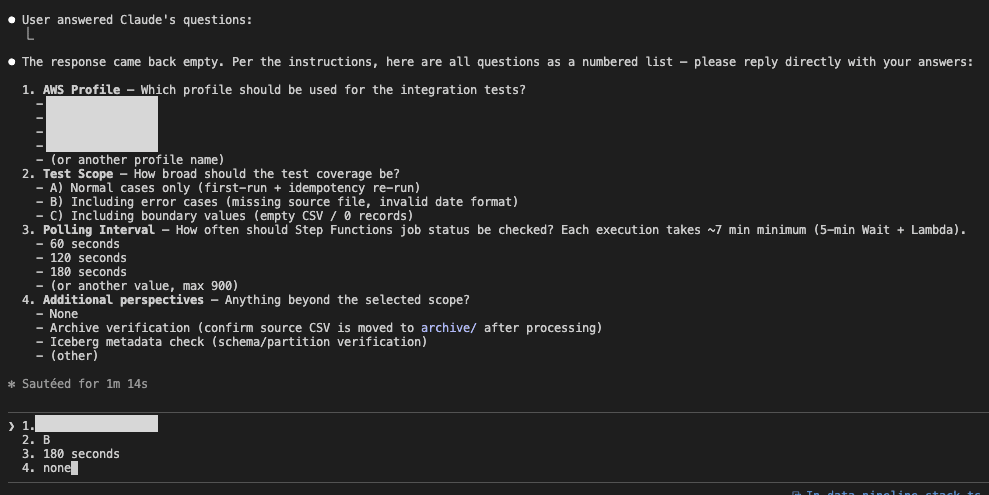
I originally intended to have Claude Code's AskUserQuestionTool respond in tab format, but since around version 2.1.63, it sometimes doesn't ask questions, so I'm temporarily using a text input format. I'm setting the profile and interval settings.
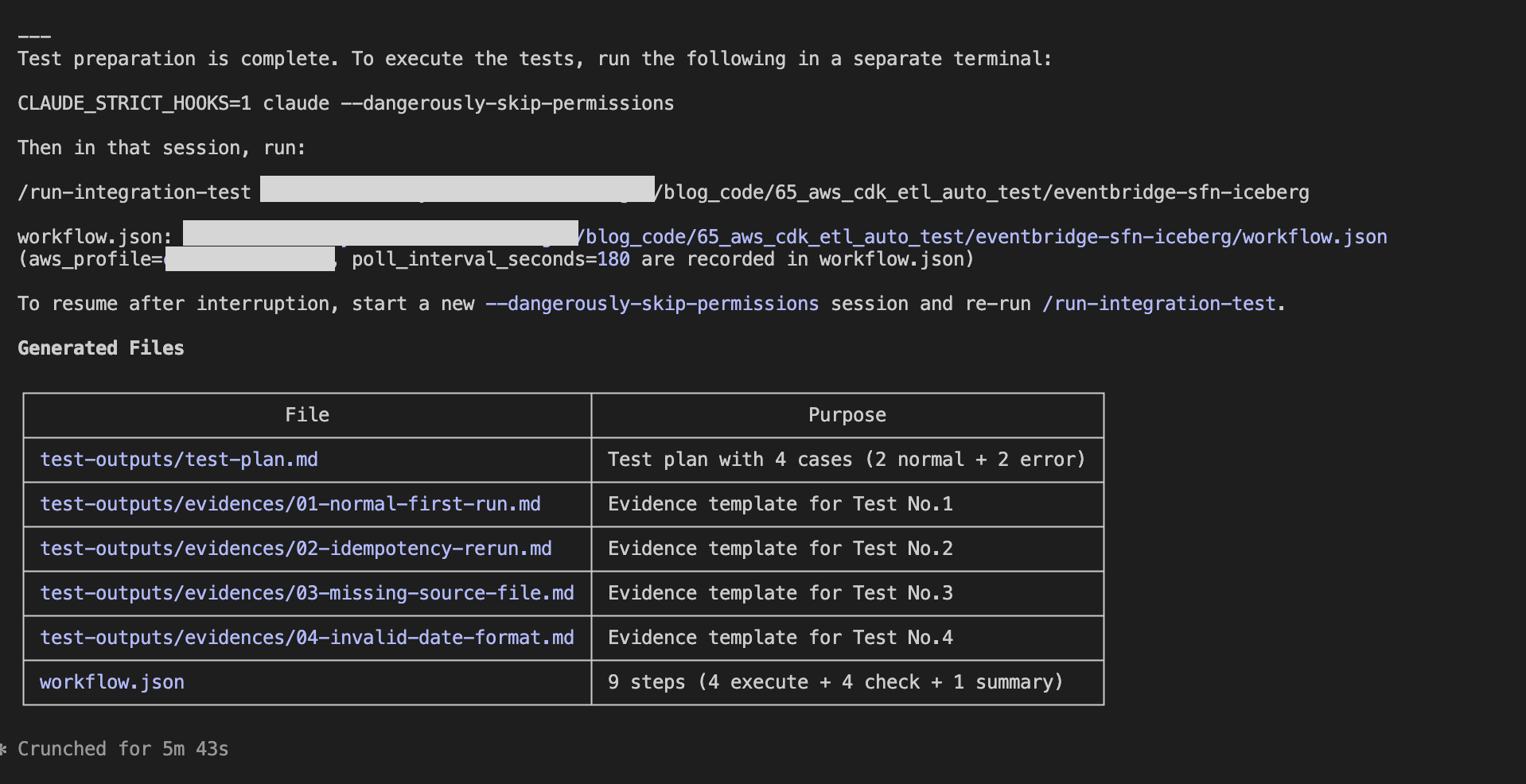
After creating the test plan and preparing test data, a command is presented to execute Phase 2. This completes Phase 1.
Running Tests (Phase 2)
Following the instructions presented in Phase 1, start a --dangerously-skip-permissions session in another terminal tab.
claude --dangerously-skip-permissions
Within the session, execute the /run-integration-test skill.
/run-integration-test <project-path>
The skill will load the workflow.json, process each step sequentially. Waiting for asynchronous jobs is done using sleep, and when all steps become completed, it generates a summary and finishes.
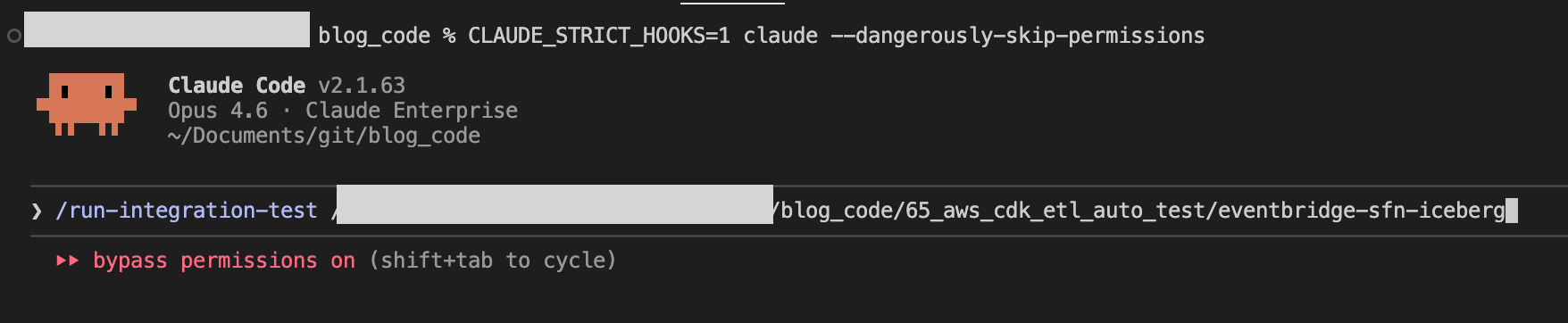
Since a command failed in the hooks midway, we can confirm that it's functioning properly.

Verifying Test Results
After the test completes, the results are automatically recorded in the summary section of test-outputs/test-plan.md.
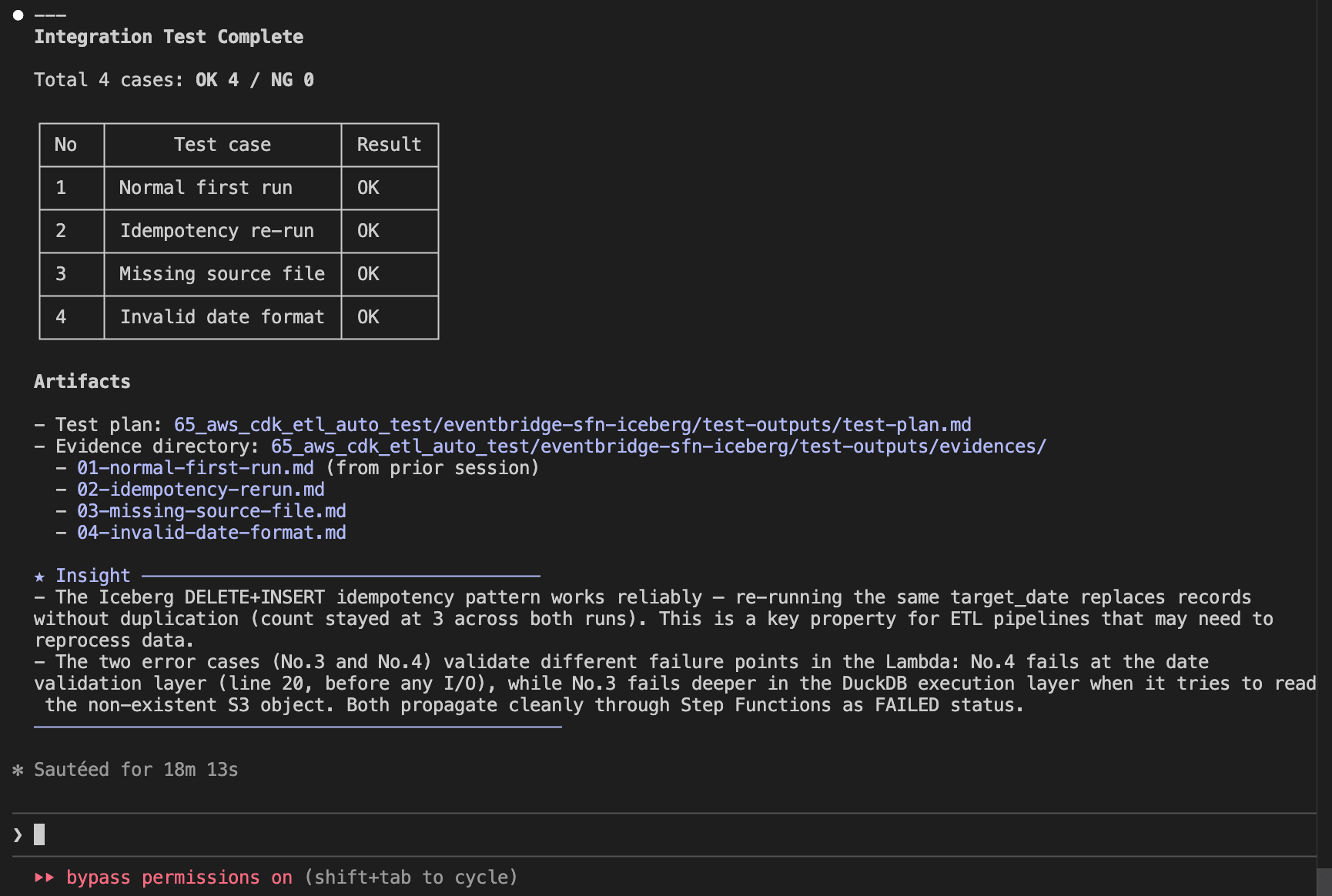
Evidence for each test case is recorded as individual files in test-outputs/evidences/.
test-plan.md (Test Plan & Summary)
# Test Plan

## Test Case List

| No  | Test case           | Category | Result | Date       | Result (retest) | Date (retest) |
| --- | ------------------- | -------- | ------ | ---------- | --------------- | ------------- |
| 1   | Normal first run    | normal   | OK     | 2026-03-02 | -               | -             |
| 2   | Idempotency re-run  | normal   | OK     | 2026-03-02 | -               | -             |
| 3   | Missing source file | error    | OK     | 2026-03-02 | -               | -             |
| 4   | Invalid date format | error    | OK     | 2026-03-02 | -               | -             |

## Summary

### Test Result Summary

Date: 2026-03-02

Total: 4 cases / OK: 4 / NG: 0

All test cases passed.

### Results by Test Case

| No  | Test case           | Result | Notes                                                                                                        |
| --- | ------------------- | ------ | ------------------------------------------------------------------------------------------------------------ |
| 1   | Normal first run    | OK     | SUCCEEDED, 3 records inserted, source deleted, archive created, 0 errors                                     |
| 2   | Idempotency re-run  | OK     | SUCCEEDED, record count remained 3 (not doubled), source deleted, archive updated, 0 errors                  |
| 3   | Missing source file | OK     | FAILED as expected (DuckDB IO error), Iceberg table unaffected, 0 unexpected errors                          |
| 4   | Invalid date format | OK     | FAILED as expected (ValueError: Invalid date format: 20251201), Lambda raised error before DuckDB processing |

### Issues Detected

None. All checks passed in all test cases.

### Observations

- The archive path uses the current run date (`archive/YYYY/MM/DD/`). When No.1 and No.2 ran on the same day, No.2 overwrote the archive created by No.1. Functionally correct but two runs on the same day produce only one archive entry per day rather than two. This is expected behavior for a date-partitioned archive design.
- Execution duration was approximately 68 seconds for normal cases (No.1, No.2). Error cases (No.3, No.4) completed in approximately 5 minutes due to Step Functions lifecycle overhead.
- No.3 fails with a DuckDB IO error (`No files found that match the pattern`) rather than a graceful application-level error. Consider adding an S3 existence check before `read_csv_auto` for better error messages.

### Improvement Suggestions

- Consider appending a timestamp suffix to the archive file name (e.g., `archive/2026/03/02/orders_2025-12-01_195254.csv`) to preserve both No.1 and No.2 archive entries when re-running on the same day. This would make the archive a complete audit trail.
- Add an S3 existence check before `read_csv_auto` in the Lambda function to return a clearer error message for missing source files (No.3).
- Add a test case for a different `target_date` to verify multi-date isolation in the Iceberg table.
01-normal-first-run.md (Evidence Sample)
# No.1 Normal first run

## Data Preparation

- Source data upload:
  `aws s3 cp resources/data/orders_2025-12-01.csv s3://<source-bucket>/data/orders_2025-12-01.csv --profile <your-profile>`

## Check Items

| #   | Check item                        | Expected value   | Actual value                                    | Judgment |
| --- | --------------------------------- | ---------------- | ----------------------------------------------- | -------- |
| 1   | SFN execution status              | SUCCEEDED        | SUCCEEDED                                       | OK       |
| 2   | rows_inserted (Lambda response)   | 3                | 3                                               | OK       |
| 3   | Iceberg record count (2025-12-01) | 3 records        | 3 records                                       | OK       |
| 4   | Source file deleted               | null (not found) | null                                            | OK       |
| 5   | Archive file created              | file exists      | archive/2026/03/02/orders_2025-12-01.csv exists | OK       |
| 6   | No ERROR logs in CloudWatch       | 0 errors         | 0 errors                                        | OK       |

## Evidence

### #1 SFN execution status

```text
Command:
aws stepfunctions describe-execution \
  --execution-arn arn:aws:states:ap-northeast-1:123456789012:execution:<project-name>-pipeline:<execution-id> \
  --profile <your-profile> --output json

Result:
{
    "executionArn": "arn:aws:states:ap-northeast-1:123456789012:execution:<project-name>-pipeline:<execution-id>",
    "stateMachineArn": "arn:aws:states:ap-northeast-1:123456789012:stateMachine:<project-name>-pipeline",
    "name": "<execution-id>",
    "status": "SUCCEEDED",
    "startDate": "2026-03-02T15:22:14.002000+09:00",
    "stopDate": "2026-03-02T15:27:23.792000+09:00",
    "input": "{\"target_date\":\"2025-12-01\"}",
    "output": "{\"statusCode\":200,\"body\":\"{\\\"rows_inserted\\\": 3, \\\"target_date\\\": \\\"2025-12-01\\\"}\"}",
    "redriveCount": 0
}
```

### #2 rows_inserted (Lambda response)

From the SFN output above:
`{"statusCode":200,"body":"{\"rows_inserted\": 3, \"target_date\": \"2025-12-01\"}"}`

rows_inserted = 3

### #3 Iceberg record count

```text
Query:
SELECT order_date, COUNT(*) as cnt
FROM <glue_database>.orders_iceberg
WHERE order_date = DATE '2025-12-01'
GROUP BY order_date

Status: SUCCEEDED

Result:
order_date   | cnt
-------------|----
2025-12-01   | 3

Data content:
order_id | customer_id | product_name | quantity | unit_price | order_date
---------|-------------|--------------|----------|------------|------------
ORD-001  | CUST-101    | Widget A     | 5        | 1200.0     | 2025-12-01
ORD-002  | CUST-102    | Widget B     | 3        | 800.5      | 2025-12-01
ORD-003  | CUST-103    | Widget C     | 10       | 450.0      | 2025-12-01
```

### #4 Source file deletion

```text
Command:
aws s3api list-objects-v2 --bucket <source-bucket> \
  --prefix "data/orders_2025-12-01.csv" \
  --query "Contents[?Key=='data/orders_2025-12-01.csv']" \
  --profile <your-profile>

Result: null
```

Source file confirmed deleted after ETL execution.

### #5 Archive file creation

```text
Command:
aws s3api list-objects-v2 --bucket <source-bucket> \
  --prefix "archive/" \
  --query "Contents[?contains(Key, 'orders_2025-12-01.csv')]" \
  --profile <your-profile>

Result:
[
    {
        "Key": "archive/2026/03/02/orders_2025-12-01.csv",
        "LastModified": "2026-03-02T06:27:23+00:00",
        "Size": 205
    }
]
```

### #6 CloudWatch Logs

```text
Command:
aws logs filter-log-events \
  --log-group-name /aws/lambda/<project-name>-process-and-load \
  --filter-pattern "ERROR" \
  --start-time 1772434934000 \
  --profile <your-profile>

Result:
{
    "events": [],
    "searchedLogStreams": []
}
```

No ERROR logs detected during execution.
In Conclusion
By combining Claude Code's Skills and Hooks, I've demonstrated how to automate testing of an ETL pipeline from AWS job execution to data validation and evidence recording. The automation covers everything from test plan generation to job execution, evidence recording, and summary creation. The ability to automatically detect and record improvement suggestions is an advantage made possible by AI. I hope this serves as a useful reference for others.