
I tried the agent team feature of Claude Code

This page has been translated by machine translation. View original
I'm from the AI Business Division/West Japan Development Team, Katagiri.
I've previously introduced Claude Code setup and subagent functionality.
In this article, I will introduce the Agent Teams feature that further enhances AI-driven development.
About this article
[Target audience]
- People who are using Claude Code
- Those who want to further improve AI-driven development efficiency
🪧 If you only want to check the setup procedure, please proceed from "here".
What are Agent Teams
Agent Teams are a feature where multiple independent Claude Code agents operate simultaneously in parallel and collaborate autonomously through a shared task list.
Why Agent Teams are necessary
Fundamental difference from single agents
Compared to executing tasks with a single agent (like subagent functionality),
"Agent Teams" represents a different approach.
First, let me explain the differences between these two.
■ Single agent characteristics
- Executed within one session[1]
- Reports results only to the main agent
- Main agent manages and controls all work
■ Agent Teams characteristics
- Main session (leader) coordinates the team, and members execute tasks autonomously
- Operates as multiple independent sessions
- Team members can coordinate directly with each other
- Self-organization through shared task lists
Usage scenarios
【When single agents are suitable】
- Sequential processes like "Execute B based on A's results"
- Main agent summarizes results, and tasks have low independence
- Cost efficiency is the top priority
【When Agent Teams are suitable】
- Multiple investigations or verifications can proceed in parallel
- Discussion and verification between members is necessary
- Task sequence is flexible, and members need to work autonomously
Why "teams" are necessary
When tackling complex tasks with a single AI agent, there's a challenge of fixating on the first hypothesis.
Let's compare using the example of instructing "investigate the cause of a bug":
【Single agent】
Makes initial hypothesis: "The cause might be connection timeout"
→ Focuses investigation on timeout-related areas
→ Tends to prioritize evidence related to timeouts
→ Higher chance of missing the actual cause
【Agent Team】
Member A: "Could connection timeout be the cause?"
Member B: "But if so, we should see other symptoms too. Could it be a memory leak?"
Member C: "Wait. Let's also check the possibility of file handle leaks"
→ Multiple hypotheses can be investigated simultaneously in parallel
→ Can reach the actual cause more objectively
This is the power of Agent Teams where multiple members can verify from different perspectives.
Not bound by a single hypothesis, they can reach more multi-faceted and objective conclusions.
Implementation selection points
The main differences between choosing single agents and agent teams are as follows:
| Aspect | Single Agent | Agent Team |
|---|---|---|
| Context window [2] | Independent for each subagent (results returned to main) | Leader + multiple members (independent context for each member) |
| Inter-member communication | ✖ Not possible | ⭕️ Direct communication possible |
| Coordination method | Main agent controls | Self-coordination with shared tasks |
| Token cost | Low | High (as each member has their own context window) |
| Usage examples | When results/goals are clear | When discussion/verification is needed |
Enabling Agent Teams
Step 1: Version check
First, verify that your Claude Code version is v2.1.32 or higher.
claude --version
Result:
Claude Code 2.1.84 (native)
Step 2: Enable in settings.json
Add the following to ~/.claude/settings.json:
{
  "env": {
    "CLAUDE_CODE_EXPERIMENTAL_AGENT_TEAMS": "1"
  }
}
If settings.json already exists
Add to the env block while keeping your existing settings.
My settings example
{
  "cleanupPeriodDays": 14,
  "model": "haiku",
  "env": {
    "DISABLE_NON_ESSENTIAL_MODEL_CALLS": "1",
    "CLAUDE_CODE_EXPERIMENTAL_AGENT_TEAMS": "1",
    "EDITOR": "nvim",
    "VISUAL": "nvim"
  },
  "hooks": {
    "Stop": [
      {
        "hooks": [
          {
            "type": "command",
            "command": "osascript -e 'display notification \"Work completed\" with title \"Claude Code\"'"
          }
        ]
      }
    ]
  },
  "statusLine": {
    "type": "command",
    "command": "bash ~/.claude/statusline-command.sh"
  },
  "language": "japanese",
  "spinnerTipsEnabled": false,
  "autoUpdatesChannel": "stable",
  "showTurnDuration": true
}
Step 3: Verify settings
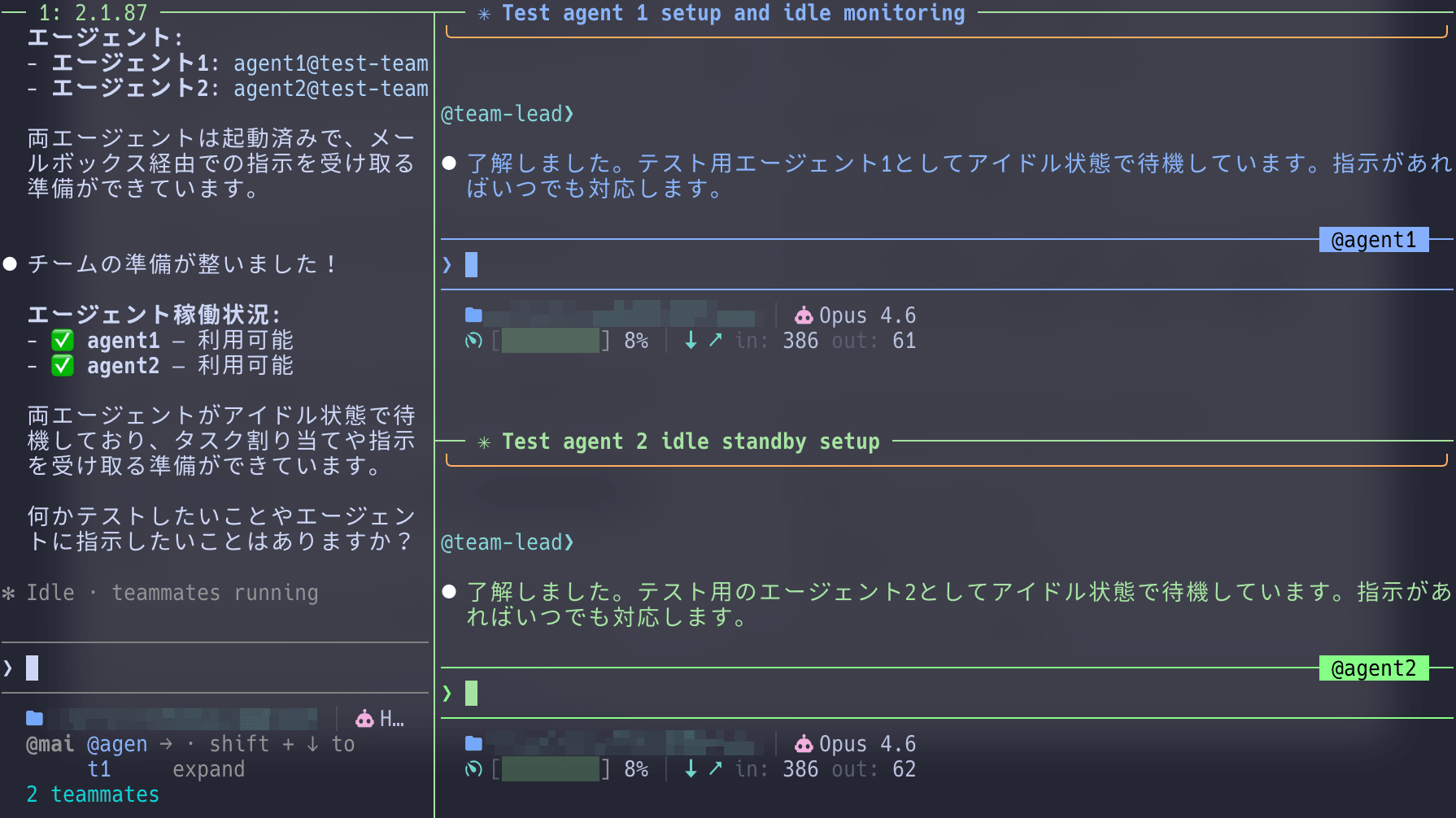
To confirm that settings have been correctly applied, launch Claude Code and ask it to create an agent team.
If it starts normally, the feature is enabled.
claude
Please create a test agent team.
1. Agent1
2. Agent2
If the team is created successfully, your settings have been correctly applied.
Display modes: How to monitor team progress
Agent Teams have two display modes:
1. In-process mode (default)
All team members run within the main terminal.
When to use:
- When you want to use agent teams immediately
- When running in integrated terminals like VS Code
Operation:
Shift+Down: Switch between team membersEnter: Display the session of the current memberEscape: Interrupt the turnCtrl+T: Toggle task list display
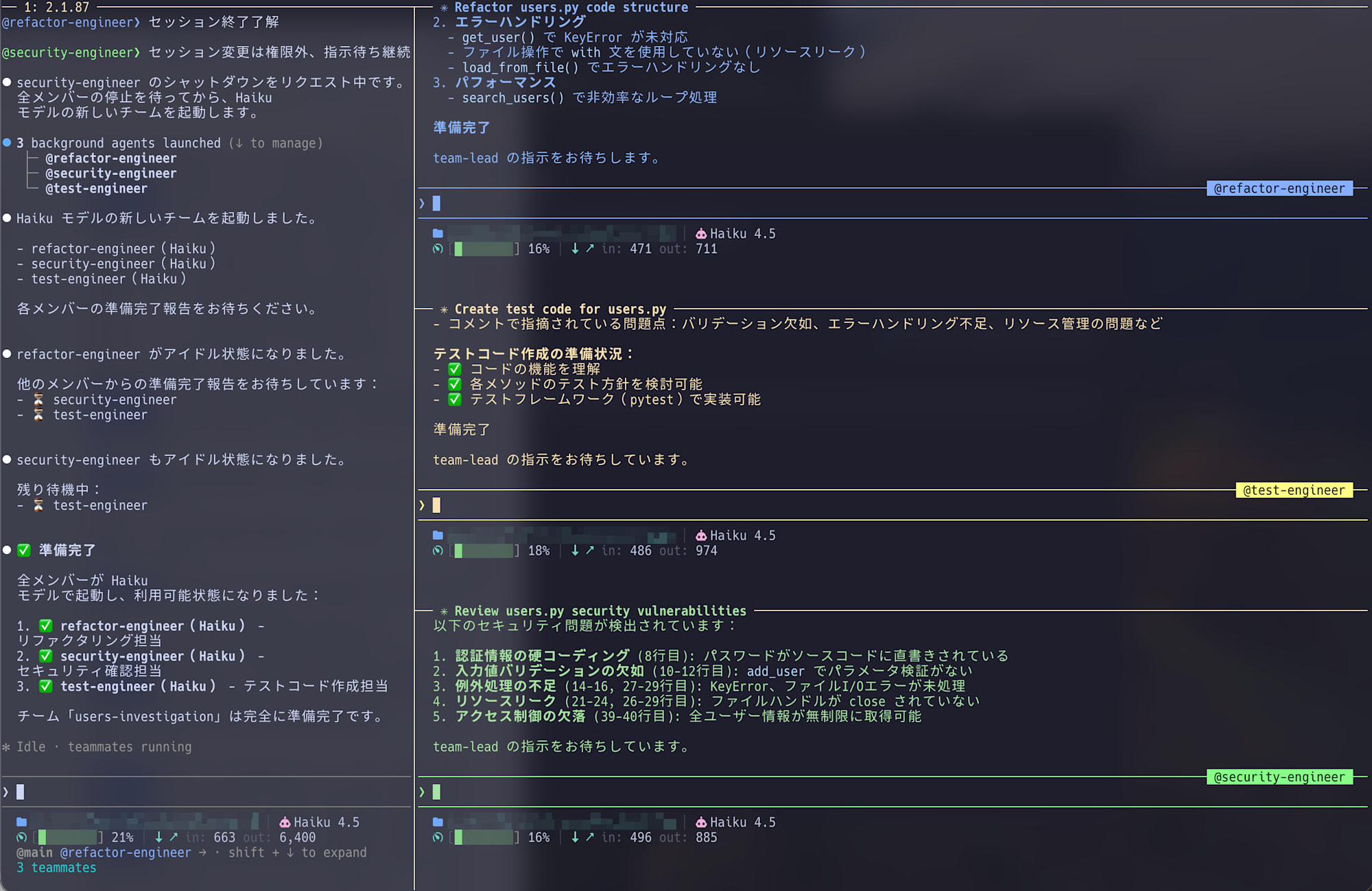
2. Split pane mode
Displays each team member in multiple windows, allowing you to see the progress of all members simultaneously.
When to use:
- When you want to monitor multiple members' progress simultaneously
- When you want to see team members' discussions in real-time
Requirements:
- tmux or iTerm2 (with
it2CLI installed) is installed - For tmux, Claude Code must be running within a tmux session
Interacting with team members
In Agent Teams, we give instructions to the leader, who then coordinates and manages team members.
Leader's role
Based on our instructions, the leader (Claude Code main session) does the following:
- Task assignment: Instructs team members what to do
- Progress monitoring: Verifies that members are working correctly
- Coordination/nudging: Redirects members who are stuck
- Result integration: Combines the achievements of each member
Direct instructions to team members
When team members aren't functioning properly, use direct instructions to control them:
@security-reviewer: Please also check for session timeout vulnerabilities.
Shutting down team members
When the team is no longer needed, instruct the leader to clean up:
Please delete the team.

Trying out Agent Teams
Within a Claude Code session, create and execute a prompt referring to the examples below to launch Agent Teams.
Please create a team to implement a new feature.
Form a team of 3 people:

1. Frontend implementation specialist
2. Backend implementation specialist
3. Test implementation specialist

Have each member work in parallel while checking with each other as needed.
Each team member will execute in parallel with the leader coordinating tasks.
Results from actually trying Agent Teams
Below is an execution example of creating a team to review users.py.
You can see that three tasks were automatically generated and assigned to specialist members.
Agent Team execution output
Output is abbreviated due to length.
❯ Please create a team to review @tmp/users.py. Provide security, performance, and test coverage specialists.
  ⎿  Read tmp/users.py (41 lines)

⏺ I'll create a team to review tmp/users.py from security, performance, and test coverage perspectives.

**Plan**
Creating a team with 3 specialist agents to perform:
1. Security reviewer: Check password management, input validation, file operation vulnerabilities
2. Performance reviewer: Analyze search logic, resource management, efficiency
3. Test coverage specialist: Evaluate test requirements and quality standards

Each agent will analyze users.py and create a report.

⏺ Next, I'll invite the 3 specialist agents to the team.

⏺ 3 background agents launched (↓ to manage)
   ├─ @security-expert (code-reviewer)
   ├─ @performance-expert (code-reviewer)
   └─ @test-expert (code-reviewer)

⏺ Team composition complete! ✓

users-py-review team has been established:

| Specialist | Assigned task |
|---|---|
| 🔒 security-expert | Review security vulnerabilities (Task #1) |
| ⚡ performance-expert | Analyze performance (Task #2) |
| 🧪 test-expert | Evaluate test coverage (Task #3) |

The 3 specialists are analyzing users.py in parallel.

...[Each member proceeds with parallel analysis]...

Now all three specialists' analyses have been completed. I'll create an integrated review report.

---

**users.py Comprehensive Review Report**

📋 **Executive Summary**

users.py has multiple critical vulnerabilities that require immediate improvement. We propose a phased improvement roadmap based on security, performance, and test coverage perspectives.

---

🔒 **Security Assessment: CRITICAL (5 vulnerabilities)**

P0 - Urgent response required

| # | Vulnerability | Current state | Risk | Improvement |
|---|---|---|---|---|
| 1 | Hardcoded password | "admin1234" exposed in code | Authentication info leak | Manage with environment variables |
| 2 | Complete lack of input validation | No ID/age/name checks | Data corruption, injection | Implement type checking and range validation |
| 3 | Missing KeyError handling | Crashes when calling non-existent ID | DoS attack | Implement try-except |
| 4 | File resource leak | No close(), no directory traversal protection | File descriptor exhaustion | Introduce with statement |
| 5 | Data modification possibility | get_all_users() directly references internal state | Unintended data changes | Return copies |

---

⚡ **Performance Assessment: Needs improvement (3.3x speedup possible)**

**Computational complexity analysis**
search_users() current state: O(n × m)
- n = number of users
- m = average username length

**Benchmark results:**

| User count | Current | After improvement | Factor |
|---|---|---|---|
| 1,000 | 100μs | 50μs | 2x |
| 10,000 | 1ms | 300μs | 3.3x |
| 100,000 | 10ms | 3ms | 3.3x |
| 1,000,000 | 1 sec | 300ms | 3.3x |

**Improvement proposals (by priority)**

| Phase | Content | Implementation time | Effect |
|---|---|---|---|
| P0 | Fix file I/O with with statement | 5 min | Eliminate resource leaks |
| P1 | Implement caching for search() | 1 hour | 3.3x speedup |
| P2 | Indexing (full implementation) | 4 hours | Memory optimization |

---

🧪 **Test Assessment: ZERO COVERAGE → 70% target**

**Current state**
- Test files: None
- Coverage: 0%
- Required implementation: 5 tests in Phase 1

**Phase 1 (Immediate - 70% target)**
Top 5 priority test cases:

```python
import pytest
from users import UserManager

def test_add_user_valid():
    """Normal operation of user addition"""
    ...[Test values listed]...

def test_get_user_not_found():
    """Error handling when getting non-existent user"""
    ...[Test values listed]...

def test_delete_user():
    """User deletion functionality"""
    ...[Test values listed]...

def test_save_and_load_users():
    """Integration test for file saving/loading"""
    ...[Test values listed]...

def test_search_users_partial_match():
    """Normal operation of search functionality"""
    ...[Test values listed]...

Test implementation roadmap
  ┌─────┬──────┬────────┬─────────┬─────────────────┐
  │ Pha │ Dead │ Test   │ Cover-  │     Tasks       │
  │ se  │ line │ count  │  age    │                 │
  ├─────┼──────┼────────┼─────────┼─────────────────┤
  │ Pha │ Today│        │         │                 │
  │ se  │      │ 5      │ 70%     │ Basic function  │
  │ 1   │      │        │         │ tests           │
  ├─────┼──────┼────────┼─────────┼─────────────────┤
  │ Pha │ 1    │        │         │ Add edge cases  │
  │ se  │ week │ 8      │ 80%     │                 │
  │ 2   │      │        │         │                 │
  ├─────┼──────┼────────┼─────────┼─────────────────┤
  │ Pha │ 2    │        │         │ Complete all    │
  │ se  │ weeks│ 12     │ 90%+    │ function        │
  │ 3   │      │        │         │ coverage        │
  └─────┴──────┴────────┴─────────┴─────────────────┘

  ---
  📊 Improvement Priority Matrix

           | Implementation time | Impact |
  ---------|----------|--------|
  P0: Security fixes | 5 min | CRITICAL
  P1: Test Phase 1 | 2 hours | CRITICAL
  P2: Performance improvements | 1 hour | HIGH
  P3: Test Phase 2-3 | 4 hours | MEDIUM

  ---
  ✅ Action Plan

  Immediate (today)

  - Introduce with statement in save_to_file() / load_from_file()
  - Create test file + implement Phase 1 tests (5 tests)
  - Move hardcoded password to environment variables

  Within 1 week

  - Add KeyError/FileNotFoundError handling
  - Implement caching for search_users()
  - Add 3 Phase 2 tests (achieve 80% coverage)

  Within 1 month

  - Full-scale search optimization with indexing
  - Complete input validation implementation
  - Complete Phase 3 tests (90%+ coverage)

  ---
  📈 Expected improvement effects

  ┌────────────────────────┬─────┬───────┬───────────┐
  │       Metrics          │ Cur │ After │ Improve-  │
  │                        │ rent│ impro │ ment      │
  │                        │     │ vemen │           │
  │                        │     │ t     │           │
  ├────────────────────────┼─────┼───────┼───────────┤
  │ Search performance     │ 1ms │ 300μs │ 3.3x      │
  │ (10k users)            │     │       │           │
  ├────────────────────────┼─────┼───────┼───────────┤
  │ Test coverage          │ 0%  │ 90%+  │ Complete  │
  │                        │     │       │ coverage  │
  ├────────────────────────┼─────┼───────┼───────────┤
  │ Resource leaks         │ Yes │ None  │ Risk      │
  │                        │     │       │ elimina-  │
  │                        │     │       │ tion      │
  ├────────────────────────┼─────┼───────┼───────────┤
  │ Security               │ 5   │ 0     │ All       │
  │ vulnerabilities        │     │       │ resolved  │
  └────────────────────────┴─────┴───────┴───────────┘

  ---
  Team analysis complete! I've provided detailed improvement proposals from 3 specialists. Let me know if you have any questions or need additional investigation.
Value of Agent Teams from execution examples
As seen in the output, using Agent Teams has the following benefits:
- Multiple members executing in parallel simultaneously
Each specialist analyzes the same code from different perspectives - Autonomous task execution
Security review completion, performance analysis submission—each works independently - Detailed analysis results
Not just "there are problems" but specific, implementable information like "O(n × m)" and "1 second delay with 1,000,000 users" - Integrated review plan
Creating a comprehensive improvement action plan by combining each analysis
While this was verification with a simple prompt, Agent Teams can provide more practical reviews when given project information (scale, security requirements, architecture, etc.) in advance.
Scenarios where Agent Teams excel
Beyond the code review examples shown, there are other situations where Agent Teams demonstrate their power.
Parallel development across multiple domains
When implementing new features with frontend, backend, and database design teams simultaneously:
【Without Agent Teams】
  1. Backend API design
  2. Frontend development (waiting for API completion)
  3. DB design adjustment
  → Dependencies cause delays

【Parallel with Agent Teams】
  Frontend team → UI implementation & mock API creation
  Backend team  → Simultaneous API spec design & implementation
  DB team       → Schema design & optimization in parallel
  → Each team proceeds autonomously with periodic synchronization
Multi-faceted technical evaluation
When evaluating new framework adoption requiring multiple perspectives:
【Without Agent Teams】
  1. Performance investigation (benchmark implementation)
  2. Operability assessment (checking deployment & monitoring)
  3. Cost analysis (infrastructure, licenses, learning curve)
  → Sequential investigation takes time

【Parallel with Agent Teams】
  Performance team → Benchmark & scalability verification
  Operations team  → Parallel evaluation of deployment, monitoring & logging
  Cost team        → Analysis of infrastructure costs, licenses & learning curve
  → Balanced decision materials available simultaneously
The value of Agent Teams' parallelization increases with projects involving multiple perspectives or domains.
Points of caution and countermeasures
1. Token cost is higher than expected
Agent Teams operate as independent Claude instances for each member, significantly increasing token consumption compared to single agents.
Countermeasures:
- Use only when parallel execution is truly necessary
- Use subagents when they are sufficient
2. Team members edit the same file
When multiple team members edit the same file, overwrites occur.
- Member A is editing users.py
- Member B is also editing users.py
→ Member A's changes are lost
Countermeasures:
When dividing work, clearly define file ownership:
+ Member A "edits users.py"
+ Member B "edits test_users.py"
→ No conflicts with different files
3. Leaving teams unattended increases wasted effort
With multiple members working independently, time might be spent on unnecessary verifications if progress isn't monitored.
Countermeasures:
- Regularly check progress
- Correct direction if it deviates
- Use direct instructions for members who are stuck
4. Limitations due to experimental nature
As an experimental feature, Agent Teams has these limitations:
- In-process team members are not restored when resuming sessions (
/resume) - Only 1 team per session (multiple parallel teams not supported)
- Team members themselves cannot generate new teams (only the leader can)
5. Task size guidelines
According to the best practices in the official documentation, 5-6 tasks per team member is the guideline for productive operation.
Conclusion
Agent Teams are a powerful weapon for further evolving AI-driven development.
However, proper usage selection is important:
【When to use Agent Teams】:
- Want to verify multiple hypotheses in parallel
- Need reviews from different perspectives
- Want parallel development across multiple domains

【When subagents are sufficient】:
- One-directional tasks like "research and summarize"
- Cost efficiency is the top priority
I'm still in the process of gaining experience with them, but I particularly appreciate their value for multi-perspective reviews and parallel development.
In your projects too, please consider whether there are situations that could benefit from parallelization.