![Claude Code Skills (Agent Skills) Introduction [Internal Study Group Slides]](https://images.ctfassets.net/ct0aopd36mqt/3KBTm8tdpO9RJJuaVvVzod/a9964bb03097b448b2327edc6920bf9f/Claude.png?w=3840&fm=webp)
Claude Code Skills (Agent Skills) Introduction [Internal Study Group Slides]

This page has been translated by machine translation. View original
I held a "Claude Code Skills (Agent Skills) Study Session" for internal team members (Cloud Business Unit Consulting Department).
Here's the slide deck adjusted for DevelopersIO.
Slide content: The text information is provided below. I hope you find it helpful.
Purpose of the Study Session
Sharing the background, goals, and agenda of the study session.
Background
Skills are hot right now 🔥
- Extensions that allow you to customize Claude Code (AI agent) behavior to your liking
- Easy to create and easy to share
Goals of this Study Session
- Have all participants set up Skills and understand the basic usage
- Explore ways to use Skills in daily work together
- Draw out participants' knowledge and outputs
Expected Outcomes
- During this session: Complete
Skillssetup + understand basic usage - Short-term: Increase in people trying efficiency improvements using
Skillsin daily work - Long-term: Accumulation of use cases, best practices, and standards within the team
Overview of Skills
Understanding the overview and folder structure of Skills.
Definition of Skills
Here's the official definition:
A simple and open format for giving agents new capabilities and expertise.
Agent Skills are folders of instructions, scripts, and resources that agents can discover and use. This allows agents to perform tasks more accurately and efficiently.
– Overview - Agent Skills (translated to Japanese)
Key Points about Skills
The key point is that it's a folder.
- Can contain not only instructions (
SKILL.md) but also scripts and references - The agent automatically discovers which skills to use and follows instructions while utilizing scripts and references in the folder as needed
Evolution of Skills
This was originally developed by Anthropic for Claude Code.
- Released by Anthropic as an open standard
- Currently being adopted by agent products beyond Claude Code
- Accepts contributions from the entire ecosystem
In other words, it's becoming a common skill format for agents rather than a Claude Code-exclusive mechanism.
Skill Folder Structure
The skill folder structure is as follows:
my-skill/
├── SKILL.md          # Required: Instructions + metadata
├── scripts/          # Optional: Scripts
├── references/       # Optional: References
└── assets/           # Optional: Templates and resources
Only SKILL.md is required. (= SKILL.md alone is sufficient)
Skill Demo *Modified for external audience
Using a document template collection skill* as an example to see automatic activation.
Input: Rough Notes
# Creating an S3 Bucket

- Do it from the management console
- Name the bucket like project-name-env-purpose
- Region is Tokyo
- Block all public access
- Enable versioning
...
Request to Claude Code
> Turn rough-notes.md into a procedure document
What Happens
- Skill activates based on
SKILL.mddescription - Reads the content of
SKILL.md - Loads template files from references
- Generates a procedure document following the template
Reference: Skill Folder Structure
.claude/skills/doc-templates/
├── SKILL.md
└── templates/
    ├── how-to/
    │   ├── README.md
    │   └── template.md
    ├── concept/
    ├── troubleshooting/
    └── ...
Skill Specifications
Let's look at the behavior we saw in the demo from a technical perspective.
Contents of SKILL.md
---
name: my-skill
description: Description of this skill. Also explain when Claude should use it.
---

# Write instructions here in natural language
At the top, the frontmatter contains name (skill name) and description (when to use). The body contains instructions written freely in Markdown.
How Skills Work
Skills operate using Progressive Disclosure.
- First, check only the
name/descriptionof all skills (lightweight) - Load the full
SKILL.mdcontent for skills deemed relevant - Read additional files in
references/etc. as needed
Rather than loading all skills from the start, it reads only what's needed when needed. The key point is to avoid overwhelming the context window.
Note: Skill Locations
There are user scope and project scope:
| Scope | Path |
|---|---|
| User | ~/.claude/skills/<skill-name>/SKILL.md |
| Project | .claude/skills/<skill-name>/SKILL.md |
Note: Relationship with Slash Commands
Claude Code originally had /command: slash commands. These were a mechanism to write instructions in Markdown in .claude/commands/<name>.md.
Slash commands are actually skills now (they evolved into this).
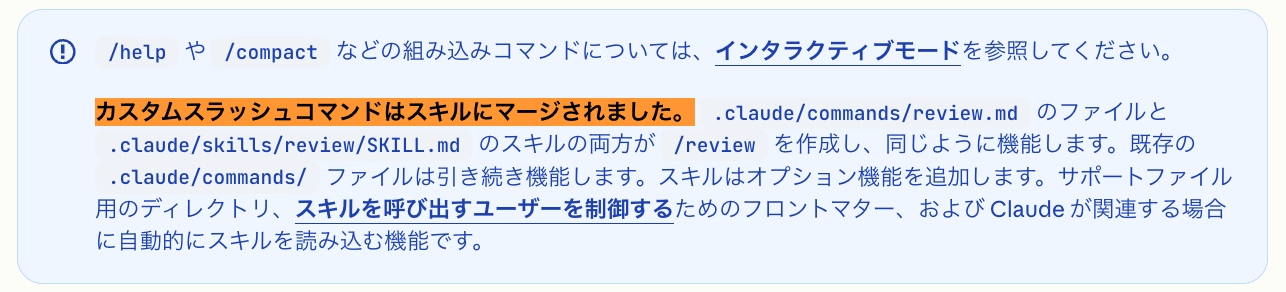
Source: https://code.claude.com/docs/ja/skills (as of 2026-03-10)
Tips for Skill Utilization
Introducing useful points for creating and developing skills.
Keep SKILL.md Under 500 Lines
SKILL.md is the entry point for a skill. Use it as an overview and navigation. Put details in references/ etc.
my-skill/
├── SKILL.md          # Overview + navigation
├── references/       # Detailed references
├── examples.md       # Usage examples
└── scripts/
    └── helper.sh
Use context: fork for Subagent Execution
Adding context: fork to the frontmatter allows the skill to run as an isolated subagent.
This keeps the main conversation context clean.
Example of context:fork usage
---
name: deep-research
description: Research a topic thoroughly
context: fork
agent: Explore
---

Research $ARGUMENTS thoroughly:
1. Find relevant files using Glob and Grep
2. Read and analyze the code
3. Summarize findings with specific file references
Tips: What is a Subagent?
A specialized AI assistant that handles specific tasks. It runs in its own context window and doesn't have access to the main conversation history. After completion, only the results are returned to the main conversation.
— Sub-agents - Claude Code Official Documentation
When Skills Don't Activate
Review your description. Does it clearly explain to Claude "when to use" the skill?
If it still doesn't work, the last resort is manual execution:
- Run directly as a slash command with
/skill-name - Example:
/fix-issue 123
Security Considerations
Limit skill sources to trusted ones:
- Self-made skills
- Skills managed and reviewed within your organization
- Trusted public skills (e.g., anthropics/skills)
When using third-party skills, check all contents of the skill (SKILL.md, scripts, references, etc.). If you can't evaluate it, don't use it.
Skill Creator Skill
Installing the official skill-creator allows you to interactively create and improve skills.
> /skill-creator
⏺ Welcome to Skill Creator!
  1. I want to create a new skill
  2. I want to improve an existing skill
  3. I want to run tests/evaluations on a skill
  4. I want to optimize a skill description (trigger)
Distinguishing from Other Mechanisms
The following video is helpful for understanding how to differentiate between Skills, CLAUDE.md, MCP, and subagents:
Skills vs CLAUDE.md
| Skills | CLAUDE.md | |
|---|---|---|
| Role | Teach "how to execute" specialized tasks | Communicate project-specific information to Claude |
| Scope | Portable expertise usable in any project | Tied to specific repositories (tech stack, conventions, etc.) |
Skills vs MCP Servers
| Skills | MCP Servers | |
|---|---|---|
| Role | Teach "how to handle" data | Provide "connection" to external data sources |
| Example | Teach query optimization patterns | Enable access to GitHub or databases |
Skills vs Subagents
| Skills | Subagents | |
|---|---|---|
| Nature | Portable expertise | Specialized AI assistants with their own context |
| Feature | Usable with any agent | Fixed roles (FE developer, UI reviewer, etc.) |
Hands-on *Modified for external audience
Let's actually create a proposal using skills.
Preparation
Assumes Claude Code is already installed.
For the hands-on, we'll use the proposal-creation-toolkit plugin. Please register with the marketplace shared with the team in advance and install the plugin.
Slide generation (marp-cli) preparation is optional.
-
Marketplace registration + Plugin installation
- Run
/pluginin Claude Code - Select "Marketplace → Add marketplace"
- Enter the (marketplace URL shared in advance)
- Select "Proposal Creation Toolkit" from the plugin list and install
- Run
-
(Optional) marp-cli preparation
If you want to experience Marp slide generation, make sure you can run marp-cli.
 # pnpm dlx: Temporarily download and run package (equivalent to npx)
 pnpm dlx @marp-team/marp-cli --version
Hands-on Overview
Use the proposal-creation-toolkit plugin to automatically generate a proposal from meeting minutes.
Meeting minutes (meeting-memo.md)
    ↓  /create-proposal       ← Everyone
Proposal markdown
    ↓  /marp-from-proposal    ← optional
Marp slides (.md) + images
    ↓  marp-cli
Presentation (HTML)
Hands-on Procedure
-
Step 1: Clone the repository and open it
Clone the hands-on repository and open it with Claude Code.
 git clone <Hands-on Repository URL>
 cd handson-repo
 claude
File structure:
 handson-repo/
 ├── meeting-memo.md      ← Meeting minutes (sample)
 └── themes/
     └── custom.css       ← Marp theme
Recommendation for hands-on: Set the model to
Default (Sonnet)for faster responses./model → Select 1. Default (recommended) -
Step 2: Generate the proposal
Enter the following in Claude Code:
/create-proposal @meeting-memo.md -
Step 3: Answer the questions
Claude will ask questions in multiple-choice format. Answer with the number.
-
Step 4: Review and approve the structure
Claude will present a table of contents draft. After reviewing the content, reply "Yes" to start generation.
Generated file:
proposal.md ← Proposal markdown -
(Optional) Step 5: Generate Marp slides
/marp-from-proposal @proposal.mdGenerated files:
 proposal_marp.md   ← Marp slides
 images/            ← Figures (auto-generated)
※For publicly available reference materials, please see:
-
(Optional) Step 6: Preview
Use marp-cli to output slides as HTML and check them.
 pnpm dlx @marp-team/marp-cli proposal_marp.md --theme themes/custom.css

 # For PDF output
 pnpm dlx @marp-team/marp-cli proposal_marp.md --theme themes/custom.css --pdf
(For those with extra time) Try Skill Creator
If you have extra time, try the official skill-creator. It allows you to interactively create and improve skills.
Install via /plugin → Search for skill-creator in the Discover tab:
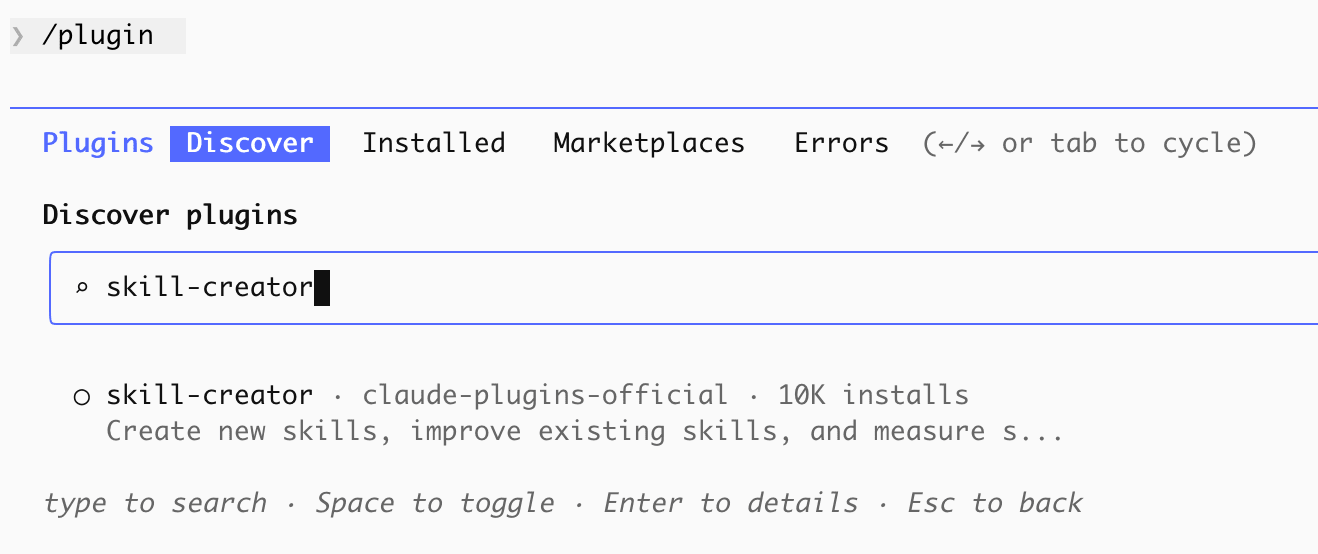
/plugin → Search for skill-creator in Discover
After installation:
/skill-creator
If you have tasks in your daily work that you'd like to make more efficient, try creating a skill for them.
Conclusion
Here's what we covered today:
- Skill Overview: Definition, folder structure
- Skill Demo: Experience with custom skill auto-activation
- Skill Specifications: SKILL.md, progressive disclosure
- Skill Utilization Tips: How to differentiate from other mechanisms (CLAUDE.md / MCP / Subagents)
- Hands-on: Using proposal-creation-toolkit to generate proposal → slides from meeting minutes