
Using Cloudflare Workers' Cron Triggers and KV to periodically cache API responses

This page has been translated by machine translation. View original
Introduction
Hello everyone, this is Akaike.
Recently, while creating a personal site with Cloudflare Workers,
I faced a challenge regarding how to cache data retrieved from external APIs.
Specifically, I implemented a feature to display a list of my articles from multiple technical blog platforms such as Qiita, Zenn, and DevelopersIO,
but it's clearly inefficient to hit external APIs with every request.
It not only slows down the response time but also risks hitting API rate limits.
So in this article, I'll summarize how I implemented a system that regularly caches external API results by combining Cloudflare Workers' Cron Triggers and KV.
Overview
Here's an overview of the architecture:
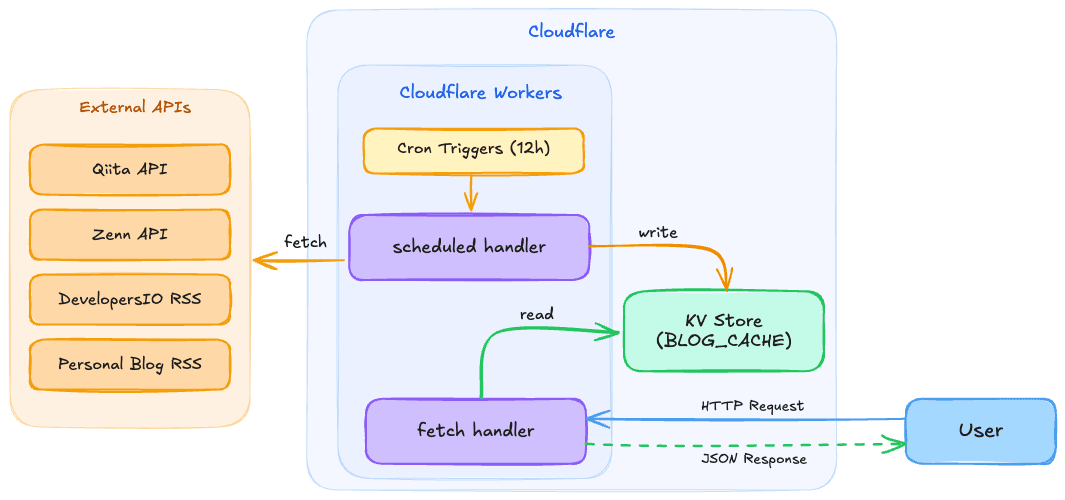
The key points are the following two, which eliminate the need to hit external APIs during user requests, resulting in faster responses and no concerns about external API rate limits:
- Cron Triggers
- Regularly (every 12 hours in this case) fetch data from external APIs and store it in KV
- KV
- Maintain the retrieved data as a cache and return it from KV when a user request comes in
Implementation
1. wrangler configuration
First, set up KV namespace and Cron Triggers in wrangler.jsonc.
{
  "name": "my-worker",
  "main": "./workers/app.ts",
  "kv_namespaces": [
    {
      "binding": "BLOG_CACHE",
      "id": "your-kv-namespace-id"
    }
  ],
  "triggers": {
    "crons": [
      "0 */12 * * *"
    ]
  }
}
- kv_namespaces
- Links a KV namespace with an arbitrary binding name (BLOG_CACHE in this case). The
idis the ID issued when creating the KV namespace
- Links a KV namespace with an arbitrary binding name (BLOG_CACHE in this case). The
- triggers.crons
- Specifies the execution schedule in cron expression.
0 */12 * * *means execute every 12 hours
- Specifies the execution schedule in cron expression.
You can create a KV namespace with the following command:
npx wrangler kv namespace create "BLOG_CACHE"
2. Worker entry point
In the Worker entry point, define two handlers: a fetch handler that processes normal HTTP requests and a scheduled handler that runs periodically.
import { updateBlogCache } from "./blogFetcher";

export default {
  // Handle normal HTTP requests
  async fetch(
    request: Request,
    env: Env,
    ctx: ExecutionContext
  ): Promise<Response> {
    // Pass to the application request handler
    return handleRequest(request, env, ctx);
  },

  // Periodic execution by Cron Triggers
  async scheduled(
    _controller: ScheduledController,
    env: Env,
    ctx: ExecutionContext
  ): Promise<void> {
    ctx.waitUntil(updateBlogCache(env.BLOG_CACHE));
  },
} satisfies ExportedHandler<Env>;
The scheduled handler is the entry point called by Cron Triggers.
Using ctx.waitUntil() allows the process to continue in the background after returning a response.
3. Retrieving data from external APIs
This is the process of retrieving data from external APIs.
Here I'll show an example of fetching articles from four sources: Qiita API, Zenn API, DevelopersIO RSS feed, and a personal blog RSS feed.
const KV_KEY = "blog_articles";

// Cloudflare Workers has a subrequest limit of 50/execution
// Limit the number of pages retrieved from each source to avoid exceeding the limit
const MAX_PAGES_QIITA = 5;
const MAX_PAGES_ZENN = 5;
// DevelopersIO RSS doesn't support pagination, so only 1 page
const MAX_PAGES_DEVIO = 1;

export interface Article {
  id: number;
  title: string;
  date: string;
  excerpt: string;
  tags: string[];
  url: string;
  source: string;
  likes_count?: number;
  page_views_count?: number;
  comments_count?: number;
}
Since the retrieval processes from each source are independent, we execute them in parallel using Promise.allSettled().
Using Promise.allSettled() instead of Promise.all() is key here.
Even if some APIs fail, we can still get results from successful sources.
export const fetchAllArticles = async (): Promise<Article[]> => {
  const results = await Promise.allSettled([
    fetchQiitaArticles(),
    fetchZennArticles(),
    fetchDevelopersIOArticles(),
    fetchTortoiseTechBlogArticles(),
  ]);

  const articles: Article[] = [];

  for (const result of results) {
    if (result.status === "fulfilled") {
      articles.push(...result.value);
    } else {
      // Log failed sources and continue
      console.error("Failed to fetch articles:", result.reason);
    }
  }

  // Remove duplicates based on URL and sort by date in descending order
  const seen = new Set<string>();
  const unique = articles.filter((a) => {
    if (seen.has(a.url)) return false;
    seen.add(a.url);
    return true;
  });

  unique.sort(
    (a, b) => new Date(b.date).getTime() - new Date(a.date).getTime()
  );

  // Assign sequential IDs after merging and sorting
  unique.forEach((article, index) => {
    article.id = index + 1;
  });

  return unique;
};
As an example of individual API retrieval, here's the process for the Qiita API.
It supports pagination while being mindful of the subrequest limit by restricting the maximum number of pages.
const fetchQiitaArticles = async (): Promise<Article[]> => {
  const allData: QiitaArticle[] = [];
  let page = 1;
  const perPage = 100;

  while (page <= MAX_PAGES_QIITA) {
    const response = await fetch(
      `https://qiita.com/api/v2/users/{username}/items?page=${page}&per_page=${perPage}`
    );

    if (!response.ok) {
      throw new Error(`Qiita API returned status: ${response.status}`);
    }

    const data = (await response.json()) as QiitaArticle[];

    if (!data || data.length === 0) break;
    allData.push(...data);

    // If the number of items is less than per_page, it's the last page
    if (data.length < perPage) break;
    page++;
  }

  return allData.map((item, index) => ({
    id: index,
    title: item.title,
    date: item.created_at.split("T")[0],
    url: item.url,
    source: "Qiita",
    tags: item.tags.map((tag) => tag.name),
  }));
};
4. Caching to KV and reading
Here's the process for writing to and reading from KV:
/**
 * Fetch articles and store them in KV.
 */
export const updateBlogCache = async (kv: KVNamespace): Promise<void> => {
  console.log("Updating blog cache...");
  const articles = await fetchAllArticles();

  if (articles.length > 0) {
    await kv.put(KV_KEY, JSON.stringify(articles));
    console.log(`Blog cache updated: ${articles.length} articles stored`);
  } else {
    // Maintain existing cache if all sources fail
    console.warn("No articles fetched, skipping KV update");
  }
};

/**
 * Get cached articles from KV.
 * Returns empty array if KV is empty.
 */
export const getCachedArticles = async (
  kv: KVNamespace
): Promise<Article[]> => {
  const cached = await kv.get(KV_KEY);

  if (cached) {
    return JSON.parse(cached) as Article[];
  }

  // Log and return an empty array if KV is empty
  // Data will be automatically saved to KV on the next Cron Trigger
  console.warn("KV cache is empty. Waiting for next scheduled update.");
  return [];
};
In getCachedArticles(), if KV is empty (e.g., right after deployment when the Cron hasn't run yet), it returns an empty array and waits for data to be saved on the next Cron Trigger.
By not including a fallback that directly hits external APIs during user requests, we avoid the risk of hitting subrequest limits or response delays.
5. Reading from KV during requests
When a user makes a request, we read from the KV cache and return it.
Here's an example using React Router v7's SSR loader:
export async function loader({ context }: Route.LoaderArgs) {
  try {
    const articles = await getCachedArticles(
      context.cloudflare.env.BLOG_CACHE
    );
    return { articles, error: null };
  } catch (err) {
    console.error("Failed to load blog articles:", err);
    return { articles: [], error: "An error occurred while retrieving articles." };
  }
}
Reading from KV is very fast, so users can view the article list with almost no wait time.
Other considerations
Subrequest limit
Cloudflare Workers Free has a limit of 50 subrequests (external fetches) per execution.
Therefore, when fetching data from multiple APIs with pagination, you can quickly reach this limit.
In this case, we addressed it by limiting the maximum number of pages from each source:
// Limit pages to avoid exceeding the limit across 4 sources
const MAX_PAGES_QIITA = 5;   // Max 5 requests
const MAX_PAGES_ZENN = 5;    // Max 5 requests
const MAX_PAGES_DEVIO = 1;   // 1 request
// tortoise-tech-blog: 1 request
// Total: Max 12 requests (within the limit of 50)
Error handling
External APIs don't always succeed.
By using Promise.allSettled(), we can still get results from other sources even if some APIs fail.
Also, if all sources fail, we maintain the existing KV cache (don't overwrite it), preventing data loss due to temporary API outages.
KV eventual consistency
Cloudflare KV is an eventually consistent storage.
After writing, it may take up to about 60 seconds for changes to propagate to all edge locations worldwide.
For use cases like this where updates occur every 12 hours via Cron Triggers,
this eventual consistency is not an issue.
However, be careful as it's not suitable for data that requires real-time updates.
Cron Triggers execution timing
Cron Triggers execution timing is based on UTC.
In this article's case, 0 */12 * * * means execution at UTC 0:00 and UTC 12:00 (JST 9:00 and JST 21:00).
Conclusion
That's how to regularly cache external API results using Cloudflare Workers' Cron Triggers and KV.
The good thing about this configuration is that it greatly reduces dependence on external APIs with a simple mechanism.
Since Cloudflare Workers operates at the edge, reading from KV is very fast,
and by regularly updating the cache with Cron Triggers, there's no need to wait for external API responses during user requests.
While this was a relatively simple use case of fetching blog post lists, there are probably many cases where you want to cache external API responses.
I hope this helps those facing similar challenges.