CloudFormation now allows for early validation to detect resource conflicts and other issues when creating change sets

This page has been translated by machine translation. View original
In the November 18, 2025 CloudFormation update, there were feature enhancements including early validation of change sets and unique Operation IDs for each stack operation.
This is a feature that detects resource name conflicts and other issues at the change set creation stage and blocks execution.
This new feature helps avoid the "wasted time" of waiting several minutes to tens of minutes for rollback completion when CloudFormation stack updates fail. In this article, I'll introduce how I tested the behavior of "early validation" by actually creating a resource conflict, and tried out the usability of the new "Operation ID".
Update Overview
The two main changes in this update are:
- Early Validation
- During change set creation (
CreateChangeSet), it validates not only syntax errors but also "name conflicts with existing resources in the account" and "emptiness requirements when deleting S3 buckets". - If validation fails, the status becomes
FAILED, and execution (Execute) is not allowed.
- During change set creation (
- Operation ID
- Each stack operation (create, update, delete) is assigned a unique ID, allowing you to filter event logs.
Test 1: Early Validation of Resource Name Conflicts
First, I tested early validation with S3 bucket creation. I wanted to confirm if it can detect "duplicate resource names" before deployment, which previously wasn't known until provisioning started.
Test Scenario
- Stack A: S3 bucket
cfn-test-bucket-alphaalready created (existing obstacle). - Stack B: Managing S3 bucket
cfn-test-bucket-beta. - Action: Update Stack B's template to add
cfn-test-bucket-alpha(duplicate with Stack A) as a new resource.
Expected behavior:
Traditionally, the change set would be created and fail at deployment execution.
With the new feature enabled, the change set creation itself should fail (FAILED).
Template Preparation
I prepared a template that adds a "bucket with duplicate name" to Stack B.
AWSTemplateFormatVersion: '2010-09-09'
Description: Add conflicting bucket
Resources:
  # Existing resource
  S3Bucket2:
    Type: AWS::S3::Bucket
    Properties:
      BucketName: cfn-test-bucket-beta-xxxxxx

  # [ADDED] New resource (with name conflicting with Stack A's existing bucket)
  S3Bucket1:
    Type: AWS::S3::Bucket
    Properties:
      BucketName: cfn-test-bucket-alpha-xxxxxx
Result: Immediate Failure!
I created a change set using AWS CLI.
aws cloudformation create-change-set \
  --stack-name stack-s3-2 \
  --change-set-name changeset-add-conflict \
  --template-body file://s3-2-add-conflict.yaml
When checking the status of the created change set... it was Status: FAILED.
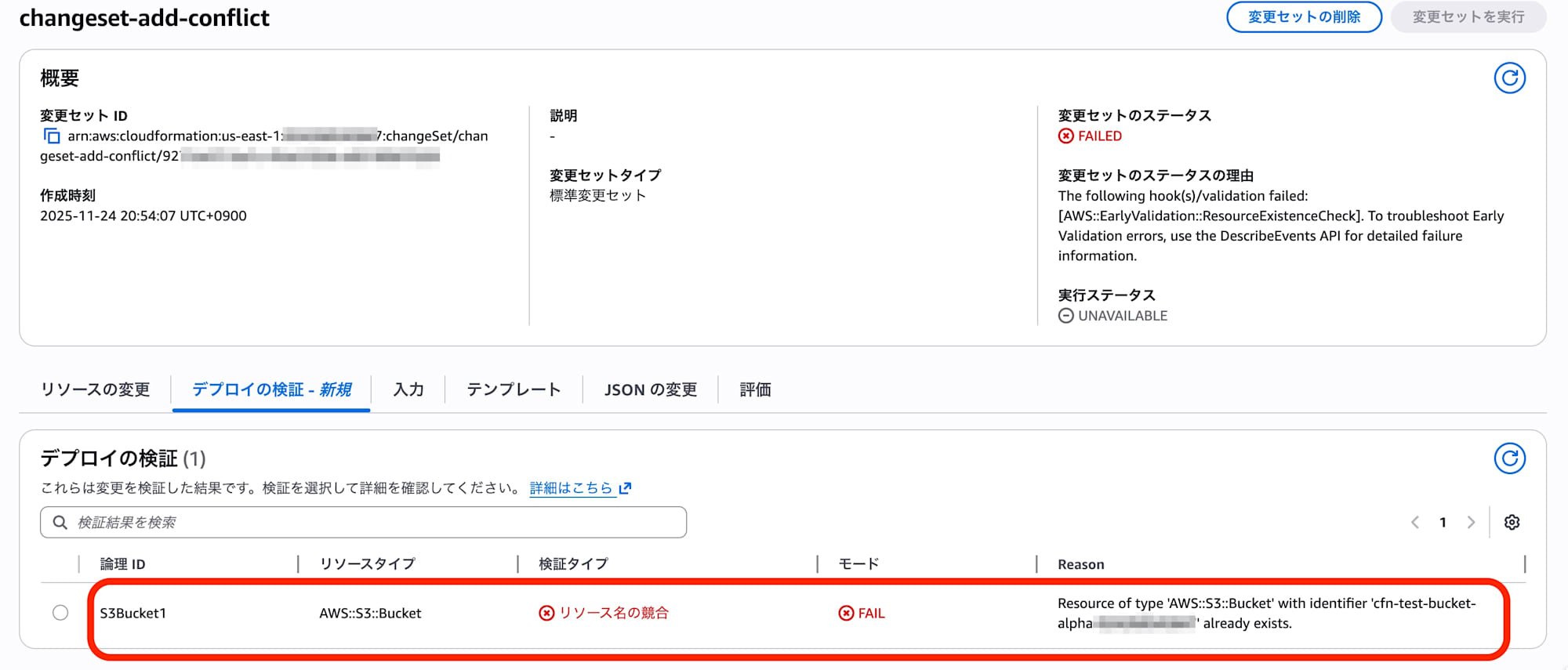
Looking at the details, the following error message was displayed:
{
    "Status": "FAILED",
    "StatusReason": "The following hook(s)/validation failed: [AWS::EarlyValidation::ResourceExistenceCheck]. To troubleshoot Early Validation errors, use the DescribeEvents API for detailed failure information.",
    "ExecutionStatus": "UNAVAILABLE",
    "Changes": [
        {
            "Type": "Resource",
            "ResourceChange": {
                "Action": "Add",
                "LogicalResourceId": "S3Bucket1",
                "ResourceType": "AWS::S3::Bucket"
            }
        }
    ]
}
We can see that the validation hook AWS::EarlyValidation::ResourceExistenceCheck is operating.
Also, ExecutionStatus is UNAVAILABLE, meaning that the execute button cannot be pressed (no worry about accidental deployment).
Previously, errors would occur when actually deploying the change set, but now errors can be identified immediately after creating the change set. This is very efficient.
Test 2: What About IAM Users? (Note)
Out of curiosity, I performed the exact same validation for IAM users (AWS::IAM::User) (adding a resource that duplicates an existing username).
Result: Not Detected
For IAM users, the change set status became CREATE_COMPLETE, passing validation.
Then, when executing (Execute) the change set, it resulted in CREATE_FAILED (AlreadyExists) and rollback occurred as before.
Lessons from Testing
From this difference in behavior, I could see the characteristics of the new feature:
-
Target resources are limited
It worked for S3 buckets but IAM users seem to be excluded at this time. Checking the official documentation, target resources includeAWS::S3::Bucket,AWS::DynamoDB::Table,AWS::EC2::Instance, etc., but IAM-related resources are not included. -
Behavior during "Update (Replacement)"
The S3 bucket test was done with "Add new", but in the pattern of "changing an existing resource name to create a conflict (Replacement)", there were cases where early validation was bypassed. It seems to work most reliably with the "new creation" path.
Test 3: Filtering Events with Operation ID
This update also includes the introduction of Operation ID.
For stacks that have been operated for a long time or are frequently updated, event history can become enormous, making it difficult to check the events of a specific deployment.
I tested whether I could extract specific deployment events using the newly supported Operation ID.
Test Results
After three updates, when extracting OperationId from the event log, I confirmed that different IDs were assigned for each operation.
| Count | Timestamp | Assigned Operation ID |
|---|---|---|
| Update 1 | 12:00:15 | 73e9f432-ca34-40c4-b113-xxxxxxxxxxxx |
| Update 2 | 12:01:00 | b96fe23c-83a2-4647-83c9-xxxxxxxxxxxx |
| Update 3 | 12:01:46 | 537edc7b-4f7e-48e3-bd4a-xxxxxxxxxxxx |
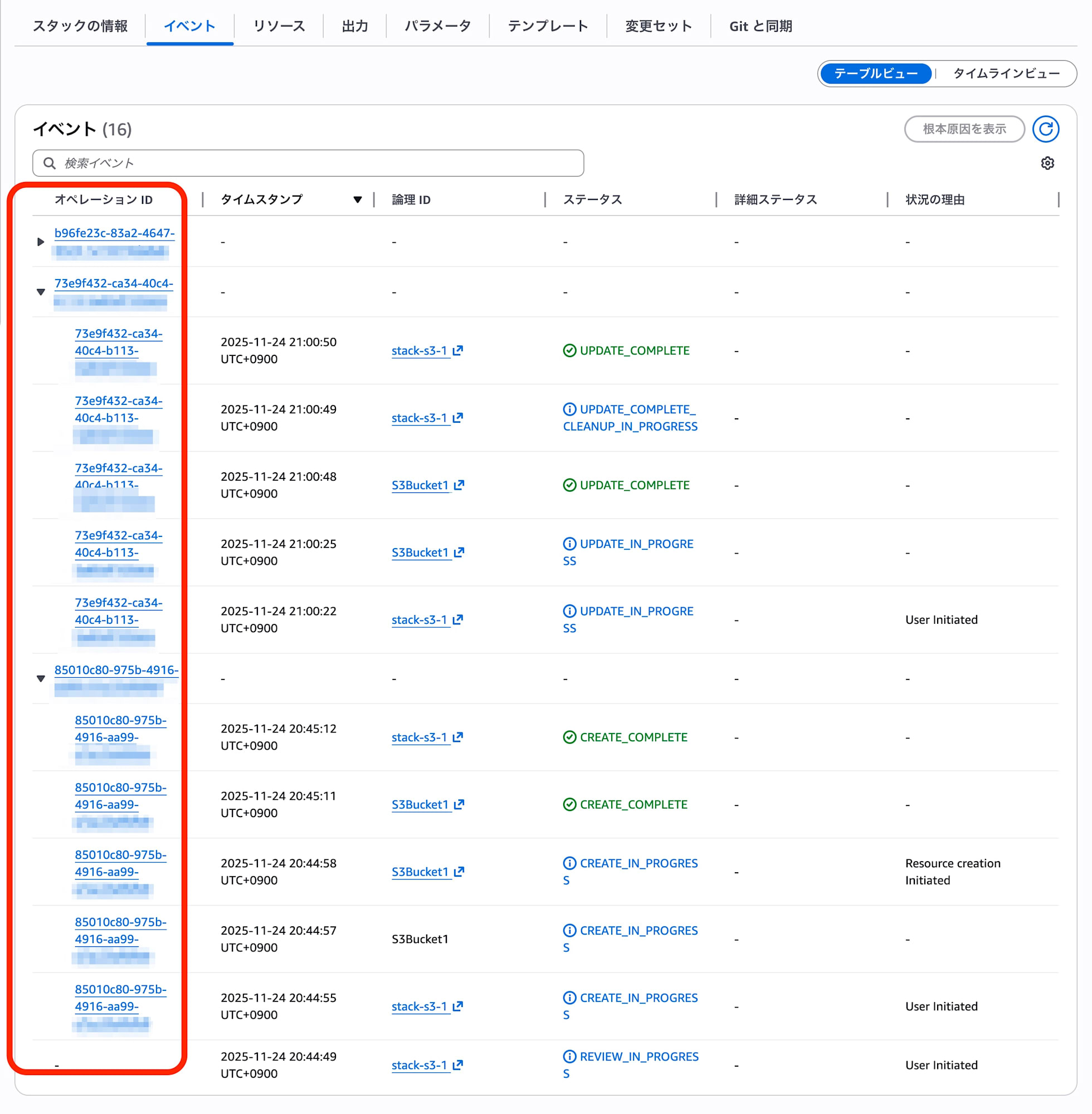
Extracting Logs for a Specific Operation
If you want to see only the logs for "Update 3", you can completely exclude unrelated past logs by filtering with this ID.
aws cloudformation describe-stack-events \
  --stack-name stack-s3-1 \
  --query 'StackEvents[?OperationId==`537edc7b-4f7e-48e3-bd4a-xxxxxxxxxxxx`]'
Filtering Results:
2025-11-24T12:02:21  UPDATE_COMPLETE
2025-11-24T12:02:19  S3Bucket1 UPDATE_COMPLETE
...
2025-11-24T12:01:53  UPDATE_IN_PROGRESS (User Initiated)
Previously, we needed to visually track logs using "time" as a reference, but now we can pinpoint deployment events of interest simply by using the Operation ID. This should also be powerful for automated investigations in CI/CD pipelines.
Summary
Until now, we had a "deploy, wait, fail, wait" cycle, but now we can "detect errors right after creating a change set", allowing for correction and retry with minimal waiting time.
This feature will be especially beneficial for resource operations that take tens of minutes for deployment or rollback, such as updating CloudFront distributions or rolling updates of EC2, ECS/Auto Scaling.
Consider incorporating this new feature, "early validation of change sets," into your CI/CD pipelines that update CloudFormation. Additionally, Operation ID is very effective for managing stacks that are frequently updated. Please make use of both.