
I tried to make it automatically run claude /resume when cmux restarts

This page has been translated by machine translation. View original
Restarting Claude Code sessions automatically when reopening cmux
Hello, I'm nonPi (@non____97).
Have you ever wanted to automatically resume your previous Claude Code sessions when restarting cmux? I certainly have.
When restarting cmux, it automatically restores your previous workspaces, layouts, and sessions.
However, it doesn't automatically restore Claude Code sessions.
When using multiple workspaces and multiple tabs with Claude Code, having to manually type claude /resume after restarting cmux can be quite tedious.
So, I've implemented a solution using Claude Code Hooks and shell scripts.
How it works
Overview
Here's a brief bullet-point explanation of what the implementation does:
- Claude Code Hooks get and save cmux workspace and tab information
- When zsh starts, if it's in cmux and a marker file exists, it executes
claude --resume <session_id>based on the marker file information
Here's a flowchart illustrating the process:
The related files for this mechanism are as follows:
| File | Role |
|---|---|
~/.claude/settings.json |
Registration of SessionStart / SessionEnd hooks |
~/.claude/cmux_session_hook.sh |
Main hook script |
~/.config/sheldon/plugins/cmux-claude-resume/ |
sheldon plugin |
~/.config/sheldon/plugins.toml |
sheldon plugin management |
$cwd/.claude/cmux-tab-info/$session_id |
Tab information cache file |
$cwd/.claude/cmux-session-resume/$session_id |
Marker file |
I'm using sheldon just because I didn't want to clutter my .zshrc.
I placed the script in ~/.config/sheldon/plugins/cmux-claude-resume/cmux-claude-resume.plugin.zsh and loaded it.
# `sheldon` configuration file
# ----------------------------
#
# You can modify this file directly or you can use one of the following
# `sheldon` commands which are provided to assist in editing the config file:
#
# - `sheldon add` to add a new plugin to the config file
# - `sheldon edit` to open up the config file in the default editor
# - `sheldon remove` to remove a plugin from the config file
#
# See the documentation for more https://github.com/rossmacarthur/sheldon#readme

shell = "zsh"

.
.
(omitted)
.
.
[plugins.cmux-claude-resume]
local = "~/.config/sheldon/plugins/cmux-claude-resume"
Claude Code Hooks
With Claude Code Hooks, I'm calling shell scripts at session start and end as follows:
{
.
.
(omitted)
.
.
  "hooks": {
    "SessionStart": [
      {
        "hooks": [
          {
            "type": "command",
            "command": "$HOME/.claude/cmux_session_hook.sh"
          }
        ]
      }
    ],
    "SessionEnd": [
      {
        "hooks": [
          {
            "type": "command",
            "command": "$HOME/.claude/cmux_session_hook.sh"
          }
        ]
      }
    ],
.
.
(omitted)
.
.
  },
.
.
(omitted)
.
.
}
At session start, I get information like workspace name and tab index.
Ideally, I would have preferred to get this information at session end, but unfortunately, commands like cmux tree can't be executed at that point.
Even if attempted, they result in ERROR: Access denied — only processes started inside cmux can connect.
Because of this limitation, if you change the workspace name after starting Claude Code, auto-resume won't work.
It would be simplest to use CMUX_SURFACE_ID and the UUID assigned to each tab, but these change after cmux restarts, so this workaround was necessary.
A feature request has been made, so let's wait hopefully.
Here's the actual shell script executed by Claude Code Hooks:
#!/bin/bash
#
# Claude Code SessionStart/SessionEnd hook for cmux session resume.
#
# Hook script for automatically resuming Claude Code during cmux session restoration.
# Register in settings.json for both SessionStart and SessionEnd.
#
# ---- Operation Overview ----
#
# SessionStart:
#   Gets workspace name / tab index / tab name from cmux CLI,
#   and saves them to a cache file for each session ID.
#   We cache this here because cmux CLI doesn't work during SessionEnd.
#   If session_source is "resume", delete the corresponding marker
#
# SessionEnd:
#   Creates a marker file if reason is "other".
#   "other" triggers on cmux ⌘+Q or ⌘+W.
#   Deletes cache if reason is "prompt_input_exit".
#
# ---- File Structure ----
#
# Cache: $cwd/.claude/cmux-tab-info/$session_id
#   Created at SessionStart. Stores workspace_name, tab_index, tab_name in key=value format.
#
# Marker: $cwd/.claude/cmux-session-resume/$session_id
#   Created at SessionEnd (reason: "other"). Copy of cache contents.
#   The zsh plugin detects this to suggest resume.
#
# ---- Why use workspace name for matching ----
#
# workspace ref (e.g. "workspace:1") can change ordering due to workspace additions/removals
# or Claude Code notifications, making it unstable after restart.
# workspace name (e.g. "workspace") doesn't change unless explicitly renamed by user,
# making it a better identifier for matching.
#
# Known limitation: If a workspace is renamed during a session,
# the cache will still have the old name and matching will fail.
#
# ---- Note about stdout ----
#
# Due to Claude Code hooks' design, output to stdout is injected into Claude's context.
# To avoid context consumption, this script avoids stdout output completely.
# File operations use redirection (> file) to avoid stdout.

# Common prefix for python3 JSON parsing.
# Using python3 since macOS doesn't have jq installed by default.
readonly _EXTRACT_PY='import json,sys; print(json.load(sys.stdin)'

#######################################
# Get current workspace name from cmux list-workspaces.
# Globals:
#   None
# Arguments:
#   None
# Outputs:
#   Workspace name to STDOUT.
# Returns:
#   0 on success, 1 if unavailable.
#######################################
get_workspace_name() {
  cmux list-workspaces 2>/dev/null \
    | grep '\[selected\]' \
    | sed 's/^\* workspace:[0-9]*  //' \
    | sed 's/  \[selected\]//'
}

#######################################
# Get tab index and name for the calling surface from cmux tree.
#
# Count surface lines in cmux tree output sequentially,
# and return the index that matches the specified surface ref.
# This index corresponds to tab order in the GUI and
# remains stable after cmux restoration (though the surface ref changes).
# Globals:
#   None
# Arguments:
#   $1 - workspace ref (e.g. "workspace:1")
#   $2 - surface ref (e.g. "surface:4")
# Outputs:
#   "tab_index tab_name" to STDOUT (space separated).
# Returns:
#   0 on success, 1 if not found.
#######################################
get_tab_info() {
  local ws_ref="$1"
  local surface_ref="$2"
  # Count surface lines sequentially in cmux tree, extract index and tab name for target line.
  # Using macOS standard awk (non-GNU), so we don't use regex capture groups
  # and manually extract quoted string with index().
  cmux tree --workspace "${ws_ref}" 2>/dev/null \
    | grep 'surface ' \
    | awk -v target="${surface_ref} " '{
      idx++
      if ($0 ~ target) {
        s = $0
        i = index(s, "\"")
        if (i > 0) {
          s = substr(s, i+1)
          j = index(s, "\"")
          if (j > 0) name = substr(s, 1, j-1)
        }
        print idx " " name
        exit
      }
    }'
}

#######################################
# Parse stdin JSON and create/delete cache/marker files
# based on SessionStart/SessionEnd.
# Globals:
#   CMUX_WORKSPACE_ID
#   _EXTRACT_PY
# Arguments:
#   None
# Outputs:
#   None (avoid stdout to prevent context consumption)
# Returns:
#   0
#######################################
main() {
  # Do nothing outside cmux (env var not set)
  if [[ -z "${CMUX_WORKSPACE_ID:-}" ]]; then
    return 0
  fi

  # Read all hook input JSON from stdin.
  local input
  input="$(cat)"

  # Extract necessary fields from stdin JSON using python3.
  # Field meanings:
  #   session_id: Session UUID
  #   cwd: Claude Code working directory
  #   hook_event: "SessionStart" or "SessionEnd"
  #   reason: SessionEnd reason
  #     - "prompt_input_exit": Normal exit via /exit or Ctrl+D
  #     - "other": Force quit via ⌘+Q or ⌘+W
  #   session_source: SessionStart source (JSON field is "source" but renamed
  #     to avoid confusion with bash builtin)
  #     - "startup": New session
  #     - "resume": Resume via --resume
  local session_id cwd hook_event reason session_source
  session_id="$(printf '%s' "${input}" \
    | python3 -c "${_EXTRACT_PY}.get('session_id',''))" \
    2>/dev/null)"
  cwd="$(printf '%s' "${input}" \
    | python3 -c "${_EXTRACT_PY}.get('cwd',''))" \
    2>/dev/null)"
  hook_event="$(printf '%s' "${input}" \
    | python3 -c "${_EXTRACT_PY}.get('hook_event_name',''))" \
    2>/dev/null)"
  reason="$(printf '%s' "${input}" \
    | python3 -c "${_EXTRACT_PY}.get('reason',''))" \
    2>/dev/null)"
  session_source="$(printf '%s' "${input}" \
    | python3 -c "${_EXTRACT_PY}.get('source',''))" \
    2>/dev/null)"

  # session_id and cwd required; exit if missing
  if [[ -z "${session_id}" ]] || [[ -z "${cwd}" ]]; then
    return 0
  fi

  # Path definitions:
  #   cache_dir: Tab info cache (one file per session ID)
  #   cache_file: Cache file for this session
  #   resume_dir: Marker file location
  local cache_dir="${cwd}/.claude/cmux-tab-info"
  local cache_file="${cache_dir}/${session_id}"
  local resume_dir="${cwd}/.claude/cmux-session-resume"

  case "${hook_event}" in
    SessionStart)
      # Get current workspace/surface info via cmux identify.
      # Cache this at SessionStart because cmux CLI doesn't respond at SessionEnd.
      local identify_json
      identify_json="$(cmux identify 2>/dev/null)"
      # Exit if cmux CLI unavailable
      if [[ -z "${identify_json}" ]]; then
        return 0
      fi

      # Extract workspace_ref and surface_ref from identify JSON
      local ws_ref surface_ref
      ws_ref="$(printf '%s' "${identify_json}" \
        | python3 -c \
        "${_EXTRACT_PY}['caller']['workspace_ref'])" \
        2>/dev/null)"
      surface_ref="$(printf '%s' "${identify_json}" \
        | python3 -c \
        "${_EXTRACT_PY}['caller']['surface_ref'])" \
        2>/dev/null)"

      # Get workspace name (used for matching)
      local ws_name
      ws_name="$(get_workspace_name)"

      # Get tab index (GUI order) and tab name from cmux tree
      local tab_info tab_index tab_name
      tab_info="$(get_tab_info "${ws_ref}" "${surface_ref}")"
      tab_index="${tab_info%% *}"
      tab_name="${tab_info#* }"

      # Save to cache file in key=value format
      if [[ -n "${ws_name}" ]] && [[ -n "${tab_index}" ]]; then
        mkdir -p "${cache_dir}"
        {
          printf 'workspace_name=%s\n' "${ws_name}"
          printf 'tab_index=%s\n' "${tab_index}"
          printf 'tab_name=%s\n' "${tab_name}"
        } > "${cache_file}"
      fi

      # On successful resume: Delete marker only, keep cache.
      # Cache is needed if resumed session is closed with ⌘+Q again,
      # to create a new marker from tab info.
      if [[ "${session_source}" == "resume" ]]; then
        rm -f "${resume_dir}/${session_id}"
      fi
      ;;

    SessionEnd)
      if [[ "${reason}" == "prompt_input_exit" ]]; then
        # Normal exit (/exit, Ctrl+D): Delete cache.
        # This session was intentionally closed, don't include in next resume.
        rm -f "${cache_file}"
      elif [[ "${reason}" == "other" ]]; then
        mkdir -p "${resume_dir}"
        if [[ -f "${cache_file}" ]]; then
          # Copy cache contents (workspace_name, tab_index, tab_name) to marker
          cp "${cache_file}" "${resume_dir}/${session_id}"
        else
          # If no cache (SessionStart hook failed etc.), create empty marker.
          # zsh plugin can't match workspace/tab but will still suggest resume
          # based on directory match alone.
          touch "${resume_dir}/${session_id}"
        fi

        # Extract session name from transcript_path and append to marker.
        # The customTitle field of the last custom-title entry in the JSONL file
        # is the session name set via /rename or auto-generated.
        local transcript_path session_name
        transcript_path="$(printf '%s' "${input}" \
          | python3 -c "${_EXTRACT_PY}.get('transcript_path',''))" \
          2>/dev/null)"
        if [[ -n "${transcript_path}" ]] && [[ -f "${transcript_path}" ]]; then
          session_name="$(python3 -c "
import json, sys
name = ''
for line in open(sys.argv[1]):
    line = line.strip()
    if not line:
        continue
    try:
        data = json.loads(line)
        if data.get('type') == 'custom-title':
            name = data.get('customTitle', '')
    except:
        pass
print(name)
" "${transcript_path}" 2>/dev/null)"
          if [[ -n "${session_name}" ]]; then
            printf 'session_name=%s\n' "${session_name}" \
              >> "${resume_dir}/${session_id}"
          fi
        fi
      fi
      ;;
  esac

}

main "$@"
Shell Script at zsh Startup
The shell script that runs at zsh startup suggests and executes claude /resume based on workspace name and tab index information.
Since I didn't want sessions that were closed by closing tabs to be automatically resumed, I added a 5-second countdown during which pressing any key would cancel the resume.
Here's the actual shell script that runs at zsh startup:
#!/usr/bin/env zsh
#
# cmux-claude-resume: Automatically resume Claude Code when restoring cmux sessions
#
# ---- Overview ----
#
# cmux restores layouts and working directories on session restoration,
# but not processes (Claude Code) within panes.
# This plugin detects marker files at zsh startup after cmux restoration
# and suggests resuming the corresponding Claude Code session.
#
# ---- Marker Files ----
#
# Markers are created by Claude Code SessionEnd hook (reason: "other").
# Location: $cwd/.claude/cmux-session-resume/$session_id
# Contents: key=value format (workspace_name, tab_index, tab_name, session_name)
#
# ---- Matching Conditions ----
#
# Resume is suggested when all 3 conditions match:
#   1. Directory: Marker exists in $PWD/.claude/cmux-session-resume/
#   2. workspace name: Marker's workspace_name matches current
#   3. tab index: Marker's tab_index matches current
#
# Why use workspace name instead of workspace ref:
#   workspace ref numbers can shift when adding/removing workspaces.
#   workspace name remains stable unless explicitly renamed.
#
# ---- Multiple Sessions in Same Directory ----
#
# Using mv to atomically acquire markers prevents race conditions
# when multiple zsh processes start simultaneously.
# Since macOS doesn't include flock by default, mv is used instead.
# mv is guaranteed atomic for same filesystem by POSIX.
# First to mv gets the marker, failures try next marker.
#
# ---- Marker Deletion ----
#
# Markers are deleted at these times:
#   - After successful resume: By SessionStart hook (source: "resume")
#   - When cancelled: By this plugin (cache also deleted)
#   - When expired: By this plugin (markers older than 1h)
#
# ---- Known Limitations ----
#
# If workspace is renamed during session,
# cache retains old name and matching will fail.

# Do nothing outside cmux (env var not set)
if [[ -z "${CMUX_WORKSPACE_ID}" ]]; then
  return 0
fi

# Marker expiration time (seconds)
readonly _CMUX_SESSION_RESUME_STALE=3600  # 1 hour

#######################################
# Get current workspace name and tab index.
#
# Uses cmux list-workspaces to get workspace name,
# and cmux identify + cmux tree to determine tab index.
# Globals:
#   None
# Arguments:
#   None
# Outputs:
#   Two lines to STDOUT:
#     line 1: workspace name
#     line 2: tab index
# Returns:
#   0 on success, 1 if unavailable.
#######################################
_cmux_session_resume::get_tab_identity() {
  # Get workspace name
  local ws_name
  ws_name="$(cmux list-workspaces 2>/dev/null \
    | grep '\[selected\]' \
    | sed 's/^\* workspace:[0-9]*  //' \
    | sed 's/  \[selected\]//')"
  [[ -n "${ws_name}" ]] || return 1

  # Get workspace_ref and surface_ref from identify
  local identify_json ws_ref surface_ref
  identify_json="$(cmux identify 2>/dev/null)" || return 1
  ws_ref="$(printf '%s' "${identify_json}" \
    | python3 -c "import json,sys; \
    print(json.load(sys.stdin)\
    ['caller']['workspace_ref'])" 2>/dev/null)" \
    || return 1
  surface_ref="$(printf '%s' "${identify_json}" \
    | python3 -c "import json,sys; \
    print(json.load(sys.stdin)\
    ['caller']['surface_ref'])" 2>/dev/null)" \
    || return 1

  # Count surface lines in cmux tree sequentially to find tab index (position of own surface_ref)
  local tab_index
  tab_index="$(cmux tree --workspace "${ws_ref}" 2>/dev/null \
    | grep 'surface ' \
    | awk -v target="${surface_ref} " \
    '{ idx++; if ($0 ~ target) { print idx; exit } }')"
  [[ -n "${tab_index}" ]] || return 1

  # Return newline-separated (because workspace name might contain spaces)
  printf '%s\n%s' "${ws_name}" "${tab_index}"
}

#######################################
# Read a value for specified key from marker file.
#
# Markers are stored in key=value format (one key per line).
# Example: workspace_name=Chat
# Globals:
#   None
# Arguments:
#   $1 - marker file path
#   $2 - key name
# Outputs:
#   Value to STDOUT.
# Returns:
#   0 on success, 1 if not found.
#######################################
_cmux_session_resume::read_marker_value() {
  grep "^${2}=" "$1" 2>/dev/null | cut -d= -f2-
}

#######################################
# Detect residual markers and execute Claude Code resume.
#
# Called at zsh startup after cmux restoration.
# Scans markers in $PWD/.claude/cmux-session-resume/,
# and if one with matching workspace name + tab index is found,
# displays a 5-second countdown.
#
# - Key pressed within 5s: Cancel (delete marker and cache)
# - After 5s: Execute claude --resume <session_id>
# Globals:
#   _CMUX_SESSION_RESUME_STALE
# Arguments:
#   None
# Outputs:
#   Writes resume prompt to STDOUT.
# Returns:
#   0
#######################################
_cmux_session_resume::check_and_prompt() {
  local resume_dir="${PWD}/.claude/cmux-session-resume"

  # Do nothing if marker directory doesn't exist
  [[ -d "${resume_dir}" ]] || return 0

  # List marker files (zsh's (N) suppresses errors if no matches)
  local marker_files=("${resume_dir}"/*(N))
  (( ${#marker_files[@]} )) || return 0

  # Get current tab's workspace name + tab index
  local tab_identity current_ws current_idx
  tab_identity="$(_cmux_session_resume::get_tab_identity)" \
    || return 0
  # Return is newline-separated, first line = workspace name, second = tab index
  current_ws="${tab_identity%%$'\n'*}"
  current_idx="${tab_identity##*$'\n'}"

  local marker_file marker_ws marker_idx marker_mod now
  for marker_file in "${marker_files[@]}"; do
    [[ -f "${marker_file}" ]] || continue

    # Delete old markers (>1h) and their caches
    marker_mod="$(stat -f %m "${marker_file}" 2>/dev/null)" \
      || continue
    now="$(date +%s)"
    if (( now - marker_mod > _CMUX_SESSION_RESUME_STALE )); then
      rm -f "${marker_file}"
      rm -f "${PWD}/.claude/cmux-tab-info/${marker_file:t}"
      continue
    fi

    # Check if both workspace name + tab index match.
    # Don't touch non-matching markers (might be for other tabs).
    marker_ws="$(_cmux_session_resume::read_marker_value \
      "${marker_file}" "workspace_name")"
    marker_idx="$(_cmux_session_resume::read_marker_value \
      "${marker_file}" "tab_index")"
    if [[ "${marker_ws}" != "${current_ws}" ]] \
        || [[ "${marker_idx}" != "${current_idx}" ]]; then
      continue
    fi

    # Atomically acquire with mv. If multiple zsh start simultaneously,
    # only the one with successful mv processes this marker.
    local claimed="${marker_file}.claiming.$$"
    mv "${marker_file}" "${claimed}" 2>/dev/null || continue

    # Get session ID / tab name / session name from marker
    local session_id tab_name session_name
    session_id="${${claimed:t}%.claiming.*}"
    tab_name="$(_cmux_session_resume::read_marker_value \
      "${claimed}" "tab_name")"
    session_name="$(_cmux_session_resume::read_marker_value \
      "${claimed}" "session_name")"

    # Display resume proposal
    local display_dir="${PWD/#$HOME/~}"
    printf '\033[1;36m%s\033[0m\n' \
      "[cmux] Claude Code session found"
    printf '  Directory: %s\n' "${display_dir}"
    printf '  Session ID: %s\n' "${session_id}"
    if [[ -n "${session_name}" ]]; then
      printf '  Session name: %s\n' "${session_name}"
    fi
    printf 'Press any key within 5 seconds to cancel\n'

    if read -t 5 -k 1 2>/dev/null; then
      # Key pressed: Cancel resume. Delete both marker and cache.
      rm -f "${claimed}"
      rm -f "${PWD}/.claude/cmux-tab-info/${session_id}"
      printf '\n[cmux] Canceled\n'
    else
      # No input for 5s: Execute resume.
      # Delete claimed file and resume session with claude --resume.
      # Original marker will be deleted by SessionStart hook (source: "resume").
      rm -f "${claimed}"
      claude --resume "${session_id}"
    fi
    return 0
  done
}

# Execute immediately when plugin loads
_cmux_session_resume::check_and_prompt
Limitations
Here are the limitations of this mechanism:
- If you change the workspace name after starting Claude Code, auto-resume won't work
- This is because workspace and session linking is done using the workspace name at Claude Code startup
- If workspace names are duplicated, auto-resume won't work
- If tabs are deleted, causing tab indices to shift up after restart, auto-resume won't work
- If you change directories within a Claude Code session, auto-resume won't work
- This can be resolved by modifying the script if you're okay with cache and marker files being created under
~/.claude/
- This can be resolved by modifying the script if you're okay with cache and marker files being created under
- For cmux restarts that involve version upgrades, workspace and tab information isn't preserved, so auto-resume won't work
- This is being discussed in Persistence of tab information and pane layouts · Issue #480 · manaflow-ai/cmux
These limitations are quite significant.
Please consider this implementation more of a temporary workaround than a robust solution.
Let's try it
Current Session Confirmation
Let's verify how this actually works.
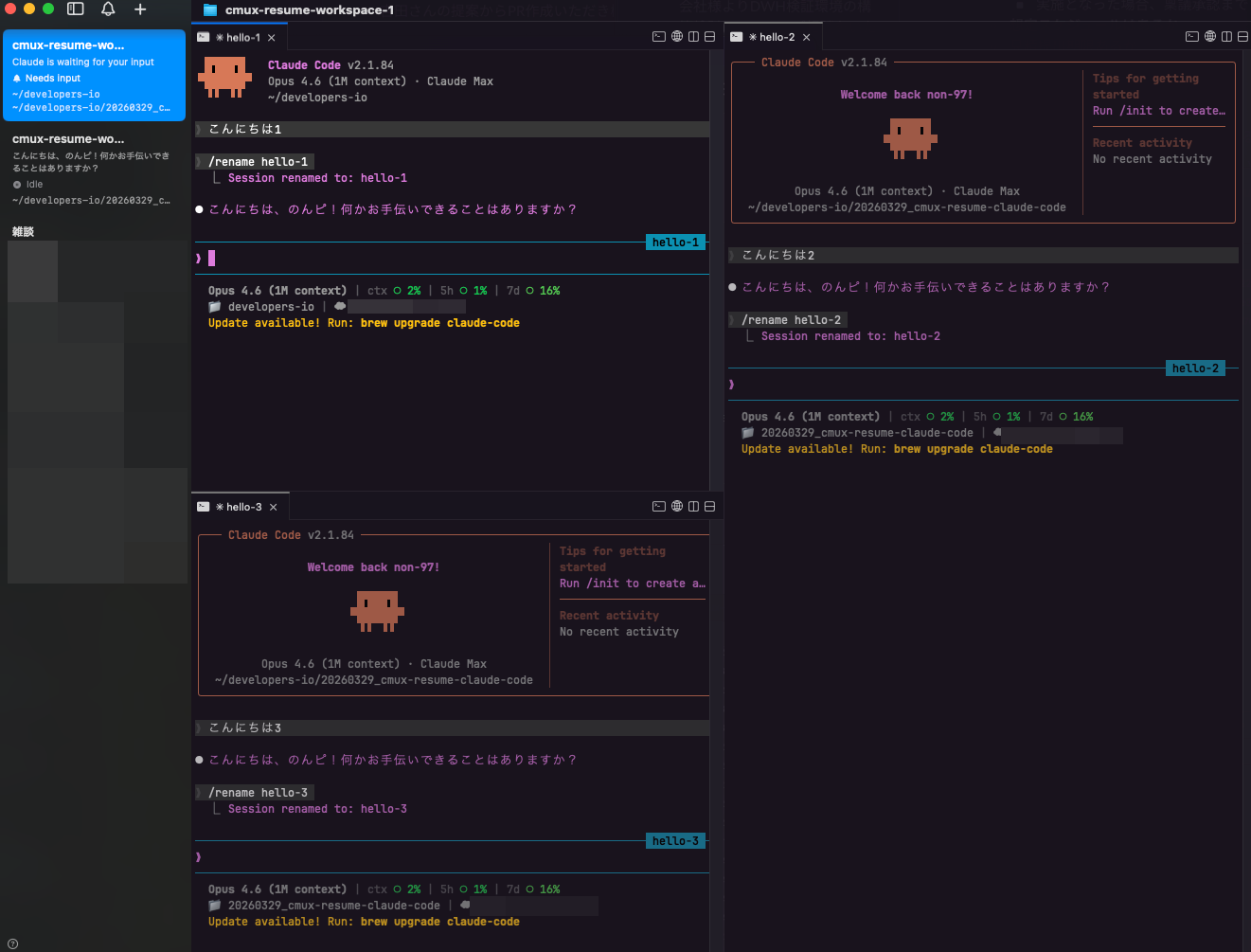
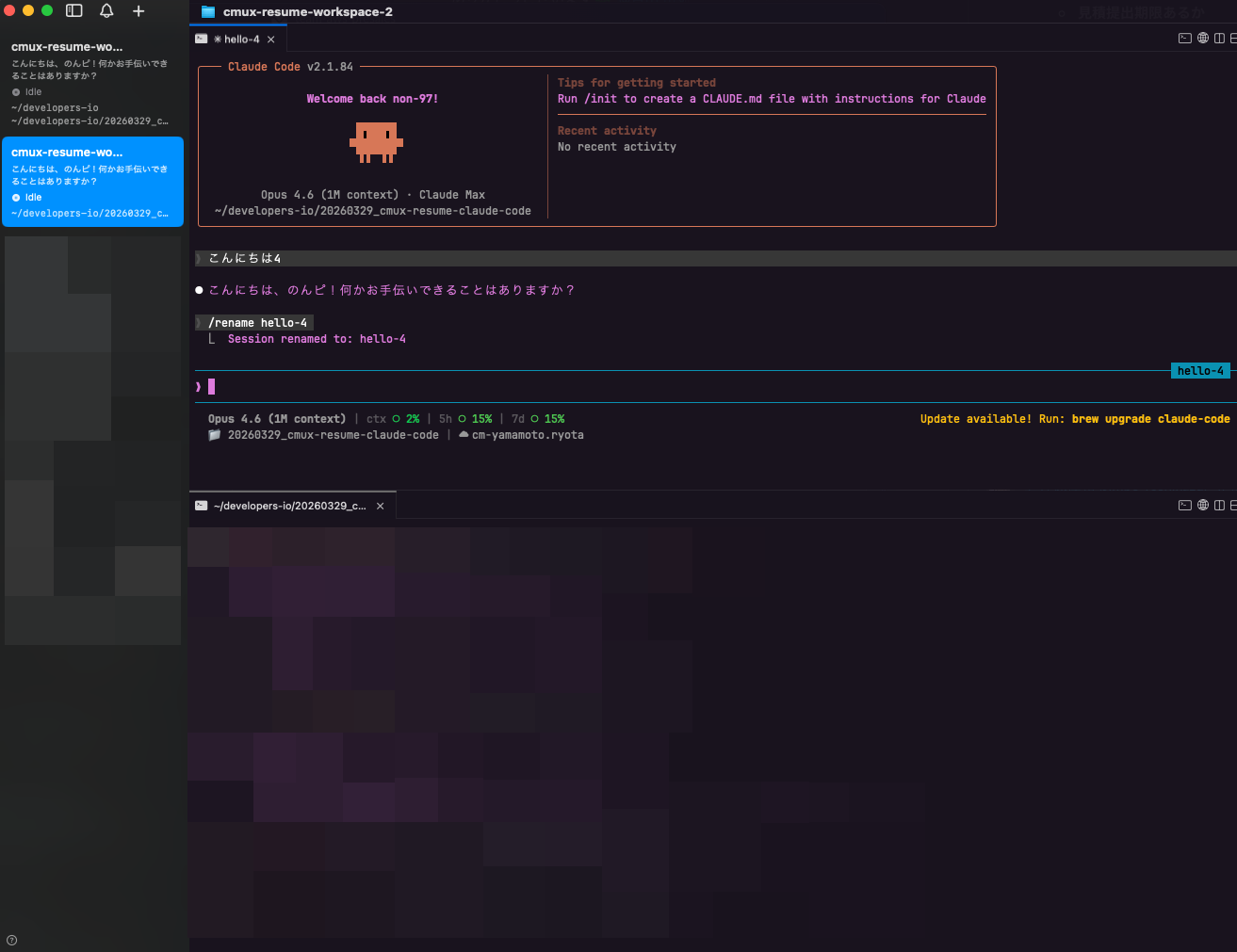
I've prepared two workspaces.
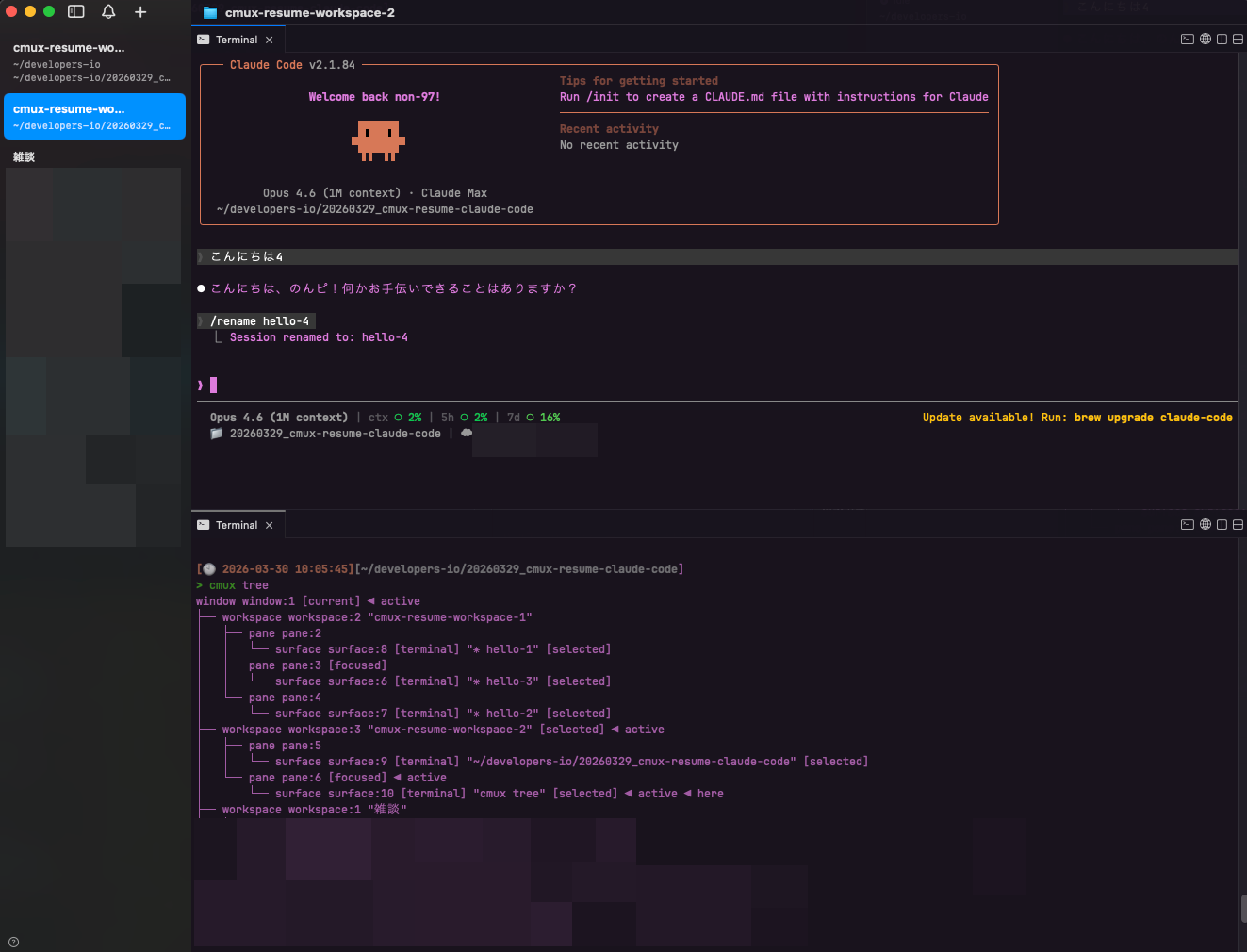
cmux-resume-workspace-1 looks like this:
cmux-resume-workspace-2 looks like this:
The result of cmux tree at this time is as follows:
> cmux tree
window window:1 [current] ◀ active
├── workspace workspace:2 "cmux-resume-workspace-1"
│   ├── pane pane:2
│   │   └── surface surface:8 [terminal] "✳ hello-1" [selected]
│   ├── pane pane:3 [focused]
│   │   └── surface surface:6 [terminal] "✳ hello-3" [selected]
│   └── pane pane:4
│       └── surface surface:7 [terminal] "✳ hello-2" [selected]
├── workspace workspace:3 "cmux-resume-workspace-2" [selected] ◀ active
│   ├── pane pane:5
│   │   └── surface surface:9 [terminal] "~/developers-io/20260329_cmux-resume-claude-code" [selected]
│   └── pane pane:6 [focused] ◀ active
│       └── surface surface:10 [terminal] "cmux tree" [selected] ◀ active ◀ here
├── workspace workspace:1 "雑談"
.
.
(omitted)
.
.
Now let's check the cache files created at the start of the Claude Code session.
> cmux version
cmux 0.62.2 (77) [6c203b514]

> pwd
~/developers-io

> ls -lR .claude
total 8
drwxr-xr-x@ 3 <username>  <groupname>    96  3 29 18:35 cmux-session-resume
drwxr-xr-x@ 4 <username>  <groupname>   128  3 30 10:04 cmux-tab-info
-rw-r--r--@ 1 <username>  <groupname>  3210  3 29 10:52 settings.local.json

.claude/cmux-session-resume:
total 0

.claude/cmux-tab-info:
total 8
-rw-r--r--@ 1 <username>  <groupname>  76  3 30 10:04 68a455c7-e74a-4250-a347-f9a05799f310

> cat .claude/cmux-tab-info/68a455c7-e74a-4250-a347-f9a05799f310
workspace_name=cmux-resume-workspace-1
tab_index=1
tab_name=✳ Claude Code
The cache file has been created.
Let's check the other directories.
> ls -lR 20260329_cmux-resume-claude-code/.claude/
total 0
drwxr-xr-x@ 2 <username>  <groupname>   64  3 29 18:33 cmux-session-resume
drwxr-xr-x@ 6 <username>  <groupname>  192  3 30 10:06 cmux-tab-info

20260329_cmux-resume-claude-code/.claude/cmux-session-resume:
total 0

20260329_cmux-resume-claude-code/.claude/cmux-tab-info:
total 24
-rw-r--r--@ 1 <username>  <groupname>  76  3 30 10:04 42c4765b-7e3e-453d-a8fd-867079adc85e
-rw-r--r--@ 1 <username>  <groupname>  76  3 30 10:04 4e4b1de9-9228-474f-beca-8ffdfa20b18c
-rw-r--r--@ 1 <username>  <groupname>  76  3 30 10:06 56eafa37-3d76-426b-a6f9-0b327d996252

> cat 20260329_cmux-resume-claude-code/.claude/cmux-tab-info/42c4765b-7e3e-453d-a8fd-867079adc85e
workspace_name=cmux-resume-workspace-1
tab_index=3
tab_name=✳ Claude Code

> cat 20260329_cmux-resume-claude-code/.claude/cmux-tab-info/4e4b1de9-9228-474f-beca-8ffdfa20b18c
workspace_name=cmux-resume-workspace-1
tab_index=2
tab_name=✳ Claude Code

> cat 20260329_cmux-resume-claude-code/.claude/cmux-tab-info/56eafa37-3d76-426b-a6f9-0b327d996252
workspace_name=cmux-resume-workspace-2
tab_index=1
tab_name=✳ Claude Code
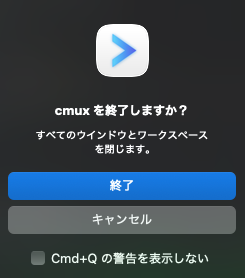
Exiting cmux with ⌘ + Q
I'll exit cmux using ⌘ + Q.
Now I'll check the cache and marker files.
> ls -lR .claude/
total 8
drwxr-xr-x@ 4 <username>  <groupname>   128  3 30 10:11 cmux-session-resume
drwxr-xr-x@ 4 <username>  <groupname>   128  3 30 10:04 cmux-tab-info
-rw-r--r--@ 1 <username>  <groupname>  3210  3 29 10:52 settings.local.json

.claude/cmux-session-resume:
total 8
-rw-r--r--@ 1 <username>  <groupname>  97  3 30 10:11 68a455c7-e74a-4250-a347-f9a05799f310

.claude/cmux-tab-info:
total 8
-rw-r--r--@ 1 <username>  <groupname>  76  3 30 10:04 68a455c7-e74a-4250-a347-f9a05799f310

> cat .claude/cmux-session-resume/68a455c7-e74a-4250-a347-f9a05799f310
workspace_name=cmux-resume-workspace-1
tab_index=1
tab_name=✳ Claude Code
session_name=hello-1
> ls -lR 20260329_cmux-resume-claude-code/.claude/
total 0
drwxr-xr-x@ 5 <username>  <groupname>  160  3 30 10:11 cmux-session-resume
drwxr-xr-x@ 6 <username>  <groupname>  192  3 30 10:06 cmux-tab-info

20260329_cmux-resume-claude-code/.claude/cmux-session-resume:
total 24
-rw-r--r--@ 1 <username>  <groupname>  97  3 30 10:11 42c4765b-7e3e-453d-a8fd-867079adc85e
-rw-r--r--@ 1 <username>  <groupname>  97  3 30 10:11 4e4b1de9-9228-474f-beca-8ffdfa20b18c
-rw-r--r--@ 1 <username>  <groupname>  97  3 30 10:11 56eafa37-3d76-426b-a6f9-0b327d996252

20260329_cmux-resume-claude-code/.claude/cmux-tab-info:
total 24
-rw-r--r--@ 1 <username>  <groupname>  76  3 30 10:04 42c4765b-7e3e-453d-a8fd-867079adc85e
-rw-r--r--@ 1 <username>  <groupname>  76  3 30 10:04 4e4b1de9-9228-474f-beca-8ffdfa20b18c
-rw-r--r--@ 1 <username>  <groupname>  76  3 30 10:06 56eafa37-3d76-426b-a6f9-0b327d996252

> cat 20260329_cmux-resume-claude-code/.claude/cmux-session-resume/42c4765b-7e3e-453d-a8fd-867079adc85e
workspace_name=cmux-resume-workspace-1
tab_index=3
tab_name=✳ Claude Code
session_name=hello-2

> cat 20260329_cmux-resume-claude-code/.claude/cmux-session-resume/4e4b1de9-9228-474f-beca-8ffdfa20b18c
workspace_name=cmux-resume-workspace-1
tab_index=2
tab_name=✳ Claude Code
session_name=hello-3

> cat 20260329_cmux-resume-claude-code/.claude/cmux-session-resume/56eafa37-3d76-426b-a6f9-0b327d996252
workspace_name=cmux-resume-workspace-2
tab_index=1
tab_name=✳ Claude Code
session_name=hello-4
We can see that marker files have been created based on the cache files.
Starting cmux
Now let's start cmux.
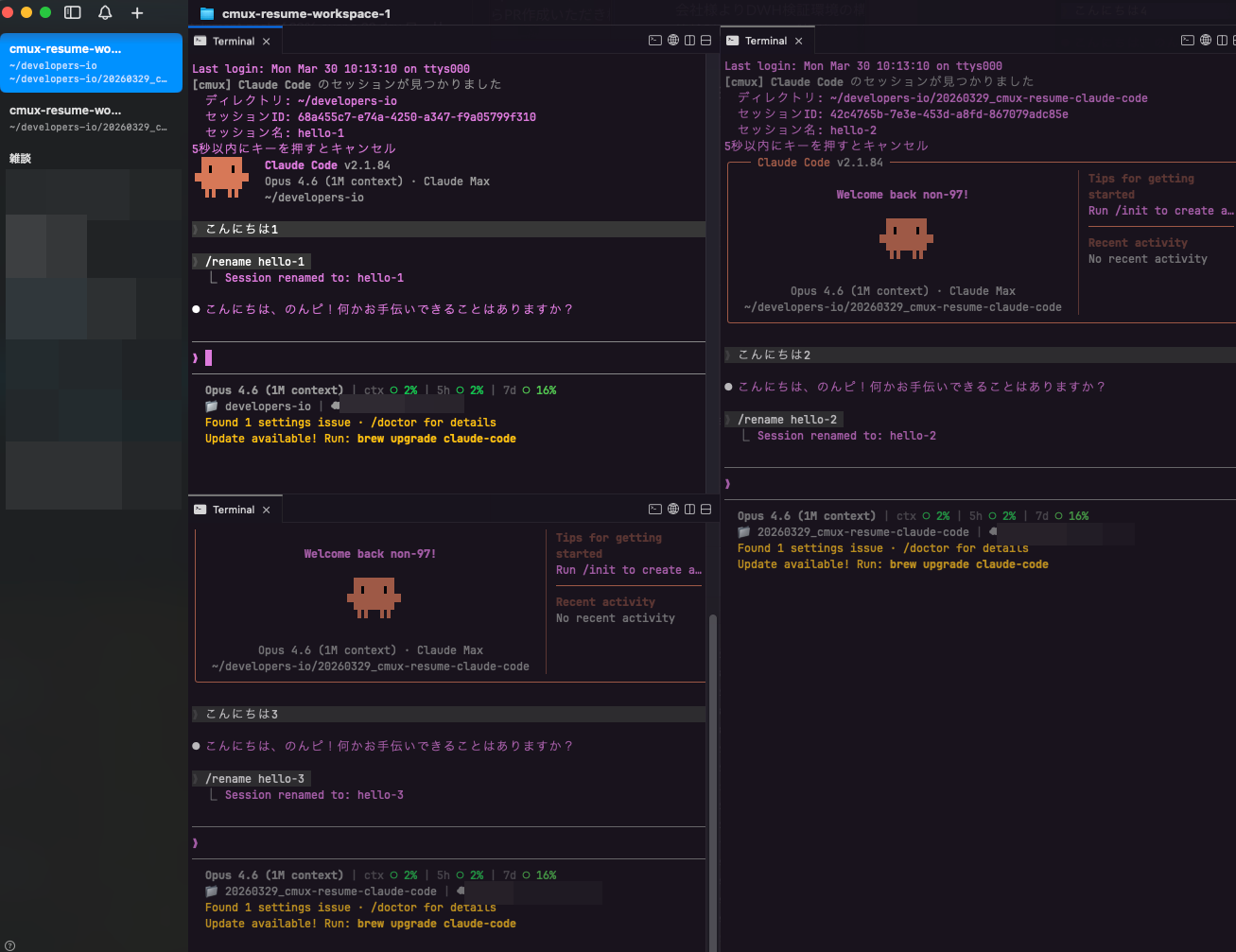
After starting, cmux-resume-workspace-1 looks like this:
And cmux-resume-workspace-2 looks like this:
Both have successfully resumed their sessions.
The result of cmux tree at this time is:
> cmux tree
window window:1 [current] ◀ active
├── workspace workspace:1 "cmux-resume-workspace-1"
│   ├── pane pane:1 [focused]
│   │   └── surface surface:3 [terminal] "✳ hello-1" [selected]
│   ├── pane pane:2
│   │   └── surface surface:1 [terminal] "✳ hello-3" [selected]
│   └── pane pane:3
│       └── surface surface:2 [terminal] "✳ hello-2" [selected]
├── workspace workspace:2 "cmux-resume-workspace-2" [selected] ◀ active
│   ├── pane pane:4
│   │   └── surface surface:5 [terminal] "✳ hello-4" [selected]
│   └── pane pane:5 [focused] ◀ active
│       └── surface surface:4 [terminal] "cmux tree" [selected] ◀ active ◀ here
├── workspace workspace:3 "雑談"
.
.
(omitted)
.
.
We can see that cmux-resume-workspace-1, which was previously workspace:2, is now workspace:1. IDs are assigned in the order of workspace startup from top to bottom.
The cache files and marker files at this time are:
> ls -lR .claude/
total 8
drwxr-xr-x@ 3 <username>  <groupname>    96  3 30 10:13 cmux-session-resume
drwxr-xr-x@ 6 <username>  <groupname>   192  3 30 10:14 cmux-tab-info
-rw-r--r--@ 1 <username>  <groupname>  3210  3 29 10:52 settings.local.json

.claude/cmux-session-resume:
total 0

.claude/cmux-tab-info:
total 24
-rw-r--r--@ 1 <username>  <groupname>  55  3 30 10:14 31790410-fcd5-4389-b832-b3df9ce99c92
-rw-r--r--@ 1 <username>  <groupname>  72  3 30 10:13 68a455c7-e74a-4250-a347-f9a05799f310
-rw-r--r--@ 1 <username>  <groupname>  55  3 30 10:14 cda60e9e-8003-408d-b9ee-71fe8e9ce99d

> cat .claude/cmux-tab-info/31790410-fcd5-4389-b832-b3df9ce99c92
workspace_name=雑談
tab_index=1
tab_name=cmux-resume

> cat .claude/cmux-tab-info/68a455c7-e74a-4250-a347-f9a05799f310
workspace_name=cmux-resume-workspace-1
tab_index=1
tab_name=✳ hello-1

> cat .claude/cmux-tab-info/cda60e9e-8003-408d-b9ee-71fe8e9ce99d
workspace_name=雑談
tab_index=1
tab_name=cmux-resume
> ls -lR 20260329_cmux-resume-claude-code/.claude/
total 0
drwxr-xr-x@ 2 <username>  <groupname>   64  3 30 10:13 cmux-session-resume
drwxr-xr-x@ 6 <username>  <groupname>  192  3 30 10:06 cmux-tab-info

20260329_cmux-resume-claude-code/.claude/cmux-session-resume:
total 0

20260329_cmux-resume-claude-code/.claude/cmux-tab-info:
total 24
-rw-r--r--@ 1 <username>  <groupname>  72  3 30 10:13 42c4765b-7e3e-453d-a8fd-867079adc85e
-rw-r--r--@ 1 <username>  <groupname>  72  3 30 10:13 4e4b1de9-9228-474f-beca-8ffdfa20b18c
-rw-r--r--@ 1 <username>  <groupname>  72  3 30 10:13 56eafa37-3d76-426b-a6f9-0b327d996252

> cat 20260329_cmux-resume-claude-code/.claude/cmux-tab-info/42c4765b-7e3e-453d-a8fd-867079adc85e
workspace_name=cmux-resume-workspace-1
tab_index=3
tab_name=✳ hello-2

> cat 20260329_cmux-resume-claude-code/.claude/cmux-tab-info/4e4b1de9-9228-474f-beca-8ffdfa20b18c
workspace_name=cmux-resume-workspace-1
tab_index=2
tab_name=✳ hello-3

> cat 20260329_cmux-resume-claude-code/.claude/cmux-tab-info/56eafa37-3d76-426b-a6f9-0b327d996252
workspace_name=cmux-resume-workspace-2
tab_index=1
tab_name=✳ hello-4
The marker files have been deleted because the sessions have been resumed.
Meanwhile, in the cache files, the tab names have been updated with the session names.
Starting cmux again after exiting
I'll exit cmux again and restart it.
Upon starting, the sessions are successfully resumed again as shown below.
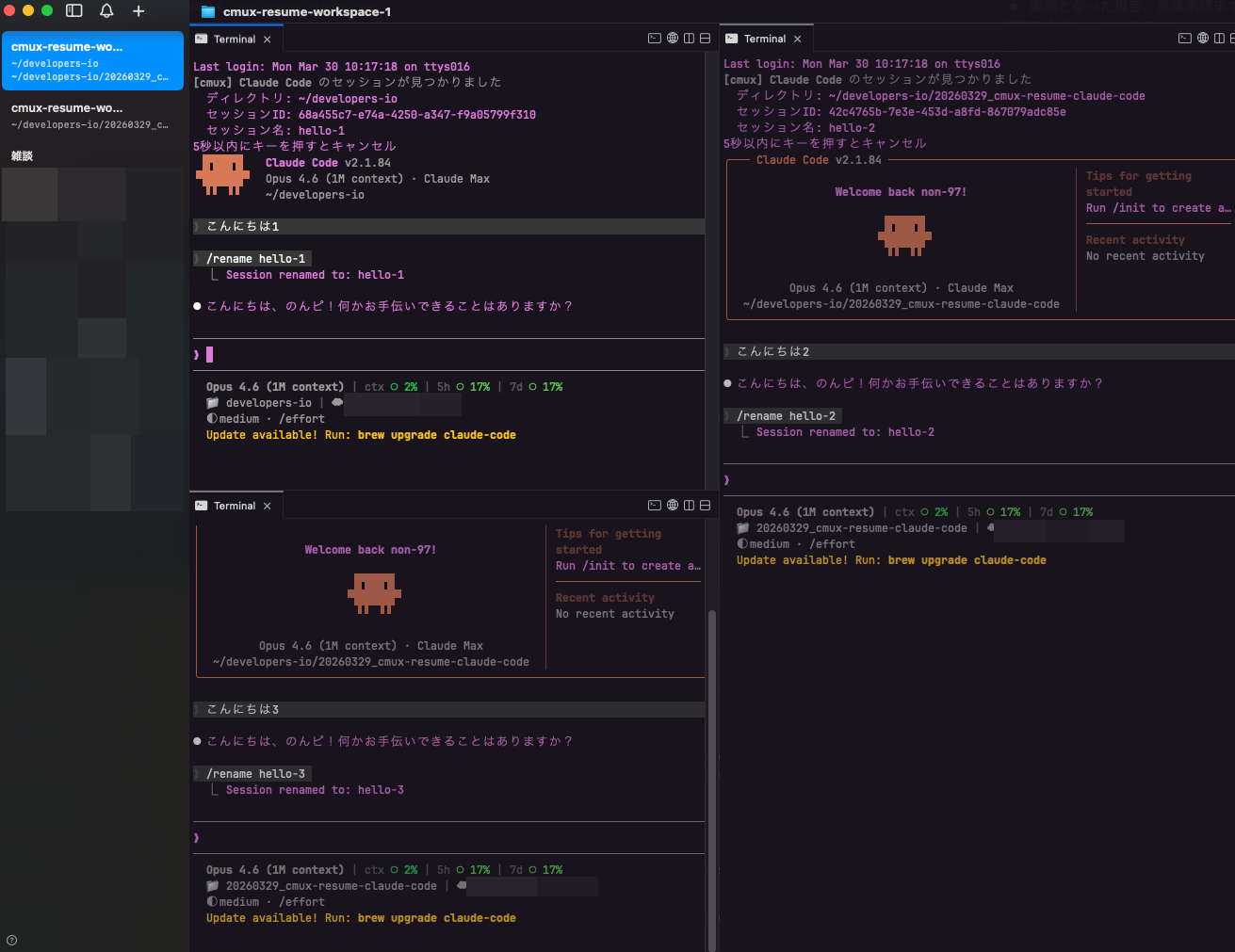
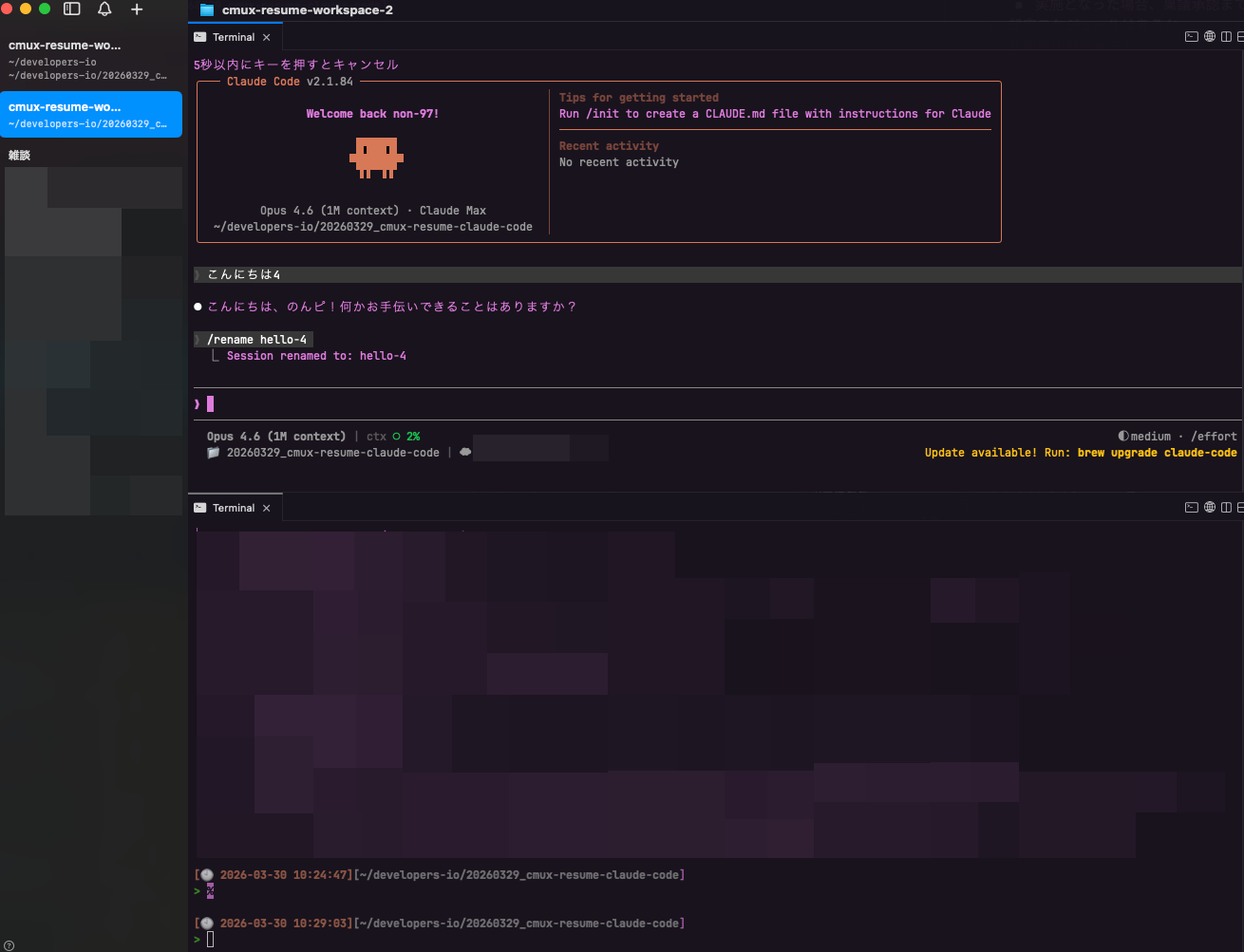
The cache files and marker files at this time are:
> ls -lR .claude/
total 8
drwxr-xr-x@ 5 <username>  <groupname>   160  3 30 10:24 cmux-session-resume
drwxr-xr-x@ 6 <username>  <groupname>   192  3 30 10:14 cmux-tab-info
-rw-r--r--@ 1 <username>  <groupname>  3210  3 29 10:52 settings.local.json

.claude/cmux-session-resume:
total 16
-rw-r--r--@ 1 <username>  <groupname>   93  3 30 10:24 68a455c7-e74a-4250-a347-f9a05799f310
-rw-r--r--@ 1 <username>  <groupname>  100  3 30 10:24 cda60e9e-8003-408d-b9ee-71fe8e9ce99d

.claude/cmux-tab-info:
total 24
-rw-r--r--@ 1 <username>  <groupname>  55  3 30 10:14 31790410-fcd5-4389-b832-b3df9ce99c92
-rw-r--r--@ 1 <username>  <groupname>  72  3 30 10:13 68a455c7-e74a-4250-a347-f9a05799f310
-rw-r--r--@ 1 <username>  <groupname>  55  3 30 10:14 cda60e9e-8003-408d-b9ee-71fe8e9ce99d

> cat .claude/cmux-session-resume/68a455c7-e74a-4250-a347-f9a05799f310
workspace_name=cmux-resume-workspace-1
tab_index=1
tab_name=✳ hello-1
session_name=hello-1

> cat .claude/cmux-session-resume/cda60e9e-8003-408d-b9ee-71fe8e9ce99d
workspace_name=雑談
tab_index=1
tab_name=cmux-resume
session_name=workspace-ref-to-name-migration
> ls -lR 20260329_cmux-resume-claude-code/.claude/
total 0
drwxr-xr-x@ 5 <username>  <groupname>  160  3 30 10:24 cmux-session-resume
drwxr-xr-x@ 6 <username>  <groupname>  192  3 30 10:06 cmux-tab-info

20260329_cmux-resume-claude-code/.claude/cmux-session-resume:
total 24
-rw-r--r--@ 1 <username>  <groupname>  93  3 30 10:24 42c4765b-7e3e-453d-a8fd-867079adc85e
-rw-r--r--@ 1 <username>  <groupname>  93  3 30 10:24 4e4b1de9-9228-474f-beca-8ffdfa20b18c
-rw-r--r--@ 1 <username>  <groupname>  93  3 30 10:24 56eafa37-3d76-426b-a6f9-0b327d996252

20260329_cmux-resume-claude-code/.claude/cmux-tab-info:
total 24
-rw-r--r--@ 1 <username>  <groupname>  72  3 30 10:13 42c4765b-7e3e-453d-a8fd-867079adc85e
-rw-r--r--@ 1 <username>  <groupname>  72  3 30 10:13 4e4b1de9-9228-474f-beca-8ffdfa20b18c
-rw-r--r--@ 1 <username>  <groupname>  72  3 30 10:13 56eafa37-3d76-426b-a6f9-0b327d996252

> cat 20260329_cmux-resume-claude-code/.claude/cmux-session-resume/42c4765b-7e3e-453d-a8fd-867079adc85e
workspace_name=cmux-resume-workspace-1
tab_index=3
tab_name=✳ hello-2
session_name=hello-2

> cat 20260329_cmux-resume-claude-code/.claude/cmux-session-resume/4e4b1de9-9228-474f-beca-8ffdfa20b18c
workspace_name=cmux-resume-workspace-1
tab_index=2
tab_name=✳ hello-3
session_name=hello-3

> cat 20260329_cmux-resume-claude-code/.claude/cmux-session-resume/56eafa37-3d76-426b-a6f9-0b327d996252
workspace_name=cmux-resume-workspace-2
tab_index=1
tab_name=✳ hello-4
session_name=hello-4
Opening a tab that was closed with ⌘ + W during a Claude Code session
Let's check what happens when opening a tab that was closed with ⌘ + W during a Claude Code session.
I'll close the tab for the hello-2 session.
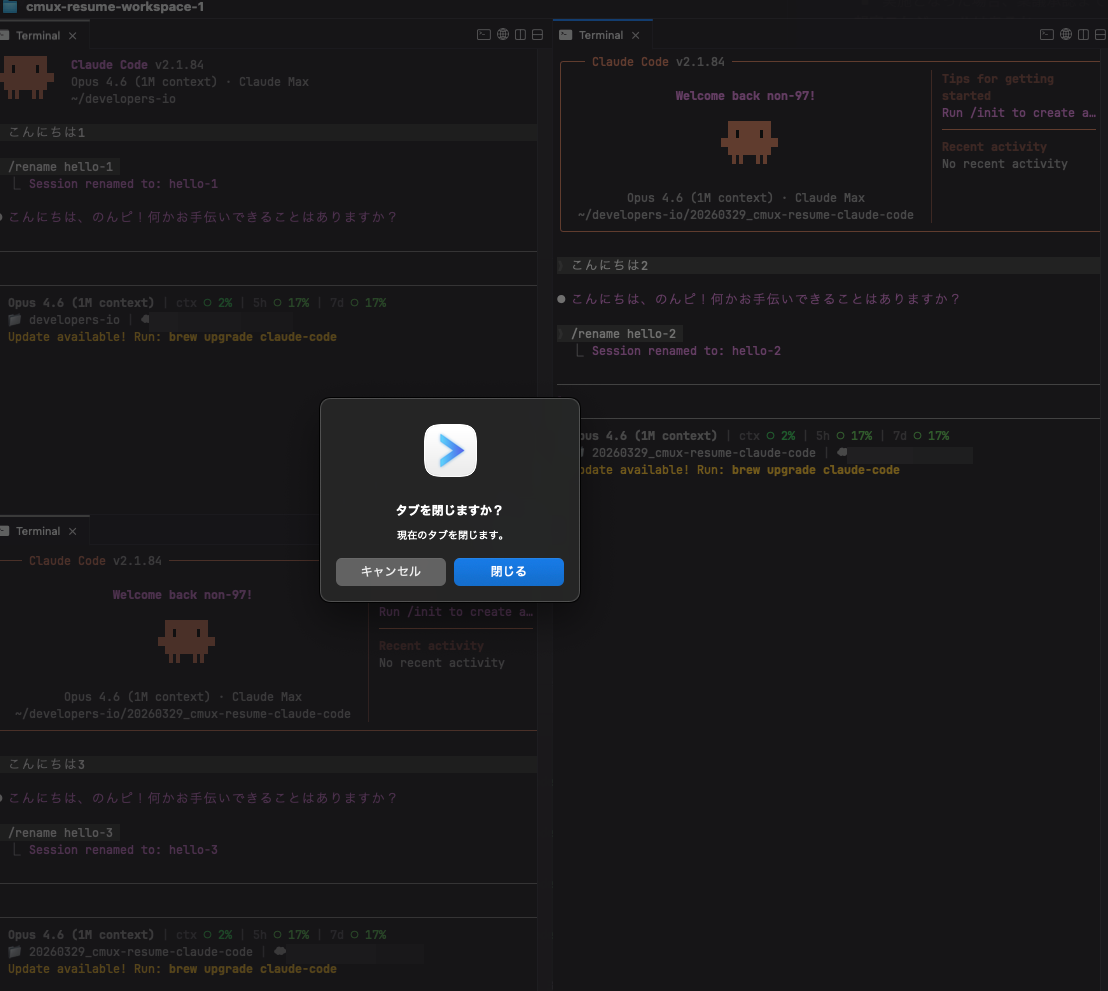
When I open a new pane, it happened to be in the hello-2 working directory, so it resumed for me.
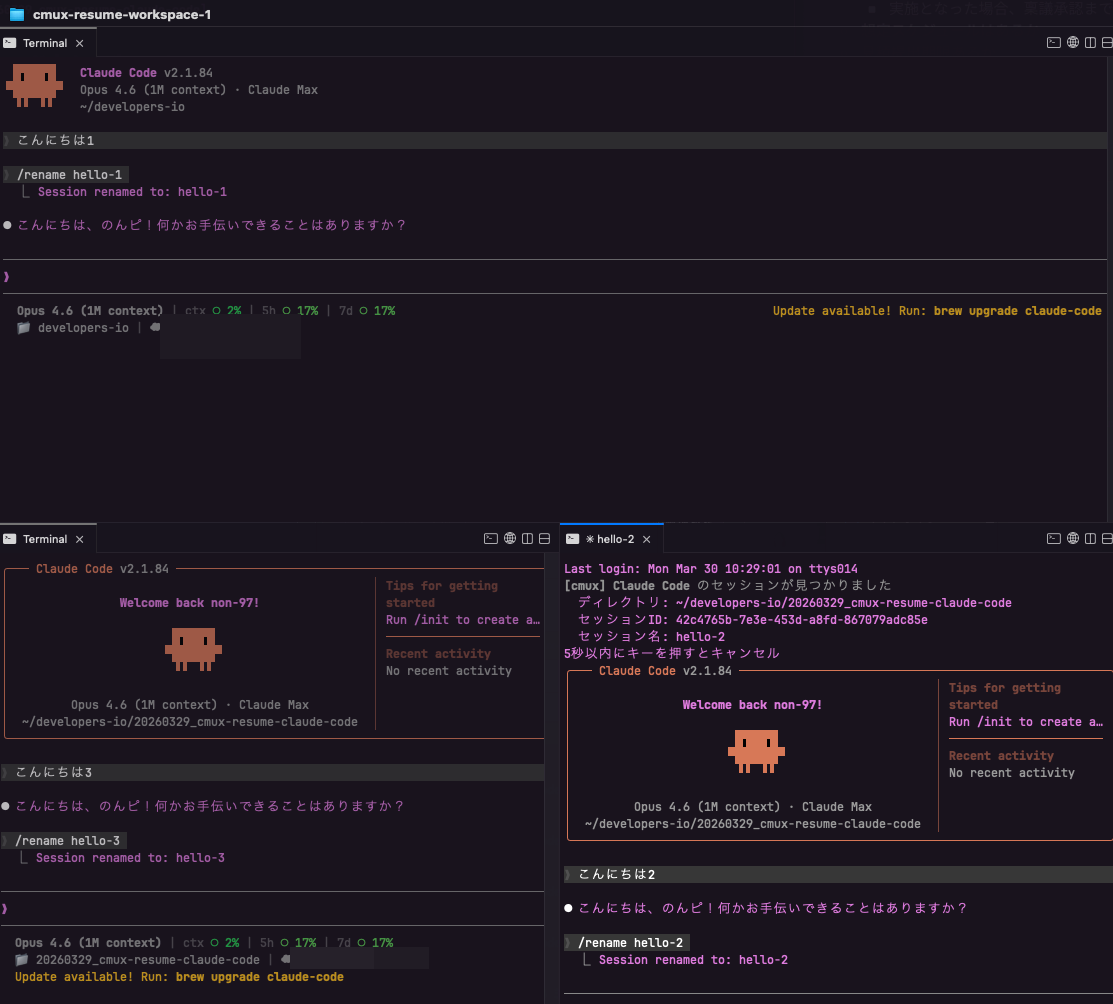
Pressing Enter when opening a tab that was closed with ⌘ + W during a Claude Code session
Let's verify the cancellation feature.
I'll close the tab for the hello-2 session and open a new pane.
According to the prompt "press any key within 5 seconds to cancel", I press Enter, and it indeed cancels the resumption.
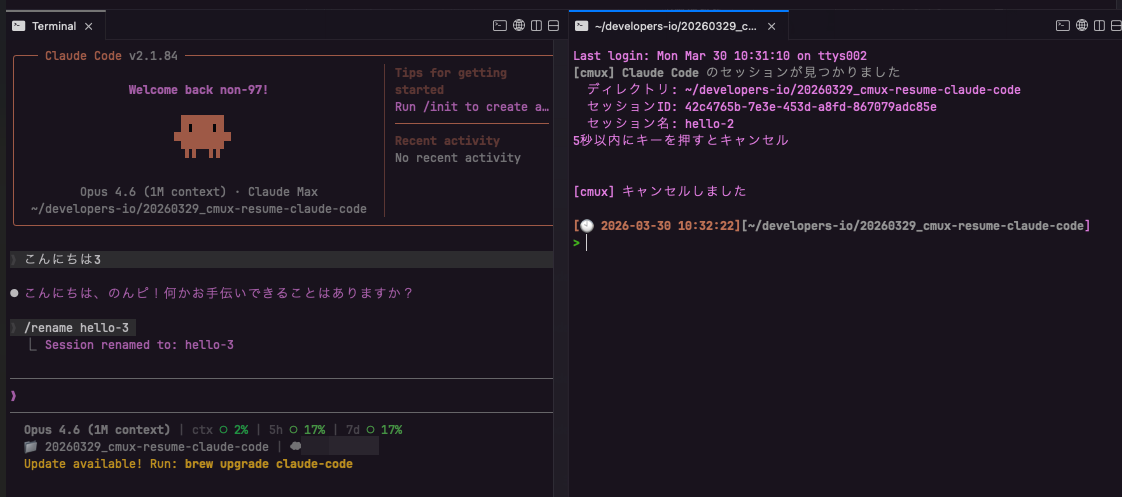
When closing a session with /exit
Let's check what happens when closing a session with /exit.
After closing a session with /exit and opening a new pane, the Claude Code session resumption process does not occur, as shown below.
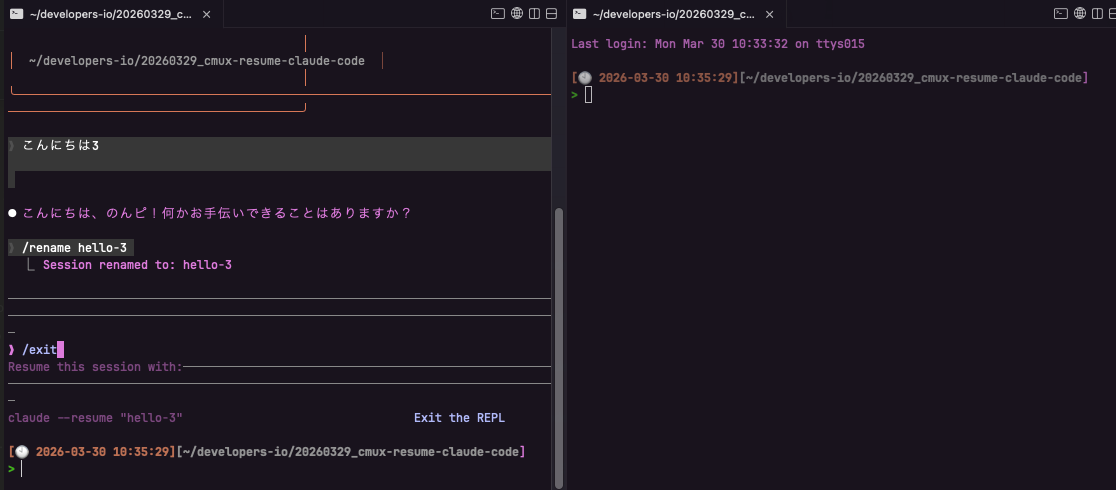
The cache files and marker files at this time are:
> ls -lR 20260329_cmux-resume-claude-code/.claude/
total 0
drwxr-xr-x@ 2 <username>  <groupname>   64  3 30 10:32 cmux-session-resume
drwxr-xr-x@ 4 <username>  <groupname>  128  3 30 10:35 cmux-tab-info

20260329_cmux-resume-claude-code/.claude/cmux-session-resume:
total 0

20260329_cmux-resume-claude-code/.claude/cmux-tab-info:
total 8
-rw-r--r--@ 1 <username>  <groupname>  72  3 30 10:29 56eafa37-3d76-426b-a6f9-0b327d996252

> cat 20260329_cmux-resume-claude-code/.claude/cmux-tab-info/56eafa37-3d76-426b-a6f9-0b327d996252
workspace_name=cmux-resume-workspace-2
tab_index=1
tab_name=✳ hello-4
We can see that the hello-2 file has been deleted due to the /exit command.
As a Temporary Solution Until cmux Supports This as a Standard Feature
I've set up cmux to automatically run claude /resume when it restarts.
I'd like to use this as a temporary solution until cmux supports this as a standard feature.
I hope this article is helpful to someone.
That's all from Nonpi (@non____97) from the Consulting Department of the Cloud Business Division!