Preparing for the end of CocoaPods by migrating from cocoapods-keys to Arkana + SPM

This page has been translated by machine translation. View original
CocoaPods is scheduled to be archived (read-only mode) by December 2026. Since repositories will no longer be updatable, migration to Swift Package Manager (SPM) will be essential to receive new SDKs and security patches.
Until now, we've been using the cocoapods-keys plugin to store sensitive information (like API keys) in Keychain to avoid hardcoding them in source code. However, since cocoapods-keys depends on CocoaPods, it cannot be used directly after switching to SPM.
"Arkana", recommended in the cocoapods-keys README, is a CLI tool that supports SPM, offering the significant advantage of eliminating dependency on CocoaPods.
This article summarizes the steps for migrating from cocoapods-keys to Arkana for managing confidential information, including making it work with Xcode Cloud.
Environment
- macOS 15.4.1 (24E263)
- Xcode 16.2
- Homebrew 4.4.31
- CocoaPods 1.16.2
I'll continue using the sample project created in the previous article "Managing secrets securely with cocoapods-keys". If you haven't tried it yet, reading that first will help you better understand the differences in this article.
1. Install Arkana
First, reinstall the dependencies. You can keep CocoaPods, but comment out cocoapods-keys to disable it. Although Arkana's latest 2.x series adds Kotlin generation and Flavors support with more functionality, we'll specify version 1.4.0 because it's the final version that works with Ruby 2.6, which is included in the standard Xcode Cloud runner.
# frozen_string_literal: true

source "https://rubygems.org"

gem "cocoapods"
# gem "cocoapods-keys", ref: "818f9d2"   # ← Comment this out as we won't use it anymore

# Arkana 1.4.0 is the final version that works with Ruby 2.6
gem "arkana", "1.4.0"
After saving the Gemfile, run bundle install. Since Arkana v1.5.0 and later requires Ruby 2.7 or higher, you'll need to use Arkana 1.4.0 if your CI environment still uses Ruby 2.6.
2. Remove cocoapods-keys
Remove the entire plugin 'cocoapods-keys', … block that remains in your Podfile.
plugin 'cocoapods-keys', {
  :project => "SampleCocoaPodsKeys",
  :keys => [
  "ApiKey",
  "ApiBaseUrl"
  ]
}
Run these commands to clean old caches:
bundle exec pod deintegrate
bundle exec pod repo update
bundle exec pod install
This completely removes cocoapods-keys from your project.
3. Prepare Arkana configuration files
Place .arkana.yml (which declares key names and environments) and .env (which contains actual values) in the project root. Since .env contains confidential information, make sure to add it to .gitignore.
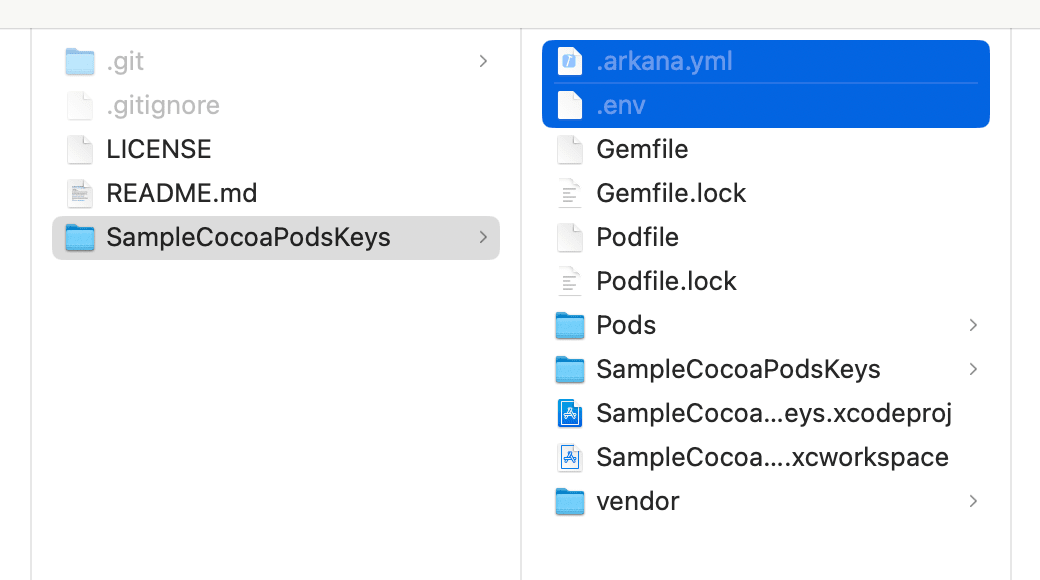
Here's a detailed explanation of the contents:
3-1. .arkana.yml
package_manager: spm
import_name: ArkanaKeys

environments:
  - Debug
  - Release          # Add as needed to match your Build Configurations

environment_secrets: # Keys that differ by environment
  - apiKey

global_secrets:      # Keys common to all environments
  - apiBaseUrl
3-2. .env
apiKeyDebug=api1234
apiKeyRelease=api5678
apiBaseUrl=https://example.com/api
3-3. Run arkana to create an SPM package
After saving the files, run bundle exec arkana.
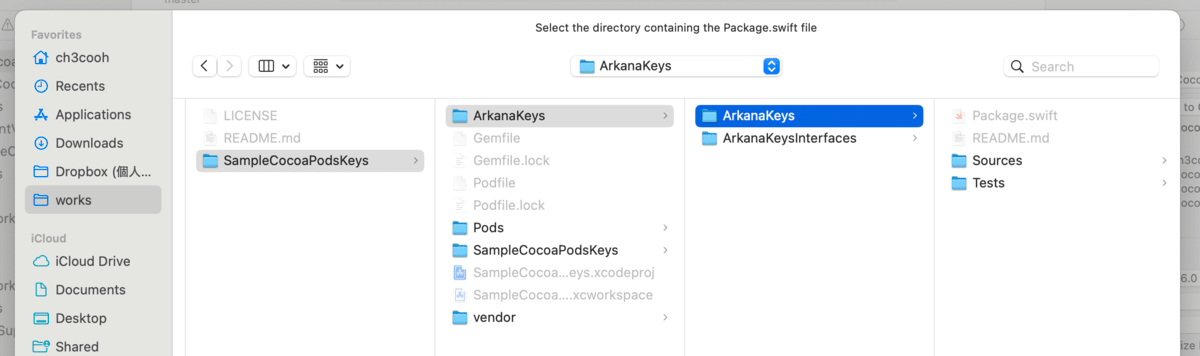
Success is indicated by the generation of a local Swift Package called ArkanaKeys/. If you're using SPM, add the inner ArkanaKeys folder via File → Add Packages → Add Local….
4. Modify existing code
Replace references to the old Keys framework with ArkanaKeys. Mainly import statements and property names will change.
import ArkanaKeys
import SwiftUI

struct ContentView: View {
    private let env    = ArkanaKeys.Debug()   // Debug or Release
    private let global = ArkanaKeys.Global()

    var body: some View {
        VStack {
#if DEBUG
            Text("API KEY: \(env.apiKey)")
            Text("BASE URL: \(global.apiBaseUrl)")
#endif
        }
    }
}
Import names and class names will vary based on the import_name in .arkana.yml and the project name at generation time, so adjust accordingly for your environment.
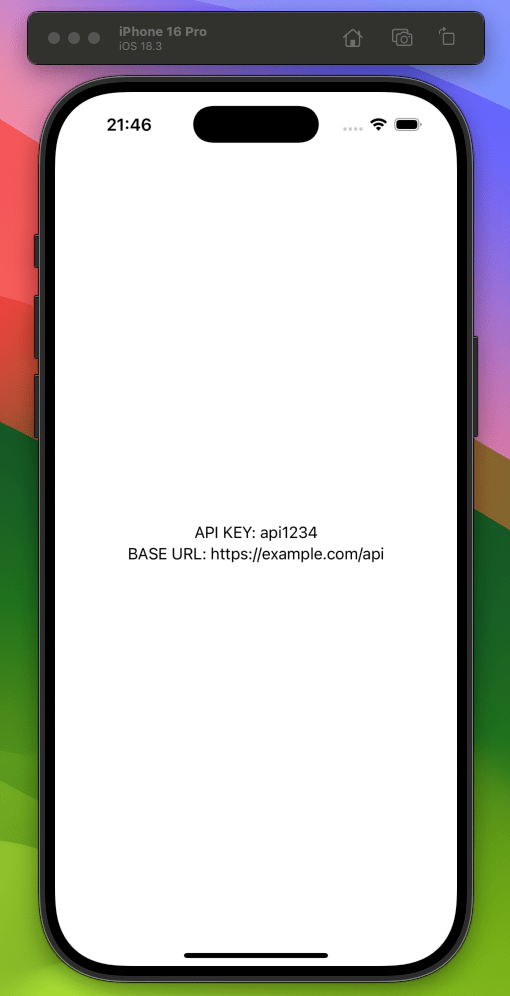
Post-execution screenshot:
5. Automatically run Arkana before building
After changing .env or in CI environments, Arkana needs to be run before building to regenerate the latest keys. Add the following line to Build Phases → Run Script in your Xcode project to automate this:
bundle exec arkana
If you don't change .env frequently, you can omit the Run Script and run it manually when needed.
6. Run Arkana in Xcode Cloud
The macOS runners in Xcode Cloud use Ruby 2.6 + RubyGems 3.0.3, which is somewhat outdated. Since the system area is read-only, Bundler must be installed in the user area.
#!/bin/zsh
set -euo pipefail

cd "$CI_PRIMARY_REPOSITORY_PATH/SampleCocoaPodsKeys"

# Errors occur due to lack of write permissions, so install Bundler in the user area
export GEM_HOME="$HOME/.gem"

# Check which Ruby is being used
echo "🔎 Ruby executable: $(which ruby)"
echo "🔎 Ruby: $(ruby -v)"
echo "🔎 RubyGems: $(gem --version)"

# Install Bundler (match the version in BUNDLED WITH in Gemfile.lock)
BUNDLER_VERSION="2.4.22"
gem install bundler -v "$BUNDLER_VERSION" --no-document --quiet
bundle install --quiet

# Generate ArkanaKeys package
bundle exec ruby -e "puts '🔎 Arkana version: ' + Gem.loaded_specs['arkana'].version.to_s"
bundle exec arkana
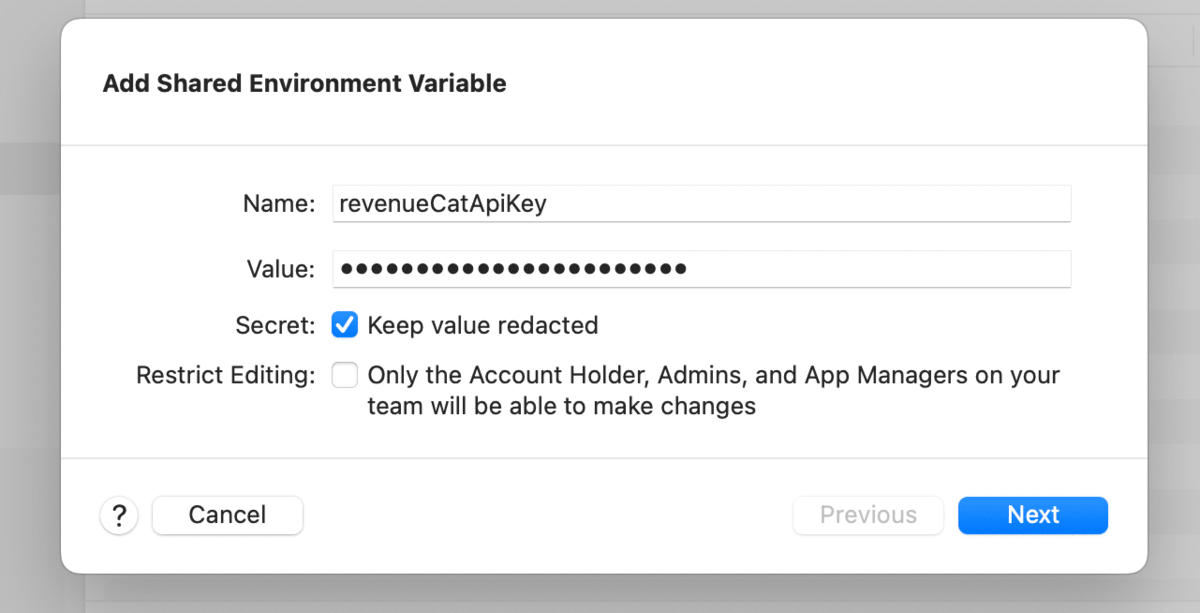
In CI environments (like Xcode Cloud), register variables like apiKeyDebug in "Environment Variables".
Real Example: Using Arkana with RevenueCat in a Personal App
As a practical example of how Arkana can be useful, I migrated the RevenueCat SDK API key in my personal app.
# .arkana.yml excerpt
global_secrets:
  - revenueCatApiKey
revenueCatApiKey=appl_REVENUE_CAT_API_KEY
The app code is simply changed as follows:
Purchases.configure(withAPIKey: ArkanaKeys.Global().revenueCatApiKey)
When .env doesn't exist, Arkana references environment variables, so in CI, passing the same keys as environment variables allows builds to succeed safely without committing the .env file.
Summary
- When CocoaPods becomes read-only,
cocoapods-keyswill no longer be updatable - Arkana allows you to continue managing sensitive information (though with a slightly different approach) using SPM + CLI
- You only need two files:
.arkana.ymland.env. Simply runbundle exec arkanabefore building - Arkana 1.4.x is the limit for Ruby 2.6 runners. If you can switch to Ruby 2.7 or later, you can upgrade to Arkana 2.x for extended features (Kotlin output, Flavors, etc.)
While there's still time before CocoaPods is discontinued, testing the migration flow early will provide peace of mind if you're currently using cocoapods-keys.
(Added 2025/05/14) Updating Ruby in the build environment to use the latest version of Arkana in Xcode Cloud
In this article, I mentioned that the latest version of Arkana requires Ruby 2.7 or later. I've written a separate article explaining how to install any version of Ruby in Xcode Cloud. Using this method, I was able to implement the latest version of Arkana.