
Using cocoapods-keys to safely handle secret information by separating it from source code

This page has been translated by machine translation. View original
API keys and secrets hardcoded in source code create a risk of exposure when GitHub repositories are made public.
cocoapods‑keys is a CocoaPods plugin where you only write key names in the Podfile, while the actual values are stored in the developer's local Keychain. Only obfuscated stubs are generated in the project, making it relatively safe to embed in binaries.
This article explains how to implement cocoapods‑keys and display API key values in a Text view when the app launches.
Environment
- macOS 15.4.1 (24E263)
- Xcode 16.2
- Homebrew 4.4.31
- CocoaPods 1.16.2
- cocoapods‑keys
'818f9d2'- Note:
'818f9d2'is a fixed commit ID, not a version
- Note:
1. Install CocoaPods and cocoapods‑keys
Generate a Gemfile with bundle init, add the following, and install.
# frozen_string_literal: true

source "https://rubygems.org"

# gem "rails"
gem "cocoapods"
gem "cocoapods-keys", ref: '818f9d2'
After bundle install, verify the setup by checking that bundle exec pod --version and bundle exec pod keys --help run successfully.
2. Make Xcode project CocoaPods compatible
Generate a Podfile with bundle exec pod init and edit it as follows:
platform :ios, "18.0"

plugin "cocoapods-keys", {
  :project => "SampleCocoaPodsKeys",
  :keys    => [
    "ApiKey",
    "ApiBaseUrl"
  ]
}

target "SampleCocoaPodsKeys" do
  use_frameworks!
  # Pods for SampleCocoaPodsKeys
end

post_install do |installer|
  installer.pods_project.targets.each do |t|
    t.build_configurations.each do |c|
      c.build_settings["IPHONEOS_DEPLOYMENT_TARGET"] = "18.0"
    end
  end
end
The strings listed in :keys become environment variable names. Avoid keys with hyphens, using ApiKey rather than API-KEY.
3. Enter key values with pod install
When you run bundle exec pod install for the first time, you'll be prompted to enter values for each key defined in the Podfile. These values are saved in your local PC's Keychain.
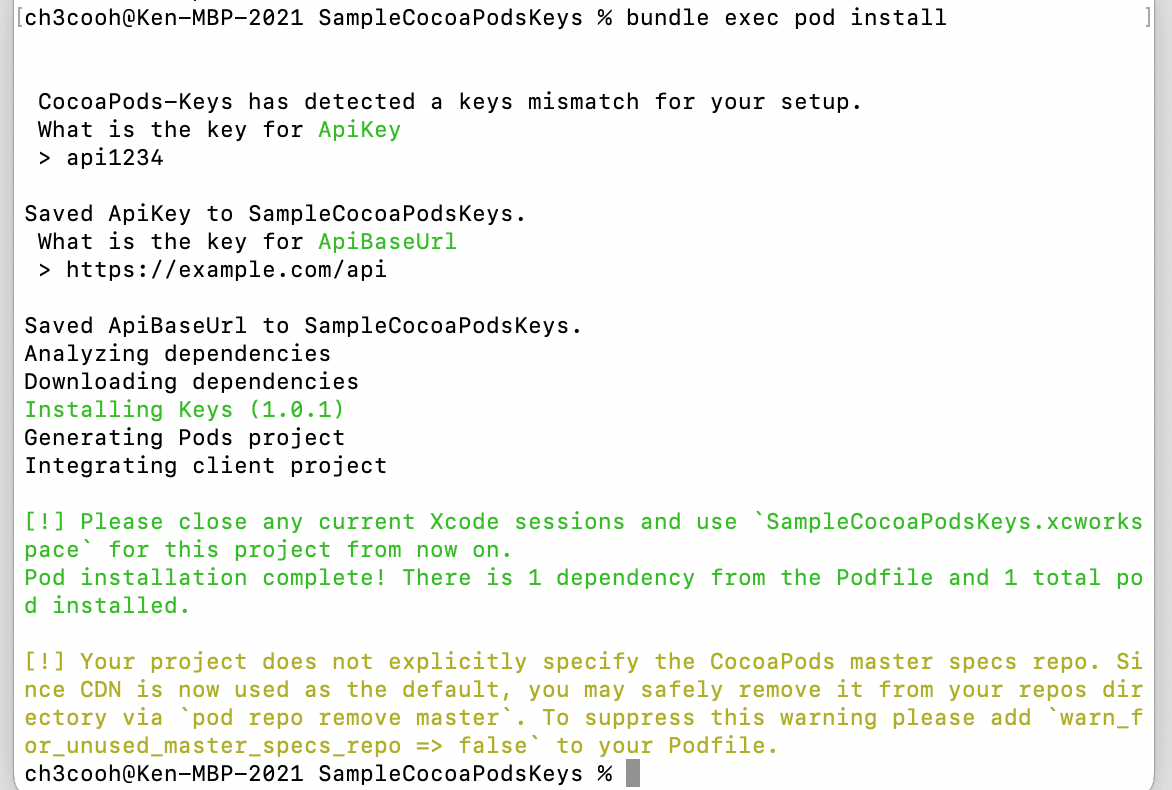
If you want to change values later
bundle exec pod keys set ApiKey "abcd1234"
bundle exec pod keys set ApiBaseUrl "https://api.example.com"
You can check saved values with bundle exec pod keys get ApiKey.
4. Check generated files
A CocoaPodsKeys module is added under the Pods/ directory.
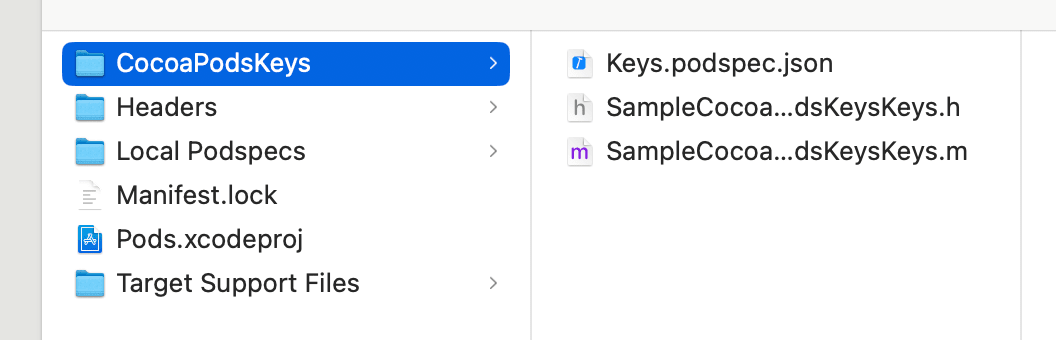
The generated SampleCocoaPodsKeysKeys.m contains obfuscated source code. To maintain the separation of secrets from source, add these files to .gitignore to prevent them from being committed to Git.
# cocoapods‑keys stub
Pods/CocoaPodsKeys/**
5. Read keys from SwiftUI
Import the Keys framework and retrieve properties from the generated class. Use #if DEBUG if you want to display keys only in debug builds.
import SwiftUI
import Keys

struct ContentView: View {
    private let keys = SampleCocoaPodsKeysKeys() // Auto-generated class name

    var body: some View {
        VStack {
#if DEBUG
            Text("API KEY: \(keys.apiKey)")
            Text("BASE URL: \(keys.apiBaseUrl)")
#endif
        }
        .padding()
    }
}

#Preview {
    ContentView()
}
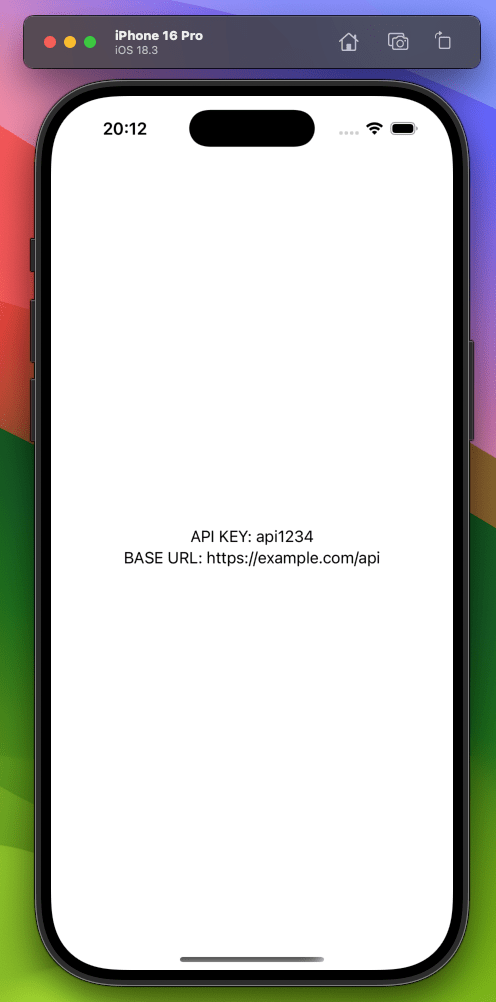
The app running results are shown below:
Troubleshooting
rsync Sandbox error
If you encounter the following error, change User Script Sandboxing to No in Build Settings:
Sandbox: rsync(58413) deny(1) file-write-create /Users/ch3cooh/Library/Developer/Xcode/DerivedData/SampleCocoaPodsKeys-cfrvgzlpnlcswcaspcgbzzumdzyd/Build/Products/Debug-iphonesimulator/SampleCocoaPodsKeys.app/Frameworks/Keys.framework/_CodeSignature
Keychain not available in CI
While secrets are stored in the Keychain on local PCs, this isn't possible in CI environments. In CI environments, setting secret environment variables will allow those values to be used instead.
Summary
- List only key names in the Podfile's cocoapods‑keys section
- Values are safely stored in Keychain during
pod install - In Swift, reference using
ProjectNameKeys().apiKeyformat
This allows you to avoid committing secrets to your repository.
(Added 2025/05/14) Preparing for CocoaPods end-of-life by migrating to Arkana+SPM
With CocoaPods being archived in December 2026, I've written an article about migrating from cocoapods-keys to Arkana+SPM to prepare for CocoaPods end-of-life.
(Added 2025/05/14) Updating Ruby in Xcode Cloud build environment to use the latest Arkana
The latest version of Arkana requires Ruby 2.7 or higher. I discovered that you can install any version of Ruby in Xcode Cloud and wrote a separate article about it. Using this method, I was able to implement the latest version of Arkana.