
Tried connecting to Aurora PostgreSQL Serverless Express configuration from Lambda using Drizzle ORM

This page has been translated by machine translation. View original
I recently wrote an article about connecting to Aurora PostgreSQL Serverless Express configuration (which I'll call Aurora Express) using Drizzle ORM.
At the end of the article, I wrote "Next, I'd like to try using it from AWS Lambda," so I actually tried it.
To get right to the conclusion, I was able to connect from Lambda without any issues. However, since several adjustments were needed to match Lambda's execution model, I'll explain the differences from last time.
The Conclusion First
- You can connect to Aurora Express from Lambda using IAM authentication
- You can run Hono as a Lambda handler using the
hono/aws-lambdaadapter - For Lambda's execution model, limit the number of connections to 1 and set a connection timeout
- IAM authentication token caching is effective during warm starts, which reduces unnecessary API calls
What We're Building
I'm running the Hono + Drizzle ORM sample I created last time on Lambda. It accepts requests via API Gateway HTTP API (v2).
The AWS configuration looks like this:
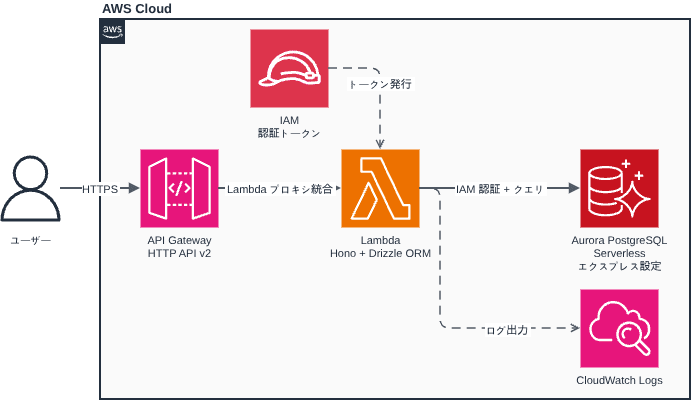
I'm using Terraform for infrastructure provisioning.
The full sample code is published in the lambda branch of the same repository as last time.
The directory structure is as follows. I've marked files that were added or changed since last time with (changed) / (added):
.
├── src/
│   ├── db/
│   │   ├── index.ts      # DB connection config (changed)
│   │   └── schema.ts     # Schema definition (unchanged)
│   ├── app.ts            # Hono route definition
│   ├── index.ts          # Lambda handler entry point (changed)
│   ├── local.ts          # Local development entry point (added)
│   └── logger.ts         # Logger configuration (unchanged)
├── scripts/
│   ├── migrate.sh        # Migration script (unchanged)
│   ├── package.sh        # Lambda deployment package creation script (added)
│   └── psql.sh           # psql connection script (added)
├── terraform/
│   ├── main.tf
│   ├── lambda.tf         # Lambda function definition (added)
│   ├── api_gateway.tf    # API Gateway HTTP API (added)
│   ├── iam.tf            # IAM roles & policies (added)
│   ├── variables.tf
│   └── outputs.tf
├── drizzle.config.ts
├── .env.example
└── package.json
Implementation Points
I'll explain the differences from last time.
Splitting Entry Points (src/index.ts / src/local.ts)
Last time, src/index.ts also handled local development server startup. Since Lambda has a different startup method, I split the entry point into two.
For Lambda (src/index.ts)
// Lambda handler entry point.
// Passes events from API Gateway (v1 REST API / v2 HTTP API) to the Hono app.
// Lambda provides environment variables natively, so dotenv is not needed.
import { handle } from 'hono/aws-lambda';
import app from './app.js';

export const handler = handle(app);
The handle() function from hono/aws-lambda converts the API Gateway event format into a form that Hono can process. It supports both v1 (REST API) and v2 (HTTP API).
- Reference: AWS Lambda - Hono
For Local Development (src/local.ts)
// Local development entry point.
// For Lambda environment, use src/index.ts.
// Always import dotenv/config first.
// .env must be loaded before other modules (like db/index.ts) refer to process.env.
import 'dotenv/config';
import { serve } from '@hono/node-server';
import app from './app.js';
import { logger } from './logger.js';

serve({ fetch: app.fetch, port: 3000 }, () =>
  logger.info('http://localhost:3000'),
);
By placing the dotenv/config import first, .env is loaded before db/index.ts refers to process.env. In Lambda, environment variables are provided natively by the runtime, so dotenv is not needed.
Adjusting DB Connection (src/db/index.ts)
I made two adjustments from last time.
① Limit the Number of Connections to 1
const pool = new Pool({
  // ...
  max: 1, // Limit connections to 1 (sufficient for this sample)
});
Since Lambda processes one request per instance sequentially, a connection pool size of 1 is sufficient.
② Set Connection Timeout
const pool = new Pool({
  // ...
  connectionTimeoutMillis: 30 * 1000,
});
Aurora Express cold starts (recovery from sleep state) can take over 20 seconds. Without a timeout setting, Lambda would wait indefinitely. By setting a 30-second timeout (shorter than Lambda's 40-second timeout discussed later), connection timeout errors can be returned before Lambda times out.
Deployment with Terraform
I manage the infrastructure with Terraform.
Lambda Function (terraform/lambda.tf)
terraform/lambda.tf
resource "aws_lambda_function" "this" {
  function_name = var.function_name
  role          = aws_iam_role.this.arn

  filename         = "${path.module}/../lambda.zip"
  source_code_hash = try(filebase64sha256("${path.module}/../lambda.zip"), null)

  # Since index.js is placed at the ZIP root, handler is index.handler
  handler = "index.handler"
  runtime = "nodejs22.x"

  timeout       = 40          # For Aurora Express cold start
  memory_size   = 128         # 128MB is sufficient for this sample
  architectures = ["arm64"]   # Graviton2, lower cost than x86_64

  environment {
    variables = {
      DB_HOST   = var.db_host
      DB_USER   = var.db_user
      DB_NAME   = var.db_name
      LOG_LEVEL = var.log_level
      TZ        = var.tz
    }
  }
}

# CloudWatch log group (explicitly defined to manage retention period)
resource "aws_cloudwatch_log_group" "lambda" {
  name              = "/aws/lambda/${var.function_name}"
  retention_in_days = 14
}
The Lambda timeout is set to 40 seconds because Aurora Express cold start can take over 20 seconds. The connection timeout (30 seconds) is set shorter than the Lambda timeout so that it fires first to return an error.
I'm using try() with source_code_hash so that terraform validate passes even if lambda.zip doesn't exist yet. You need to create the ZIP with npm run package before deployment.
API Gateway HTTP API (terraform/api_gateway.tf)
Since Hono handles routing, I'm using the $default route in API Gateway to forward all requests to Lambda.
terraform/api_gateway.tf
# HTTP API (v2)
resource "aws_apigatewayv2_api" "this" {
  name          = var.function_name
  protocol_type = "HTTP"
}

# Lambda proxy integration (payload format version 2.0)
resource "aws_apigatewayv2_integration" "lambda" {
  api_id                 = aws_apigatewayv2_api.this.id
  integration_type       = "AWS_PROXY"
  integration_uri        = aws_lambda_function.this.invoke_arn
  payload_format_version = "2.0"
}

# $default route: forward all paths and methods to Lambda
resource "aws_apigatewayv2_route" "this" {
  api_id    = aws_apigatewayv2_api.this.id
  route_key = "$default"
  target    = "integrations/${aws_apigatewayv2_integration.lambda.id}"
}

# $default stage (auto_deploy = true eliminates manual deployment steps)
resource "aws_apigatewayv2_stage" "default" {
  api_id      = aws_apigatewayv2_api.this.id
  name        = "$default"
  auto_deploy = true
}

# Permission for API Gateway to invoke Lambda
resource "aws_lambda_permission" "apigw" {
  statement_id  = "AllowAPIGatewayInvoke"
  action        = "lambda:InvokeFunction"
  function_name = aws_lambda_function.this.function_name
  principal     = "apigateway.amazonaws.com"
  source_arn    = "${aws_apigatewayv2_api.this.execution_arn}/*/*"
}
Using the $default stage makes the endpoint format https://<id>.execute-api.<region>.amazonaws.com/users with no path prefix.
IAM Roles & Policies (terraform/iam.tf)
The rds-db:connect permission is required for Lambda to connect to Aurora Express using IAM authentication.
terraform/iam.tf
# Lambda execution role
resource "aws_iam_role" "this" {
  name = "${var.function_name}-lambda-exec"

  assume_role_policy = jsonencode({
    Version = "2012-10-17"
    Statement = [{
      Effect    = "Allow"
      Principal = { Service = "lambda.amazonaws.com" }
      Action    = "sts:AssumeRole"
    }]
  })
}

# Permission to write to CloudWatch Logs
resource "aws_iam_role_policy_attachment" "basic_execution" {
  role       = aws_iam_role.this.name
  policy_arn = "arn:aws:iam::aws:policy/service-role/AWSLambdaBasicExecutionRole"
}

# Aurora IAM authentication permission (rds-db:connect)
resource "aws_iam_role_policy" "rds_iam_connect" {
  name = "${var.function_name}-rds-iam-connect"
  role = aws_iam_role.this.id

  policy = jsonencode({
    Version = "2012-10-17"
    Statement = [{
      Effect = "Allow"
      Action = "rds-db:connect"
      # dbuser:* to not fix the cluster ID, restrict by db_user only
      Resource = "arn:aws:rds-db:${var.aws_region}:${data.aws_caller_identity.current.account_id}:dbuser:*/${var.db_user}"
    }]
  })
}
- Reference: Lambda execution role - AWS Lambda
- Reference: Creating and using IAM policies for IAM database access - Amazon Relational Database Service
Deployment Procedure
1. Create Lambda Deployment Package
Running npm run package builds TypeScript and creates lambda.zip.
$ npm run package
==> Building TypeScript...
==> Creating temporary directory...
==> Copying compiled files (dist/src/ → ZIP root)...
==> Installing production dependencies (excluding devDependencies)...
==> Creating ZIP...

✓ Created lambda.zip: /path/to/lambda.zip
  Size: 12M
The ZIP contains the contents of dist/src/ placed at the root. The Lambda handler is specified as index.handler.
scripts/package.sh in full
#!/bin/bash
set -euo pipefail

SCRIPT_DIR="$(cd "$(dirname "${BASH_SOURCE[0]}")" && pwd)"
PROJECT_ROOT="$(cd "${SCRIPT_DIR}/.." && pwd)"
ZIP_OUTPUT="${PROJECT_ROOT}/lambda.zip"

echo "==> Building TypeScript..."
cd "${PROJECT_ROOT}"
npm run build

echo "==> Creating temporary directory..."
TEMP_DIR=$(mktemp -d)
trap 'rm -rf "${TEMP_DIR}"' EXIT

# Copy contents of dist/src/ to root (Lambda handler = index.handler)
echo "==> Copying compiled files (dist/src/ → ZIP root)..."
cp -r "${PROJECT_ROOT}/dist/src/." "${TEMP_DIR}/"

# Copy package.json (needed for "type": "module" ESM detection)
echo "==> Installing production dependencies (excluding devDependencies)..."
cp "${PROJECT_ROOT}/package.json" "${TEMP_DIR}/package.json"
cp "${PROJECT_ROOT}/package-lock.json" "${TEMP_DIR}/package-lock.json"
cd "${TEMP_DIR}"
npm ci --omit=dev

echo "==> Creating ZIP..."
rm -f "${ZIP_OUTPUT}"
zip -r "${ZIP_OUTPUT}" . --exclude "package-lock.json"
2. Create Resources with Terraform
Create terraform.tfvars and set the Aurora Express endpoint.
$ cp terraform/terraform.tfvars.example terraform/terraform.tfvars
db_host = "my-express-cluster.cluster-xxxxxxxxxxxx.ap-northeast-1.rds.amazonaws.com"
Create resources with terraform apply.
$ cd terraform
$ terraform apply

Apply complete! Resources: 10 added, 0 changed, 0 destroyed.

Outputs:

api_url                 = "https://xxxxxxxxxx.execute-api.ap-northeast-1.amazonaws.com"
lambda_function_arn     = "arn:aws:lambda:ap-northeast-1:123456789012:function:aurora-express-drizzle-sample"
lambda_function_name    = "aurora-express-drizzle-sample"
lambda_iam_role_arn     = "arn:aws:iam::123456789012:role/aurora-express-drizzle-sample-lambda-exec"
lambda_log_group_name   = "/aws/lambda/aurora-express-drizzle-sample"
Testing
Check the API operation with the curl command.
Set API_URL to the api_url output value from Terraform.
$ API_URL="https://xxxxxxxxxx.execute-api.ap-northeast-1.amazonaws.com"

# POST - Create user
$ curl -s -X POST ${API_URL}/users \
  -H 'Content-Type: application/json' \
  -d '{"name":"クラスメソ太","email":"mesota@example.com"}'
{
  "id": 1,
  "name": "クラスメソ太",
  "email": "mesota@example.com",
  "createdAt": "2026-03-28T10:00:00.000Z"
}

# GET - List users
$ curl -s ${API_URL}/users
[
  { "id": 1, "name": "クラスメソ太", "email": "mesota@example.com", "createdAt": "2026-03-28T10:00:00.000Z" }
]

# PUT - Update user
$ curl -s -X PUT ${API_URL}/users/1 \
  -H 'Content-Type: application/json' \
  -d '{"name":"クラスメソ次郎"}'
{
  "id": 1,
  "name": "クラスメソ次郎",
  "email": "mesota@example.com",
  "createdAt": "2026-03-28T10:00:00.000Z"
}

# DELETE - Delete user
$ curl -s -X DELETE ${API_URL}/users/1
{
  "id": 1,
  "name": "クラスメソ次郎",
  "email": "mesota@example.com",
  "createdAt": "2026-03-28T10:00:00.000Z"
}
It works perfectly!
Checking Execution Time in CloudWatch Logs
Lambda execution logs are output to CloudWatch Logs. Let's check the cold start logs.
As with last time (when starting the Express server), it takes time to connect when Aurora Express is waking from sleep state.
This time, it took almost 20 seconds for the connection to be established.
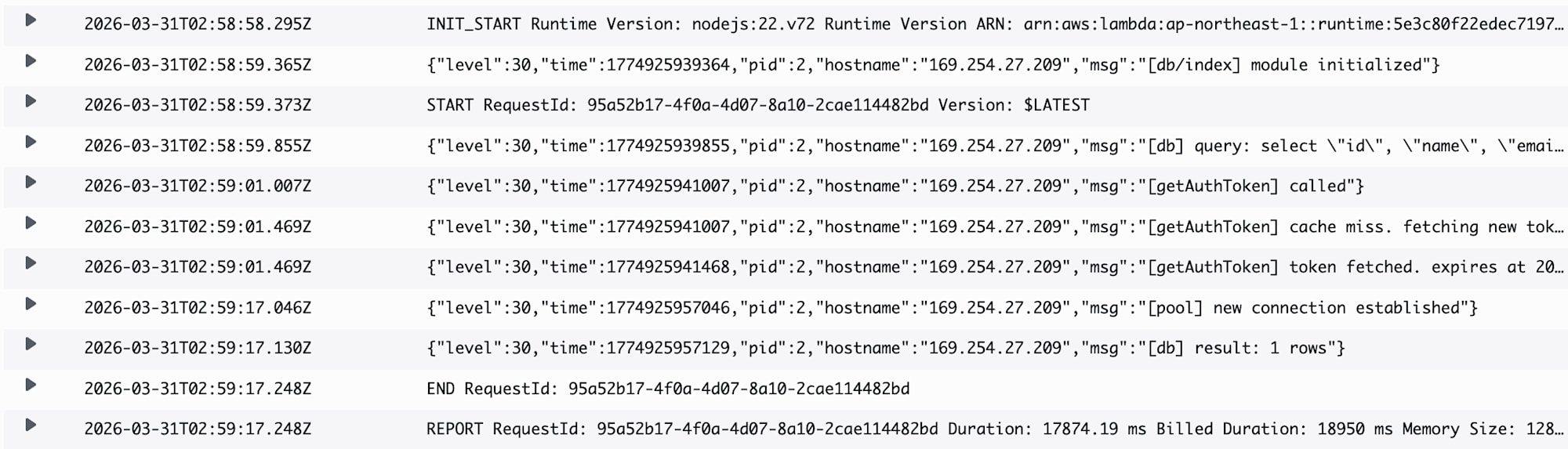
In warm starts when the same Lambda instance is reused, the IAM authentication token cache is valid, so the AWS API call for token retrieval is skipped and the connection is reused.
In this case, responses come back in milliseconds. We're benefiting nicely from warm starts.

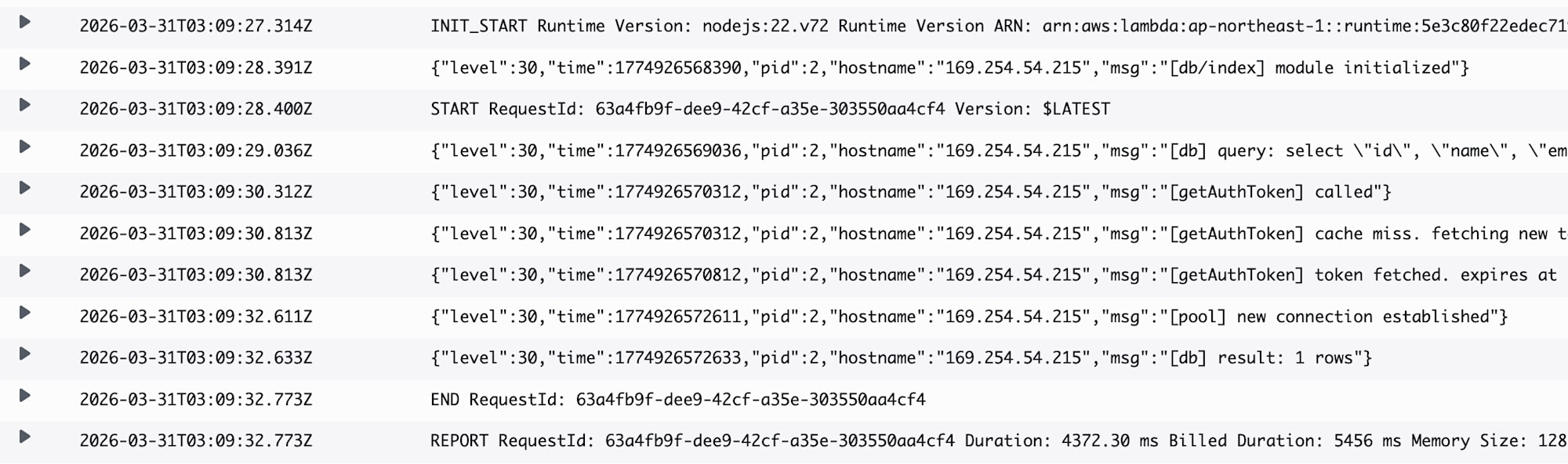
When executed in a Lambda cold start, there's reconnection processing which takes some time.
This time, the response took 4-5 seconds.
Important Notes
Lambda Concurrency and max_connections Limit
Lambda launches as many instances as there are concurrent requests (default limit 1,000). Since each instance maintains one connection, concurrent requests ≈ simultaneous connections to Aurora.
Aurora Serverless v2's max_connections is statically determined by the maximum ACU setting's memory. It's based on the maximum ACU, not the current ACU, to prevent connections from being dropped during scale-down.
The following values are from the official Aurora Serverless v2 documentation. While I couldn't confirm if Aurora Express uses the same values, they serve as a reference:
| Max ACU | max_connections (reference) |
|---|---|
| 1 | 189 |
| 4 | 823 |
| 8 | 1,669 |
| 16 | 3,360 |
| 32 | 5,000 (limit) |
Connection exhaustion occurs if Lambda's concurrent executions exceed this value.
Also, if the minimum ACU is 0 (auto-pause enabled), the max_connections limit is restricted to 2,000 regardless of the maximum ACU setting.
This configuration is very suitable for internal tools or personal development/prototypes with limited concurrent connections, but careful consideration is needed when applying it to large-scale B2C systems.
Conclusion
I was able to connect to Aurora Express with Drizzle ORM from Lambda, just as I did with the Express server last time.
While there were several Lambda-specific points, such as splitting entry points and adjusting connection pool settings, thanks to the hono/aws-lambda adapter, the Hono application code itself required almost no changes.
While the Aurora Express cold start time requires attention, the Lambda + API Gateway combination seems convenient for personal development and prototyping since it can be used easily without a VPC.
I hope this blog helps someone.