Migrating Datadog Agent to IMDSv2

This page has been translated by machine translation. View original
Hello. This is Shiina from the Operations department.
Introduction
From a security enhancement standpoint, AWS recommends migrating EC2 instance metadata service to IMDSv2.
IMDSv1 has been identified as a risk for credential leakage through attacks like SSRF because it allows access to metadata without tokens.
The Datadog agent uses the metadata service to resolve hostnames.
Depending on the agent version you're using, agent-side adjustments may be necessary when migrating to IMDSv2.
In this article, I'll explore how to actually migrate to IMDSv2 with different Datadog agent versions.
Purpose of Using the Metadata Service
The Datadog agent may retrieve instance ID information to determine a unique hostname.[1]
It does this by accessing the metadata service to obtain the instance ID.
This access to the metadata service occurs primarily during agent startup and periodically.
Metadata Service Version Used
This depends on the Datadog agent version.[2]
- v7.64.0 and later: Uses IMDSv2 by default
- Before v7.64.0: Uses IMDSv1 by default
For versions before v7.64.0, the ec2_prefer_imdsv2 parameter must be specified in datadog.yaml to use IMDSv2.[3]
Migration Method Summary
For v7.64.0 and later
No specific configuration is needed on the Datadog agent side, and you can require IMDSv2 on the EC2 instance.
For versions before v7.64.0
One of the following approaches is necessary:
- Upgrade the Datadog agent to the latest version (v7.64.0 or later)
- Specify the parameter
ec2_prefer_imdsv2: truein datadog.yaml
Migrating to IMDSv2 (v7.64.0 and later)
Let's migrate a Linux EC2 instance running a Datadog agent version that uses IMDSv2 by default.
Since the Datadog agent already supports IMDSv2, we can simply require IMDSv2 on the instance.
Prerequisites
- Using Datadog agent v7.75.2
Checking Agent Version
First, let's check the version of the installed Datadog agent.
datadog-agent version
Agent 7.75.2 - Commit: d7a183b727 - Serialization version: v5.0.177 - Go version: go1.25.6
We can confirm it's v7.75.2.
Checking Datadog Agent Hostname Information
Let's check the hostname information for the running Datadog agent.
datadog-agent status
========
Hostname
========

  ccrid: arn:aws:ec2:ap-northeast-1:XXXXXXXXXXXX:instance/i-XXXXXXXXXXXX
  ec2-hostname: ip-10-0-0-180.ap-northeast-1.compute.internal
  host_aliases: [i-XXXXXXXXXXXX]
  hostname: i-XXXXXXXXXXXX
  hostname-resolution-version: 1
  instance-id: i-XXXXXXXXXXXX
  socket-fqdn: ip-10-0-0-180.ap-northeast-1.compute.internal.
  socket-hostname: ip-10-0-0-180.ap-northeast-1.compute.internal
  hostname provider: aws
  unused hostname providers:
    'hostname' configuration/environment: hostname is empty
    'hostname_file' configuration/environment: 'hostname_file' configuration is not enabled
    azure: azure_hostname_style is set to 'os'
    container: the agent is not containerized
    fargate: agent is not running in sidecar mode
    fqdn: 'hostname_fqdn' configuration is not enabled
    gce: unable to retrieve hostname from GCE: GCE metadata API error: status code 404 trying to GET http://169.254.169.254/computeMetadata/v1/instance/hostname
The instance ID information has been retrieved.
No errors occurred when retrieving metadata from the aws provider.
Requiring IMDSv2 on the EC2 Instance
Let's require IMDSv2 on the EC2 instance.
- Check the current metadata options.
aws ec2 describe-instances \
  --instance-ids i-XXXXXXXXXXXX \
  --query 'Reservations[0].Instances[0].MetadataOptions' \
  --output json
{
    "State": "applied",
    "HttpTokens": "optional",
    "HttpPutResponseHopLimit": 2,
    "HttpEndpoint": "enabled",
    "HttpProtocolIpv6": "disabled",
    "InstanceMetadataTags": "disabled"
}
The output shows "HttpTokens": "optional", meaning both IMDSv1 and IMDSv2 are available.
- Require IMDSv2.
aws ec2 modify-instance-metadata-options \
    --instance-id i-XXXXXXXXXXXX \
    --http-tokens required \
    --http-endpoint enabled
- Check the current metadata options again.
{
    "State": "applied",
    "HttpTokens": "required",
    "HttpPutResponseHopLimit": 2,
    "HttpEndpoint": "enabled",
    "HttpProtocolIpv6": "disabled",
    "InstanceMetadataTags": "disabled"
}
The output shows "HttpTokens": "required".
The instance is now configured to require IMDSv2 only.
- Restart the Datadog agent and check for any impact.
systemctl restart datadog-agent
- Check the Datadog agent's hostname information.
datadog-agent status
========
Hostname
========

  ccrid: arn:aws:ec2:ap-northeast-1:XXXXXXXXXXXX:instance/i-XXXXXXXXXXXX
  ec2-hostname: ip-10-0-0-180.ap-northeast-1.compute.internal
  host_aliases: [i-XXXXXXXXXXXX]
  hostname: i-XXXXXXXXXXXX
  hostname-resolution-version: 1
  instance-id: i-XXXXXXXXXXXX
  socket-fqdn: ip-10-0-0-180.ap-northeast-1.compute.internal.
  socket-hostname: ip-10-0-0-180.ap-northeast-1.compute.internal
  hostname provider: aws
  unused hostname providers:
    'hostname' configuration/environment: hostname is empty
    'hostname_file' configuration/environment: 'hostname_file' configuration is not enabled
    azure: azure_hostname_style is set to 'os'
    container: the agent is not containerized
    fargate: agent is not running in sidecar mode
    fqdn: 'hostname_fqdn' configuration is not enabled
    gce: unable to retrieve hostname from GCE: GCE metadata API error: status code 401 trying to GET http://169.254.169.254/computeMetadata/v1/instance/hostname
As before, the instance ID information is being retrieved.
No errors are occurring when retrieving metadata from the aws provider.
Without any specific configuration on the Datadog agent side, we can require IMDSv2.
Migrating to IMDSv2 (before v7.64.0)
Let's migrate a Linux EC2 instance running a Datadog agent version that uses IMDSv1 by default.
First, we'll update the Datadog agent to use IMDSv2, then require IMDSv2 on the instance.
Prerequisites
- Using Datadog agent v7.63.0
- No other software that uses IMDSv1 is installed
Checking Agent Version
First, let's check the version of the installed Datadog agent.
datadog-agent version
Agent 7.63.0 - Commit: 2bbd8a37c4 - Serialization version: v5.0.141 - Go version: go1.23.5
We can confirm it's v7.63.0.
Checking Datadog Agent Hostname Information
Let's check the hostname information for the running Datadog agent.
datadog-agent status
========
Hostname
========

  ec2-hostname: ip-10-0-0-87.ap-northeast-1.compute.internal
  host_aliases: [i-XXXXXXXXXXXX]
  hostname: i-XXXXXXXXXXXX
  hostname-resolution-version: 1
  instance-id: i-XXXXXXXXXXXX
  socket-fqdn: ip-10-0-0-87.ap-northeast-1.compute.internal.
  socket-hostname: ip-10-0-0-87.ap-northeast-1.compute.internal
  hostname provider: aws
  unused hostname providers:
    'hostname' configuration/environment: hostname is empty
    'hostname_file' configuration/environment: 'hostname_file' configuration is not enabled
    azure: azure_hostname_style is set to 'os'
    container: the agent is not containerized
    fargate: agent is not runnning on Fargate
    fqdn: 'hostname_fqdn' configuration is not enabled
    gce: unable to retrieve hostname from GCE: GCE metadata API error: status code 404 trying to GET http://169.254.169.254/computeMetadata/v1/instance/hostname
The instance ID information has been retrieved.
No errors occurred when retrieving metadata from the aws provider.
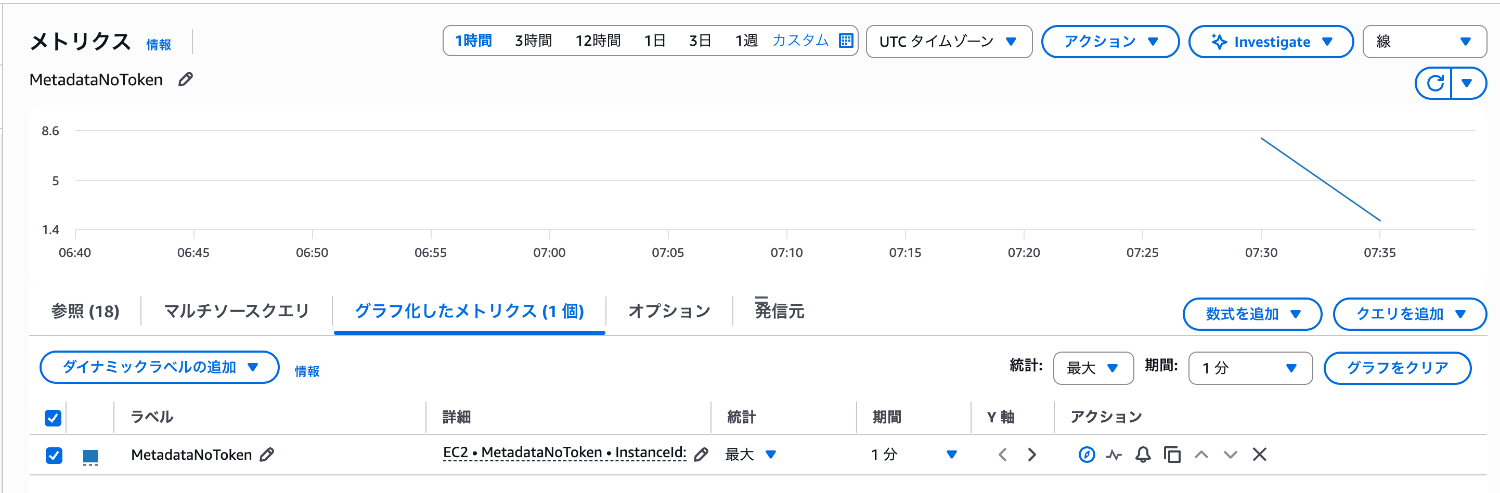
Next, let's check the CloudWatch MetadataNoToken metric.
We can confirm values are being recorded.
This indicates that IMDSv1 is being used by the Datadog agent.
Configuring the Datadog Agent for IMDSv2
To use IMDSv2, we need to explicitly specify it with a parameter.
By specifying ec2_prefer_imdsv2: true in datadog.yaml, the Datadog agent will use IMDSv2.
- Modify datadog.yaml
Edit /etc/datadog-agent/datadog.yaml and save it.
## @param ec2_prefer_imdsv2 - boolean - optional - default: false
ec2_prefer_imdsv2: true
- Restart the agent to apply the configuration.
systemctl restart datadog-agent
- Check the Datadog agent's hostname information.
datadog-agent status
========
Hostname
========

  ec2-hostname: ip-10-0-0-87.ap-northeast-1.compute.internal
  host_aliases: [i-XXXXXXXXXXXX]
  hostname: i-XXXXXXXXXXXX
  hostname-resolution-version: 1
  instance-id: i-XXXXXXXXXXXX
  socket-fqdn: ip-10-0-0-87.ap-northeast-1.compute.internal.
  socket-hostname: ip-10-0-0-87.ap-northeast-1.compute.internal
  hostname provider: aws
  unused hostname providers:
    'hostname' configuration/environment: hostname is empty
    'hostname_file' configuration/environment: 'hostname_file' configuration is not enabled
    azure: azure_hostname_style is set to 'os'
    container: the agent is not containerized
    fargate: agent is not runnning on Fargate
    fqdn: 'hostname_fqdn' configuration is not enabled
    gce: unable to retrieve hostname from GCE: GCE metadata API error: status code 404 trying to GET http://169.254.169.254/computeMetadata/v1/instance/hostname
As before, the instance ID information is being retrieved.
No errors are occurring when retrieving metadata from the aws provider.
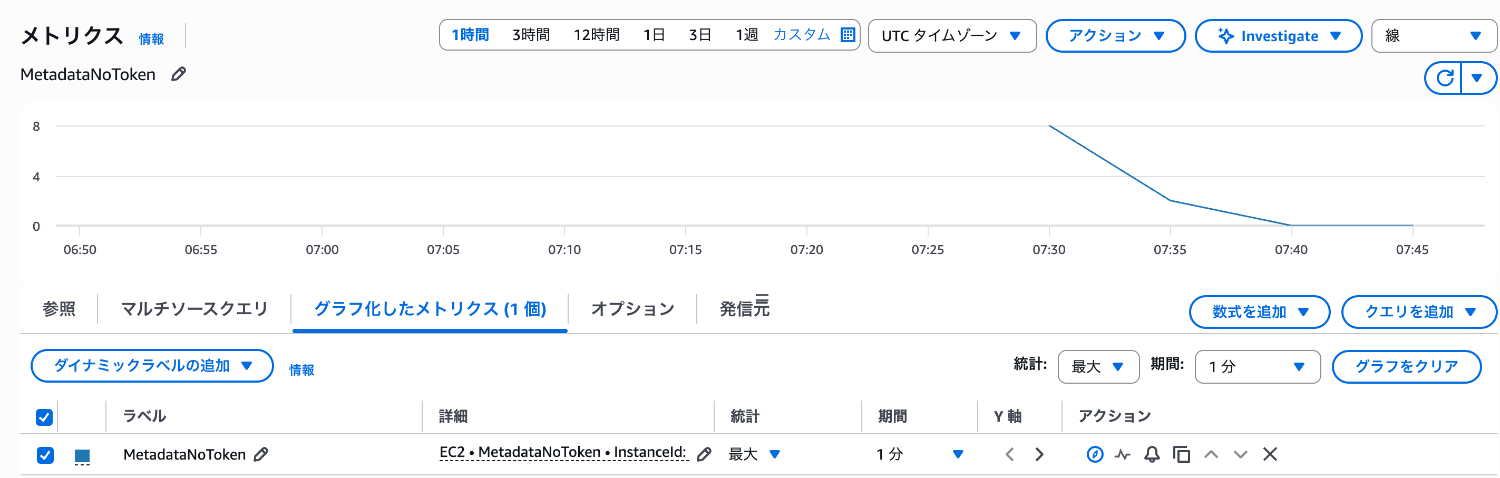
Next, let's check the CloudWatch MetadataNoToken metric again.
We can confirm that the Datadog agent is now using IMDSv2, as no metrics have been recorded since the agent restart.
Requiring IMDSv2 on the EC2 Instance
Let's require IMDSv2 on the EC2 instance.
- Check the current metadata options.
aws ec2 describe-instances \
  --instance-ids i-XXXXXXXXXXXX \
  --query 'Reservations[0].Instances[0].MetadataOptions' \
  --output json
{
    "State": "applied",
    "HttpTokens": "optional",
    "HttpPutResponseHopLimit": 2,
    "HttpEndpoint": "enabled",
    "HttpProtocolIpv6": "disabled",
    "InstanceMetadataTags": "disabled"
}
The output shows "HttpTokens": "optional", meaning both IMDSv1 and IMDSv2 are available.
- Require IMDSv2.
aws ec2 modify-instance-metadata-options \
    --instance-id i-XXXXXXXXXXXX \
    --http-tokens required \
    --http-endpoint enabled
- Check the current metadata options again.
{
    "State": "applied",
    "HttpTokens": "required",
    "HttpPutResponseHopLimit": 2,
    "HttpEndpoint": "enabled",
    "HttpProtocolIpv6": "disabled",
    "InstanceMetadataTags": "disabled"
}
The output shows "HttpTokens": "required".
The instance is now configured to require IMDSv2 only.
- Restart the Datadog agent and check for any impact.
systemctl restart datadog-agent
- Check the Datadog agent's hostname information.
datadog-agent status
========
Hostname
========

  ec2-hostname: ip-10-0-0-87.ap-northeast-1.compute.internal
  host_aliases: [i-XXXXXXXXXXXX]
  hostname: i-XXXXXXXXXXXX
  hostname-resolution-version: 1
  instance-id: i-XXXXXXXXXXXX
  socket-fqdn: ip-10-0-0-87.ap-northeast-1.compute.internal.
  socket-hostname: ip-10-0-0-87.ap-northeast-1.compute.internal
  hostname provider: aws
  unused hostname providers:
    'hostname' configuration/environment: hostname is empty
    'hostname_file' configuration/environment: 'hostname_file' configuration is not enabled
    azure: azure_hostname_style is set to 'os'
    container: the agent is not containerized
    fargate: agent is not runnning on Fargate
    fqdn: 'hostname_fqdn' configuration is not enabled
    gce: unable to retrieve hostname from GCE: GCE metadata API error: status code 401 trying to GET http://169.254.169.254/computeMetadata/v1/instance/hostname
As before, the instance ID information is being retrieved.
No errors are occurring when retrieving metadata from the aws provider.
The migration to IMDSv2 is complete.
What Happens Without Specifying the Parameter and Requiring IMDSv2?
Let's create a Linux EC2 instance requiring IMDSv2 and install a Datadog agent version that uses IMDSv1 by default.
We'll check how the Datadog agent behaves without specifying the ec2_prefer_imdsv2 parameter.
Prerequisites
- Using Datadog agent v7.63.0
- EC2 instance requires IMDSv2
- Check the current metadata options.
aws ec2 describe-instances \
  --instance-ids i-XXXXXXXXXXXX \
  --query 'Reservations[0].Instances[0].MetadataOptions' \
  --output json
{
    "State": "applied",
    "HttpTokens": "required",
    "HttpPutResponseHopLimit": 2,
    "HttpEndpoint": "enabled",
    "HttpProtocolIpv6": "disabled",
    "InstanceMetadataTags": "disabled"
}
The output shows "HttpTokens": "required", meaning only IMDSv2 is allowed.
- Install the Datadog agent with a specific version.
DD_API_KEY=<YOUR_API_KEY>
DD_AGENT_MAJOR_VERSION=7
DD_AGENT_MINOR_VERSION=63.0
bash -c "$(curl -L https://install.datadoghq.com/scripts/install_script_agent7.sh)"
- Check the Datadog agent's hostname information.
datadog-agent status
========
Hostname
========

  host_aliases: [i-XXXXXXXXXXXX]
  hostname: ip-10-0-0-91.ap-northeast-1.compute.internal
  hostname-resolution-version: 1
  socket-fqdn: ip-10-0-0-91.ap-northeast-1.compute.internal.
  socket-hostname: ip-10-0-0-91.ap-northeast-1.compute.internal
  hostname provider: os
  unused hostname providers:
    'hostname' configuration/environment: hostname is empty
    'hostname_file' configuration/environment: 'hostname_file' configuration is not enabled
    aws: Unable to determine hostname from EC2: status code 401 trying to GET http://169.254.169.254/latest/meta-data/instance-id
    azure: azure_hostname_style is set to 'os'
    container: the agent is not containerized
    fargate: agent is not runnning on Fargate
    fqdn: 'hostname_fqdn' configuration is not enabled
    gce: unable to retrieve hostname from GCE: GCE metadata API error: status code 401 trying to GET http://169.254.169.254/computeMetadata/v1/instance/hostname
We can see that the agent cannot access the metadata service and is getting a 4xx error.
aws: Unable to determine hostname from EC2: status code 401 trying to GET http://169.254.169.254/latest/meta-data/instance-id
According to Datadog's hostname selection rules, when metadata cannot be accessed, it uses hostname -f to determine the hostname.
We can confirm that the following value is being used as the hostname:
hostname -f
ip-10-0-0-91.ap-northeast-1.compute.internal
Impact on Operation
When checking the Host List in the Datadog console by selecting "Hosts" from "Infrastructure," the agent recognizes the hostname with an ip-xxx-xxx-xxx-xxx format.
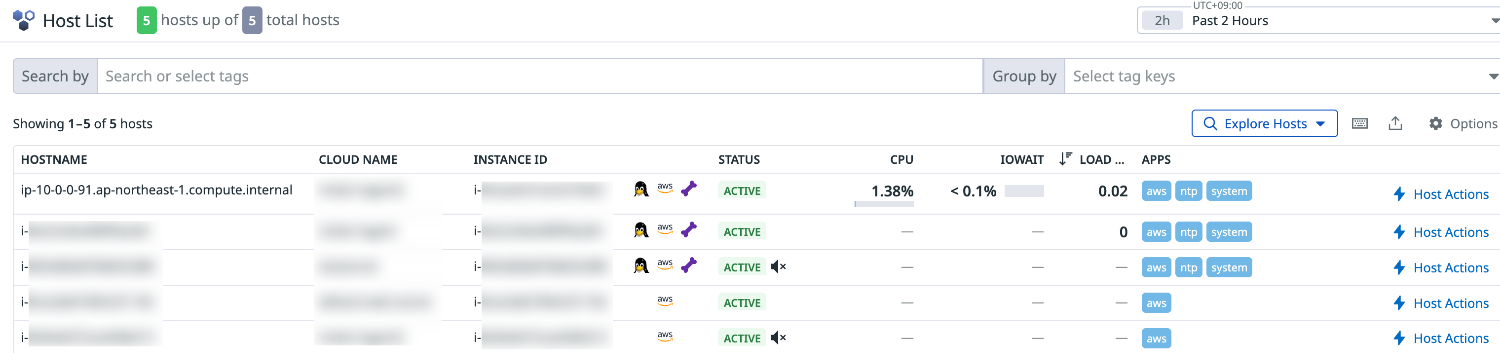
If the hostname differs from other instances, this may impact dashboards, existing monitors, and notifications that use the host tag.
For example, differences appear in graph displays.
For graphs filtered by host, hostnames starting with i-xxxxxxxxxxx and those starting with ip-xxx-xxx-xxx-xxx will be mixed.
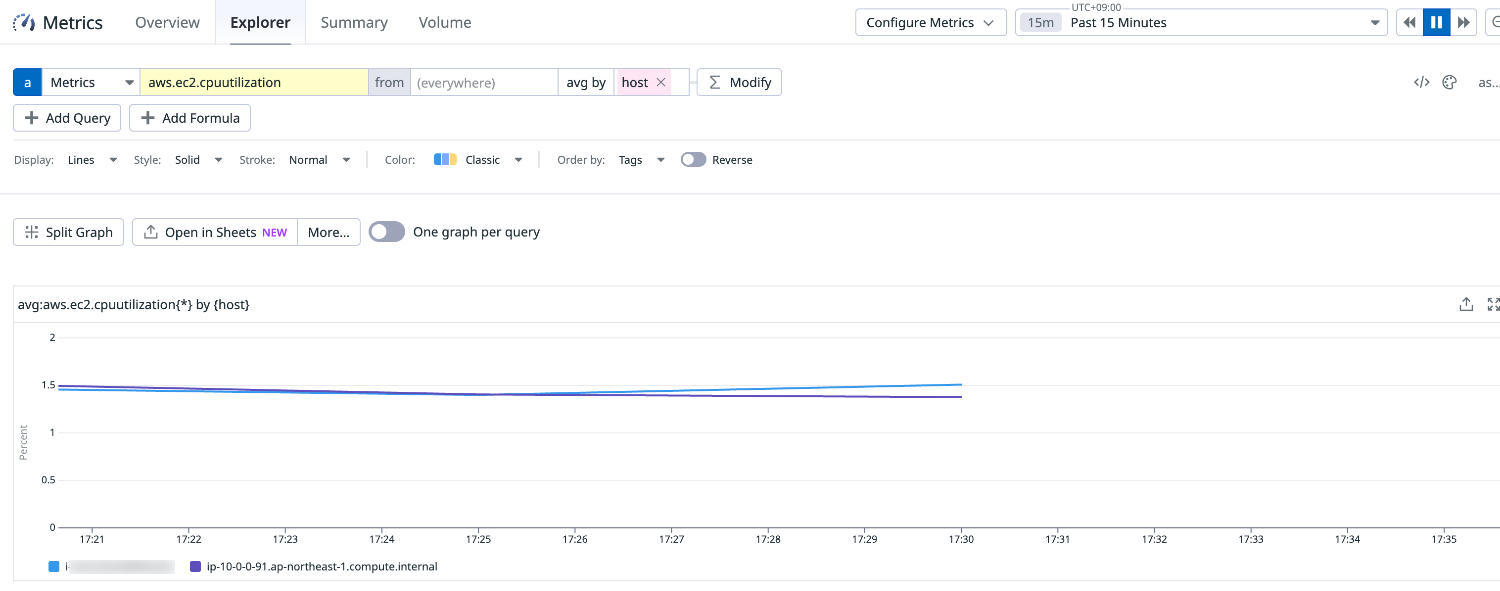
This can cause confusion in operations, so it's important to configure IMDSv2 support using the ec2_prefer_imdsv2 parameter when using older versions of the Datadog agent.
Conclusion
The IMDSv2 support in the Datadog agent varies by version. With v7.64.0 or later, you can migrate to IMDSv2 without any additional agent configuration.
For versions before v7.64.0, you need to either add the ec2_prefer_imdsv2: true setting or upgrade the agent.
If you require IMDSv2 without making these adjustments, the hostname will change from the instance ID to the FQDN hostname, potentially affecting dashboards and monitors.
If you're considering migrating to IMDSv2, start by checking your agent version.
I hope this article has been helpful.
References