I tried the official Claude Code plugin that allows you to operate Datadog with natural language without MCP

This page has been translated by machine translation. View original
Hello. I'm Shiina from the Operations Department.
Introduction
Previously, I introduced an article about how to analyze Datadog data in natural language without specialized knowledge by combining Claude and MCP.
Since then, Datadog's official MCP server has been announced, but it's currently in preview and not generally available.[1]
I'm also waiting to use it.
For those who can't wait for the MCP server, I recommend the official Datadog Claude Code plugin "datadog-api-claude-plugin".
It allows you to operate Datadog in natural language through the Pup CLI.
In this article, I tried using the plugin to search logs, check monitors, investigate instances, and even generate code automatically in natural language.
What is the Datadog API Claude plugin?
The Datadog API Claude plugin is an official Datadog tool that allows you to access various Datadog data in natural language from Claude through the Pup CLI.
This plugin doesn't require an MCP server and works by directly connecting with Claude Code through the Pup CLI.
One of its attractions is the low implementation barrier due to its simple configuration that doesn't depend on MCP.
Plugin Structure
datadog-api-claude-plugin/
├── .claude-plugin/
│   └── plugin.json          # Plugin metadata (references 46 agents)
├── agents/                  # 46 specialized domain agents
│   ├── logs.md
│   ├── metrics.md
│   ├── monitors.md
│   └── ...
├── skills/
│   └── code-generation/     # Code generation skill
│       └── SKILL.md
├── CLAUDE.md               # Plugin instructions (symlink to AGENTS.md)
├── AGENTS.md               # Comprehensive agent documentation
agents/
The agents/ directory contains 46 specialized agents for various Datadog functional areas (log management, metrics, monitors, etc.).
SKILL.md
The SKILL.md file contains instructions for a skill that automatically generates code snippets for Datadog API operations (client initialization, authentication setup, API call code).
It supports Python, Ruby, Go, Java, and TypeScript languages.
It uses official Datadog SDK packages for each language while incorporating error handling best practices.
It also includes authentication information (API key/APP key) setup and can generate accurate code based on the OpenAPI specification.
AGENTS.md
This contains instructions for handling the entire plugin.
It serves as a comprehensive guide on how to use the 46 different agents.
Note that CLAUDE.md is a symbolic link to AGENTS.md.
Here's an image of how it works:
Plugin Use Cases
The plugin can be utilized for the following purposes:
Incident Response & Investigation
- Conduct initial investigation of failures in natural language, checking logs, metrics, and traces comprehensively.
- Analyze root causes by drilling down from error logs to traces and infrastructure metrics in natural language.
- Create a timeline that organizes events before and after a failure chronologically.
Monitoring & Alert Management
- List monitors that have been in No Data or downtime state for a long time.
- Check currently alerting monitors or downtime settings.
- Consult AI to review the appropriateness of thresholds and notification destinations.
Operational Efficiency
- Cross-reference information from multiple dashboards in natural language.
- Detect security signals and suspicious access patterns for security investigations.
- Retrieve detailed information about specific hosts or containers.
Coding Support
- Auto-generate code for Datadog API integration.
- Generate operational tools for periodic report creation and metric aggregation.
- Code monitors and dashboard settings as Infrastructure as Code (IaC).
Knowledge Sharing & Reporting
- Generate incident report drafts based on investigation results.
- Summarize daily/weekly operation reports in natural language.
Setup
Prerequisites
- Claude Code CLI installed
- Node.js installed
- Datadog account available
- Pup CLI installed
For information on installing Pup CLI, please refer to this article.
Plugin Installation
- Clone the repository.
git clone https://github.com/DataDog/datadog-api-claude-plugin.git
Cloning into 'datadog-api-claude-plugin'...
remote: Enumerating objects: 1222, done.
remote: Counting objects: 100% (384/384), done.
remote: Compressing objects: 100% (162/162), done.
remote: Total 1222 (delta 311), reused 231 (delta 221), pack-reused 838 (from 1
Receiving objects: 100% (1222/1222), 1.20 MiB | 3.47 MiB/s, done.
Resolving deltas: 100% (764/764), done.
- Install skills.
npx skills add ./datadog-api-claude-plugin
Need to install the following packages:
skills@1.3.8
Ok to proceed? (y) y

███████╗██╗  ██╗██╗██╗     ██╗     ███████╗
██╔════╝██║ ██╔╝██║██║     ██║     ██╔════╝
███████╗█████╔╝ ██║██║     ██║     ███████╗
╚════██║██╔═██╗ ██║██║     ██║     ╚════██║
███████║██║  ██╗██║███████╗███████╗███████║
╚══════╝╚═╝  ╚═╝╚═╝╚══════╝╚══════╝╚══════╝

┌   skills
│
◇  Source: /Users/shiina.yuichi/datadog-claude/datadog-api-claude-plugin
│
◇  Local path validated
│
◇  Found 1 skill
│
●  Skill: dd-file-issue
│
│  File GitHub issues to the right repository (pup CLI or plugin)
│
◇  39 agents
◇  Which agents do you want to install to?
│  Amp, Codex, Gemini CLI, GitHub Copilot, Kimi Code CLI, OpenCode
│
◇  Installation scope
│  Project
│
◇  Installation method
│  Symlink (Recommended)

│
◇  Installation Summary ───────────────────────────────────────────────────────╮
│                                                                              │
│  ~/datadog-claude/.agents/skills/dd-file-issue                               │
│    universal: Amp, Codex, Gemini CLI, GitHub Copilot, Kimi Code CLI +1 more  │
│                                                                              │
├──────────────────────────────────────────────────────────────────────────────╯
│
◇  Proceed with installation?
│  Yes
│
◇  Installation complete

│
◇  Installed 1 skill ──────────────────────────────────────────────────────────╮
│                                                                              │
│  ✓ ~/datadog-claude/.agents/skills/dd-file-issue                             │
│    universal: Amp, Codex, Gemini CLI, GitHub Copilot, Kimi Code CLI +1 more  │
│                                                                              │
├──────────────────────────────────────────────────────────────────────────────╯

│
└  Done!  Review skills before use; they run with full agent permissions.

│
│  One-time prompt - you won't be asked again if you dismiss.
│
◇  Install the find-skills skill? It helps your agent discover and suggest skills.
│  Yes

│
◇  Installing find-skills skill...

┌   skills
│
◇  Source: https://github.com/vercel-labs/skills.git
│
◇  Repository cloned
│
◇  Found 1 skill
│
●  Selected 1 skill: find-skills

│
◇  Installation Summary ───────────────────────────────────────────────────────╮
│                                                                              │
│  ~/.agents/skills/find-skills                                                │
│    universal: Amp, Codex, Gemini CLI, GitHub Copilot, Kimi Code CLI +1 more  │
│                                                                              │
├──────────────────────────────────────────────────────────────────────────────╯
│
◇  Installation complete

│
◇  Installed 1 skill ──────────────────────────────────────────────────────────╮
│                                                                              │
│  ✓ ~/.agents/skills/find-skills                                              │
│    universal: Amp, Codex, Gemini CLI, GitHub Copilot, Kimi Code CLI +1 more  │
│                                                                              │
├──────────────────────────────────────────────────────────────────────────────╯

│
└  Done!  Review skills before use; they run with full agent permissions.
- Confirm that the skills have been added.
npx skills list
Project Skills

dd-file-issue ~/datadog-claude/.agents/skills/dd-file-issue
  Agents: Replit
Datadog Authentication Setup (Optional)
While secure browser-based authentication using Pup CLI's OAuth2 is possible, you can also use traditional Datadog API keys for API requests.
This is available as an alternative method when you lack permissions or can't use Pup CLI commands.
To use API key authentication, set the following environment variables:
export DD_API_KEY="your-api-key"
export DD_APP_KEY="your-app-key"
export DD_SITE="datadoghq.com"
Operating Datadog in Natural Language
Let's try conversing using Claude Code.
For this test, I'm using the Claude Opus 4.6 model.
Login
Let's try logging in using Pup CLI's OAuth2.
I want to use the Datadog API Claude plugin so please log me in
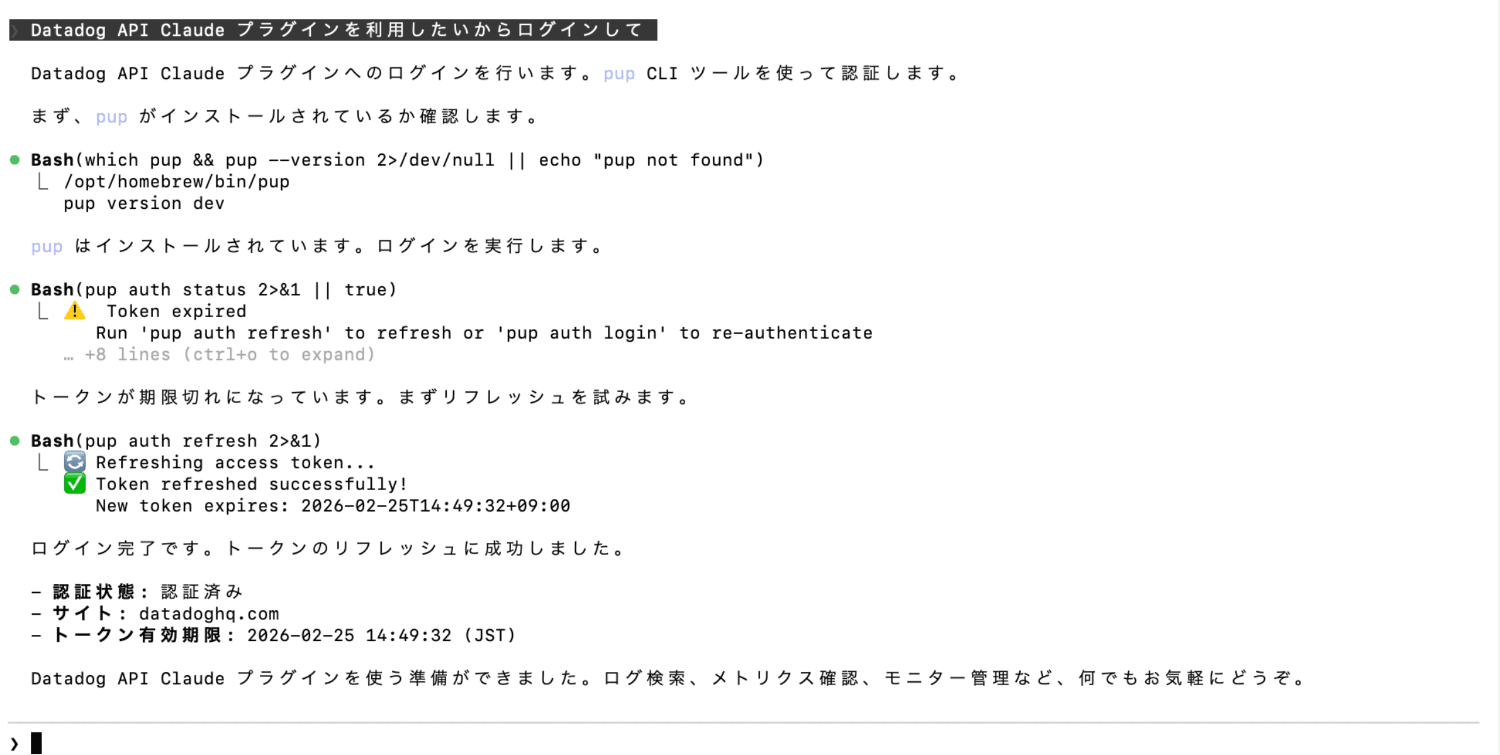
Since I was already logged in, the token was refreshed.
If you're not logged in, the pup auth login command will be executed, and browser-based authentication will proceed.
Checking Monitor Status
What monitors are in alert state?
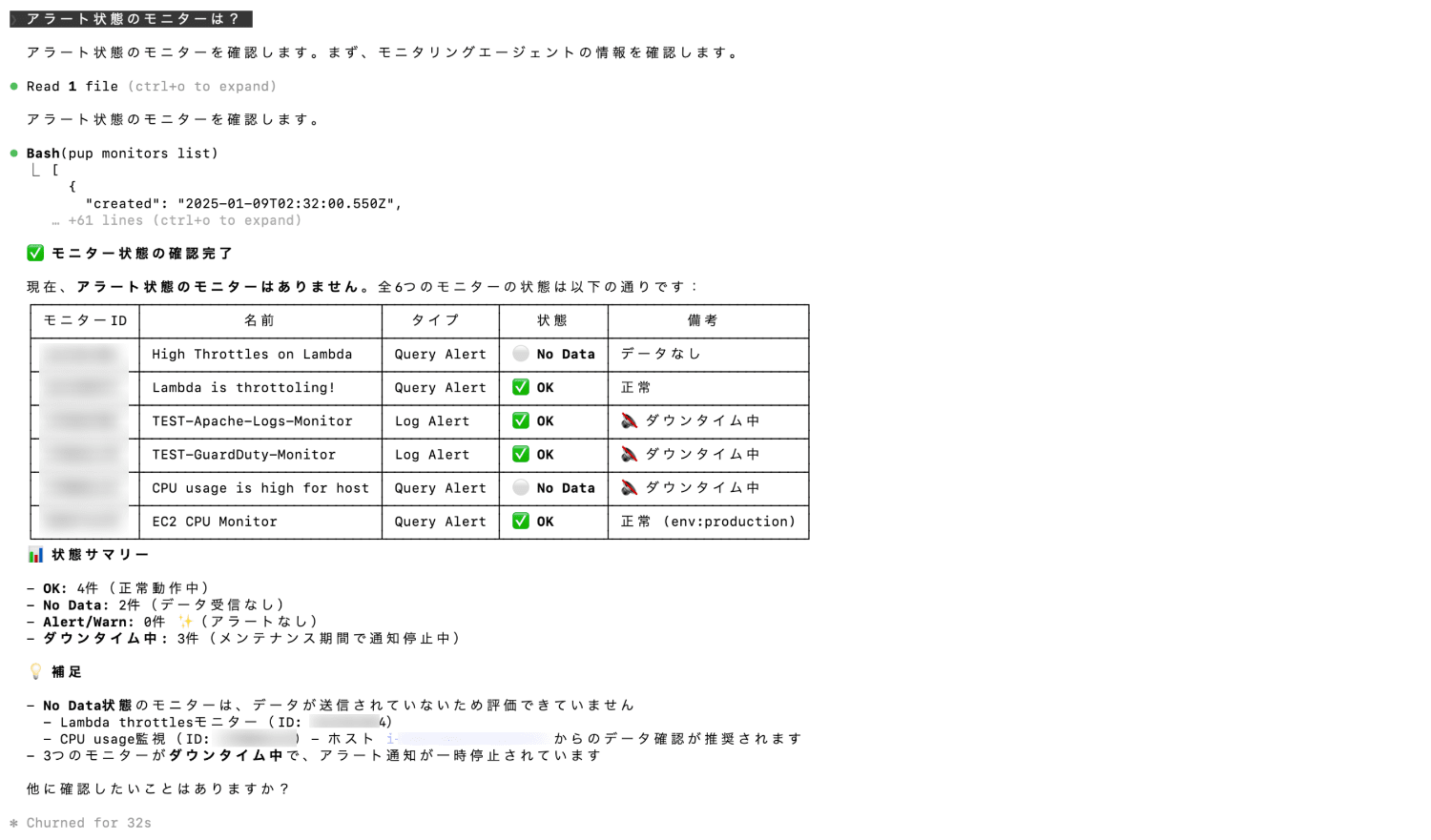
We can see it's checking monitor status using Pup CLI.
Log Search
Show error logs from the past 6 hours
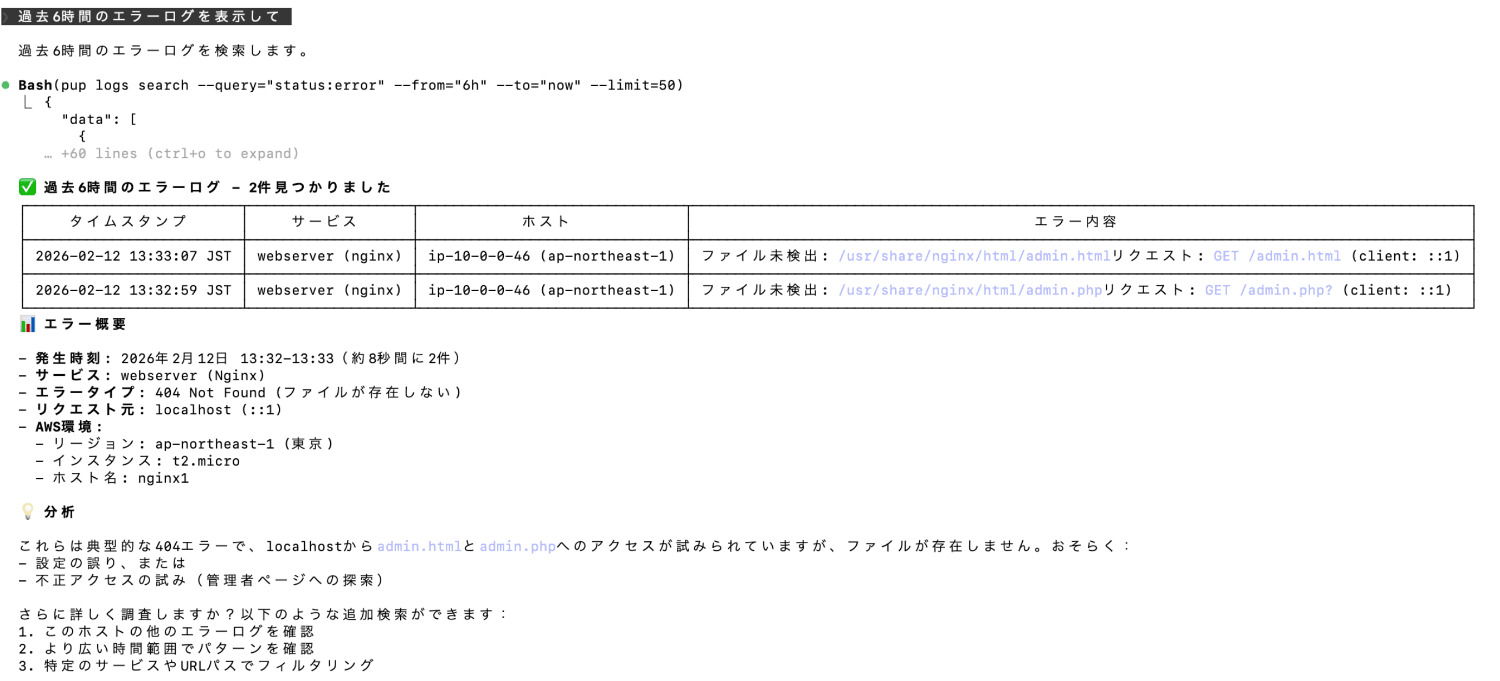
Similarly, it's performing log searches using Pup CLI.
We're also getting AI analysis and insights.
Monitor Creation
Create a monitor for these error logs
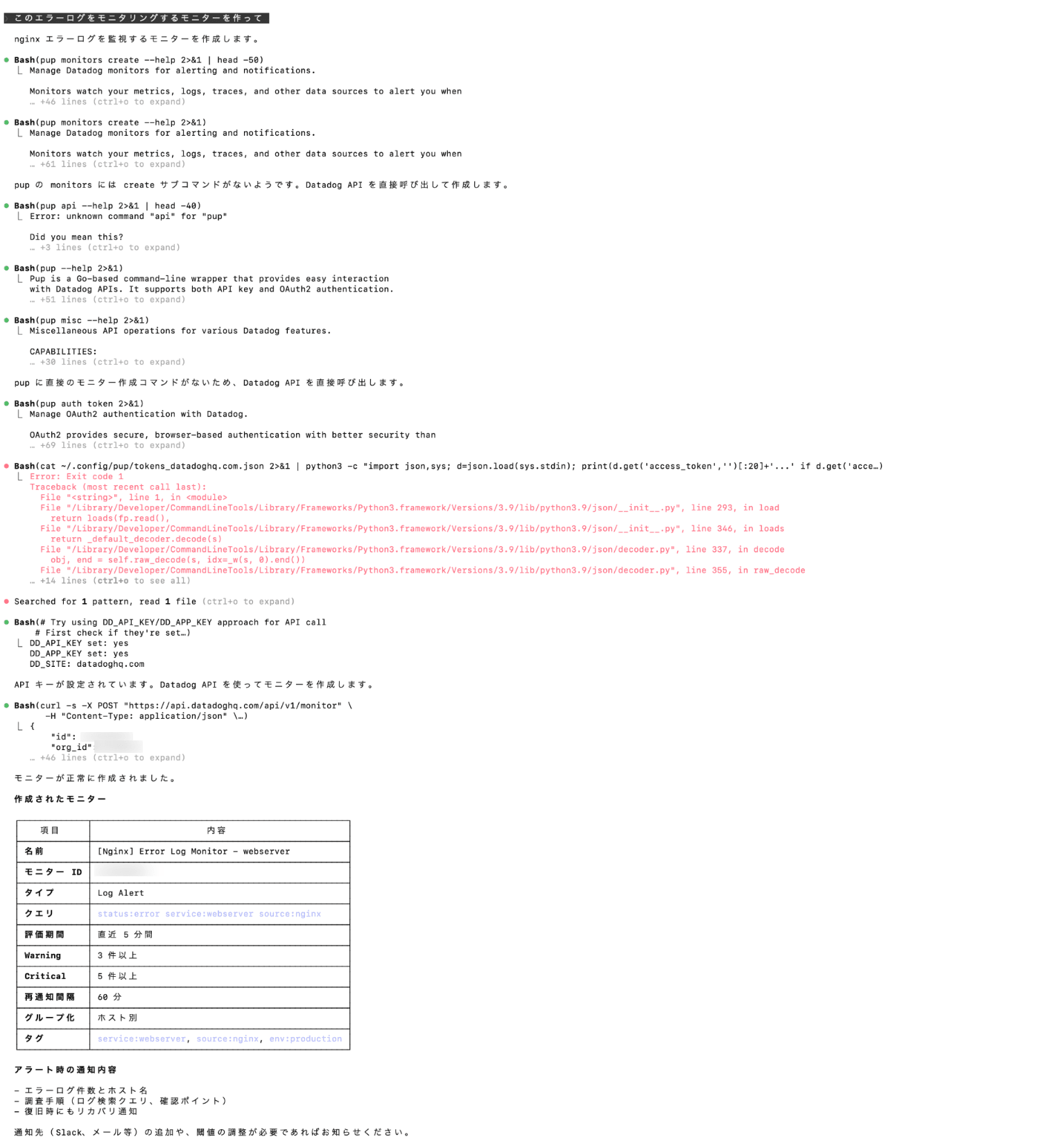
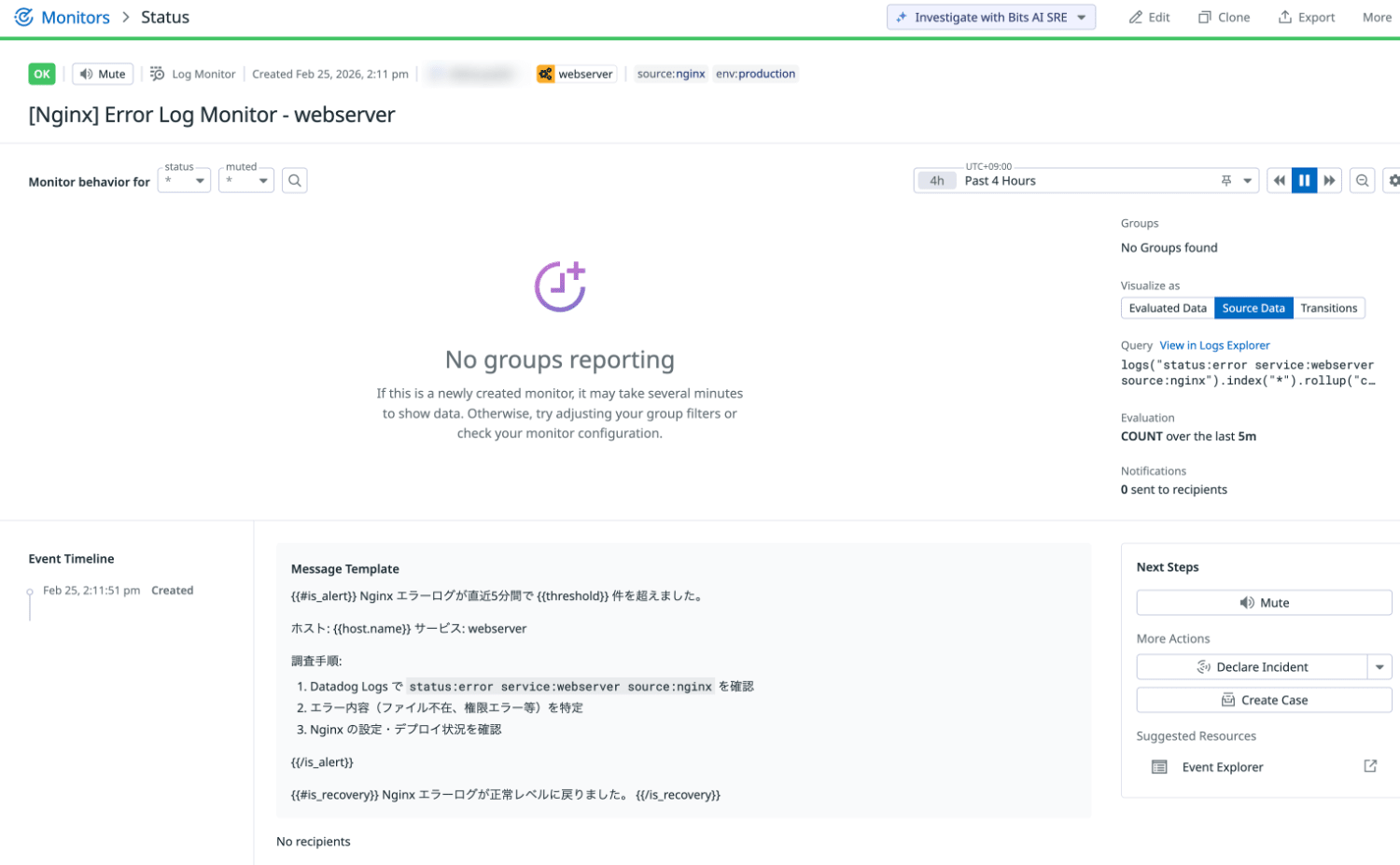
A monitor has been created.
Note that at this time, monitor creation functionality via Pup CLI commands is not provided.
Therefore, as an alternative, creation was done using traditional Datadog API requests.
Instance Investigation
Investigate i-XXXXXXXXXXXXXXX
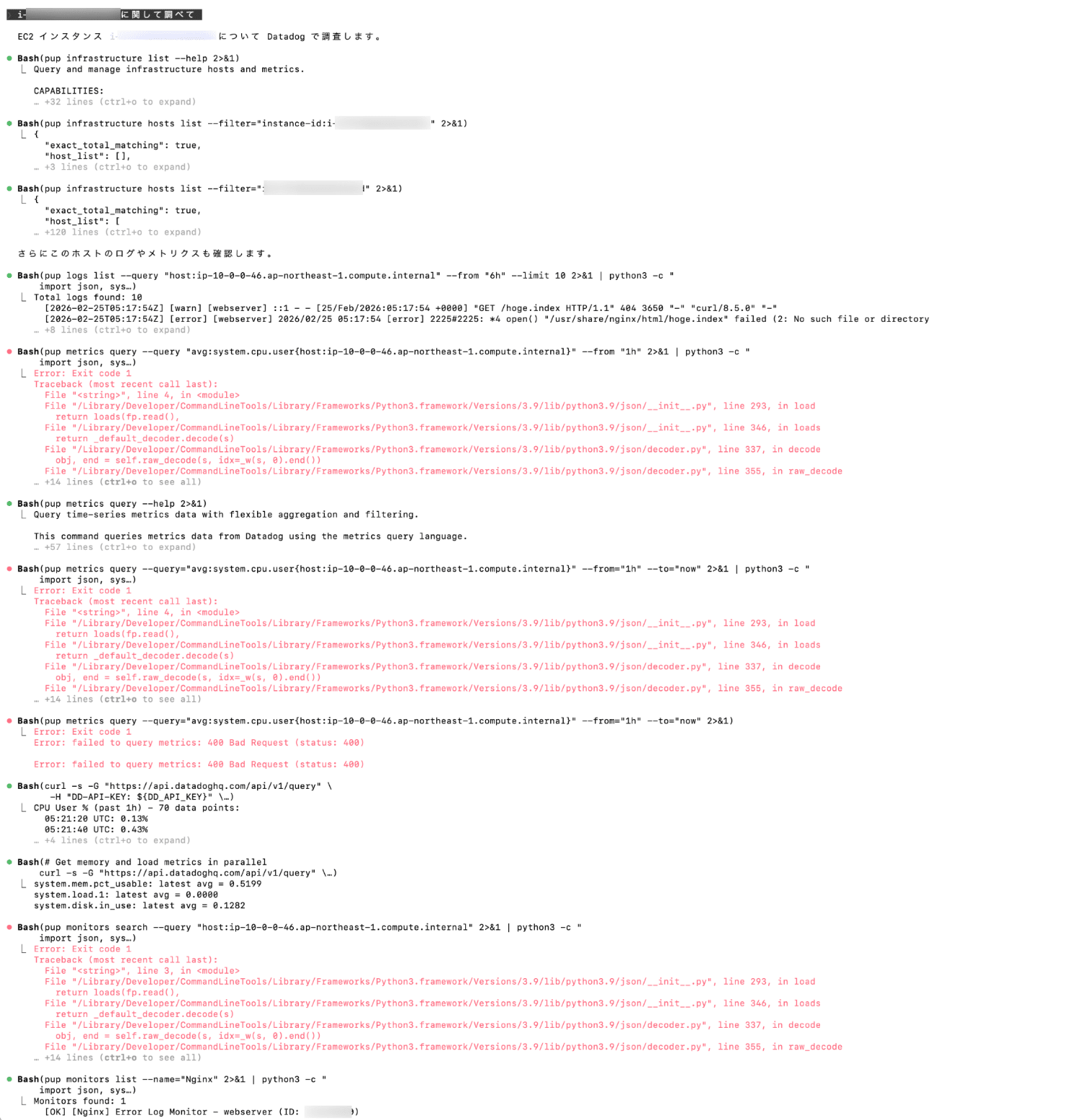
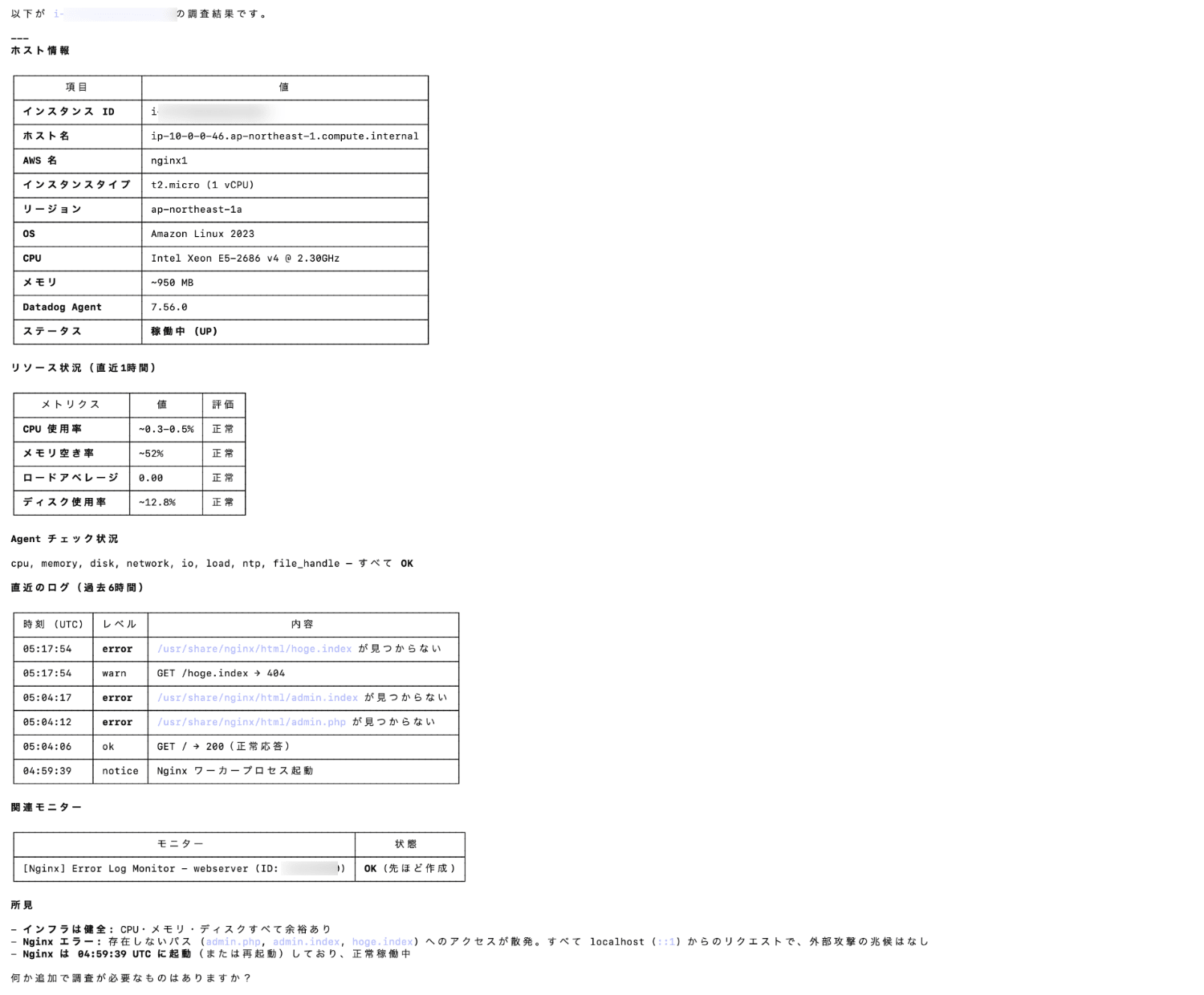
We can see it's creating investigation reports using Pup CLI commands and the Datadog API.
Coding in Natural Language
Let's try creating application code in Python.
Code Generation
Generate Python code that queries error logs from the past hour and outputs the results to a CSV
⏺ I'll generate Python code to retrieve error logs from the past hour and output them to CSV. First, I'll check the details of this plugin's code-generation skill.

⏺ Read 1 file (ctrl+o to expand)
  ⎿  Loaded datadog-api-claude-plugin/CLAUDE.md

⏺ I'll also check the log agent details to generate the optimal code.

⏺ Read 1 file (ctrl+o to expand)

⏺ Perfect! Now I'll generate Python code that searches for error logs from the past hour and exports them to CSV.

⏺ Write(search_error_logs.py)
  ⎿  Wrote 199 lines to search_error_logs.py
      1 #!/usr/bin/env python3
      2 """
      3 Datadog Error Log Search and CSV Export
      4
      5 This script searches Datadog logs for errors in the last hour
      6 and exports the results to a CSV file.
      7
      8 Requirements:
      9     pip install datadog-api-client pandas
     … +189 lines (ctrl+o to expand)

⏺ Next, I'll create a requirements.txt file and a README to explain usage.

⏺ Write(requirements.txt)
  ⎿  Wrote 3 lines to requirements.txt
      1 datadog-api-client>=2.30.0
      2 pandas>=2.0.0

⏺ Write(README.md)
  ⎿  Wrote 181 lines to README.md
       1 # Datadog Error Log Search Script
       2
       3 Python script to search for error logs from the past hour from the Datadog API and output them to a CSV file.
       4
       5 ## Features
       6
       7 - Search for error logs using the Datadog Logs API
       8 - Retrieve logs from the past hour (customizable)
       9 - Output results to a CSV file
      10 - Display error aggregation by service
     … +171 lines (ctrl+o to expand)

⏺ Making the script executable.

⏺ Bash(chmod +x search_error_logs.py)
  ⎿  Done

⏺ ✅ Python code generation complete!

  I've created a Python script that searches for error logs from the past hour and outputs them to CSV.

  📁 Files created

  1. search_error_logs.py - Main script
    - Search for error logs using Datadog Logs API
    - Output results to a CSV file (error_logs.csv)
    - Display error aggregation by service
  2. requirements.txt - Dependencies
  3. README.md - Detailed usage guide

  🚀 Usage

  1. Install packages

  cd /Users/shiina.yuichi/datadog-claude
  pip install -r requirements.txt

  2. Set environment variables (skip if already set)

  export DD_API_KEY="your-api-key"
  export DD_APP_KEY="your-app-key"
  export DD_SITE="datadoghq.com"

  3. Run the script

  python search_error_logs.py

  or

  ./search_error_logs.py

  📊 Output

  The script outputs:

  - error_logs.csv - Error log details (timestamp, service, message, etc.)
  - Console output - Error count and aggregation by service

  ⚙️  Customization methods

  Changing the search time range:

  Edit the main() function in the script:

  # Search logs from past 3 hours
  logs = search_error_logs(hours=3, limit=1000)

  Changing search conditions:

  Edit the query in the search_error_logs() function:

  query="status:error service:api"  # Errors from API service only
  query="status:error env:production"  # Production environment only

  🔍 To check results immediately

  If you want to check immediately without running the script, use the pup command:

  pup logs search --query="status:error" --from="1h" --to="now"

  Please check README.md for detailed usage!
The script code, dependencies, and README.md have been generated.
  datadog-claude/
  ├── README.md                  # Usage guide (in Japanese)
  ├── requirements.txt           # Dependencies (datadog-api-client)
  ├── search_error_logs.py       # Main script
Check Generated Files
Let's check the generated code and documentation.
search_error_logs.py
#!/usr/bin/env python3
"""
Datadog Error Log Search → CSV Export Script

Retrieves error logs from the past hour using Datadog Logs API v2 and exports them to a CSV file.
Supports pagination to retrieve all records without limitations.

Required packages:
    pip install datadog-api-client

Environment variables:
    DD_API_KEY  Datadog API key
    DD_APP_KEY  Datadog application key
    DD_SITE     Datadog site (default: datadoghq.com)
"""

import csv
import json
import os
import sys
from datetime import datetime, timedelta, timezone

from datadog_api_client import ApiClient, Configuration
from datadog_api_client.v2.api.logs_api import LogsApi
from datadog_api_client.v2.model.logs_list_request import LogsListRequest
from datadog_api_client.v2.model.logs_list_request_page import LogsListRequestPage
from datadog_api_client.v2.model.logs_query_filter import LogsQueryFilter
from datadog_api_client.v2.model.logs_sort import LogsSort

# ---------------------------------------------------------------------------
# Constants
# ---------------------------------------------------------------------------
DEFAULT_QUERY = "status:error"
DEFAULT_HOURS = 1
PAGE_LIMIT = 1000          # Max records per API request
MAX_PAGES = 50             # Safety measure: maximum page count
OUTPUT_FILE = "error_logs.csv"

# Base columns for CSV output (order guaranteed)
BASE_COLUMNS = [
    "timestamp",
    "status",
    "service",
    "host",
    "message",
    "tags",
]

# ---------------------------------------------------------------------------
# Helpers
# ---------------------------------------------------------------------------
def flatten_dict(d: dict, parent_key: str = "", sep: str = ".") -> dict:
    """Flatten nested dictionaries into keys with dot notation.

    Example: {"http": {"url": "/api", "status_code": 200}}
      → {"http.url": "/api", "http.status_code": 200}
    """
    items: list[tuple[str, object]] = []
    for k, v in d.items():
        new_key = f"{parent_key}{sep}{k}" if parent_key else k
        if isinstance(v, dict):
            items.extend(flatten_dict(v, new_key, sep).items())
        else:
            items.append((new_key, v))
    return dict(items)

def safe_str(value: object) -> str:
    """Safely convert a value to string."""
    if value is None:
        return ""
    if isinstance(value, (list, dict)):
        return json.dumps(value, ensure_ascii=False, default=str)
    return str(value)

# ---------------------------------------------------------------------------
# Datadog API Operations
# ---------------------------------------------------------------------------
def build_configuration() -> Configuration:
    """Build Datadog API Configuration from environment variables."""
    api_key = os.getenv("DD_API_KEY")
    app_key = os.getenv("DD_APP_KEY")
    site = os.getenv("DD_SITE", "datadoghq.com")

    if not api_key or not app_key:
        print(
            "Error: Set the DD_API_KEY and DD_APP_KEY environment variables.\n"
            "\n"
            "  export DD_API_KEY='your-api-key'\n"
            "  export DD_APP_KEY='your-app-key'\n"
            "\n"
            "Keys can be obtained from Datadog > Organization Settings > API Keys / Application Keys",
            file=sys.stderr,
        )
        sys.exit(1)

    cfg = Configuration()
    cfg.api_key["apiKeyAuth"] = api_key
    cfg.api_key["appKeyAuth"] = app_key
    cfg.server_variables["site"] = site
    return cfg

def fetch_error_logs(
    query: str = DEFAULT_QUERY,
    hours: int = DEFAULT_HOURS,
) -> list[dict]:
    """Search logs using Datadog Logs API v2 and return as a list of dictionaries.

    Automatically handles pagination (cursor) to retrieve all records.
    """
    cfg = build_configuration()
    now = datetime.now(timezone.utc)
    from_time = now - timedelta(hours=hours)

    with ApiClient(cfg) as client:
        api = LogsApi(client)

        all_logs: list[dict] = []
        cursor: str | None = None

        for page_num in range(1, MAX_PAGES + 1):
            page = LogsListRequestPage(limit=PAGE_LIMIT)
            if cursor:
                page.cursor = cursor

            body = LogsListRequest(
                filter=LogsQueryFilter(
                    query=query,
                    _from=from_time.isoformat(),
                    to=now.isoformat(),
                ),
                sort=LogsSort.TIMESTAMP_ASCENDING,
                page=page,
            )

            resp = api.list_logs(body=body)

            if not resp.data:
                break

            for log in resp.data:
                attrs = log.attributes
                row: dict[str, str] = {
                    "timestamp": safe_str(
                        getattr(attrs, "timestamp", "")
                    ),
                    "status": safe_str(getattr(attrs, "status", "")),
                    "service": safe_str(getattr(attrs, "service", "")),
                    "host": safe_str(getattr(attrs, "host", "")),
                    "message": safe_str(getattr(attrs, "message", "")),
                    "tags": ",".join(getattr(attrs, "tags", []) or []),
                }

                # Add flattened custom attributes
                custom = getattr(attrs, "attributes", None)
                if custom and isinstance(custom, dict):
                    for k, v in flatten_dict(custom).items():
                        row[k] = safe_str(v)

                all_logs.append(row)

            print(
                f"  Page {page_num}: {len(resp.data)} records retrieved "
                f"(total {len(all_logs)} records)"
            )

            # Get cursor for next page
            cursor = None
            if resp.meta and hasattr(resp.meta, "page"):
                cursor = getattr(resp.meta.page, "after", None)
            if not cursor:
                break

    return all_logs

# ---------------------------------------------------------------------------
# CSV Export
# ---------------------------------------------------------------------------
def write_csv(logs: list[dict], path: str = OUTPUT_FILE) -> None:
    """Write log list to a CSV file."""
    if not logs:
        print("No logs to output.", file=sys.stderr)
        return

    # Collect all column names from logs, with base columns fixed at the beginning
    extra_cols = sorted(
        {k for row in logs for k in row if k not in BASE_COLUMNS}
    )
    fieldnames = BASE_COLUMNS + extra_cols

    with open(path, "w", newline="", encoding="utf-8") as f:
        writer = csv.DictWriter(
            f,
            fieldnames=fieldnames,
            extrasaction="ignore",
        )
        writer.writeheader()
        writer.writerows(logs)

    print(f"\n✅ Exported {len(logs)} logs to {path}.")

# ---------------------------------------------------------------------------
# Summary Display
# ---------------------------------------------------------------------------
def print_summary(logs: list[dict]) -> None:
    """Display error count by service."""
    if not logs:
        return

    services: dict[str, int] = {}
    for row in logs:
        svc = row.get("service") or "(unknown)"
        services[svc] = services.get(svc, 0) + 1

    print(f"\n{'='*40}")
    print(f" Error Log Summary")
    print(f"{'='*40}")
    print(f" Total: {len(logs)} records")
    print(f"\n Service breakdown:")
    for svc, cnt in sorted(services.items(), key=lambda x: -x[1]):
        print(f"   {svc}: {cnt} records")
    print(f"{'='*40}")

# ---------------------------------------------------------------------------
# Main
# ---------------------------------------------------------------------------
def main() -> int:
    query = DEFAULT_QUERY
    hours = DEFAULT_HOURS

    now = datetime.now(timezone.utc)
    from_time = now - timedelta(hours=hours)
    print(f"🔍 Datadog Log Search")
    print(f"   Query : {query}")
    print(f"   Period: {from_time:%Y-%m-%d %H:%M:%S} UTC → {now:%Y-%m-%d %H:%M:%S} UTC")
    print()

    try:
        logs = fetch_error_logs(query=query, hours=hours)
    except Exception as e:
        print(f"❌ Failed to retrieve logs: {e}", file=sys.stderr)
        return 1

    write_csv(logs, OUTPUT_FILE)
    print_summary(logs)
    return 0

if __name__ == "__main__":
    sys.exit(main())
README.md
# Datadog Error Log Search → CSV Export

Python script that retrieves error logs from the past hour using Datadog Logs API v2 and exports them to a CSV file.

## Features

- Error log search using Datadog Logs API v2
- Cursor-based pagination support (automatic full retrieval)
- Flattens nested custom attributes into CSV columns
- Displays error count summary by service

## Requirements

- Python 3.10 or higher
- Datadog account (API key & application key)

## Setup

### 1. Install dependencies

```bash
pip install -r requirements.txt
2. Set environment variables
export DD_API_KEY="your-datadog-api-key"
export DD_APP_KEY="your-datadog-application-key"
export DD_SITE="datadoghq.com"   # Optional (default: datadoghq.com)
To get keys: Datadog > Organization Settings > API Keys / Application Keys
Usage
python search_error_logs.py
This will generate error_logs.csv.
Sample Output
🔍 Datadog Log Search
   Query : status:error
   Period: 2026-02-13 08:00:00 UTC → 2026-02-13 09:00:00 UTC

  Page 1: 142 records retrieved (total 142 records)

✅ Exported 142 logs to error_logs.csv.

========================================
 Error Log Summary
========================================
 Total: 142 records

 Service breakdown:
   api: 68 records
   web-app: 45 records
   worker: 29 records
========================================
CSV Columns
| Column | Description |
|---|---|
timestamp |
Log timestamp |
status |
Log level (error) |
service |
Service name |
host |
Host name |
message |
Log message |
tags |
Tags (comma-separated) |
| (dynamic columns) | Custom attributes flattened (e.g., http.status_code, error.kind) |
Customization
Edit the constants at the top of the script to change behavior:
DEFAULT_QUERY = "status:error"    # Search query
DEFAULT_HOURS = 1                 # Search period (hours)
PAGE_LIMIT    = 1000              # Records per page
MAX_PAGES     = 50                # Maximum page count
OUTPUT_FILE   = "error_logs.csv"  # Output filename
Query Examples
# Specific service errors
DEFAULT_QUERY = "status:error service:api"

# Production environment only
DEFAULT_QUERY = "status:error env:production"

# HTTP 5xx errors only
DEFAULT_QUERY = "status:error @http.status_code:>=500"

# Combined conditions
DEFAULT_QUERY = "status:error service:api env:production @http.method:POST"
Quick Check with pup CLI
You can also use the OAuth-authenticated pup CLI to check logs directly without the Python script:
# Search error logs
pup logs search --query="status:error" --from="1h" --to="now"

# Display in table format
pup logs search --query="status:error" --from="1h" --to="now" --output=table
Troubleshooting
| Error | Solution |
|---|---|
DD_API_KEY and DD_APP_KEY environment variables must be set |
Environment variables not set. Use export DD_API_KEY=... |
403 Forbidden |
Insufficient API key permissions. Verify Logs Read permission |
429 Rate Limit |
API call limit reached. Wait or narrow search range |
| Zero logs | Widen time range (DEFAULT_HOURS) or loosen query conditions |
License
Apache License 2.0
requirements.txt
datadog-api-client>=2.30.0
Run the Script
Let's run the generated script code:
python3 search_error_logs.py

🔍 Datadog Log Search
   Query : status:error
   Period: 2026-02-11 20:47:18 UTC → 2026-02-13 08:47:18 UTC

  Page 1: 2 records retrieved (total 2 records)

✅ Exported 2 logs to error_logs.csv.

========================================
 Error Log Summary
========================================
 Total: 2 records

 Service breakdown:
   webserver: 2 records
========================================

```csv:error_logs.csv
timestamp,status,service,host,message,tags,date_access,error.message,http.method,http.url,http.url_details.path,http.version,level,network.ip.attributes,network.ip.list,request,server
2026-02-12 04:32:59+00:00,error,webserver,localhost,"2026/02/12 04:32:59 [error] 2224#2224: *2 open() ""/usr/share/nginx/html/admin.php"" failed (2: No such file or directory), client: ::1, server: _, request: ""GET /admin.php? HTTP/1.1"", host: ""localhost""","availability-zone:ap-northeast-1a,aws_account:XXXXXXXXXXXX,cloud_provider:aws,datadog.api_key_uuid:XXXXXXXXXX,datadog.submission_auth:api_key,dirname:/var/log/nginx,filename:error.log,iam_profile:ec2-role,image:ami-XXXXXXXXXX,instance-type:t2.micro,kernel:none,name:nginx1,region:ap-northeast-1,security-group:sg-XXXXXXXXXX,service:webserver,source:nginx",1770870779000.0,"2224#2224: *2 open() ""/usr/share/nginx/html/admin.php"" failed (2: No such file or directory)",GET,/admin.php?,/admin.php,1.1,error,"[{""ip"": ""::1"", ""source"": [""message""]}]","[""::1""]",GET /admin.php? HTTP/1.1,_
2026-02-12 04:33:07+00:00,error,webserver,localhost,"2026/02/12 04:33:07 [error] 2224#2224: *3 open() ""/usr/share/nginx/html/admin.html"" failed (2: No such file or directory), client: ::1, server: _, request: ""GET /admin.html HTTP/1.1"", host: ""localhost""","availability-zone:ap-northeast-1a,aws_account:XXXXXXXXXXXX,cloud_provider:aws,datadog.api_key_uuid:XXXXXXXXXX,datadog.submission_auth:api_key,dirname:/var/log/nginx,filename:error.log,iam_profile:ec2-role,image:ami-XXXXXXXXXX,instance-type:t2.micro,kernel:none,name:nginx1,region:ap-northeast-1,security-group:sg-XXXXXXXXXX,service:webserver,source:nginx",1770870787000.0,"2224#2224: *3 open() ""/usr/share/nginx/html/admin.html"" failed (2: No such file or directory)",GET,/admin.html,/admin.html,1.1,error,"[{""ip"": ""::1"", ""source"": [""message""]}]","[""::1""]",GET /admin.html HTTP/1.1,_
It works properly.
Verify Best Practices from SKILL.md
Let's check if the generated code and documentation follow best practices:
- Using Official API Client
The code uses datadog-api-client (Python) v2 API:
from datadog_api_client import ApiClient, Configuration
from datadog_api_client.v2.api.logs_api import LogsApi
from datadog_api_client.v2.model.logs_list_request import LogsListRequest
- Authentication Configuration
The design retrieves keys and site from three environment variables, avoiding hardcoded secrets:
api_key = os.getenv("DD_API_KEY")
app_key = os.getenv("DD_APP_KEY")
site = os.getenv("DD_SITE", "datadoghq.com")

cfg = Configuration()
cfg.api_key["apiKeyAuth"] = api_key
cfg.api_key["appKeyAuth"] = app_key
cfg.server_variables["site"] = site
- Error Handling
Authentication issues cause early termination, API exceptions are comprehensively caught, and infinite loops are limited by MAX_PAGES:
if not api_key or not app_key:
    print("Error: Set the DD_API_KEY and DD_APP_KEY environment variables.", file=sys.stderr)
    sys.exit(1)
try:
    logs = fetch_error_logs(query=query, hours=hours)
except Exception as e:
    print(f"❌ Failed to retrieve logs: {e}", file=sys.stderr)
    return 1
MAX_PAGES = 50
for page_num in range(1, MAX_PAGES + 1):
    if not resp.data:
        break
    if not cursor:
        break
- Examples Provided
The documentation includes output examples, query samples, and troubleshooting guidance:
### Sample Output

\```
🔍 Datadog Log Search
   Query : status:error
   Period: 2026-02-13 08:00:00 UTC → 2026-02-13 09:00:00 UTC

  Page 1: 142 records retrieved (total 142 records)

✅ Exported 142 logs to error_logs.csv.

========================================
 Error Log Summary
========================================
 Total: 142 records

 Service breakdown:
   api: 68 records
   web-app: 45 records
   worker: 29 records
========================================
\```

### Query Examples
\```python
# Specific service errors
DEFAULT_QUERY = "status:error service:api"

# Production environment only
DEFAULT_QUERY = "status:error env:production"

# HTTP 5xx errors only
DEFAULT_QUERY = "status:error @http.status_code:>=500"

# Combined conditions
DEFAULT_QUERY = "status:error service:api env:production @http.method:POST"
\```

## Troubleshooting

| Error | Solution |
|--------|----------|
| `DD_API_KEY and DD_APP_KEY environment variables must be set` | Environment variables not set. Use `export DD_API_KEY=...` |
| `403 Forbidden` | Insufficient API key permissions. Verify Logs Read permission |
| `429 Rate Limit` | API call limit reached. Wait or narrow search range |
| Zero logs | Widen time range (`DEFAULT_HOURS`) or loosen query conditions |
- Mention of pup CLI for Quick Testing
The README mentions the Pup CLI commands:
## Quick Check with pup CLI

You can also use the OAuth-authenticated `pup` CLI to check logs directly without the Python script:

\```bash
# Search error logs
pup logs search --query="status:error" --from="1h" --to="now"

# Display in table format
pup logs search --query="status:error" --from="1h" --to="now" --output=table
\```
Overall, the generated code and README.md follow the best practices outlined in Skill.md.
Summary
I tested the official Claude Code plugin "datadog-api-claude-plugin" to perform log searches, create monitors, investigate instances, and generate code using natural language.
The simple configuration, which connects directly through the Pup CLI without requiring an MCP server, makes it easy to get started and try out. The 46 specialized agents that are appropriately assigned based on the situation allow for advanced operations and investigations using natural language, even with limited Datadog expertise.
If you can't wait for the official MCP server to become generally available, I highly recommend trying this plugin.
I hope this article has been helpful.
References