
When developing agents with Claude Agent SDK, you should control the agent loop

This page has been translated by machine translation. View original
Hello, this is Otaki.
Claude Code provides the Claude Agent SDK (formerly Claude Code SDK) for developing agents. The Agent SDK is available in Python and TypeScript versions, allowing you to integrate agent AI using Claude API into your application with just a few lines of code.
In this article, I'll introduce the basic concepts and practices for designing agent AI with Claude.
How the Agent Loop Works
While Claude has various features, the basic flow can be represented by the following agent loop.
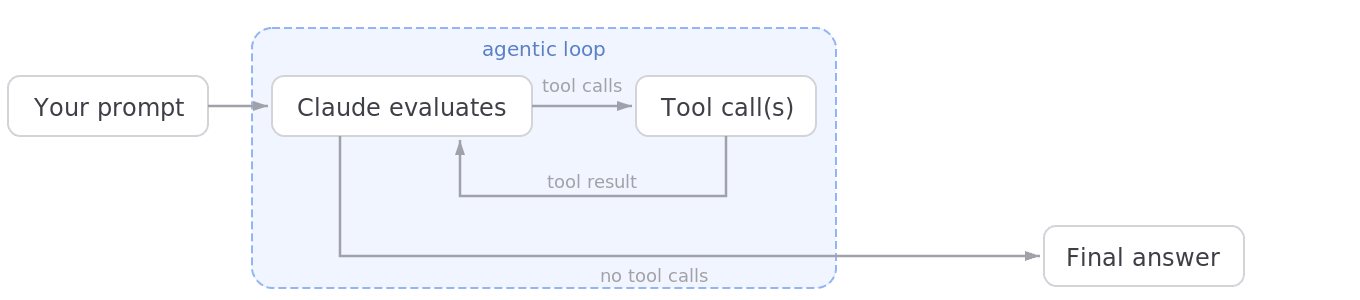
Source: https://platform.claude.com/docs/en/agent-sdk/agent-loop
Claude receives a request (prompt) from a user, considers what process to perform, and if necessary, selects various functions to request as tool calls. Claude receives the tool execution results and repeatedly selects and calls the next tool based on those results. This is the agent loop. When Claude determines that it has completed addressing the prompt, it stops calling tools, returns the final result, and ends the loop.
You can think of the "thinking" or "searching the web" displays that you normally see in Claude Code or Claude Cowork as aspects of the agent loop. Tools include Read, Edit, Write for manipulating files, WebSearch for executing web searches, and more. In the Claude Agent SDK, you can configure permission settings for calling tools using allowedTools and similar options. We'll explain more about tools in another article.
Agent Loop Termination Conditions
What would be a good logic for the agent loop termination conditions? Since Claude returns messages at each phase of the loop (what we'll call turns here), you evaluate the termination conditions by analyzing these messages. Message types include:
SystemMessage: Messages related to the sessionAssistantMessage: Messages from the Claude agentUserMessage: Messages related to toolsResultMessage: Messages related to processing results
When using the Agent SDK, you can simply check if the message instance is a ResultMessage. The Agent SDK internally calls REST APIs like the Claude API and returns these message instances after analyzing the responses. In Claude API responses, the stop_reason element indicates the reason for turn termination.
Main types of stop_reason:
end_turn: Normal completion of a turntool_use: Waiting for tool usagemax_tokens: Exceeding token limits specified in the requestrefusal: Refusal due to safety concerns
Basically, you should check for end_turn while handling tool_use cases by calling tools on the application side (in practice, the Agent SDK identifies and handles the tools).
On the other hand, checking whether text messages (content.text, etc.) returned by Claude contain specific strings like "end" is not recommended as a termination condition. Since agents generate text messages in various contexts, this approach is not suitable for accurately determining termination conditions.
Summary
I've introduced the basic concepts for designing agent AI with Claude, focusing on the agent loop and its termination conditions. We'll continue to introduce methods for integrating Claude into applications, so please stay tuned.
Reference URLs