
Change the ECS service deployment strategy to blue/green

This page has been translated by machine translation. View original
I'm serina from the Starbucks Digital Technology Department.
I'll summarize how to change the ECS deployment strategy from rolling update to blue/green deployment.
About ECS Blue/Green Deployment
With the July 2025 update, you can now choose blue/green deployment as an ECS deployment strategy.
Reference: Accelerate safe software releases with new built-in blue/green deployments in Amazon ECS
How Blue/Green Deployment Works (Image)
- Blue: Current production environment
- Green: New release environment
Both are prepared simultaneously.
Release Flow
- Currently "Blue (current environment)" is running
- "Green (new version)" is started behind the scenes
- Confirm there are no issues
- If no problems, switch user access to Green
- Monitor for a certain period (bake_time)
- If no issues, stop the old Blue environment
If problems are found during the bake_time, you can immediately return to the original Blue environment by selecting "Roll back" from the management console.
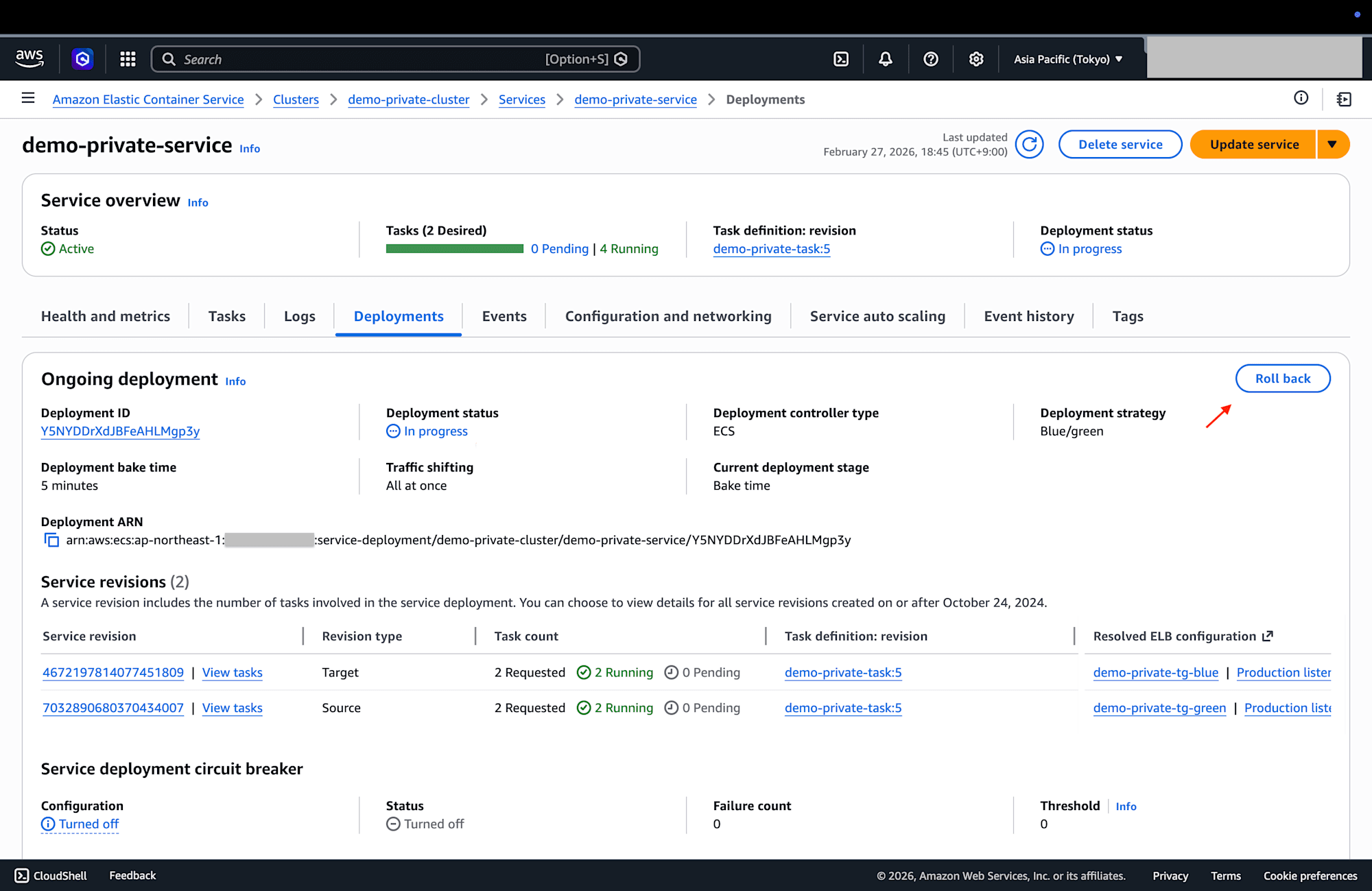
Reference: Amazon ECS Blue/Green Service Deployment Workflow - AWS Documentation
Required Changes
- Set the deployment strategy to blue/green
- Create target groups for both Blue and Green
- Delete existing target groups as they are no longer needed
- Since they cannot be deleted immediately, we will remove them gradually (details in the operation verification section)
- Add Blue and Green target groups to the listener rules and control the traffic ratio with weight
- Create an IAM role
- For blue/green deployment, ECS needs permission to automatically switch the forwarding destination (weight) of ALB listener rules
Implementation with Terraform
To configure blue/green deployment in Terraform, you need to set up load_balancer.advanced_configuration.
This setting was added in 6.4.0, so if your version is older, you need to upgrade to this version or higher.
Reference: 6.4.0 (July 17, 2025) - terraform-provider-aws / CHANGELOG.md
Changes
Changing the ECS Deployment Strategy
- Set strategy to
BLUE_GREEN - Set
bake_time_in_minutesto the time (in minutes) to monitor for issues after switching traffic to Green- After this time passes, the old Blue environment is automatically stopped. Rollbacks must be performed within this time if needed
- Add load_balancer configuration
- For Blue/Green deployment,
advanced_configurationsettings are required - Reference: load_balancer - Terraform Documentation
- For Blue/Green deployment,
  deployment_configuration {
    strategy = "BLUE_GREEN"

    bake_time_in_minutes = 5
  }

  load_balancer {
    target_group_arn = var.target_group_blue_arn
    container_name   = format("%s-%s-%s", var.project_name, var.environment, "container")
    container_port   = var.container_port

    advanced_configuration {
      alternate_target_group_arn = var.target_group_green_arn
      production_listener_rule   = var.alb_listener_rule_arn
      role_arn                   = aws_iam_role.alb_service_role.arn
    }
  }
Adding Target Groups
resource "aws_lb_target_group" "blue" {
  name     = format("%s-%s-%s", var.project_name, var.environment, "tg-blue")
  port     = 80
  protocol = "HTTP"
  vpc_id   = var.vpc_id

  target_type = "ip"

  health_check {
    path                = "/status"
    interval            = 30
    timeout             = 5
    healthy_threshold   = 5
    unhealthy_threshold = 2
    matcher             = "200"
  }

  tags = merge(var.tags, {
    Name = format("%s-%s-%s", var.project_name, var.environment, "tg-blue")
  })
}

resource "aws_lb_target_group" "green" {
  name     = format("%s-%s-%s", var.project_name, var.environment, "tg-green")
  port     = 80
  protocol = "HTTP"
  vpc_id   = var.vpc_id

  target_type = "ip"

  health_check {
    path                = "/status"
    interval            = 30
    timeout             = 5
    healthy_threshold   = 5
    unhealthy_threshold = 2
    matcher             = "200"
  }

  tags = merge(var.tags, {
    Name = format("%s-%s-%s", var.project_name, var.environment, "tg-green")
  })
}
Changing Listener Rules
- Specify target groups for Blue/Green
- Set
action[0].forwardtoignore_changes- This prevents unintended changes being detected during the next
terraform applyas ECS automatically rewrites theweightof ALB listener rules during deployment
- This prevents unintended changes being detected during the next
resource "aws_lb_listener_rule" "production_listener_rule" {
  listener_arn = aws_lb_listener.https.arn
  priority     = 1

  action {
    type = "forward"

    forward {
      target_group {
        arn    = aws_lb_target_group.blue.arn
        weight = 100
      }

      target_group {
        arn    = aws_lb_target_group.green.arn
        weight = 0
      }
    }
  }

  condition {
    # ~~omitted~~
  }

  lifecycle {
    ignore_changes = [action[0].forward]
  }
}
Adding ECS Service Role
data "aws_iam_policy_document" "alb_service_role_assume_policy" {
  statement {
    effect = "Allow"
    actions = [
      "sts:AssumeRole"
    ]
    principals {
      type = "Service"
      identifiers = [
        "ecs.amazonaws.com"
      ]
    }
  }
}

resource "aws_iam_role" "alb_service_role" {
  name               = "${var.project_name}-${var.environment}-ecs-alb-service-role"
  assume_role_policy = data.aws_iam_policy_document.alb_service_role_assume_policy.json
}

resource "aws_iam_role_policy_attachment" "alb_service_role_policy" {
  role       = aws_iam_role.alb_service_role.name
  policy_arn = "arn:aws:iam::aws:policy/AmazonECSInfrastructureRolePolicyForLoadBalancers"
}
Reference: AmazonECSInfrastructureRolePolicyForLoadBalancers - AWS Managed Policy Reference Guide
Operation Verification
This shows the behavior when changing the deployment strategy with Terraform for an already running ECS service.
I confirmed that the configuration can be changed without downtime.
For existing target groups, a gradual deletion procedure is required as they are still in use during the configuration change.
Behavior after terraform apply
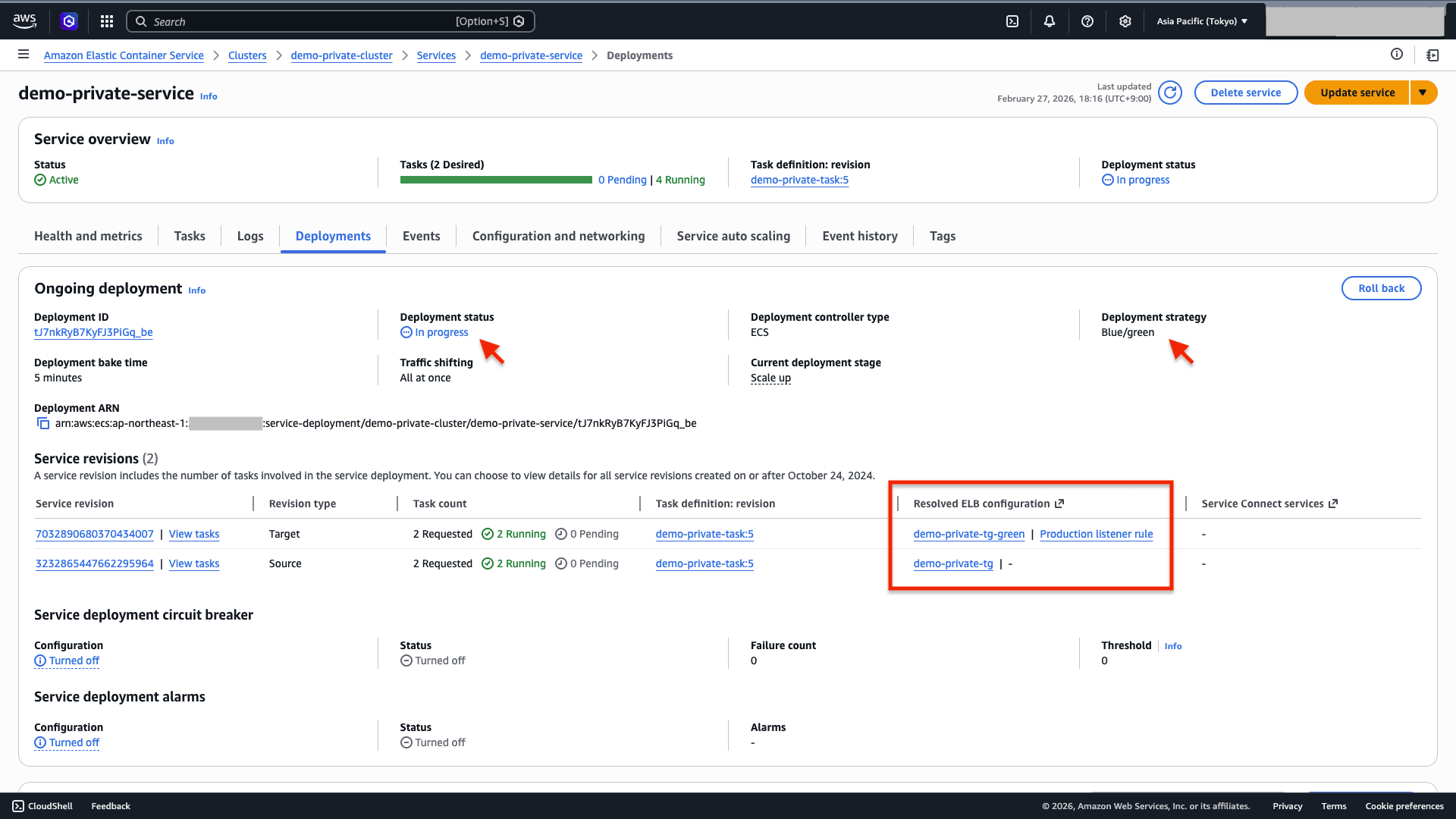
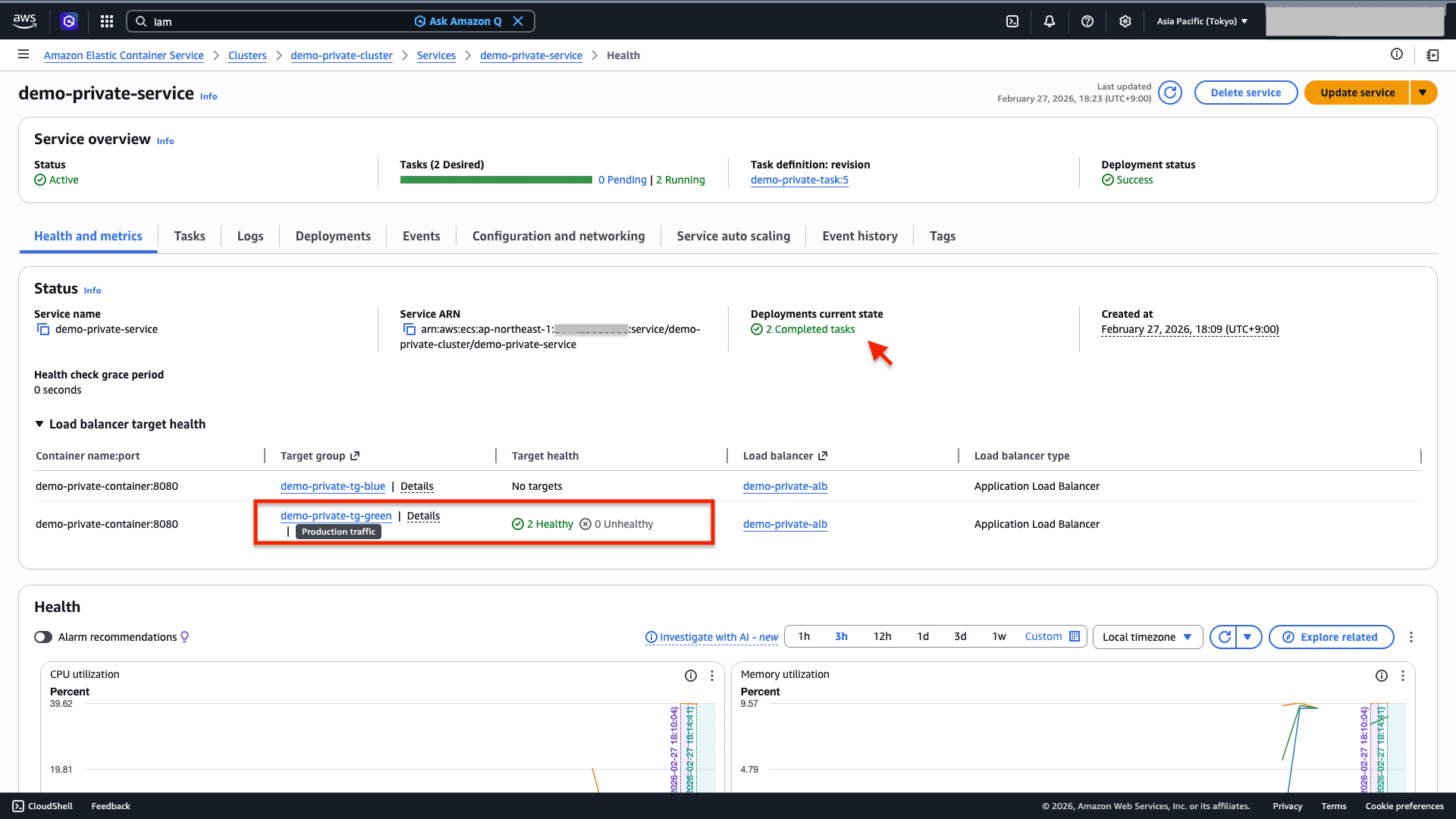
- The deployment strategy changes to "Blue/Green"
- New tasks with the Green target group configured are launched
- Existing target groups are still in use, so they cannot be deleted at this stage
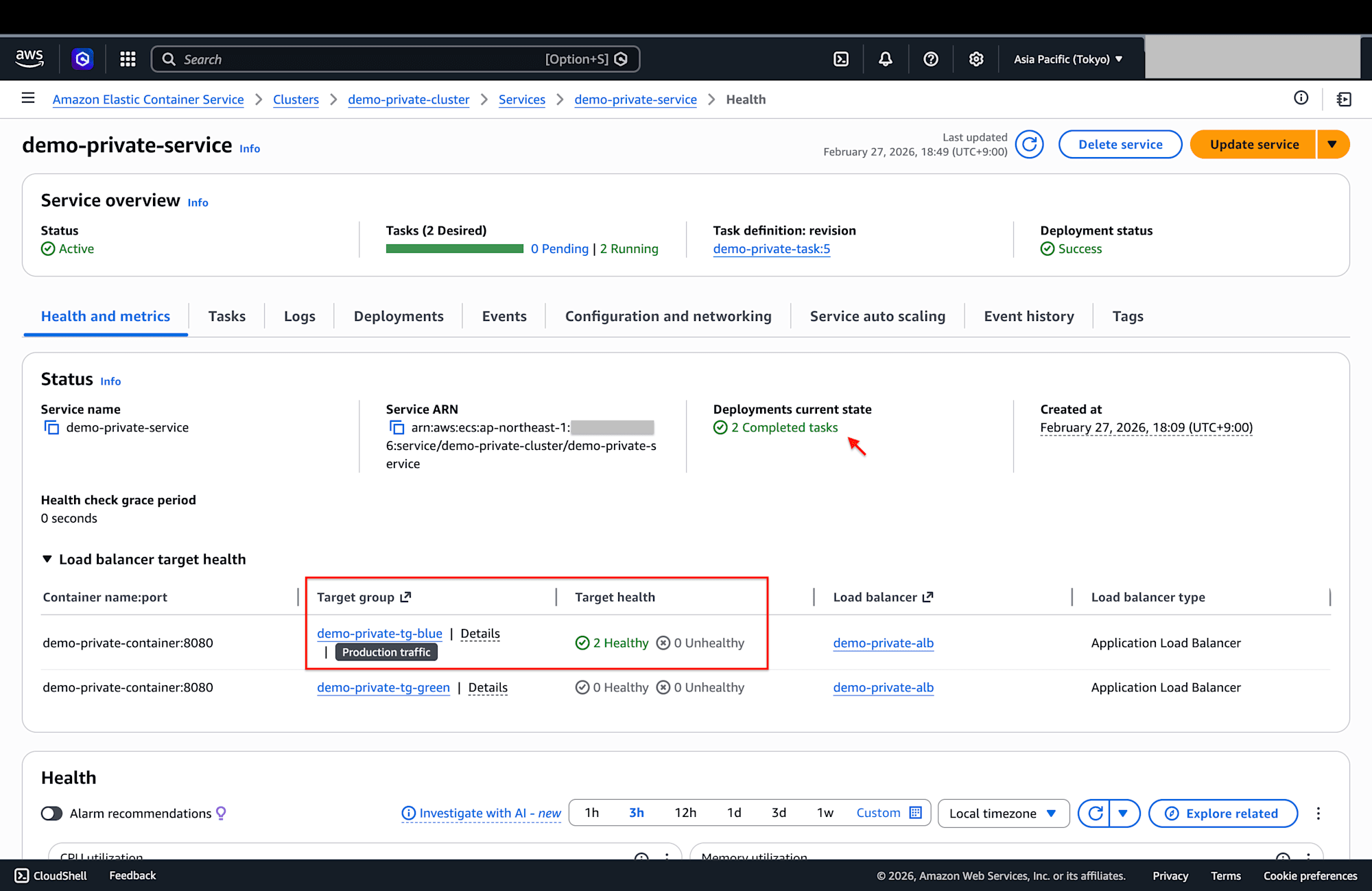
Task in Progress
Task Completed
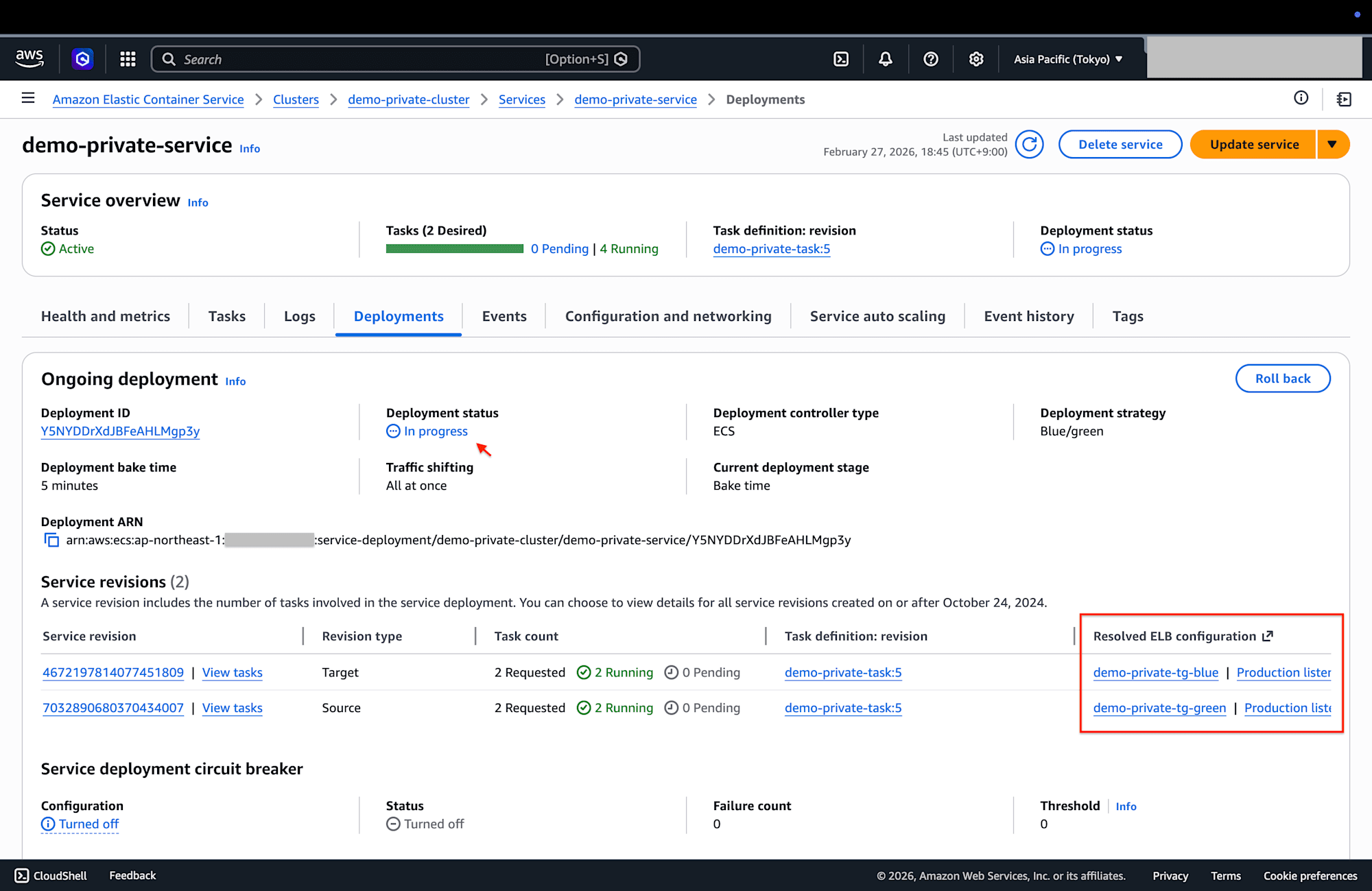
Behavior when updating the service again
- Since Green is now running, new Blue tasks are launched
- Existing target groups are no longer used at this stage, so they can be deleted
Task in Progress
Task Completed
In Conclusion
It was easier to change than I expected!
I found that the deployment strategy can be changed smoothly without recreating resources.