
Tried running a Postfix container on ECS Fargate with SMTP relay to Amazon SES SMTP interface

This page has been translated by machine translation. View original
Reducing SMTP Server Operational Load
Hello, I'm nonPi (@non____97).
Have you ever wanted to reduce the operational burden of SMTP servers? I certainly have.
When sending large volumes of email on AWS, Amazon SES is commonly used.
Amazon SES offers two methods for sending emails: SMTP and API. The latter is recommended for reasons related to credential management and throughput.
On the other hand, if you're using packaged software or it's difficult to modify your email delivery system, the SMTP interface comes into play.
In such cases, it's often operationally challenging to provide Amazon SES SMTP user credentials to each individual client that needs to send email. Instead, a separate SMTP server (MTA) is typically set up.
There are also cases where an SMTP server is needed because the email client doesn't support SMTP-Auth.
In my experience, Postfix is commonly used as this SMTP server. Typically, multiple EC2 instances with Postfix installed are set up with an NLB for load balancing. While not using Amazon SES, the following article illustrates a similar approach.
However, many people prefer not to manage the OS of EC2 instances. I imagine many would like to containerize and run on ECS Fargate if possible.
So, I'll actually try running Postfix on ECS Fargate and relaying SMTP to Amazon SES's SMTP interface.
Implementation
Test Environment
Here's my test environment:
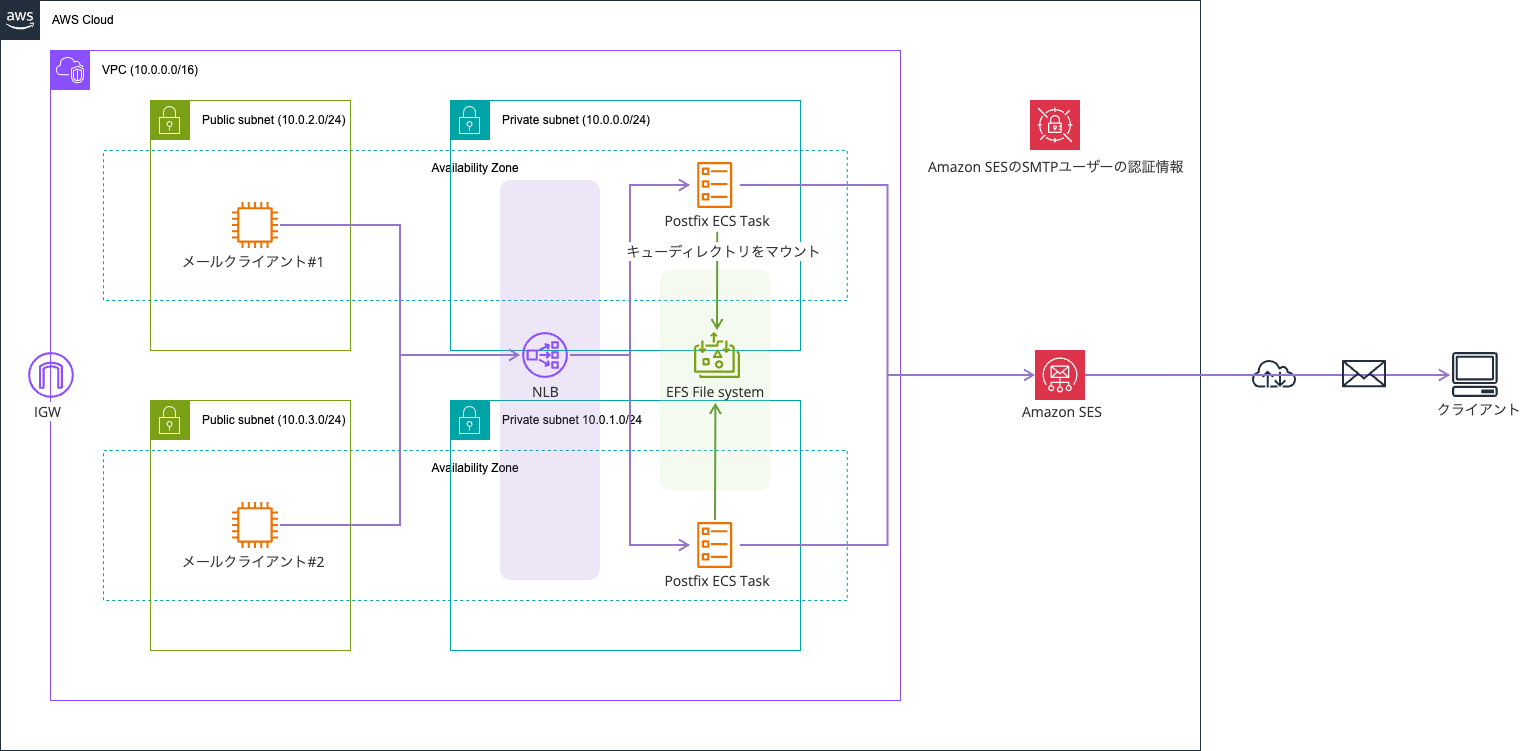
I've containerized Postfix and run it on ECS Fargate. An NLB is used for load balancing the Postfix containers.
This approach is similar in direction to the SES SMTP Relay using AWS Fargate published as AWS Samples.
However, the key component in this setup that doesn't exist in the AWS Samples is EFS. I'll explain why later. If you're running Postfix on EC2 instances that don't auto-scale, you might not need this.
All resources except Amazon SES, Secrets Manager, and the EC2 instance for the email client are built using AWS CDK. The code used is available in the following GitHub repository:
The Amazon SES ID is www.non-97.net.
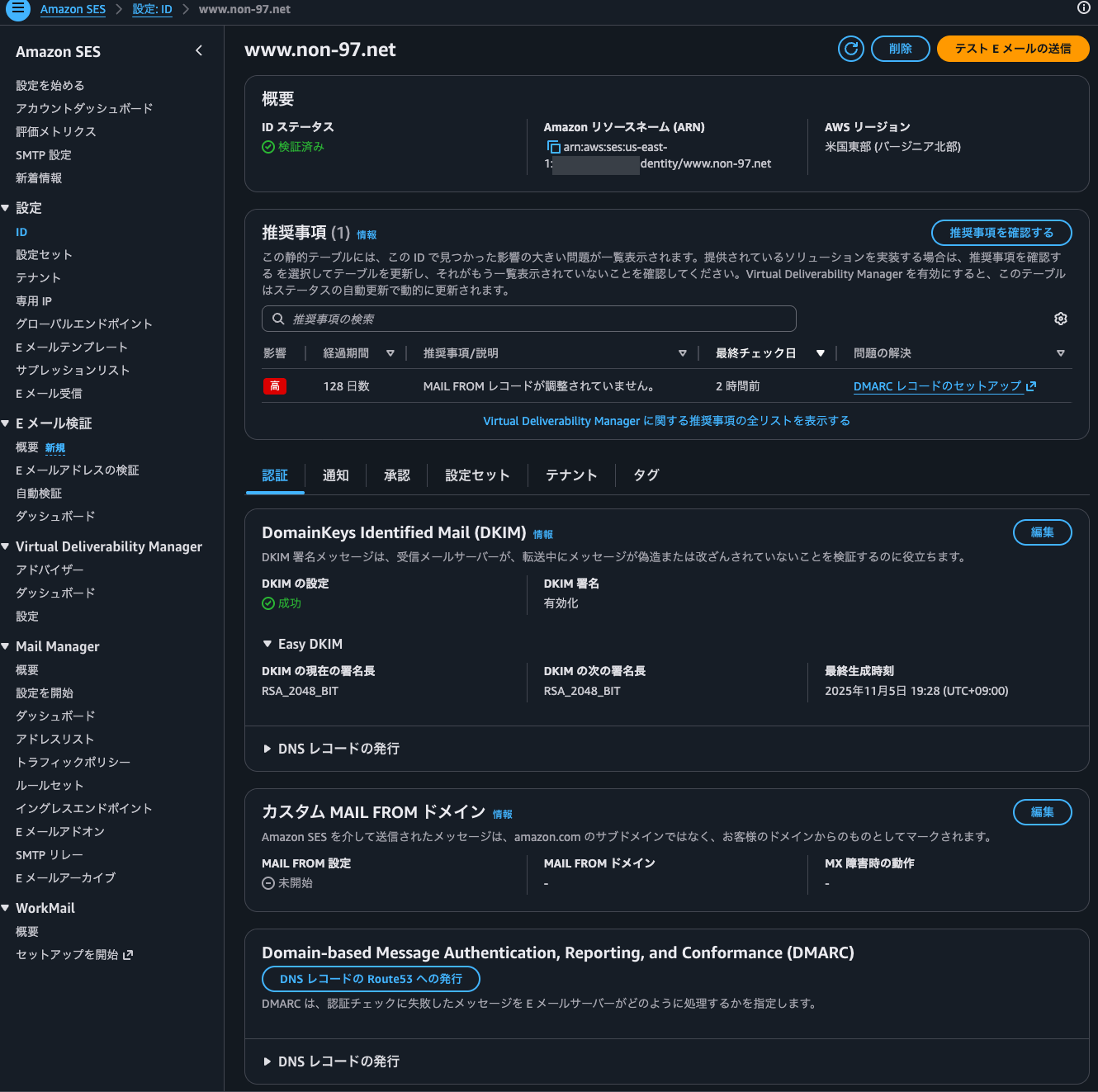
Why EFS is Used
The reason for using EFS is to avoid losing emails.
EFS is used as storage for various mail queues like deferred and incoming, as well as delivery status reports. The types of queues and delivery status reports are as follows:
| Queue | Default Directory | Role |
|---|---|---|
| maildrop | /var/spool/postfix/maildrop |
Receipt queue for mail submitted via the sendmail command |
| hold | /var/spool/postfix/hold |
Mail intentionally held by the administrator |
| incoming | /var/spool/postfix/incoming |
Mail processed by the cleanup daemon |
| active | /var/spool/postfix/active |
Mail currently being delivered by qmgr |
| deferred | /var/spool/postfix/deferred |
Mail that temporarily failed delivery |
| corrupt | /var/spool/postfix/corrupt |
Corrupted queue files that cannot be processed |
| bounce | /var/spool/postfix/bounce |
Bounce mail reports |
| defer | /var/spool/postfix/defer |
Delivery failure reasons for each mail in the deferred queue |
| trace | /var/spool/postfix/trace |
Results of delivery path tracing from sendmail -bv or ETRN |
Reference: Postfix manual - qmgr(8)
A simplified diagram of mail delivery and queue relationships looks like this:
Reference: Postfix Architecture Overview
When using Fargate as your data plane, you need to be careful about where to store persistent data.
If you're only using ephemeral storage, emails in the queue could be lost when tasks are replaced, scaled in, or otherwise deleted.
This is a significant concern for an email delivery infrastructure. If you're uncomfortable with this risk, it might be better to simply run Postfix on EC2 instances.
I'll explain the detailed implementation later.
Postfix Startup Process
Let me explain the process when starting Postfix.
To prevent email loss, I'm performing the following steps:
| No | Step | Description |
|---|---|---|
| 1 | EFS mount check | Verify the existence of /mnt/efs/postfix |
| 2 | flock slot acquisition | Apply exclusive lock using flock -n on lock file in EFSPrioritize slots with remaining mail, otherwise take an available slot |
| 3 | Queue directory initialization | Create queue directories under /var/spool/postfix with postfix post-install create-missing, then replace incoming / active / deferred with symbolic links to slot directories on EFS |
| 4 | Relay client configuration | Set from S3, or default to 127.0.0.0/8 |
| 5 | Postfix configuration | Configure SMTP relay, TLS, logging, etc. using postconf |
| 6 | SASL authentication setup | Generate sasl_passwd from Amazon SES SMTP user credentials stored in Secrets Manager, convert to DB with postmap, then delete plaintext |
| 7 | Signal handler setup | Handle SIGTERM/SIGINT to stop Postfix and release locks |
| 8 | Postfix startup | Start with postfix start-fg & in background, wait up to 30 seconds for startup |
| 9 | Flush deferred queue | Retry queued messages with postqueue -f |
| 10 | Start background monitoring | Launch parallel processes for health check (30-second interval) and orphaned mail collection (300-second interval) from slots previously mounted by terminated ECS tasks, wait for main process to exit with wait |
Simply mounting EFS for each Postfix container's mail queue directory is insufficient.
Multiple Postfix instances should not share queues simultaneously.
For the Postfix mail queue, it does not matter how well NFS file locking works. The reason is that you cannot share Postfix queues among multiple running Postfix instances. You can use NFS to switch a Postfix mail queue from one NFS client to another one, but only one NFS client can access a Postfix mail queue at any particular point in time.
For mailbox file sharing with NFS, your options are to use fcntl (kernel locks), dotlock (username.lock files), to use both locking methods simultaneously, or to switch to maildir format. The maildir format uses one file per message and needs no file locking support in Postfix or in other mail software.
To address this, one approach is to prepare mail queue directories on EFS for the maximum number of ECS tasks, and have each ECS task mount a separate directory.
To ensure they don't mount the same directory, I'm using flock for exclusive locking. This article was helpful for understanding flock:
On NFS, flock is internally emulated as fcntl, so we can use flock without issues.
NFS details
Up to Linux 2.6.11, flock() does not lock files over NFS (i.e., the scope of locks was limited to the local system). Instead, one could use fcntl(2) byte-range locking, which does work over NFS, given a sufficiently recent version of Linux and a server which supports locking.
Since Linux 2.6.12, NFS clients support flock() locks by emulating them as fcntl(2) byte-range locks on the entire file. This means that fcntl(2) and flock() locks do interact with one another over NFS. It also means that in order to place an exclusive lock, the file must be opened for writing.
Since Linux 2.6.37, the kernel supports a compatibility mode that allows flock() locks (and also fcntl(2) byte region locks) to be treated as local; see the discussion of the local_lock option in nfs(5).
However, this solution isn't complete on its own.
With just this approach, emails won't be lost but they'll float around in EFS.
For example, if up to 4 ECS tasks can run simultaneously due to Auto Scaling, rolling updates, or Blue/Green Deployment, you would set up directories on EFS like this:
- /postfix/slot_1
- /postfix/slot_2
- /postfix/slot_3
- /postfix/slot_4
But if only 1 or 2 tasks are running normally, emails remaining in /postfix/slot_3 or /postfix/slot_4 won't be picked up and delivered.
That's why step 10 includes a process to collect mail left in slots mounted by terminated ECS tasks.
Additionally, the health check in step 10 verifies Postfix's status and accessibility to the NFS mount point. This is to prevent mail from continuing to be routed if EFS becomes unavailable due to a failure. If the health check fails, the container is stopped with SIGTERM.
After examining the source code of Postfix 3.10.8, I found that it doesn't send an ACK to the client until the queue file is written to the incoming queue. This means that if a Postfix container with a failed EFS mount receives mail, the client will be aware of the issue.
| Order | Process | File:Line |
|---|---|---|
| 1 | Accept connection from SMTP client | src/smtpd/smtpd.c:5765 |
| 2 | Receive DATA command and begin receiving message body | src/smtpd/smtpd.c:3614 |
| 3 | Create file in incoming queue to store message body (permission 0600) | src/global/mail_stream.c:433 |
| 4 | Transfer message to cleanup for header formatting and address normalization | src/smtpd/smtpd.c:3698 |
| 5 | Process message in cleanup for header normalization and access control | src/cleanup/cleanup_message.c |
| 6 | Write processed message to queue file by cleanup | src/cleanup/cleanup_out.c |
| 7 | Finalize message size and write it so qmgr can handle message properly | src/cleanup/cleanup_api.c:262 |
| 8 | Flush buffer contents to kernel in preparation for disk sync | src/global/mail_stream.c:296 |
| 9 | Change permissions to 0700 so qmgr recognizes this file as processable | src/global/mail_stream.c:302 |
| 10 | Sync kernel buffers to disk with fsync to prevent data loss in case of failure | src/global/mail_stream.c:304 |
| 11 | Close file to release file descriptor | src/global/mail_stream.c:347 |
| 12 | Notify qmgr of new mail to begin delivery processing | src/global/mail_stream.c:368 |
| 13 | Notify completion so smtpd can respond | src/cleanup/cleanup.c:628 |
| 14 | Receive response from cleanup to confirm persistence to queue | src/global/mail_stream.c:386 |
| 15 | Return "250 OK" to client to acknowledge receipt of mail | src/smtpd/smtpd.c:3869 |
By the way, the /var/spool/postfix directory in the Postfix container looks like this:
$ ls -l /var/spool/postfix
total 28
lrwxrwxrwx    1 postfix  postfix         31 Mar 15 05:55 active -> /mnt/efs/postfix/spool-1/active
lrwxrwxrwx    1 postfix  postfix         31 Mar 15 05:55 bounce -> /mnt/efs/postfix/spool-1/bounce
lrwxrwxrwx    1 postfix  postfix         32 Mar 15 05:55 corrupt -> /mnt/efs/postfix/spool-1/corrupt
lrwxrwxrwx    1 postfix  postfix         30 Mar 15 05:55 defer -> /mnt/efs/postfix/spool-1/defer
lrwxrwxrwx    1 postfix  postfix         33 Mar 15 05:55 deferred -> /mnt/efs/postfix/spool-1/deferred
drwx------    2 postfix  root          4096 Mar  5 00:39 flush
lrwxrwxrwx    1 postfix  postfix         29 Mar 15 05:55 hold -> /mnt/efs/postfix/spool-1/hold
lrwxrwxrwx    1 postfix  postfix         33 Mar 15 05:55 incoming -> /mnt/efs/postfix/spool-1/incoming
lrwxrwxrwx    1 postfix  postdrop        33 Mar 15 05:55 maildrop -> /mnt/efs/postfix/spool-1/maildrop
drwxr-xr-x    1 root     postfix       4096 Mar 15 05:55 pid
drwx------    1 postfix  root          4096 Mar 15 05:55 private
drwx--x---    1 postfix  postdrop      4096 Mar 15 05:55 public
lrwxrwxrwx    1 postfix  postfix         30 Mar 15 05:55 saved -> /mnt/efs/postfix/spool-1/saved
lrwxrwxrwx    1 postfix  postfix         30 Mar 15 05:55 trace -> /mnt/efs/postfix/spool-1/trace
Formatting Postfix Logs
Unfortunately, Postfix 3.10 (at the time of writing) cannot output structured logs.
Without structured logs, CloudWatch Logs field indexing doesn't work effectively, making it time-consuming and costly to search by message ID or queue ID during troubleshooting.
In this case, I formatted the logs using AWS FireLens (AWS for Fluent Bit).
Postfix logs don't have a unified structure, as shown here:
Since regular expressions have limitations, I used a Lua script for processing.
The process follows these steps:
- Attempt JSON parsing
- If successful, set
log_typeto the value of thesourcefield in the JSON - If no
sourcefield exists,log_typeremains unset
- If successful, set
- Match syslog pattern
- Convert timestamp to ISO 8601
- Set
log_type = "postfix" - Extract detailed fields with daemon-specific parsers
- If both 1 and 2 fail, set
log_type = "raw"and output as is
Also, without filtering, NLB health check logs would flood the output.
Specifically, logs like these would appear repeatedly:
I've excluded the following logs because they're easy to identify:
| Target Log | Description |
|---|---|
| NOQUEUE lost connection after CONNECT | Log when client disconnects after TCP connection and server's 220 banner without sending any SMTP commands Essentially just health checks or port scans |
| disconnect commands=0/0 | Log when disconnecting without exchanging any SMTP commands |
To exclude connect logs would require Postfix to know the NLB ENI's IP addresses. While NLB IP addresses don't change dynamically like ALB ones, I felt managing them would be cumbersome, so I didn't exclude them.
Please see the actual code for details.
Ideally, I wanted to pass the Lua script through an init process without building a custom FireLens container, but the init process treats everything as config to Include, which doesn't work with Lua scripts. That's unfortunate.
The init process is explained here:
How init process works?
- The init process will request ECS Task Metadata. Get valuable parts from the responses and set them using export as environment variables.
- After you set the ARN or Path of the config files as environment variables in the ECS Task Definition, the init process will collect all config files which you specified (download files which come from S3 if needed).
- The init process will create the main config file and use @INCLUDE keyword to add the config file FireLens generated into it.
- The init process will process these config files one by one, use @INCLUDE keyword to add config files to the main config file. And the init process will check if each config file is a parser config. If it is a parser config, change the original Fluent Bit command, add -R to specify that parser. For more details, please see the example below.
- The init process will finally invoke Fluent Bit with the modified main configuration file.
aws-for-fluent-bit/use_cases/init-process-for-fluent-bit at mainline · aws/aws-for-fluent-bit
Dockerfile
Here's the Dockerfile:
FROM public.ecr.aws/docker/library/bash:5.2.37-alpine3.22

RUN apk add --no-cache \
      postfix \
      util-linux \
      aws-cli \
      cyrus-sasl \
      cyrus-sasl-login

COPY docker-entrypoint.sh /docker-entrypoint.sh

EXPOSE 25

ENTRYPOINT ["/docker-entrypoint.sh"]
I'm using the Bash image because the shell script is written in Bash. I'm also not very familiar with ash, Alpine's standard shell.
I considered running with a non-root user, but it wasn't possible. Postfix's main function has code that rejects execution if UID is not 0:
/*
  * The mail system must be run by the superuser so it can revoke
  * privileges for selected operations. That's right - it takes privileges
  * to toss privileges.
  */
if (getuid() != 0) {
msg_error("to submit mail, use the Postfix sendmail command");
msg_fatal("the postfix command is reserved for the superuser");
}
Mail Delivery
Let's actually deliver some mail.
First, install mailx on the EC2 instance.
Then, specify the NLB's DNS name in ~/.mailrc to relay SMTP.
$ hostname -i
10.0.2.220

$ sudo dnf install mailx
.
.
(omitted)
.
.
Installed:
  mailx-12.5-43.amzn2023.0.1.x86_64

Complete!

$ vi ~/.mailrc
$ cat ~/.mailrc
set smtp=smtp://EcsFar-EcsCo-TDpxMt8JmRX7-db95221b13f236ae.elb.us-east-1.amazonaws.com
Now send an email:
$ echo "test mail body" \
  | mail \
    -s "test mail subject 1" \
    -r noreply@www.non-97.net <destination email address>
Checking the mailbox confirms the email was delivered:
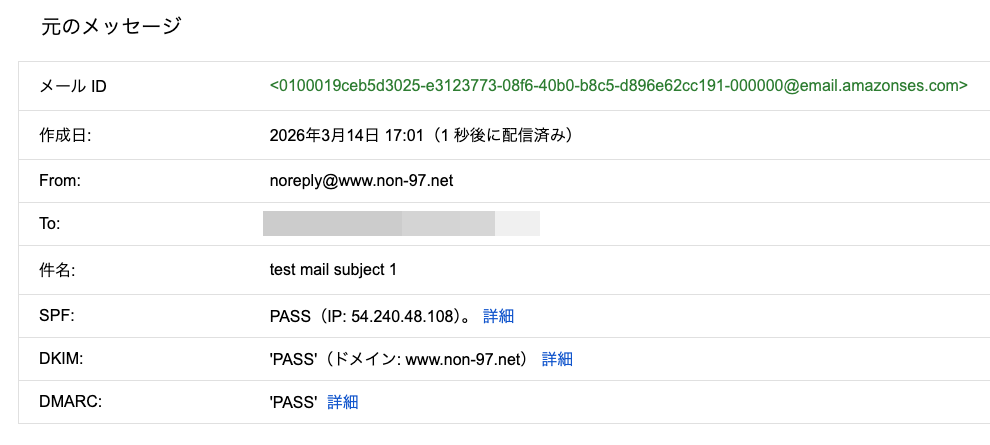
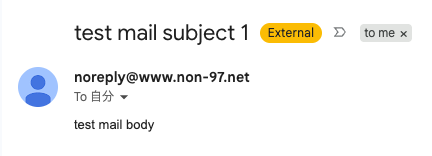
The Postfix logs output to CloudWatch Logs for this delivery are:
When Specifying a Sender Domain Not on the Allowed List
Let's check what happens when specifying a sender domain that's not on the allowed list.
In an environment where a self-managed SMTP server is relaying to Amazon SES's SMTP interface, if the sender domain doesn't exist as an Amazon SES ID (or its subdomain), the relay failure is logged on the SMTP server but the email client can't know about it, as explained in this article:
To avoid emails accumulating in the SMTP server's queue, I'm using Postfix's check_sender_access to prevent relaying in the first place.
I'll try sending an email with the sender domain non-97.net:
$ echo "test mail body" \
  | mail \
    -s "test mail subject noreply@non-97.net" \
    -r noreply@non-97.net <destination email address>

smtp-server: 554 5.7.1 <noreply@non-97.net>: Sender address rejected: Access denied
"/home/ssm-user/dead.letter" 11/350
. . . message not sent.
We can see it was rejected.
The Postfix logs for this attempt are:
When Specifying a Non-FQDN Sender Domain
Let's also check what happens when specifying a sender domain that's not in FQDN format.
This is controlled by Postfix's reject_non_fqdn_sender:
$ echo "test mail body" \
  | mail \
    -s "test mail subject noreply@non-97net" \
    -r noreply@non-97net <destination email address>

smtp-server: 504 5.5.2 <noreply@non-97net>: Sender address rejected: need fully-qualified address
"/home/ssm-user/dead.letter" 11/347
. . . message not sent.
The error is quite clear.
The Postfix logs for this attempt are:
Sending Email from Outside mynetwork
Finally, let's try sending an email from outside the mynetwork.
From an EC2 instance outside mynetwork:
$ hostname -i
10.0.3.19

$ echo "test mail body" \
  | mail \
    -s "test mail subject from outside mynetworks" \
    -r noreply@www.non-97.net <destination email address>

smtp-server: 554 5.7.1 <<destination email address>>: Relay access denied
"/home/ssm-user/dead.letter" 11/363
. . . message not sent.
Access was denied as expected.
The logs for this attempt are:
ECS Task Replacement and Email Queue Verification
First, I'll change the security group of the Amazon SES SMTP interface VPC endpoint to prevent SMTP relay from ECS tasks on TCP/587.
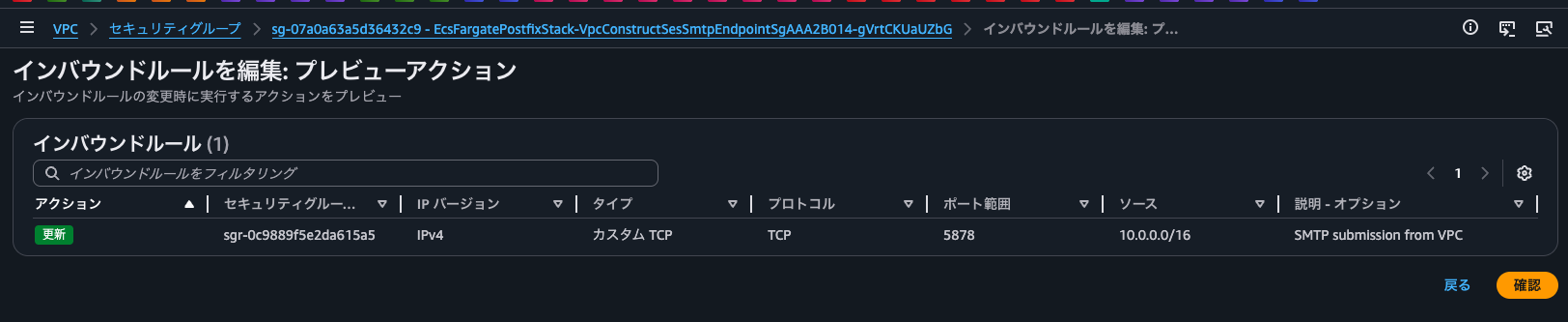
Currently, the Postfix containers are using slots 1 and 2 respectively.
{
    "ecs_cluster": "EcsFargatePostfixStack-EcsConstructCluster14AE103B-ZkzhWed6B4ZR",
    "ecs_task_arn": "arn:aws:ecs:us-east-1:<AWS Account ID>:task/EcsFargatePostfixStack-EcsConstructCluster14AE103B-ZkzhWed6B4ZR/72dc511278ea45afa779a82f984646b8",
    "ecs_task_definition": "EcsFargatePostfixStackEcsConstructTaskDef7C428F37:7",
    "log_type": "entrypoint",
    "source": "entrypoint",
    "log_timestamp": "2026-03-14T11:00:29Z",
    "level": "info",
    "slot": "2",
    "container_id": "72dc511278ea45afa779a82f984646b8-3282321826",
    "log": "Acquired slot",
    "container_name": "postfix"
}

{
    "level": "info",
    "container_name": "postfix",
    "container_id": "e3cf6875680342e780ee8421344990d9-3282321826",
    "ecs_cluster": "EcsFargatePostfixStack-EcsConstructCluster14AE103B-ZkzhWed6B4ZR",
    "ecs_task_arn": "arn:aws:ecs:us-east-1:<AWS Account ID>:task/EcsFargatePostfixStack-EcsConstructCluster14AE103B-ZkzhWed6B4ZR/e3cf6875680342e780ee8421344990d9",
    "ecs_task_definition": "EcsFargatePostfixStackEcsConstructTaskDef7C428F37:7",
    "slot": "1",
    "log": "Acquired slot",
    "log_type": "entrypoint",
    "source": "entrypoint",
    "log_timestamp": "2026-03-14T10:59:56Z"
}
I'll connect to the container using ECS Exec to check the current mail queue.
$ ls -l /proc/1/fd/
total 0
lrwx------    1 root     root            64 Mar 14 11:14 0 -> /dev/null
l-wx------    1 root     root            64 Mar 14 11:14 1 -> pipe:[22062]
l-wx------    1 root     root            64 Mar 14 11:14 10 -> /mnt/efs/postfix/.lock-2
l-wx------    1 root     root            64 Mar 14 11:14 2 -> pipe:[22063]
lr-x------    1 root     root            64 Mar 14 11:14 255 -> /docker-entrypoint.sh

$ find /mnt/efs/postfix/ -exec ls -ld {} \;
drwxr-xr-x    6 root     root          6144 Mar 14 06:51 /mnt/efs/postfix/
-rw-r--r--    1 root     root             0 Mar 14 11:00 /mnt/efs/postfix/.lock-4
drwxr-xr-x   12 root     root          6144 Mar 14 06:36 /mnt/efs/postfix/spool-2
drwxr-xr-x    2 postfix  postdrop      6144 Mar 14 06:36 /mnt/efs/postfix/spool-2/maildrop
drwxr-xr-x    2 postfix  postfix       6144 Mar 14 11:12 /mnt/efs/postfix/spool-2/incoming
drwxr-xr-x    2 postfix  postfix       6144 Mar 14 11:12 /mnt/efs/postfix/spool-2/active
drwxr-xr-x    2 postfix  postfix       6144 Mar 14 06:36 /mnt/efs/postfix/spool-2/bounce
drwxr-xr-x    2 postfix  postfix       6144 Mar 14 06:36 /mnt/efs/postfix/spool-2/defer
drwxr-xr-x    2 postfix  postfix       6144 Mar 14 06:36 /mnt/efs/postfix/spool-2/deferred
drwxr-xr-x    2 postfix  postfix       6144 Mar 14 06:36 /mnt/efs/postfix/spool-2/saved
drwxr-xr-x    2 postfix  postfix       6144 Mar 14 06:36 /mnt/efs/postfix/spool-2/hold
drwxr-xr-x    2 postfix  postfix       6144 Mar 14 06:36 /mnt/efs/postfix/spool-2/corrupt
drwxr-xr-x    2 postfix  postfix       6144 Mar 14 06:36 /mnt/efs/postfix/spool-2/trace
-rw-r--r--    1 root     root             0 Mar 14 11:00 /mnt/efs/postfix/.lock-8
-rw-r--r--    1 root     root             0 Mar 14 11:00 /mnt/efs/postfix/.lock-6
-rw-r--r--    1 root     root             0 Mar 14 11:00 /mnt/efs/postfix/.lock-2
drwxr-xr-x   12 root     root          6144 Mar 14 06:51 /mnt/efs/postfix/spool-4
drwxr-xr-x    2 postfix  postdrop      6144 Mar 14 06:51 /mnt/efs/postfix/spool-4/maildrop
drwxr-xr-x    2 postfix  postfix       6144 Mar 14 08:01 /mnt/efs/postfix/spool-4/incoming
drwxr-xr-x    2 postfix  postfix       6144 Mar 14 08:01 /mnt/efs/postfix/spool-4/active
drwxr-xr-x    2 postfix  postfix       6144 Mar 14 06:51 /mnt/efs/postfix/spool-4/bounce
drwxr-xr-x    2 postfix  postfix       6144 Mar 14 06:51 /mnt/efs/postfix/spool-4/defer
drwxr-xr-x    2 postfix  postfix       6144 Mar 14 06:51 /mnt/efs/postfix/spool-4/deferred
drwxr-xr-x    2 postfix  postfix       6144 Mar 14 06:51 /mnt/efs/postfix/spool-4/saved
drwxr-xr-x    2 postfix  postfix       6144 Mar 14 06:51 /mnt/efs/postfix/spool-4/hold
drwxr-xr-x    2 postfix  postfix       6144 Mar 14 06:51 /mnt/efs/postfix/spool-4/corrupt
drwxr-xr-x    2 postfix  postfix       6144 Mar 14 06:51 /mnt/efs/postfix/spool-4/trace
-rw-r--r--    1 root     root             0 Mar 14 11:00 /mnt/efs/postfix/.lock-5
-rw-r--r--    1 root     root             0 Mar 14 11:00 /mnt/efs/postfix/.lock-1
drwxr-xr-x   12 root     root          6144 Mar 14 06:51 /mnt/efs/postfix/spool-3
drwxr-xr-x    2 postfix  postdrop      6144 Mar 14 06:51 /mnt/efs/postfix/spool-3/maildrop
drwxr-xr-x    2 postfix  postfix       6144 Mar 14 10:45 /mnt/efs/postfix/spool-3/incoming
drwxr-xr-x    2 postfix  postfix       6144 Mar 14 10:45 /mnt/efs/postfix/spool-3/active
drwxr-xr-x    2 postfix  postfix       6144 Mar 14 06:51 /mnt/efs/postfix/spool-3/bounce
drwxr-xr-x    2 postfix  postfix       6144 Mar 14 06:51 /mnt/efs/postfix/spool-3/defer
drwxr-xr-x    2 postfix  postfix       6144 Mar 14 06:51 /mnt/efs/postfix/spool-3/deferred
drwxr-xr-x    2 postfix  postfix       6144 Mar 14 06:51 /mnt/efs/postfix/spool-3/saved
drwxr-xr-x    2 postfix  postfix       6144 Mar 14 06:51 /mnt/efs/postfix/spool-3/hold
drwxr-xr-x    2 postfix  postfix       6144 Mar 14 06:51 /mnt/efs/postfix/spool-3/corrupt
drwxr-xr-x    2 postfix  postfix       6144 Mar 14 06:51 /mnt/efs/postfix/spool-3/trace
drwxr-xr-x   12 root     root          6144 Mar 14 06:36 /mnt/efs/postfix/spool-1
drwxr-xr-x    2 postfix  postdrop      6144 Mar 14 06:36 /mnt/efs/postfix/spool-1/maildrop
drwxr-xr-x    2 postfix  postfix       6144 Mar 14 06:36 /mnt/efs/postfix/spool-1/incoming
drwxr-xr-x    2 postfix  postfix       6144 Mar 14 06:36 /mnt/efs/postfix/spool-1/active
drwxr-xr-x    2 postfix  postfix       6144 Mar 14 06:36 /mnt/efs/postfix/spool-1/bounce
drwxr-xr-x    2 postfix  postfix       6144 Mar 14 06:36 /mnt/efs/postfix/spool-1/defer
drwxr-xr-x    2 postfix  postfix       6144 Mar 14 06:36 /mnt/efs/postfix/spool-1/deferred
drwxr-xr-x    2 postfix  postfix       6144 Mar 14 06:36 /mnt/efs/postfix/spool-1/saved
drwxr-xr-x    2 postfix  postfix       6144 Mar 14 06:36 /mnt/efs/postfix/spool-1/hold
drwxr-xr-x    2 postfix  postfix       6144 Mar 14 06:36 /mnt/efs/postfix/spool-1/corrupt
drwxr-xr-x    2 postfix  postfix       6144 Mar 14 06:36 /mnt/efs/postfix/spool-1/trace
-rw-r--r--    1 root     root             0 Mar 14 11:00 /mnt/efs/postfix/.lock-7
-rw-r--r--    1 root     root             0 Mar 14 11:00 /mnt/efs/postfix/.lock-3
I can see that we already have spool directories up to spool-4 due to previous ECS task replacements.
I confirm there are currently no emails in the queue. Now I'll send two test emails:
$ echo "test mail body" \
  | mail \
    -s "relocate mail 1" \
    -r noreply@www.non-97.net <destination email address>

$ echo "test mail body" \
  | mail \
    -s "relocate mail 2" \
    -r noreply@www.non-97.net <destination email address>
Now checking the mail queue:
$ date
Sat Mar 14 11:21:53 UTC 2026

$ find /mnt/efs/postfix/ -exec ls -ld {} \;
drwxr-xr-x    6 root     root          6144 Mar 14 06:51 /mnt/efs/postfix/
-rw-r--r--    1 root     root             0 Mar 14 11:00 /mnt/efs/postfix/.lock-4
drwxr-xr-x   12 root     root          6144 Mar 14 06:36 /mnt/efs/postfix/spool-2
drwxr-xr-x    2 postfix  postdrop      6144 Mar 14 06:36 /mnt/efs/postfix/spool-2/maildrop
drwxr-xr-x    2 postfix  postfix       6144 Mar 14 11:21 /mnt/efs/postfix/spool-2/incoming
drwxr-xr-x    2 postfix  postfix       6144 Mar 14 11:21 /mnt/efs/postfix/spool-2/active
-rwx------    1 root     root          1474 Mar 14 11:21 /mnt/efs/postfix/spool-2/active/0833CCDF9EDB97C23F128
drwxr-xr-x    2 postfix  postfix       6144 Mar 14 06:36 /mnt/efs/postfix/spool-2/bounce
drwxr-xr-x    2 postfix  postfix       6144 Mar 14 06:36 /mnt/efs/postfix/spool-2/defer
drwxr-xr-x    2 postfix  postfix       6144 Mar 14 06:36 /mnt/efs/postfix/spool-2/deferred
drwxr-xr-x    2 postfix  postfix       6144 Mar 14 06:36 /mnt/efs/postfix/spool-2/saved
drwxr-xr-x    2 postfix  postfix       6144 Mar 14 06:36 /mnt/efs/postfix/spool-2/hold
drwxr-xr-x    2 postfix  postfix       6144 Mar 14 06:36 /mnt/efs/postfix/spool-2/corrupt
drwxr-xr-x    2 postfix  postfix       6144 Mar 14 06:36 /mnt/efs/postfix/spool-2/trace
.
.
(omitted)
.
.
drwxr-xr-x   12 root     root          6144 Mar 14 06:36 /mnt/efs/postfix/spool-1
drwxr-xr-x    2 postfix  postdrop      6144 Mar 14 06:36 /mnt/efs/postfix/spool-1/maildrop
drwxr-xr-x    2 postfix  postfix       6144 Mar 14 06:36 /mnt/efs/postfix/spool-1/incoming
drwxr-xr-x    2 postfix  postfix       6144 Mar 14 06:36 /mnt/efs/postfix/spool-1/active
-rwx------    1 root     root          1474 Mar 14 11:21 /mnt/efs/postfix/spool-1/active/8DE35ADBE8D24D3EFFF0C
drwxr-xr-x    2 postfix  postfix       6144 Mar 14 06:36 /mnt/efs/postfix/spool-1/bounce
drwxr-xr-x    2 postfix  postfix       6144 Mar 14 06:36 /mnt/efs/postfix/spool-1/defer
drwxr-xr-x    2 postfix  postfix       6144 Mar 14 06:36 /mnt/efs/postfix/spool-1/deferred
drwxr-xr-x    2 postfix  postfix       6144 Mar 14 06:36 /mnt/efs/postfix/spool-1/saved
drwxr-xr-x    2 postfix  postfix       6144 Mar 14 06:36 /mnt/efs/postfix/spool-1/hold
drwxr-xr-x    2 postfix  postfix       6144 Mar 14 06:36 /mnt/efs/postfix/spool-1/corrupt
drwxr-xr-x    2 postfix  postfix       6144 Mar 14 06:36 /mnt/efs/postfix/spool-1/trace
-rw-r--r--    1 root     root             0 Mar 14 11:00 /mnt/efs/postfix/.lock-7
-rw-r--r--    1 root     root             0 Mar 14 11:00 /mnt/efs/postfix/.lock-3
I can see that after checking a few more times, the emails are moving from the active queue to the deferred queue as they fail to send.
Checking the queue content:
/ # postqueue -p
-Queue ID-  --Size-- ----Arrival Time---- -Sender/Recipient-------
0833CCDF9EDB97C23F128     589 Sat Mar 14 11:21:36  noreply@www.non-97.net
(connect to email-smtp.us-east-1.amazonaws.com[10.0.0.229]:587: Operation timed out)
                                         <destination email address>

-- 0 Kbytes in 1 Request.
The logs for queue ID 0833CCDF9EDB97C23F128 are available at:
Now I'll stop the ECS task from the management console.
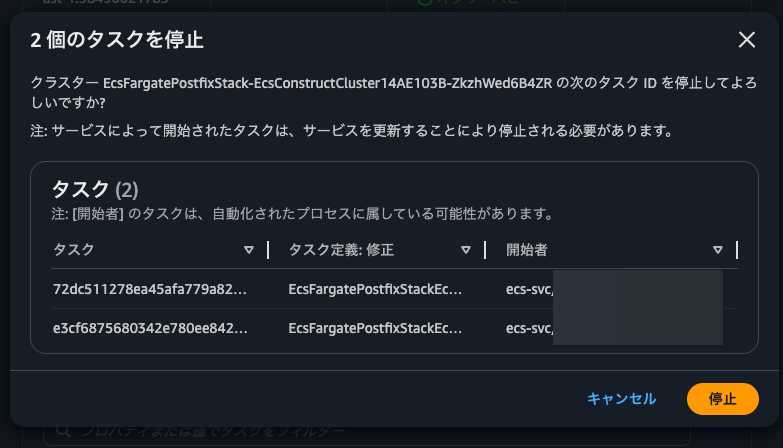
After sending the stop request, I can see that Postfix shut down and the locks were released:
Checking the newly started ECS task:
$ ls -l /proc/1/fd/
total 0
lrwx------    1 root     root            64 Mar 14 11:35 0 -> /dev/null
l-wx------    1 root     root            64 Mar 14 11:35 1 -> pipe:[22614]
l-wx------    1 root     root            64 Mar 14 11:35 10 -> /mnt/efs/postfix/.lock-3
l-wx------    1 root     root            64 Mar 14 11:35 2 -> pipe:[22615]
lr-x------    1 root     root            64 Mar 14 11:35 255 -> /docker-entrypoint.sh

$ find /mnt/efs/postfix/ -exec ls -ld {} \;
drwxr-xr-x    6 root     root          6144 Mar 14 06:51 /mnt/efs/postfix/
-rw-r--r--    1 root     root             0 Mar 14 11:29 /mnt/efs/postfix/.lock-4
drwxr-xr-x   10 root     root          6144 Mar 14 11:31 /mnt/efs/postfix/spool-2
drwxr-xr-x    2 postfix  postdrop      6144 Mar 14 06:36 /mnt/efs/postfix/spool-2/maildrop
drwxr-xr-x    2 postfix  postfix       6144 Mar 14 11:21 /mnt/efs/postfix/spool-2/incoming
drwxr-xr-x    2 postfix  postfix       6144 Mar 14 11:31 /mnt/efs/postfix/spool-2/active
drwxr-xr-x    2 postfix  postfix       6144 Mar 14 06:36 /mnt/efs/postfix/spool-2/bounce
drwxr-xr-x    2 postfix  postfix       6144 Mar 14 06:36 /mnt/efs/postfix/spool-2/saved
drwxr-xr-x    2 postfix  postfix       6144 Mar 14 06:36 /mnt/efs/postfix/spool-2/hold
drwxr-xr-x    2 postfix  postfix       6144 Mar 14 06:36 /mnt/efs/postfix/spool-2/corrupt
drwxr-xr-x    2 postfix  postfix       6144 Mar 14 06:36 /mnt/efs/postfix/spool-2/trace
-rw-r--r--    1 root     root             0 Mar 14 11:29 /mnt/efs/postfix/.lock-8
-rw-r--r--    1 root     root             0 Mar 14 11:29 /mnt/efs/postfix/.lock-6
-rw-r--r--    1 root     root             0 Mar 14 11:29 /mnt/efs/postfix/.lock-2
drwxr-xr-x   12 root     root          6144 Mar 14 06:51 /mnt/efs/postfix/spool-4
drwxr-xr-x    2 postfix  postdrop      6144 Mar 14 06:51 /mnt/efs/postfix/spool-4/maildrop
drwxr-xr-x    2 postfix  postfix       6144 Mar 14 08:01 /mnt/efs/postfix/spool-4/incoming
drwxr-xr-x    2 postfix  postfix       6144 Mar 14 08:01 /mnt/efs/postfix/spool-4/active
drwxr-xr-x    2 postfix  postfix       6144 Mar 14 06:51 /mnt/efs/postfix/spool-4/bounce
drwxr-xr-x    2 postfix  postfix       6144 Mar 14 06:51 /mnt/efs/postfix/spool-4/defer
drwxr-xr-x    2 postfix  postfix       6144 Mar 14 06:51 /mnt/efs/postfix/spool-4/deferred
drwxr-xr-x    2 postfix  postfix       6144 Mar 14 06:51 /mnt/efs/postfix/spool-4/saved
drwxr-xr-x    2 postfix  postfix       6144 Mar 14 06:51 /mnt/efs/postfix/spool-4/hold
drwxr-xr-x    2 postfix  postfix       6144 Mar 14 06:51 /mnt/efs/postfix/spool-4/corrupt
drwxr-xr-x    2 postfix  postfix       6144 Mar 14 06:51 /mnt/efs/postfix/spool-4/trace
-rw-r--r--    1 root     root             0 Mar 14 11:29 /mnt/efs/postfix/.lock-5
-rw-r--r--    1 root     root             0 Mar 14 11:29 /mnt/efs/postfix/.lock-1
drwxr-xr-x   12 root     root          6144 Mar 14 06:51 /mnt/efs/postfix/spool-3
drwxr-xr-x    2 postfix  postdrop      6144 Mar 14 11:32 /mnt/efs/postfix/spool-3/maildrop
drwxr-xr-x    2 postfix  postfix       6144 Mar 14 11:32 /mnt/efs/postfix/spool-3/incoming
drwxr-xr-x    2 postfix  postfix       6144 Mar 14 11:33 /mnt/efs/postfix/spool-3/active
drwxr-xr-x    2 postfix  postfix       6144 Mar 14 06:51 /mnt/efs/postfix/spool-3/bounce
drwxr-xr-x    3 postfix  postfix       6144 Mar 14 11:33 /mnt/efs/postfix/spool-3/defer
drwx------    2 root     postfix       6144 Mar 14 11:33 /mnt/efs/postfix/spool-3/defer/E
-rw-------    1 root     root           338 Mar 14 11:33 /mnt/efs/postfix/spool-3/defer/E/EE380F9BA9BBFD0C85874
-rw-------    1 root     root           338 Mar 14 11:33 /mnt/efs/postfix/spool-3/defer/E/E05BA284CCE58B510C041
drwxr-xr-x    3 postfix  postfix       6144 Mar 14 11:33 /mnt/efs/postfix/spool-3/deferred
drwx------    2 root     postfix       6144 Mar 14 11:33 /mnt/efs/postfix/spool-3/deferred/E
-rwx------    1 root     root          1610 Mar 14 11:38 /mnt/efs/postfix/spool-3/deferred/E/EE380F9BA9BBFD0C85874
-rwx------    1 root     root          1610 Mar 14 11:38 /mnt/efs/postfix/spool-3/deferred/E/E05BA284CCE58B510C041
drwxr-xr-x    2 postfix  postfix       6144 Mar 14 06:51 /mnt/efs/postfix/spool-3/saved
drwxr-xr-x    2 postfix  postfix       6144 Mar 14 06:51 /mnt/efs/postfix/spool-3/hold
drwxr-xr-x    2 postfix  postfix       6144 Mar 14 06:51 /mnt/efs/postfix/spool-3/corrupt
drwxr-xr-x    2 postfix  postfix       6144 Mar 14 06:51 /mnt/efs/postfix/spool-3/trace
drwxr-xr-x   10 root     root          6144 Mar 14 11:31 /mnt/efs/postfix/spool-1
drwxr-xr-x    2 postfix  postdrop      6144 Mar 14 06:36 /mnt/efs/postfix/spool-1/maildrop
drwxr-xr-x    2 postfix  postfix       6144 Mar 14 11:21 /mnt/efs/postfix/spool-1/incoming
drwxr-xr-x    2 postfix  postfix       6144 Mar 14 11:30 /mnt/efs/postfix/spool-1/active
drwxr-xr-x    2 postfix  postfix       6144 Mar 14 06:36 /mnt/efs/postfix/spool-1/bounce
drwxr-xr-x    2 postfix  postfix       6144 Mar 14 06:36 /mnt/efs/postfix/spool-1/saved
drwxr-xr-x    2 postfix  postfix       6144 Mar 14 06:36 /mnt/efs/postfix/spool-1/hold
drwxr-xr-x    2 postfix  postfix       6144 Mar 14 06:36 /mnt/efs/postfix/spool-1/corrupt
drwxr-xr-x    2 postfix  postfix       6144 Mar 14 06:36 /mnt/efs/postfix/spool-1/trace
-rw-r--r--    1 root     root             0 Mar 14 11:29 /mnt/efs/postfix/.lock-7
-rw-r--r--    1 root     root             0 Mar 14 11:29 /mnt/efs/postfix/.lock-3

/ # postqueue -p
-Queue ID-  --Size-- ----Arrival Time---- -Sender/Recipient-------
EE380F9BA9BBFD0C85874     725 Sat Mar 14 11:21:36  noreply@www.non-97.net
(connect to email-smtp.us-east-1.amazonaws.com[10.0.0.229]:587: Operation timed out)
                                         <destination email address>

E05BA284CCE58B510C041     725 Sat Mar 14 11:21:48  noreply@www.non-97.net
(connect to email-smtp.us-east-1.amazonaws.com[10.0.0.229]:587: Operation timed out)
                                         <destination email address>

-- 1 Kbytes in 2 Requests.
You can see that the emails that were in Slots 1 and 2 have moved to Slot 3. This happens because the Postfix container collects mail queues that remain in unmounted Slots (= where the Postfix container isn't locked) every 60 seconds.
The logs for this process are as follows:
We can see that after collecting the mail queue and re-inserting it into the queue, it transitions through pickup → cleanup → qmgr(active) → deferred.
Earlier we observed the collection of emails that had moved to the deferred queue, so now let's confirm that emails in the active queue can also be collected.
We'll stop the container with kill 1 right after sending a second email.
$ echo "test mail body" \
  | mail \
    -s "relocate mail 3" \
    -r noreply@www.non-97.net <destination email address>

$ echo "test mail body" \
  | mail \
    -s "relocate mail 4" \
    -r noreply@www.non-97.net <destination email address>
$ find /mnt/efs/postfix/ -exec ls -ld {} \;
drwxr-xr-x    6 root     root          6144 Mar 14 06:51 /mnt/efs/postfix/
.
.
(omitted)
.
.
drwxr-xr-x   12 root     root          6144 Mar 14 06:51 /mnt/efs/postfix/spool-3
drwxr-xr-x    2 postfix  postdrop      6144 Mar 14 11:32 /mnt/efs/postfix/spool-3/maildrop
drwxr-xr-x    2 postfix  postfix       6144 Mar 14 11:38 /mnt/efs/postfix/spool-3/incoming
drwxr-xr-x    2 postfix  postfix       6144 Mar 14 11:38 /mnt/efs/postfix/spool-3/active
-rwx------    1 root     root          1473 Mar 14 11:38 /mnt/efs/postfix/spool-3/active/9D2504003182DCDC4FED6
drwxr-xr-x    2 postfix  postfix       6144 Mar 14 06:51 /mnt/efs/postfix/spool-3/bounce
drwxr-xr-x    3 postfix  postfix       6144 Mar 14 11:33 /mnt/efs/postfix/spool-3/defer
drwx------    2 root     postfix       6144 Mar 14 11:33 /mnt/efs/postfix/spool-3/defer/E
-rw-------    1 root     root           338 Mar 14 11:33 /mnt/efs/postfix/spool-3/defer/E/EE380F9BA9BBFD0C85874
-rw-------    1 root     root           338 Mar 14 11:33 /mnt/efs/postfix/spool-3/defer/E/E05BA284CCE58B510C041
drwxr-xr-x    3 postfix  postfix       6144 Mar 14 11:33 /mnt/efs/postfix/spool-3/deferred
drwx------    2 root     postfix       6144 Mar 14 11:33 /mnt/efs/postfix/spool-3/deferred/E
-rwx------    1 root     root          1610 Mar 14 11:38 /mnt/efs/postfix/spool-3/deferred/E/EE380F9BA9BBFD0C85874
-rwx------    1 root     root          1610 Mar 14 11:38 /mnt/efs/postfix/spool-3/deferred/E/E05BA284CCE58B510C041
drwxr-xr-x    2 postfix  postfix       6144 Mar 14 06:51 /mnt/efs/postfix/spool-3/saved
drwxr-xr-x    2 postfix  postfix       6144 Mar 14 06:51 /mnt/efs/postfix/spool-3/hold
drwxr-xr-x    2 postfix  postfix       6144 Mar 14 06:51 /mnt/efs/postfix/spool-3/corrupt
drwxr-xr-x    2 postfix  postfix       6144 Mar 14 06:51 /mnt/efs/postfix/spool-3/trace
.
.
(omitted)
.
.

$ kill 1
At this point, we also restore the security group rules for the SMTP interface VPC endpoint to allow TCP/587 communication.

After waiting for a while, the emails were sent.
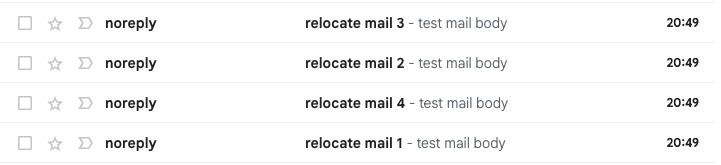
This confirms that unsent emails remaining in the queue can be collected and sent by a different ECS task.
Checking behavior when Postfix cannot communicate with EFS when receiving mail
Let's check what happens when Postfix cannot communicate with EFS at the time of receiving mail.
We'll modify the security group rules so that the ECS task cannot communicate with EFS.

Then we'll send emails before the health check in the container stops the Postfix process.
$ echo "test mail body" \
  | mail \
    -s "down efs mail 1" \
    -r noreply@www.non-97.net <destination email address>
$ echo "test mail body" \
  | mail \
    -s "down efs mail 2" \
    -r noreply@www.non-97.net <destination email address>
$ echo "test mail body" \
  | mail \
    -s "down efs mail 3" \
    -r noreply@www.non-97.net <destination email address>

Unexpected EOF on SMTP connection
Unexpected EOF on SMTP connection
"/home/ssm-user/dead.letter" 11/337
. . . message not sent.
"/home/ssm-user/dead.letter" 11/337
. . . message not sent.
Unexpected EOF on SMTP connection
"/home/ssm-user/dead.letter" 11/337
. . . message not sent.
A few seconds after executing the mail command, we got an "Unexpected EOF on SMTP connection" error.
Let's check the dead letter:
$ ls -l /home/ssm-user/dead.letter
-rw-------. 1 ssm-user ssm-user 2740 Mar 15 02:29 /home/ssm-user/dead.letter

$ cat /home/ssm-user/dead.letter
Date: Sat, 14 Mar 2026 08:12:17 +0000
From: noreply@non-97.net
To: <destination email address>
Subject: test mail subject noreply@non-97.net
Message-ID: <69b51861.cb36E8tLLM583neD%noreply@non-97.net>
User-Agent: Heirloom mailx 12.5 7/5/10
MIME-Version: 1.0
Content-Type: text/plain; charset=us-ascii
Content-Transfer-Encoding: 7bit

test mail body
Date: Sat, 14 Mar 2026 08:15:58 +0000
From: noreply@non-97net
To: <destination email address>
Subject: test mail subject noreply@non-97net
Message-ID: <69b5193e.xx31YKlgwQs0qM51%noreply@non-97net>
User-Agent: Heirloom mailx 12.5 7/5/10
MIME-Version: 1.0
Content-Type: text/plain; charset=us-ascii
Content-Transfer-Encoding: 7bit

test mail body
Date: Sat, 14 Mar 2026 10:43:49 +0000
From: noreply@non-97.net
To: <destination email address>
Subject: test mail subject noreply@non-97.net
Message-ID: <69b53be5.GFTYJfWem3dvtMTe%noreply@non-97.net>
User-Agent: Heirloom mailx 12.5 7/5/10
MIME-Version: 1.0
Content-Type: text/plain; charset=us-ascii
Content-Transfer-Encoding: 7bit

test mail body
Date: Sat, 14 Mar 2026 11:14:06 +0000
From: noreply@non-97net
To: <destination email address>
Subject: test mail subject noreply@non-97net
Message-ID: <69b542fe.5VgfjycqZXZqEeTT%noreply@non-97net>
User-Agent: Heirloom mailx 12.5 7/5/10
MIME-Version: 1.0
Content-Type: text/plain; charset=us-ascii
Content-Transfer-Encoding: 7bit

test mail body
Date: Sat, 14 Mar 2026 11:20:23 +0000
From: noreply@www.non-97net
To: <destination email address>
Subject: relocate mail 1
Message-ID: <69b54477.1bZPoQONOYTHRk6Q%noreply@www.non-97net>
User-Agent: Heirloom mailx 12.5 7/5/10
MIME-Version: 1.0
Content-Type: text/plain; charset=us-ascii
Content-Transfer-Encoding: 7bit

test mail body
Date: Sun, 15 Mar 2026 02:28:18 +0000
From: noreply@www.non-97.net
To: <destination email address>
Subject: down efs mail 1
Message-ID: <69b61942.uUMYNMIkK5gjtKxW%noreply@www.non-97.net>
User-Agent: Heirloom mailx 12.5 7/5/10
MIME-Version: 1.0
Content-Type: text/plain; charset=us-ascii
Content-Transfer-Encoding: 7bit

test mail body
Date: Sun, 15 Mar 2026 02:28:52 +0000
From: noreply@www.non-97.net
To: <destination email address>
Subject: down efs mail 3
Message-ID: <69b61964.qRy/6EB9i/or9+Xw%noreply@www.non-97.net>
User-Agent: Heirloom mailx 12.5 7/5/10
MIME-Version: 1.0
Content-Type: text/plain; charset=us-ascii
Content-Transfer-Encoding: 7bit

test mail body
Date: Sun, 15 Mar 2026 02:28:38 +0000
From: noreply@www.non-97.net
To: <destination email address>
Subject: down efs mail 2
Message-ID: <69b61956.RJ5fY4aQkZoaDoIM%noreply@www.non-97.net>
User-Agent: Heirloom mailx 12.5 7/5/10
MIME-Version: 1.0
Content-Type: text/plain; charset=us-ascii
Content-Transfer-Encoding: 7bit

test mail body
We can see all the failed email sends, including those we just sent.
This confirms that when EFS is down, SMTP relay to Postfix fails and users can notice the failure.
Running a reliable SMTP server on ECS Fargate with Postfix requires some ingenuity
We tested running a Postfix container on ECS Fargate to relay SMTP to Amazon SES's SMTP interface.
Running a reliable SMTP server on ECS Fargate with Postfix requires some careful design. Honestly, there are more factors to consider than with EC2 instances, so I feel it might be simpler to just set up multiple EC2 instances and load balance them with an NLB.
I hope this article helps someone.
That's all from Cloud Business Headquarters, Consulting Department's Non-Pi (@non____97)!