
How to investigate a repository in GitHub Copilot's web console

This page has been translated by machine translation. View original
When developing iOS apps, there are times when you just want to quickly check project settings like Deployment Target or library versions. Starting Xcode just for this can be cumbersome, and I was looking for an easier way to verify these details.
That's when I tried the GitHub Copilot Web console (Copilot Chat on github.com). It allows you to ask Copilot questions using your repository code as context directly in the browser, letting you investigate project information without opening Xcode.
In this article, I'll introduce the specific steps and privacy differences between plans.
Testing Environment
- GitHub Copilot Pro (personal account)
- GitHub Copilot Business (company account)
- Prerequisite: Being logged into GitHub
Steps to Investigate a Repository with Copilot Chat on GitHub.com
- Sign in to github.com and open the repository page you want to investigate
- Click the Copilot icon in the upper right corner of the page
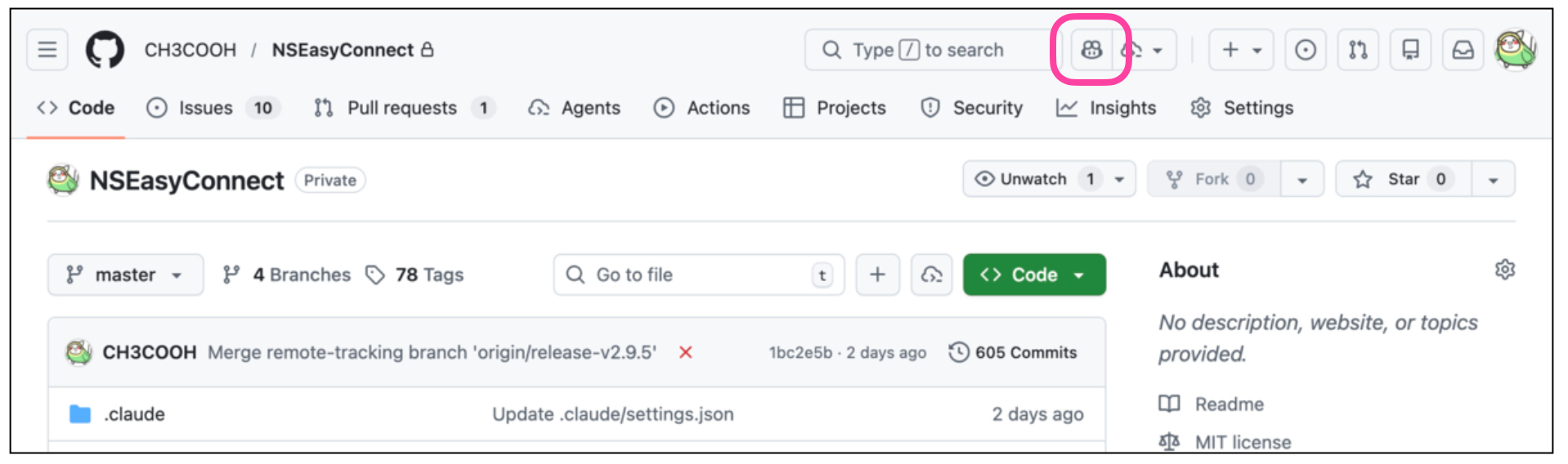
- A chat panel will open with "Chatting about [repository name]" displayed at the top
- If a different repository name is displayed, select the target from "All repositories"
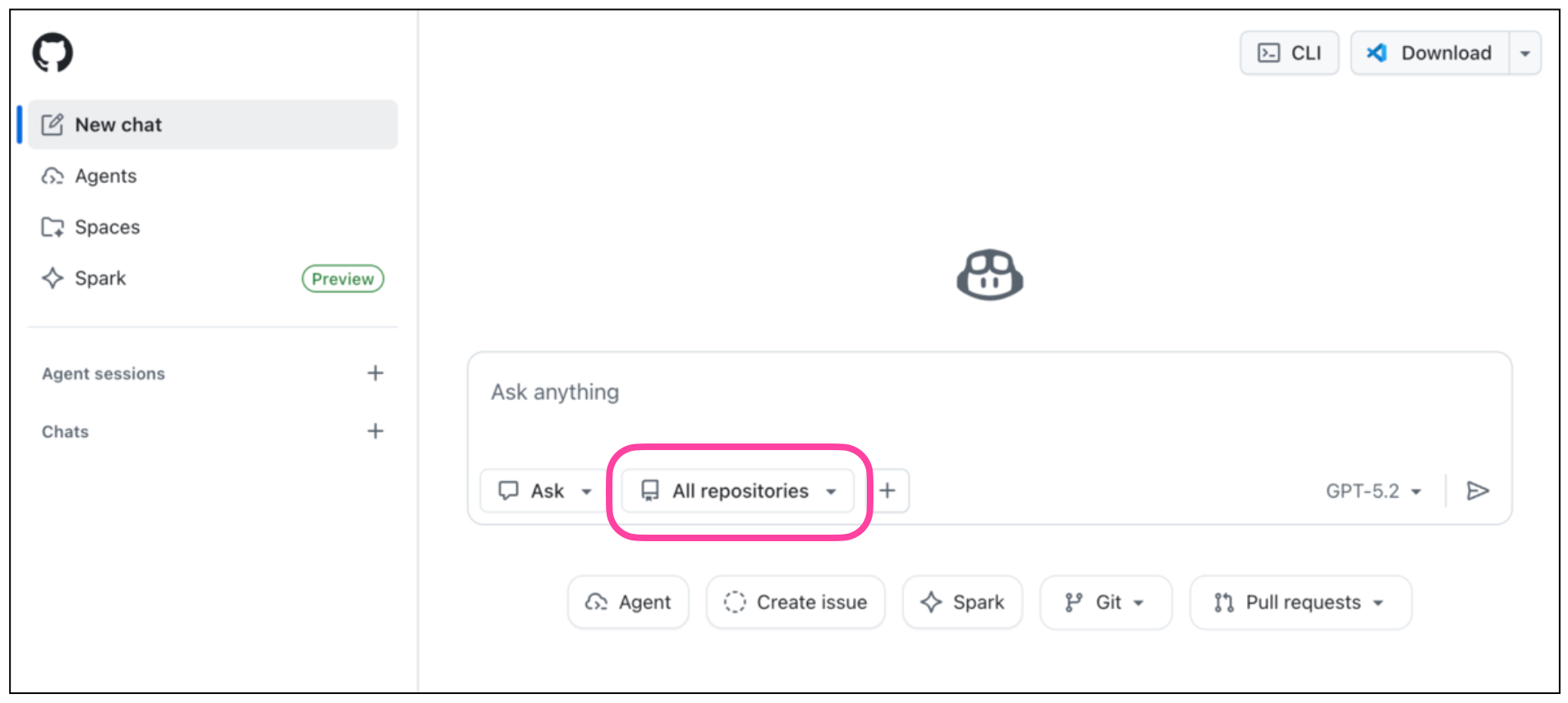
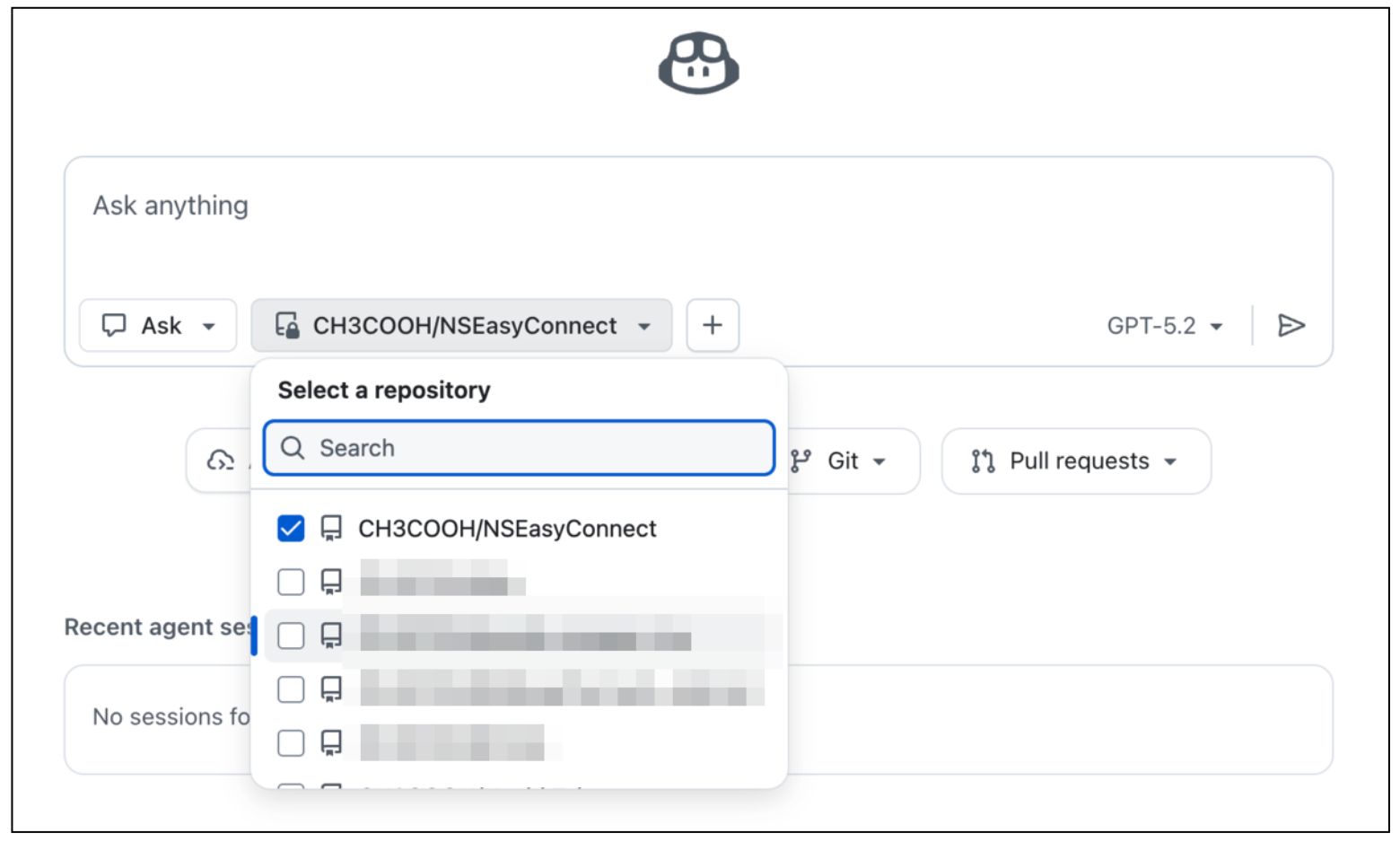
- If a different repository name is displayed, select the target from "All repositories"
- Enter your question in the "Ask Copilot" box at the bottom and press Enter
Now you can ask Copilot questions using your repository code as context.
Example Use Case: Checking an iOS App's Deployment Target
If you want to know the supported OS version without opening Xcode, prompts like the following are effective:
Please tell me the value of IPHONEOS_DEPLOYMENT_TARGET from the project.pbxproj file.
Or you can simply ask:
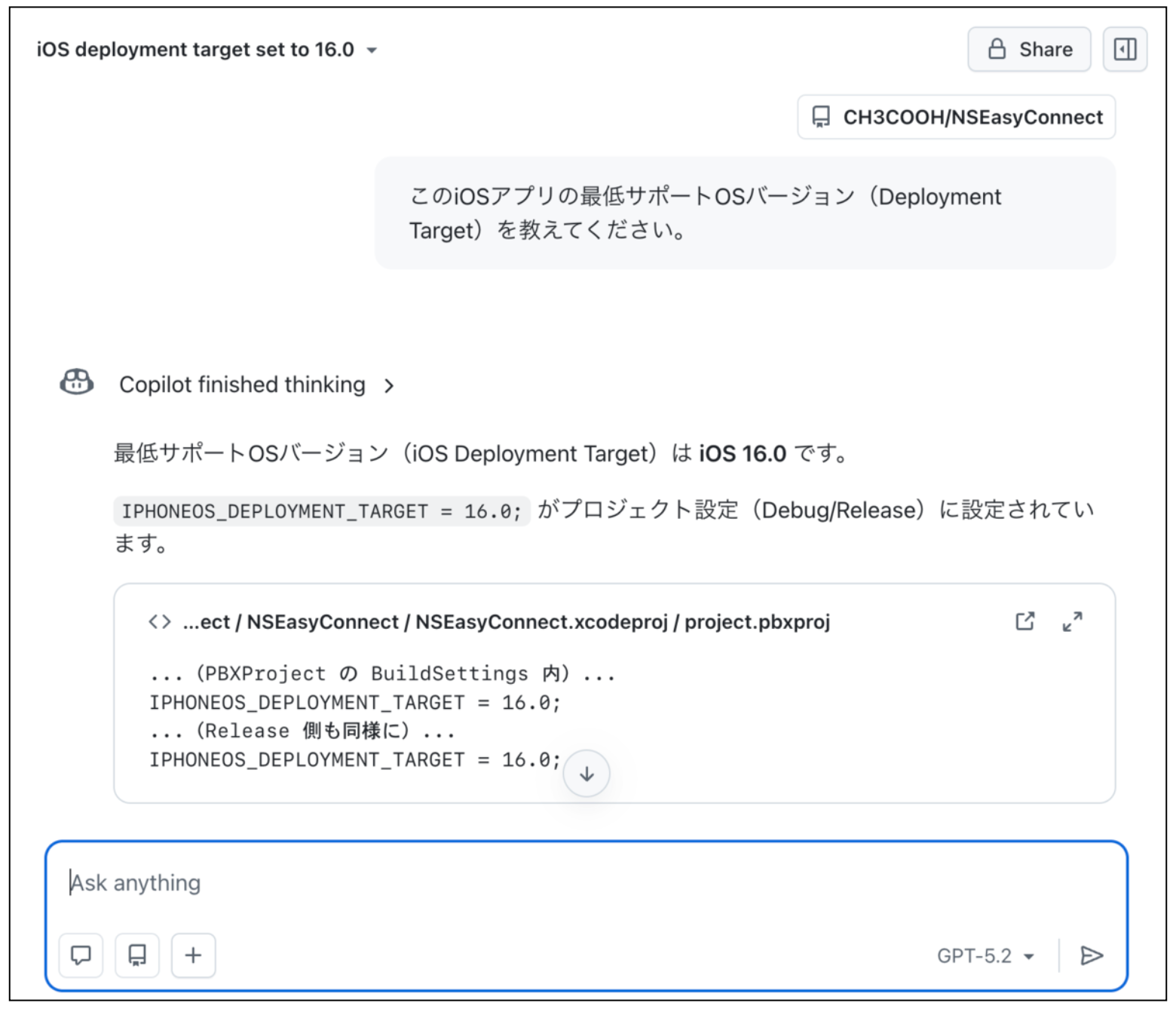
What is the minimum supported iOS version (Deployment Target) for this iOS app?
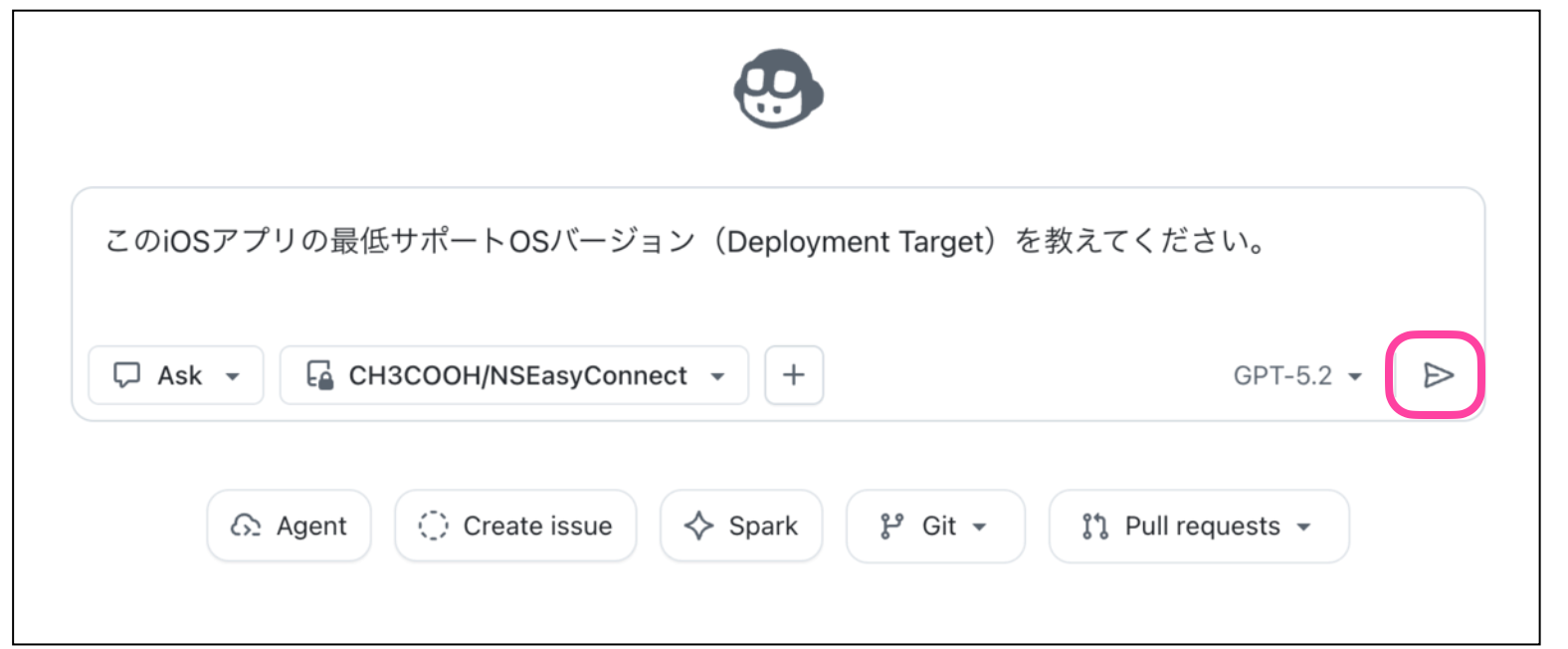
Copilot will reference project.pbxproj or Package.swift in the repository to provide an answer.
Other Use Cases
You can also use it in the following ways:
Based on the README, please summarize the purpose of this repository.(Understanding repository overview)Please tell me the list of Swift Packages used in this project
Differences Between Free, Pro, and Business Features
Currently, Copilot offers Free, Pro, and Pro+ ($39/month) plans for individuals, and Business and Enterprise plans for organizations. I'll focus on comparing the Free, Pro, and Business plans here. Note that Pro+ is required for full access to all models. For details, please refer to the official plan comparison page.
| Feature | Free | Pro | Business |
|---|---|---|---|
| Monthly fee | Free | $10/month | $19/month/user |
| Premium requests | 50/month | 300/month (additional purchases available) | 300/month (additional purchases available) |
| Code completions | 2,000/month | Unlimited | Unlimited |
| Available models | Lightweight models only | Including some premium models | Same (Pro+ or higher for all models) |
| Coding agent | None | Yes | Yes |
| Code review (PR & diff review) | Limited (VS Code selection review only) | Yes | Yes |
| Organization policy management | None | None | Yes |
| Audit logs | None | None | Yes |
| IP indemnification (copyright protection) | None | None | Yes |
| Content Exclusion | None | None | Yes |
| SAML SSO authentication | None | None | Yes |
For simple tasks like checking a Deployment Target as described in this article, the lightweight models in the Free plan are sufficient.
While Pro and Business plans offer similar types of models, the Business plan is designed for organizational and team use. It allows administrators to centrally manage members' Copilot usage and significantly enhances privacy and security protections, as described later.
The right plan depends on whether you're doing individual development or team development. Here's a guide to all plans:
| Case | Recommended Plan |
|---|---|
| Personal learning/OSS development | Free |
| Individual development/side jobs | Pro |
| Individuals wanting all latest models | Pro+ |
| Company teams | Business |
| Large enterprise | Enterprise |
Privacy and Data Learning
We've covered GitHub Copilot's web console and the differences between plans. While checking public information like "iOS app Deployment Target" is not a concern, when dealing with sensitive business code, you may wonder "Will my code be used for AI training?" The data handling varies by plan and settings, which I'll outline below.
Difference Between "AI Training" and "Product Improvement"
For Copilot's data usage, we need to distinguish between two concepts: "AI model training" and "product improvement."
- AI model training: Currently OFF by default for all plans (and cannot be enabled)
- Data usage for product improvement: This is a separate setting that exists in Free and Pro plans
According to License Terms and Your Data Usage (verified March 2026), the "Default setting not to use data for training" is "Included" for all plans including Free. While previously AI training was ON by default for Free plans, currently AI training is OFF by default (and cannot be enabled) for all plans.
However, in Free and Pro plans, data usage for product improvement exists as a separate setting that users need to explicitly turn OFF. The setting can be found at (Managing Copilot policies as an individual subscriber - GitHub Docs):
GitHub profile → Copilot settings → "Allow GitHub to use my code snippets from the code editor for product improvements"
If you're concerned, it's best to turn this OFF. Note that in Copilot Business, this setting is off by default, so the setting itself doesn't exist.
Summary by Plan
Based on the above, here's a summary of data handling by plan:
| Free | Pro | Business / Enterprise | |
|---|---|---|---|
| Is code used for AI training? | OFF by default | OFF by default | Not used (settings cannot be changed) |
| Usage for product improvement | Yes (can be turned OFF in settings) | Yes (can be turned OFF in settings) | No |
| Strength of data protection | Medium | Medium | High |
Business/Enterprise Data Protection
In Business and Enterprise plans, learning usage is prohibited not only for GitHub models but also for third-party models (such as Anthropic's Claude, Google's models, etc.).
No. GitHub uses neither Copilot Business nor Enterprise data to train the GitHub model. Notice this restriction also applies to third-party models as well (e.g. Anthropic, Google).
— Microsoft Tech Community: Demystifying GitHub Copilot Security Controls
Additionally, a particularly powerful feature in the Business plan is Content Exclusion. You can configure specific files or directories to be inaccessible to Copilot at the repository or organization level. For example, excluding secret keys, authentication information, and highly confidential configuration files can reduce the risk of them being included in prompt contexts (GitHub Docs: Content exclusions for GitHub Copilot).
However, there are limitations to Content Exclusion to be aware of. GitHub Copilot CLI, Copilot coding agent, and agent mode in IDE Copilot Chat are not subject to Content Exclusion (GitHub Docs).
The plan also includes Audit Log and IP indemnification (copyright protection), making it easier to meet security and compliance requirements for business use.
Code is Sent to Servers
Common to all plans, code is processed through GitHub proxy servers on Microsoft Azure. It's not processed locally, which is important to understand.
Summary
Using Copilot Chat on GitHub.com allows you to investigate repository project settings and code structure without launching Xcode.
- Available even with the Free plan, and lightweight models are sufficient for checking things like Deployment Target
- Data usage for AI training is currently OFF by default for all plans
- Data usage for product improvement needs to be turned OFF separately in Free and Pro plans
- For team adoption, Content Exclusion and IP indemnification in the Business plan are important decision factors
I use Copilot Pro and haven't experienced any inconvenience when investigating from the web console. However, since privacy handling differs significantly between plans, teams should verify data handling in advance when implementing Copilot. I hope this serves as a reference when considering which Copilot plan to adopt.