When I set the aws command as an alias in zsh, AWS CLI tab completion stopped working! How to fix this

This page has been translated by machine translation. View original
Good evening, this is Yukihiro Chiba.
AWS CLI offers a command completion feature. When you type part of a command or parameter and press the TAB key, it displays a list of possible completions. I'll be referring to this as "tab completion" from here on.
👇Example quoted from the documentation. After typing 'd' as a subcommand of aws dynamodb and pressing TAB, it displays a list of subcommands that start with d.
$ aws dynamodb dTAB
delete-backup                        describe-global-table
delete-item                          describe-global-table-settings
delete-table                         describe-limits
describe-backup                      describe-table
describe-continuous-backups          describe-table-replica-auto-scaling
describe-contributor-insights        describe-time-to-live
describe-endpoints
On Linux and Mac, AWS CLI tab completion can be enabled by adding appropriate code to your profile depending on your shell type (zsh, bash, tcsh).
For zsh, add the following to your ~/.zshrc: [1]
autoload -Uz compinit && compinit
autoload bashcompinit && bashcompinit
complete -C '/usr/local/bin/aws_completer' aws
I encountered an issue where tab completion stopped working after I added an alias setting for aws to my ~/.zshrc.
I was able to resolve the issue by adding setopt completealiases, and I'd like to share the details.
Environment Information
zsh 5.9 (arm64-apple-darwin24.0)macOS Sequoia 15.5aws-cli/2.32.6 Python/3.13.9 Darwin/24.5.0 exe/arm64op 2.32.0(1password CLI that prompted me to add this alias)
What Was the Problem?
My previous ~/.zshrc had the following content:
autoload -Uz compinit && compinit
autoload bashcompinit && bashcompinit
complete -C '/usr/local/bin/aws_completer' aws
I added one line as follows:
autoload -Uz compinit && compinit
autoload bashcompinit && bashcompinit
+ source /Users/chiba.yukihiro/.config/op/plugins.sh
complete -C '/usr/local/bin/aws_completer' aws
As a result, AWS CLI tab completion stopped working. This was a problem.
What Was Added?
This follows the approach outlined in the blog post below:
I moved my authentication information from ~/.aws/credential to 1Password CLI. The profile configuration makes AWS CLI go through the 1Password CLI Shell Plugin each time it runs.
You would of course need to change my name to your actual username.
The loaded script contains:
export OP_PLUGIN_ALIASES_SOURCED=1
alias aws="op plugin run -- aws"
Here, aws is set as an alias for op plugin run -- aws.
How I Resolved It
I added one more line:
autoload -Uz compinit && compinit
autoload bashcompinit && bashcompinit
+ setopt completealiases
source /Users/chiba.yukihiro/.config/op/plugins.sh
complete -C '/usr/local/bin/aws_completer' aws
I added it as the third line, but the position doesn't matter much. It worked wherever I placed it.
Also, I've omitted line breaks and comments with # for simplicity, but feel free to add those as needed.
After adding this line and reloading the profile, I was able to use both "AWS CLI tab completion" and "1Password plugin for AWS CLI execution" together. Great success!
What Was the Cause and Solution?
First, let me explain each element with some comments:
# -------------------------------
# Initialize Zsh completion functionality
# -------------------------------
# Load and initialize zsh's standard completion system
autoload -Uz compinit && compinit

# Enable Bash-compatible completion functionality (bash-completion format)
# Needed for AWS CLI completion settings (complete -C)
autoload bashcompinit && bashcompinit

# Enable completion for actual commands behind aliases
# Necessary to make completion work properly for aliases that wrap commands
# e.g., alias aws="op plugin run -- aws"
setopt completealiases

# -------------------------------
# Load 1Password CLI (op) plugin
# -------------------------------
# Load the alias settings provided by op plugins
# This file defines aliases for running aws command through the op plugin
source /Users/chiba.yukihiro/.config/op/plugins.sh

# -------------------------------
# AWS CLI completion settings
# -------------------------------
# Configure the use of aws_completer program for completing
# AWS CLI commands and options when "aws <TAB>" is executed
complete -C '/usr/local/bin/aws_completer' aws
# This flag is an environment variable indicating that
# 1Password CLI (op) plugin settings have already been loaded.
# It helps prevent duplicate alias definitions if loaded multiple times.
export OP_PLUGIN_ALIASES_SOURCED=1

# An alias to route AWS CLI through 1Password CLI (op) when used.
# This allows automatic retrieval of AWS credentials stored in 1Password.
alias aws="op plugin run -- aws"
The key points are:
complete -C '/usr/local/bin/aws_completer' aws- "Use aws_completer for aws command completion"
alias aws="op plugin run -- aws"- "Set aws as an alias for
op plugin run -- aws"
- "Set aws as an alias for
The relationship can be visualized like this:
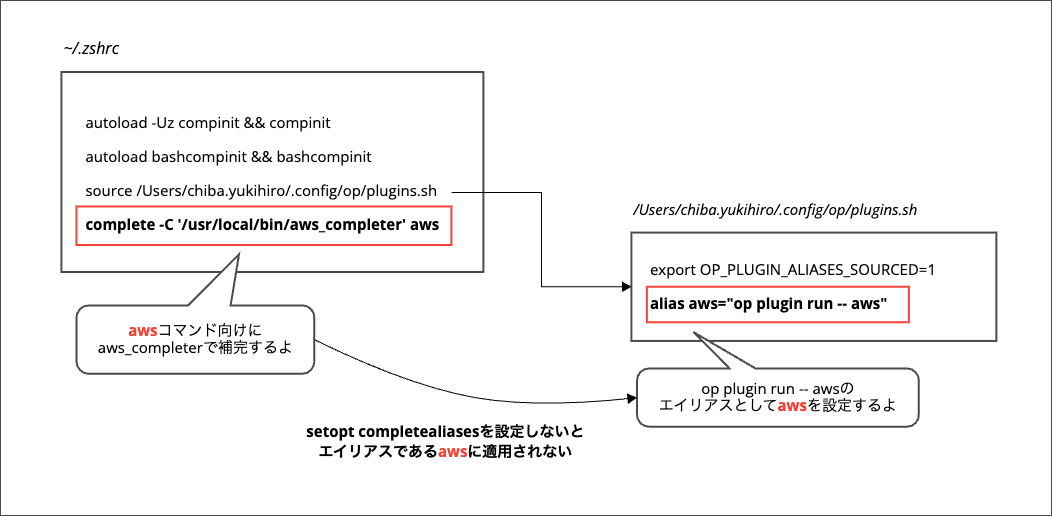
The original configuration didn't apply completion to the aws alias, which was the root cause of the problem.
By setting setopt completealiases, completion now works with the aws alias, resolving the issue.
What is setopt completealiases?
You can find the explanation for setopt completealiases here:
COMPLETE_ALIASESPrevents aliases on the command line from being internally substituted before completion is attempted. The effect is to make the alias a distinct command for completion purposes.
The same content can be confirmed with man zshoptions.
A direct translation would be something like:
Prevents aliases on the command line from being internally replaced before completion is attempted.
As a result, the alias is treated as a separate command for completion purposes.
Without this setting, the internal conversion from "aws" to "op plugin run -- aws" happens before "use aws_completer for aws command completion" can be applied, preventing AWS CLI tab completion from working.
With setopt completealiases, the behavior changes to apply completion to the aws alias as well.
Side Note
I only knew about tab completion for AWS CLI, but apparently there's also an auto-prompt feature available only in AWS CLI v2.
I learned about it while researching this issue:
It looks quite useful.
Conclusion
I've introduced a solution for when AWS CLI tab completion stops working after setting an alias for the aws command in zsh.
There might be other solutions, but adding setopt completealiases seems to be the simplest approach.
It was fun getting a glimpse into zsh options that I don't usually pay much attention to. I hope this helps anyone experiencing similar issues.
This has been Chiba Yuki (@batchicchi).
You don't need to write the full path on line 3 if aws_completer is in your PATH. I do this by preference. ↩︎