
Causes and countermeasures for lifecycle delays when switching tabs in iOS 18

This article was published more than one year ago. Please be aware that the information may be outdated.
This page has been translated by machine translation. View original
I found when running apps built with Xcode 16 on iOS 18.0 or later devices, the screen transition (tab switching) using UITabBarController behaves differently compared to previous versions, so I investigated this issue.
Overview
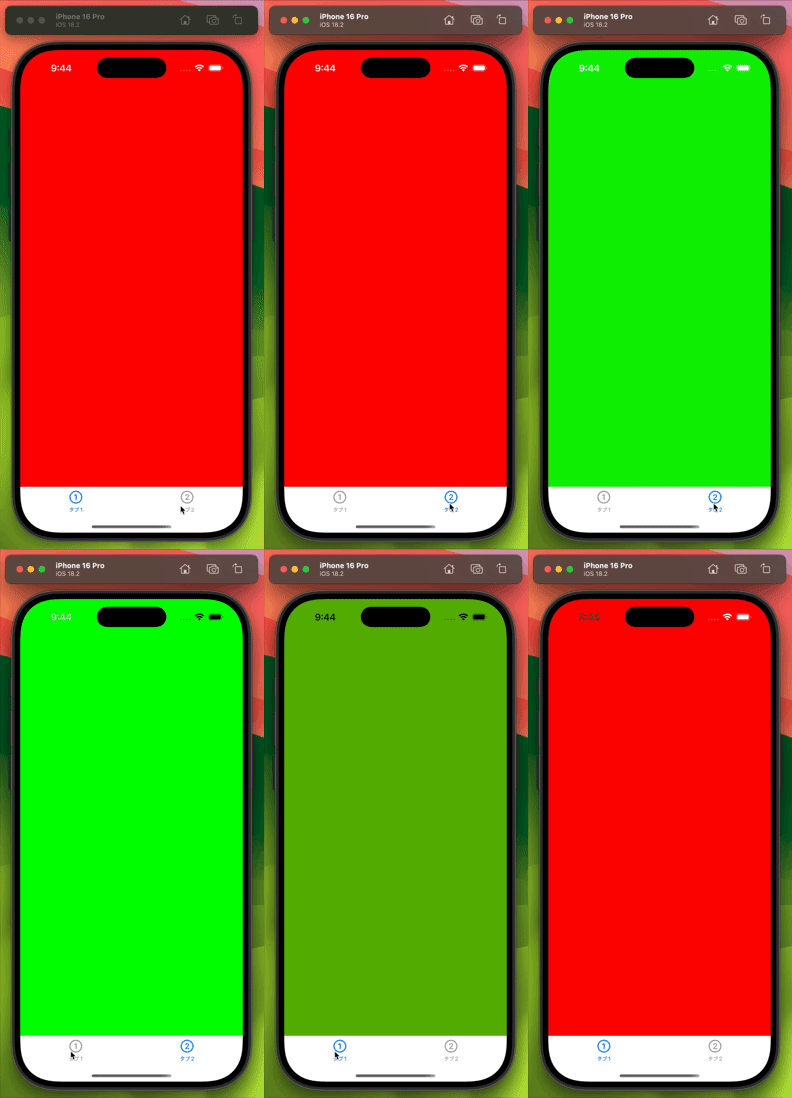
- Tab bar switching in iOS 18 now applies a cross-dissolve (fade-in/fade-out) animation
- As a result, the timing of
viewDidDisappearfor the hiding screen andviewDidAppearfor the displayed screen is delayed by 0.5-0.7 seconds - If you have implementations that depend on existing lifecycles, bugs may occur
This change is not explicitly documented in Apple's official documentation, so developers may encounter problems without being aware of it.
Background of the Issue
Multiple issues were reported from users who updated to iOS 18 in an app under development.
The issues involved unintended behaviors during specific screen transitions or tab switching. Since the implementation had not changed, yet the behavior seemed different, I suspected changes in the lifecycle might be the cause.
Other developers seem to have similar questions, with several related questions posted on StackOverflow and Apple Developer Forums. However, there were no useful answers, and Apple's official documentation did not mention relevant changes.
In this context, I discovered the following Twitter (now X) post by anz:
This post led me to conduct verification to identify the cause of the problem.
Verification Details
I created a simple sample project with a UITabBarController that just switches between screen 1 and screen 2. I overrode the lifecycle methods in each screen and added logs to check the behavior.
Below is the code example for screen 1 (red):
final class Tab1ViewController: UIViewController {
    override func viewDidLoad() {
        super.viewDidLoad()
        view.backgroundColor = .red
        title = "タブ1"
    }

    override func viewWillAppear(_ animated: Bool) {
        super.viewWillAppear(animated)
        NSLog("🟥Tab1 - viewWillAppear")
    }

    override func viewDidAppear(_ animated: Bool) {
        super.viewDidAppear(animated)
        NSLog("🟥Tab1 - viewDidAppear")
    }

    override func viewWillDisappear(_ animated: Bool) {
        super.viewWillDisappear(animated)
        NSLog("🟥Tab1 - viewWillDisappear")
    }

    override func viewDidDisappear(_ animated: Bool) {
        super.viewDidDisappear(animated)
        NSLog("🟥Tab1 - viewDidDisappear")
    }

    override func viewWillLayoutSubviews() {
        super.viewWillLayoutSubviews()
        NSLog("🟥Tab1 - viewWillLayoutSubviews")
    }

    override func viewDidLayoutSubviews() {
        super.viewDidLayoutSubviews()
        NSLog("🟥Tab1 - viewDidLayoutSubviews")
    }
}
Lifecycle Log Comparison
Comparing the lifecycle logs during tab switching on iOS 17 and iOS 18, the following differences were found:
| iOS 18.2 | iOS 17.5 | |
|---|---|---|
| 🟢Tab2 - viewWillAppear | 🟢Tab2 - viewWillAppear | No change |
| 🟥Tab1 - viewWillDisappear | 🟥Tab1 - viewWillDisappear | No change |
| 🟢Tab2 - viewWillLayoutSubviews | 🟢Tab2 - viewWillLayoutSubviews | No change |
| 🟢Tab2 - viewDidLayoutSubviews | 🟢Tab2 - viewDidLayoutSubviews | No change |
| (0.5-0.7 second delay) | 🟥Tab1 - viewDidDisappear | In iOS 17.5, called without delay |
| 🟢Tab2 - viewDidAppear | 🟢Tab2 - viewDidAppear | |
| 🟥Tab1 - viewDidDisappear |
Investigating Differences Between iOS 17 and iOS 18
To investigate the cause of this difference, I enabled [Debug] → [Slow Animations] in the iOS simulator to observe the transition. I discovered that iOS 18 applies a cross-dissolve (fade-in/fade-out) animation during tab switching.
This animation seems to be causing the delay in lifecycle method calls.
Disabling Animation
To avoid lifecycle delays, I considered a method to disable animation during tab switching. By creating a custom class that inherits from UITabBarController and setting the animation duration to 0 seconds, animation can be effectively disabled:
final class MyTabController: UITabBarController, UITabBarControllerDelegate {
    override func viewDidLoad() {
        super.viewDidLoad()
        NSLog("🟦TabBarController - viewDidLoad")

        delegate = self
    }

    func tabBarController(_ tabBarController: UITabBarController, shouldSelect viewController: UIViewController) -> Bool {
        guard
            let fromView = selectedViewController?.view,
            let toView = viewController.view,
            fromView != toView
        else {
            return false
        }

        UIView.transition(
            from: fromView,
            to: toView,
            duration: 0,
            options: [],
            completion: nil
        )
        return true
    }
}
Implementation Considerations
This method is just a temporary workaround. Since disabling animation may compromise user experience, the following points should be considered:
- Confirm that it doesn't negatively affect the app's overall design policy
- Consider implementing solutions that don't depend on lifecycle timing
However, considering future iOS updates, disabling tab switching animation is not recommended.
Conclusion and Next Steps
From this verification, we found that iOS 18 introduced cross-dissolve animation for tab switching, which delays lifecycle method call timing. Since this change is not explicitly documented, it may cause bugs in implementations that depend on existing lifecycles.
If you experience mysterious bugs during tab switching, compare lifecycle logs between iOS 17 and iOS 18, and if possible, revise the screen implementation to work regardless of animation presence.